Flight Simulator Controller

56 Produkte

  • letzter Vorrat TCA Side Stick X Airbus Edition for sale at FlightSimZone

    Thrustmaster TCA Sidestick X Airbus Edition

    4 auf Lager Versand innerhalb von 1-3 Werktagen.

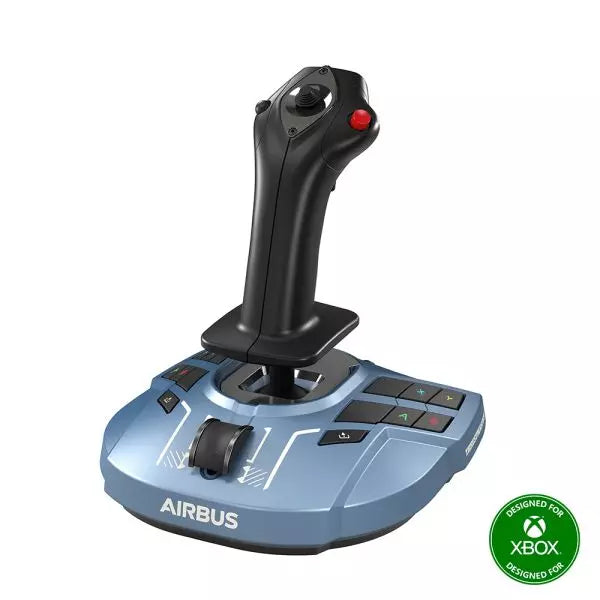
    Das TCA Sidestick X Airbus Edition ist ein eleganter und vielseitiger Flugsteuerknüppel, der das Airbus-inspirierte Handling direkt in Ihre Hände bringt. Mit einem ergonomischen Design, das dem Airbus A320 nachempfunden ist, bietet er ein authentisches Gefühl für virtuelle Piloten. Ausgestattet mit einem integrierten Schubhebel mit Schubumkehr und 21 neu zuweisbaren Tasten bietet dieser Sidestick zahlreiche Steuerungsoptionen für jede Flugphase. Dank des integrierten Ökosystem-Hubs ist die Einrichtung denkbar einfach und ermöglicht eine nahtlose Kompatibilität mit Xbox Series X|S und PC. Perfekt ausbalanciert zwischen Funktionalität und Stil, ist dieser Sidestick bereit für den Start! Was macht das TCA Sidestick X Airbus Edition besonders? 1:1 Airbus-Ergonomie Entwickelt als realistische Nachbildung des Airbus A320 Sidesticks, bietet dieses Gerät eine haptische Verbindung, die dem echten Flugzeug nachempfunden ist. Dies macht es ideal für Airbus-Enthusiasten oder alle, die ihre Simulation mit authentischer Form und Layout verbessern möchten. Austauschbare Kopfmodule Mit vier austauschbaren Kopfmodulen kann der Stick für Links-, Rechtshänder- oder zentrale Cockpit-Positionen angepasst werden. Diese Modularität ermöglicht personalisierte Setups, egal ob Sie alleine fliegen oder als Teil einer Crew. Integrierter Ökosystem-Hub Der integrierte Hub verbindet das gesamte Thrustmaster Airbus-Ökosystem mit der Xbox Series X|S. Das Anschließen von Add-ons wie Schubhebeln oder Ruderpedalen ist jetzt unkompliziert und reduziert Kabelsalat auf eine einzige USB-Verbindung für PC oder Konsole. Verbesserter Schubhebel mit Schubumkehr Der verbesserte Schubhebel an der Basis verfügt über eine Schubumkehr, eine seltene Ergänzung bei Flugsteuerknüppeln für Verkehrsflugzeuge. Dies sorgt für mehr Kontrolle während der Landungen, insbesondere unter anspruchsvollen Bedingungen. Vorteile und Nachteile Vorteile Nachteile Ergonomisches, Airbus-inspiriertes Design für ein natürliches und intuitives Gefühl. Nicht kompatibel mit PlayStation-Systemen. Austauschbare Module ermöglichen flexible Konfigurationen. Einige Nutzer berichten von einer leichten Basis, die sich bewegen kann. Integrierter Ökosystem-Hub vereinfacht die Konnektivität über mehrere Geräte hinweg. Schubhebel bietet keine Feinjustierung für manche Simulationen. Integrierter Schubhebel mit Schubumkehr für präzisere Landekontrolle. Spezifikationen Spezifikation Wert Breite 195 mm Tiefe 195 mm Höhe 225 mm Gewicht 787 g Lieferumfang 1 TCA Sidestick X, 4 austauschbare Kopfmodule, 1 USB-C-Kabel, Benutzerhandbuch Kompatibilität des TCA Sidestick X Airbus Edition Das TCA Sidestick X Airbus Edition fügt sich nahtlos in das Thrustmaster-Ökosystem ein. Es kann mit Add-ons wie dem TCA Quadrant Airbus Edition und den T.Flight Ruderpedalen verbunden werden, um die Funktionalität zu erweitern. Der integrierte Hub reduziert Kabelsalat, indem mehrere Geräte über eine einzige USB-Verbindung mit PC oder Xbox Series X|S verbunden werden können. Allerdings ist dieser Sidestick nicht mit PlayStation-Systemen kompatibel, was ihn auf PC- und Xbox-Nutzer beschränkt. Auf der Gaming-Seite ist der Sidestick vollständig kompatibel mit Microsoft Flight Simulator 2020 auf PC und Xbox und daher eine ausgezeichnete Wahl für Simulationspiloten auf diesen Plattformen. Während seine Kompatibilität mit anderen Simulatoren wie X-Plane und DCS World nicht offiziell aufgeführt ist, sollten PC-Nutzer dank der flexiblen Konnektivität und des Designs keine Probleme haben. Kaufen Sie Ihr Thrustmaster TCA Sidestick X Airbus Edition bei FlightSimZone! ✓ Exzellenter Kundenservice ✓ EU-Lager ✓ Schneller Versand.

    4 auf Lager Versand innerhalb von 1-3 Werktagen.

    €119,00

  • letzter Vorrat Thrustmaster T.16000M FCS Flight Pack for sale on FlightSimZone

    Thrustmaster T.16000M FCS Flight Pack

    4 auf Lager Versand innerhalb von 1-3 Werktagen.

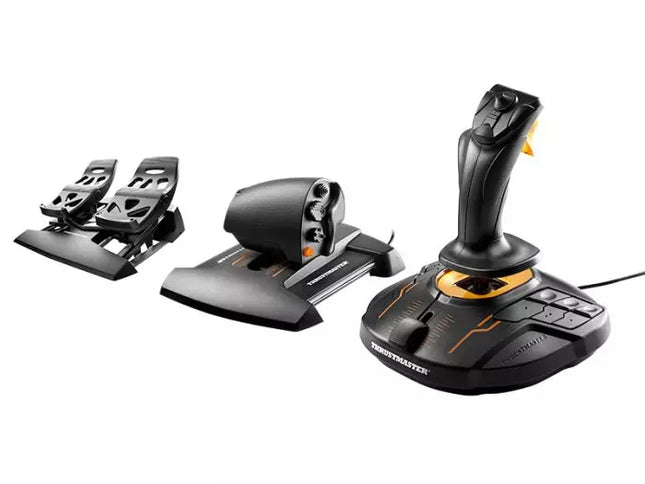
    Das T.16000M FCS Flight Pack ist die ideale Wahl für Simulationspiloten, die präzise und vielseitige Steuerungselemente benötigen. Dieses All-in-One-Paket umfasst den T.16000M FCS Joystick, TWCS Schubregler und TFRP Ruderpedale und bietet eine umfassende Steuerungslösung für Luftfahrt- und Weltraumsimulationen. Mit seinen reibungslosen Gleittechniken, programmierbarer Software und magnetischen Sensoren für dauerhafte Genauigkeit verwandelt dieses Setup Ihren Schreibtisch in ein echtes Cockpit und gibt Ihnen die volle Kontrolle über jedes Manöver. Was macht das T.16000M FCS Flight Pack besonders? Unübertroffene Langlebigkeit durch magnetische Sensoren Die H.E.A.R.T HallEffect-Technologie nutzt magnetische Sensoren für eine unübertroffene Haltbarkeit, sodass die Genauigkeit des Joysticks auch nach Jahren intensiver Nutzung erhalten bleibt. Im Gegensatz zu Potentiometer-basierten Systemen eliminiert dieses Design mechanischen Verschleiß und sorgt für gleichbleibend präzise Eingaben. Umfassendes All-in-One-Steuerungssystem Mit einem Joystick, einem Schubregler und Ruderpedalen bietet das T.16000M FCS Flight Pack eine vollständige Steuerungslösung für fortgeschrittene Simulationspiloten. Dieses Trio eliminiert die Notwendigkeit zusätzlicher Peripheriegeräte und ermöglicht die nahtlose Koordination komplexer Flugmanöver. Individuell anpassbar für jede Art von Pilot Die T.A.R.G.E.T-Software ermöglicht es den Nutzern, Tasten, Achsen und Makros individuell anzupassen. Egal, ob Sie Zivilflugzeuge, Jets oder Raumschiffe steuern – diese Flexibilität gewährleistet eine optimale Steuerung, abgestimmt auf spezifische Spiele und Szenarien. Sanfte und komfortable Bewegungen Der TWCS-Schubregler und die TFRP-Ruderpedale nutzen die S.M.A.R.T-Technologie für ein reibungsloses Gleitverhalten. Diese Komponenten bieten eine intuitive Widerstandsanpassung, die präzise und komfortable Steuerung ermöglicht, selbst bei längeren Spielsitzungen. Vorteile und Nachteile Vorteile Nachteile Hervorragende Genauigkeit dank HallEffect-Magnetsensoren. Nicht kompatibel mit Konsolen wie Xbox oder PlayStation. All-in-One-System reduziert den Bedarf an zusätzlichen Peripheriegeräten. Pedale könnten für größere Füße etwas klein sein. Individuell anpassbare Steuerung über T.A.R.G.E.T-Software. Schubregler besitzt keine Rastung für Nachbrenner oder Leerlauf. Reibungslose Gleitbewegung für präzise und komfortable Steuerung. Spezifikationen Spezifikation Wert Komponenten Joystick, Schubregler, Ruderpedale Kompatibilität Windows 10, 8, 7, Vista (32-Bit & 64-Bit) Verbindungstyp USB Joystick-Achsen 4 (einschließlich Twist-Ruder) Tasten 30 über alle Komponenten hinweg Ruder-Technologie S.M.A.R.T Gleitmechanismus Schubweg 80 mm Farbe Schwarz mit orangefarbenen Akzenten Kompatibilität des T.16000M FCS Flight Pack Das T.16000M FCS Flight Pack ist vollständig kompatibel mit PCs, die unter Windows 10, 8, 7 und Vista (32-Bit & 64-Bit) laufen. Die USB-Verbindung ermöglicht eine einfache Integration in die meisten Setups, während die T.A.R.G.E.T-Software das System so konfigurieren kann, dass es als einzelnes USB-Gerät fungiert. Das Paket lässt sich nahtlos mit anderen Thrustmaster-Peripheriegeräten wie den MFD-Panels kombinieren und bietet somit eine einheitliche Lösung für anspruchsvolle Flugsimulationen. Während das System auf dem PC hervorragend funktioniert, ist es nicht mit Konsolen wie Xbox oder PlayStation kompatibel und daher für Konsolenspieler ungeeignet. Das Flight Pack harmoniert jedoch hervorragend mit beliebten Simulationstiteln wie Microsoft Flight Simulator, X-Plane und Elite Dangerous. Aufgrund fehlender nativer Unterstützung für macOS sollten Apple-Nutzer vor dem Kauf die Kompatibilität überprüfen.

    4 auf Lager Versand innerhalb von 1-3 Werktagen.

    €239,00

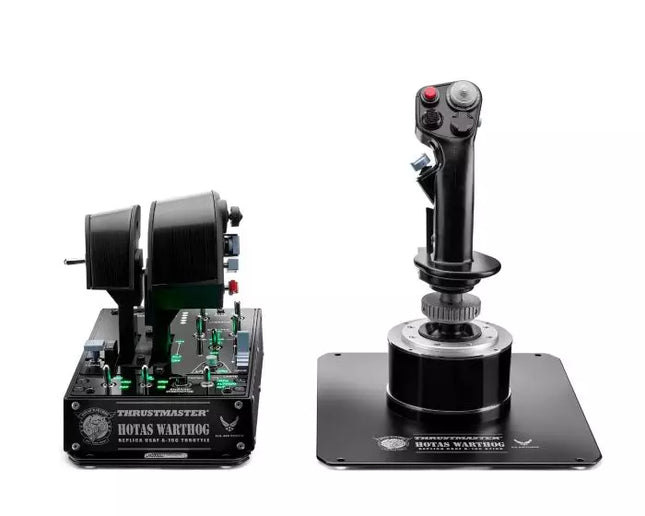
  • letzter Vorrat HOTAS WARTHOG™ For Sale On FlightSimZone

    Thrustmaster HOTAS WARTHOG

    4 auf Lager Versand innerhalb von 1-3 Werktagen.

    Der HOTAS WARTHOG ist der Traum eines jeden Flugsimulations-Enthusiasten. Entwickelt als exakte Nachbildung der Steuerung des U.S. Air Force A-10C, bringt dieser Joystick realistische Funktionalität und beeindruckende Präzision ins virtuelle Cockpit. Mit seiner Vollmetallkonstruktion, den H.E.A.R.T Hall Effect AccuRate Technology Sensoren und magnetischen Drosselsensoren liefert der HOTAS WARTHOG ein solides, immersives Gefühl, das über Jahre hinweg Bestand hat. Egal, ob Sie stundenlang fliegen oder jeden Eingabewert fein abstimmen – dieses Steuerungssystem bietet eine herausragende und langlebige Erfahrung, die in der Welt der Flugsimulationen herausragt. Was macht den HOTAS WARTHOG besonders? Authentische A-10C Flugzeug-Nachbildung Der HOTAS WARTHOG bietet eine originalgetreue Nachbildung des A-10C Steuerknüppels, der doppelten Drosseln und des Kontrollpanels der U.S. Air Force. Die Liebe zum Detail zeigt sich in der Metallkonstruktion und der präzisen Platzierung der Tasten, was eine noch realistischere und lohnende Flugerfahrung schafft. Diese Detailgenauigkeit ist selten im Bereich der Flugsimulations-Peripheriegeräte und spricht Nutzer an, die sowohl bei Design als auch Funktionalität höchste Präzision fordern. Robuste Vollmetallkonstruktion Im Gegensatz zu vielen Konkurrenzprodukten verfügt der HOTAS WARTHOG über einen vollständig aus Metall gefertigten Joystick und Drosselhebel, was ihm ein massives und hochwertiges Gefühl verleiht. Nutzer schätzen besonders das hohe Gewicht und die robusten, industrietauglichen Schalter und Tasten. Diese massive Bauweise stellt sicher, dass der HOTAS WARTHOG selbst intensiver Nutzung über Jahre standhält, ohne Abnutzungserscheinungen zu zeigen. Fortschrittliche Sensortechnologie Die H.E.A.R.T (HallEffect AccuRate Technology) sorgt für höchste Präzision mit einer 16-Bit-Auflösung. Dadurch bleiben die Eingaben über Jahre hinweg präzise und reaktionsschnell, ohne mechanischen Verschleiß. Diese Technologie garantiert, dass jede Ihrer Bewegungen sofort in der Simulation umgesetzt wird – ohne Drift oder Abnutzung. Umfangreiche Anpassungsmöglichkeiten Mit 55 vollständig programmierbaren Tasten, zwei Vier-Wege-Hats und fünf programmierbaren LEDs bietet der HOTAS WARTHOG eine außergewöhnliche Anpassungsfähigkeit. Ob für verschiedene Flugzeuge oder missionenspezifische Anpassungen – die T.A.R.G.E.T Software ermöglicht eine einfache Konfiguration und nahtlose Integration mit Flugsimulatoren. Vorteile und Nachteile Vorteile Nachteile Vollmetallkonstruktion für Langlebigkeit und Realismus. Das hohe Gewicht ist nicht für alle Setups ideal. Hochpräzise H.E.A.R.T Sensortechnologie für exakte Eingaben. Große Bauweise benötigt viel Platz. Umfangreiche Anpassungsmöglichkeiten mit 55 programmierbaren Tasten. Spezifikationen Spezifikation Wert Joystick-Konstruktion Metall Drosselsystem Doppeldrossel, Metallgriffe Gesamtanzahl der Tasten 55 programmierbare Tasten Gewicht 6,35 kg Kontrollpanel 15 Tasten, TRIM-Rad, Hintergrundbeleuchtung Hats und Schalter 2 Vier-Wege-Hats, 1 POV-Hat, 1 Maus-Hat Sensor-Technologie H.E.A.R.T Hall Effect AccuRate Technology Abnehmbare Komponenten Joystick- und Drosselgriffe Kompatibilität des HOTAS WARTHOG Der HOTAS WARTHOG wurde primär für PC entwickelt und bietet umfassende Softwareunterstützung durch die T.A.R.G.E.T-Programmiersoftware, die eine tiefgehende Anpassung und Integration mit verschiedenen Flugsimulatoren ermöglicht. Während er keine Unterstützung für Konsolen bietet, ist er mit vielen der beliebtesten Flugsimulationsspiele auf dem PC kompatibel, darunter DCS World und Microsoft Flight Simulator. Zudem funktioniert der HOTAS WARTHOG nahtlos mit anderen Thrustmaster-Peripheriegeräten wie Ruderpedalen und MFD-Cockpit-Panels und ermöglicht so ein einheitliches Simulationserlebnis. Als USB-verbundenes Gerät ist der HOTAS WARTHOG mit Windows-PCs sofort einsatzbereit, und die T.A.R.G.E.T-Software ermöglicht eine umfassende Personalisierung. Leider ist er nicht mit Konsolen wie PlayStation oder Xbox kompatibel. Für ernsthafte Simulationspiloten, die auf PC-Flugsimulationen spezialisiert sind, stellt dies jedoch keinen Nachteil dar, sondern zeigt die Fokussierung auf ein hochwertiges Desktop-Erlebnis.

    4 auf Lager Versand innerhalb von 1-3 Werktagen.

    €549,00

  • Rabatt -3%letzter Vorrat Honeycomb Alpha Flight Controls For Sale On FlightSimZone

    Fly Honeycomb Honeycomb Alpha Flight Controls

    3 auf Lager Versand innerhalb von 1-3 Werktagen.

    Der Alpha Flight Controls von Honeycomb Aeronautical ist ein funktionsreicher, langlebiger Steuerhorn-Controller, der Ihr Flugsimulationserlebnis auf ein neues Niveau hebt. Ausgestattet mit internen Komponenten in Luftfahrtqualität bietet er einen butterweichen 180°-Lenkeinschlag und 15 cm Bewegungsspielraum entlang seiner Stahlachse, was in jeder Flugbewegung für Präzision und flüssige Steuerung sorgt. Das integrierte Schaltpanel mit roter LED-Hintergrundbeleuchtung ahmt reale Avionik nach, während das ergonomische Griffdesign eine Vielzahl von taktilen Tasten und Schaltern für vielseitige Steuerung bietet. Dieses Simulationswerkzeug ist ideal für Nutzer, die robuste Bauweise und zuverlässige Performance schätzen. Was macht die Alpha Flight Controls besonders? Robuste Konstruktion Mit einer Stahlachse und Komponenten in Luftfahrtqualität gewährleistet das Steuerhorn Langlebigkeit für jahrelangen Einsatz. Diese Stabilität gibt Nutzern das Vertrauen, an ihre Grenzen zu gehen, ohne sich um Abnutzung sorgen zu müssen – ein entscheidender Vorteil gegenüber konkurrenzprodukten mit hohem Kunststoffanteil. Umfassendes Schaltpanel Das integrierte Schaltpanel mit Master-, Alternator-, Avionik- und Lichtschaltern ist ein herausragendes Feature. Zusammen mit einem Zündschalter ermöglicht es eine realistische Simulation von Vorflugkontrollen und Triebwerksstarts, wodurch ein zusätzlicher Realismus entsteht, den viele andere Produkte vermissen lassen. Ergonomisches Design und Anpassungsmöglichkeiten Die durchdacht gestalteten Griffe enthalten mehrere Tasten, Hat-Switches und eine Push-to-Talk-Taste für intuitive Steuerung. Die Vielzahl an Funktionen und anpassbaren Softwareprofilen richtet sich sowohl an Gelegenheitsspieler als auch an angehende Piloten, die ihr Erlebnis verfeinern wollen. Kreuzkompatibel und zukunftssicher Montagepunkte und Halterungen ermöglichen eine nahtlose Integration mit anderen Honeycomb- und Saitek-Produkten, was es ideal für wachsende Heimcockpit-Setups macht. Seine Kompatibilität mit gängigen Flugsimulatoren sorgt für Vielseitigkeit in jedem Simulations-Setup. Vorteile und Nachteile Vorteile Nachteile Langlebige Stahlachse mit Komponenten in Luftfahrtqualität. Keine Kompatibilität mit älteren Betriebssystemen wie Windows 7. Integriertes Schaltpanel mit LED-Hintergrundbeleuchtung. Software zur vollen Funktionalität kann komplex in der Einrichtung sein. Kompatibel mit gängigen Flugsimulatoren und Zubehör. Begrenzte Anpassungsmöglichkeiten für die Ergonomie der Griffe. Weiter 180°-Lenkeinschlag für sanfte Steuerimpulse. Keine Halterung für Tischmontage enthalten, separater Kauf erforderlich. Spezifikationen Spezifikation Wert Abmessungen (Gerätehülle) 44.8 x 31.4 x 23.7 cm Abmessungen (Verpackung) 46.2 x 32.7 x 25.5 cm Bewegungslänge 15 cm Lenkeinschlag 180° Kompatibilität Windows 10 (64-Bit), macOS Lieferumfang Alpha Flight Controls Einheit, Treiber Kompatibilität der Alpha Flight Controls Die Alpha Flight Controls sind mit gängigen Flugsimulatoren kompatibel, darunter Microsoft Flight Simulator 2020, X-Plane 11 und Lockheed Martin Prepar3D (v3-v5). Sie unterstützen sowohl Windows 10 (64-Bit) als auch macOS, wobei einige Funktionen das Honeycomb Config Tool für eine optimale Nutzung erfordern. Ältere Betriebssysteme wie Windows 7 und FSX werden nicht unterstützt, was Nutzer mit älteren Setups einschränken könnte. Für die Hardware-Kompatibilität sind Montagepunkte und Halterungen enthalten, die eine nahtlose Integration mit dem Honeycomb Bravo Throttle Quadrant und Saitek-Panels ermöglichen. Das Steuerhorn lässt sich problemlos in verschiedene Cockpit-Setups integrieren, was es zu einer ausgezeichneten Wahl für erweiterbare Simulationseinrichtungen macht. Allerdings sind Tischklemmen oder Halterungen separat erhältlich. In Bezug auf Gaming-Plattformen ist das Alpha Flight Controls auf den PC ausgerichtet und bietet keine Konsolenunterstützung. Es ist für Simulationsplattformen mit USB-Verbindung optimiert und nicht für Xbox oder PlayStation geeignet. Die Kompatibilität mit verschiedenen Flugsimulatoren macht es jedoch zu einer flexiblen und robusten Wahl für PC-basierte Flugenthusiasten.

    3 auf Lager Versand innerhalb von 1-3 Werktagen.

    €299,00 €289,00

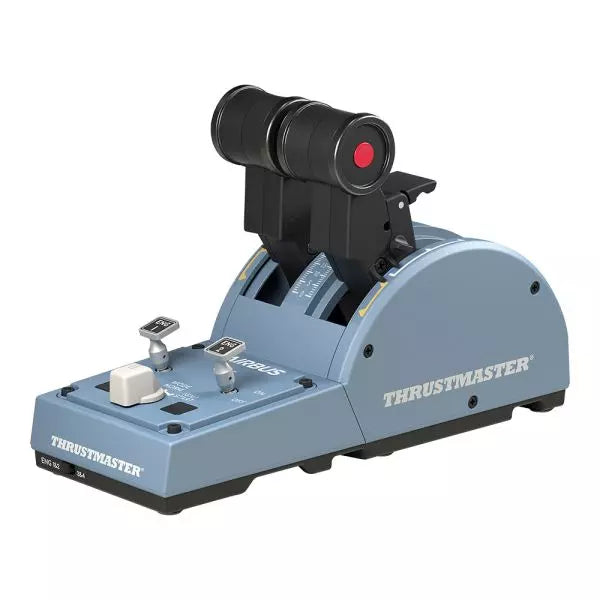
  • TCA Quadrant Airbus Edition

    Thrustmaster TCA Quadrant Airbus Edition

    Nicht vorrätig, Vorbestellungen möglich. Versand in 2–2,5 Wochen.

    Der TCA Quadrant Airbus Edition ist ein Traum für Flugsimulations-Enthusiasten, die ein taktiles, ziviles Luftfahrt-Drosselerlebnis suchen. Mit zwei Schubhebeln samt ikonischen Airbus-Rasten und einem Schubumkehrmechanismus bietet er unvergleichliche Kontrolle für sanfte Starts und präzise Landungen. Dank 16 zuweisbaren Tasten und kontaktloser magnetischer Sensortechnologie, die eine unbegrenzte Lebensdauer gewährleistet, bietet dieser Schubquadrant sowohl Vielseitigkeit als auch Langlebigkeit. Mechanische Selektoren ermöglichen eine nahtlose Anpassung an verschiedene Flugzeugtypen und bieten endlose Möglichkeiten. Was macht den TCA Quadrant Airbus Edition besonders? Ikonische Airbus-Rasten und Schubumkehr Die Rastpunkte des Quadranten ahmen die Flugmodi von Airbus-Flugzeugen nach, von "Idle" bis "TO/GA". In Kombination mit dem Schubumkehrmechanismus machen diese Details die Übergänge zwischen den Leistungsstufen zu einem taktilen Erlebnis und geben dem Nutzer eine fein abgestimmte, intuitive Kontrolle. Kontaktlose magnetische Sensortechnologie Im Gegensatz zu vielen Konkurrenzprodukten, die auf Potentiometer setzen, nutzt der TCA Quadrant Airbus Edition HallEffect-Magnetsensoren. Diese bieten eine längere Lebensdauer, überlegene Empfindlichkeit und eine geschmeidigere Bedienung, selbst bei intensiver Nutzung. Erweiterbares Ökosystem Die Kompatibilität mit zusätzlichem Zubehör wie dem TCA Quadrant Add-On Airbus Edition oder den Thrustmaster T.Flight Ruderpedalen bietet eine Upgrade-Möglichkeit für Vierstrahler-Setups und erweiterte Steuerungskonzepte. Dieser modulare Ansatz stellt langfristigen Mehrwert für engagierte Sim-Piloten sicher. Anpassbare Spannung und Modi Eine integrierte Spannungsschraube erlaubt es dem Nutzer, das Schubgefühl nach seinen Vorlieben einzustellen. Zudem ermöglichen mechanische Selektoren das Deaktivieren der Rastpunkte, um sanfte Achsübergänge für andere Flugzeugtypen wie Kampfjets oder allgemeine Luftfahrzeuge zu ermöglichen. Vorteile und Nachteile Vorteile Nachteile Präzise Airbus-Rasten für modusspezifische Steuerung. Begrenzte Kompatibilität mit Nicht-Windows-Plattformen. Kontaktlose magnetische Sensoren sorgen für langlebige Nutzung. Zusätzliche Zubehörteile erforderlich für Mehrmotoren-Setups. Erweiterbar mit dem Thrustmaster-TCA-Ökosystem. Enthält 16 Tasten für umfangreiche Anpassung. Spezifikationen Spezifikation Wert Breite 10.0" / 255 mm Tiefe 5.7" / 145 mm Höhe 3.3" / 85 mm Gewicht 1.2 lb / 530 g Lieferumfang TCA Quadrant, USB-Kabel, Befestigungsstange, Anschlüsse Technologie HallEffect AccuRate Technology (kontaktlose magnetische Sensoren) Tasten 16 physische und virtuelle Tasten Kompatibilität des TCA Quadrant Airbus Edition Kompatible Geräte Details TCA Sidestick Airbus Edition Ermöglicht ein vollständiges Airbus-Cockpit-Erlebnis. Thrustmaster T.Flight Ruderpedale Bietet verbesserte Steuerung für Boden- und Flugmanöver. Thrustmaster T.A.R.G.E.T Software Ermöglicht Programmierung und Tests komplexer Setups. Der TCA Quadrant Airbus Edition ist kompatibel mit Windows 10 und Windows 8 PCs und lässt sich problemlos in gängige Sim-Setups integrieren. Während er mit der Thrustmaster T.A.R.G.E.T Software für erweiterte Anpassungen optimiert ist, bietet er keine native Konsolenkompatibilität, was ihn zur idealen Wahl für PC-exklusive Piloten macht. In Kombination mit Zubehör wie den T.Flight Ruderpedalen wird das Simulationserlebnis weiter verbessert. Auf Gaming-Plattformen brilliert der Quadrant in Microsoft Flight Simulator und X-Plane. Seine Kompatibilität mit Spielen, die mehrere Tastenbelegungen unterstützen, sowie seine Rastpunkt- und Achseneinstellungen gewährleisten hohe Flexibilität. Aufgrund seines zivilen Luftfahrtfokus ist er weniger für allgemeine Gaming-Setups geeignet.

    Nicht vorrätig, Vorbestellungen möglich. Versand in 2–2,5 Wochen.

    €109,00

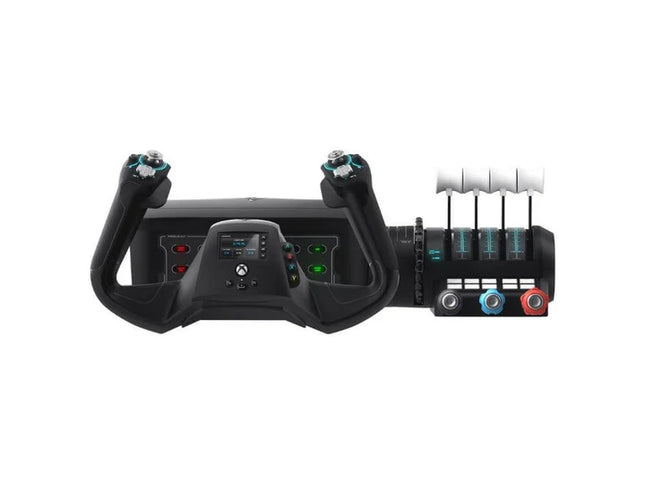
  • Turtle Beach VelocityOne Flight System

    Turtle Beach Turtle Beach VelocityOne Flight System

    Nicht vorrätig, Vorbestellungen möglich. Versand in 2–2,5 Wochen.

    VelocityOne Flight System ist eine leistungsstarke All-in-One-Lösung für Flugenthusiasten auf PC und Xbox. Mit seinem Dual-Throttle-System und dem Statusanzeige-Panel eignet es sich sowohl für Cessnas als auch für große Verkehrsflugzeuge. Der geschmeidige 180°-Drehyoke mit Hall-Effekt-Sensoren sorgt für ein zuverlässiges, taktiles Steuergefühl, während das Trimmrad und die programmierbaren Tasten individuelle Anpassungen ermöglichen, die realen Flugabläufen entsprechen. Ob beim Durchqueren von Wolken oder bei präzisen Landungen – mit diesem System haben Sie die volle Kontrolle. Was macht das VelocityOne Flight System besonders? Vielseitiges Throttle-System Das VelocityOne Flight System bietet zwei Drosseloptionen – vier austauschbare Hebel für Airliner und vernierartige Steuerung für kleinere Flugzeuge wie die Cessna 172. Diese Flexibilität ermöglicht eine präzise Leistungssteuerung für unterschiedliche Flugzeugtypen und spricht sowohl Liebhaber der allgemeinen Luftfahrt als auch Verkehrsflugzeugpiloten an. Integriertes Statusanzeige-Panel Das enthaltene Statusanzeige-Panel erhöht die Immersion durch Überwachung kritischer Systeme. Mit austauschbaren Anzeigen passt es sich verschiedenen Flugzeugtypen an und liefert visuelle Rückmeldungen zu Triebwerksproblemen, Warnungen oder Systemzuständen, ohne zusätzliche Hardware zu benötigen. Rudersteuerung über den Yoke Die integrierte Rudersteuerung im Yoke ermöglicht die präzise Steuerung von Seitenruder, Bugrad und Bremsen mit den Fingerspitzen. Auch wenn es dedizierte Pedale nicht vollständig ersetzt, ist es eine praktische Lösung für Nutzer, die eine kompakte Steuerung bevorzugen. Flight Management Display Der integrierte Bildschirm dient als Flight Management Display für Microsoft Flight Simulator und ermöglicht den schnellen Wechsel zwischen Profilen sowie die Anzeige wichtiger Flugdaten. Dadurch wird die Abhängigkeit von externen Anzeigen minimiert, sodass der Fokus voll auf der Steuerung liegt. Vor- und Nachteile Vorteile Nachteile Dual-Throttle-System für verschiedene Flugzeugtypen. Rudersteuerung am Yoke weniger realistisch als Pedale. Statusanzeige-Panel bietet visuelle Systemmeldungen. Teurer als andere Einsteiger-Flugsteuerungen. Kompatibel mit PC und Xbox Series X|S. Nicht kompatibel mit PlayStation-Plattformen. Technische Daten Technische Spezifikation Wert Marke Turtle Beach Yoke-Drehwinkel 180° Throttle-Typ Dual (Airliner- und Vernier-Style) Plattformkompatibilität PC, Xbox Series X|S, Xbox One Sensor-Typ Hall-Effekt-Sensoren Programmierbare Tasten 10 Statusanzeige-Panel Inklusive mit austauschbaren Anzeigen VelocityOne Flight System Kompatibilität Das VelocityOne Flight System wurde für PC- und Xbox-Plattformen entwickelt und ist eine hervorragende Wahl für Konsolen- und Desktop-Nutzer. Es verbindet sich nahtlos mit Microsoft Flight Simulator auf Xbox Series X|S, und die Hall-Effekt-Sensoren gewährleisten eine präzise und zuverlässige Steuerung für anspruchsvolle Manöver. Während das System eine knopfgesteuerte Rudersteuerung bietet, können Nutzer für ein immersiveres Erlebnis dedizierte Ruderpedale hinzufügen, was jedoch zusätzliche Hardware erfordert. Für Gaming-Plattformen ist das VelocityOne für Xbox Series X|S, Xbox One und Windows-PCs mit modernen Flugsimulatoren optimiert. Leider ist es nicht mit PlayStation-Konsolen oder Mac-Betriebssystemen kompatibel. Während das Flight Management Display besonders gut mit Microsoft Flight Simulator funktioniert, lässt es sich auch mit anderen Flugsimulatoren integrieren und bietet eine flexible, funktionsreiche Erfahrung für Piloten jeder Erfahrungsstufe.

    Nicht vorrätig, Vorbestellungen möglich. Versand in 2–2,5 Wochen.

    €379,00

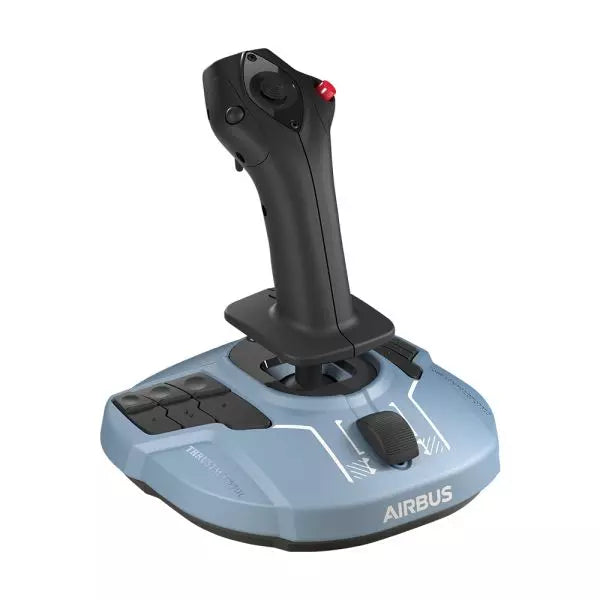
  • letzter Vorrat TCA Sidestick Airbus Edition for sale on FlightSimZone

    Thrustmaster TCA Sidestick Airbus Edition

    3 auf Lager Versand innerhalb von 1-3 Werktagen.

    TCA Sidestick Airbus Edition ist ein vielseitiger und robuster Sidestick, der die Essenz der Airbus-Flugsteuerung einfängt. Mit seinem ergonomischen 1:1-Design, inspiriert vom Airbus A320, bietet dieser Sidestick ein taktiles und anpassbares Flugerlebnis. Dank einer integrierten Schubachse mit einzigartigem Schubumkehrmechanismus und 12 frei belegbaren Tasten passt er sich flexibel an verschiedene Flugstile an – ob als Kapitän, Co-Pilot oder in zentraler Solo-Position. Durch die kontaktlose Magnetsensortechnologie sind Steuerbefehle besonders präzise und langlebig. Was macht den TCA Sidestick Airbus Edition besonders? Austauschbare Joystick-Kopfteile Der Kopf des Sidesticks ist modular aufgebaut und kann für verschiedene Konfigurationen als Kapitän, Co-Pilot oder Solo-Pilot angepasst werden. Diese Flexibilität wird besonders von Nutzern geschätzt, die verschiedene Flugpositionen simulieren möchten. Integrierte Schubachse mit Schubumkehr Eine eingebaute Schubachse mit Schubumkehrmechanismus macht diesen Stick einzigartig. Diese Funktion ist selten bei Sidesticks und bietet eine bessere Kontrolle bei Landungen und Bodenmanövern. HallEffect-Magnetsensoren Dank kontaktloser Magnettechnologie sind Steuerbefehle über die gesamte Lebensdauer hinweg präzise und frei von Abnutzung. Nutzer schätzen die langlebige Konstruktion und die präzise Steuerung. Integrierte Rudersteuerung Der Twist-Rudermechanismus mit optionaler Verriegelung bietet eine vielseitige Steuerung für Piloten, die mehrere Funktionen gleichzeitig bedienen möchten. Vor- und Nachteile Vorteile Nachteile Modulares Design für verschiedene Pilotenkonfigurationen. Nur mit PC kompatibel. Integrierte Schubachse mit Schubumkehr. Kleinere Basis könnte für manche weniger stabil sein. Magnetische Sensoren sorgen für präzise und langlebige Steuerung. Keine zusätzlichen Drehregler oder Schieberegler vorhanden. Ergonomisches Airbus-Design für hohen Komfort. Technische Daten Technische Spezifikation Wert Breite 195 mm Tiefe 195 mm Höhe 225 mm Gewicht 920 g Lieferumfang 1x Sidestick, 4x austauschbare Joystick-Kopfteile TCA Sidestick Airbus Edition Kompatibilität Der TCA Sidestick Airbus Edition ist vollständig kompatibel mit anderen Komponenten des Thrustmaster-Airbus-Ökosystems, einschließlich des TCA Quadrant Airbus Edition und des TCA Quadrant Add-On. Er lässt sich zudem gut mit den T.Flight Rudder Pedals und der TM Flying Clamp für eine stabilere Befestigung kombinieren. Allerdings ist er nicht mit Konsolen wie Xbox oder PlayStation kompatibel, wodurch er sich ausschließlich für PC-Nutzer eignet. Für Gaming-Plattformen unterstützt der Sidestick PC (Windows 10 und 8), ist jedoch nicht mit macOS oder Linux-Systemen nutzbar. Er ist mit gängigen Flugsimulatoren wie Microsoft Flight Simulator und X-Plane kompatibel. Allerdings ist seine Nutzung auf Spiele beschränkt, die konfigurierbare Flugsteuerungen unterstützen, da er keine Plug-and-Play-Unterstützung für Arcade- oder Casual-Spiele bietet.

    3 auf Lager Versand innerhalb von 1-3 Werktagen.

    €69,00

  • letzter Vorrat Wingflex A320 EFIS Cube

    WingFlex Wingflex A320 EFIS Cube

    3 auf Lager Versand innerhalb von 1-3 Werktagen.

    Wingflex A320 EFIS Cube puts Airbus navigation and display management exactly where your hand expects it, combining full-function EFIS and glareshield controls with high-contrast dual-colour displays in a compact 80% scale design. From adjusting barometric pressure to selecting navigation modes, every rotary movement and button press feels deliberate and satisfying. The synchronized backlighting, integrated stand and simple USB connectivity make it an excellent addition to a desktop Airbus cockpit without demanding the space of a full-size flight deck. What Sets the Wingflex A320 EFIS Cube apart? More Than Just an EFIS Panel Unlike many desktop EFIS units that focus solely on navigation display controls, the EFIS Cube also integrates important glareshield functions such as Master Warning, Master Caution and CHRONO controls. Having these frequently used functions within easy reach creates a cleaner cockpit workflow and reduces the need to return to the virtual cockpit during busy phases of flight. Compact Size Without Sacrificing Functionality The 80% scale design makes the panel much easier to accommodate on a typical desktop while preserving the familiar Airbus control layout. Buttons, rotary selectors and push-pull controls remain comfortably spaced, allowing quick adjustments without making the panel feel cramped. It strikes an effective balance between space efficiency and comfortable day-to-day operation. Consistent Lighting Across Your Cockpit The synchronized brightness system keeps the displays and backlighting aligned with supported simulator lighting, creating a cohesive appearance throughout the cockpit. Combined with Airbus-style fonts and dual-colour displays, important flight information remains crisp and easy to read whether flying during bright daylight or on a dark nighttime arrival. Built for Modular Cockpit Expansion The EFIS Cube performs perfectly as a standalone controller but is equally suited to growing cockpit projects. It integrates neatly alongside the Wingflex FCU Cube and RMP Combo Cube, allowing sim pilots to expand their Airbus setup gradually while maintaining a consistent appearance, matching lighting and a tidy desktop footprint. Pros and Cons Pros Cons Integrated glareshield controls reduce additional hardware. Reduced scale differs from full-size Airbus dimensions. Dual-colour displays remain easy to read. Designed specifically for Airbus aircraft. Synchronized lighting creates consistent cockpit appearance. Plug-and-play USB connection simplifies installation. Compact footprint fits comfortably beneath most monitors. Specifications Specification Value Product Wingflex A320 EFIS Cube Scale 80% scale Primary Function Airbus Electronic Flight Instrument System control panel Integrated Functions EFIS controls and glareshield controls Display Type High-contrast dual-colour LCD displays Display Fonts Airbus-style fonts Controls Buttons, rotary knobs and switches Lighting Fully synchronized adjustable backlighting Connection USB Installation Plug-and-play Stand Integrated low-profile desktop stand Primary Use Airbus flight simulation Wingflex A320 EFIS Cube Compatibility Simulator Compatible Aircraft X-Plane ToLiss A319, A320, A330, A340; Laminar A330 Microsoft Flight Simulator Fenix A3xx, FlyByWire A320 & A380, iniBuilds A320, A321, A330, A340, A350, Aerosoft A340, Headwind A330 Prepar3D FSLabs A32x The Wingflex A320 EFIS Cube connects through USB and can be used either as a standalone Airbus EFIS controller or alongside the Wingflex FCU Cube and Wingflex RMP Combo Cube. Its synchronized brightness allows all compatible Cube modules to maintain a consistent appearance, while the integrated stand provides a comfortable operating angle for desktop cockpits. The published compatibility list covers a wide selection of Airbus aircraft across the major PC flight simulators. It supports Fenix A3xx, ToLiss Airbus aircraft, FlyByWire A320 and A380, multiple iniBuilds Airbus models, Laminar A330, Aerosoft A340, Headwind A330 and FSLabs A32x. The panel is designed specifically for Airbus aircraft and is not intended for Boeing flight decks or other aircraft with different EFIS layouts. The EFIS Cube is compatible with Microsoft Flight Simulator 2020 and 2024, X-Plane 11 and 12 and Prepar3D on Windows PCs. It uses a USB connection with plug-and-play operation and is not compatible with Xbox or PlayStation consoles, as dedicated cockpit hardware requires PC-based simulator support.

    3 auf Lager Versand innerhalb von 1-3 Werktagen.

    €199,00

  • letzter Vorrat Wingflex A320 FCU Cube

    WingFlex Wingflex A320 FCU Cube

    3 auf Lager Versand innerhalb von 1-3 Werktagen.

    Wingflex A320 FCU Cube brings Airbus autopilot management into a compact desktop format with full autopilot control functionality and a durable all-aluminum construction. Every heading adjustment, altitude selection and autopilot engagement is handled through tactile knobs and switches that encourage proper cockpit workflows instead of constant mouse clicks. The synchronized dimmer, adjustable backlighting and plug-and-play USB connection make it equally suited to quick evening flights or long IFR sessions, all without demanding the space of a full-size glareshield. What Sets the Wingflex A320 FCU Cube apart? Compact Airbus Autopilot Without Sacrificing Core Controls At 80% scale, the FCU Cube preserves the control layout Airbus pilots expect while significantly reducing the space required on a desktop. Independent reviews consistently note that this balance makes it much easier to fit beneath standard monitors than full-size panels, yet the spacing remains comfortable enough for deliberate heading, speed and altitude adjustments during demanding approaches. Switches That Reward Every Input The AP1, AP2 and A/THR buttons use dedicated axial switches with a 2.5 mm travel, while the remaining controls employ Alps switches with a 2.0 mm stroke. Pilots frequently comment that well-designed tactile controls encourage proper use of the autopilot throughout a flight instead of relying on keyboard shortcuts once the novelty wears off. Solid Metal Construction Built for Frequent Flying The aluminum housing and matching aluminum control knobs give the FCU Cube a reassuring weight that keeps it planted during repeated adjustments. Reviewers often highlight the rigid construction because it avoids the flex sometimes found in lighter desktop panels, making heading changes and rotary inputs feel consistent throughout longer flying sessions. Designed to Grow Into a Complete Airbus Cockpit The FCU Cube works well as a standalone autopilot controller, but it is equally at home alongside the Wingflex EFIS Cube and RMP Combo Cube. Shared brightness synchronization creates a unified appearance across the glareshield, allowing cockpit builders to expand their setup gradually instead of replacing hardware every time a new module is added. Pros and Cons Pros Cons Aluminum housing provides excellent structural rigidity. Reduced scale differs from full-size Airbus dimensions. Autopilot switches deliver satisfying tactile feedback. Designed specifically for Airbus aircraft families. Plug-and-play USB installation minimizes setup time. Synchronized lighting complements other Cube modules. Broad Airbus simulator compatibility across major platforms. Specifications Specification Value Product Wingflex A320 FCU Cube Scale 80% scale Primary Function Airbus Flight Control Unit (FCU) Construction Aviation-grade aluminum body and knobs Connection USB Installation Plug-and-play Autopilot Switches AP1, AP2 and A/THR axial switches Autopilot Switch Travel 2.5 mm Other Button Switches Japan Alps switches with 2.0 mm travel Lighting Adjustable backlighting with synchronized dimmer knob Primary Use Airbus flight simulation autopilot control Wingflex A320 FCU Cube Compatibility Simulator Compatible Aircraft X-Plane ToLiss A319, A320, A330, A340; Laminar A330 Microsoft Flight Simulator Fenix A3xx, FlyByWire A320 & A380, iniBuilds A320, A321, A330, A340, A350, Aerosoft A340, Headwind A330 Prepar3D FSLabs A32x The FCU Cube connects through USB and operates as either a standalone Airbus autopilot controller or as part of the broader Wingflex Cube ecosystem. It supports brightness synchronization with the Wingflex EFIS Cube and RMP Combo Cube, creating a consistent glareshield appearance. Its compact dimensions also make it easy to integrate into desktop cockpits or modular simulator builds without requiring a full-width Airbus panel. The published compatibility list covers a broad range of Airbus simulations across the leading platforms. It supports Fenix A3xx, ToLiss Airbus aircraft, FlyByWire A320 and A380, multiple iniBuilds Airbus models, Laminar A330, Aerosoft A340, Headwind A330 and FSLabs A32x. Unlike the RMP Combo Cube, the FCU Cube also supports the FlyByWire A380 and iniBuilds A350, making it one of the most widely compatible Airbus autopilot panels in the Wingflex lineup. The FCU Cube is designed for Microsoft Flight Simulator, X-Plane and Prepar3D on Windows PCs. It communicates through USB and works with supported Airbus aircraft using Wingflex software integration. It is not compatible with Xbox or PlayStation consoles, as dedicated USB cockpit peripherals of this type require PC-based simulator support.

    3 auf Lager Versand innerhalb von 1-3 Werktagen.

    €199,00

  • letzter Vorrat Wingflex A320 RMP Combo Cube

    WingFlex Wingflex A320 RMP Combo Cube

    3 auf Lager Versand innerhalb von 1-3 Werktagen.

    Wingflex A320 RMP Combo Cube squeezes four useful Airbus control sections into one compact unit, combining RMP, ATC, TCAS and warning-panel functions with high-contrast dual-colour LCD screens. Its physical knobs and illuminated controls give frequency changes and transponder entries a satisfying mechanical rhythm, without consuming the entire desk. The 80% scale and 13-degree tilt keep everything comfortably visible, while USB connectivity makes installation refreshingly direct. Apparently, proper radio management does not require a full cockpit shell and several kilometres of wiring. What Sets the Wingflex A320 RMP Combo Cube apart? Four Control Sections Earn Their Desk Space Rather than reproducing only the radio management panel, the unit combines RMP, ATC, TCAS and glareshield warning functions behind one compact face. This gives solo pilots considerably more usable control than a single-purpose radio panel. Hands-on coverage particularly values the integrated radio section because it places communication and surveillance controls beside the Airbus autopilot hardware, where they can be reached without returning to the virtual cockpit. Compact Dimensions Without Tiny Controls The 80% scale reduces the panel’s footprint while retaining physical rotary controls and readable displays. Review coverage of the complete Cube system found the format notably easier to position beneath a conventional monitor than full-width Airbus hardware. The compromise is sensible for desktop pilots: it saves space without shrinking everything into fiddly miniature controls that require the fingertips of a concert pianist and the patience of an air-traffic controller. Lighting That Behaves as One Cockpit System The RMP Combo Cube can synchronize its brightness with the Wingflex FCU Cube and EFIS Cube, producing consistent illumination across the complete glareshield arrangement. Independent reporting also notes that each module can still operate separately, so the RMP does not require the complete Cube set. That flexibility is useful for gradual cockpit builds, while synchronized backlighting prevents one panel glowing like a supermarket sign beside two carefully dimmed instruments. Straightforward Setup, With Aircraft-Specific Boundaries User feedback describes the initial setup as notably simple, and the panel operates through a direct USB connection with Wingflex integration software. However, reports also show that behaviour may vary between aircraft and simulator versions, particularly when a specific function has not yet been implemented. It is therefore far less troublesome than custom wiring, but compatibility should still be checked by aircraft rather than assumed from the presence of an Airbus badge. Pros and Cons Pros Cons Four integrated sections reduce separate hardware requirements. Reduced scale differs from full-size cockpit dimensions. Dual-colour displays provide clear frequency information. Aircraft support varies between simulator platforms. Synchronized lighting complements other Wingflex Cube modules. USB connection keeps desktop installation straightforward. Angled enclosure improves visibility from seated positions. Specifications Specification Value Product Wingflex A320 RMP Combo Cube Scale 80% scale Integrated Functions RMP, ATC, TCAS and glareshield warning panel Display Type Dual-colour LCD screens Display Background Black Viewing Angle 13 degrees Connection USB Installation Plug-and-play Lighting Synchronized brightness adjustment Compatible Lighting Modules Wingflex A320 FCU Cube and A320 EFIS Cube Primary Use Airbus flight simulation cockpit control Wingflex A320 RMP Combo Cube Compatibility Simulator Compatible Aircraft Status X-Plane ToLiss A319, A320, A330 and A340; Laminar A330 Supported Microsoft Flight Simulator Fenix A3xx; FlyByWire A320; iniBuilds A320, A321, A330 and A340; Aerosoft A340; Headwind A330 Supported Prepar3D FSLabs A32x Supported Microsoft Flight Simulator FlyByWire A380 Not supported Microsoft Flight Simulator iniBuilds A350 Not supported The panel connects through a single USB connection and can be used independently as a desktop controller. It also integrates with the Wingflex A320 FCU Cube and Wingflex A320 EFIS Cube, including synchronized brightness across the modules. Within the optional Cube console, the panels can share an internal USB hub and run to the computer through one external cable. No universal mounting compatibility with third-party cockpit frames is specified. Aircraft support is integration-specific rather than universal. The panel supports ToLiss, Fenix, FSLabs, FlyByWire A320 and several iniBuilds aircraft, alongside the listed Laminar, Aerosoft and Headwind models. The FlyByWire A380 is not supported, and the iniBuilds A350 is not supported. Reports of differing behaviour between Microsoft Flight Simulator and X-Plane also show why pilots should use the published aircraft list instead of assuming every Airbus add-on will communicate correctly. For gaming platforms, the RMP Combo Cube is intended for Windows PC flight simulation and works with supported aircraft in Microsoft Flight Simulator, X-Plane and Prepar3D. It relies on PC-side USB communication and Wingflex software for integration and firmware management. It is not listed as compatible with Xbox or PlayStation, so console editions of Microsoft Flight Simulator should not be treated as supported platforms.

    3 auf Lager Versand innerhalb von 1-3 Werktagen.

    €199,00

  • Wingflex A320 Combo Cube

    WingFlex Wingflex A320 Combo Cube

    6 auf Lager Versand innerhalb von 1-3 Werktagen.

    Wingflex A320 Combo Cube places the Airbus glareshield essentials into one tidy desktop system, combining EFIS, FCU and multifunction RMP controls with high-contrast dual-colour displays. The knobs click and turn with enough purpose to make heading changes, radio tuning and barometric adjustments feel far better than poking at a virtual cockpit. USB connectivity keeps installation straightforward, while the 13-degree viewing angle brings the panels naturally into sight. It is compact Airbus hardware for pilots whose desks already resemble a mildly concerned electronics workshop. What Sets the Wingflex A320 Combo Cube apart? Three Core Panels Without a Full-Size Glareshield The bundle combines an EFIS, FCU and RMP-based multifunction panel in an 80% scale layout, saving roughly eleven centimetres compared with a full-size arrangement. Reviewers have praised that reduction because it preserves practical control spacing while fitting more comfortably beneath ordinary monitors. The result feels substantial enough for deliberate operation without demanding the sort of desk usually reserved for air-traffic control or an exceptionally ambitious accountant. A Smarter Use of the Right-Hand Position Instead of supplying a second EFIS that a solo pilot may rarely touch, Wingflex fills the right side with a four-in-one panel covering radio management, transponder, TCAS and warning functions. Review feedback identifies this as one of the bundle’s most practical decisions, since it places genuinely useful controls within reach. It sacrifices strict two-seat symmetry, but gains considerably more day-to-day function for single-pilot desktop flying. Clear Displays and Cohesive Night Lighting Dual-colour screens provide sharp contrast against their dark backgrounds, while synchronized brightness allows the EFIS, FCU and RMP sections to behave like one connected panel. Independent testing found the displays notably crisp and the backlighting pleasant in darker rooms. That matters during evening approaches, when deciphering fuzzy digits is an unnecessary challenge and the weather already has enough creative ways to ruin a carefully prepared arrival. Simple Assembly With a Stable Optional Console When paired with the Cube Stand, the three modules connect through internal USB-C cables and a built-in hub, leaving a single cable running to the PC. Reviewers found assembly straightforward and noted that the broad base remained firmly planted while pressing buttons and turning encoders. The stand also gives the separate modules a cleaner, unified appearance, although it is an optional bundle choice rather than standard equipment with every configuration. Pros and Cons Pros Cons Compact layout preserves valuable desktop space. Reduced scale differs from full-size cockpit dimensions. Three modules cover major glareshield functions. Optional console increases the complete setup footprint. Dual-colour displays remain clear in low light. RMP module combines four useful control sections. USB installation requires minimal external interface hardware. Specifications Specification Value Product Wingflex A320 Combo Cube Included Modules A320 EFIS Cube, A320 FCU Cube and A320 RMP Combo Cube Scale 80% scale Interface USB Installation Plug-and-play Display Type Dual-colour LCD screens Viewing Angle 13 degrees FCU Construction Aluminium body and knobs RMP Functions RMP, ATC, TCAS and side-panel controls Lighting Synchronized brightness across compatible Cube modules Product Dimensions 52.0 × 18.5 × 16.5 cm Package Dimensions 64.0 × 24.0 × 20.5 cm Bundle Options Three-module bundle, or bundle with Cube Stand Glareshield Housing Not included with the standard three-module bundle Wingflex A320 Combo Cube Compatibility Simulator Aircraft With Full Bundle Support Microsoft Flight Simulator Fenix A3xx, FSLabs A32x, FlyByWire A320, iniBuilds A320, A321, A330 and A340, Aerosoft A340, Headwind A330 X-Plane ToLiss A319, A320, A330 and A340; Laminar A330 Prepar3D FSLabs A32x and other listed aircraft where supported through Wingflex Bridge Aircraft Compatibility Limitation FlyByWire A380 EFIS and FCU supported; RMP Combo Cube not supported iniBuilds A350 EFIS and FCU supported; RMP Combo Cube not supported The three modules connect through USB and can operate as separate desktop units or within the optional Cube Stand. That stand contains an internal USB hub, allowing its three module connections to exit through one PC cable. The bundle pairs naturally with Airbus throttles, sidesticks, MCDUs and overhead panels, but it does not include a full glareshield enclosure and no standard mounting compatibility with third-party cockpit shells is specified. Full compatibility depends on all three modules supporting the selected aircraft, because the EFIS and FCU lists are slightly broader than the RMP list. The complete bundle supports Fenix, ToLiss, FlyByWire A320, FSLabs, several iniBuilds aircraft, Aerosoft A340 and Headwind A330. The FlyByWire A380 and iniBuilds A350 are not fully supported because their RMP integration is currently excluded, even though the EFIS and FCU modules list them individually. For software platforms, the Combo Cube is built for Microsoft Flight Simulator 2020 and 2024, X-Plane 11 and 12 and Prepar3D on Windows PC. It uses Wingflex Bridge for aircraft communication and firmware management. It is not listed as compatible with Xbox or PlayStation, because the required PC-side integration software and dedicated USB panel support are not available on those console platforms.

    6 auf Lager Versand innerhalb von 1-3 Werktagen.

    €550,00 - €740,00

  • letzter Vorrat Wingflex DAP 500

    WingFlex Wingflex DAP 500

    5 auf Lager Versand innerhalb von 1-3 Werktagen.

    Please note! The item may take 7-10 business days to ship! Wingflex DAP 500 puts dedicated general aviation autopilot controls right where your hand expects them, combining fully customizable controls with plug-and-play USB connectivity for a clean desktop setup. Instead of reaching for on-screen knobs every few minutes, you can adjust heading, altitude and navigation modes through tactile buttons and encoders that feel purposeful. The aluminum stand, automatic aircraft configuration and ambient-light-controlled backlighting make it equally comfortable during a sunny VFR hop or a late-night IFR approach. What Sets the Wingflex DAP 500 apart? Designed Specifically for General Aviation While many autopilot panels focus on airliners, the DAP 500 is built around the aircraft most GA pilots actually fly. Its control layout suits piston singles, turboprops and light business aircraft, making routine autopilot adjustments feel intuitive. Pilots who regularly fly aircraft like the C172, TBM, Vision Jet or King Air often appreciate hardware that reflects their everyday flying instead of borrowing layouts from transport-category aircraft. Flexible Controls That Adapt to Your Flying Style With twelve programmable push buttons, two pushable rotary encoders and an additional scroll-wheel encoder, the panel can be tailored well beyond its default assignments. Community discussions around configurable hardware consistently highlight this flexibility as a major advantage because it allows pilots to create workflows that match their preferred aircraft rather than forcing identical controls across every simulator. Automatic Aircraft Profiles Reduce Setup Time WingFlex Bridge software automatically configures supported aircraft, helping users spend more time flying and less time assigning controls. Reviewers generally regard automatic profile detection as one of the biggest quality-of-life improvements in modern simulator hardware, particularly for pilots who regularly switch between multiple aircraft during the same week instead of flying a single favourite. Built to Grow With Future Cockpit Expansions The DAP 500 is designed as part of a broader modular ecosystem, with support planned for additional DAP-series expansion panels. Combined with firmware updates delivered through OTA software, it offers a platform that can continue evolving without replacing the core autopilot unit. That modular philosophy appeals to cockpit builders who prefer expanding their simulator gradually rather than purchasing an entire panel stack in one go. Pros and Cons Pros Cons Automatic aircraft profiles simplify supported aircraft setup. Designed primarily for general aviation aircraft. Extensive programmable controls suit different flying styles. Requires WingFlex Bridge for automatic configuration features. Ambient light sensor adjusts backlighting automatically. Aluminum stand provides stable desktop positioning. OTA firmware updates add future functionality. Specifications Specification Value Product Wingflex DAP 500 Digital Autopilot Panel Primary Use General aviation flight simulation Connection USB plug-and-play Push Buttons 12 Pushable Rotary Encoders 2 Scroll-Wheel Encoder 1 Key Assignment Fully user customizable Configuration Automatic via WingFlex Bridge software Backlighting Adjustable with ambient light sensor Firmware OTA firmware upgrade support Construction Aluminum alloy stand Expandability Supports future DAP-series auxiliary panels Wingflex DAP 500 Compatibility Simulator Compatible Aircraft X-Plane Baron 58, King Air C90B, Citation XLS, Skyhawk G1000, Cirrus SR22, Vision SF50, Lancair Evolution, RV10 Microsoft Flight Simulator 2020 NXCub, XCub, King Air 350, Bonanza G36, C208B Grand Caravan EX, CJ4, C172 G1000, DA40 NG, Pilatus PC-6, TBM 930 Microsoft Flight Simulator 2024 TBM 930, Bonanza G36, King Air 350, C172 G1000, C208B Grand Caravan EX, C400 Corvalis, CJ4, DA62, DA40 NG, Draco X, Vision SF50, Archer, ES30, NXCub, PC-12 NGX, XCub The DAP 500 connects through USB and uses WingFlex Bridge software to automatically configure supported aircraft profiles. It is designed for general aviation cockpits and works especially well alongside hardware such as G1000 panels, radio stacks, throttle quadrants and yokes. The panel also supports future DAP-series expansion modules, allowing users to gradually build a more complete general aviation cockpit instead of replacing existing hardware. Compatibility is focused on aircraft equipped with autopilot systems commonly found in general aviation rather than commercial airliners. It supports a broad collection of Asobo, Laminar Research and Microsoft aircraft, including the C172 G1000, King Air, TBM 930, Vision Jet, DA62 and PC-12 NGX. It is not intended for Boeing or Airbus airliner autopilot systems, which use different control layouts and operating logic. The DAP 500 is compatible with Microsoft Flight Simulator 2020, Microsoft Flight Simulator 2024 and X-Plane on PC. It connects as a USB peripheral and relies on WingFlex Bridge software for supported aircraft integration. It is not compatible with Xbox or PlayStation consoles, as those platforms do not support dedicated desktop flight simulation control panels of this type.

    5 auf Lager Versand innerhalb von 1-3 Werktagen.

    €179,00

Flight simulator controller for sale at FlightSImZone

Anmeldung

Haben Sie Ihr Passwort vergessen?

Sie haben noch kein Konto?
Konto erstellen




