Pannelli strumenti

26 prodotti

  • Ultima scorta! MOZA MA3F Electronic Flight Control Modules R for sale on FlightSimZone

    Moza MOZA MA3F Electronic Flight Control Modules R (Pre-Order! Shipping Starts mid-to-late-August)

    5 in stock Spedizione in 1-3 giorni lavorativi.

    MOZA MA3F Electronic Flight Control Modules R capture the distinctive workflow of the Airbus A320 flight deck with hardware that feels satisfying every time you dial in a heading or adjust altitude. The dual-rail spring-loaded push/pull mechanism recreates the signature operation of Airbus autopilot controls, while custom segmented displays faithfully mirror Airbus-specific character formatting and spacing. Every knob, button, and illuminated indicator works together to make route management, climb planning, and approach setup feel remarkably natural throughout every stage of flight. What Sets the MOZA MA3F Electronic Flight Control Modules R apart? Airbus Push/Pull Controls Done Properly – One feature that consistently stands out is the custom dual-rail push/pull mechanism. Instead of using a basic spring-loaded encoder, the controls deliver distinct travel and resistance that closely match Airbus operating procedures. Many experienced Airbus sim pilots appreciate how this makes managed and selected mode changes feel much more deliberate while reducing accidental inputs during busy phases of flight. Displays That Capture Airbus Character – The segmented displays have been carefully designed to reproduce the distinctive appearance of Airbus FCU readouts, including character spacing and formatting. Rather than looking like generic digital displays, they blend naturally into an Airbus cockpit. Enthusiasts often point to details like these as the difference between simply operating a simulator and enjoying a convincing airline cockpit environment. Expandable to Match Your Cockpit – Whether you choose the FCU on its own, pair it with a single EFIS module, or install the complete Electronic Flight Control Module suite, the system grows alongside your cockpit. Builders appreciate this flexibility because it allows gradual upgrades while maintaining a consistent appearance and control layout throughout the simulator. Purpose-Built for Dedicated Airbus Flying – Seamless integration with MOZA Cockpit software, synchronized lighting, and support for leading Airbus aircraft make the system especially attractive for airliner enthusiasts. Community feedback often highlights how easy it is to configure while still providing extensive customization for display lighting, controls, and cockpit organization. Pros and Cons Pros Cons Excellent Airbus-style push/pull autopilot controls. Designed specifically for Airbus aircraft. Displays accurately reproduce Airbus FCU formatting. Requires a Windows PC. Multiple configurations suit evolving cockpit builds. Synchronized lighting enhances cockpit consistency. Specifications Specification Value Product Type Airbus A320-style FCU and EFIS control system Available Configurations EFIS Display Type Custom Airbus-style segmented displays Autopilot Control Mechanism Dual-rail spring-loaded push/pull controls Lighting Independent display, character, and status illumination Software Integration MOZA Cockpit Supported Platform PC Mounting Options Included bracket, aluminum profile, 75 mm VESA mount Extended Function Optional EFIS extended-function control mode MOZA MA3F Electronic Flight Control Modules R Compatibility Hardware Compatibility Mounting Systems Included bracket, aluminum-profile rigs, 75 × 75 mm VESA mounts MOZA Cockpit Software Supported for telemetry synchronization and configuration Cockpit Layouts FCU only, single EFIS, or complete EFCM suite Flight Simulator Compatibility Microsoft Flight Simulator Default Airbus A320/A330 and supported Airbus add-ons X-Plane Compatible with Airbus aircraft including ToLiss models Third-Party Aircraft Fenix A320, FlightFactor A320, ToLiss series, and other Airbus airliners Built for PC flight simulation, the MA3F Electronic Flight Control Modules R work seamlessly with MOZA Cockpit software, providing synchronized lighting, telemetry integration, and straightforward configuration. Included bracket mounting, aluminum-profile compatibility, and 75 mm VESA support make installation simple whether you're assembling a desktop setup or a dedicated Airbus cockpit. The modular design allows builders to begin with a single FCU or expand into a complete Electronic Flight Control Module suite over time. Independent adjustment of display brightness, character illumination, and status lighting helps maintain a consistent cockpit appearance during daytime departures and late-night arrivals. Compatible with Microsoft Flight Simulator and X-Plane, the system supports default Airbus A320 and A330 aircraft together with leading third-party aircraft including Fenix A320, ToLiss, FlightFactor A320, and other popular Airbus airliners. The supported platform is PC; gaming consoles and macOS are not supported.

    5 in stock Spedizione in 1-3 giorni lavorativi.

    €109,00

  • Ultima scorta! MOZA MA3F Electronic Flight Control Modules L for sale on FlightSimZone

    Moza MOZA MA3F Electronic Flight Control Modules L (Pre-Order! Shipping Starts mid-to-late-August)

    5 in stock Spedizione in 1-3 giorni lavorativi.

    MOZA MA3F Electronic Flight Control Modules L bring the unmistakable Airbus A320 flight deck to your simulator with controls that make every heading change, altitude adjustment, and approach setup feel deliberate. The dual-rail spring-loaded push/pull mechanism recreates the distinctive operation of Airbus autopilot controls, while custom segmented displays faithfully mirror Airbus-specific character formatting and spacing. From the satisfying click of each selector to the coordinated cockpit lighting, every interaction encourages proper Airbus procedures throughout the entire flight. What Sets the MOZA MA3F Electronic Flight Control Modules L apart? Faithful Airbus Push/Pull Operation – The dual-rail spring-loaded push/pull mechanism delivers a noticeably more convincing feel than conventional encoder-based controls. Airbus enthusiasts often point out that having distinct push and pull actions makes switching between managed and selected modes feel far more intuitive, helping reproduce familiar cockpit workflows without relying on keyboard shortcuts or mouse clicks. Displays That Match Airbus Presentation – Rather than using generic digital readouts, the custom segmented displays reproduce Airbus-style character spacing, typography, and formatting. Builders frequently appreciate these visual details because the modules blend naturally with other Airbus cockpit hardware, creating a clean and cohesive flight deck instead of a collection of mismatched peripherals. Flexible Expansion for Growing Cockpits – Available as an FCU only, FCU with a single EFIS, or a complete Electronic Flight Control Module suite, the system adapts to different cockpit sizes and budgets. The optional extended-function EFIS mode adds further flexibility, allowing additional controls to be accessed without filling the cockpit with extra hardware. Straightforward Installation and Configuration – The included mounting bracket, aluminum-profile compatibility, and standard 75 mm VESA support make installation simple across desktop and full-frame cockpits. Users also appreciate MOZA Cockpit software for its synchronized lighting, streamlined configuration process, and flexible control customization without requiring complicated setup procedures. Pros and Cons Pros Cons Excellent Airbus-style push/pull control mechanism. Designed specifically for Airbus aircraft. Displays closely match Airbus FCU formatting. Requires a Windows PC. Modular configurations support gradual cockpit upgrades. Synchronized lighting creates a cohesive cockpit appearance. Specifications Specification Value Product Type Airbus A320-style FCU and EFIS control system Available Configurations FCU only, FCU + single EFIS, complete EFCM suite Display Type Custom Airbus-style segmented displays Autopilot Control Mechanism Dual-rail spring-loaded push/pull controls Lighting Independent display, character, and status illumination Software Integration MOZA Cockpit Supported Platform PC Mounting Options Included bracket, aluminum profile, 75 mm VESA mount Extended Function Optional EFIS extended-function control mode MOZA MA3F Electronic Flight Control Modules L Compatibility Hardware Compatibility Mounting Systems Included bracket, aluminum-profile rigs, 75 × 75 mm VESA mounts MOZA Cockpit Software Telemetry synchronization and configuration supported Cockpit Configurations FCU only, single EFIS, or complete EFCM suite Flight Simulator Compatibility Microsoft Flight Simulator Default Airbus A320/A330 and supported Airbus add-ons X-Plane Compatible with Airbus aircraft including ToLiss series Third-Party Aircraft Fenix A320, FlightFactor A320, ToLiss series, and other popular Airbus airliners Designed for PC flight simulation, the MA3F Electronic Flight Control Modules L integrate with MOZA Cockpit software for telemetry synchronization, synchronized lighting, and simple configuration. Included bracket mounting, aluminum-profile compatibility, and 75 mm VESA support allow the modules to fit comfortably into desktop cockpits or larger Airbus flight deck projects. The modular design allows builders to begin with a single FCU or expand into a complete Electronic Flight Control Module suite as their simulator grows. Independent adjustment of display brightness, character illumination, and status lighting helps maintain a consistent cockpit appearance during daytime departures and night operations alike. Compatible with Microsoft Flight Simulator and X-Plane, the system supports default Airbus A320 and A330 aircraft together with leading third-party aircraft including Fenix A320, ToLiss, FlightFactor A320, and other popular Airbus airliners. The supported platform is PC; gaming consoles and macOS are not supported.

    5 in stock Spedizione in 1-3 giorni lavorativi.

    €109,00

Flight Simulator Instrument Panels for Sale at FlightSimZone

Trasforma la tua esperienza di simulazione di volo con la nostra selezione completa di pannelli strumenti professionali per simulatore di volo. Che tu sia un pilota virtuale esperto o un neofita, la nostra collezione offre il perfetto equilibrio tra realismo e funzionalità.

Tabella comparativa

Prodotto Tipo Display Compatibilità Caratteristiche principali
GFC700 Autopilota Digitale MSFS, X-Plane, P3D Sistema autopilota avanzato, preselezione altitudine, controllo rateo di salita
GCU47X Unità di controllo LCD MSFS, X-Plane Display digitale, controlli integrati, selezione modalità
GTN650 Navigazione Touchscreen MSFS, X-Plane, P3D GPS/NAV/COM, interfaccia touch, visualizzazione meteo
GNS430 Navigazione LCD Tutti i principali simulatori GPS/NAV/COM, navigatore integrato, pianificazione volo
GNS530 Navigazione LCD Tutti i principali simulatori GPS/NAV/COM avanzato, display più ampio, navigazione evoluta
GFC500 Autopilota Digitale MSFS, X-Plane Autopilota digitale, ESP, direttore di volo
GTN750 Navigazione Touchscreen MSFS, X-Plane, P3D GPS/NAV/COM premium, display touch ampio, mappe e chart
G1000 PFD/MFD Glass cockpit LCD Tutti i principali simulatori Display primari/multifunzione, visione sintetica, monitoraggio motore
G500 Glass cockpit LCD MSFS, X-Plane Sistema doppio display, sovrapposizione meteo, mappatura terreno
G1000 Suite Sistema integrato LCD Tutti i principali simulatori Soluzione glass cockpit completa, integrazione totale, autopilota avanzato

Pannelli strumenti per Microsoft Flight Simulator

Scopri la nuova generazione dell’aviazione virtuale con pannelli strumenti appositamente progettati per Microsoft Flight Simulator. La nostra selezione si integra alla perfezione con MSFS 2024, offrendo livelli di immersione e controllo mai visti prima. Potrai agire su manopole e pulsanti reali che rispecchiano perfettamente quelli del simulatore, compreso il sofisticato G1000 e l’intuitiva interfaccia GTN750.

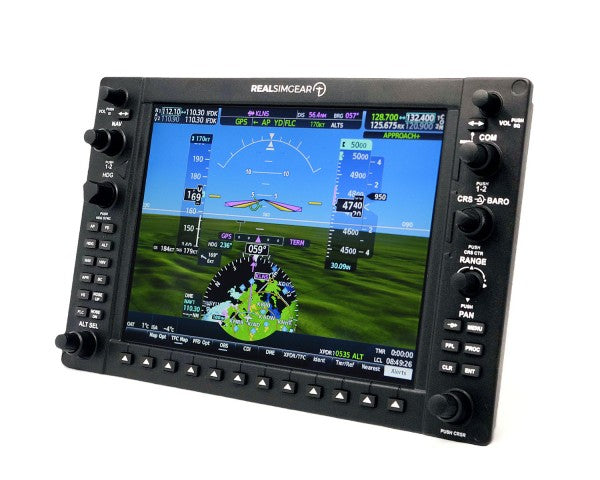
Pannelli strumenti RealSimGear

RealSimGear è al vertice dell’hardware per simulazione di volo, offrendo soluzioni professionali che colmano il divario tra virtuale e reale. La qualità è visibile in ogni prodotto: dalla calibrazione del GTN750 al feeling realistico del pacchetto G1000. Il sistema autopilota GFC500 completa la gamma, offrendo controllo e navigazione avanzati.

Pannelli strumenti di volo

  • Integrazione hardware: I nostri pannelli strumenti utilizzano connessione USB plug & play, per un’installazione facile e compatibilità immediata con tutte le piattaforme. Ogni pannello è sottoposto a test rigorosi per garantire prestazioni affidabili anche in sessioni di volo prolungate.
  • Materiali e qualità costruttiva: Materiali premium e costruzione robusta assicurano resistenza e longevità. Display retroilluminati consentono la massima visibilità in ogni condizione di luce, mentre encoder e switch di alta qualità offrono feedback tattile fedele ai componenti aeronautici reali.
  • Compatibilità software: Oltre alla compatibilità di base, questi pannelli offrono integrazione avanzata con vari simulatori. Funzioni evolute includono rilevamento automatico, mappatura pulsanti personalizzata e aggiornamenti in tempo reale.
  • Valore formativo: Se vuoi mantenere la tua proficiency o prepararti alla licenza reale, questi strumenti forniscono benefici didattici autentici. Esercitati su procedure e sviluppa la memory muscolare in ambiente sicuro con strumenti che replicano la strumentazione del cockpit reale.

Consigli degli esperti

Per la postazione definitiva di aviazione generale consigliamo di combinare il pacchetto G1000 Suite con il sistema autopilota GFC500. Questa configurazione offre strumentazione completa e controllo automatico evoluto. Il GTN750 è un eccellente complemento per la navigazione avanzata, con funzioni aggiuntive come mapping dettagliato e informazioni meteo.

Installazione e supporto

Ogni pannello strumenti include istruzioni dettagliate per l’installazione e accesso diretto al nostro supporto tecnico. Gli aggiornamenti firmware regolari garantiscono prestazioni ottimali e compatibilità con le ultime versioni dei simulatori.

Completa il tuo simulatore di volo

La tua esperienza non è completa solo con il pannello strumenti! Dai un’occhiata ai nostri yoke, throttle, e pedali timone per decollare al meglio! Vuoi il massimo dell’immersione? Un cockpit da simulatore di volo è straordinario per vivere la simulazione in modo totale.


Login

Hai dimenticato la password?

Non hai ancora un conto?
Creare un profilo


