
Honeycomb

8 prodotti

  • Ultima scorta! Honeycomb Bundle (Yoke & Throttle) For Sale On FlightSimZone

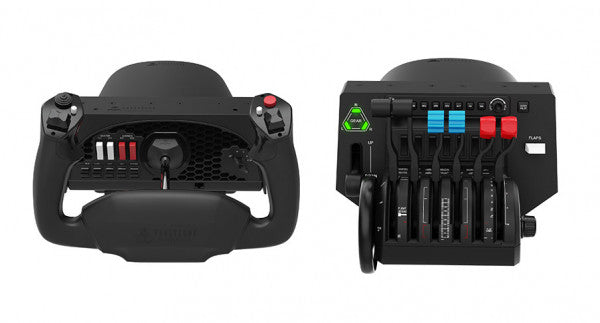
    Fly Honeycomb Honeycomb Bundle (Yoke & Throttle)

    14 recensioni

    2 in stock Shipped in 1-3 business days.

    The Honeycomb Bundle (Yoke & Throttle) is a dream package for flight simulation enthusiasts, combining the acclaimed Alpha Flight Controls and Bravo Throttle Quadrant into a single, cost-saving package. Designed with input from professional pilots and aerospace engineers, it boasts a robust all-metal yoke mechanism and customizable throttle configurations. Whether you're fine-tuning a smooth landing or managing multi-engine systems, the bundle’s intuitive controls and comprehensive switch panels offer unparalleled control and versatility. This isn’t just gear; it’s your co-pilot for a truly elevated sim experience. What sets the Honeycomb Bundle (Yoke & Throttle) apart? Durable Build for Long-Term Use The bundle is built with aerospace-grade components and an all-metal yoke mechanism, ensuring it withstands hours of intensive use. This makes it a trusted companion for both aspiring pilots and seasoned sim enthusiasts seeking equipment that doesn’t flinch under pressure. Incredibly Versatile Throttle Configuration The Bravo Throttle Quadrant is a standout, accommodating single-engine to four-engine setups with ease. Its detailed customization options include thrust reversers, autopilot systems, and a trim wheel, offering flexibility across different aircraft types. Enhanced Switch and Control Panels The switch panel on the Alpha yoke and the annunciator panel on the Bravo throttle provide a plethora of controls, making external keyboard usage almost obsolete. The clear LED backlighting ensures visibility in any lighting conditions. Seamless Integration with Popular Simulators The bundle is compatible with all major flight simulators like Microsoft Flight Simulator and X-Plane 11, providing plug-and-play functionality with profiles designed to simplify setup and maximize control precision. Pros and Cons Pros Cons Exceptional durability with all-metal yoke mechanism. Throttle quadrant levers feel slightly stiff initially. Versatile throttle configurations for various aircraft types. LED backlighting is not adjustable in brightness. Comprehensive switch and annunciator panels reduce keyboard reliance. Compatible with multiple operating systems and platforms. Specifications Specification Value Yoke Turn Radius 180° Yoke Shaft Travel 15 cm Throttle Configurations Single to four-engine, piston or jet Mounting Compatibility Honeycomb and Saitek products Supported OS Windows 10 (64-bit), macOS, Linux Warranty 2 years Honeycomb Bundle (Yoke & Throttle) Compatibility The Honeycomb Bundle (Yoke & Throttle) offers seamless compatibility with major flight simulation software, including Microsoft Flight Simulator, X-Plane 11, and Prepar3D. While the Alpha yoke functions without additional software for X-Plane 11, the Bravo throttle requires the Honeycomb Config Tool for full functionality on Windows and macOS. It lacks support for older simulators like FSX/P3D v3, but profiles are available for more recent platforms, ensuring a hassle-free experience. In terms of hardware, the bundle integrates easily with Honeycomb and Saitek mounting systems, adding versatility to your cockpit setup. While it doesn’t support consoles, it connects effortlessly to PCs through USB and offers plug-and-play functionality for supported games. This makes it a solid choice for simmers who value flexibility in their cockpit configuration. For gaming platforms, the bundle is focused on PC-based simulators and is not compatible with consoles like Xbox or PlayStation. It shines when paired with games like Microsoft Flight Simulator, offering robust support for both general aviation and airliner setups, allowing simmers to explore skies with exceptional control.

    2 in stock Shipped in 1-3 business days.

    €509,00

  • Honeycomb Echo Aviation Controller

    Fly Honeycomb Honeycomb Echo Aviation Controller

    Esaurito, Pre-Orders Available. Shipped in 2-2.5 weeks from now.

    Honeycomb Echo Aviation Controller is one of those devices that makes you rethink how much hardware you actually need to fly properly. Everything sits in your hands—pitch, roll, yaw, throttle, trim—all within reach, anchored by a 16-bit Hall-effect thumbstick that feels smooth and consistent through every movement. Pair that with a complete all-in-one flight control layout, and you’ve got a compact cockpit that works just as well on a desk as it does on the couch. It’s clever, tactile, and surprisingly capable for its size. What Sets the Honeycomb Echo Aviation Controller apart? All-in-One Without Feeling Compromised – Many compact controllers try to do everything and end up feeling like a gamepad with extra buttons. The Echo stands out because each control has a defined purpose and physical identity. Users often mention how the dedicated trim wheel, levers, and rudder system make it feel closer to a proper flight control setup, rather than a simplified alternative. Mechanical Rudder Integration – Instead of relying on twist input or triggers, the Echo uses mechanically linked rudder pedals with Hall-effect sensing. This is something pilots quickly notice, especially during coordinated turns or crosswind landings. The self-centering action gives a consistent feel that’s easier to manage than digital-style inputs found on many compact controllers. Designed for Flexible Flying Spaces – Feedback from users consistently highlights how freeing it is to fly without a fixed rig. Whether sitting at a desk, relaxing on a couch, or traveling, the Echo adapts without needing mounts or external peripherals. It’s particularly appealing for sim pilots who don’t have space for a full yoke, throttle quadrant, and pedal setup. Thoughtful Control Layout for MSFS – The layout feels intentionally designed around Microsoft Flight Simulator workflows. Common functions like gear, flaps, trim, and camera controls are placed where fingers naturally rest. Many users note that once muscle memory develops, cockpit interaction becomes quicker and more fluid compared to mapping everything onto a generic controller. Pros and Cons Pros Cons All flight controls integrated into one compact unit Less tactile separation than full-size hardware setups Hall-effect sensors provide smooth, drift-free input Limited physical range compared to dedicated yokes Wireless operation with long battery life Portable design works without dedicated sim rig Specifications Specification Value Control Type All-in-one flight controller (pitch, roll, yaw, throttle, trim, flaps, gear) Primary Input 16-bit Hall-effect thumbstick Rudder System Mechanically linked Hall-effect rudder pedals Throttle/Sliders Four detented sliders with interchangeable caps Connectivity Wireless (2.4 GHz dongle) or USB-C wired Battery 1200 mAh, up to 15 hours usage System Compatibility PC and Mac Software Compatibility Microsoft Flight Simulator, X-Plane 11/12, Prepar3D Included Accessories Travel case, lever caps, wireless dongle, USB cable Warranty 2-year limited warranty Honeycomb Echo Aviation Controller Compatibility The Echo is built with flexibility in mind. It is compatible with PC and Mac systems and connects either through USB-C wired connection or a 2.4 GHz wireless dongle. Because it operates as a standalone controller, it does not require additional yokes, pedals, or throttle quadrants, making it ideal for compact setups or portable use. It is not designed to integrate directly with traditional hardware ecosystems like separate yokes or external rudder pedals. Its all-in-one design means fewer cables and simpler setups, but it also means less modular expansion compared to full cockpit systems. Pilots who prefer mixing and matching hardware may find it less suited to complex multi-device configurations, as the Echo is intended to replace, rather than complement, those components. On the software side, the controller is fully compatible with Microsoft Flight Simulator and also supports X-Plane 11, X-Plane 12, and Prepar3D. It is not designed for console use, focusing entirely on PC-based simulation platforms where full input mapping and customization are available.

    Esaurito, Pre-Orders Available. Shipped in 2-2.5 weeks from now.

    €150,00

  • Vendita -3%Ultima scorta! Honeycomb Bravo Throttle Quadrant For Sale On FlightSimZone

    Fly Honeycomb Honeycomb Bravo Throttle Quadrant

    2 in stock Shipped in 1-3 business days.

    The Honeycomb Bravo Throttle Quadrant is a versatile all-in-one control system that lets you soar through the skies in virtual aviation with precision. Designed for both casual pilots and seasoned simmers, it adapts to your flying style, offering configurations for small aircraft and large airliners alike. Featuring a fully functional autopilot panel and customizable thrust levers, it puts essential controls at your fingertips. Whether you're managing thrust reversers or adjusting flaps, this sleek device is built to elevate your cockpit setup and make every flight unforgettable. What sets the Bravo Throttle Quadrant apart? Unmatched Versatility The Honeycomb Bravo Throttle Quadrant adapts to a variety of aircraft configurations, from single-engine planes to four-engine airliners. This flexibility means it can handle piston, jet, and turboprop controls seamlessly, catering to both general aviation enthusiasts and commercial flight sim fans. Enhanced Physical Feedback With its sturdy levers, clickable buttons, and smooth trim wheel, the tactile experience feels as close as it gets to operating a real cockpit. The gear lever and annunciator panel add an extra layer of functionality, keeping your hands busy and your keyboard untouched. Comprehensive Autopilot and Annunciator Features The included autopilot panel mimics the functionality of systems found in real aircraft, while the annunciator panel delivers vital status alerts. These features reduce reliance on on-screen controls and make managing complex systems much easier. Expandable Design With integrated mounting points, the Bravo works seamlessly with other Honeycomb and Saitek products. This modularity allows users to grow their setup over time, creating a cohesive and customizable virtual cockpit. Pros and Cons Pros Cons Wide range of configuration options for all aircraft types. Annunciator lights and some features don’t work on Xbox. Durable design with a solid, professional feel. Relatively large footprint, requires space for optimal use. Comprehensive autopilot and annunciator panels included. Requires external software for optimal customization. Compatible with multiple simulators on PC and Mac. No support for FSX on the latest version of the Config Tool. Specifications Specification Value Package Contents Throttle quadrant, mounting points, brackets Compatibility Microsoft Flight Simulator, X-Plane 11, Prepar3D V3-V5 Operating Systems Windows 10 (64-bit), macOS Catalina+ Warranty 2 years Bravo Throttle Quadrant Compatibility Simulator Compatibility Microsoft Flight Simulator Fully supported with Config Tool X-Plane 11 Fully supported, with Windows and Mac versions Prepar3D Supported for versions 3, 4, and 5 The Honeycomb Bravo Throttle Quadrant is engineered for compatibility with popular simulator platforms, including Microsoft Flight Simulator 2020, X-Plane 11, and Prepar3D. While PC users can enjoy full functionality, Xbox users must note that some features, such as the annunciator lights, won't work when connected via the XPC Hub. This makes it an excellent choice for PC-based setups but requires consideration for console users. When it comes to hardware, the Bravo pairs seamlessly with other Honeycomb products, like the Alpha Flight Controls, and integrates with Saitek peripherals through its mounting points. These features ensure a cohesive and expandable setup. However, it’s not compatible with older FSX versions unless you're running the older Config Tool, so check your software version before diving in.

    2 in stock Shipped in 1-3 business days.

    €309,00 €300,00

  • Ultima scorta! Honeycomb Sierra TPM Module

    Fly Honeycomb Honeycomb Sierra TPM Module

    2 in stock Shipped in 1-3 business days.

    Honeycomb Sierra TPM Module porta il fascino tattile dell’aviazione generale classica direttamente sulla tua scrivania, con un throttle vernier in metallo bloccabile che offre una piacevole sensazione meccanica al tatto e una trim wheel integrata ad alta risoluzione che consente di regolare l’assetto con precisione usando la punta delle dita. Progettato pensando ad aeromobili monomotore a elica come il Cessna 172, combina una costruzione interamente in metallo, controlli integrati per flap e freno di stazionamento e indicatori LED del carrello di atterraggio in un modulo compatto che si integra perfettamente in un home cockpit di livello avanzato. Cosa distingue l’Honeycomb Sierra TPM Module? Autentica Sensazione Vernier da Aviazione Generale Il throttle vernier in metallo bloccabile con manopole di regolazione fine per elica e miscela non si limita ad avere l’aspetto corretto — offre quella sensazione di spingi-tira e ruota-per-regolare che i piloti associano ai cockpit GA classici. Molti utenti sottolineano come la regolazione incrementale consenta variazioni di potenza più fluide durante la salita e l’avvicinamento, soprattutto sugli aeromobili a pistoni, rispetto ai throttle a leva scorrevole che possono risultare troppo bruschi per una gestione delicata del motore. Workflow di Cockpit Integrato Invece di distribuire i controlli su pannelli separati, il Sierra TPM riunisce trim, flap, freno di stazionamento e carrello in un layout coerente. La trim wheel a basso profilo e alta risoluzione è particolarmente apprezzata per la sua rotazione fluida e l’input preciso, rendendo naturali le regolazioni di beccheggio durante la crociera o l’avvicinamento finale. Riduce la dipendenza dalle scorciatoie da tastiera e mantiene le mani dove devono essere — su hardware dedicato. Solida Costruzione Interamente in Metallo Realizzato con componenti di qualità Honeycomb e un robusto chassis interamente in metallo, questo modulo offre peso e rigidità percepibili. Gli appassionati menzionano spesso la sua stabilità sulla scrivania, con flessioni minime durante movimenti decisi del throttle. Rispetto alle alternative più leggere in plastica, il Sierra TPM mantiene la stabilità strutturale nel tempo, aspetto particolarmente apprezzato nelle configurazioni di cockpit permanenti o semi-permanenti. Integrazione Perfetta con l’Ecosistema Honeycomb Progettato per abbinarsi perfettamente agli yoke e ai sistemi di montaggio Honeycomb, la dual mounting solution inclusa semplifica l’allineamento e il posizionamento. Gli utenti che utilizzano già unità Alpha o Bravo spesso evidenziano come il linguaggio di design e la spaziatura dei controlli risultino uniformi, creando un flight deck visivamente coerente ed ergonomicamente consistente senza moduli disomogenei. Pro e Contro Pro Contro Il throttle vernier in metallo offre un controllo incrementale preciso. Progettato principalmente per aeromobili GA monomotore. La trim wheel integrata garantisce regolazioni di beccheggio fluide. Richiede spazio sulla scrivania per la mounting solution completa. Lo chassis interamente in metallo è stabile e resistente. Gli indicatori LED del carrello forniscono un chiaro feedback visivo. Specifiche Specifica Valore Product Name Honeycomb Sierra TPM Module EAN 4039621003998 Construction Costruzione interamente in metallo con componenti di qualità Honeycomb Throttle Type Throttle vernier in metallo bloccabile con manopole per elica e miscela Integrated Controls Trim wheel, freno di stazionamento, leva flap, leva carrello con indicatori LED Layout Stile aviazione generale per aeroplani monomotore a elica Mounting Dual mounting solution inclusa Connection USB-C to USB-A cable Compatibility PC e Mac Drivers MSFS 2020 Driver, MSFS 2024 Driver Included in the Box Sierra TPM Module, Dual Mounting Solution, USB-C to USB-A Cable, Quick Start Guide (EFIGS) Compatibilità Honeycomb Sierra TPM Module Platform Compatibility Operating Systems PC e Mac Connection Type USB-C to USB-A (connessione USB diretta) Primary Ecosystem Pairing Hardware Honeycomb Alpha e Bravo Il Sierra TPM Module si collega tramite USB diretto, rendendo semplice l’integrazione nella maggior parte delle configurazioni di cockpit desktop. Si abbina particolarmente bene con Honeycomb Alpha yoke e Bravo throttle quadrants, condividendo la stessa filosofia di design e lo stesso ecosistema di montaggio. Grazie alla dual mounting solution, può essere montato sulla scrivania insieme ad altre unità Honeycomb per un layout uniforme. Non è destinato a configurazioni console e non si interfaccia direttamente con hardware standalone senza un PC o Mac compatibile. Dal lato software, supporta Microsoft Flight Simulator 2020 e Microsoft Flight Simulator 2024 tramite driver dedicati, ed è compatibile anche con simulatori come X-Plane e Prepar3D su PC. Non è compatibile con console Xbox, poiché si basa su driver USB standard per PC/Mac anziché su firmware certificato per console. Per i sim pilot desktop focalizzati sull’aviazione generale, si integra perfettamente nelle moderne piattaforme di simulazione basate su PC.

    2 in stock Shipped in 1-3 business days.

    €269,00

  • Vendita -3%Ultima scorta! Honeycomb Alpha Flight Controls For Sale On FlightSimZone

    Fly Honeycomb Honeycomb Alpha Flight Controls

    4 in stock Shipped in 1-3 business days.

    The Alpha Flight Controls by Honeycomb Aeronautical is a feature-rich, durable yoke designed to elevate your flight simulation experience. Built with aerospace-grade internal components, it offers a buttery-smooth 180° turn radius and 15 cm of travel along its steel shaft, delivering precision and fluidity in every maneuver. Its integrated switch panel with red LED backlighting replicates real-world avionics, while the ergonomic handle design packs an array of tactile buttons and switches for versatile control. This is a simulator tool for those who appreciate robust design and reliable performance. What sets the Alpha Flight Controls apart? Robust Construction Built with a steel shaft and aerospace-grade components, the yoke ensures durability for years of regular use. This sturdiness gives users the confidence to push boundaries without worrying about wear and tear, a significant advantage over its plastic-heavy competitors. Comprehensive Switch Panel The integrated switch panel with master, alternator, avionics, and light switches is a standout feature. Coupled with an ignition switch, it allows users to simulate pre-flight checks and engine starts accurately, adding a layer of realism many products overlook. Ergonomic Design and Customization Thoughtfully designed handles include multiple buttons, hat switches, and a push-to-talk button for intuitive control. The array of functions and customizable software profiles cater to both casual sim enthusiasts and aspiring pilots looking to fine-tune their experience. Cross-Compatible and Future-Ready Mounting points and brackets allow seamless integration with other Honeycomb and Saitek products, making it ideal for those with an expanding home cockpit. Its compatibility with popular simulators ensures versatility for any flight sim setup. Pros and Cons Pros Cons Durable steel shaft with aerospace-grade components. Not compatible with older operating systems like Windows 7. Integrated switch panel with LED backlighting. Software required for full functionality can be complex to set up. Compatible with major flight simulators and accessories. Limited adjustability for handle ergonomics. Wide 180° turn radius for smooth control inputs. No included mount for desk setups, requires separate purchase. Specifications Specification Value Dimensions (Sleeve) 44.8 x 31.4 x 23.7 cm Dimensions (Carton) 46.2 x 32.7 x 25.5 cm Travel Length 15 cm Turn Radius 180° Compatibility Windows 10 (64-bit), macOS Package Contents Alpha Flight Controls unit, drivers Alpha Flight Controls Compatibility The Alpha Flight Controls is compatible with major flight simulators, including Microsoft Flight Simulator 2020, X-Plane 11, and Lockheed Martin Prepar3D (v3-v5). It supports both Windows 10 (64-bit) and macOS, although some features require the Honeycomb Config Tool for optimal use. Notably, older operating systems like Windows 7 and FSX are not supported, which may limit users with legacy setups. For hardware compatibility, it includes mounting points and brackets designed to pair seamlessly with Honeycomb Bravo Throttle Quadrant and Saitek panels. The yoke integrates effortlessly into a range of cockpit builds, making it an excellent choice for expandable setups. However, note that desk clamps or mounts are sold separately. In terms of gaming platforms, the Alpha Flight Controls is PC-centric, with no console support. It’s optimized for simulation platforms requiring USB connections and doesn’t cater to Xbox or PlayStation. Its compatibility with varied simulators ensures a flexible and robust option for PC-based flight enthusiasts.

    4 in stock Shipped in 1-3 business days.

    €299,00 €289,00

  • Honeycomb Alpha Flight Controls XPC

    Fly Honeycomb Honeycomb Alpha Flight Controls XPC

    1 recensione

    Esaurito, Pre-Orders Available. Shipped in 2-2.5 weeks from now.

    Honeycomb Alpha Flight Controls XPC brings a refined yoke experience to sim pilots seeking robust control and ergonomic design. The 180° yoke rotation with upgraded Hall Effect sensors ensures smooth handling without a center detent, while the multi-function switch panel gives instant access to critical aircraft systems. The damped, self-centering mechanism allows for fluid maneuvering, and the illuminated base provides visibility for night flights. With full Xbox and PC compatibility, it integrates seamlessly with Microsoft Flight Simulator and other major titles. What Sets the Honeycomb Alpha Flight Controls XPC Apart? Smooth and Accurate Hall Effect Sensors – Unlike traditional potentiometers, Hall Effect sensors provide longevity and reliability by eliminating physical wear. The result is consistent control input over time, free from degradation or calibration drift. Comprehensive Switch Panel for Realistic Workflow – The built-in switch panel eliminates the need for extra hardware, featuring controls for master, alternator, avionics, and lights, plus a five-position ignition switch for proper startup sequences. Ergonomic and Fully-Equipped Handles – The left handle features an 8-way hat switch and two-way rocker switches, while the right includes additional toggles and buttons. This ensures easy camera control, trim adjustment, and in-flight commands without lifting a hand off the yoke. True Multi-Platform Support – Many yokes are PC-exclusive, but this one works with Xbox Series X|S as well, making it a rare option for console sim enthusiasts. It’s automatically recognized in Microsoft Flight Simulator, reducing setup time. Pros and Cons Pros Cons Durable Hall Effect sensors reduce calibration drift No force feedback or haptic resistance Integrated switch panel for electrical controls Not compatible with PlayStation Xbox compatibility expands beyond PC users Mounting requires additional space Specifications Specification Value Yoke Rotation 180° Sensor Type Hall Effect Switch Panel Master, alternator, avionics, light switches Ignition 5-position rotary switch Connectivity USB-C to USB-A Dimensions 40 x 13 x 27 cm / 15.75 x 5.19 x 10.63 in Compatibility PC (Windows), Xbox Series X|S, Xbox One Warranty 2 years Honeycomb Alpha Flight Controls XPC Compatibility Software Compatibility Details Full Compatibility Microsoft Flight Simulator, X-Plane 11 & 12, Prepar3D Hardware Compatibility Details PC (Windows) Works with all major flight sims via USB connection Xbox Series X|S Full plug-and-play functionality with Microsoft Flight Simulator Seamlessly integrates with Microsoft Flight Simulator, automatically detecting the yoke and eliminating the need for extensive setup. It also works with X-Plane and Prepar3D, making it a versatile choice for flight sim enthusiasts across multiple platforms. Designed for PC and Xbox Series X|S, this yoke does not support PlayStation or MacOS. The direct USB connection ensures low latency input, while the integrated switches add extra functionality without requiring additional peripherals.

    Esaurito, Pre-Orders Available. Shipped in 2-2.5 weeks from now.

    €399,00

  • Honeycomb Bravo Throttle Quadrant Lite

    Fly Honeycomb Honeycomb Bravo Throttle Quadrant Lite

    Esaurito, Pre-Orders Available. Shipped in 2-2.5 weeks from now.

    Honeycomb Bravo Throttle Quadrant Lite concentra l’esperienza essenziale del Bravo originale in un pacchetto più compatto e mirato. Le quattro leve intercambiabili con tensione regolabile scorrono con un rassicurante peso meccanico, mentre la trim wheel integrata a basso profilo e alta risoluzione consente di regolare finemente il beccheggio con precisione alla punta delle dita. Dal clic deciso della leva del carrello con indicazione LED alla soddisfacente trazione del freno di stazionamento, questa unità offre input affidabili per configurazioni GA e bimotore senza risultare eccessiva per chi sta costruendo il proprio cockpit per la prima volta. Cosa distingue l’Honeycomb Bravo Throttle Quadrant Lite? Semplificato Senza Essere Ridotto A differenza di molti throttle quadrant orientati all’ingresso che sacrificano flessibilità, il Bravo Lite mantiene vivo il DNA modulare. Gli utenti sottolineano spesso come conservi leve intercambiabili e personalizzazione dei flap detent, riducendo al contempo parte della complessità del Bravo completo. Il risultato è un’unità compatta che supporta comunque configurazioni monomotore e bimotore, rendendola interessante per i piloti che passano da throttle in plastica di base. Tensione Regolabile con Feedback Meccanico La resistenza delle leve può essere regolata secondo le preferenze personali, facendo una differenza percepibile durante le variazioni di potenza in salita e le regolazioni in finale corta. Molti sim pilot evidenziano come il movimento risulti fluido e controllato, non morbido o elastico. Rispetto ai quadrant più leggeri, il Bravo Lite offre una sensazione più stabile nelle transizioni di throttle, soprattutto quando montato saldamente con la dual mounting solution inclusa. Trim e Comandi a Terra Integrati La trim wheel integrata e il freno di stazionamento eliminano la necessità di periferiche separate. L’alta risoluzione della trim wheel è spesso lodata per aiutare a stabilizzare gli avvicinamenti senza continue micro-correzioni tramite tastiera o pulsanti dello yoke. Aggiungendo la leva del carrello con indicatore di stato LED, si ottiene una conferma visiva chiara durante i cicli del carrello — un piccolo dettaglio che aumenta notevolmente la sicurezza nei circuiti trafficati. Ottimizzazione Mirata per MSFS Progettato pensando a Microsoft Flight Simulator, il Bravo Lite beneficia di supporto driver dedicato e profili scaricabili. Gli utenti apprezzano la rapidità con cui viene configurato in MSFS 2020 e 2024 rispetto ad alcuni quadrant USB generici. Allo stesso tempo, rimane compatibile con X-Plane e Prepar3D, offrendo una versatilità maggiore rispetto a molte unità throttle specifiche per singolo simulatore in questa fascia di prezzo. Pro e Contro Pro Contro Leve intercambiabili compatibili con diversi tipi di aeromobili. Meno controlli rispetto alla versione completa Bravo. Tensione regolabile che migliora la sensazione del throttle. Solo PC e Mac, nessun supporto console. Trim wheel integrata per un controllo preciso del beccheggio. Indicatore LED del carrello per un chiaro feedback di stato. Specifiche Specifica Valore Product Name Honeycomb Bravo Throttle Quadrant Lite Dimensions (L x H x W) 40 x 13 x 27 cm (15.75 x 5.19 x 10.63 inches) Throttle Levers Quattro leve intercambiabili con tensione regolabile Flap System Inserti flap detent intercambiabili inclusi Trim Control Trim wheel integrata a basso profilo e alta risoluzione Landing Gear Lever Con indicatore di stato LED Parking Brake Leva integrata Connectivity USB-C to USB-A (cavo incluso) System Compatibility PC e Mac Software Compatibility Microsoft Flight Simulator 2020/2024, FSX, Prepar3D V3-V5, X-Plane 11/12 Included in the Box Throttle Quadrant Lite, Flap detent inlays, Interchangeable levers (Commercial & GA), USB-C cable, Dual mounting solution, Quick Start Guide Compatibilità Honeycomb Bravo Throttle Quadrant Lite Category Compatibility Operating Systems Microsoft Windows (64-bit), macOS Connection USB-C to USB-A (porta USB standard richiesta) Supported Simulators MSFS 2020/2024, FSX, Prepar3D V3–V5, X-Plane 11/12 Il Bravo Lite si collega tramite USB standard, rendendo semplice l’integrazione con yoke, stick e pedali del timone di vari marchi. Si abbina particolarmente bene con gli yoke Honeycomb Alpha e con altro hardware modulare grazie alla dual mounting solution. È progettato esclusivamente per sistemi PC e Mac e non funziona in modo indipendente senza un computer collegato. Dal lato simulatore, è ottimizzato per Microsoft Flight Simulator 2020 e 2024, con driver LED dedicati e profili aeromobile scaricabili. Funziona anche con X-Plane 11 e 12, FSX e Prepar3D V3–V5 tramite riconoscimento USB HID standard. Non è compatibile con console Xbox, poiché si basa su driver e architettura USB per PC anziché su firmware certificato per console.

    Esaurito, Pre-Orders Available. Shipped in 2-2.5 weeks from now.

    €209,00

  • Ultima scorta! Honeycomb Foxtrot Aviation Stick

    Fly Honeycomb Honeycomb Foxtrot Aviation Stick

    4 in stock Shipped in 1-3 business days.

    Honeycomb Foxtrot Aviation Stick è progettato per i piloti che preferiscono un sidestick in mano e una scrivania libera davanti a sé. Fin dal primo movimento, il sistema di resistenza lineare fluida senza center detent offre una sensazione scorrevole e controllata, ideale per input in stile Airbus e manovre acrobatiche. All’interno, la risoluzione a 16-bit con tecnologia di sensori Hall Effect traduce anche i più sottili movimenti del polso in un controllo preciso a schermo. Aggiungi la tensione regolabile e un design completamente ambidestro, e ottieni uno stick che trasmette solidità e intenzionalità, non una sensazione da giocattolo. Cosa distingue l’Honeycomb Foxtrot Aviation Stick? Filosofia di Controllo Senza Center Detent Molti stick si affidano a un evidente scatto centrale, che può rendere le piccole correzioni troppo meccaniche. Il sistema di resistenza lineare del Foxtrot elimina questo punto centrale, creando una transizione fluida lungo l’intera escursione dell’asse. I piloti che volano su aeromobili Airbus apprezzano particolarmente questa soluzione, poiché rispecchia più fedelmente il comportamento del sidestick e consente correzioni dolci di beccheggio e rollio senza contrastare un “clic” a molla al centro. Sinergia tra Sensori e Risoluzione Con una risoluzione a 16-bit abbinata a sensori Hall Effect, il Foxtrot garantisce un rilevamento dell’input pulito e senza contatto. Gli appassionati sottolineano spesso la costanza nel tempo — nessun picco, nessun degrado graduale tipico dei potenziometri meccanici. Le regolazioni fini del trim in avvicinamento o gli input di rollio controllati in acrobazia risultano stabili e prevedibili, soprattutto rispetto agli stick entry-level che possono mostrare jitter vicino al centro. Resistenza e Ergonomia Configurabili La tensione regolabile consente di adattare lo stick alle preferenze personali, sia che si prediligano input leggeri con la punta delle dita sia una resistenza più marcata per movimenti controllati. In combinazione con il design ambidestro dell’impugnatura, il Foxtrot si adatta a configurazioni sia per mancini che per destrimani. Gli utenti con cockpit compatti evidenziano spesso quanto sia versatile in diverse posizioni di seduta, inclusi montaggi centrali o laterali. Alta Densità di Switch Senza Confusione Tra i 5 switch a due vie, i 4 pulsanti azione programmabili, il POV hat, il grilletto, i rocker e il pannello rotativo multi-via, lo stick offre un’elevata flessibilità di input. Ciò che colpisce è la disposizione logica dei controlli; i sim pilot menzionano spesso come funzioni quali trim, modalità autopilota o controlli della telecamera possano essere assegnate senza sensazione di affollamento o ricerca alla cieca durante il volo. Pro e Contro Pro Contro Resistenza lineare senza center detent fluida e precisa. Nessuna compatibilità nativa con console. I sensori Hall Effect riducono l’usura nel lungo periodo. Nessuna base di montaggio dedicata inclusa. Tensione regolabile adatta a diversi stili di volo. Ampie opzioni di configurazione per switch e pulsanti. Specifiche Specifica Valore Product Name Honeycomb Foxtrot Aviation Stick Control System Sistema di resistenza lineare senza center detent Sensor Technology Sensori Hall Effect Resolution 16-bit Tension Adjustment Resistenza dello stick regolabile Switches 5 switch a due vie Action Buttons 4 pulsanti programmabili Rotary Panel Controlli rotativi a 3, 4 e 5 vie Grip Design Ambidestro Connection USB-C to USB-A cable System Compatibility PC e Mac Included in the Box Foxtrot Aviation Stick, USB-C to USB-A Cable, Quick Start Guide (EFIGS) Download Support Profili Basic Bindings (XML) per MSFS 2024 Compatibilità Honeycomb Foxtrot Aviation Stick Platform Compatibility Operating Systems PC e Mac Connection Type USB-C to USB-A interfaccia USB diretta Primary Sim Support MSFS 2024 (XML bindings), MSFS, X-Plane, Prepar3D Il Foxtrot Aviation Stick si collega tramite USB standard, consentendo un’integrazione semplice nella maggior parte delle configurazioni di cockpit desktop. Funziona perfettamente insieme a throttle quadrants, pedali del timone e pannelli radio di altri marchi importanti grazie alla sua architettura HID plug-and-play. Il suo design ambidestro lo rende adatto a configurazioni sia lato sinistro che destro, incluso il montaggio laterale in stile Airbus. Non è compatibile con console Xbox e non funziona come dispositivo standalone senza un PC o Mac collegato. Dal punto di vista software, supporta Microsoft Flight Simulator 2024 con profili di binding XML dedicati e opera con simulatori PC popolari come Microsoft Flight Simulator (2020), X-Plane e Prepar3D tramite mappature manuali o della community. Non è progettato per piattaforme basate su console, poiché si affida al riconoscimento driver nativo PC/Mac piuttosto che a firmware certificato per console.

    4 in stock Shipped in 1-3 business days.

    €165,00

Honeycomb Aeronautical flight simulator hardware for sale at FlightSimZone

Benvenuto nella collezione Honeycomb Aeronautical di FlightSimZone, dove precisione e passione si incontrano nella simulazione di volo. Come il più grande negozio europeo dedicato ai simulatori, offriamo con orgoglio tutta la gamma dei comandi Honeycomb, pensati per offrire un’esperienza aeronautica autentica sia agli appassionati sia ai piloti in formazione.

Tabella comparativa


Caratteristiche Alpha Flight Controls XPC Bravo Throttle Quadrant Charlie Rudder Pedals
Prezzo €299,99 €279,99 €349,99
Funzione principale Yoke Control System da 180° Quadrante acceleratore Sistema pedali timone
Materiali Alluminio e acciaio aeronautico Polimero industriale e metallo Struttura interamente in metallo
Connessione USB
Sensori effetto Hall
Pulsanti configurabili 13 pulsanti 9 pulsanti + 3 assi Asse freno punta
Pannello switch
Display retroilluminato
Opzioni montaggio Montaggio su scrivania, pannello Montaggio su scrivania, pannello Montaggio a pavimento, scrivania
Garanzia 5 anni 5 anni 5 anni
Compatibilità MSFS
Compatibilità X-Plane

Comandi di volo professionali

Honeycomb Aeronautical ha rivoluzionato il settore con la realizzazione di hardware autentico, di livello aeronautico. Ogni prodotto è sviluppato e testato insieme a piloti professionisti, garantendo realismo e funzionalità senza compromessi. La cura nei dettagli e l’impiego di materiali di derivazione aerospace fissano nuovi standard nella simulazione domestica.

Yoke Honeycomb

La serie Alpha Flight Controls è il fiore all’occhiello Honeycomb: cloche progettata per replicare le sensazioni reali degli aeromobili. Le principali caratteristiche includono:

  • Albero interamente in acciaio con doppio cuscinetto a sfera, per movimenti fluidi e controllo preciso che replica la gestione del velivolo reale
  • Rotazione di 180° con tensione regolabile, per personalizzare il feeling in base al tipo di aeromobile simulato
  • Pannello switch integrato con comandi avionici autentici: magneto, alternatori, luci e altro, riducendo la necessità di hardware supplementare

Quadranti acceleratore Honeycomb

Il Bravo Throttle Quadrant incarna dedizione alla versatilità e precisione: quadrante con

  • Setup configurabile che supporta single e multi-engine (aeromobili semplici e complessi)
  • Componenti professionali per durabilità nel tempo anche dopo migliaia di ore di simulazione
  • Funzione thrust reverser dentata per feedback realistico soprattutto in fase di atterraggio

Puoi anche acquistare il bundle Honeycomb che include Alpha e Bravo.

Controlli Honeycomb per il volo

L’ecosistema Honeycomb è pensato per lavorare in perfetta sinergia, creando un vero cockpit modulare e professionale. Ogni componente può essere aggiunto gradualmente, mantenendo qualità e compatibilità con le piattaforme più diffuse (MSFS, X-Plane, Prepar3D).

Qualità e durata

La qualità Honeycomb si vede in ogni dettaglio: materiali industriali e componenti professionali assicurano longevità e prestazioni costanti. Ogni prodotto è soggetto a rigorosi controlli:

  • Test individuale di ogni unità prima della spedizione
  • Controlli qualità su più stadi durante la produzione
  • Prove di stress in diverse condizioni operative e ambientali

Perché scegliere Honeycomb su FlightSimZone

Come rivenditore europeo leader nella simulazione di volo, collaboriamo direttamente con Honeycomb Aeronautical per garantire ai clienti prodotti aggiornati e supporto continuo. Grazie all’esperienza del nostro team, ricevi sempre consiglio qualificato per la scelta e l’ottimizzazione del setup.

Che tu stia costruendo il primo cockpit domestico oppure aggiorni la tua postazione, la gamma Honeycomb garantisce realismo, durata e qualità. Con la disponibilità e il supporto di FlightSimZone, troverai sempre il prodotto giusto per portare la simulazione a un livello superiore.

Scopri oggi la collezione completa Honeycomb Aeronautical e fai il primo passo verso la simulazione professionale. Il nostro staff è pronto ad aiutarti nella scelta dei prodotti Honeycomb adatti alle tue esigenze e preferenze.

P.S. Oltre a Honeycomb troverai anche Thrustmaster, Turtle Beach, Moza e molti altri!

Login

Hai dimenticato la password?

Non hai ancora un conto?
Creare un profilo




