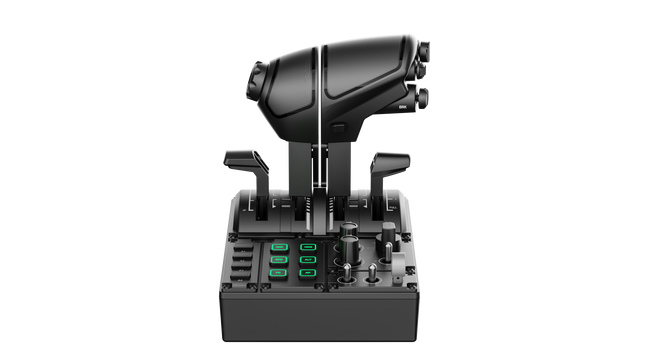
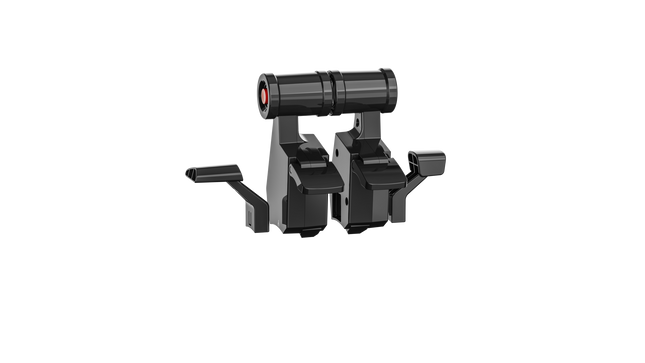
Das MOZA MTQ Throttle Panel ist ein modulares Flugsteuerungssystem, entwickelt für Piloten, die bei jeder Bewegung des Schubhebels ein präzises, mechanisches und haptisches Erlebnis suchen. Mit seinem modularen Schubhebel-System und einer vielseitigen Anordnung der Bedienelemente verwandelt es jedes Flugsimulations-Setup in ein cockpitreifes Steuerzentrum. Die spürbaren Rastpunkte, die Metallkonstruktion und die anpassbare RGB-Beleuchtung verleihen jedem Hebel ein zielgerichtetes Gefühl – egal ob beim Hochfahren der Triebwerke eines Airbus oder beim Aktivieren des Nachbrenners eines Kampfjets. Mechanische Präzision trifft hier auf funktionale Vielseitigkeit.
Was das MOZA MTQ Throttle Panel auszeichnet
Authentisches modulares Hebelerlebnis — Im Gegensatz zu festen Schubhebeln ermöglicht das MTQ den Wechsel zwischen Airbus-, Boeing- und Jet-Hebelstilen über ein Schienensystem. Jeder Hebel verfügt über eigene mechanische Rastpunkte, sodass Nutzer Übergänge wie Umkehrschub oder Nachbrenner-Arretierungen physisch spüren können. Die haptische Präzision dieser Rastpunkte wird von Sim-Piloten häufig für die klare Rückmeldung und Kontrolle des Schubs gelobt.
Ergonomisches Layout mit durchdachtem Design — Die Steueroberfläche verfügt über 10 Tasten, 3 Drehregler und 3 Kippschalter, die alle innerhalb natürlicher Handbereiche platziert sind. Enthusiasten schätzen die klare, nicht überladene Anordnung, die intuitiven Zugriff auf wichtige Flugfunktionen ermöglicht, ohne die Konzentration zu unterbrechen. Ein dedizierter Fahrwerkshebel erhöht zusätzlich den Realismus und erleichtert die Übergänge zwischen den Flugphasen.
Anpassbare RGB-Beleuchtung und Software-Integration — Die MOZA Cockpit Software bietet vollständige Kontrolle über Helligkeit, Farblogik und telemetriebasierte Lichteffekte. Nutzer berichten, dass die Beleuchtung nicht nur beeindruckend in dunklen Cockpits wirkt, sondern auch so programmiert werden kann, dass sie Flugzustände wie Fahrwerksposition oder Schubhebelzonen widerspiegelt – wodurch Beleuchtung zu einem funktionalen Feedback wird und nicht bloß Dekoration.
Mechanisches Feedback über mehrere Achsen — Das MTQ verfügt über vier Achsen, jede mit eigenen, taktilen Rastpunkten für Funktionen wie Klappen und Luftbremsen. Das Gefühl jeder Achse ist auf unterschiedliche Widerstandsstufen abgestimmt, und der virtuelle Rastpunkt der Luftbremsachse erzeugt ein spürbares Klicken beim Ausfahren. Piloten berichten, dass die gleichmäßige Haptik über alle Achsen hinweg das Panel gleichermaßen für zivile, militärische und allgemeine Luftfahrt-Setups geeignet macht.
Vorteile und Nachteile
Vorteile
Nachteile
Austauschbare Hebelmodule ermöglichen vielseitige Flugkonfigurationen.
Keine eigenständige USB-Verbindung; erfordert MOZA-Basisverbindung.
Ausgezeichnete haptische Rastpunkte auf Schub- und Klappenachsen.
Begrenzte Unterstützung durch Drittanbieter-Ökosysteme.
Intuitives Layout mit anpassbarer RGB-Beleuchtung.
Robustes, mechanisches Design mit sanfter Bewegungsdämpfung.
Technische Daten
Spezifikation
Wert
Hebelsystem
Modulare Schubhebel mit Schienenschiebemechanismus
Enthaltene Schubhebel-Stile
TQF (Kampfjet), TQA (Airbus), TQB (Boeing)
Achsen
Vier unabhängige Achsen mit Rastpunkten
Tasten und Bedienelemente
10 Tasten, 3 Drehregler, 3 Kippschalter, Fahrwerkshebel
RGB-Beleuchtung
Sechs RGB-Tasten, 16,7 Millionen Farboptionen
Konnektivität
RJ11-Verbindung zu MOZA-Flugbases
Software
MOZA Cockpit mit telemetriebasierten Lichteffekten
MOZA MTQ Throttle Panel Kompatibilität
Kompatible Hardware
Details
MOZA Flight Bases (z. B. AB6)
Direkte RJ11-Verbindung für Plug-and-Play-Integration
MOZA-Ökosystem-Komponenten
Nahtlose Funktion über die MOZA Cockpit Software
Drittanbietersysteme
Begrenzte Unterstützung; erfordert möglicherweise Adapter oder Software-Mapping
Das MOZA MTQ Throttle Panel wird direkt über RJ11 an MOZA-Flugbases angeschlossen, was den Kabelsalat reduziert und eine latenzarme Kommunikation gewährleistet. Das modulare Hebeldesign macht es kompatibel mit den TQF-, TQA- und TQB-Schubhebelvarianten, die jeweils für unterschiedliche Flugzeugtypen entwickelt wurden. Obwohl es in erster Linie für das MOZA-Ökosystem entwickelt wurde, berichten Nutzer von eingeschränkter Kompatibilität mit Drittanbietersystemen – oft unter Verwendung von Adaptern oder benutzerdefinierten Zuordnungen. Dank seiner stabilen, montagefreundlichen Basis lässt sich das MTQ problemlos in Aluminium-Cockpits und modulare Rigs integrieren.
Auf der Softwareseite arbeitet das MTQ nahtlos mit der MOZA Cockpit Software zusammen und integriert sich direkt in beliebte Flugsimulationen wie Microsoft Flight Simulator 2020/2024, X-Plane 11/12 und DCS World. Es ist vollständig kompatibel mit Windows-PCs, wird jedoch nicht von Konsolen wie Xbox oder PlayStation unterstützt. Mit seinem modularen Ansatz und der breiten In-Sim-Kompatibilität ist das MTQ ideal für PC-Piloten, die sowohl Flexibilität als auch mechanische Präzision verlangen.
Nicht vorrätig,
Vorbestellungen möglich. Versand in 2–2,5 Wochen.
Honeycomb Sierra TPM Module bringt den taktilen Charme der klassischen General Aviation direkt auf Ihren Schreibtisch – mit einem arretierbaren Metall-Gasvernier, das sich angenehm mechanisch anfühlt, und einem integrierten hochauflösenden Trimmrad, mit dem sich die Fluglage präzise mit den Fingerspitzen einstellen lässt. Entwickelt mit einmotorigen Propellerflugzeugen wie der Cessna 172 im Blick, kombiniert es eine Vollmetallkonstruktion, integrierte Klappen- und Parkbremsensteuerung sowie LED-Fahrwerksanzeigen in einem kompakten Modul, das sich nahtlos in ein anspruchsvolles Home-Cockpit einfügt.
Was zeichnet das Honeycomb Sierra TPM Module aus?
Echtes General-Aviation-Vernier-Gefühl Das arretierbare Metall-Gasvernier mit fein einstellbaren Propeller- und Gemischreglern sieht nicht nur authentisch aus – es liefert genau das Druck-Zieh- und Dreh-zur-Feineinstellung-Gefühl, das Piloten aus klassischen GA-Cockpits kennen. Viele Nutzer heben hervor, wie die schrittweise Feinjustierung sanftere Leistungsänderungen im Steigflug und im Anflug ermöglicht, insbesondere bei Kolbenflugzeugen, im Vergleich zu Schubhebeln, die für ein sensibles Motormanagement oft zu abrupt reagieren.
Integrierter Cockpit-Workflow Anstatt Bedienelemente auf mehrere Panels zu verteilen, vereint das Sierra TPM Trimmung, Klappen, Parkbremse und Fahrwerk in einem stimmigen Layout. Das flache, hochauflösende Trimmrad wird besonders für seine gleichmäßige Rotation und präzise Eingabe gelobt, wodurch Nickanpassungen im Reiseflug oder im Endanflug natürlich wirken. Es reduziert die Abhängigkeit von Tastaturbefehlen und sorgt dafür, dass die Hände dort bleiben, wo sie hingehören – an dedizierter Hardware.
Stabile Vollmetallkonstruktion Gefertigt mit Honeycomb-Komponentenqualität und einem robusten Vollmetall-Chassis, vermittelt dieses Modul spürbares Gewicht und hohe Steifigkeit. Enthusiasten erwähnen häufig, dass es fest auf dem Schreibtisch steht und selbst bei energischen Gasbewegungen kaum nachgibt. Im Vergleich zu leichteren Kunststoffalternativen bleibt das Sierra TPM langfristig strukturell stabil – besonders geschätzt in permanenten oder semi-permanenten Cockpit-Setups.
Nahtlose Integration in das Honeycomb-Ökosystem Entwickelt für die perfekte Kombination mit Honeycomb-Steuerhörnern und Montagesystemen, vereinfacht die mitgelieferte Dual-Montagelösung Ausrichtung und Positionierung. Nutzer, die bereits Alpha- oder Bravo-Einheiten verwenden, betonen häufig, wie Design und Bedienelement-Abstände harmonieren und so ein optisch einheitliches sowie ergonomisch stimmiges Flugdeck ohne uneinheitliche Module entsteht.
Vor- und Nachteile
Vorteile
Nachteile
Metall-Vernier-Gashebel ermöglicht feine, schrittweise Steuerung.
Primär für einmotorige GA-Flugzeuge konzipiert.
Integriertes Trimmrad sorgt für sanfte Nickanpassungen.
Benötigt Schreibtischplatz für die vollständige Montagelösung.
Vollmetall-Chassis wirkt stabil und langlebig.
LED-Fahrwerksanzeigen bieten klare visuelle Rückmeldung.
Spezifikationen
Spezifikation
Wert
Product Name
Honeycomb Sierra TPM Module
EAN
4039621003998
Construction
Vollmetallkonstruktion mit Honeycomb-Komponentenqualität
Throttle Type
Arretierbares Metall-Gasvernier mit Propeller- und Gemischreglern
Integrated Controls
Trimmrad, Parkbremse, Klappenhebel, Fahrwerkshebel mit LED-Anzeigen
Layout
General-Aviation-Stil für einmotorige Propellerflugzeuge
Mounting
Dual-Montagelösung im Lieferumfang enthalten
Connection
USB-C zu USB-A Kabel
Compatibility
PC und Mac
Drivers
MSFS 2020 Driver, MSFS 2024 Driver
Included in the Box
Sierra TPM Module, Dual Mounting Solution, USB-C to USB-A Cable, Quick Start Guide (EFIGS)
Honeycomb Sierra TPM Module Kompatibilität
Platform
Compatibility
Operating Systems
PC und Mac
Connection Type
USB-C zu USB-A (direkte USB-Verbindung)
Primary Ecosystem Pairing
Honeycomb Alpha und Bravo Hardware
Das Sierra TPM Module wird über direktes USB angeschlossen und lässt sich dadurch unkompliziert in die meisten Desktop-Cockpit-Setups integrieren. Es harmoniert besonders gut mit Honeycomb Alpha Steuerhörnern und Bravo Schubquadranten und teilt dieselbe Designphilosophie sowie dasselbe Montagesystem. Dank der Dual-Montagelösung kann es zusammen mit anderen Honeycomb-Einheiten am Schreibtisch montiert werden, um ein einheitliches Layout zu schaffen. Es ist nicht für Konsolen-Setups vorgesehen und kann ohne kompatiblen PC oder Mac nicht direkt mit eigenständiger Hardware verbunden werden.
Auf Softwareseite unterstützt es Microsoft Flight Simulator 2020 und Microsoft Flight Simulator 2024 über dedizierte Treiber und funktioniert zudem mit Simulatoren wie X-Plane und Prepar3D auf dem PC. Es ist nicht mit Xbox-Konsolen kompatibel, da es auf standardmäßige USB-PC/Mac-Treiber und nicht auf konsolenzertifizierte Firmware angewiesen ist. Für Desktop-Sim-Piloten mit Fokus auf General Aviation fügt es sich nahtlos in moderne, PC-basierte Simulationsplattformen ein.
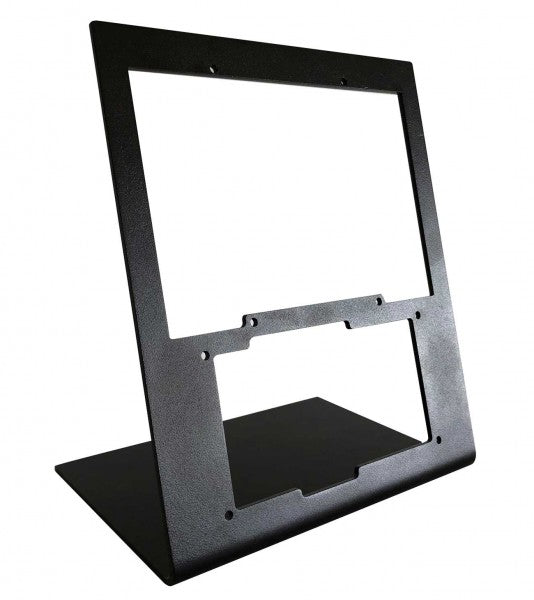
Der RealSimGear - Desktop Stand für G1000 Suite bietet eine herausragende Lösung für Flugsimulations-Enthusiasten, die Wert auf Stabilität und Ordnung in ihrem Setup legen. Gefertigt aus langlebigem 3 mm lackiertem Stahl, ermöglicht dieser Ständer eine stabile und erhöhte Position für das PFD, MFD und das Audiopanel der G1000 Suite. Die mattschwarze Oberfläche ergänzt jedes Setup, während gummierte Anti-Rutsch-Füße und präzise Montagekompatibilität eine mühelose Integration gewährleisten. Dieser Ständer ist ein unverzichtbares Zubehör für alle, die eine strukturierte und ergonomische Flugsimulation erleben möchten.
Was macht den RealSimGear - Desktop Stand für G1000 Suite besonders?
Speziell für die G1000 Suite entwickelt Dieser Ständer wurde gezielt für das G1000 PFD, MFD und das Audiopanel entworfen. Dank maßgeschneiderter Abmessungen und sicherer Montagemöglichkeiten fügt er sich nahtlos in jedes Flugsimulations-Setup ein und sorgt für eine perfekte Ausrichtung aller drei Komponenten.
Robuste und langlebige Konstruktion Gefertigt aus 3 mm lackiertem Stahl, ist dieser Ständer für lange Simulationssitzungen konzipiert. Die stabile Bauweise minimiert Vibrationen und erhöht die Gesamtlebensdauer Ihres Setups, sodass Sie sich auf intensive Flugszenarien konzentrieren können.
Umfassende Montagekompatibilität Mit vorgebohrten Montageschlitzen, die mit Saitek/Logitech Yokes, Honeycomb Alpha und Bravo Steuerungen kompatibel sind, ermöglicht dieser Ständer eine nahtlose Integration in gängige Hardware-Setups. Diese Flexibilität erleichtert die Hardware-Konfiguration für sowohl erfahrene Piloten als auch Anfänger.
Ergonomische Unterstützung Durch die Erhöhung der G1000 Suite auf eine ideale Höhe minimiert dieser Ständer Ermüdung und verbessert die Benutzerfreundlichkeit. Das Design orientiert sich an echten Cockpit-Layouts und sorgt für eine organisierte und funktionale Anordnung bei langen Trainingsflügen oder Freizeitsimulationen.
Vorteile und Nachteile
Vorteile
Nachteile
Perfekt für PFD, MFD und Audiopanel ausgelegt.
Höherer Preis im Vergleich zu einfacheren Ständern.
Langlebige 3 mm lackierte Stahlkonstruktion widersteht Abnutzung.
Ausschließlich für die G1000 Suite konzipiert.
Kompatibel mit Saitek/Logitech und Honeycomb-Systemen.
Spezifikationen
Spezifikation
Wert
Material
3 mm lackierter Stahl
Oberfläche
Mattschwarz
Merkmale
Gummierte Anti-Rutsch-Füße, Montageschrauben
Kapazität
Hält G1000 PFD, MFD und Audiopanel
Montagekompatibilität
Saitek/Logitech Yokes, Honeycomb Alpha/Bravo
RealSimGear - Desktop Stand für G1000 Suite Kompatibilität
Der RealSimGear - Desktop Stand für G1000 Suite wurde speziell für die G1000 Suite entwickelt und bietet eine perfekte Passform für das PFD, MFD und das Audiopanel. Er verfügt über Montageschlitze, die mit Saitek/Logitech Yoke-Montagesystemen sowie den Honeycomb Alpha und Bravo Steuerungen kompatibel sind. Diese Anpassungsfähigkeit sorgt für eine mühelose Integration in bestehende Setups und minimiert den Bedarf an zusätzlicher Hardware oder Modifikationen.
Dieser Ständer ist für PC-basierte Simulations-Setups konzipiert und funktioniert einwandfrei mit Plattformen wie X-Plane und Microsoft Flight Simulator. Konsolenplattformen werden nicht direkt unterstützt, da der Fokus auf professionellen und enthusiastischen PC-Konfigurationen liegt. Dies stellt sicher, dass Nutzer eine optimale Erfahrung mit führender Flugsimulationssoftware erhalten.
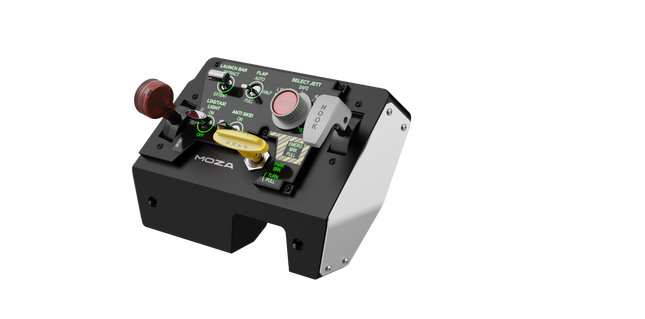
Moza MTLP Take-off Landing Panel bringt das Gefühl eines echten Kampfjet-Betriebs in das Heim-Cockpit mit einem robusten, taktilen Steuerungssystem, das für ernsthafte Sim-Piloten entwickelt wurde. Inspiriert vom F/A-18-Landepanel bietet es ein intuitives Schalterlayout, das schnelle, instinktive Eingaben ermöglicht, ohne auf visuelle Bestätigung angewiesen zu sein. Der authentische Feststellbremsmechanismus sorgt für einen soliden, mechanischen Rückstoß, der sich anfühlt, als käme er direkt aus einem echten Kampfjet. Mit 25 programmierbaren Schaltsignalen und Hall-Effekt-Sensoren für höchste Präzision überbrückt dieses Panel die Lücke zwischen virtueller und haptischer Cockpit-Interaktion.
Was hebt das Moza MTLP Take-off Landing Panel hervor?
Entwickelt für direkte Steuerung Nach dem Vorbild des F/A-18-Landepanels priorisiert dieses Setup eine intuitive Bedienung. Das Schalterlayout ermöglicht es Piloten, kritische Flugzeugfunktionen durch bloße Haptik zu steuern, wodurch die Notwendigkeit entfällt, den Blick vom Bildschirm abzuwenden – ein entscheidender Vorteil in schnellen Umgebungen wie Kampfeinsätzen und Trägerlandungen.
Hall-Sensor-Präzision für zentrale Funktionen Im Gegensatz zu herkömmlichen mechanischen Schaltern integriert das MTLP Hall-Effekt-Sensoren in Schlüsselsteuerungen wie das Fahrwerk und den Fanghaken. Diese Sensoren gewährleisten eine langfristige Zuverlässigkeit und gleichbleibende Eingabepräzision, ohne dass Abnutzung oder Drift entstehen.
Robuste Konstruktion für dauerhafte Nutzung Die Aluminiumlegierung, die für den Bremshebel, den Fanghaken und das Fahrwerk verwendet wird, sorgt für Langlebigkeit. Diese Komponenten sind auf wiederholte, kraftvolle Betätigung ausgelegt und machen das Panel zu einer langfristigen Investition für Flugenthusiasten, die mechanische Robustheit schätzen.
Nahtlose Integration in das Moza-Ökosystem Das MTLP wurde speziell für die reibungslose Zusammenarbeit mit dem Moza MTP Throttle Panel entwickelt, um ein vollständiges Kampfjet-Steuerungssetup zu bilden. Über die Moza Cockpit-Software können Nutzer telemetriegesteuerte Beleuchtungseffekte synchronisieren und ihre Tastenbelegungen individuell anpassen.
Vorteile und Nachteile
Vorteile
Nachteile
Nach dem F/A-18-Landepanel modelliert
Tischklemme separat erhältlich
Hall-Effekt-Sensoren für Präzision und Langlebigkeit
Nur PC-kompatibel
25 programmierbare Schaltsignale für umfangreiche Steuerung
Kompatibel mit Moza-Ökosystem für vollständiges Kampfjet-Setup
Spezifikationen
Spezifikation
Wert
Abmessungen
196.5 × 134.7 × 149 mm
Gehäusematerial
Verbundmaterialien
Bremshebel-Material
Aluminiumlegierung
Gewicht
680g
Schaltsignale
25
Telemetrie-Beleuchtung
Ja (kein zusätzliches Plug-in erforderlich)
Unterstützte Plattform
PC
Tischklemme
Optionales Zubehör
Enthaltenes Zubehör
Datenkabel, Benutzerhandbuch
Kompatibilität des Moza MTLP Take-off Landing Panel
Kompatibel mit
Nicht kompatibel mit
Moza MTP Throttle Panel
Schubhebel von Drittanbietern
Moza Cockpit-Software zur Anpassung
Konsolenplattformen
PC-basierte Flugsimulatoren
MacOS
Entwickelt für PC-basierte Simulatoren, integriert sich das MTLP nahtlos mit dem Moza MTP Throttle Panel, um eine fighter-jet-ähnliche Steuerkonfiguration zu ermöglichen. Das Panel wird über die Moza Cockpit-Software konfiguriert und bietet umfangreiche Anpassungsmöglichkeiten, einschließlich telemetriegesteuerter Beleuchtungseffekte. Es unterstützt jedoch keine Schubhebel von Drittanbietern, sodass die beste Funktionalität innerhalb des Moza-Ökosystems erreicht wird.
Ausschließlich PC-Kompatibilität gewährleistet Unterstützung für die wichtigsten Flugsimulatoren, aber MacOS und Konsolen werden nicht unterstützt. Flugenthusiasten, die Microsoft Flight Simulator 2020, Microsoft Flight Simulator 2024 und X-Plane 12 nutzen, finden das Panel nativ erkannt mit direkter Plug-and-Play-Funktionalität über USB. Xbox- oder PlayStation-Nutzer müssen jedoch auf alternative Hardware zurückgreifen.
Wingflex A320 EFIS Cube puts Airbus navigation and display management exactly where your hand expects it, combining full-function EFIS and glareshield controls with high-contrast dual-colour displays in a compact 80% scale design. From adjusting barometric pressure to selecting navigation modes, every rotary movement and button press feels deliberate and satisfying. The synchronized backlighting, integrated stand and simple USB connectivity make it an excellent addition to a desktop Airbus cockpit without demanding the space of a full-size flight deck.
What Sets the Wingflex A320 EFIS Cube apart?
More Than Just an EFIS Panel Unlike many desktop EFIS units that focus solely on navigation display controls, the EFIS Cube also integrates important glareshield functions such as Master Warning, Master Caution and CHRONO controls. Having these frequently used functions within easy reach creates a cleaner cockpit workflow and reduces the need to return to the virtual cockpit during busy phases of flight.
Compact Size Without Sacrificing Functionality The 80% scale design makes the panel much easier to accommodate on a typical desktop while preserving the familiar Airbus control layout. Buttons, rotary selectors and push-pull controls remain comfortably spaced, allowing quick adjustments without making the panel feel cramped. It strikes an effective balance between space efficiency and comfortable day-to-day operation.
Consistent Lighting Across Your Cockpit The synchronized brightness system keeps the displays and backlighting aligned with supported simulator lighting, creating a cohesive appearance throughout the cockpit. Combined with Airbus-style fonts and dual-colour displays, important flight information remains crisp and easy to read whether flying during bright daylight or on a dark nighttime arrival.
Built for Modular Cockpit Expansion The EFIS Cube performs perfectly as a standalone controller but is equally suited to growing cockpit projects. It integrates neatly alongside the Wingflex FCU Cube and RMP Combo Cube, allowing sim pilots to expand their Airbus setup gradually while maintaining a consistent appearance, matching lighting and a tidy desktop footprint.
Pros and Cons
Pros
Cons
Integrated glareshield controls reduce additional hardware.
Reduced scale differs from full-size Airbus dimensions.
Dual-colour displays remain easy to read.
Designed specifically for Airbus aircraft.
Synchronized lighting creates consistent cockpit appearance.
Plug-and-play USB connection simplifies installation.
Compact footprint fits comfortably beneath most monitors.
Specifications
Specification
Value
Product
Wingflex A320 EFIS Cube
Scale
80% scale
Primary Function
Airbus Electronic Flight Instrument System control panel
Integrated Functions
EFIS controls and glareshield controls
Display Type
High-contrast dual-colour LCD displays
Display Fonts
Airbus-style fonts
Controls
Buttons, rotary knobs and switches
Lighting
Fully synchronized adjustable backlighting
Connection
USB
Installation
Plug-and-play
Stand
Integrated low-profile desktop stand
Primary Use
Airbus flight simulation
Wingflex A320 EFIS Cube Compatibility
Simulator
Compatible Aircraft
X-Plane
ToLiss A319, A320, A330, A340; Laminar A330
Microsoft Flight Simulator
Fenix A3xx, FlyByWire A320 & A380, iniBuilds A320, A321, A330, A340, A350, Aerosoft A340, Headwind A330
Prepar3D
FSLabs A32x
The Wingflex A320 EFIS Cube connects through USB and can be used either as a standalone Airbus EFIS controller or alongside the Wingflex FCU Cube and Wingflex RMP Combo Cube. Its synchronized brightness allows all compatible Cube modules to maintain a consistent appearance, while the integrated stand provides a comfortable operating angle for desktop cockpits.
The published compatibility list covers a wide selection of Airbus aircraft across the major PC flight simulators. It supports Fenix A3xx, ToLiss Airbus aircraft, FlyByWire A320 and A380, multiple iniBuilds Airbus models, Laminar A330, Aerosoft A340, Headwind A330 and FSLabs A32x. The panel is designed specifically for Airbus aircraft and is not intended for Boeing flight decks or other aircraft with different EFIS layouts.
The EFIS Cube is compatible with Microsoft Flight Simulator 2020 and 2024, X-Plane 11 and 12 and Prepar3D on Windows PCs. It uses a USB connection with plug-and-play operation and is not compatible with Xbox or PlayStation consoles, as dedicated cockpit hardware requires PC-based simulator support.
Wingflex A320 FCU Cube brings Airbus autopilot management into a compact desktop format with full autopilot control functionality and a durable all-aluminum construction. Every heading adjustment, altitude selection and autopilot engagement is handled through tactile knobs and switches that encourage proper cockpit workflows instead of constant mouse clicks. The synchronized dimmer, adjustable backlighting and plug-and-play USB connection make it equally suited to quick evening flights or long IFR sessions, all without demanding the space of a full-size glareshield.
What Sets the Wingflex A320 FCU Cube apart?
Compact Airbus Autopilot Without Sacrificing Core Controls At 80% scale, the FCU Cube preserves the control layout Airbus pilots expect while significantly reducing the space required on a desktop. Independent reviews consistently note that this balance makes it much easier to fit beneath standard monitors than full-size panels, yet the spacing remains comfortable enough for deliberate heading, speed and altitude adjustments during demanding approaches.
Switches That Reward Every Input The AP1, AP2 and A/THR buttons use dedicated axial switches with a 2.5 mm travel, while the remaining controls employ Alps switches with a 2.0 mm stroke. Pilots frequently comment that well-designed tactile controls encourage proper use of the autopilot throughout a flight instead of relying on keyboard shortcuts once the novelty wears off.
Solid Metal Construction Built for Frequent Flying The aluminum housing and matching aluminum control knobs give the FCU Cube a reassuring weight that keeps it planted during repeated adjustments. Reviewers often highlight the rigid construction because it avoids the flex sometimes found in lighter desktop panels, making heading changes and rotary inputs feel consistent throughout longer flying sessions.
Designed to Grow Into a Complete Airbus Cockpit The FCU Cube works well as a standalone autopilot controller, but it is equally at home alongside the Wingflex EFIS Cube and RMP Combo Cube. Shared brightness synchronization creates a unified appearance across the glareshield, allowing cockpit builders to expand their setup gradually instead of replacing hardware every time a new module is added.
Pros and Cons
Pros
Cons
Aluminum housing provides excellent structural rigidity.
Reduced scale differs from full-size Airbus dimensions.
Autopilot switches deliver satisfying tactile feedback.
Designed specifically for Airbus aircraft families.
Plug-and-play USB installation minimizes setup time.
Synchronized lighting complements other Cube modules.
Broad Airbus simulator compatibility across major platforms.
Specifications
Specification
Value
Product
Wingflex A320 FCU Cube
Scale
80% scale
Primary Function
Airbus Flight Control Unit (FCU)
Construction
Aviation-grade aluminum body and knobs
Connection
USB
Installation
Plug-and-play
Autopilot Switches
AP1, AP2 and A/THR axial switches
Autopilot Switch Travel
2.5 mm
Other Button Switches
Japan Alps switches with 2.0 mm travel
Lighting
Adjustable backlighting with synchronized dimmer knob
Primary Use
Airbus flight simulation autopilot control
Wingflex A320 FCU Cube Compatibility
Simulator
Compatible Aircraft
X-Plane
ToLiss A319, A320, A330, A340; Laminar A330
Microsoft Flight Simulator
Fenix A3xx, FlyByWire A320 & A380, iniBuilds A320, A321, A330, A340, A350, Aerosoft A340, Headwind A330
Prepar3D
FSLabs A32x
The FCU Cube connects through USB and operates as either a standalone Airbus autopilot controller or as part of the broader Wingflex Cube ecosystem. It supports brightness synchronization with the Wingflex EFIS Cube and RMP Combo Cube, creating a consistent glareshield appearance. Its compact dimensions also make it easy to integrate into desktop cockpits or modular simulator builds without requiring a full-width Airbus panel.
The published compatibility list covers a broad range of Airbus simulations across the leading platforms. It supports Fenix A3xx, ToLiss Airbus aircraft, FlyByWire A320 and A380, multiple iniBuilds Airbus models, Laminar A330, Aerosoft A340, Headwind A330 and FSLabs A32x. Unlike the RMP Combo Cube, the FCU Cube also supports the FlyByWire A380 and iniBuilds A350, making it one of the most widely compatible Airbus autopilot panels in the Wingflex lineup.
The FCU Cube is designed for Microsoft Flight Simulator, X-Plane and Prepar3D on Windows PCs. It communicates through USB and works with supported Airbus aircraft using Wingflex software integration. It is not compatible with Xbox or PlayStation consoles, as dedicated USB cockpit peripherals of this type require PC-based simulator support.
Wingflex A320 RMP Combo Cube squeezes four useful Airbus control sections into one compact unit, combining RMP, ATC, TCAS and warning-panel functions with high-contrast dual-colour LCD screens. Its physical knobs and illuminated controls give frequency changes and transponder entries a satisfying mechanical rhythm, without consuming the entire desk. The 80% scale and 13-degree tilt keep everything comfortably visible, while USB connectivity makes installation refreshingly direct. Apparently, proper radio management does not require a full cockpit shell and several kilometres of wiring.
What Sets the Wingflex A320 RMP Combo Cube apart?
Four Control Sections Earn Their Desk Space Rather than reproducing only the radio management panel, the unit combines RMP, ATC, TCAS and glareshield warning functions behind one compact face. This gives solo pilots considerably more usable control than a single-purpose radio panel. Hands-on coverage particularly values the integrated radio section because it places communication and surveillance controls beside the Airbus autopilot hardware, where they can be reached without returning to the virtual cockpit.
Compact Dimensions Without Tiny Controls The 80% scale reduces the panel’s footprint while retaining physical rotary controls and readable displays. Review coverage of the complete Cube system found the format notably easier to position beneath a conventional monitor than full-width Airbus hardware. The compromise is sensible for desktop pilots: it saves space without shrinking everything into fiddly miniature controls that require the fingertips of a concert pianist and the patience of an air-traffic controller.
Lighting That Behaves as One Cockpit System The RMP Combo Cube can synchronize its brightness with the Wingflex FCU Cube and EFIS Cube, producing consistent illumination across the complete glareshield arrangement. Independent reporting also notes that each module can still operate separately, so the RMP does not require the complete Cube set. That flexibility is useful for gradual cockpit builds, while synchronized backlighting prevents one panel glowing like a supermarket sign beside two carefully dimmed instruments.
Straightforward Setup, With Aircraft-Specific Boundaries User feedback describes the initial setup as notably simple, and the panel operates through a direct USB connection with Wingflex integration software. However, reports also show that behaviour may vary between aircraft and simulator versions, particularly when a specific function has not yet been implemented. It is therefore far less troublesome than custom wiring, but compatibility should still be checked by aircraft rather than assumed from the presence of an Airbus badge.
Pros and Cons
Pros
Cons
Four integrated sections reduce separate hardware requirements.
Reduced scale differs from full-size cockpit dimensions.
Dual-colour displays provide clear frequency information.
Aircraft support varies between simulator platforms.
Synchronized lighting complements other Wingflex Cube modules.
USB connection keeps desktop installation straightforward.
Angled enclosure improves visibility from seated positions.
Specifications
Specification
Value
Product
Wingflex A320 RMP Combo Cube
Scale
80% scale
Integrated Functions
RMP, ATC, TCAS and glareshield warning panel
Display Type
Dual-colour LCD screens
Display Background
Black
Viewing Angle
13 degrees
Connection
USB
Installation
Plug-and-play
Lighting
Synchronized brightness adjustment
Compatible Lighting Modules
Wingflex A320 FCU Cube and A320 EFIS Cube
Primary Use
Airbus flight simulation cockpit control
Wingflex A320 RMP Combo Cube Compatibility
Simulator
Compatible Aircraft
Status
X-Plane
ToLiss A319, A320, A330 and A340; Laminar A330
Supported
Microsoft Flight Simulator
Fenix A3xx; FlyByWire A320; iniBuilds A320, A321, A330 and A340; Aerosoft A340; Headwind A330
Supported
Prepar3D
FSLabs A32x
Supported
Microsoft Flight Simulator
FlyByWire A380
Not supported
Microsoft Flight Simulator
iniBuilds A350
Not supported
The panel connects through a single USB connection and can be used independently as a desktop controller. It also integrates with the Wingflex A320 FCU Cube and Wingflex A320 EFIS Cube, including synchronized brightness across the modules. Within the optional Cube console, the panels can share an internal USB hub and run to the computer through one external cable. No universal mounting compatibility with third-party cockpit frames is specified.
Aircraft support is integration-specific rather than universal. The panel supports ToLiss, Fenix, FSLabs, FlyByWire A320 and several iniBuilds aircraft, alongside the listed Laminar, Aerosoft and Headwind models. The FlyByWire A380 is not supported, and the iniBuilds A350 is not supported. Reports of differing behaviour between Microsoft Flight Simulator and X-Plane also show why pilots should use the published aircraft list instead of assuming every Airbus add-on will communicate correctly.
For gaming platforms, the RMP Combo Cube is intended for Windows PC flight simulation and works with supported aircraft in Microsoft Flight Simulator, X-Plane and Prepar3D. It relies on PC-side USB communication and Wingflex software for integration and firmware management. It is not listed as compatible with Xbox or PlayStation, so console editions of Microsoft Flight Simulator should not be treated as supported platforms.
Wingflex A320 Combo Cube places the Airbus glareshield essentials into one tidy desktop system, combining EFIS, FCU and multifunction RMP controls with high-contrast dual-colour displays. The knobs click and turn with enough purpose to make heading changes, radio tuning and barometric adjustments feel far better than poking at a virtual cockpit. USB connectivity keeps installation straightforward, while the 13-degree viewing angle brings the panels naturally into sight. It is compact Airbus hardware for pilots whose desks already resemble a mildly concerned electronics workshop.
What Sets the Wingflex A320 Combo Cube apart?
Three Core Panels Without a Full-Size Glareshield The bundle combines an EFIS, FCU and RMP-based multifunction panel in an 80% scale layout, saving roughly eleven centimetres compared with a full-size arrangement. Reviewers have praised that reduction because it preserves practical control spacing while fitting more comfortably beneath ordinary monitors. The result feels substantial enough for deliberate operation without demanding the sort of desk usually reserved for air-traffic control or an exceptionally ambitious accountant.
A Smarter Use of the Right-Hand Position Instead of supplying a second EFIS that a solo pilot may rarely touch, Wingflex fills the right side with a four-in-one panel covering radio management, transponder, TCAS and warning functions. Review feedback identifies this as one of the bundle’s most practical decisions, since it places genuinely useful controls within reach. It sacrifices strict two-seat symmetry, but gains considerably more day-to-day function for single-pilot desktop flying.
Clear Displays and Cohesive Night Lighting Dual-colour screens provide sharp contrast against their dark backgrounds, while synchronized brightness allows the EFIS, FCU and RMP sections to behave like one connected panel. Independent testing found the displays notably crisp and the backlighting pleasant in darker rooms. That matters during evening approaches, when deciphering fuzzy digits is an unnecessary challenge and the weather already has enough creative ways to ruin a carefully prepared arrival.
Simple Assembly With a Stable Optional Console When paired with the Cube Stand, the three modules connect through internal USB-C cables and a built-in hub, leaving a single cable running to the PC. Reviewers found assembly straightforward and noted that the broad base remained firmly planted while pressing buttons and turning encoders. The stand also gives the separate modules a cleaner, unified appearance, although it is an optional bundle choice rather than standard equipment with every configuration.
Pros and Cons
Pros
Cons
Compact layout preserves valuable desktop space.
Reduced scale differs from full-size cockpit dimensions.
Three modules cover major glareshield functions.
Optional console increases the complete setup footprint.
Dual-colour displays remain clear in low light.
RMP module combines four useful control sections.
USB installation requires minimal external interface hardware.
Specifications
Specification
Value
Product
Wingflex A320 Combo Cube
Included Modules
A320 EFIS Cube, A320 FCU Cube and A320 RMP Combo Cube
Scale
80% scale
Interface
USB
Installation
Plug-and-play
Display Type
Dual-colour LCD screens
Viewing Angle
13 degrees
FCU Construction
Aluminium body and knobs
RMP Functions
RMP, ATC, TCAS and side-panel controls
Lighting
Synchronized brightness across compatible Cube modules
Product Dimensions
52.0 × 18.5 × 16.5 cm
Package Dimensions
64.0 × 24.0 × 20.5 cm
Bundle Options
Three-module bundle, or bundle with Cube Stand
Glareshield Housing
Not included with the standard three-module bundle
Wingflex A320 Combo Cube Compatibility
Simulator
Aircraft With Full Bundle Support
Microsoft Flight Simulator
Fenix A3xx, FSLabs A32x, FlyByWire A320, iniBuilds A320, A321, A330 and A340, Aerosoft A340, Headwind A330
X-Plane
ToLiss A319, A320, A330 and A340; Laminar A330
Prepar3D
FSLabs A32x and other listed aircraft where supported through Wingflex Bridge
Aircraft
Compatibility Limitation
FlyByWire A380
EFIS and FCU supported; RMP Combo Cube not supported
iniBuilds A350
EFIS and FCU supported; RMP Combo Cube not supported
The three modules connect through USB and can operate as separate desktop units or within the optional Cube Stand. That stand contains an internal USB hub, allowing its three module connections to exit through one PC cable. The bundle pairs naturally with Airbus throttles, sidesticks, MCDUs and overhead panels, but it does not include a full glareshield enclosure and no standard mounting compatibility with third-party cockpit shells is specified.
Full compatibility depends on all three modules supporting the selected aircraft, because the EFIS and FCU lists are slightly broader than the RMP list. The complete bundle supports Fenix, ToLiss, FlyByWire A320, FSLabs, several iniBuilds aircraft, Aerosoft A340 and Headwind A330. The FlyByWire A380 and iniBuilds A350 are not fully supported because their RMP integration is currently excluded, even though the EFIS and FCU modules list them individually.
For software platforms, the Combo Cube is built for Microsoft Flight Simulator 2020 and 2024, X-Plane 11 and 12 and Prepar3D on Windows PC. It uses Wingflex Bridge for aircraft communication and firmware management. It is not listed as compatible with Xbox or PlayStation, because the required PC-side integration software and dedicated USB panel support are not available on those console platforms.




