Flight Simulator Joysticks

19 produits

  • VelocityOne Flightdeck

    Turtle Beach VelocityOne Flightdeck

    Rupture de stock, Pre-Orders Available. Shipped in 2-2.5 weeks from now.

    VelocityOne Flightdeck delivers an exceptional HOTAS experience, built for sim pilots who crave full control. The Flight Touch Display puts real-time status updates and extra input options at your fingertips, while the adjustable stick height ensures a comfortable grip for every hand size. Its Hall-effect sensors promise long-lasting accuracy, and the customizable OLED HUD offers on-the-fly tuning. Whether you're maneuvering through dogfights or exploring deep space, this setup provides a comprehensive set of controls designed for seamless integration with major flight sims. What Sets the VelocityOne Flightdeck Apart? Flight Touch Display Adds Layers of Control – Unlike traditional HOTAS setups, this system introduces a dedicated touchscreen for managing in-flight status and input commands. It effectively expands your cockpit controls, allowing you to assign up to 39 extra button functions for customized interactions. Fully Adjustable Stick for Comfort and Ergonomics – Many setups lock users into a single grip position, but this one features an adjustable stick height. That means pilots with different hand sizes can fine-tune the control feel, ensuring maximum precision without hand fatigue. Modular Design with Dual USB Connectivity – While some HOTAS systems cram everything into a single unit, this setup consists of two independently connected USB devices. This allows for greater flexibility in mounting options and ensures reliable input recognition without interference. Deep Customization Through the Flight Hangar App – Unlike many competitors, this system comes with a dedicated configuration app that allows users to tweak lighting, input sensitivity, and firmware updates. The ability to save and load profiles for different aircraft ensures consistency across multiple simulations. Pros and Cons Pros Cons Touchscreen display provides extra controls and customization Requires manual mapping for full function in some games Modular design with independent throttle and stick Button layout can feel overwhelming for beginners Adjustable stick height for better ergonomics Limited compatibility with certain space sims Specifications Specification Value Connection Type USB-C to USB-A (Throttle and Stick) Weight (Stick) 1.46kg / 3.22lbs Weight (Throttle) 1.51kg / 3.33lbs Dimensions (Stick) 177 x 215.8 x 234.3 mm / 6.97” x 8.50” x 9.22” Dimensions (Throttle) 177.9 x 207.6 x 134.2 mm / 7.00” x 8.17” x 5.28” Programmable Buttons 139 Throttle Type Dual-engine with independent or linked control Included Accessories 2x USB-C to USB-A cables, mounting screws VelocityOne Flightdeck Compatibility Software Compatibility Details Full Compatibility Microsoft Flight Simulator 2020, X-Plane 11 & 12, DCS World, Prepar3D, Star Citizen, War Thunder Limited Compatibility Star Wars Squadrons, Elite: Dangerous (requires manual mapping) Hardware Compatibility Details PC (Windows 10 & 11) Requires USB connection; no support for Mac or consoles Designed exclusively for Windows 10 & 11 PCs, this HOTAS system does not support MacOS or gaming consoles. The dual USB design allows separate recognition of the throttle and stick, reducing input lag and ensuring stable connection across all supported simulators. Best suited for Microsoft Flight Simulator, X-Plane, and DCS World, the VelocityOne Flightdeck also supports Star Citizen and War Thunder with full button mapping. While it works with Elite: Dangerous and Star Wars Squadrons, manual configuration is required due to button limitations.

    Rupture de stock, Pre-Orders Available. Shipped in 2-2.5 weeks from now.

    €419,00

  • Dernier stock ! VelocityOne Flightstick

    Turtle Beach VelocityOne Flightstick

    3 en stock Shipped in 1-3 business days.

    Le VelocityOne Flightstick est un joystick polyvalent et riche en fonctionnalités, conçu pour améliorer votre expérience de simulation de vol. Avec son mini quadrant des gaz intégré et ses boutons personnalisables, il offre un contrôle détaillé aussi bien pour les pilotes occasionnels que pour les experts. Son design ergonomique assure un confort optimal pendant les longues sessions de vol, tandis que son écran OLED intégré garde les informations essentielles à portée de main. Que vous naviguiez dans les airs sur PC ou Xbox, ce Flightstick allie fonctionnalité et esthétisme pour une immersion totale, du décollage à l’atterrissage. Qu'est-ce qui distingue le VelocityOne Flightstick ? Écran OLED intégré – L’écran OLED intégré fournit des informations essentielles en temps réel, facilitant l’accès aux paramètres critiques sans détourner votre attention. Cette fonctionnalité est particulièrement utile pour ajuster les configurations en vol et optimiser le contrôle. Personnalisation avancée – Avec ses nombreux boutons programmables et ses profils enregistrables, le VelocityOne Flightstick s’adapte à différents styles de vol et types d’aéronefs. Sa molette de trim dédiée et ses doubles switchs multidirectionnels permettent des ajustements précis, convenant aussi bien aux débutants qu’aux pilotes aguerris. Compatibilité multi-plateforme – Compatible à la fois avec les plateformes PC et Xbox, ce joystick s’intègre parfaitement aux simulateurs populaires. Son port USB-C assure une connexion rapide et sans latence pour une expérience fluide et immersive. Conception ergonomique et robuste – Construit pour durer, le Flightstick combine confort et solidité. Son agencement intuitif et sa fabrication de qualité en font un compagnon de vol fiable, même pendant de longues heures d’utilisation. Avantages et Inconvénients Avantages Inconvénients Écran OLED offrant un accès rapide aux informations critiques. Configuration initiale pouvant être complexe pour les débutants. Boutons programmables pour une personnalisation avancée. Non compatible avec les consoles PlayStation. Fonctionne sans problème sur PC et Xbox. Caractéristiques Techniques Caractéristique Valeur Type de produit Joystick Contrôle du gouvernail Oui Capteurs magnétiques Oui Éclairage RGB Oui Couleur Noir Poids 0,8 kg Plateforme PC, Xbox One, Xbox Series X|S Système d’exploitation Windows 10 ou supérieur Connexion USB-C vers USB-A Garantie 2 ans (retour atelier) Compatibilité du VelocityOne Flightstick Le VelocityOne Flightstick est compatible avec les plateformes PC et Xbox, ce qui en fait un choix polyvalent pour les passionnés de simulation de vol. Conçu pour Windows 10 ou supérieur, il se connecte facilement via USB-C, garantissant une transmission rapide et fiable des données. Cependant, il n’est pas compatible avec les systèmes PlayStation, ce qui peut être un inconvénient pour les joueurs multi-plateformes. Le Flightstick s’intègre parfaitement avec les principaux simulateurs de vol, notamment Microsoft Flight Simulator 2020, offrant un contrôle de précision pour une expérience immersive. Grâce à ses boutons programmables et à sa molette de trim, ce joystick est un excellent choix pour une grande variété d’aéronefs et de styles de jeu. Sa compatibilité avec les Xbox Series X|S et Xbox One garantit une intégration fluide sur console. Toutefois, il est exclusivement conçu pour les systèmes Windows et Xbox, excluant les plateformes macOS et Linux, ses fonctionnalités étant optimisées pour les systèmes mentionnés.

    3 en stock Shipped in 1-3 business days.

    €169,00

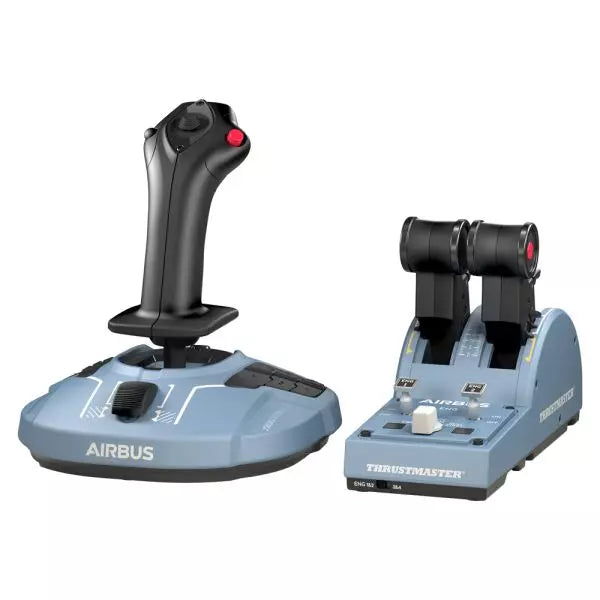
  • Dernier stock ! TCA Officer Pack Airbus Edition for sale on FlightSimzone

    Thrustmaster TCA Officer Pack Airbus Edition

    5 en stock Shipped in 1-3 business days.

    Le TCA Officer Pack Airbus Edition est un incontournable pour tous ceux qui souhaitent reproduire l’expérience de l’aviation commerciale dans leur configuration. Doté d’un design ergonomique inspiré de l’Airbus A320, ce pack inclut à la fois le TCA Sidestick et le Quadrant de manettes des gaz pour un contrôle inégalé. Grâce à la technologie de capteurs magnétiques garantissant des entrées fluides et à un sidestick modulaire pour des configurations personnalisables, ce pack vous permet de dominer les airs avec précision. Que vous pilotiez un avion de ligne ou un jet de combat, ce pack s’adapte à tous vos besoins. Qu'est-ce qui distingue le TCA Officer Pack Airbus Edition ? Conception modulaire du sidestick – Le sidestick dispose de modules de boutons interchangeables, vous permettant de l’adapter à une configuration de commandant, de copilote ou de vol solo. Cette modularité est une caractéristique rare, offrant une flexibilité unique pour différents styles de jeu. Crans de position et mécanisme d’inversion de poussée – Le quadrant des gaz comprend des crans de position précis et un mécanisme intégré d’inversion de poussée, apportant un retour tactile fidèle aux commandes réelles. La possibilité de passer en mode linéaire ajoute encore plus de polyvalence pour divers types d’aéronefs. Technologie magnétique durable – Les deux dispositifs exploitent des capteurs magnétiques sans contact, éliminant les potentiomètres et garantissant une durée de vie prolongée. Ce système améliore la fiabilité et réduit le temps de latence des entrées durant les manœuvres critiques. Compatibilité avec plusieurs périphériques – Ce pack s’intègre parfaitement aux accessoires Thrustmaster tels que les pédales de gouverne T.Flight Rudder Pedals et le TM Flying Clamp. Il assure ainsi une configuration immersive pour les passionnés d’aviation. Avantages et Inconvénients Avantages Inconvénients Design ergonomique inspiré des commandes Airbus A320. Fréquemment en rupture de stock en raison de la forte demande. Sidestick modulaire permettant plusieurs configurations. Absence de rétroéclairage sur le quadrant des gaz pour les vols de nuit. Capteurs magnétiques garantissant une durabilité exceptionnelle. Pas de support natif pour les consoles, exclusivement PC. Prise en charge des avions à quatre moteurs via un second quadrant. Un second quadrant est nécessaire pour un contrôle complet des quatre moteurs. Caractéristiques Techniques Caractéristique Valeur Largeur du TCA Sidestick 195 mm Profondeur du TCA Sidestick 225 mm Hauteur du TCA Sidestick 195 mm Poids du TCA Sidestick 920 g Largeur du TCA Quadrant 255 mm Profondeur du TCA Quadrant 145 mm Hauteur du TCA Quadrant 85 mm Poids du TCA Quadrant 530 g Contenu de la boîte TCA Sidestick, TCA Quadrant, 4 modules de tête interchangeables, câble USB, stickers, connecteurs, tige de fixation Compatibilité du TCA Officer Pack Airbus Edition Matériel Compatibilité Pédales de gouverne Compatible avec Thrustmaster T.Flight et Pendular Rudder Support de montage Compatible avec Thrustmaster TM Flying Clamp Le TCA Officer Pack Airbus Edition est conçu pour s’intégrer parfaitement avec les autres périphériques Thrustmaster, en faisant un ajout polyvalent pour toute installation dédiée à la simulation aérienne. Le quadrant des gaz permet l’association de deux unités pour gérer les avions à quatre moteurs, et la modularité du sidestick s’adapte à différentes configurations de cockpit. Cependant, sa compatibilité limitée au PC signifie que les utilisateurs souhaitant une intégration sur console devront chercher d’autres solutions. Concernant les plateformes de jeu, ce pack est entièrement compatible avec les systèmes Windows 10 et 8, et fonctionne avec les principaux simulateurs de vol comme Microsoft Flight Simulator et X-Plane. Toutefois, il n’offre pas de compatibilité native avec les consoles, limitant son utilisation aux joueurs sur PC.

    5 en stock Shipped in 1-3 business days.

    €179,00

  • Dernier stock ! Honeycomb Foxtrot Aviation Stick

    Fly Honeycomb Honeycomb Foxtrot Aviation Stick

    4 en stock Shipped in 1-3 business days.

    Honeycomb Foxtrot Aviation Stick est conçu pour les pilotes qui préfèrent un sidestick en main et un bureau dégagé devant eux. Dès le premier mouvement, le système de résistance linéaire fluide sans point dur central offre une sensation précise et maîtrisée, idéale pour les commandes de type Airbus et les manœuvres acrobatiques. À l’intérieur, la résolution 16-bit associée à la technologie de capteurs à effet Hall traduit les moindres mouvements du poignet en un contrôle précis à l’écran. Ajoutez une tension réglable et une conception entièrement ambidextre, et vous obtenez un stick à la sensation professionnelle, loin d’un simple accessoire ludique. Qu’est-ce qui distingue le Honeycomb Foxtrot Aviation Stick ? Philosophie de contrôle sans point dur central De nombreux sticks reposent sur une bosse centrale perceptible, ce qui peut rendre les petites corrections mécaniques. Le système de résistance linéaire du Foxtrot supprime ce cran, assurant une transition fluide sur toute la course des axes. Les pilotes volant sur Airbus apprécient particulièrement cette conception, car elle reproduit plus fidèlement le comportement d’un sidestick et permet des corrections douces de tangage et de roulis sans lutter contre un « clic » à ressort au centre. Synergie entre capteurs et résolution Avec une résolution 16-bit associée à des capteurs à effet Hall, le Foxtrot offre une détection d’entrée propre et sans contact. Les passionnés soulignent souvent sa constance dans le temps : pas de pics, pas de dégradation progressive liée aux potentiomètres mécaniques. Les ajustements subtils du trim en approche ou les entrées précises en roulis en voltige restent stables et prévisibles, notamment comparé aux sticks d’entrée de gamme qui peuvent présenter des tremblements près du centre. Résistance et ergonomie configurables La tension réglable permet d’adapter le stick aux préférences personnelles, que vous privilégiez des commandes légères du bout des doigts ou une résistance plus ferme pour des mouvements contrôlés. Associé à sa poignée ambidextre, le Foxtrot convient aussi bien aux configurations gaucher que droitier. Les utilisateurs disposant de cockpits compacts mettent souvent en avant son adaptabilité à différentes positions d’assise, y compris en montage central ou latéral. Densité de commandes sans encombrement Avec 5 interrupteurs à deux positions, 4 boutons d’action programmables, un POV hat, une gâchette, des rockers et un panneau rotatif multi-direction, le stick offre une grande flexibilité de commandes. Ce qui ressort particulièrement, c’est la disposition logique des contrôles ; les sim pilots mentionnent fréquemment que des fonctions comme le trim, les modes du pilote automatique ou les commandes caméra peuvent être assignées sans sensation d’encombrement ni recherche à l’aveugle en plein vol. Avantages et Inconvénients Avantages Inconvénients Résistance linéaire sans point dur central, sensation fluide. Aucune compatibilité native avec les consoles. Les capteurs à effet Hall réduisent l’usure à long terme. Aucune base de montage dédiée incluse. Tension réglable adaptée à différents styles de vol. Nombreuses options de configuration des interrupteurs et boutons. Spécifications Spécification Valeur Product Name Honeycomb Foxtrot Aviation Stick Control System Système de résistance linéaire sans point dur central Sensor Technology Capteurs à effet Hall Resolution 16-bit Tension Adjustment Résistance du stick réglable Switches 5 interrupteurs à deux positions Action Buttons 4 boutons programmables Rotary Panel Commandes rotatives 3, 4 et 5 positions Grip Design Ambidextre Connection USB-C to USB-A cable System Compatibility PC et Mac Included in the Box Foxtrot Aviation Stick, USB-C to USB-A Cable, Quick Start Guide (EFIGS) Download Support Profils Basic Bindings (XML) pour MSFS 2024 Compatibilité Honeycomb Foxtrot Aviation Stick Platform Compatibility Operating Systems PC et Mac Connection Type USB-C to USB-A interface USB directe Primary Sim Support MSFS 2024 (XML bindings), MSFS, X-Plane, Prepar3D Le Foxtrot Aviation Stick se connecte via USB standard, ce qui permet une intégration facile dans la plupart des configurations de cockpit de bureau. Il fonctionne parfaitement aux côtés de throttle quadrants, pédales de palonnier et panneaux radio d’autres grandes marques grâce à son architecture HID plug-and-play. Sa conception ambidextre le rend adapté aux configurations siège gauche ou droit, y compris un montage latéral de type Airbus. Il est non compatible avec les consoles Xbox et ne fonctionne pas comme appareil autonome sans PC ou Mac connecté. Côté logiciel, il prend en charge Microsoft Flight Simulator 2024 avec des profils XML dédiés et fonctionne avec des simulateurs PC populaires tels que Microsoft Flight Simulator (2020), X-Plane et Prepar3D via des configurations manuelles ou communautaires. Il n’est pas conçu pour les plateformes basées sur console, car il repose sur la reconnaissance native des pilotes PC/Mac plutôt que sur un firmware certifié console.

    4 en stock Shipped in 1-3 business days.

    €165,00

  • WINCTRL URSA MINOR Airline Joystick R

    WINCTRL WINCTRL URSA MINOR Airline Joystick R

    Rupture de stock, Pre-Orders Available. Shipped in 2-2.5 weeks from now.

    WINCTRL URSA MINOR Airline Joystick R brings airline-style control to the desktop with a clever mix of tactile feedback and thoughtful engineering. The standout feature is the flight-data-linked vibration engine, which adds subtle physical cues during events like flap deployment, airflow changes, and touchdown. Pair that with non-contact magnetic resistance sensors on the X and Y axes, and the stick delivers smooth, stable inputs without the wear issues common in cheaper mechanisms. The result is a joystick that feels lively in hand yet technically grounded under the hood. What Sets the WINCTRL URSA MINOR Airline Joystick R apart? Flight Data Driven Vibration Feedback The URSA MINOR stands out with a vibration motor tied directly to in-sim flight data. Instead of generic rumble, the stick reacts to events like landing contact, airflow changes, or flap movement. Pilots online often mention how this adds subtle physical cues during phases like flare or speed changes, providing a tactile reminder of what the aircraft is doing without constantly glancing at instruments. Robust Gimbal With Magnetic Sensors At the core of the stick is a glass-fiber-reinforced nylon gimbal running on ball bearings, paired with non-contact magnetic sensors for the primary axes. This combination helps maintain smooth motion over time without the jitter common in potentiometer-based designs. Enthusiasts frequently note that the stick movement feels stable across the entire travel range, particularly during small pitch adjustments on final approach. Airliner-Inspired Grip Layout The grip design borrows cues from airline sidestick ergonomics, offering a balanced control layout that includes a PTT trigger, autopilot disconnect switch, and a concealed five-way switch beneath a magnetic cover. Pilots often highlight how practical this arrangement is for everyday flying tasks—radio calls, autopilot overrides, and camera views can all be handled without reaching for the keyboard. Flexible Mounting and Maintenance Design The base includes anti-slip pads for desktop use along with pre-drilled mounting holes for cockpit rigs. A quick-release base cover allows access to internal adjustments without dismantling the entire unit. This detail is frequently appreciated by sim cockpit builders who prefer gear that can be tuned or serviced easily rather than permanently sealed hardware. Pros and Cons Pros Cons Flight-data vibration feedback adds tactile flight cues. Plastic construction compared to metal joystick designs. Magnetic sensors reduce wear and input drift. Limited axis travel compared to extended bases. Good button layout for airliner-style flying tasks. Desk or cockpit mounting options included. Specifications Specification Value Product Model URSA MINOR-Airline-Joystick R Material Industrial ABS plastic (PC + ABS) Controller 32-bit ARM controller X/Y Axis Movement Angle ±15° Z Axis Rotation Angle ±20° X/Y Sensors Non-contact magnetic resistance sensors Gimbal Construction Glass fiber reinforced nylon with ball bearings Operating Force (X/Y) Approximately 6N Rotation Torque (Z) ~4 kgf·cm Throttle Axis Type Long-travel sliding potentiometer Throttle Axis Travel 38 mm Buttons 14 buttons (250gf press force, 0.25 mm travel) Special Controls Hidden 5-way switch, PTT trigger, autopilot disconnect Vibration Feature Adjustable amplitude levels from 0–255 Mounting Options Anti-slip desktop pads and cockpit mounting holes Item Weight 3 kg Included in Box J5-BASE-BLACK + JGRIP-C1-R, Data Cable, Toolkit, Accessories Pack WINCTRL URSA MINOR Airline Joystick R Compatibility Platform Compatibility Connection Type USB plug-and-play connection Software Configuration WW SIMAPP Pro software for button mapping Mounting Desktop use or cockpit mounting The URSA MINOR Airline Joystick R connects via standard USB, allowing it to integrate easily with throttle quadrants, rudder pedals, and other flight hardware from many manufacturers. The base supports both desktop placement with anti-slip pads and cockpit mounting using pre-drilled holes, which is useful for sim rigs or permanent setups. Configuration is handled through WW SIMAPP Pro software, enabling button assignments and vibration adjustments directly from a visual interface. Within a flight setup, the joystick works well alongside external throttles, radio panels, or pedal systems because it behaves as a standard USB HID controller. It does not require proprietary ecosystems and can coexist with other brands in the same cockpit. However, it is intended for PC-based simulation environments and does not integrate directly with console platforms. In terms of simulators, the stick supports Microsoft Flight Simulator 2020, X-Plane, Prepar3D, and also space or combat titles like Star Citizen, Elite Dangerous, and War Thunder. Its plug-and-play USB design allows quick recognition in most PC simulation platforms. It is not designed for Xbox or PlayStation consoles, as those systems typically require licensed hardware and different firmware structures.

    Rupture de stock, Pre-Orders Available. Shipped in 2-2.5 weeks from now.

    €99,00

  • WINCTRL URSA MINOR Airline Joystick L

    WINCTRL WINCTRL URSA MINOR Airline Joystick L

    Rupture de stock, Pre-Orders Available. Shipped in 2-2.5 weeks from now.

    WINCTRL URSA MINOR Airline Joystick L brings airline-style control to the desktop with a clever mix of tactile feedback and thoughtful engineering. The standout feature is the flight-data-linked vibration engine, which adds subtle physical cues during events like flap deployment, airflow changes, and touchdown. Pair that with non-contact magnetic resistance sensors on the X and Y axes, and the stick delivers smooth, stable inputs without the wear issues common in cheaper mechanisms. The result is a joystick that feels lively in hand yet technically grounded under the hood. What Sets the WINCTRL URSA MINOR Airline Joystick L apart? Flight Data Driven Vibration Feedback The URSA MINOR stands out with a vibration motor tied directly to in-sim flight data. Instead of generic rumble, the stick reacts to events like landing contact, airflow changes, or flap movement. Pilots online often mention how this adds subtle physical cues during phases like flare or speed changes, providing a tactile reminder of what the aircraft is doing without constantly glancing at instruments. Robust Gimbal With Magnetic Sensors At the core of the stick is a glass-fiber-reinforced nylon gimbal running on ball bearings, paired with non-contact magnetic sensors for the primary axes. This combination helps maintain smooth motion over time without the jitter common in potentiometer-based designs. Enthusiasts frequently note that the stick movement feels stable across the entire travel range, particularly during small pitch adjustments on final approach. Airliner-Inspired Grip Layout The grip design borrows cues from airline sidestick ergonomics, offering a balanced control layout that includes a PTT trigger, autopilot disconnect switch, and a concealed five-way switch beneath a magnetic cover. Pilots often highlight how practical this arrangement is for everyday flying tasks—radio calls, autopilot overrides, and camera views can all be handled without reaching for the keyboard. Flexible Mounting and Maintenance Design The base includes anti-slip pads for desktop use along with pre-drilled mounting holes for cockpit rigs. A quick-release base cover allows access to internal adjustments without dismantling the entire unit. This detail is frequently appreciated by sim cockpit builders who prefer gear that can be tuned or serviced easily rather than permanently sealed hardware. Pros and Cons Pros Cons Flight-data vibration feedback adds tactile flight cues. Plastic construction compared to metal joystick designs. Magnetic sensors reduce wear and input drift. Limited axis travel compared to extended bases. Good button layout for airliner-style flying tasks. Desk or cockpit mounting options included. Specifications Specification Value Product Model URSA MINOR-Airline-Joystick L Material Industrial ABS plastic (PC + ABS) Controller 32-bit ARM controller X/Y Axis Movement Angle ±15° Z Axis Rotation Angle ±20° X/Y Sensors Non-contact magnetic resistance sensors Gimbal Construction Glass fiber reinforced nylon with ball bearings Operating Force (X/Y) Approximately 6N Rotation Torque (Z) ~4 kgf·cm Throttle Axis Type Long-travel sliding potentiometer Throttle Axis Travel 38 mm Buttons 14 buttons (250gf press force, 0.25 mm travel) Special Controls Hidden 5-way switch, PTT trigger, autopilot disconnect Vibration Feature Adjustable amplitude levels from 0–255 Mounting Options Anti-slip desktop pads and cockpit mounting holes Item Weight 3 kg Included in Box J5-BASE-BLACK + JGRIP-C1-R, Data Cable, Toolkit, Accessories Pack WINCTRL URSA MINOR Airline Joystick L Compatibility Platform Compatibility Connection Type USB plug-and-play connection Software Configuration WW SIMAPP Pro software for button mapping Mounting Desktop use or cockpit mounting The URSA MINOR Airline Joystick L connects via standard USB, allowing it to integrate easily with throttle quadrants, rudder pedals, and other flight hardware from many manufacturers. The base supports both desktop placement with anti-slip pads and cockpit mounting using pre-drilled holes, which is useful for sim rigs or permanent setups. Configuration is handled through WW SIMAPP Pro software, enabling button assignments and vibration adjustments directly from a visual interface. Within a flight setup, the joystick works well alongside external throttles, radio panels, or pedal systems because it behaves as a standard USB HID controller. It does not require proprietary ecosystems and can coexist with other brands in the same cockpit. However, it is intended for PC-based simulation environments and does not integrate directly with console platforms. In terms of simulators, the stick supports Microsoft Flight Simulator 2020, X-Plane, Prepar3D, and also space or combat titles like Star Citizen, Elite Dangerous, and War Thunder. Its plug-and-play USB design allows quick recognition in most PC simulation platforms. It is not designed for Xbox or PlayStation consoles, as those systems typically require licensed hardware and different firmware structures.

    Rupture de stock, Pre-Orders Available. Shipped in 2-2.5 weeks from now.

    €99,00

  • Honeycomb Echo Aviation Controller

    Fly Honeycomb Honeycomb Echo Aviation Controller

    Rupture de stock, Pre-Orders Available. Shipped in 2-2.5 weeks from now.

    Honeycomb Echo Aviation Controller is one of those devices that makes you rethink how much hardware you actually need to fly properly. Everything sits in your hands—pitch, roll, yaw, throttle, trim—all within reach, anchored by a 16-bit Hall-effect thumbstick that feels smooth and consistent through every movement. Pair that with a complete all-in-one flight control layout, and you’ve got a compact cockpit that works just as well on a desk as it does on the couch. It’s clever, tactile, and surprisingly capable for its size. What Sets the Honeycomb Echo Aviation Controller apart? All-in-One Without Feeling Compromised – Many compact controllers try to do everything and end up feeling like a gamepad with extra buttons. The Echo stands out because each control has a defined purpose and physical identity. Users often mention how the dedicated trim wheel, levers, and rudder system make it feel closer to a proper flight control setup, rather than a simplified alternative. Mechanical Rudder Integration – Instead of relying on twist input or triggers, the Echo uses mechanically linked rudder pedals with Hall-effect sensing. This is something pilots quickly notice, especially during coordinated turns or crosswind landings. The self-centering action gives a consistent feel that’s easier to manage than digital-style inputs found on many compact controllers. Designed for Flexible Flying Spaces – Feedback from users consistently highlights how freeing it is to fly without a fixed rig. Whether sitting at a desk, relaxing on a couch, or traveling, the Echo adapts without needing mounts or external peripherals. It’s particularly appealing for sim pilots who don’t have space for a full yoke, throttle quadrant, and pedal setup. Thoughtful Control Layout for MSFS – The layout feels intentionally designed around Microsoft Flight Simulator workflows. Common functions like gear, flaps, trim, and camera controls are placed where fingers naturally rest. Many users note that once muscle memory develops, cockpit interaction becomes quicker and more fluid compared to mapping everything onto a generic controller. Pros and Cons Pros Cons All flight controls integrated into one compact unit Less tactile separation than full-size hardware setups Hall-effect sensors provide smooth, drift-free input Limited physical range compared to dedicated yokes Wireless operation with long battery life Portable design works without dedicated sim rig Specifications Specification Value Control Type All-in-one flight controller (pitch, roll, yaw, throttle, trim, flaps, gear) Primary Input 16-bit Hall-effect thumbstick Rudder System Mechanically linked Hall-effect rudder pedals Throttle/Sliders Four detented sliders with interchangeable caps Connectivity Wireless (2.4 GHz dongle) or USB-C wired Battery 1200 mAh, up to 15 hours usage System Compatibility PC and Mac Software Compatibility Microsoft Flight Simulator, X-Plane 11/12, Prepar3D Included Accessories Travel case, lever caps, wireless dongle, USB cable Warranty 2-year limited warranty Honeycomb Echo Aviation Controller Compatibility The Echo is built with flexibility in mind. It is compatible with PC and Mac systems and connects either through USB-C wired connection or a 2.4 GHz wireless dongle. Because it operates as a standalone controller, it does not require additional yokes, pedals, or throttle quadrants, making it ideal for compact setups or portable use. It is not designed to integrate directly with traditional hardware ecosystems like separate yokes or external rudder pedals. Its all-in-one design means fewer cables and simpler setups, but it also means less modular expansion compared to full cockpit systems. Pilots who prefer mixing and matching hardware may find it less suited to complex multi-device configurations, as the Echo is intended to replace, rather than complement, those components. On the software side, the controller is fully compatible with Microsoft Flight Simulator and also supports X-Plane 11, X-Plane 12, and Prepar3D. It is not designed for console use, focusing entirely on PC-based simulation platforms where full input mapping and customization are available.

    Rupture de stock, Pre-Orders Available. Shipped in 2-2.5 weeks from now.

    €150,00

Flight Simulator Joysticks for sale at FlightSImZone

Lorsque vous entrez dans le monde de la simulation de vol, un joystick de simulateur de vol de qualité sert de lien principal avec l'avion virtuel. Ces instruments de précision traduisent vos moindres mouvements en entrées de contrôle de vol précises, ce qui les rend essentiels aussi bien pour les vols occasionnels que pour les applications d'entraînement au vol sérieux.

Meilleurs Joysticks pour Simulateur de Vol

Le marché d'aujourd'hui propose divers joysticks conçus pour répondre à différents besoins et préférences. Le HOTAS Warthog représente le segment premium avec sa construction entièrement métallique et sa précision de qualité militaire, tandis que le T.Flight Stick X offre un excellent point d'entrée pour les débutants. Le TCA Sidestick X Airbus Edition fait le lien entre ces segments avec son ressenti authentique d'avion de ligne et ses capteurs de qualité professionnelle.

Joystick Microsoft Flight Simulator

Le moteur physique sophistiqué de Microsoft Flight Simulator exige des dispositifs d'entrée précis pour un contrôle optimal. Le T16000M FCS est devenu un choix populaire pour cette plateforme, offrant une excellente précision grâce à ses capteurs Hall Effect et son design ergonomique. Le VelocityOne Flightstick complète cette sélection avec ses caractéristiques dédiées optimisées pour la plateforme de Microsoft.

Joystick Simulateur de Vol pour PC

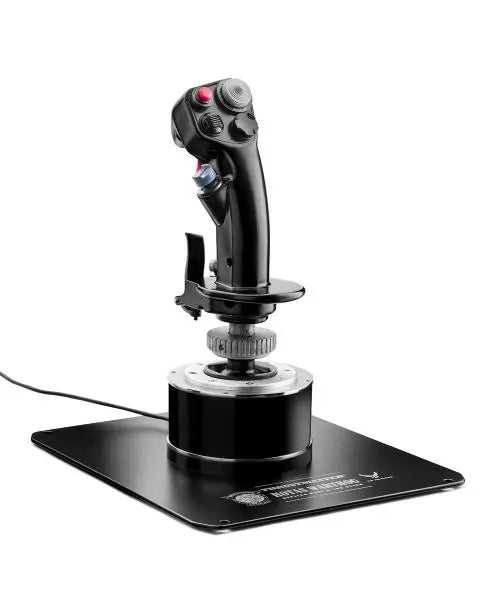
Les plateformes PC offrent la plus large compatibilité avec les systèmes de contrôle de vol, permettant aux pilotes de choisir parmi une vaste gamme d'options. Le AVA F/A-18 Super Hornet Flightstick incarne la technologie moderne de contrôle de vol pour PC, incorporant des capteurs avancés et des fonctionnalités programmables qui améliorent l'expérience de simulation. Ces contrôleurs axés sur le PC incluent souvent des logiciels de personnalisation permettant de créer des profils de contrôle personnels et d'ajuster les paramètres de sensibilité.

Tableau de comparaison

Caractéristique HOTAS Warthog TCA Sidestick X Airbus T16000M FCS VelocityOne Flightstick T.Flight Stick X AVA F/A-18 Super Hornet
Compatibilité avec la plateforme PC PC PC Xbox Series X|S, PC PC, PS3 PC
Construction Tout Métal Plastique Industriel Plastique Renforcé Plastique Premium Plastique Hybrid Métal/Plastique
Type de capteur H.E.A.R.T Hall Effect H.E.A.R.T Hall Effect Hall Effect Hall Effect Potentiomètre Hall Effect
Nombre de boutons 19 + Hat Switch 17 + Hat Switch 16 + Hat Switch 12 + Hat Switch 12 + Hat Switch 19 + Dual Hat Switch
Throttle inclus Oui (Séparé) Non Optionnel Non Non Non
Fonctionnalités logicielles Logiciel T.A.R.G.E.T Logiciel T.A.R.G.E.T Logiciel T.A.R.G.E.T Application personnalisée Calibration de base Programmation Avancée
Résolution de l'axe 16-bit 16-bit 16-bit 16-bit 8-bit 16-bit
Caractéristiques spéciales • Design de qualité militaire
• Système à double manette des gaz
• Montage sur plaque métallique
• Design Airbus
• Système modulaire
• Ambidextre
• Design ambidextre
• Base large
• Tension réglable
• Optimisé pour Xbox
• Affichage de statut
• Commandes rapides
• Fonctionnalités de base
• Design compact
• Abordable
• Réplique F/A-18
• Prêt pour le combat
• Poignée Premium

Caractéristiques techniques clés :

Technologie de précision

  • Capteurs magnétiques Hall Effect
  • Axes de résolution 16 bits
  • Commutateurs à hat multidirectionnels

Éléments de durabilité

  • Base renforcée
  • Composants de qualité industrielle
  • Mécanismes de gimbal métalliques

Joystick de simulateur de vol pour Xbox

La simulation de vol sur console a beaucoup évolué, notamment dans l'écosystème Xbox. Les joysticks modernes compatibles Xbox offrent des fonctionnalités sophistiquées auparavant exclusives aux systèmes PC. Ces contrôleurs combinent la simplicité du plug-and-play avec des fonctionnalités de qualité professionnelle, garantissant que les pilotes sur console puissent expérimenter le même niveau de précision de contrôle que leurs homologues sur PC.

Technologies de contrôle avancées

Les joysticks modernes de simulateur de vol intègrent plusieurs innovations technologiques qui améliorent leurs performances et leur durabilité. Les capteurs à haute résolution fournissent des données de position précises, tandis que les matériaux avancés garantissent une opération constante pendant des milliers d'heures de vol. Les fabricants intègrent désormais des éléments de design inspirés de l'aviation militaire, créant des contrôleurs qui offrent un ressenti authentique tout en maintenant une excellente ergonomie.

Ces innovations s'étendent à l'intégration logicielle, de nombreux joysticks offrant des applications de programmation dédiées. Ces outils permettent aux utilisateurs de créer des profils de contrôle personnalisés, d'ajuster les courbes de sensibilité et de configurer des mappings de boutons avancés pour différents types d'avions. L'intégration de plusieurs axes de contrôle permet de simuler de manière plus réaliste des manœuvres de vol complexes, de la formation précise aux scénarios de combat avancés.

Achetez votre joystick de simulateur de vol chez FlightSimZone

Un joystick de simulateur de vol de qualité représente un investissement crucial dans votre parcours d'aviation virtuelle. Que vous pratiquiez des procédures pour la formation au vol réel ou que vous profitiez de sessions de vol occasionnelles, le bon joystick peut considérablement améliorer votre expérience. Chez FlightSimZone, nous comprenons l'importance de faire correspondre les pilotes avec leurs solutions de contrôle idéales.

Achetez votre joystick de simulateur de vol chez FlightSimZone aujourd'hui et découvrez le parfait équilibre entre précision et contrôle dans votre cockpit virtuel.


Connexion

Vous avez oublié votre mot de passe ?

Vous n'avez pas encore de compte ?
Créer un compte


