Niet op voorraad,
Pre-orders beschikbaar. Verzending binnen 2-2,5 weken.
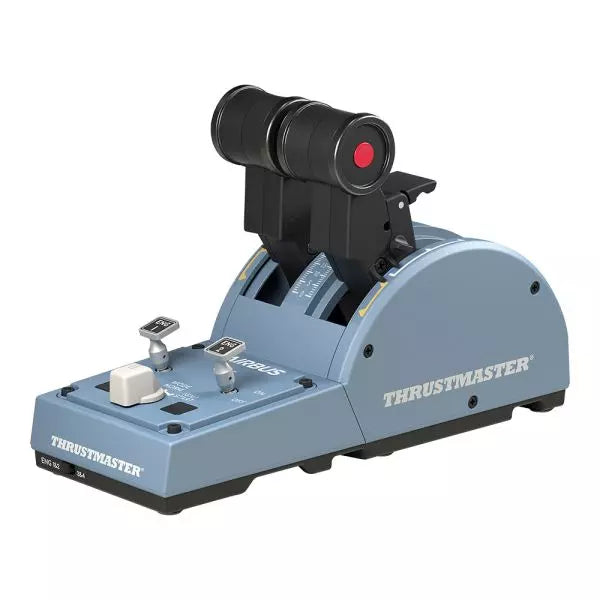
TCA Quadrant Airbus Edition is een droom voor vliegtuigsimulatie-enthousiastelingen die een tactiele, civiele luchtvaartervaring zoeken. Met dubbele gashendels, iconische Airbus-detents en een thrust-reverser mechanisme, biedt deze quadrant ongeëvenaarde controle over elk aspect van het vliegen. Met 16 toewijsbare knoppen en magnetische sensors zonder contact voor een onbeperkte levensduur, levert deze throttle quadrant veelzijdigheid en duurzaamheid. De mechanische selectors zorgen voor eenvoudige aanpassing aan verschillende vliegtuigtypen, waardoor de mogelijkheden eindeloos zijn.
Wat maakt de TCA Quadrant Airbus Edition uniek?
Iconische Airbus-detents en Thrust-Reverser – De quadrant bevat realistische detents die de Airbus-vluchtmodi repliceren, van "Idle" tot "TO/GA." De thrust-reverser mechaniek biedt soepele overgangen tussen vermogensstanden voor een intuïtieve en realistische bediening.
Magnetische Sensor Technologie – In tegenstelling tot traditionele potentiometers maakt deze throttle gebruik van HallEffect-sensoren zonder contact. Dit verlengt de levensduur, verbetert de gevoeligheid en garandeert soepele prestaties, zelfs bij intensief gebruik.
Uitbreidbaar Ecosysteem – De quadrant kan worden uitgebreid met accessoires zoals de TCA Quadrant Add-On Airbus Edition of Thrustmaster T.Flight-rudder systemen, waardoor hij geschikt is voor viermotorige vliegtuigen en geavanceerde bedieningseisen.
Aanpasbare Weerstand en Modi – De ingebouwde weerstandsschroef stelt gebruikers in staat om de throttle-gevoeligheid aan te passen. Daarnaast kunnen de mechanische selectors de detents uitschakelen, waardoor soepele as-overgangen mogelijk zijn voor andere vliegtuigen zoals gevechtsvliegtuigen of algemene luchtvaartmodellen.
Voordelen en Nadelen
Voordelen
Nadelen
Nauwkeurige Airbus-detents voor realistische controle.
Beperkte compatibiliteit met niet-Windows platforms.
Magnetische sensors zorgen voor langdurige betrouwbaarheid.
Vereist extra accessoires voor multi-engine setups.
Uitbreidbaar binnen het Thrustmaster TCA-ecosysteem.
16 knoppen voor uitgebreide aanpasbaarheid.
Specificaties
Specificatie
Waarde
Breedte
10.0” / 255 mm
Diepte
5.7” / 145 mm
Hoogte
3.3” / 85 mm
Gewicht
1.2 lb / 530 g
Inhoud van de doos
TCA Quadrant, USB-kabel, verbindingsstangen
Technologie
HallEffect AccuRate Technology (magnetische sensors zonder contact)
Knoppen
16 fysieke en virtuele knoppen
TCA Quadrant Airbus Edition Compatibiliteit
Compatibele Apparaten
Details
TCA Sidestick Airbus Edition
Werkt perfect voor een volledige Airbus-cockpitervaring.
Thrustmaster T.Flight Rudder Pedals
Voegt verbeterde controle toe voor taxiën en luchtmanoeuvres.
Thrustmaster T.A.R.G.E.T Software
Biedt geavanceerde programmering en profielbeheer.
De TCA Quadrant Airbus Edition is compatibel met Windows 10 en Windows 8 en integreert naadloos met populaire vluchtsimulatoren. Hoewel hij uitstekend samenwerkt met de Thrustmaster T.A.R.G.E.T software voor extra maatwerk, biedt hij geen native console-ondersteuning, waardoor hij het meest geschikt is voor pc-gebruikers. Het koppelen met accessoires zoals de T.Flight-rudderpedalen versterkt de vluchtbeleving verder.
Qua gamingplatforms schittert de quadrant in Microsoft Flight Simulator en X-Plane. Met compatibiliteit voor games die meerdere knopconfiguraties ondersteunen en de Airbus-geïnspireerde detents, is hij een uitstekende keuze voor civiele luchtvaartsimulaties. Voor algemene gamingtoepassingen is hij minder geschikt vanwege zijn gespecialiseerde ontwerp.
Niet op voorraad,
Pre-orders beschikbaar. Verzending binnen 2-2,5 weken.
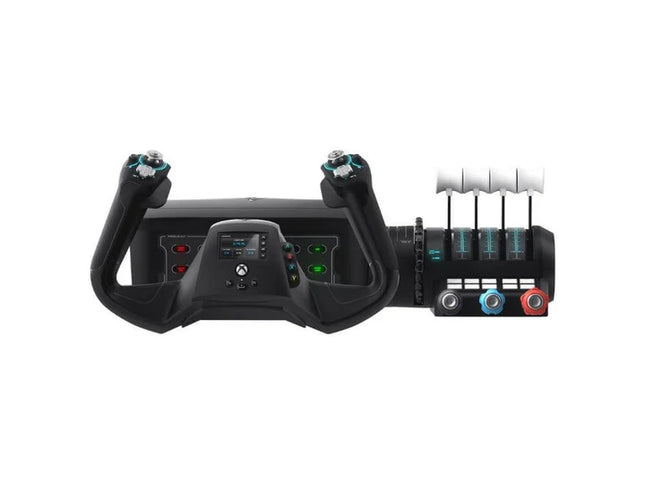
VelocityOne Flight System is een robuuste alles-in-één oplossing voor luchtvaartliefhebbers op PC en Xbox. Met een dubbel throttlesysteem en een statusindicatorpaneel is dit systeem geschikt voor piloten van zowel Cessna's als straalvliegtuigen. De soepele 180° roterende yoke met hall-effect sensoren biedt een tastbare, betrouwbare bediening, terwijl het trimwiel en de programmeerbare knoppen aanpasbare instellingen mogelijk maken die echte operaties nabootsen. Of je nu door de wolken zweeft of precieze landingen uitvoert, dit systeem geeft je volledige controle.
Wat maakt de VelocityOne Flight System uniek?
Veelzijdig throttlesysteem – Het VelocityOne Flight System beschikt over dubbele throttle-opties: vier verwisselbare hendels voor airliners en Vernier-stijl bediening voor kleinere vliegtuigen zoals de Cessna 172. Deze flexibiliteit maakt nauwkeurige vermogensregeling mogelijk voor verschillende vliegtuigtypen, geschikt voor zowel algemene als commerciële luchtvaart.
Geïntegreerd annunciatorpaneel – Het inbegrepen Status Indicator Panel voegt een extra laag realisme toe door kritieke systemen te monitoren. Met verwisselbare platen kan het zich aanpassen aan verschillende vliegtuigen en biedt het visuele feedback over motorproblemen, waarschuwingen of systeemstatussen zonder extra hardware.
Roerbediening via yoke – Geïntegreerde roerbesturing op de yoke stelt je in staat om het staartroer, het neuswiel en de remmen met vingertoppen te bedienen. Hoewel het geen toegewijde pedalen vervangt, is het een praktische en effectieve oplossing voor gebruikers die eenvoud zoeken zonder in te boeten op controle.
Flight Management Display – Het ingebouwde scherm dient als Flight Management Display voor Microsoft Flight Simulator, waarmee je naadloos tussen profielen schakelt en essentiële gegevens tijdens de vlucht weergeeft. Deze functie minimaliseert de afhankelijkheid van externe schermen en houdt de focus op de besturing.
Voordelen en Nadelen
Voordelen
Nadelen
Inclusief dubbele throttle-opties voor diverse vliegtuigtypen.
Roerbesturing op de yoke is minder realistisch dan pedalen.
Annunciatorpaneel biedt visuele feedback over systeemstatus.
Hoger geprijsd dan andere instap-flight controllers.
Compatibel met PC en Xbox Series X|S.
Niet compatibel met PlayStation-platforms.
Specificaties
Specificatie
Waarde
Merk
Turtle Beach
Yoke-rotatie
180°
Throttle-type
Dubbel (Airliner en Vernier-stijl)
Platformcompatibiliteit
PC, Xbox Series X|S, Xbox One
Sensor Type
Hall-effect
Programmeerbare knoppen
10
Annunciatorpaneel
Inbegrepen met verwisselbare platen
VelocityOne Flight System Compatibiliteit
Het VelocityOne Flight System is ontworpen voor PC en Xbox-platforms, waardoor het een uitstekende keuze is voor zowel console- als desktopgebruikers. Het integreert naadloos met Microsoft Flight Simulator op Xbox Series X|S en de hall-effect sensoren zorgen voor soepele, betrouwbare invoer voor precisiemanoeuvres. Hoewel het een knopgestuurde roerbediening biedt, kunnen gebruikers die een meeslepender ervaring zoeken het combineren met toegewijde roerpedalen, al kan dit extra hardware vereisen.
Voor gamingplatforms is de VelocityOne geoptimaliseerd voor Xbox Series X|S en Xbox One, evenals Windows-gebaseerde PC’s met moderne simulatoren. Helaas ontbreekt compatibiliteit met PlayStation-consoles of Mac-besturingssystemen. Hoewel het Flight Management Display bijzonder goed werkt met Microsoft Flight Simulator, integreert het ook met andere vluchtsimulatoren, waardoor piloten een veelzijdige en feature-rijke ervaring krijgen, ongeacht hun favoriete simulatiegame.
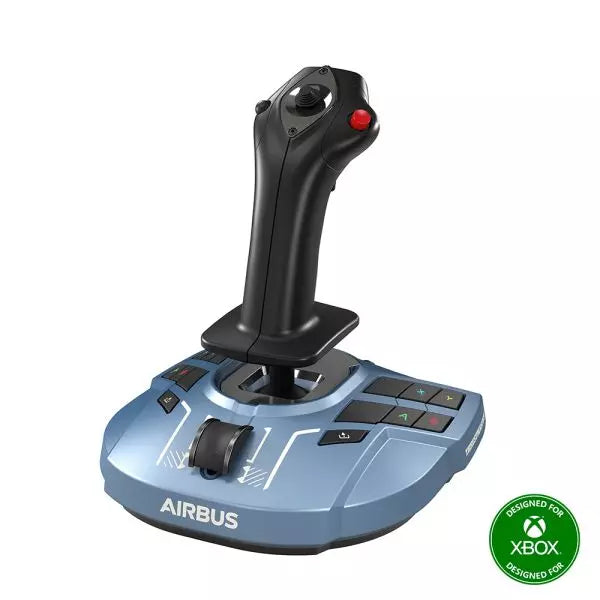
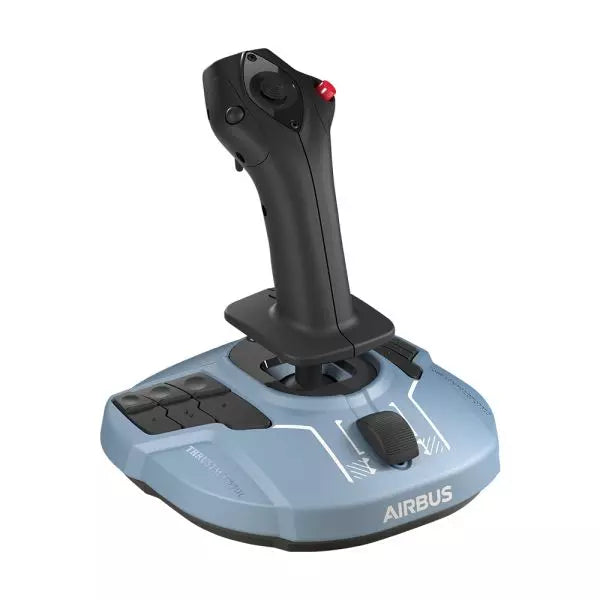
TCA Sidestick Airbus Edition is een robuuste en veelzijdige sidestick die de essentie van Airbus-vluchtbediening vastlegt. Met een ergonomisch ontwerp op ware grootte, geïnspireerd door de Airbus A320, biedt deze sidestick een tactiele en aanpasbare ervaring voor jouw vluchtsimulaties. Met een ingebouwde throttle-as met een uniek thrust-reverse mechanisme en 12 opnieuw toewijsbare knoppen, is het ontworpen om zich aan te passen aan jouw rol—of je nu als captain, co-piloot of solo centraal vliegt. Dankzij de contactloze magnetische sensortechnologie voelt elke manoeuvre soepel en natuurlijk aan.
Wat maakt de TCA Sidestick Airbus Edition uniek?
Verwisselbare joystickkopmodules – De kop van de sidestick is modulair, zodat je deze kunt aanpassen voor gebruik als captain, co-piloot of solo. Deze flexibiliteit maakt het een favoriet onder gebruikers die hun opstelling willen afstemmen op verschillende vluchtconfiguraties.
Ingebouwde throttle met thrust-reverser – De geïntegreerde throttle-as, compleet met een thrust-reverser mechanisme, maakt deze stick bijzonder. Dit is een zeldzame functie op sidesticks en biedt meer controle tijdens landingen en taximanouvres.
HallEffect magnetische sensoren – Dankzij de contactloze magnetische technologie wordt slijtage geëlimineerd en blijven de invoeren uiterst nauwkeurig gedurende de hele levensduur van de stick. Gebruikers prijzen de duurzaamheid en soepele werking.
Geïntegreerde roerbesturing – Het twist-roermechanisme met optionele vergrendeling biedt veelzijdige controle voor multitasking-piloten, waardoor de gebruiksvriendelijkheid in diverse vluchtsituaties wordt verbeterd.
Voordelen en Nadelen
Voordelen
Nadelen
Modulair ontwerp van de kop past zich aan verschillende pilotenrollen aan.
Alleen compatibel met PC.
Ingebouwde throttle met thrust-reverser voegt extra functionaliteit toe.
Kleinere basis kan minder stabiel aanvoelen voor sommige gebruikers.
Magnetische sensoren zorgen voor langdurige betrouwbaarheid.
Geen extra programmeerbare draaiknoppen of schuifregelaars.
Ergonomisch Airbus-geïnspireerd ontwerp biedt een comfortabele grip.
Specificaties
Specificatie
Waarde
Breedte
7.7” / 195 mm
Diepte
7.7” / 195 mm
Hoogte
8.9” / 225 mm
Gewicht
2.0 lb / 920 g
Inhoud verpakking
1 x Sidestick, 4 x Joystickkopmodules
TCA Sidestick Airbus Edition Compatibiliteit
De TCA Sidestick Airbus Edition werkt naadloos samen met andere onderdelen van het Thrustmaster Airbus-ecosysteem, zoals de TCA Quadrant Airbus Edition en de TCA Quadrant Add-On. Het kan ook effectief worden gekoppeld aan de T.Flight Rudder Pedals en de TM Flying Clamp voor een stabielere setup. Echter, het mist compatibiliteit met consoles zoals Xbox of PlayStation, waardoor het ideaal is voor PC-gebruikers. Deze sidestick is perfect voor geavanceerde vluchtsimulatoren, maar niet geschikt voor console-gebaseerde vlieggames.
Voor gamingplatforms ondersteunt de sidestick PC (Windows 10 en 8), maar werkt niet op macOS of Linux-systemen. Hij is compatibel met populaire vluchtsimulatoren zoals Microsoft Flight Simulator en X-Plane. Echter, het gebruik is beperkt tot games die configureerbare vluchtbediening ondersteunen, omdat het geen plug-and-play functionaliteit biedt voor casual of arcade-achtige titels.
MOZA MA3F Electronic Flight Control Modules L bring the unmistakable Airbus A320 flight deck to your simulator with controls that make every heading change, altitude adjustment, and approach setup feel deliberate. The dual-rail spring-loaded push/pull mechanism recreates the distinctive operation of Airbus autopilot controls, while custom segmented displays faithfully mirror Airbus-specific character formatting and spacing. From the satisfying click of each selector to the coordinated cockpit lighting, every interaction encourages proper Airbus procedures throughout the entire flight.
What Sets the MOZA MA3F Electronic Flight Control Modules L apart?
Faithful Airbus Push/Pull Operation – The dual-rail spring-loaded push/pull mechanism delivers a noticeably more convincing feel than conventional encoder-based controls. Airbus enthusiasts often point out that having distinct push and pull actions makes switching between managed and selected modes feel far more intuitive, helping reproduce familiar cockpit workflows without relying on keyboard shortcuts or mouse clicks.
Displays That Match Airbus Presentation – Rather than using generic digital readouts, the custom segmented displays reproduce Airbus-style character spacing, typography, and formatting. Builders frequently appreciate these visual details because the modules blend naturally with other Airbus cockpit hardware, creating a clean and cohesive flight deck instead of a collection of mismatched peripherals.
Flexible Expansion for Growing Cockpits – Available as an FCU only, FCU with a single EFIS, or a complete Electronic Flight Control Module suite, the system adapts to different cockpit sizes and budgets. The optional extended-function EFIS mode adds further flexibility, allowing additional controls to be accessed without filling the cockpit with extra hardware.
Straightforward Installation and Configuration – The included mounting bracket, aluminum-profile compatibility, and standard 75 mm VESA support make installation simple across desktop and full-frame cockpits. Users also appreciate MOZA Cockpit software for its synchronized lighting, streamlined configuration process, and flexible control customization without requiring complicated setup procedures.
Pros and Cons
Pros
Cons
Excellent Airbus-style push/pull control mechanism.
Designed specifically for Airbus aircraft.
Displays closely match Airbus FCU formatting.
Requires a Windows PC.
Modular configurations support gradual cockpit upgrades.
Synchronized lighting creates a cohesive cockpit appearance.
Specifications
Specification
Value
Product Type
Airbus A320-style FCU and EFIS control system
Available Configurations
FCU only, FCU + single EFIS, complete EFCM suite
Display Type
Custom Airbus-style segmented displays
Autopilot Control Mechanism
Dual-rail spring-loaded push/pull controls
Lighting
Independent display, character, and status illumination
Software Integration
MOZA Cockpit
Supported Platform
PC
Mounting Options
Included bracket, aluminum profile, 75 mm VESA mount
Extended Function
Optional EFIS extended-function control mode
MOZA MA3F Electronic Flight Control Modules L Compatibility
Hardware
Compatibility
Mounting Systems
Included bracket, aluminum-profile rigs, 75 × 75 mm VESA mounts
MOZA Cockpit Software
Telemetry synchronization and configuration supported
Cockpit Configurations
FCU only, single EFIS, or complete EFCM suite
Flight Simulator
Compatibility
Microsoft Flight Simulator
Default Airbus A320/A330 and supported Airbus add-ons
X-Plane
Compatible with Airbus aircraft including ToLiss series
Third-Party Aircraft
Fenix A320, FlightFactor A320, ToLiss series, and other popular Airbus airliners
Designed for PC flight simulation, the MA3F Electronic Flight Control Modules L integrate with MOZA Cockpit software for telemetry synchronization, synchronized lighting, and simple configuration. Included bracket mounting, aluminum-profile compatibility, and 75 mm VESA support allow the modules to fit comfortably into desktop cockpits or larger Airbus flight deck projects.
The modular design allows builders to begin with a single FCU or expand into a complete Electronic Flight Control Module suite as their simulator grows. Independent adjustment of display brightness, character illumination, and status lighting helps maintain a consistent cockpit appearance during daytime departures and night operations alike.
Compatible with Microsoft Flight Simulator and X-Plane, the system supports default Airbus A320 and A330 aircraft together with leading third-party aircraft including Fenix A320, ToLiss, FlightFactor A320, and other popular Airbus airliners. The supported platform is PC; gaming consoles and macOS are not supported.
MOZA MA3F Electronic Flight Control Modules R leggen de kenmerkende workflow van het Airbus A320-flightdeck vast met hardware die elke keer bevredigend aanvoelt wanneer je een koers instelt of de hoogte aanpast. Het veerbelaste push/pull-mechanisme met dubbele rail bootst de karakteristieke werking van Airbus-autopilotbediening na, terwijl aangepaste gesegmenteerde displays de Airbus-specifieke tekenopmaak en spatiëring getrouw weerspiegelen. Elke knop, toets en verlichte indicator werkt samen om routebeheer, klimplanning en naderingsinstelling gedurende elke vluchtfase opmerkelijk natuurlijk te laten aanvoelen.
Wat onderscheidt de MOZA MA3F Electronic Flight Control Modules R?
Airbus push/pull-bediening correct uitgevoerd – Een functie die consequent opvalt, is het aangepaste push/pull-mechanisme met dubbele rail. In plaats van een eenvoudige veerbelaste encoder te gebruiken, leveren de bedieningselementen een duidelijke slag en weerstand die nauw aansluiten bij Airbus-bedieningsprocedures. Veel ervaren Airbus-simpiloten waarderen hoe dit wijzigingen tussen managed en selected mode veel bewuster laat aanvoelen en tegelijk onbedoelde invoer tijdens drukke vluchtfasen vermindert.
Displays die het Airbus-karakter vangen – De gesegmenteerde displays zijn zorgvuldig ontworpen om de kenmerkende uitstraling van Airbus FCU-uitlezingen te reproduceren, inclusief tekenafstand en opmaak. In plaats van eruit te zien als generieke digitale displays, gaan ze natuurlijk op in een Airbus-cockpit. Enthousiastelingen wijzen vaak op dit soort details als het verschil tussen simpelweg een simulator bedienen en genieten van een overtuigende airline-cockpitomgeving.
Uitbreidbaar om bij je cockpit te passen – Of je nu alleen de FCU kiest, deze koppelt aan één EFIS-module of de complete Electronic Flight Control Module suite installeert, het systeem groeit mee met je cockpit. Bouwers waarderen deze flexibiliteit omdat ze geleidelijke upgrades mogelijk maakt, terwijl een consistente uitstraling en bedieningsindeling in de hele simulator behouden blijven.
Doelgericht gebouwd voor toegewijd Airbus-vliegen – Naadloze integratie met MOZA Cockpit software, gesynchroniseerde verlichting en ondersteuning voor toonaangevende Airbus-vliegtuigen maken het systeem bijzonder aantrekkelijk voor airlinerliefhebbers. Feedback uit de community benadrukt vaak hoe eenvoudig het te configureren is, terwijl het toch uitgebreide aanpassing biedt voor displayverlichting, bedieningselementen en cockpitorganisatie.
Voor- en nadelen
Voordelen
Nadelen
Uitstekende push/pull-autopilotbediening in Airbus-stijl.
Specifiek ontworpen voor Airbus-vliegtuigen.
Displays reproduceren de Airbus FCU-opmaak nauwkeurig.
Vereist een Windows-PC.
Meerdere configuraties passen bij evoluerende cockpitbuilds.
Gesynchroniseerde verlichting verbetert de cockpitconsistentie.
Specificaties
Specificatie
Waarde
Producttype
FCU- en EFIS-bedieningssysteem in Airbus A320-stijl
Beschikbare configuraties
EFIS
Displaytype
Aangepaste gesegmenteerde displays in Airbus-stijl
Autopilotbedieningsmechanisme
Veerbelaste push/pull-bediening met dubbele rail
Verlichting
Onafhankelijke display-, teken- en statusverlichting
Software-integratie
MOZA Cockpit
Ondersteund platform
PC
Montageopties
Meegeleverde beugel, aluminiumprofiel, 75 mm VESA-montage
Uitgebreide functie
Optionele bedieningsmodus voor uitgebreide EFIS-functies
Compatibiliteit van de MOZA MA3F Electronic Flight Control Modules R
Hardware
Compatibiliteit
Montagesystemen
Meegeleverde beugel, rigs met aluminiumprofielen, 75 × 75 mm VESA-montages
MOZA Cockpit Software
Ondersteund voor telemetriesynchronisatie en configuratie
Cockpitindelingen
Alleen FCU, enkele EFIS of complete EFCM-suite
Vluchtsimulator
Compatibiliteit
Microsoft Flight Simulator
Standaard Airbus A320/A330 en ondersteunde Airbus-add-ons
X-Plane
Compatibel met Airbus-vliegtuigen, inclusief ToLiss-modellen
Vliegtuigen van derden
Fenix A320, FlightFactor A320, ToLiss-serie en andere Airbus-airliners
Gebouwd voor PC-vluchtsimulatie, werken de MA3F Electronic Flight Control Modules R naadloos samen met MOZA Cockpit software en bieden ze gesynchroniseerde verlichting, telemetrie-integratie en eenvoudige configuratie. Meegeleverde beugelmontage, compatibiliteit met aluminiumprofielen en 75 mm VESA-ondersteuning maken installatie eenvoudig, of je nu een desktopopstelling of een speciale Airbus-cockpit samenstelt.
Het modulaire ontwerp stelt bouwers in staat te beginnen met één FCU of in de loop van de tijd uit te breiden naar een complete Electronic Flight Control Module suite. Onafhankelijke aanpassing van displayhelderheid, tekenverlichting en statusverlichting helpt een consistente cockpituitstraling te behouden tijdens vertrekken overdag en late aankomsten in de nacht.
Compatibel met Microsoft Flight Simulator en X-Plane, ondersteunt het systeem standaard Airbus A320- en A330-vliegtuigen samen met toonaangevende vliegtuigen van derden, waaronder Fenix A320, ToLiss, FlightFactor A320 en andere populaire Airbus-airliners. Het ondersteunde platform is PC; gameconsoles en macOS worden niet ondersteund.
MOZA MA3F Electronic Flight Control Modules brengen het Airbus A320-flightdeck naar je simulator met bedieningselementen die vanaf de eerste koerswijziging tot de eindnadering bevredigend aanvoelen. Het veerbelaste push/pull-mechanisme met dubbele rail bootst de kenmerkende werking van Airbus-autopilotbediening na, terwijl aangepaste gesegmenteerde displays de unieke tekenindeling en opmaak van de FCU getrouw reproduceren. Elke draai aan een knop, druk op een toets en display-update voelt doelgericht, waardoor lange IFR-vluchten veel boeiender worden dan wanneer je alleen op virtuele cockpitbediening vertrouwt.
Wat onderscheidt de MOZA MA3F Electronic Flight Control Modules?
Autopilotbediening die overtuigend aanvoelt – Een functie die vaak wordt geprezen door ervaren Airbus-simpiloten is het veerbelaste push/pull-mechanisme met dubbele rail. In plaats van te vertrouwen op een eenvoudige drukknop achter een draaiencoder, bieden de bedieningselementen een duidelijke slag en weerstand die de Airbus-workflow beter weerspiegelen. Tijdens klimmen, dalingen en naderingswijzigingen voelt elke invoer bewust aan en stimuleert deze correcte cockpitprocedures.
Displays ontworpen rond Airbus-styling – De gesegmenteerde displays doen meer dan alleen cijfers tonen. Tekenafstand, opmaak en typografie sluiten nauw aan bij de Airbus FCU-presentatie, waardoor een cockpituitstraling ontstaat die direct vertrouwd aanvoelt voor Airbus-liefhebbers. Bouwers waarderen dit niveau van visuele details vaak omdat het de hardware helpt natuurlijk op te gaan in andere cockpitpanelen in plaats van op te vallen als een generieke controller.
Flexibele configuraties voor elke cockpit – Het systeem is beschikbaar als alleen een FCU, een FCU gecombineerd met één EFIS, of als een complete EFCM-suite. Deze flexibiliteit stelt bouwers in staat geleidelijk uit te breiden in plaats van alles in één keer aan te schaffen. De optionele uitgebreide-functiecapaciteit geeft één EFIS-module ook extra taken, waardoor onnodige muisinteractie tijdens drukke vluchtfasen wordt verminderd.
Ontworpen voor bestaande flightdecks – Standaard 75 mm VESA-compatibiliteit, de meegeleverde montagebeugel en ondersteuning voor aluminiumprofielen maken installatie eenvoudig in uiteenlopende simulatorframes. Gebruikers waarderen ook de naadloze integratie met MOZA Cockpit software, waar gesynchroniseerde verlichting en bedieningsconfiguratie kunnen worden beheerd zonder langdurige installatieprocedures.
Voor- en nadelen
Voordelen
Nadelen
Uitstekend push/pull-bedieningsmechanisme in Airbus-stijl.
Uitsluitend gericht op Airbus-vliegtuigen.
Gesegmenteerde displays sluiten nauw aan bij Airbus-opmaak.
Alleen PC-platform.
Meerdere configuraties passen bij verschillende cockpitbudgetten.
Geïntegreerde verlichtingssynchronisatie verbetert de cockpitconsistentie.
Specificaties
Specificatie
Waarde
Producttype
FCU- en EFIS-bedieningssysteem in Airbus A320-stijl
Configuratie
Alleen FCU
Displaytype
Aangepaste gesegmenteerde displays in Airbus-stijl
Autopilotbediening
Veerbelast push/pull-mechanisme met dubbele rail
Verlichting
Onafhankelijke scherm-, teken- en statusverlichting
Software
MOZA Cockpit-integratie
Ondersteund platform
PC
Montageopties
Meegeleverde beugel, aluminiumprofiel, 75 mm VESA-montage
Uitgebreide functies
Optionele bedieningsmodus voor uitgebreide EFIS-functies
Compatibiliteit van de MOZA MA3F Electronic Flight Control Modules
Hardware
Compatibiliteit
Montagesystemen
Meegeleverde beugel, rigs met aluminiumprofielen, 75 mm VESA-montages
MOZA Cockpit Software
Telemetriesynchronisatie en configuratie ondersteund
Cockpitconfiguraties
Alleen FCU, enkele EFIS of complete EFCM-suite
Vluchtsimulator
Compatibiliteit
Microsoft Flight Simulator
Standaard A320/A330-vliegtuigen en compatibele Airbus-add-ons
X-Plane
Compatibele Airbus-vliegtuigen, inclusief ToLiss-serie
Vliegtuigen van derden
Fenix A320, FlightFactor A320 en andere populaire Airbus-airliners
Ontworpen voor PC-vluchtsimulatie, integreren de MA3F Electronic Flight Control Modules met MOZA Cockpit software voor telemetriesynchronisatie, verlichtingsregeling en eenvoudige configuratie. 75 mm VESA-compatibiliteit, ondersteuning voor aluminiumprofielen en de meegeleverde montagebeugel zorgen ervoor dat de modules gemakkelijk passen in desktopcockpits of grotere simulatorframes.
Het modulaire ontwerp stelt bouwers in staat te beginnen met één FCU of uit te breiden naar een complete EFCM-suite naarmate hun cockpit groeit. Onafhankelijke verlichtingsaanpassing voor displays, tekens en statusindicatoren helpt de modules natuurlijk op te gaan in omliggende instrumenten tijdens zowel dag- als nachtoperaties.
Compatibel met Microsoft Flight Simulator en X-Plane, ondersteunt het systeem standaard Airbus A320- en A330-vliegtuigen naast toonaangevende add-ons van derden, waaronder Fenix A320, ToLiss en FlightFactor A320. De modules zijn bedoeld voor PC-gebruik en zijn niet compatibel met gameconsoles.
Het MOZA FMP18 Paneel Pakket verandert een bureau in een cockpit in vliegdekschipstijl, met doordacht ontworpen bedieningselementen, scherpe displays en een lay-out die is geïnspireerd op de legendarische F/A-18. De 7,1-inch vierkante displays op ware grootte leveren haarscherpe beelden in een resolutie van 800 × 800, terwijl het magnetische modulaire snelwisselsysteem het wisselen van paneelconfiguraties verrassend eenvoudig maakt. Elke knop, draaiknop en schakelaar voelt mechanisch nauwkeurig aan, waardoor opstartprocedures, navigatie en gevechtsmissies vanaf de eerste checklist tot de laatste landing op het vliegdekschip bijzonder bevredigend aanvoelen.
Wat onderscheidt het MOZA FMP18 Paneel Pakket?
Vierkante displays die perfect aansluiten op de cockpitlay-out: Veel concurrerende cockpitpanelen maken gebruik van traditionele rechthoekige schermen, waardoor de verhoudingen afwijken van het origineel. De FMP18 gebruikt juist speciale vierkante displays van 7,1 inch, waardoor de DDI- en AMPCD-indeling van het vliegtuig veel nauwkeuriger wordt weergegeven. Binnen de flightsim-community wordt hardware die vervormde graphics voorkomt en een realistischere presentatie biedt bijzonder gewaardeerd.
Magnetisch modulair uitbreidbaar: Dankzij het magnetische snelwisselsysteem met geïntegreerde pogo-pin-aansluitingen kunnen panelen moeiteloos worden verwisseld. In plaats van een complete cockpit om te bouwen voor verschillende vliegtuigen kunnen gebruikers eenvoudig compatibele modules wisselen, terwijl de installatie netjes en overzichtelijk blijft. Deze flexibiliteit is vooral populair bij simpiloten die regelmatig met meerdere vliegtuigen vliegen zonder voor elk toestel een aparte cockpit te bouwen.
Bedieningselementen ontworpen voor zelfverzekerde bediening: Met 95 knoppen, 16 draairegelaars en zeven tuimelschakelaars voelt iedere invoer duidelijk en mechanisch aan. Piloten waarderen hardware die elke handeling via gevoel bevestigt, waardoor ze tijdens drukke naderingen op een vliegdekschip of complexe wapenbediening minder vaak naar beneden hoeven te kijken. Het resultaat is een cockpitworkflow die natuurlijk en bijzonder bevredigend aanvoelt.
Eenvoudig te integreren in bestaande cockpits: Dankzij standaard VESA-compatibiliteit van 75 × 75 mm, een verstelbare bureauklem en ondersteuning voor aluminiumprofielen past de FMP18 moeiteloos in uiteenlopende simulatoropstellingen. Met de MOZA Cockpit Software kunnen displays worden toegewezen en bedieningselementen volledig worden aangepast, waardoor het paneelpakket zowel geschikt is voor een dedicated vliegdekschipcockpit als voor het uitbreiden van een bestaande simulator.
Voor- en nadelen
Voordelen
Nadelen
Vierkante displays sluiten nauw aan op de verhoudingen van het originele vliegtuig.
Vereist behoorlijk wat ruimte op een bureau of in een cockpit.
Het magnetische snelwisselsysteem maakt het wisselen van panelen eenvoudig.
Alleen geschikt voor PC.
Uitstekende tactiele knoppen en draairegelaars.
Flexibele VESA-montage past bij veel cockpitopstellingen.
Specificaties
Specificatie
Waarde
Producttype
Voorste cockpitpaneelpakket in vliegdekschipstijl
Afmetingen
527 × 456 × 212 mm (inclusief klem)
Gewicht
4,15 kg
Materiaal behuizing
Composietmaterialen
Displays
Drie vierkante displays van 7,1 inch
Schermresolutie
800 × 800
Verversingssnelheid
60 Hz
Knoppen
95
Draairegelaars
16
Tuimelschakelaars
7
USB-pollingfrequentie
1000 Hz
Aansluitingen
USB 3.0 Type-A ×3, USB Type-C ×4
Montagemogelijkheden
Bureauklem, aluminiumprofiel, standaard VESA 75 × 75 mm
Ondersteund platform
PC
Meegeleverde accessoires
USB 3.0 Type-A-kabels (3), USB Type-C-kabels (4)
Compatibiliteit van het MOZA FMP18 Paneel pakket
Hardware
Compatibiliteit
Montagesystemen
Officiële bureauklem, simulatorframes van aluminiumprofielen, VESA-bevestigingen van 75 × 75 mm
MOZA Cockpit Software
Toewijzing van displays en volledige configuratie van bedieningselementen
Modulaire panelen
Ondersteunt compatibele modules met magnetisch snelwisselsysteem
Platform
Compatibiliteit
PC
Ondersteund
Ontwikkeld voor flightsimulatie op de PC, integreert de FMP18 naadloos met de MOZA Cockpit Software voor displaytoewijzing, knopconfiguratie en aanpassing van draairegelaars. Dankzij het magnetische snelwisselsysteem kunnen compatibele modules snel worden verwisseld, terwijl standaard VESA-montage en ondersteuning voor aluminiumprofielen een eenvoudige installatie in uiteenlopende cockpitopstellingen mogelijk maken.
De meegeleverde verstelbare bureauklem ondersteunt zowel de complete assemblage als afzonderlijke modules, zodat gebruikers de positie eenvoudig kunnen aanpassen zonder de montagehardware te vervangen. De lichte composietconstructie vermindert bovendien de belasting van simulatorframes zonder in te leveren op stevigheid.
PC is het ondersteunde platform, waardoor het paneelpakket geschikt is voor de belangrijkste flightsimulators die aangepaste cockpithardware ondersteunen. Spelconsoles worden niet ondersteund en het systeem is ontwikkeld voor gebruikers die een dedicated desktop- of cockpitomgeving voor flightsimulatie bouwen.
MOZA MB7F Flight Computer Display legt de uitstraling en workflow van de Boeing 737 CDU vast en geeft thuiscockpitbouwers een bevredigende manier om routes, aankomsten en vliegtuigprestaties te beheren. Het 5.1-inch IPS-display met hoge resolutie toont scherpe tekst die tijdens elke vluchtfase gemakkelijk leesbaar blijft, terwijl het frontpaneel van gegoten aluminium bij elke toetsindruk een solide gevoel geeft. Van pre-flight programmering tot dalingsplanning: elke druk op een knop en elke display-update voegt vertrouwen toe aan de ervaring zonder dat je naar een muis hoeft te grijpen.
Wat onderscheidt de MOZA MB7F Flight Computer Display?
Gebouwd rond Boeing 737-workflows – In plaats van te dienen als een generiek toetsenpaneel is de MB7F ontworpen rond de indeling en bedieningsflow van de Boeing 737 CDU. Piloten die regelmatig met PMDG en vergelijkbare vliegtuigen vliegen, waarderen speciale hardware die routeprogrammering, prestatie-invoer en FMC-wijzigingen binnen handbereik houdt in plaats van te vertrouwen op pop-upvensters op het scherm.
```
``` Uitstekend mechanisch gevoel – De combinatie van dome-schakelaars met zware bediening en stijve siliconen toetskappen geeft elke druk een zelfverzekerde, positieve respons. Veel cockpitbouwers waarderen hardware die elke invoer alleen al via aanraking communiceert, waardoor het gemakkelijker wordt om lange vluchtplannen en gegevensinvoer af te werken terwijl de aandacht op het flightdeck gericht blijft.
```
``` Nuttig naast vluchtplanning – De geïntegreerde checklistpagina's en drie ingebouwde whiteboardpagina's maken van de MB7F meer dan een CDU-replica. Frequenties, klaringsnotities, naderingsbriefings en operationele herinneringen kunnen allemaal direct op de unit worden opgeslagen, waardoor er minder behoefte is aan papieren notities of extra displays tijdens langere vluchten.
```
``` Ontworpen om met je cockpit mee te groeien – De meegeleverde bureaustandaard biedt een eenvoudig startpunt, terwijl standaard 75 × 75 mm VESA-compatibiliteit permanente installatie net zo eenvoudig maakt. Gecombineerd met gesynchroniseerde verlichting via MOZA Cockpit software past het display natuurlijk in zowel compacte desktopopstellingen als volledige cockpitbuilds in Boeing-stijl.
Voor- en nadelen
Voordelen
Nadelen
Uitstekende tactiele toetsen met minimale speling.
Primair ontworpen voor Boeing 737-vliegtuigen.
Scherp IPS-display houdt tekst gemakkelijk leesbaar.
Alleen PC-platform.
Geïntegreerde checklist- en whiteboardfuncties.
Solide frontpaneel van gegoten aluminium.
Specificaties
Specificatie
Waarde
Producttype
Boeing 737 Flight Computer Display (CDU)
Afmetingen
277.9 × 145.5 × 32 mm
Gewicht
646 g
Displaygrootte
5.1-inch IPS
Materiaal behuizing
Gegoten aluminiumlegering, ABS, PC
Aansluiting
USB Type-C 2.0
Nominale spanning
5 V
Nominale stroom
900 mA
Ondersteund platform
PC
Montageopties
Bureaustandaard, 75 × 75 mm VESA-montage
Meegeleverde accessoires
Datakabel, bureaustandaard
Compatibiliteit van de MOZA MB7F Flight Computer Display
Hardware
Compatibiliteit
MOZA Cockpit Software
Ondersteunt gesynchroniseerde verlichting en configuratie
Montagesystemen
Bureaustandaard en 75 × 75 mm VESA-montage
Aansluiting
USB Type-C 2.0
Vluchtsimulator
Compatibiliteit
Microsoft Flight Simulator
Ondersteunt PMDG en andere Boeing 737-add-ons
X-Plane
Compatibel met ondersteunde Boeing 737-add-ons
Ontworpen voor PC-vluchtsimulatie, integreert de MB7F met MOZA Cockpit software voor gesynchroniseerde verlichting en configuratie. Een USB Type-C-aansluiting houdt de installatie eenvoudig, terwijl de meegeleverde bureaustandaard en 75 × 75 mm VESA-compatibiliteit het gemakkelijk maken om te wisselen tussen een desktopopstelling en een speciale cockpit.
De compacte voetafdruk en het stevige metalen frontpaneel maken de MB7F zeer geschikt voor installaties met meerdere panelen zonder montageramen overmatig te belasten. Hij werkt comfortabel naast yokes, throttles, radiopanelen en andere cockpithardware, of hij nu op een bureau of op een simulatorframe van aluminiumprofielen wordt geïnstalleerd.
Compatibel met Microsoft Flight Simulator en X-Plane, de MB7F is ontworpen voor PMDG en andere toonaangevende Boeing 737-add-ons. PC is het ondersteunde platform; Mac-systemen en gameconsoles worden niet ondersteund.
MOZA MA3F Flight Computer Display brengt vluchtbeheer in Airbus-stijl naar de thuiscockpit met een indeling waarbij elke druk op een knop en elke gegevensinvoer voldoening geeft. Het 5.1-inch IPS-display met hoge resolutie houdt vluchtplannen, procedures en navigatiepagina's scherp en gemakkelijk leesbaar, terwijl het frontpaneel van gegoten aluminium elke interactie een geruststellend gevoel van stevigheid geeft. Toetsen met zware bediening, gesynchroniseerde verlichting en doordachte workflowtools maken het programmeren van een aankomst of het aanpassen van een route bevredigend, van het eerste waypoint tot de eindnadering.
Wat onderscheidt de MOZA MA3F Flight Computer Display?
Toetsen die doelgericht aanvoelen – Veel vluchtbeheereenheden richten zich bijna volledig op het uiterlijk, maar de MA3F besteedt evenveel aandacht aan hoe elke toets reageert. De dome-schakelaars met zware bediening en stijve siliconen toetskappen zorgen voor een stevige, bewuste aanslag die gebruikers tijdens langere vluchten vaak waarderen. De stabiele toetsactie helpt ook onbedoelde invoer te verminderen bij het snel bijwerken van vluchtplannen of het wijzigen van prestatiegegevens.
Praktische functies naast vluchtplanning – Ingebouwde checklistpagina's en drie geïntegreerde whiteboardpagina's maken dit meer dan een eenvoudige MCDU-replica. Piloten kunnen notities, naderingsbriefings, frequenties of klaringsinformatie rechtstreeks op de unit bewaren in plaats van te vertrouwen op papier of een tweede monitor. Veel cockpitbouwers waarderen deze workflowtoevoegingen omdat ze rommel verminderen en belangrijke informatie binnen handbereik houden.
Premium constructie zonder overmatige omvang – Het frontpaneel van gegoten aluminium geeft de MA3F een geruststellend solide gevoel, terwijl het totale gewicht beheersbaar blijft voor bureau- of cockpitinstallaties. Gecombineerd met het scherpe IPS-display en de strakke oppervlakteafwerking valt hij op als een verfijnd stuk hardware dat natuurlijk integreert in speciale Airbus-flightdecks.
Brede ondersteuning voor het Airbus-ecosysteem – De MA3F ondersteunt talrijke Airbus-vliegtuigen in Microsoft Flight Simulator en X-Plane, inclusief gerespecteerde add-ons van derden zoals de Fenix A320, Toliss-vliegtuigen en FlightFactor A320. Gecombineerd met aanpasbare lettertypen en gesynchroniseerde verlichting past hij zich gemakkelijk aan naarmate simulatorbibliotheken blijven groeien.
Voor- en nadelen
Voordelen
Nadelen
Uitstekende tactiele toetsen met een stevig mechanisch gevoel.
Beperkt tot Airbus-vluchtbeheersystemen.
Scherp IPS-display met aanpasbare lettertypen.
Alleen PC-platform.
Ingebouwde checklist- en whiteboardpagina's voegen extra gebruiksgemak toe.
Het frontpaneel van gegoten aluminium voelt uitzonderlijk solide aan.
Specificaties
Specificatie
Waarde
Producttype
Flight Computer Display in Airbus-stijl (MCDU/FCD)
Displaygrootte
5.1-inch IPS
Materiaal frontpaneel
Gegoten aluminiumlegering
Materiaal behuizing
ABS + PC
Aansluiting
USB Type-C 2.0
Nominale spanning
5V
Nominale stroom
900mA
Ondersteund platform
PC
Montageopties
Bureaustandaard, 75 × 75 mm VESA-montage
Meegeleverde accessoires
Datakabel, bureaustandaard
MA3F-afmetingen
277.9 × 145.5 × 29.6 mm
MA3F-gewicht
588 g
MB7F-afmetingen
277.9 × 145.5 × 32 mm
MB7F-gewicht
646 g
Compatibiliteit van de MOZA MA3F Flight Computer Display
Hardware
Compatibiliteit
MOZA Cockpit Software
Ondersteunt telemetriesynchronisatie en verlichtingsregeling
Montage
Bureaustandaard en 75 × 75 mm VESA-montage
Aansluiting
USB Type-C 2.0
Vluchtsimulator
Compatibiliteit
Microsoft Flight Simulator
Ondersteunt Airbus A320/A330-familie
X-Plane
Ondersteunt Airbus-vliegtuigen, inclusief Toliss-modellen
Vliegtuigen van derden
Compatibel met Fenix A320, FlightFactor A320 en andere
Gebouwd voor PC-vluchtsimulatie, integreert de MA3F met MOZA Cockpit software voor gesynchroniseerde verlichting en configuratie. Een USB Type-C-aansluiting houdt de installatie eenvoudig, terwijl de meegeleverde bureaustandaard en 75 × 75 mm VESA-compatibiliteit hem even geschikt maken voor bureaugebruik als voor permanente cockpitinstallaties.
De compacte afmetingen en lichte constructie maken hem gemakkelijk te installeren naast andere Airbus-bedieningselementen zonder overmatige belasting op een cockpitframe te plaatsen. Het display is bedoeld als aanvulling op speciale Airbus-flightdecks, terwijl het flexibel genoeg blijft voor modulaire thuiscockpitprojecten.
Compatibel met Airbus-vliegtuigen in Microsoft Flight Simulator en X-Plane, ondersteunt de MA3F de A320- en A330-families samen met gerespecteerde vliegtuigen van derden, waaronder Fenix A320, Toliss en FlightFactor A320. Het ondersteunde platform is PC; Mac-systemen en gameconsoles worden niet ondersteund.
Niet op voorraad,
Pre-orders beschikbaar. Verzending binnen 2-2,5 weken.
Honeycomb Echo Aviation Controller is one of those devices that makes you rethink how much hardware you actually need to fly properly. Everything sits in your hands—pitch, roll, yaw, throttle, trim—all within reach, anchored by a 16-bit Hall-effect thumbstick that feels smooth and consistent through every movement. Pair that with a complete all-in-one flight control layout, and you’ve got a compact cockpit that works just as well on a desk as it does on the couch. It’s clever, tactile, and surprisingly capable for its size.
What Sets the Honeycomb Echo Aviation Controller apart?
All-in-One Without Feeling Compromised – Many compact controllers try to do everything and end up feeling like a gamepad with extra buttons. The Echo stands out because each control has a defined purpose and physical identity. Users often mention how the dedicated trim wheel, levers, and rudder system make it feel closer to a proper flight control setup, rather than a simplified alternative.
Mechanical Rudder Integration – Instead of relying on twist input or triggers, the Echo uses mechanically linked rudder pedals with Hall-effect sensing. This is something pilots quickly notice, especially during coordinated turns or crosswind landings. The self-centering action gives a consistent feel that’s easier to manage than digital-style inputs found on many compact controllers.
Designed for Flexible Flying Spaces – Feedback from users consistently highlights how freeing it is to fly without a fixed rig. Whether sitting at a desk, relaxing on a couch, or traveling, the Echo adapts without needing mounts or external peripherals. It’s particularly appealing for sim pilots who don’t have space for a full yoke, throttle quadrant, and pedal setup.
Thoughtful Control Layout for MSFS – The layout feels intentionally designed around Microsoft Flight Simulator workflows. Common functions like gear, flaps, trim, and camera controls are placed where fingers naturally rest. Many users note that once muscle memory develops, cockpit interaction becomes quicker and more fluid compared to mapping everything onto a generic controller.
Pros and Cons
Pros
Cons
All flight controls integrated into one compact unit
Less tactile separation than full-size hardware setups
Hall-effect sensors provide smooth, drift-free input
Limited physical range compared to dedicated yokes
Wireless operation with long battery life
Portable design works without dedicated sim rig
Specifications
Specification
Value
Control Type
All-in-one flight controller (pitch, roll, yaw, throttle, trim, flaps, gear)
Primary Input
16-bit Hall-effect thumbstick
Rudder System
Mechanically linked Hall-effect rudder pedals
Throttle/Sliders
Four detented sliders with interchangeable caps
Connectivity
Wireless (2.4 GHz dongle) or USB-C wired
Battery
1200 mAh, up to 15 hours usage
System Compatibility
PC and Mac
Software Compatibility
Microsoft Flight Simulator, X-Plane 11/12, Prepar3D
Included Accessories
Travel case, lever caps, wireless dongle, USB cable
Warranty
2-year limited warranty
Honeycomb Echo Aviation Controller Compatibility
The Echo is built with flexibility in mind. It is compatible with PC and Mac systems and connects either through USB-C wired connection or a 2.4 GHz wireless dongle. Because it operates as a standalone controller, it does not require additional yokes, pedals, or throttle quadrants, making it ideal for compact setups or portable use. It is not designed to integrate directly with traditional hardware ecosystems like separate yokes or external rudder pedals.
Its all-in-one design means fewer cables and simpler setups, but it also means less modular expansion compared to full cockpit systems. Pilots who prefer mixing and matching hardware may find it less suited to complex multi-device configurations, as the Echo is intended to replace, rather than complement, those components.
On the software side, the controller is fully compatible with Microsoft Flight Simulator and also supports X-Plane 11, X-Plane 12, and Prepar3D. It is not designed for console use, focusing entirely on PC-based simulation platforms where full input mapping and customization are available.
Niet op voorraad,
Pre-orders beschikbaar. Verzending binnen 2-2,5 weken.
WINCTRL URSA MINOR Airline Joystick L brings airline-style control to the desktop with a clever mix of tactile feedback and thoughtful engineering. The standout feature is the flight-data-linked vibration engine, which adds subtle physical cues during events like flap deployment, airflow changes, and touchdown. Pair that with non-contact magnetic resistance sensors on the X and Y axes, and the stick delivers smooth, stable inputs without the wear issues common in cheaper mechanisms. The result is a joystick that feels lively in hand yet technically grounded under the hood.
What Sets the WINCTRL URSA MINOR Airline Joystick L apart?
Flight Data Driven Vibration Feedback The URSA MINOR stands out with a vibration motor tied directly to in-sim flight data. Instead of generic rumble, the stick reacts to events like landing contact, airflow changes, or flap movement. Pilots online often mention how this adds subtle physical cues during phases like flare or speed changes, providing a tactile reminder of what the aircraft is doing without constantly glancing at instruments.
Robust Gimbal With Magnetic Sensors At the core of the stick is a glass-fiber-reinforced nylon gimbal running on ball bearings, paired with non-contact magnetic sensors for the primary axes. This combination helps maintain smooth motion over time without the jitter common in potentiometer-based designs. Enthusiasts frequently note that the stick movement feels stable across the entire travel range, particularly during small pitch adjustments on final approach.
Airliner-Inspired Grip Layout The grip design borrows cues from airline sidestick ergonomics, offering a balanced control layout that includes a PTT trigger, autopilot disconnect switch, and a concealed five-way switch beneath a magnetic cover. Pilots often highlight how practical this arrangement is for everyday flying tasks—radio calls, autopilot overrides, and camera views can all be handled without reaching for the keyboard.
Flexible Mounting and Maintenance Design The base includes anti-slip pads for desktop use along with pre-drilled mounting holes for cockpit rigs. A quick-release base cover allows access to internal adjustments without dismantling the entire unit. This detail is frequently appreciated by sim cockpit builders who prefer gear that can be tuned or serviced easily rather than permanently sealed hardware.
Pros and Cons
Pros
Cons
Flight-data vibration feedback adds tactile flight cues.
Plastic construction compared to metal joystick designs.
Magnetic sensors reduce wear and input drift.
Limited axis travel compared to extended bases.
Good button layout for airliner-style flying tasks.
Desk or cockpit mounting options included.
Specifications
Specification
Value
Product Model
URSA MINOR-Airline-Joystick L
Material
Industrial ABS plastic (PC + ABS)
Controller
32-bit ARM controller
X/Y Axis Movement Angle
±15°
Z Axis Rotation Angle
±20°
X/Y Sensors
Non-contact magnetic resistance sensors
Gimbal Construction
Glass fiber reinforced nylon with ball bearings
Operating Force (X/Y)
Approximately 6N
Rotation Torque (Z)
~4 kgf·cm
Throttle Axis Type
Long-travel sliding potentiometer
Throttle Axis Travel
38 mm
Buttons
14 buttons (250gf press force, 0.25 mm travel)
Special Controls
Hidden 5-way switch, PTT trigger, autopilot disconnect
Vibration Feature
Adjustable amplitude levels from 0–255
Mounting Options
Anti-slip desktop pads and cockpit mounting holes
Item Weight
3 kg
Included in Box
J5-BASE-BLACK + JGRIP-C1-R, Data Cable, Toolkit, Accessories Pack
WINCTRL URSA MINOR Airline Joystick L Compatibility
Platform
Compatibility
Connection Type
USB plug-and-play connection
Software Configuration
WW SIMAPP Pro software for button mapping
Mounting
Desktop use or cockpit mounting
The URSA MINOR Airline Joystick L connects via standard USB, allowing it to integrate easily with throttle quadrants, rudder pedals, and other flight hardware from many manufacturers. The base supports both desktop placement with anti-slip pads and cockpit mounting using pre-drilled holes, which is useful for sim rigs or permanent setups. Configuration is handled through WW SIMAPP Pro software, enabling button assignments and vibration adjustments directly from a visual interface.
Within a flight setup, the joystick works well alongside external throttles, radio panels, or pedal systems because it behaves as a standard USB HID controller. It does not require proprietary ecosystems and can coexist with other brands in the same cockpit. However, it is intended for PC-based simulation environments and does not integrate directly with console platforms.
In terms of simulators, the stick supports Microsoft Flight Simulator 2020, X-Plane, Prepar3D, and also space or combat titles like Star Citizen, Elite Dangerous, and War Thunder. Its plug-and-play USB design allows quick recognition in most PC simulation platforms. It is not designed for Xbox or PlayStation consoles, as those systems typically require licensed hardware and different firmware structures.
Niet op voorraad,
Pre-orders beschikbaar. Verzending binnen 2-2,5 weken.
WINCTRL URSA MINOR Airline Joystick R brings airline-style control to the desktop with a clever mix of tactile feedback and thoughtful engineering. The standout feature is the flight-data-linked vibration engine, which adds subtle physical cues during events like flap deployment, airflow changes, and touchdown. Pair that with non-contact magnetic resistance sensors on the X and Y axes, and the stick delivers smooth, stable inputs without the wear issues common in cheaper mechanisms. The result is a joystick that feels lively in hand yet technically grounded under the hood.
What Sets the WINCTRL URSA MINOR Airline Joystick R apart?
Flight Data Driven Vibration Feedback The URSA MINOR stands out with a vibration motor tied directly to in-sim flight data. Instead of generic rumble, the stick reacts to events like landing contact, airflow changes, or flap movement. Pilots online often mention how this adds subtle physical cues during phases like flare or speed changes, providing a tactile reminder of what the aircraft is doing without constantly glancing at instruments.
Robust Gimbal With Magnetic Sensors At the core of the stick is a glass-fiber-reinforced nylon gimbal running on ball bearings, paired with non-contact magnetic sensors for the primary axes. This combination helps maintain smooth motion over time without the jitter common in potentiometer-based designs. Enthusiasts frequently note that the stick movement feels stable across the entire travel range, particularly during small pitch adjustments on final approach.
Airliner-Inspired Grip Layout The grip design borrows cues from airline sidestick ergonomics, offering a balanced control layout that includes a PTT trigger, autopilot disconnect switch, and a concealed five-way switch beneath a magnetic cover. Pilots often highlight how practical this arrangement is for everyday flying tasks—radio calls, autopilot overrides, and camera views can all be handled without reaching for the keyboard.
Flexible Mounting and Maintenance Design The base includes anti-slip pads for desktop use along with pre-drilled mounting holes for cockpit rigs. A quick-release base cover allows access to internal adjustments without dismantling the entire unit. This detail is frequently appreciated by sim cockpit builders who prefer gear that can be tuned or serviced easily rather than permanently sealed hardware.
Pros and Cons
Pros
Cons
Flight-data vibration feedback adds tactile flight cues.
Plastic construction compared to metal joystick designs.
Magnetic sensors reduce wear and input drift.
Limited axis travel compared to extended bases.
Good button layout for airliner-style flying tasks.
Desk or cockpit mounting options included.
Specifications
Specification
Value
Product Model
URSA MINOR-Airline-Joystick R
Material
Industrial ABS plastic (PC + ABS)
Controller
32-bit ARM controller
X/Y Axis Movement Angle
±15°
Z Axis Rotation Angle
±20°
X/Y Sensors
Non-contact magnetic resistance sensors
Gimbal Construction
Glass fiber reinforced nylon with ball bearings
Operating Force (X/Y)
Approximately 6N
Rotation Torque (Z)
~4 kgf·cm
Throttle Axis Type
Long-travel sliding potentiometer
Throttle Axis Travel
38 mm
Buttons
14 buttons (250gf press force, 0.25 mm travel)
Special Controls
Hidden 5-way switch, PTT trigger, autopilot disconnect
Vibration Feature
Adjustable amplitude levels from 0–255
Mounting Options
Anti-slip desktop pads and cockpit mounting holes
Item Weight
3 kg
Included in Box
J5-BASE-BLACK + JGRIP-C1-R, Data Cable, Toolkit, Accessories Pack
WINCTRL URSA MINOR Airline Joystick R Compatibility
Platform
Compatibility
Connection Type
USB plug-and-play connection
Software Configuration
WW SIMAPP Pro software for button mapping
Mounting
Desktop use or cockpit mounting
The URSA MINOR Airline Joystick R connects via standard USB, allowing it to integrate easily with throttle quadrants, rudder pedals, and other flight hardware from many manufacturers. The base supports both desktop placement with anti-slip pads and cockpit mounting using pre-drilled holes, which is useful for sim rigs or permanent setups. Configuration is handled through WW SIMAPP Pro software, enabling button assignments and vibration adjustments directly from a visual interface.
Within a flight setup, the joystick works well alongside external throttles, radio panels, or pedal systems because it behaves as a standard USB HID controller. It does not require proprietary ecosystems and can coexist with other brands in the same cockpit. However, it is intended for PC-based simulation environments and does not integrate directly with console platforms.
In terms of simulators, the stick supports Microsoft Flight Simulator 2020, X-Plane, Prepar3D, and also space or combat titles like Star Citizen, Elite Dangerous, and War Thunder. Its plug-and-play USB design allows quick recognition in most PC simulation platforms. It is not designed for Xbox or PlayStation consoles, as those systems typically require licensed hardware and different firmware structures.




