Accessori Pannelli strumenti

18 prodotti

  • Wingflex A320 Combo Cube

    WingFlex Wingflex A320 Combo Cube

    6 in stock Spedizione in 1-3 giorni lavorativi.

    Wingflex A320 Combo Cube places the Airbus glareshield essentials into one tidy desktop system, combining EFIS, FCU and multifunction RMP controls with high-contrast dual-colour displays. The knobs click and turn with enough purpose to make heading changes, radio tuning and barometric adjustments feel far better than poking at a virtual cockpit. USB connectivity keeps installation straightforward, while the 13-degree viewing angle brings the panels naturally into sight. It is compact Airbus hardware for pilots whose desks already resemble a mildly concerned electronics workshop. What Sets the Wingflex A320 Combo Cube apart? Three Core Panels Without a Full-Size Glareshield The bundle combines an EFIS, FCU and RMP-based multifunction panel in an 80% scale layout, saving roughly eleven centimetres compared with a full-size arrangement. Reviewers have praised that reduction because it preserves practical control spacing while fitting more comfortably beneath ordinary monitors. The result feels substantial enough for deliberate operation without demanding the sort of desk usually reserved for air-traffic control or an exceptionally ambitious accountant. A Smarter Use of the Right-Hand Position Instead of supplying a second EFIS that a solo pilot may rarely touch, Wingflex fills the right side with a four-in-one panel covering radio management, transponder, TCAS and warning functions. Review feedback identifies this as one of the bundle’s most practical decisions, since it places genuinely useful controls within reach. It sacrifices strict two-seat symmetry, but gains considerably more day-to-day function for single-pilot desktop flying. Clear Displays and Cohesive Night Lighting Dual-colour screens provide sharp contrast against their dark backgrounds, while synchronized brightness allows the EFIS, FCU and RMP sections to behave like one connected panel. Independent testing found the displays notably crisp and the backlighting pleasant in darker rooms. That matters during evening approaches, when deciphering fuzzy digits is an unnecessary challenge and the weather already has enough creative ways to ruin a carefully prepared arrival. Simple Assembly With a Stable Optional Console When paired with the Cube Stand, the three modules connect through internal USB-C cables and a built-in hub, leaving a single cable running to the PC. Reviewers found assembly straightforward and noted that the broad base remained firmly planted while pressing buttons and turning encoders. The stand also gives the separate modules a cleaner, unified appearance, although it is an optional bundle choice rather than standard equipment with every configuration. Pros and Cons Pros Cons Compact layout preserves valuable desktop space. Reduced scale differs from full-size cockpit dimensions. Three modules cover major glareshield functions. Optional console increases the complete setup footprint. Dual-colour displays remain clear in low light. RMP module combines four useful control sections. USB installation requires minimal external interface hardware. Specifications Specification Value Product Wingflex A320 Combo Cube Included Modules A320 EFIS Cube, A320 FCU Cube and A320 RMP Combo Cube Scale 80% scale Interface USB Installation Plug-and-play Display Type Dual-colour LCD screens Viewing Angle 13 degrees FCU Construction Aluminium body and knobs RMP Functions RMP, ATC, TCAS and side-panel controls Lighting Synchronized brightness across compatible Cube modules Product Dimensions 52.0 × 18.5 × 16.5 cm Package Dimensions 64.0 × 24.0 × 20.5 cm Bundle Options Three-module bundle, or bundle with Cube Stand Glareshield Housing Not included with the standard three-module bundle Wingflex A320 Combo Cube Compatibility Simulator Aircraft With Full Bundle Support Microsoft Flight Simulator Fenix A3xx, FSLabs A32x, FlyByWire A320, iniBuilds A320, A321, A330 and A340, Aerosoft A340, Headwind A330 X-Plane ToLiss A319, A320, A330 and A340; Laminar A330 Prepar3D FSLabs A32x and other listed aircraft where supported through Wingflex Bridge Aircraft Compatibility Limitation FlyByWire A380 EFIS and FCU supported; RMP Combo Cube not supported iniBuilds A350 EFIS and FCU supported; RMP Combo Cube not supported The three modules connect through USB and can operate as separate desktop units or within the optional Cube Stand. That stand contains an internal USB hub, allowing its three module connections to exit through one PC cable. The bundle pairs naturally with Airbus throttles, sidesticks, MCDUs and overhead panels, but it does not include a full glareshield enclosure and no standard mounting compatibility with third-party cockpit shells is specified. Full compatibility depends on all three modules supporting the selected aircraft, because the EFIS and FCU lists are slightly broader than the RMP list. The complete bundle supports Fenix, ToLiss, FlyByWire A320, FSLabs, several iniBuilds aircraft, Aerosoft A340 and Headwind A330. The FlyByWire A380 and iniBuilds A350 are not fully supported because their RMP integration is currently excluded, even though the EFIS and FCU modules list them individually. For software platforms, the Combo Cube is built for Microsoft Flight Simulator 2020 and 2024, X-Plane 11 and 12 and Prepar3D on Windows PC. It uses Wingflex Bridge for aircraft communication and firmware management. It is not listed as compatible with Xbox or PlayStation, because the required PC-side integration software and dedicated USB panel support are not available on those console platforms.

    6 in stock Spedizione in 1-3 giorni lavorativi.

    €550,00 - €740,00

  • Ultima scorta! Wingflex B777 CDU

    WingFlex Wingflex B777 CDU

    3 in stock Spedizione in 1-3 giorni lavorativi.

    Please note! Shipping of this item may take 7-10 business days! Wingflex B777 CDU brings long-haul flight management onto a dedicated physical interface, combining 1:1 full-scale construction with plug-and-play USB connectivity. The illuminated aircraft-style keypad gives route entries, performance calculations and arrival changes a satisfyingly deliberate rhythm, while the slim enclosure avoids swallowing half the desk. Physical captain and first-officer selection adds useful flexibility, and the adjustable stand keeps the screen readable from several seating positions. It is considerably more convincing than wrestling with a tiny pop-out window somewhere between cruise altitude and dinner service. What Sets the Wingflex B777 CDU apart? Full-Scale Controls for Proper Boeing Workflows The 1:1 layout preserves the spacing, key placement and proportions expected from a Boeing 777 CDU. That makes frequent tasks such as route entry, performance setup and arrival amendments easier to complete through muscle memory. Independent video coverage also shows the unit functioning as a substantial desktop control rather than a reduced keypad, which should please pilots whose fingers have grown tired of negotiating tiny virtual buttons with a mouse. Useful Support Beyond the Boeing 777 Despite its B777-specific face and operating style, the unit supports selected PMDG, iFly, Zibo, LevelUp and IXEG aircraft. This includes several 737 variants and the PMDG 747 V2 alongside the supported 777 family. That broader integration gives Boeing-focused pilots more value from one device, although the physical legends and layout naturally remain best matched to the 777 rather than every aircraft in the compatibility list. One Unit Can Serve Either Cockpit Seat Physical left-and-right selection allows the CDU to represent the captain or first-officer position without requiring a second unit. This is particularly useful for compact home cockpits, shared training stations and desktop layouts where space disappears faster than fuel during a badly planned diversion. The multi-angle stand further improves placement flexibility, letting the display sit below a monitor, beside a throttle quadrant or within a developing cockpit structure. Desktop-Friendly Construction Without a Wiring Project The USB interface combines the display and physical controls into one self-contained unit, avoiding the separate controller boards, video connections and custom wiring common in more elaborate cockpit components. Its 1.25 kg weight provides enough substance to remain planted during data entry, while the slim housing remains portable. Review footage also demonstrates straightforward stand assembly and operation with Microsoft Flight Simulator, making the unit approachable for pilots who prefer flying to cable archaeology. Pros and Cons Pros Cons Full-scale keypad supports familiar Boeing flight-management procedures. Physical layout remains specifically tailored to Boeing aircraft. Backlit keys improve operation in dark cockpit setups. Compatibility is restricted to explicitly supported aircraft packages. Physical switch selects captain or first-officer operation. Adjustable stand provides several practical viewing positions. USB connection reduces separate interface hardware requirements. Specifications Specification Value Product Wingflex B777 CDU Aircraft Style Boeing 777 Control Display Unit Scale 1:1 full scale Construction Aviation-grade materials Interface USB Installation Plug-and-play design Keyboard Aircraft-style internal structure with backlighting Input Behaviour Customisable random entry-delay effect Cockpit Position Selection Physical switching between left and right seats Firmware Supports online firmware upgrades Stand Multi-angle adjustable stand Form Factor Slim, ultra-thin design Length 33 cm Height 24 cm Width 10 cm Weight 1.25 kg Supported Simulator Families Microsoft Flight Simulator, X-Plane 11/12 and Prepar3D Wingflex B777 CDU Compatibility Platform Compatible Aircraft Microsoft Flight Simulator PMDG 737NG 600, 700, 800 and 900; PMDG 777-300ER, 777-200ER and 777-200F; iFly 737 MAX X-Plane 11/12 Zibo 737NG, LevelUp 737NG and IXEG 737-300 Classic Prepar3D PMDG 777, PMDG 737NGXu, PMDG 747 V2, iFly 737NG and iFly 737 MAX The CDU connects through a USB interface and combines its screen, illuminated keypad and seat-selection controls in one enclosure. Its physical captain and first-officer switching allows one device to serve either CDU position, while the multi-angle desktop stand supports several installation positions. No standard cockpit mounting pattern or direct compatibility with third-party CDU frames is specified, so permanent cockpit installation may require a purpose-made bracket or shelf. Software integration covers PMDG, iFly, Zibo, LevelUp and IXEG aircraft, including selected 737, 747 and 777 packages. The B777 layout is naturally best suited to PMDG 777 operations, although supported 737 software can also communicate with the unit. Aircraft not included in the published compatibility table, generic FMC implementations and unrelated Airbus packages should not be considered supported merely because they use a superficially similar flight-management interface. For simulation platforms, the CDU supports Microsoft Flight Simulator on PC, X-Plane 11 and 12 and Prepar3D when used with a listed aircraft package. Independent review footage demonstrates operation in both Microsoft Flight Simulator 2020 and 2024. It is a PC-focused USB peripheral and is not listed for Xbox or PlayStation, so console versions of Microsoft Flight Simulator fall outside its published compatibility.

    3 in stock Spedizione in 1-3 giorni lavorativi.

    €599,00

  • RealSimGear - Desktop Stand for RealSimGear GTN650 for sale on FlightSimZone

    RealSimGear RealSimGear - Desktop Stand for RealSimGear GTN650

    10 in stock Spedizione in 1-3 giorni lavorativi.

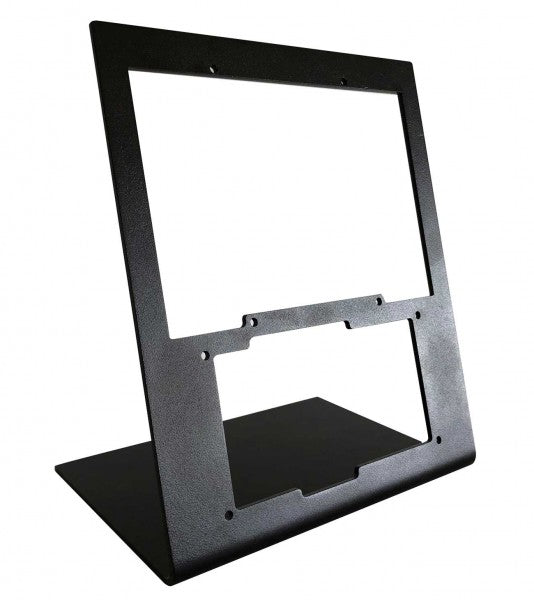
    The RealSimGear - Desktop Stand for RealSimGear GTN650 delivers a solid and ergonomic foundation for your GTN650. Crafted from 3mm steel with a durable powder-coated matte black finish, it offers both sturdiness and style. Its rubber non-slip feet ensure stability during use, while its mounting holes provide compatibility with systems like Honeycomb Alpha, Bravo, and Saitek/Logitech yokes. This stand is a game-changer for anyone looking to create a reliable and clean cockpit setup for their simulation adventures. RealSimGear - Desktop Stand for RealSimGear GTN650 apart? Durable Steel Construction Constructed from 3mm steel and finished with a powder-coated matte black surface, the stand resists wear and adds a sleek touch to your setup. Its robust design ensures it can handle the demands of regular use without wobbling or bending. Non-Slip Stability The stand features rubber non-slip feet, which keep it securely anchored on your desk. This design minimizes movement during use, even during intensive flight simulations, giving you peace of mind. Versatile Mounting Compatibility With pre-drilled holes, the stand is compatible with the Honeycomb Alpha and Bravo systems, Saitek/Logitech yokes, and the RealSimGear Flight Deck Mounting Plate. This versatility makes it an excellent choice for a variety of setups. Compact and Practical Design The stand elevates the GTN650 to an ergonomic viewing angle while maintaining a minimal footprint. It keeps your workspace organized and avoids unnecessary bulk, perfect for streamlined cockpit environments. Pros and Cons Pros Cons Durable 3mm steel construction with powder-coated finish. Only compatible with the RealSimGear GTN650. Rubber feet provide excellent non-slip stability. Does not include additional mounting hardware. Compatible with multiple mounting systems. Specifications Specification Value Material 3mm steel Finish Powder-coated matte black Foot Type Rubber non-slip feet Mounting Holes Compatible with Honeycomb Alpha/Bravo, Saitek/Logitech yoke, RealSimGear Flight Deck RealSimGear - Desktop Stand for RealSimGear GTN650 Compatibility The RealSimGear - Desktop Stand for RealSimGear GTN650 is specifically designed for the GTN650, ensuring a secure and elevated position for this device. It is equipped with mounting holes that support systems like the Honeycomb Alpha and Bravo, as well as Saitek/Logitech yokes, and the RealSimGear Flight Deck Mounting Plate. However, it is not suitable for devices outside this ecosystem, which makes it a dedicated choice for GTN650 users. This stand integrates seamlessly with PC-based flight simulation setups and complements platforms like Microsoft Flight Simulator and X-Plane. However, it is not designed for console compatibility, ensuring it focuses solely on delivering an optimized experience for PC-based flight simulation enthusiasts.

    10 in stock Spedizione in 1-3 giorni lavorativi.

    €62,00

  • RealSimGear - Dual Desktop Stand for RealSimGear G5 for sale on FlightSimZone

    RealSimGear RealSimGear - Dual Desktop Stand for RealSimGear G5

    10 in stock Spedizione in 1-3 giorni lavorativi.

    The RealSimGear - Dual Desktop Stand for RealSimGear G5 brings durability and versatility to your flight simulation setup. Crafted from rugged 3mm powder-coated steel, this stand elevates and securely holds two G5 units, ensuring they remain stable throughout your sessions. With rubber non-slip feet and precise mounting compatibility, it offers an ergonomic and reliable way to configure your instruments, echoing the setup of real-world aviation cockpits for an unparalleled training and simulation experience. What sets the RealSimGear - Dual Desktop Stand for RealSimGear G5 apart? Designed for Dual G5 Units This stand is specifically built to house two G5 units, making it ideal for setups requiring both a Primary Flight Display (PFD) and Horizontal Situation Indicator (HSI). The design ensures seamless integration and proper spacing, allowing users to recreate the layout found in many aircraft panels. Rugged Build Quality Made from 3mm powder-coated steel, the stand offers exceptional durability. Its matte black finish resists wear while complementing the sleek aesthetics of modern simulation setups, ensuring it lasts through countless hours of use. Ergonomic Placement The elevated positioning provided by this stand reduces strain during long sessions and ensures easy access to both G5 units. Its thoughtful design mirrors real cockpit configurations, enhancing the practicality of your setup. Flexible Mounting Compatibility With pre-drilled holes compatible with RealSimGear Flight Deck Mounting Plate, Saitek/Logitech yoke systems, and Honeycomb Alpha and Bravo controls, this stand integrates effortlessly into most flight sim configurations, reducing the need for additional mounting hardware. Pros and Cons Pros Cons Securely holds two G5 units for cohesive setups. Not designed for single-unit configurations. Durable steel construction with a matte black finish. Limited to desk-mounted applications. Compatible with multiple popular mounting systems. Specifications Specification Value Material 3mm steel Finish Powder-coated matte black Features Non-slip rubber feet, mounting screws Capacity Holds 2 x RealSimGear G5 units Mounting Compatibility Flight Deck Plate, Saitek/Logitech, Honeycomb Alpha/Bravo RealSimGear - Dual Desktop Stand for RealSimGear G5 Compatibility The RealSimGear - Dual Desktop Stand for RealSimGear G5 is purpose-built to accommodate two G5 units, making it perfect for those using a PFD/HSI setup. It features mounting holes that align with the RealSimGear Flight Deck Mounting Plate, Saitek/Logitech yoke systems, and Honeycomb Alpha and Bravo controls. This ensures seamless integration with popular hardware configurations while maintaining a stable and ergonomic layout. The stand is optimized for PC-based simulation setups and supports platforms like X-Plane and Microsoft Flight Simulator. However, it does not directly support console-based gaming systems, focusing instead on professional and enthusiast PC configurations. Its compatibility ensures a plug-and-play experience with well-known flight simulation software.

    10 in stock Spedizione in 1-3 giorni lavorativi.

    €82,00

  • RealSimGear Desktop Stand for G500 for sale on FlightSimZone

    RealSimGear RealSimGear Desktop Stand for G500

    10 in stock Spedizione in 1-3 giorni lavorativi.

    The RealSimGear Desktop Stand for G500 is an elegant and functional solution for flight sim enthusiasts seeking a secure mount for their G500 avionics. Made from durable 3mm powder-coated steel, it combines strength with a sleek matte black finish. Its rubber non-slip feet ensure stability even during the most intense maneuvers. Compatible with popular mounting systems and yokes, this stand provides an elevated, ergonomic position for your hardware, enhancing your overall flight simulation experience. What sets the RealSimGear Desktop Stand for G500 apart? Durable Steel Construction Crafted from 3mm steel with a powder-coated finish, this stand resists wear and tear while maintaining a refined look. It's built to last, providing a dependable foundation for the G500 and other compatible hardware. Non-Slip Stability The rubberized feet prevent sliding, offering a secure hold even during high-torque adjustments or enthusiastic use. This feature keeps your setup stable and in place without requiring constant adjustments. Versatile Mounting Options Its base accommodates various mounting systems, including the RealSimGear Flight Deck Mounting Plate, Saitek/Logitech yoke systems, and Honeycomb Alpha and Bravo products. This flexibility makes it an excellent choice for multi-device setups. Optimized Ergonomics The elevated design positions your G500 at a comfortable viewing angle, reducing strain and enhancing your control experience. The design ensures you can access your controls effortlessly during flights. Pros and Cons Pros Cons Sturdy 3mm steel construction ensures durability. Limited to desk-mounted setups. Rubberized feet provide exceptional stability. Powder-coated surface may show scratches over time. Compatible with multiple yoke and mounting systems. Elevated design improves viewing and accessibility. Specifications Specification Value Material 3mm steel Finish Powder-coated matte black Features Non-slip rubber feet, mounting screws Compatibility RealSimGear Flight Deck Mounting Plate, Saitek/Logitech, Honeycomb Alpha & Bravo RealSimGear Desktop Stand for G500 Compatibility The RealSimGear Desktop Stand for G500 is designed to fit a range of flight simulation setups seamlessly. It supports the RealSimGear Flight Deck Mounting Plate and is fully compatible with Saitek/Logitech yoke systems, Honeycomb Alpha yoke, and Honeycomb Bravo throttle quadrants. This flexibility ensures it can integrate into diverse configurations, catering to a broad spectrum of flight sim enthusiasts. While its compatibility with dedicated flight hardware is excellent, the stand is limited to desk-mounted applications and does not directly support gaming consoles. However, its universal design allows it to adapt to most PC-based setups, making it a versatile and practical choice for users running flight sims on Windows or other desktop platforms.

    10 in stock Spedizione in 1-3 giorni lavorativi.

    €103,00

  • RealSimGear - Desktop Stand for GTN750 & GTN650 for sale on FlightSimZone

    Virtual Fly RealSimGear - Desktop Stand for GTN750 & GTN650

    10 in stock Spedizione in 1-3 giorni lavorativi.

    The RealSimGear Desktop Stand for GTN750 & GTN650 is a purpose-built solution for flight simulation enthusiasts looking to stabilize and showcase their avionics. Constructed from durable 3mm powder-coated steel, it combines strength with a sleek matte black finish. The rubber non-slip feet and mounting screws ensure a firm grip, even during intense sim sessions. Designed for the GTN750 and GTN650, it provides an elevated, ergonomic platform that enhances usability and keeps your setup organized and functional. What sets the RealSimGear Desktop Stand for GTN750 & GTN650 apart? Sturdy and Sleek Build Made from 3mm powder-coated steel, this stand combines durability with a stylish matte black finish. It resists scratches and wear, ensuring a lasting, polished appearance that fits seamlessly into your sim rig. Enhanced Stability Equipped with rubber non-slip feet, the stand stays firmly in place during even the most demanding simulation sessions. This feature minimizes vibration and movement, giving you peace of mind while focusing on your flight. Wide Compatibility The mounting holes are designed to accommodate a range of systems, including the RealSimGear Flight Deck Mounting Plate, Saitek/Logitech yoke systems, and Honeycomb Alpha and Bravo yokes. This versatility makes it an excellent choice for users with multi-brand setups. Ergonomic Positioning The elevated design of the stand places your GTN750 and GTN650 at an optimal height and angle, reducing strain and making controls more accessible. It’s all about improving the functionality and comfort of your setup. Pros and Cons Pros Cons Sturdy 3mm steel construction for lasting durability. Limited to desk-mounted setups only. Rubber feet prevent sliding during intense use. Not ideal for portable or travel use. Compatible with multiple yoke and mounting systems. Specifications Specification Value Material 3mm steel Finish Powder-coated matte black Features Non-slip rubber feet, mounting screws Compatibility RealSimGear Flight Deck Mounting Plate, Saitek/Logitech, Honeycomb Alpha & Bravo RealSimGear Desktop Stand for GTN750 & GTN650 Compatibility The RealSimGear Desktop Stand for GTN750 & GTN650 is designed with versatility in mind, supporting various mounting systems and hardware configurations. It is fully compatible with the RealSimGear Flight Deck Mounting Plate, as well as Saitek/Logitech yoke systems and Honeycomb Alpha and Bravo yokes. This flexibility makes it a reliable choice for users running mixed-brand hardware in their simulation setups. While it excels with PC-based simulation systems, this stand is not compatible with console-based setups. Its design caters primarily to desktop users, offering stability and integration with popular flight simulation platforms. For gamers using titles like Microsoft Flight Simulator or X-Plane, the stand provides a functional and ergonomic mounting solution, further enhancing their sim rig's performance.

    10 in stock Spedizione in 1-3 giorni lavorativi.

    €135,00

Flight Simulator Panel Accessories for Sale at FlightSimZone
Disponiamo di un'ampia gamma di accessori per cruscotti in vendita. Il nostro marchio più popolare è RealSimGear, grazie alle sue repliche fedeli alla realtà.

Login

Hai dimenticato la password?

Non hai ancora un conto?
Creare un profilo




