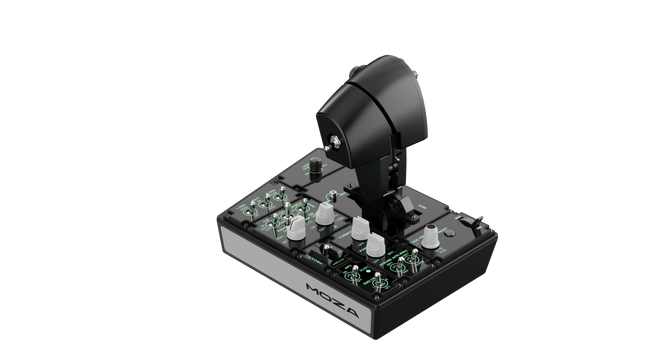
Moza MTP Throttle Panel offre un'esperienza di controllo del volo robusta ispirata agli aerei da caccia basati su portaerei. Il sistema di detent regolabile consente un controllo preciso, che si tratti di gestire i postbruciatori o di simulare i detent centrali nei simulatori spaziali. Il sistema di feedback vibratorio integrato migliora la consapevolezza situazionale, avvisando i piloti di cambiamenti aerodinamici, avvisi di sovravelocità e condizioni di combattimento. Con 27 interruttori programmabili, un joystick ad effetto Hall e impugnature in lega di alluminio, questo pannello dell'acceleratore è progettato per gli appassionati di simulazione di volo che cercano un controllo preciso in ambienti ad alta intensità.
Cosa distingue il Moza MTP Throttle Panel?
Sistema di detent personalizzabile per il massimo controllo Il MTP Throttle consente agli utenti di regolare le posizioni dei detent, rendendolo ideale per impostazioni di postbruciatore, spinta inversa o manovre precise nello spazio. Che si tratti di affinare le curve di potenza o di creare stadi distinti del motore, questa funzione offre una flessibilità non comune in altri sistemi di acceleratore.
Feedback vibratorio integrato per una consapevolezza migliorata A differenza degli acceleratori passivi, il MTP include motori di vibrazione che reagiscono ai dati di telemetria del simulatore. Questo sistema di feedback fornisce avvisi tattili per condizioni come la resistenza aerodinamica, gli avvisi di sovravelocità e i guasti di sistema, offrendo ai piloti un ulteriore livello di consapevolezza situazionale.
27 interruttori programmabili per operazioni di volo complesse La superficie di controllo è dotata di 27 interruttori, tutti configurabili per funzioni essenziali come l'apertura del carrello, l'accensione del motore o i sistemi di combattimento. Il layout ottimizzato garantisce che i comandi siano facilmente accessibili senza bisogno di distrazioni durante il volo.
Joystick ad effetto Hall per una maggiore flessibilità di input Integrato direttamente nell'acceleratore, questo joystick offre un input privo di deriva per regolazioni di controllo precise. Che sia assegnato al trim di beccheggio, agli input del timone o anche alla navigazione della telecamera, il sensore ad effetto Hall garantisce prestazioni costanti senza l'usura dei potenziometri tradizionali.
Pro e contro
Pro
Contro
Sistema di detent regolabile per postbruciatori e simulatori spaziali
Il supporto per il clamp da scrivania è venduto separatamente
Feedback vibratorio integrato che reagisce alle condizioni di volo
Supporto solo per PC, nessuna compatibilità con console
27 interruttori programmabili per una mappatura estesa dei comandi
Impugnatura in alluminio resistente con una sensazione tattile
Specifiche
Specifiche
Valore
Dimensioni
277 × 194 × 216 mm
Materiale della scocca
Materiale composito
Materiale dell'impugnatura dell'acceleratore
Leghe di alluminio
Peso
2,1 kg
Interruttori fisici
27
Telemetria vibrazione
Supportato (nessun plug-in richiesto)
Telemetria illuminazione
Supportato (nessun plug-in richiesto)
Piattaforma supportata
PC
Clamp da scrivania
Accessorio opzionale
Piastra di montaggio per scrivania
Accessorio opzionale
Accessori inclusi
Cavo dati, chiave, manuale utente
Compatibilità Moza MTP Throttle Panel
Compatibile con
Non compatibile con
Software MOZA Cockpit per personalizzazione
Piattaforme per console
Pannello MOZA MTLP per configurazione completa del jet da combattimento
Quadranti dell'acceleratore di terze parti
Simulatori di volo basati su PC
MacOS
Progettato per simulatori di volo basati su PC, il MTP Throttle si integra perfettamente con il software MOZA Cockpit, consentendo regolazioni precise per il feedback vibratorio, la mappatura degli interruttori e gli effetti di illuminazione basati sulla telemetria. Si abbina anche al pannello MOZA MTLP, creando un sistema di controllo modulare per jet da combattimento che migliora l'esperienza di decollo e atterraggio.
Compatibilità solo con PC garantisce funzionalità plug-and-play con Microsoft Flight Simulator 2020, Microsoft Flight Simulator 2024 e X-Plane 12. Tuttavia, questo sistema non supporta MacOS o console, quindi gli utenti Xbox e PlayStation dovranno cercare soluzioni di acceleratore compatibili altrove.
Esaurito,
Preordini disponibili. Spedizione prevista tra 2 e 2,5 settimane.
Honeycomb Bravo Throttle Quadrant Lite concentra l’esperienza essenziale del Bravo originale in un pacchetto più compatto e mirato. Le quattro leve intercambiabili con tensione regolabile scorrono con un rassicurante peso meccanico, mentre la trim wheel integrata a basso profilo e alta risoluzione consente di regolare finemente il beccheggio con precisione alla punta delle dita. Dal clic deciso della leva del carrello con indicazione LED alla soddisfacente trazione del freno di stazionamento, questa unità offre input affidabili per configurazioni GA e bimotore senza risultare eccessiva per chi sta costruendo il proprio cockpit per la prima volta.
Cosa distingue l’Honeycomb Bravo Throttle Quadrant Lite?
Semplificato Senza Essere Ridotto A differenza di molti throttle quadrant orientati all’ingresso che sacrificano flessibilità, il Bravo Lite mantiene vivo il DNA modulare. Gli utenti sottolineano spesso come conservi leve intercambiabili e personalizzazione dei flap detent, riducendo al contempo parte della complessità del Bravo completo. Il risultato è un’unità compatta che supporta comunque configurazioni monomotore e bimotore, rendendola interessante per i piloti che passano da throttle in plastica di base.
Tensione Regolabile con Feedback Meccanico La resistenza delle leve può essere regolata secondo le preferenze personali, facendo una differenza percepibile durante le variazioni di potenza in salita e le regolazioni in finale corta. Molti sim pilot evidenziano come il movimento risulti fluido e controllato, non morbido o elastico. Rispetto ai quadrant più leggeri, il Bravo Lite offre una sensazione più stabile nelle transizioni di throttle, soprattutto quando montato saldamente con la dual mounting solution inclusa.
Trim e Comandi a Terra Integrati La trim wheel integrata e il freno di stazionamento eliminano la necessità di periferiche separate. L’alta risoluzione della trim wheel è spesso lodata per aiutare a stabilizzare gli avvicinamenti senza continue micro-correzioni tramite tastiera o pulsanti dello yoke. Aggiungendo la leva del carrello con indicatore di stato LED, si ottiene una conferma visiva chiara durante i cicli del carrello — un piccolo dettaglio che aumenta notevolmente la sicurezza nei circuiti trafficati.
Ottimizzazione Mirata per MSFS Progettato pensando a Microsoft Flight Simulator, il Bravo Lite beneficia di supporto driver dedicato e profili scaricabili. Gli utenti apprezzano la rapidità con cui viene configurato in MSFS 2020 e 2024 rispetto ad alcuni quadrant USB generici. Allo stesso tempo, rimane compatibile con X-Plane e Prepar3D, offrendo una versatilità maggiore rispetto a molte unità throttle specifiche per singolo simulatore in questa fascia di prezzo.
Pro e Contro
Pro
Contro
Leve intercambiabili compatibili con diversi tipi di aeromobili.
Meno controlli rispetto alla versione completa Bravo.
Tensione regolabile che migliora la sensazione del throttle.
Solo PC e Mac, nessun supporto console.
Trim wheel integrata per un controllo preciso del beccheggio.
Indicatore LED del carrello per un chiaro feedback di stato.
Specifiche
Specifica
Valore
Product Name
Honeycomb Bravo Throttle Quadrant Lite
Dimensions (L x H x W)
40 x 13 x 27 cm (15.75 x 5.19 x 10.63 inches)
Throttle Levers
Quattro leve intercambiabili con tensione regolabile
Flap System
Inserti flap detent intercambiabili inclusi
Trim Control
Trim wheel integrata a basso profilo e alta risoluzione
Landing Gear Lever
Con indicatore di stato LED
Parking Brake
Leva integrata
Connectivity
USB-C to USB-A (cavo incluso)
System Compatibility
PC e Mac
Software Compatibility
Microsoft Flight Simulator 2020/2024, FSX, Prepar3D V3-V5, X-Plane 11/12
Included in the Box
Throttle Quadrant Lite, Flap detent inlays, Interchangeable levers (Commercial & GA), USB-C cable, Dual mounting solution, Quick Start Guide
Compatibilità Honeycomb Bravo Throttle Quadrant Lite
Category
Compatibility
Operating Systems
Microsoft Windows (64-bit), macOS
Connection
USB-C to USB-A (porta USB standard richiesta)
Supported Simulators
MSFS 2020/2024, FSX, Prepar3D V3–V5, X-Plane 11/12
Il Bravo Lite si collega tramite USB standard, rendendo semplice l’integrazione con yoke, stick e pedali del timone di vari marchi. Si abbina particolarmente bene con gli yoke Honeycomb Alpha e con altro hardware modulare grazie alla dual mounting solution. È progettato esclusivamente per sistemi PC e Mac e non funziona in modo indipendente senza un computer collegato.
Dal lato simulatore, è ottimizzato per Microsoft Flight Simulator 2020 e 2024, con driver LED dedicati e profili aeromobile scaricabili. Funziona anche con X-Plane 11 e 12, FSX e Prepar3D V3–V5 tramite riconoscimento USB HID standard. Non è compatibile con console Xbox, poiché si basa su driver e architettura USB per PC anziché su firmware certificato per console.
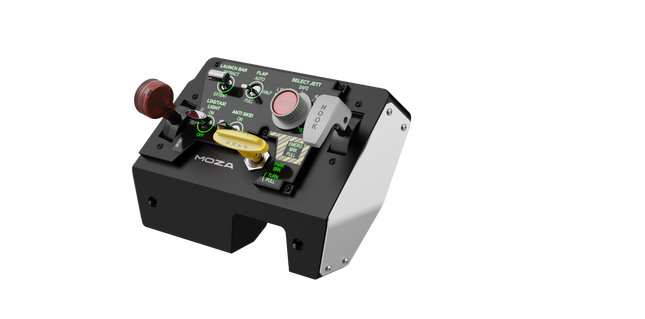
Moza MTLP Take-off Landing Panel porta l'essenza delle operazioni dei jet da combattimento nel cockpit domestico con un sistema di controllo robusto e tattile progettato per i piloti di simulazione seri. Progettato sulla base del pannello di atterraggio dell'F/A-18, offre una disposizione degli interruttori intuitiva che consente input rapidi e istintivi senza fare affidamento sulla conferma visiva. Il meccanismo autentico del freno di stazionamento fornisce un rimbalzo solido e meccanico che sembra provenire da un vero jet da combattimento. Con 25 segnali di interruttore programmabili e sensori ad effetto Hall per una maggiore precisione, questo pannello colma il divario tra interazione virtuale e pratica manuale nel cockpit.
Cosa distingue il Moza MTLP Take-off Landing Panel?
Progettato per il controllo tattile – Modellato sul pannello di atterraggio dell'F/A-18, questa configurazione prioritizza un'operazione istintiva. La disposizione degli interruttori consente ai piloti di gestire le funzioni critiche dell'aereo tramite il tatto, riducendo la necessità di distogliere lo sguardo dallo schermo. Questo tipo di rafforzamento tattile è essenziale per ambienti ad alta velocità come i voli da combattimento e gli atterraggi su portaerei.
Precisione del sensore Hall per le funzioni principali – A differenza degli interruttori meccanici standard, il MTLP integra sensori ad effetto Hall negli input principali come le leve del carrello di atterraggio e dell'arresto di coda. Questi sensori garantiscono affidabilità a lungo termine e precisione costante degli input, eliminando la deriva o il degrado legato all'usura nel tempo.
Costruito per resistere all'uso ripetuto – La costruzione in lega di alluminio utilizzata nella leva del freno, nella leva dell'arresto di coda e nel carrello di atterraggio assicura durabilità. Questi componenti possono sopportare ingaggi ripetuti e vigorosi, rendendo il pannello un investimento a lungo termine per gli appassionati di volo che richiedono robustezza meccanica.
Integrazione senza soluzione di continuità con l'ecosistema Moza – Il MTLP è progettato per funzionare senza problemi con il Moza MTP Throttle Panel, formando una configurazione di controllo del jet da combattimento coesa. Tramite il software Moza Cockpit, gli utenti possono sincronizzare gli effetti di illuminazione legati alla telemetria e personalizzare la configurazione dei pulsanti per adattarla al proprio stile di volo.
Pro e Contro
Pro
Contro
Modellato sul pannello di atterraggio dell'F/A-18
Clamp da scrivania venduto separatamente
Sensori ad effetto Hall per precisione e longevità
Compatibilità limitata con PC
25 segnali di interruttore programmabili per un controllo esteso
Compatibile con l'ecosistema Moza per una configurazione completa da combattimento
Specifiche
Specifiche
Valore
Dimensioni
196,5 × 134,7 × 149 mm
Materiale della struttura
Materiali compositi
Materiale della leva del freno
Leghe di alluminio
Peso
680g
Segnali di interruttore
25
Illuminazione telemetrica
Sì (nessun plugin aggiuntivo richiesto)
Piattaforma supportata
PC
Clamp da scrivania
Accessorio opzionale
Accessori inclusi
Cavo dati, manuale utente
Compatibilità del Moza MTLP Take-off Landing Panel
Compatibile con
Non compatibile con
Moza MTP Throttle Panel
Pannelli di acceleratore di terze parti
Software Moza Cockpit per la personalizzazione
Piattaforme per console
Simulazioni di volo su PC
MacOS
Progettato per simulatori basati su PC, il MTLP si integra perfettamente con il Moza MTP Throttle Panel per creare una suite di controllo in stile jet da combattimento. Il pannello è configurato tramite il software Moza Cockpit, che consente ampie personalizzazioni, inclusi gli effetti di illuminazione legati alla telemetria. Tuttavia, non supporta i pannelli di acceleratore di terze parti, il che significa che la piena funzionalità è meglio ottenuta all'interno dell'ecosistema Moza.
Compatibilità solo con PC garantisce supporto per i principali simulatori di volo, ma MacOS e le console non sono supportate. Gli appassionati di simulazione di volo che utilizzano Microsoft Flight Simulator 2020, Microsoft Flight Simulator 2024 e X-Plane 12 troveranno il pannello riconosciuto nativamente, offrendo funzionalità plug-and-play diretta tramite USB. Tuttavia, gli utenti alla ricerca del supporto per Xbox o PlayStation dovranno considerare hardware alternativo.
Esaurito,
Preordini disponibili. Spedizione prevista tra 2 e 2,5 settimane.
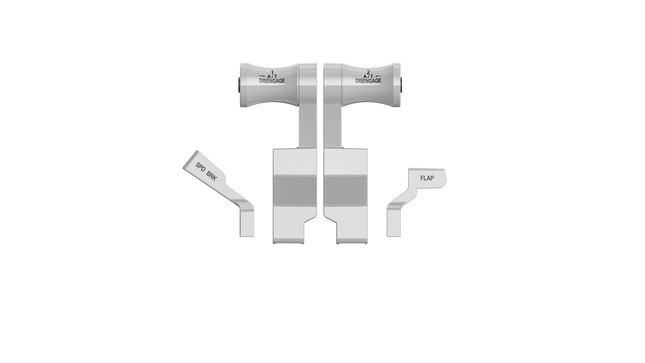
WINCTRL URSA MINOR 32 Throttle Metal / 32 PAC Metal brings airline-style control to the desktop with satisfying mechanical feedback and thoughtful cockpit cues. The standout element is the metal core throttle structure with contactless Hall sensors, giving the levers a firm, confident movement that feels deliberate rather than flimsy. Add to that the flaps and speed brake levers with authentic position limiters, and each action—from extending flaps to deploying spoilers—has a distinct mechanical rhythm that keeps your hands engaged throughout the flight.
What Sets the WINCTRL URSA MINOR 32 Throttle Metal / 32 PAC Metal apart?
Airliner-Style Lever Mechanics The throttle pack focuses heavily on airline-style interaction. The flap lever includes five defined positions with a pull mechanism and mechanical stops, while the speed brake lever features multiple limiter stages including a locked half position. Pilots often point out how these physical cues make routine procedures—like configuring flaps on approach—feel more deliberate compared to smooth, unrestricted levers found on generic throttle quadrants.
Metal-Core Construction With Hall Sensors The internal structure of the flap and speed brake assemblies uses metal components rather than lightweight plastic linkages. Combined with high-resolution Hall sensors, the result is smooth lever tracking without contact wear. Users commonly note that the levers maintain consistent movement over time, especially during frequent adjustments such as spoiler deployment or flap retraction in busy traffic patterns.
Detailed Cockpit Interaction Features Small details elevate the experience, including the long-travel RESET push button and the parking brake lever using a pull-and-turn mechanism. These little touches may seem minor on paper, but they change how the controls feel in practice. Sim pilots often appreciate these mechanical distinctions because they create clear feedback for each function rather than relying on generic toggle switches.
Synchronized Backlighting With Sim Data The throttle system includes lighting that synchronizes with the simulator in real time, reflecting aircraft states directly on the hardware. Community feedback frequently highlights how this makes night flights easier to manage, as illuminated controls help locate switches quickly without relying on screen overlays or keyboard shortcuts.
Pros and Cons
Pros
Cons
Metal lever cores provide sturdy mechanical movement.
Designed primarily for airliner-style flight operations.
Hall sensors reduce wear and signal drift.
Requires desk space or cockpit mounting.
Flap and spoiler detents improve control awareness.
Synchronized lighting helps during night operations.
Specifications
Specification
Value
Product Name
WINCTRL URSA MINOR 32 Throttle Metal / 32 PAC Metal
Construction
Metal core structure for flap and speed brake levers
Sensors
Contactless Hall effect sensors
Flap Lever Positions
5 positions with pull mechanism and position stops
Speed Brake Lever
Multiple limiters including half-position lock
Parking Brake
Pull-and-turn lever mechanism
RESET Button
Long-travel push button with bottom activation
Backlighting
Simulator-synchronized lighting
Rudder Trim
Integrated RUD TRIM rotary switch with position display
Software
WW SIMAPP Pro configuration software
Material
Metal core with structural frame
WINCTRL URSA MINOR 32 Throttle Metal / 32 PAC Metal Compatibility
Platform
Compatibility
Connection Type
USB plug-and-play interface
Configuration Software
WW SIMAPP Pro
Mounting Options
Desktop placement or cockpit mounting
The throttle system connects through standard USB, allowing it to operate alongside other flight hardware such as yokes, sticks, rudder pedals, and radio panels from different manufacturers. The design integrates particularly well with other Winwing cockpit components, including compatible rudder pedal systems where the RUD TRIM rotary switch can interact with Cyber Taurus pedal hardware. It functions as a typical USB HID device, meaning it can coexist with mixed-brand cockpit setups without proprietary hardware requirements.
The throttle pack is designed primarily for PC-based flight simulation systems and integrates with simulator data through configuration software. It does not rely on a closed ecosystem and can be used with various cockpit rigs or desk-mounted setups. Console compatibility is not supported, as the device depends on PC drivers and simulator integration software.
In terms of simulator support, the hardware works with Microsoft Flight Simulator, X-Plane, and Prepar3D, where lighting synchronization and input mapping can be configured through WW SIMAPP Pro. It is intended for PC flight simulation platforms and is not designed for Xbox or PlayStation consoles, which typically require certified peripherals.
The Virtual Fly V3RNIO TPM brings classic throttle control to your flight simulation setup with incredible accuracy and tactile charm. This Vernier-style throttle quadrant is perfect for single-engine piston aircraft, offering levers that replicate the feel and functionality of real aircraft controls. Made from durable metal and equipped with Hall effect sensors, it combines longevity with precision. With adjustable resistance and fine-tuning dials, every movement feels deliberate, making it a remarkable addition to any sim enthusiast's setup.
What sets the Virtual Fly V3RNIO TPM apart?
Authentic Vernier Design The Vernier-style control system replicates the distinct push-pull and rotary adjustments found in real single-engine aircraft. This design makes it uniquely suitable for fine-tuning throttle, propeller, and mixture settings with unmatched accuracy.
Hall Effect Sensors Unlike conventional potentiometers, the magnetic Hall sensors used in the V3RNIO TPM are wear-free and provide incredibly precise inputs. This ensures consistent performance, even after extensive use, making it a dependable choice for long-term sim enthusiasts.
Durable Metal Construction Built entirely from metal, the V3RNIO TPM is rugged and built to last. Its weight and solidity not only make it durable but also contribute to a grounded, realistic feel during use.
Adjustable Resistance The throttle lever features adjustable resistance, allowing users to customize the feel to their preference. Whether you prefer a light touch or a firmer grip, this feature lets you fine-tune the control experience to match your style.
Pros and Cons
Pros
Cons
Durable metal build ensures long-term reliability.
Limited to single-engine piston aircraft setups.
Hall sensors provide wear-free and accurate operation.
Higher price point compared to simpler alternatives.
Authentic Vernier-style controls for precise adjustments.
Adjustable resistance allows for personalized control feel.
Specifications
Specification
Value
Material
Durable metal construction
Sensors
Magnetic Hall effect sensors
Control Type
Throttle, Propeller, Mixture (Vernier-style)
Adjustable Resistance
Yes
Engine Compatibility
Single-engine piston aircraft
Connectivity
USB
Virtual Fly V3RNIO TPM Compatibility
The Virtual Fly V3RNIO TPM is compatible with major flight simulation platforms, including Microsoft Flight Simulator (FSX and MSFS2020), Prepar3D, and X-Plane. With USB connectivity, it is easy to integrate into most PC-based simulation systems. The drivers ensure plug-and-play functionality, while tools like FSUIPC allow for additional customization to suit your preferences. This unit is tailored specifically for single-engine piston aircraft, making it less versatile for other types of setups.
This throttle quadrant is optimized for PC-based simulation, ensuring excellent compatibility with a wide range of hardware. It does not support console platforms, emphasizing its focus on delivering precise control for dedicated flight simulation environments. Users seeking a unit for casual or multi-platform gaming should consider alternatives better suited to those needs.
The Virtual Fly TQ3+ throttle quadrant is an expertly engineered piece of equipment designed to elevate your simulation experience. Featuring adjustable resistance and advanced Hall sensors, this unit offers an unparalleled tactile feel and remarkable accuracy. Its all-metal construction not only ensures durability but also delivers a robust and satisfying weight under your hand. This throttle quadrant is tailored for single-engine aircraft, offering dedicated levers for throttle, propeller, and mixture control, making it an essential tool for serious flight sim enthusiasts.
What sets the Virtual Fly TQ3+ apart?
Durable Metal Construction The TQ3+ is crafted from sustainable metal, ensuring it remains sturdy and dependable over years of use. Its solid build distinguishes it from competitors that often rely on lightweight plastic, giving it a reassuring heft that enhances the overall simulation experience.
Adjustable Resistance The throttle levers allow for fine-tuning resistance, letting users tailor the feel to their exact preferences. This customization feature ensures that every movement feels natural and intentional, especially useful for prolonged flight sessions.
Advanced Hall Sensors Equipped with magnetic Hall sensors, the TQ3+ delivers smooth and wear-free performance. These sensors are more accurate and durable than traditional potentiometers, ensuring consistent input detection even after extended use.
Dedicated Reverse and Feather Positions The throttle levers include physical detents for reverse, feather, and idle cutoff, adding a tactile element that simulates real-world aviation controls. This attention to detail enhances the operational fidelity of single-engine aircraft simulations.
Pros and Cons
Pros
Cons
Durable metal build ensures longevity and stability.
Only supports single-engine aircraft setups.
Adjustable resistance provides personalized control feel.
Higher cost compared to entry-level throttle quadrants.
Hall sensors offer wear-free and precise operation.
Detents for reverse and feather add tactile accuracy.
Specifications
Specification
Value
Material
Sustainable metal construction
Sensors
Magnetic Hall sensors
Adjustable Resistance
Yes
Throttle Configuration
Throttle, Propeller, Mixture
Engine Compatibility
Single-engine only
Connectivity
USB
Virtual Fly TQ3+ Compatibility
The Virtual Fly TQ3+ is compatible with popular flight simulation software, including Microsoft Flight Simulator (FSX and MSFS), Prepar3D, and X-Plane. The throttle is recognized natively by most simulators, allowing for seamless integration. Users can further customize settings using tools like FSUIPC for additional control over the input configuration. However, it is designed for single-engine setups, limiting its scope for multi-engine aircraft enthusiasts.
This throttle quadrant connects via USB, making it compatible with a wide range of PC-based simulation systems. It works excellently as part of a complete flight rig, particularly when paired with other Virtual Fly components. Console compatibility is not supported, as the TQ3+ is focused on delivering exceptional functionality for PC users and simulators.
On the platform side, the TQ3+ excels on PC, where it integrates flawlessly with simulation software. It is not compatible with gaming consoles or casual flight games, ensuring its appeal remains focused on dedicated flight simulation enthusiasts.
The Virtual Fly TQ6+ is a robust throttle quadrant designed for sim pilots who value smooth control and precise inputs. With its magnetic hall effect sensors ensuring accurate, frictionless operation and adjustable lever resistance, this all-metal unit delivers a tactile experience like no other. Weighing in at 3 kilos, it feels substantial and reliable in your setup. Whether you're fine-tuning power or cutting engines, the TQ6+ offers nuanced control for multi-engine prop aircraft enthusiasts.
What sets the Virtual Fly TQ6+ apart?
Robust All-Metal Construction Unlike many plastic competitors, the TQ6+ is built entirely from metal, offering durability and a weighty, premium feel. This makes it not only reliable for long-term use but also gives it a steady presence on your desk or rig, even during intense sessions.
Magnetic Hall Effect Sensors The use of hall effect sensors ensures frictionless and wear-free operation, providing consistent accuracy over time. These sensors are praised by users for their reliability and ability to maintain smooth operation without degradation.
Adjustable Lever Resistance Customizing the resistance of each throttle lever lets you match the controls to your flying preferences. Whether you prefer a light touch or a firm resistance, this feature allows for a tailored experience.
Plug-and-Play Convenience Compatible with major simulators like MSFS, X-Plane, and P3D, the TQ6+ is easy to set up. Recognized automatically by most software, it saves time while still offering advanced customization options for those who want more control.
Pros and Cons
Pros
Cons
Durable all-metal construction ensures long-term reliability.
Colored lever buttons are not interchangeable.
Magnetic sensors provide smooth and accurate operation.
Higher price point than some competitors.
Adjustable lever resistance allows for personalized control feel.
Specifications
Specification
Value
Material
All-metal construction
Weight
3 kg
Sensors
Magnetic hall effect sensors
Adjustable Resistance
Yes
Compatibility
MSFS, X-Plane, P3D
Virtual Fly TQ6+ Compatibility
The Virtual Fly TQ6+ is designed to integrate seamlessly with major flight simulators. It works perfectly with Microsoft Flight Simulator (FSX and MSFS), X-Plane, and Prepar3D, ensuring broad compatibility for sim enthusiasts. Its plug-and-play nature means it is recognized automatically by most simulators, while also supporting advanced customization through tools like FSUIPC.
In terms of hardware, the TQ6+ supports various flight setups, thanks to its solid build and standard USB connection. However, it’s primarily geared for PC use and does not offer native console compatibility. PC pilots will appreciate its straightforward connection and the ability to configure settings to their exact preferences within their simulator's controls menu.




