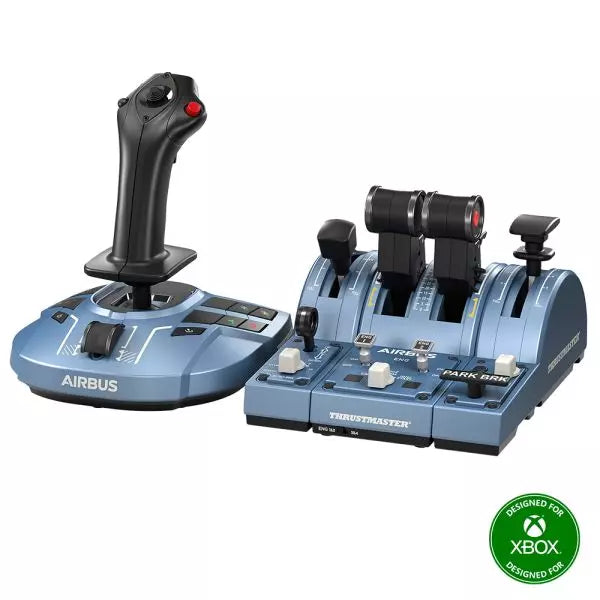
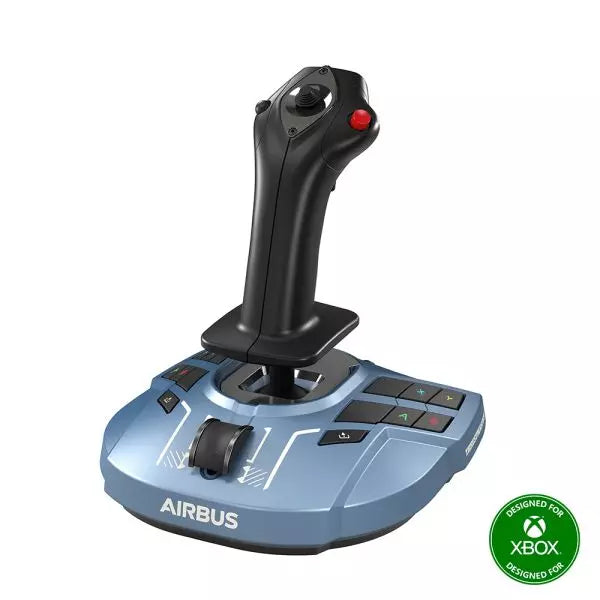
The TCA Captain Pack X Airbus Edition is an exciting leap for flight sim enthusiasts who dream of commanding the cockpit of an Airbus A320. Combining the ergonomic replicas of the Airbus sidestick and quadrant, it delivers a feature-rich experience inspired by authentic aviation controls. From the tactile feedback of its 31 action buttons to the satisfying resistance of the throttle’s detents, this setup immerses you in every aspect of flight. Whether you're handling precise approaches or testing the thrust reverser, this package elevates your sim flights to a whole new level.
What sets the TCA Captain Pack X Airbus Edition apart?
Airbus-Authentic Design The sidestick and quadrant are true 1:1 scale replicas, giving you the same control layout and feel as the real Airbus A320. With this attention to detail, everything from the landing gear lever to the speed brake mimics the actual aircraft, making your setup as close to a real cockpit as possible.
Thrust Reverser Mechanism A rare addition to home flight sim controllers, the built-in thrust reverser adds depth to your landing sequences. It’s a unique feature that brings added realism to your sessions, especially when combined with the quadrant's detailed throttle detents.
Integrated Ecosystem Hub Simplified connectivity is a game-changer with the new hub design. Connect all your Thrustmaster Airbus accessories—rudder pedals, add-ons, and more—using a single USB cable. This design minimizes clutter and enhances compatibility with Xbox Series X|S and PC platforms.
Versatility and Modularity The sidestick offers customizable button head modules and can adapt for left-handed, right-handed, or central cockpit positions. This makes the controller versatile for solo flights or co-pilot setups, catering to both casual simmers and serious enthusiasts.
Pros and Cons
Pros
Cons
Authentic Airbus-inspired layout enhances flight realism.
Limited compatibility with non-Airbus-style setups.
Thrust reverser adds depth to landing procedures.
No force feedback or vibration features included.
Integrated hub reduces cable clutter significantly.
Specifications
Specification
Value
Sidestick Dimensions
7.7” x 7.7” x 8.9” (195 mm x 195 mm x 225 mm)
Quadrant Dimensions
7.5” x 9.3” x 3.3” (190 mm x 235 mm x 85 mm)
Sidestick Weight
1.7 lb (787 g)
Quadrant Weight
2 x 1.2 lb (2 x 530 g)
Package Contents
Sidestick, Quadrant, Add-on Modules, USB Cable, Connectors
Connectivity
USB-C to USB-A, 2x SATA cables
TCA Captain Pack X Airbus Edition Compatibility
The TCA Captain Pack X Airbus Edition integrates seamlessly with the Thrustmaster T.Flight Rudder Pedals (TFRP) and the Thrustmaster Pendular Rudder (TPR) systems, as well as with other add-ons like the TM Flying Clamp. Its Ecosystem Hub makes it easier than ever to connect all components using a single USB cable, supporting both Xbox Series X|S and PC platforms. However, the quadrant’s Airbus-specific design may not suit enthusiasts looking for a Boeing-style setup or generic controls.
On the gaming front, it’s fully compatible with Microsoft Flight Simulator 2020 and integrates automatically on both PC and Xbox Series X|S. This pack also supports various other titles on Xbox and PC with customizable mappings, though it may not work with older consoles or unsupported games.
MOZA MA3F Electronic Flight Control Modules R capture the distinctive workflow of the Airbus A320 flight deck with hardware that feels satisfying every time you dial in a heading or adjust altitude. The dual-rail spring-loaded push/pull mechanism recreates the signature operation of Airbus autopilot controls, while custom segmented displays faithfully mirror Airbus-specific character formatting and spacing. Every knob, button, and illuminated indicator works together to make route management, climb planning, and approach setup feel remarkably natural throughout every stage of flight.
What Sets the MOZA MA3F Electronic Flight Control Modules R apart?
Airbus Push/Pull Controls Done Properly – One feature that consistently stands out is the custom dual-rail push/pull mechanism. Instead of using a basic spring-loaded encoder, the controls deliver distinct travel and resistance that closely match Airbus operating procedures. Many experienced Airbus sim pilots appreciate how this makes managed and selected mode changes feel much more deliberate while reducing accidental inputs during busy phases of flight.
Displays That Capture Airbus Character – The segmented displays have been carefully designed to reproduce the distinctive appearance of Airbus FCU readouts, including character spacing and formatting. Rather than looking like generic digital displays, they blend naturally into an Airbus cockpit. Enthusiasts often point to details like these as the difference between simply operating a simulator and enjoying a convincing airline cockpit environment.
Expandable to Match Your Cockpit – Whether you choose the FCU on its own, pair it with a single EFIS module, or install the complete Electronic Flight Control Module suite, the system grows alongside your cockpit. Builders appreciate this flexibility because it allows gradual upgrades while maintaining a consistent appearance and control layout throughout the simulator.
Purpose-Built for Dedicated Airbus Flying – Seamless integration with MOZA Cockpit software, synchronized lighting, and support for leading Airbus aircraft make the system especially attractive for airliner enthusiasts. Community feedback often highlights how easy it is to configure while still providing extensive customization for display lighting, controls, and cockpit organization.
Pros and Cons
Pros
Cons
Excellent Airbus-style push/pull autopilot controls.
Designed specifically for Airbus aircraft.
Displays accurately reproduce Airbus FCU formatting.
Requires a Windows PC.
Multiple configurations suit evolving cockpit builds.
Synchronized lighting enhances cockpit consistency.
Specifications
Specification
Value
Product Type
Airbus A320-style FCU and EFIS control system
Available Configurations
EFIS
Display Type
Custom Airbus-style segmented displays
Autopilot Control Mechanism
Dual-rail spring-loaded push/pull controls
Lighting
Independent display, character, and status illumination
Software Integration
MOZA Cockpit
Supported Platform
PC
Mounting Options
Included bracket, aluminum profile, 75 mm VESA mount
Extended Function
Optional EFIS extended-function control mode
MOZA MA3F Electronic Flight Control Modules R Compatibility
Hardware
Compatibility
Mounting Systems
Included bracket, aluminum-profile rigs, 75 × 75 mm VESA mounts
MOZA Cockpit Software
Supported for telemetry synchronization and configuration
Cockpit Layouts
FCU only, single EFIS, or complete EFCM suite
Flight Simulator
Compatibility
Microsoft Flight Simulator
Default Airbus A320/A330 and supported Airbus add-ons
X-Plane
Compatible with Airbus aircraft including ToLiss models
Third-Party Aircraft
Fenix A320, FlightFactor A320, ToLiss series, and other Airbus airliners
Built for PC flight simulation, the MA3F Electronic Flight Control Modules R work seamlessly with MOZA Cockpit software, providing synchronized lighting, telemetry integration, and straightforward configuration. Included bracket mounting, aluminum-profile compatibility, and 75 mm VESA support make installation simple whether you're assembling a desktop setup or a dedicated Airbus cockpit.
The modular design allows builders to begin with a single FCU or expand into a complete Electronic Flight Control Module suite over time. Independent adjustment of display brightness, character illumination, and status lighting helps maintain a consistent cockpit appearance during daytime departures and late-night arrivals.
Compatible with Microsoft Flight Simulator and X-Plane, the system supports default Airbus A320 and A330 aircraft together with leading third-party aircraft including Fenix A320, ToLiss, FlightFactor A320, and other popular Airbus airliners. The supported platform is PC; gaming consoles and macOS are not supported.
Il Pacchetto Pannelli MOZA FMP18 trasforma una semplice scrivania in un cockpit in stile portaerei grazie a controlli progettati con cura, display nitidi e un layout ispirato al leggendario F/A-18. I display quadrati da 7,1 pollici a dimensioni reali offrono immagini nitide con risoluzione di 800 × 800, mentre il sistema modulare magnetico a sostituzione rapida rende estremamente semplice modificare la configurazione dei pannelli. Ogni pulsante, encoder rotativo e interruttore offre un feedback meccanico preciso, rendendo procedure di avviamento, navigazione e missioni di combattimento coinvolgenti dalla prima checklist fino all'ultimo appontaggio sulla portaerei.
Che cosa distingue il Pacchetto Pannelli MOZA FMP18?
Display quadrati che riproducono fedelmente il layout dell'aereo: Molti pannelli cockpit concorrenti utilizzano schermi rettangolari tradizionali che compromettono le proporzioni originali. L'FMP18 utilizza invece display quadrati dedicati da 7,1 pollici, offrendo una rappresentazione molto più fedele della disposizione dei DDI e dell'AMPCD dell'aeromobile. Gli appassionati di simulatori di volo apprezzano particolarmente un hardware che evita immagini deformate e garantisce una presentazione più pulita durante ogni fase del volo.
Espansione modulare magnetica: Il sistema di sostituzione rapida magnetico con connessioni pogo-pin integrate rende il cambio della configurazione dei pannelli semplice e immediato. Invece di ricostruire l'intero cockpit per ogni velivolo, è possibile sostituire rapidamente i moduli compatibili mantenendo una postazione ordinata. Questa flessibilità è sempre più apprezzata dagli appassionati che pilotano regolarmente diversi aeromobili senza dedicare uno spazio permanente a ciascuno di essi.
Controlli progettati per un utilizzo preciso: Con 95 pulsanti, 16 encoder rotativi e sette interruttori a levetta, ogni comando restituisce un feedback meccanico ben definito. I piloti apprezzano l'hardware che permette di confermare ogni input attraverso il solo tatto, riducendo la necessità di distogliere lo sguardo durante gli impegnativi appontaggi su portaerei o la gestione avanzata dei sistemi d'arma. Il risultato è un flusso di lavoro nel cockpit naturale e altamente soddisfacente.
Facile integrazione nei cockpit esistenti: La compatibilità VESA standard da 75 × 75 mm, il morsetto da scrivania regolabile e il supporto per profili in alluminio consentono all'FMP18 di adattarsi facilmente a un'ampia varietà di postazioni per simulatori. Il software MOZA Cockpit Software permette inoltre di assegnare i display e personalizzare i controlli, rendendo il pacchetto ideale sia per cockpit dedicati alle operazioni su portaerei sia per l'espansione di un simulatore già esistente.
Pro e contro
Pro
Contro
I display quadrati riproducono fedelmente le proporzioni del cockpit reale.
Richiede uno spazio considerevole sulla scrivania o nel cockpit.
Il sistema magnetico a sostituzione rapida semplifica il cambio dei pannelli.
Compatibile esclusivamente con PC.
Pulsanti ed encoder rotativi eccellenti con un preciso feedback tattile.
Il montaggio VESA flessibile si adatta a numerose configurazioni di cockpit.
Specifiche tecniche
Specifica
Valore
Tipo di prodotto
Pacchetto pannelli frontali per cockpit in stile portaerei
Dimensioni
527 × 456 × 212 mm (morsetto incluso)
Peso
4,15 kg
Materiale della scocca
Materiali compositi
Display
Tre display quadrati da 7,1 pollici
Risoluzione del display
800 × 800
Frequenza di aggiornamento
60 Hz
Pulsanti
95
Encoder rotativi
16
Interruttori a levetta
7
Frequenza di polling USB
1000 Hz
Porte di connessione
USB 3.0 Type-A ×3, USB Type-C ×4
Opzioni di montaggio
Morsetto da scrivania, profili in alluminio, VESA standard 75 × 75 mm
Piattaforma supportata
PC
Accessori inclusi
Cavi USB 3.0 Type-A (3), cavi USB Type-C (4)
Compatibilità del Pacchetto Pannelli MOZA FMP18
Hardware
Compatibilità
Sistemi di montaggio
Morsetto da scrivania ufficiale, strutture con profili in alluminio, supporti VESA 75 × 75 mm
MOZA Cockpit Software
Assegnazione dei display e configurazione completa dei controlli
Pannelli modulari
Supporta moduli compatibili con sistema magnetico a sostituzione rapida
Piattaforma
Compatibilità
PC
Supportata
Progettato per la simulazione di volo su PC, l'FMP18 si integra perfettamente con MOZA Cockpit Software per l'assegnazione dei display, la configurazione dei pulsanti e la personalizzazione degli encoder rotativi. Il sistema magnetico a sostituzione rapida consente di sostituire rapidamente i moduli compatibili, mentre il montaggio VESA standard e il supporto per profili in alluminio rendono l'installazione semplice in numerose configurazioni di cockpit.
Il morsetto regolabile incluso supporta sia l'intero gruppo sia i singoli moduli, permettendo di adattarne facilmente la posizione senza sostituire il sistema di montaggio. La struttura leggera in materiale composito riduce inoltre il carico sul telaio del simulatore mantenendo un'elevata rigidità.
Il PC è la piattaforma supportata, rendendo il pacchetto ideale per i principali simulatori di volo compatibili con hardware cockpit personalizzato. Le console di gioco non sono supportate e il sistema è progettato per utenti che realizzano postazioni dedicate alla simulazione di volo su scrivania o in un cockpit completo.
MOZA MA3F Flight Computer Display brings Airbus-style flight management into the home cockpit with a layout that rewards every button press and data entry. The 5.1-inch high-resolution IPS display keeps flight plans, procedures, and navigation pages crisp and easy to read, while the die-cast aluminum front panel gives every interaction a reassuring sense of solidity. Heavy-actuation keys, synchronized lighting, and thoughtful workflow tools make programming an arrival or revising a route feel satisfying from the first waypoint to the final approach.
What Sets the MOZA MA3F Flight Computer Display apart?
Keys That Feel Purpose-Built – Many flight management units focus almost entirely on appearance, but the MA3F pays equal attention to how every key behaves. The heavy-actuation dome switches and rigid silicone keycaps create a firm, deliberate press that users frequently appreciate during longer flights. The stable key action also helps reduce accidental inputs when quickly updating flight plans or changing performance data.
Practical Features Beyond Flight Planning – Built-in checklist pages and three integrated whiteboard pages make this more than a simple MCDU replica. Pilots can keep notes, approach briefings, frequencies, or clearance information directly on the unit instead of relying on paper or a second monitor. Many cockpit builders value these workflow additions because they reduce clutter while keeping important information close at hand.
Premium Construction Without Excessive Bulk – The die-cast aluminum front panel gives the MA3F a reassuringly solid feel while keeping overall weight manageable for desktop or cockpit installations. Combined with the sharp IPS display and clean surface finish, it stands out as a polished piece of hardware that integrates naturally into dedicated Airbus flight decks.
Broad Airbus Ecosystem Support – The MA3F supports numerous Airbus aircraft across Microsoft Flight Simulator and X-Plane, including respected third-party add-ons such as the Fenix A320, Toliss aircraft, and FlightFactor A320. Combined with customizable fonts and synchronized lighting, it adapts easily as simulator libraries continue to grow.
Pros and Cons
Pros
Cons
Excellent tactile keys with firm mechanical feel.
Limited to Airbus flight management systems.
Sharp IPS display with customizable fonts.
PC platform only.
Built-in checklist and whiteboard pages add utility.
Die-cast aluminum front panel feels exceptionally solid.
Specifications
Specification
Value
Product Type
Airbus-style Flight Computer Display (MCDU/FCD)
Display Size
5.1-inch IPS
Front Panel Material
Die-cast aluminum alloy
Body Material
ABS + PC
Connection
USB Type-C 2.0
Rated Voltage
5V
Rated Current
900mA
Supported Platform
PC
Mounting Options
Desktop stand, 75 × 75 mm VESA mount
Included Accessories
Data cable, desktop stand
MA3F Dimensions
277.9 × 145.5 × 29.6 mm
MA3F Weight
588 g
MB7F Dimensions
277.9 × 145.5 × 32 mm
MB7F Weight
646 g
MOZA MA3F Flight Computer Display Compatibility
Hardware
Compatibility
MOZA Cockpit Software
Supports telemetry synchronization and lighting control
Mounting
Desktop stand and 75 × 75 mm VESA mount
Connection
USB Type-C 2.0
Flight Simulator
Compatibility
Microsoft Flight Simulator
Supports Airbus A320/A330 family
X-Plane
Supports Airbus aircraft including Toliss models
Third-Party Aircraft
Compatible with Fenix A320, FlightFactor A320, and others
Built for PC flight simulation, the MA3F integrates with MOZA Cockpit software for synchronized lighting and configuration. A USB Type-C connection keeps installation straightforward, while the included desktop stand and 75 × 75 mm VESA compatibility make it equally suitable for desktop use or permanent cockpit installations.
The compact dimensions and lightweight construction make it easy to install alongside other Airbus controls without placing excessive strain on a cockpit frame. The display is intended to complement dedicated Airbus flight decks while remaining flexible enough for modular home cockpit projects.
Compatible with Microsoft Flight Simulator and X-Plane Airbus aircraft, the MA3F supports the A320 and A330 families along with respected third-party aircraft including Fenix A320, Toliss, and FlightFactor A320. The supported platform is PC; Mac systems and gaming consoles are not supported.
Honeycomb Foxtrot Aviation Stick è progettato per i piloti che preferiscono un sidestick in mano e una scrivania libera davanti a sé. Fin dal primo movimento, il sistema di resistenza lineare fluida senza center detent offre una sensazione scorrevole e controllata, ideale per input in stile Airbus e manovre acrobatiche. All’interno, la risoluzione a 16-bit con tecnologia di sensori Hall Effect traduce anche i più sottili movimenti del polso in un controllo preciso a schermo. Aggiungi la tensione regolabile e un design completamente ambidestro, e ottieni uno stick che trasmette solidità e intenzionalità, non una sensazione da giocattolo.
Cosa distingue l’Honeycomb Foxtrot Aviation Stick?
Filosofia di Controllo Senza Center Detent Molti stick si affidano a un evidente scatto centrale, che può rendere le piccole correzioni troppo meccaniche. Il sistema di resistenza lineare del Foxtrot elimina questo punto centrale, creando una transizione fluida lungo l’intera escursione dell’asse. I piloti che volano su aeromobili Airbus apprezzano particolarmente questa soluzione, poiché rispecchia più fedelmente il comportamento del sidestick e consente correzioni dolci di beccheggio e rollio senza contrastare un “clic” a molla al centro.
Sinergia tra Sensori e Risoluzione Con una risoluzione a 16-bit abbinata a sensori Hall Effect, il Foxtrot garantisce un rilevamento dell’input pulito e senza contatto. Gli appassionati sottolineano spesso la costanza nel tempo — nessun picco, nessun degrado graduale tipico dei potenziometri meccanici. Le regolazioni fini del trim in avvicinamento o gli input di rollio controllati in acrobazia risultano stabili e prevedibili, soprattutto rispetto agli stick entry-level che possono mostrare jitter vicino al centro.
Resistenza e Ergonomia Configurabili La tensione regolabile consente di adattare lo stick alle preferenze personali, sia che si prediligano input leggeri con la punta delle dita sia una resistenza più marcata per movimenti controllati. In combinazione con il design ambidestro dell’impugnatura, il Foxtrot si adatta a configurazioni sia per mancini che per destrimani. Gli utenti con cockpit compatti evidenziano spesso quanto sia versatile in diverse posizioni di seduta, inclusi montaggi centrali o laterali.
Alta Densità di Switch Senza Confusione Tra i 5 switch a due vie, i 4 pulsanti azione programmabili, il POV hat, il grilletto, i rocker e il pannello rotativo multi-via, lo stick offre un’elevata flessibilità di input. Ciò che colpisce è la disposizione logica dei controlli; i sim pilot menzionano spesso come funzioni quali trim, modalità autopilota o controlli della telecamera possano essere assegnate senza sensazione di affollamento o ricerca alla cieca durante il volo.
Pro e Contro
Pro
Contro
Resistenza lineare senza center detent fluida e precisa.
Nessuna compatibilità nativa con console.
I sensori Hall Effect riducono l’usura nel lungo periodo.
Nessuna base di montaggio dedicata inclusa.
Tensione regolabile adatta a diversi stili di volo.
Ampie opzioni di configurazione per switch e pulsanti.
Specifiche
Specifica
Valore
Product Name
Honeycomb Foxtrot Aviation Stick
Control System
Sistema di resistenza lineare senza center detent
Sensor Technology
Sensori Hall Effect
Resolution
16-bit
Tension Adjustment
Resistenza dello stick regolabile
Switches
5 switch a due vie
Action Buttons
4 pulsanti programmabili
Rotary Panel
Controlli rotativi a 3, 4 e 5 vie
Grip Design
Ambidestro
Connection
USB-C to USB-A cable
System Compatibility
PC e Mac
Included in the Box
Foxtrot Aviation Stick, USB-C to USB-A Cable, Quick Start Guide (EFIGS)
Download Support
Profili Basic Bindings (XML) per MSFS 2024
Compatibilità Honeycomb Foxtrot Aviation Stick
Platform
Compatibility
Operating Systems
PC e Mac
Connection Type
USB-C to USB-A interfaccia USB diretta
Primary Sim Support
MSFS 2024 (XML bindings), MSFS, X-Plane, Prepar3D
Il Foxtrot Aviation Stick si collega tramite USB standard, consentendo un’integrazione semplice nella maggior parte delle configurazioni di cockpit desktop. Funziona perfettamente insieme a throttle quadrants, pedali del timone e pannelli radio di altri marchi importanti grazie alla sua architettura HID plug-and-play. Il suo design ambidestro lo rende adatto a configurazioni sia lato sinistro che destro, incluso il montaggio laterale in stile Airbus. Non è compatibile con console Xbox e non funziona come dispositivo standalone senza un PC o Mac collegato.
Dal punto di vista software, supporta Microsoft Flight Simulator 2024 con profili di binding XML dedicati e opera con simulatori PC popolari come Microsoft Flight Simulator (2020), X-Plane e Prepar3D tramite mappature manuali o della community. Non è progettato per piattaforme basate su console, poiché si affida al riconoscimento driver nativo PC/Mac piuttosto che a firmware certificato per console.
Moza MTLP Take-off Landing Panel porta l'essenza delle operazioni dei jet da combattimento nel cockpit domestico con un sistema di controllo robusto e tattile progettato per i piloti di simulazione seri. Progettato sulla base del pannello di atterraggio dell'F/A-18, offre una disposizione degli interruttori intuitiva che consente input rapidi e istintivi senza fare affidamento sulla conferma visiva. Il meccanismo autentico del freno di stazionamento fornisce un rimbalzo solido e meccanico che sembra provenire da un vero jet da combattimento. Con 25 segnali di interruttore programmabili e sensori ad effetto Hall per una maggiore precisione, questo pannello colma il divario tra interazione virtuale e pratica manuale nel cockpit.
Cosa distingue il Moza MTLP Take-off Landing Panel?
Progettato per il controllo tattile – Modellato sul pannello di atterraggio dell'F/A-18, questa configurazione prioritizza un'operazione istintiva. La disposizione degli interruttori consente ai piloti di gestire le funzioni critiche dell'aereo tramite il tatto, riducendo la necessità di distogliere lo sguardo dallo schermo. Questo tipo di rafforzamento tattile è essenziale per ambienti ad alta velocità come i voli da combattimento e gli atterraggi su portaerei.
Precisione del sensore Hall per le funzioni principali – A differenza degli interruttori meccanici standard, il MTLP integra sensori ad effetto Hall negli input principali come le leve del carrello di atterraggio e dell'arresto di coda. Questi sensori garantiscono affidabilità a lungo termine e precisione costante degli input, eliminando la deriva o il degrado legato all'usura nel tempo.
Costruito per resistere all'uso ripetuto – La costruzione in lega di alluminio utilizzata nella leva del freno, nella leva dell'arresto di coda e nel carrello di atterraggio assicura durabilità. Questi componenti possono sopportare ingaggi ripetuti e vigorosi, rendendo il pannello un investimento a lungo termine per gli appassionati di volo che richiedono robustezza meccanica.
Integrazione senza soluzione di continuità con l'ecosistema Moza – Il MTLP è progettato per funzionare senza problemi con il Moza MTP Throttle Panel, formando una configurazione di controllo del jet da combattimento coesa. Tramite il software Moza Cockpit, gli utenti possono sincronizzare gli effetti di illuminazione legati alla telemetria e personalizzare la configurazione dei pulsanti per adattarla al proprio stile di volo.
Pro e Contro
Pro
Contro
Modellato sul pannello di atterraggio dell'F/A-18
Clamp da scrivania venduto separatamente
Sensori ad effetto Hall per precisione e longevità
Compatibilità limitata con PC
25 segnali di interruttore programmabili per un controllo esteso
Compatibile con l'ecosistema Moza per una configurazione completa da combattimento
Specifiche
Specifiche
Valore
Dimensioni
196,5 × 134,7 × 149 mm
Materiale della struttura
Materiali compositi
Materiale della leva del freno
Leghe di alluminio
Peso
680g
Segnali di interruttore
25
Illuminazione telemetrica
Sì (nessun plugin aggiuntivo richiesto)
Piattaforma supportata
PC
Clamp da scrivania
Accessorio opzionale
Accessori inclusi
Cavo dati, manuale utente
Compatibilità del Moza MTLP Take-off Landing Panel
Compatibile con
Non compatibile con
Moza MTP Throttle Panel
Pannelli di acceleratore di terze parti
Software Moza Cockpit per la personalizzazione
Piattaforme per console
Simulazioni di volo su PC
MacOS
Progettato per simulatori basati su PC, il MTLP si integra perfettamente con il Moza MTP Throttle Panel per creare una suite di controllo in stile jet da combattimento. Il pannello è configurato tramite il software Moza Cockpit, che consente ampie personalizzazioni, inclusi gli effetti di illuminazione legati alla telemetria. Tuttavia, non supporta i pannelli di acceleratore di terze parti, il che significa che la piena funzionalità è meglio ottenuta all'interno dell'ecosistema Moza.
Compatibilità solo con PC garantisce supporto per i principali simulatori di volo, ma MacOS e le console non sono supportate. Gli appassionati di simulazione di volo che utilizzano Microsoft Flight Simulator 2020, Microsoft Flight Simulator 2024 e X-Plane 12 troveranno il pannello riconosciuto nativamente, offrendo funzionalità plug-and-play diretta tramite USB. Tuttavia, gli utenti alla ricerca del supporto per Xbox o PlayStation dovranno considerare hardware alternativo.
Moza MH16 Flightstick porta un approccio audace e senza compromessi alla simulazione di volo. Progettato con lega di alluminio di grado aerospaziale, questo flightstick non è solo estetico: è costruito per resistere a sessioni intense senza perdere colpi. Con 27 segnali di input e un joystick ALPS a 8 vie, ogni comando è a portata di mano, pronto per manovre precise. I componenti modulari removibili significano che puoi personalizzare il setup in base alle tue necessità, mentre la costruzione robusta garantisce stabilità anche nelle dogfight più impegnative. Che tu stia volando a bassa quota o entrando in una curva stretta, questo flightstick offre un livello di controllo che ti tiene completamente concentrato.
Cosa distingue il Moza MH16 Flightstick?
Costruito come un vero stick da jet da combattimento – Il design interamente in metallo non è solo per estetica: fornisce la sensazione e la solidità di un vero sistema di controllo di un aereo. Rispetto ai concorrenti in plastica, l'MH16 offre una presa più solida e robusta, riducendo la flessione e garantendo durabilità nel tempo.
Modulare e espandibile – A differenza di molti flightstick fissi, l'MH16 presenta moduli removibili con connessioni a pin pogo, che consentono una personalizzazione semplice. Questo significa che gli utenti possono sostituire o aggiornare i componenti senza dover rifare il cablaggio o smontare l'intera unità.
Personalizzazione estesa – Con 27 segnali di input e un joystick ALPS a 8 vie, i piloti possono mappare i comandi esattamente come vogliono. Questo livello di flessibilità nell'assegnazione dei pulsanti e delle funzioni lo rende una scelta ideale per chi desidera un controllo completo sulla propria esperienza di simulazione.
Compatibilità plug-and-play senza problemi – Nessuna configurazione complessa, nessun driver extra necessario: basta collegare e partire. Il connettore a 5 pin per aviazione garantisce una trasmissione sicura e stabile dell'input, rendendo il flightstick immediatamente operativo con la maggior parte delle basi di volo sul mercato.
Pro e Contro
Pro
Contro
Corpo in lega di alluminio di grado aerospaziale offre durabilità e presa solida.
Esaurito—la disponibilità potrebbe essere un problema.
I moduli removibili consentono una facile personalizzazione.
Non supporta ufficialmente MacOS.
27 input e joystick ALPS a 8 vie offrono un controllo ampio.
Plug-and-play con la maggior parte delle basi di volo.
Specifiche
Specifiche
Valore
Piattaforma
PC
Materiale principale
Lega di alluminio di grado aerospaziale
Voltaggio nominale
3.3V
Corrente nominale
5A
Connettore
Connettore per aviazione a 5 pin
Modulo asse Z
Opzionale
Dimensioni
99×213.5×132mm
Compatibilità del Moza MH16 Flightstick
Compatibile con
Non compatibile con
PC (sistemi basati su Windows)
MacOS
La maggior parte delle basi di volo con connettore per aviazione a 5 pin
Consolle (PlayStation, Xbox)
Software di controllo MOZA Cockpit
Interfacce USB non standard
Il Moza MH16 Flightstick si integra perfettamente con la maggior parte delle configurazioni di volo su PC, grazie al suo connettore per aviazione a 5 pin e alla funzionalità plug-and-play. Tuttavia, gli utenti Mac dovranno cercare altrove, poiché non esiste un supporto ufficiale per macOS. Gli utenti hanno segnalato una solida integrazione con una varietà di basi, rendendolo un'opzione flessibile per chi ama combinare e abbinare il proprio equipaggiamento.
Per quanto riguarda le piattaforme di gioco, l'MH16 è esclusivamente per utenti PC. Funziona senza problemi con simulatori di volo basati su Windows come DCS, MSFS2020 e X-Plane, ma i giocatori su console non sono fortunati: non c'è supporto nativo per PlayStation o Xbox. Tuttavia, se sei un appassionato di simulatori di volo, questo non è un problema, poiché il PC rimane la piattaforma di riferimento per i piloti seri.
The TCA Sidestick X Airbus Edition is a sleek and versatile flight stick designed to bring Airbus-inspired handling into your hands. With an ergonomic design modeled on the Airbus A320, it offers an incredible feel for any virtual pilot. Featuring a built-in throttle with thrust reverser and 21 remappable buttons, this sidestick delivers control options galore for every phase of flight. Its integrated Ecosystem Hub simplifies setup, allowing seamless compatibility with Xbox Series X|S and PC. A perfect balance of function and flair, this sidestick is ready for takeoff!
What sets the TCA Sidestick X Airbus Edition apart?
1:1 Airbus Ergonomics Crafted as a true-to-life Airbus A320 sidestick replica, this device provides a tactile connection that mirrors the real-world aircraft. The design makes it ideal for Airbus enthusiasts or anyone wanting to elevate their sim experience with authentic shaping and layout.
Swappable Head Modules With four interchangeable head button modules, you can adapt the stick’s configuration for left-handed, right-handed, or central positioning. This modularity allows personalized setups, whether you're flying solo or as part of a crew.
Integrated Ecosystem Hub The built-in hub brings the entire Thrustmaster Airbus ecosystem to Xbox Series X|S. Connecting add-ons like throttles or pedals is now streamlined, reducing cable clutter to a single USB connection for the PC or console.
Enhanced Throttle with Thrust Reverser The improved throttle in the base features a thrust reverser, a rare addition for airliner flight sticks. It delivers greater control during landings, especially in demanding runway conditions.
Pros and Cons
Pros
Cons
Ergonomic Airbus-inspired design feels natural and intuitive.
Not compatible with PlayStation systems.
Swappable modules allow flexible configurations.
Some users report light base weight causing movement.
Integrated Ecosystem Hub simplifies connectivity across devices.
Throttle lacks fine adjustment for some sim setups.
Built-in throttle includes thrust reverser for better landing control.
Specifications
Specification
Value
Width
7.7 inches / 195 mm
Depth
7.7 inches / 195 mm
Height
8.9 inches / 225 mm
Weight
787 g
Package Contents
1 TCA Sidestick X, 4 swappable joystick head modules, 1 USB-C cable, User manual
TCA Sidestick X Airbus Edition Compatibility
The TCA Sidestick X Airbus Edition integrates smoothly into the Thrustmaster ecosystem. It connects to add-ons like the TCA Quadrant Airbus Edition and T.Flight Rudder Pedals, expanding its functionality. The built-in hub reduces clutter by allowing multiple devices to link through a single USB connection to your PC or Xbox Series X|S. However, this sidestick is not compatible with PlayStation systems, limiting its audience to PC and Xbox users.
On the gaming side, the sidestick is fully compatible with Microsoft Flight Simulator 2020 on both PC and Xbox, making it an excellent choice for simmers on those platforms. While its compatibility with other simulators like X-Plane and DCS World isn't officially listed, PC users should experience no issues thanks to its flexible design and connectivity options.
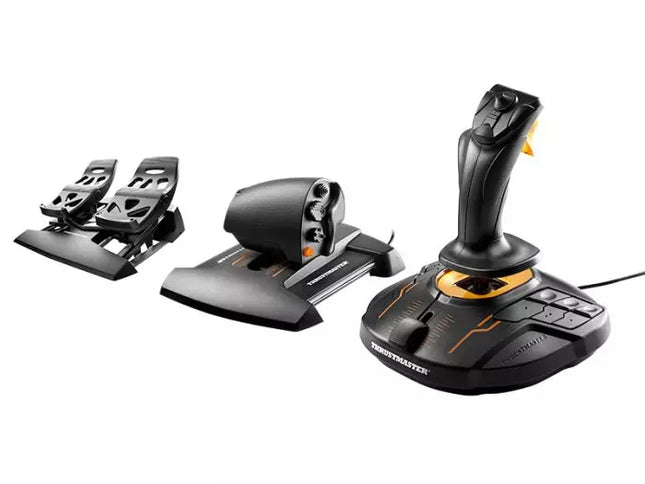
The T.16000M FCS Flight Pack is a standout choice for sim pilots who demand precise and versatile controls. This all-in-one pack features the T.16000M FCS joystick, TWCS throttle, and TFRP rudder pedals, delivering an intricate control setup ideal for aviation and space simulation. With its smooth sliding mechanisms, programmable software, and magnetic sensors for lasting accuracy, it’s a tactile and technical delight. From pitch-perfect inputs to ergonomic designs, this setup transforms your desk into a cockpit, putting you in command of every maneuver.
What sets the T.16000M FCS Flight Pack apart?
Unrivaled Longevity with Magnetic Sensors The H.E.A.R.T HallEffect technology relies on magnetic sensors for unmatched durability, ensuring the joystick’s accuracy remains unchanged over years of use. Unlike potentiometer-based systems, this design eliminates wear and tear, providing consistently smooth and precise inputs that hold steady even during intensive flight campaigns.
Comprehensive All-in-One Control System With a joystick, throttle, and rudder pedals included, the T.16000M FCS Flight Pack offers a complete setup for advanced simmers. This trio eliminates the need for additional peripherals, letting users seamlessly coordinate complex flight maneuvers while reducing clutter with integrated, ergonomic components.
Customizable for Every Pilot’s Needs The T.A.R.G.E.T programming software allows users to map buttons, axes, and macros to fit their unique playstyle. Whether flying civilian aircraft, jets, or navigating through space, this flexibility ensures optimal functionality tailored to specific games and scenarios, providing control tailored to your exact specifications.
Smooth and Comfortable Motion Both the TWCS throttle and TFRP rudder pedals utilize S.M.A.R.T technology for smooth sliding. These components provide intuitive resistance and glide, making every adjustment precise and comfortable. The ergonomic placement further enhances accessibility, even during extended play sessions.
Pros and Cons
Pros
Cons
Exceptional accuracy thanks to HallEffect magnetic sensors.
Not compatible with consoles like Xbox or PlayStation.
All-in-one system reduces need for additional peripherals.
Pedals may feel too small for larger feet.
Customizable controls via T.A.R.G.E.T software.
Throttle lacks a detent for afterburner or idle.
Smooth sliding motion enhances precision and comfort.
Specifications
Specification
Value
Components
Joystick, throttle, rudder pedals
Compatibility
Windows 10, 8, 7, Vista (32-bit & 64-bit)
Connection Type
USB
Joystick Axes
4 (including twist rudder)
Buttons
30 across all components
Rudder Technology
S.M.A.R.T sliding motion
Throttle Travel Range
3.2 inches (80 mm)
Color
Black with orange accents
T.16000M FCS Flight Pack Compatibility
The T.16000M FCS Flight Pack is fully compatible with PCs running Windows 10, 8, 7, and Vista (both 32-bit and 64-bit). Its USB connection ensures straightforward integration with most setups, while the T.A.R.G.E.T software enhances compatibility by allowing users to program the system to function as a single USB device. The pack seamlessly integrates with other Thrustmaster peripherals, such as the MFD panels, providing a cohesive ecosystem for ambitious flight sim setups.
While this system excels on PC, it is not compatible with consoles like Xbox or PlayStation, making it unsuitable for console-based simmers. The pack also works harmoniously with popular simulation titles like Microsoft Flight Simulator, X-Plane, and Elite Dangerous. However, its lack of native support for MacOS limits its use for Apple users, so check your platform’s compatibility before diving into your next flight adventure.
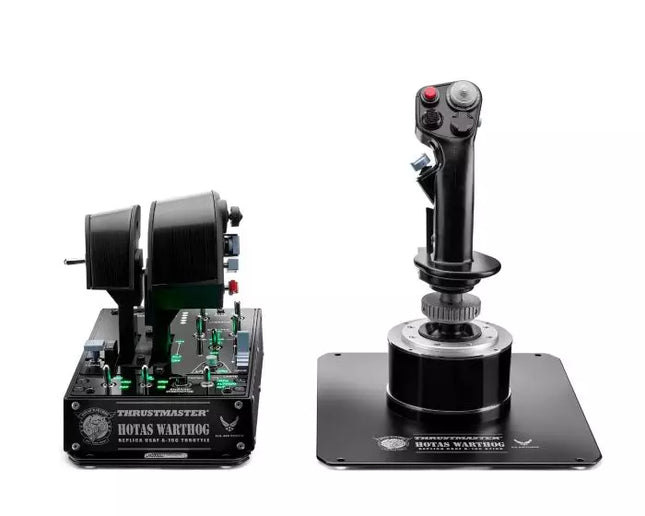
HOTAS WARTHOG is a flight simulation enthusiast’s dream. Designed to replicate the U.S. Air Force A-10C joystick and throttle controls, this joystick brings realistic functionality and impressive precision to the virtual cockpit. With its fully metal construction, H.E.A.R.T Hall Effect AccuRate Technology sensors, and magnetic throttle sensors, the HOTAS WARTHOG delivers a solid, immersive feel that lasts for years. Whether you’re flying for hours or fine-tuning every input, this joystick setup offers a satisfying and durable experience that stands out in the world of flight sims.
What sets the HOTAS WARTHOG apart?
Authentic A-10C Aircraft Replica The HOTAS WARTHOG features an exact replica of the U.S. Air Force's A-10C joystick, dual throttles, and control panel. The attention to detail extends to the metal construction and accurate button placements, which create a more convincing and rewarding flying experience. This level of realism is rare in the world of flight sim peripherals and appeals to users who demand precision in both design and function.
Durable All-Metal Construction Unlike many competitors, the HOTAS WARTHOG boasts a full metal frame across the joystick and throttle, making it a tank in terms of durability and feel. Users frequently note the substantial weight and the robust, industrial-quality switches and buttons. This sturdy design ensures the HOTAS WARTHOG will handle intensive use for years without showing signs of wear and tear, while also offering a premium tactile experience that’s hard to match.
Advanced Sensor Technology The H.E.A.R.T (HallEffect AccuRate Technology) ensures that the joystick and throttles provide superior precision with 16-bit resolution. This results in inputs that remain accurate and smooth over time without degrading, even after extended use. The technology behind this setup guarantees that every movement you make is reflected instantly in the simulation, with no mechanical drift or wear as you continue flying.
Customizable and Programmable Features With 55 fully programmable buttons, 2 four-way hats, and even 5 programmable LEDs, the HOTAS WARTHOG offers an extraordinary level of customization. Whether you need to tweak functions for different aircraft or streamline your setup for specific missions, the T.A.R.G.E.T software suite ensures that all these controls can be easily configured to match your preferences and provide seamless integration with flight simulators.
Pros and Cons
Pros
Cons
All-metal construction for durability and realism.
Heavy design may not be suitable for all setups.
Highly precise H.E.A.R.T sensor technology for accurate inputs.
Large form factor may take up significant desk space.
Extensive customization with 55 programmable buttons.
Specifications
Specification
Value
Joystick Construction
Metal
Throttle System
Dual throttle, metal handles
Total Buttons
55 programmable buttons
Weight
14 lbs
Control Panel
15 buttons, TRIM wheel, backlighting
Hats and Switches
2 four-way hats, 1 POV hat, 1 mouse hat
Sensor Technology
H.E.A.R.T Hall Effect AccuRate Technology
Detachable Components
Joystick and throttle handles
HOTAS WARTHOG Compatibility
The HOTAS WARTHOG is primarily designed for use with PC and features comprehensive software support through the T.A.R.G.E.T programming suite, which allows for deep customization and integration across various flight simulators. While it does not support console gaming, it is compatible with many popular flight simulation games available on PC, including DCS World and Microsoft Flight Simulator. Additionally, the HOTAS WARTHOG works seamlessly with other Thrustmaster flight peripherals like rudder pedals and MFD cockpit panels, providing a cohesive simulation experience.
As a USB-connected device, the HOTAS WARTHOG is plug-and-play with Windows PCs, and users can rely on the T.A.R.G.E.T software to further personalize their setup. Unfortunately, it is not compatible with consoles, including PlayStation and Xbox. However, for serious sim pilots who are dedicated to PC flight simulation, this is less of a limitation and more of a focus on fine-tuning the experience for desktop enthusiasts.
The Alpha Flight Controls by Honeycomb Aeronautical is a feature-rich, durable yoke designed to elevate your flight simulation experience. Built with aerospace-grade internal components, it offers a buttery-smooth 180° turn radius and 15 cm of travel along its steel shaft, delivering precision and fluidity in every maneuver. Its integrated switch panel with red LED backlighting replicates real-world avionics, while the ergonomic handle design packs an array of tactile buttons and switches for versatile control. This is a simulator tool for those who appreciate robust design and reliable performance.
What sets the Alpha Flight Controls apart?
Robust Construction Built with a steel shaft and aerospace-grade components, the yoke ensures durability for years of regular use. This sturdiness gives users the confidence to push boundaries without worrying about wear and tear, a significant advantage over its plastic-heavy competitors.
Comprehensive Switch Panel The integrated switch panel with master, alternator, avionics, and light switches is a standout feature. Coupled with an ignition switch, it allows users to simulate pre-flight checks and engine starts accurately, adding a layer of realism many products overlook.
Ergonomic Design and Customization Thoughtfully designed handles include multiple buttons, hat switches, and a push-to-talk button for intuitive control. The array of functions and customizable software profiles cater to both casual sim enthusiasts and aspiring pilots looking to fine-tune their experience.
Cross-Compatible and Future-Ready Mounting points and brackets allow seamless integration with other Honeycomb and Saitek products, making it ideal for those with an expanding home cockpit. Its compatibility with popular simulators ensures versatility for any flight sim setup.
Pros and Cons
Pros
Cons
Durable steel shaft with aerospace-grade components.
Not compatible with older operating systems like Windows 7.
Integrated switch panel with LED backlighting.
Software required for full functionality can be complex to set up.
Compatible with major flight simulators and accessories.
Limited adjustability for handle ergonomics.
Wide 180° turn radius for smooth control inputs.
No included mount for desk setups, requires separate purchase.
Specifications
Specification
Value
Dimensions (Sleeve)
44.8 x 31.4 x 23.7 cm
Dimensions (Carton)
46.2 x 32.7 x 25.5 cm
Travel Length
15 cm
Turn Radius
180°
Compatibility
Windows 10 (64-bit), macOS
Package Contents
Alpha Flight Controls unit, drivers
Alpha Flight Controls Compatibility
The Alpha Flight Controls is compatible with major flight simulators, including Microsoft Flight Simulator 2020, X-Plane 11, and Lockheed Martin Prepar3D (v3-v5). It supports both Windows 10 (64-bit) and macOS, although some features require the Honeycomb Config Tool for optimal use. Notably, older operating systems like Windows 7 and FSX are not supported, which may limit users with legacy setups.
For hardware compatibility, it includes mounting points and brackets designed to pair seamlessly with Honeycomb Bravo Throttle Quadrant and Saitek panels. The yoke integrates effortlessly into a range of cockpit builds, making it an excellent choice for expandable setups. However, note that desk clamps or mounts are sold separately.
In terms of gaming platforms, the Alpha Flight Controls is PC-centric, with no console support. It’s optimized for simulation platforms requiring USB connections and doesn’t cater to Xbox or PlayStation. Its compatibility with varied simulators ensures a flexible and robust option for PC-based flight enthusiasts.
Esaurito,
Preordini disponibili. Spedizione prevista tra 2 e 2,5 settimane.
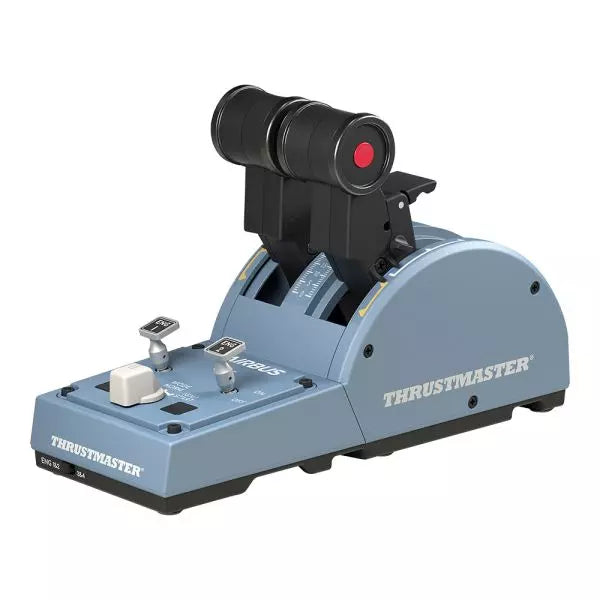
The TCA Quadrant Airbus Edition is a dream come true for flight sim enthusiasts who crave a tactile, civil aviation throttle experience. Featuring dual thrust levers with the iconic Airbus detents and a thrust reverser mechanism, it offers unparalleled control for everything from smooth takeoffs to precise landings. With 16 assignable buttons and contactless magnetic sensor technology ensuring an unlimited lifespan, this throttle quadrant delivers versatility and durability. Its mechanical selectors enable seamless adaptability across various aircraft types, putting endless possibilities at your fingertips.
What sets the TCA Quadrant Airbus Edition apart?
Iconic Airbus Detents and Thrust Reverser The quadrant’s detents replicate the flight modes of Airbus airliners, from "Idle" to "TO/GA." Paired with the thrust reverser mechanism, these details make transitions between power settings a tactile delight, giving users fine-tuned control that’s intuitive and deeply satisfying.
Contactless Magnetic Sensor Technology Unlike many competing products that rely on potentiometers, the TCA Quadrant Airbus Edition uses HallEffect magnetic sensors. These sensors provide an extended lifespan, superior sensitivity, and smoother operation, even during demanding and frequent use.
Expandable Ecosystem The quadrant’s compatibility with additional accessories, like the TCA Quadrant Add-On Airbus Edition or Thrustmaster T.Flight rudder systems, offers an upgrade path for four-engine aircraft setups and advanced control schemes. This modular approach ensures long-term value for dedicated sim pilots.
Customizable Tension and Modes The built-in tensioning screw lets users adjust the throttle feel to match their preferences. Additionally, mechanical selectors allow detents to be disabled, enabling smooth axis transitions for other types of aircraft, such as fighter jets or general aviation planes.
Pros and Cons
Pros
Cons
Accurate Airbus detents for mode-specific control.
Limited compatibility with non-Windows platforms.
Contactless magnetic sensors ensure long-term durability.
Requires additional accessories for multi-engine setups.
Expandable with Thrustmaster’s TCA ecosystem.
Includes 16 buttons for extensive customization.
Specifications
Specification
Value
Width
10.0” / 255 mm
Depth
5.7” / 145 mm
Height
3.3” / 85 mm
Weight
1.2 lb / 530 g
Box Contents
TCA Quadrant, USB cable, attachment rod, connectors
Technology
HallEffect AccuRate Technology (contactless magnetic sensors)
Buttons
16 physical and virtual buttons
TCA Quadrant Airbus Edition Compatibility
Compatible Devices
Details
TCA Sidestick Airbus Edition
Works seamlessly for a full Airbus cockpit experience.
Thrustmaster T.Flight Rudder Pedals
Provides enhanced control for ground and in-flight maneuvers.
Thrustmaster T.A.R.G.E.T Software
Allows programming and testing of complex setups.
The TCA Quadrant Airbus Edition is compatible with Windows 10 and Windows 8 PCs, ensuring integration with popular sim setups. While it excels with the Thrustmaster T.A.R.G.E.T software for added customization, it does not offer native console compatibility, making it ideal for PC-exclusive pilots. Pairing it with accessories like the T.Flight rudder pedals enhances the experience further.
In gaming platforms, the quadrant shines in Microsoft Flight Simulator and X-Plane. Compatibility with games that support multiple button configurations, along with its detent and axis settings, ensures flexibility. It is less suitable for general-purpose gaming setups due to its civil aviation-focused design.