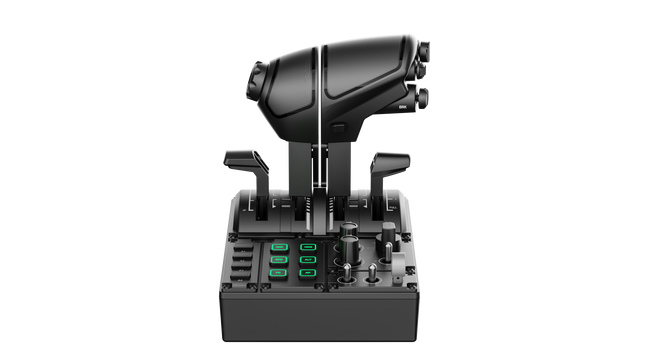
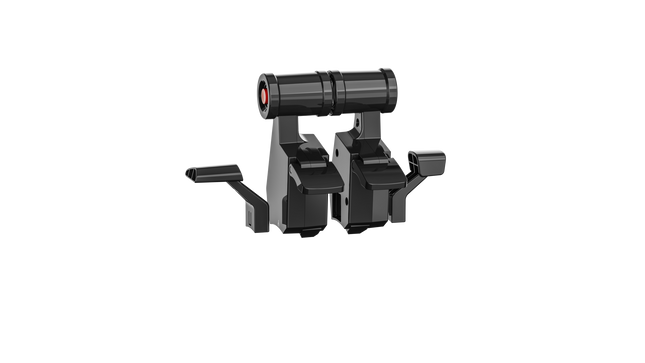
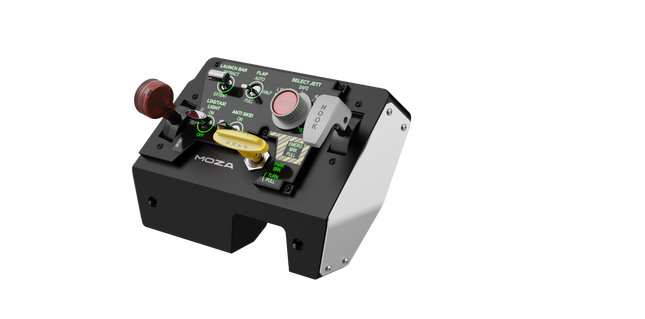
Il MOZA MTQ Throttle Panel è un sistema di controllo di volo modulare progettato per i piloti che desiderano un coinvolgimento tattile e una precisione meccanica in ogni movimento della leva del gas. Con il suo sistema modulare di leve del gas e il layout di controllo versatile, trasforma qualsiasi configurazione di simulatore di volo in un'esperienza di livello cockpit. I fermi meccanici ben calibrati, la costruzione in metallo e l’illuminazione RGB personalizzabile conferiscono a ogni leva una sensazione decisa e funzionale — che si tratti di avviare i motori di un Airbus o di attivare i postbruciatori di un caccia. È la combinazione perfetta tra soddisfazione meccanica e versatilità funzionale.
Cosa distingue il MOZA MTQ Throttle Panel
Esperienza autentica con leve modulari — A differenza delle manette fisse, l'MTQ consente ai piloti di passare tra gli stili di leve Airbus, Boeing e caccia utilizzando un sistema di montaggio su guida. Ogni leva offre i propri fermi meccanici, permettendo agli utenti di percepire i punti di transizione, come l’attivazione della spinta inversa o il blocco del postbruciatore. La precisione tattile di questi fermi è ampiamente apprezzata dai piloti virtuali per la chiarezza fisica che apporta al controllo della manetta.
Layout ergonomico con design funzionale — La superficie di controllo dispone di 10 pulsanti, 3 manopole rotative e 3 interruttori a levetta, tutti posizionati in aree naturali per la mano. Gli appassionati apprezzano il modo in cui evita l’ingombro, offrendo un accesso intuitivo alle funzioni di volo principali senza distrazioni. L’aggiunta di una leva dedicata al carrello di atterraggio aumenta il realismo e rende le transizioni tra le fasi di volo più fluide e istintive.
RGB personalizzabile e integrazione software — Il software MOZA Cockpit offre il pieno controllo sulla luminosità RGB, la logica dei colori e gli effetti di illuminazione basati sulla telemetria. I feedback degli utenti indicano che l’illuminazione non solo risulta spettacolare in un cockpit poco illuminato, ma può essere programmata per riflettere stati di volo come la posizione del carrello o le zone dei fermi della manetta, trasformando la luce in un vero e proprio feedback funzionale anziché in una semplice decorazione.
Feedback meccanico su più assi — L’MTQ è dotato di quattro assi, ciascuno con fermi tattili unici per funzioni come flap e aerofreni. La sensazione di ogni asse è stata calibrata con diversi livelli di resistenza, e il fermo virtuale con clic sulla leva dell’aerofreno aggiunge un tocco di soddisfazione al momento dell’attivazione. I piloti trovano che la coerenza tra gli assi renda questo pannello perfettamente adatto sia alle configurazioni commerciali che militari e dell’aviazione generale.
Pro e Contro
Pro
Contro
I moduli di leva intercambiabili offrono configurazioni di volo versatili.
Nessuna connessione USB autonoma; richiede collegamento alla base MOZA.
Eccellenti fermi tattili sugli assi di manetta e flap.
Supporto limitato per ecosistemi di terze parti.
Layout intuitivo con personalizzazione dell’illuminazione RGB.
Design meccanico durevole con movimento fluido e ammortizzato.
Specifiche tecniche
Specifiche
Valore
Sistema di leve
Leve del gas modulari con meccanismo a guida scorrevole
Stili di manetta inclusi
TQF (Caccia), TQA (Airbus), TQB (Boeing)
Assi
Quattro assi indipendenti con fermi
Pulsanti e controlli
10 pulsanti, 3 manopole rotative, 3 interruttori a levetta, leva del carrello di atterraggio
Illuminazione RGB
Sei pulsanti RGB, 16,7 milioni di opzioni di colore
Connettività
Connessione RJ11 alle basi di volo MOZA
Software
MOZA Cockpit con effetti di illuminazione basati sulla telemetria
Compatibilità del MOZA MTQ Throttle Panel
Hardware compatibile
Dettagli
Basi di volo MOZA (es. AB6)
Connessione RJ11 diretta per un’integrazione plug-and-play
Componenti dell’ecosistema MOZA
Funzionamento fluido tramite il software MOZA Cockpit
Sistemi di terze parti
Supporto limitato; può richiedere adattatori o mappature software
Il MOZA MTQ Throttle Panel si collega direttamente alle basi di volo MOZA tramite RJ11, riducendo l’ingombro dei cavi e garantendo una comunicazione a bassa latenza. Il suo design modulare delle leve lo rende compatibile con le varianti di manetta TQF, TQA e TQB, ognuna progettata per specifici stili di aeromobili. Pur essendo concepito principalmente per l’ecosistema MOZA, gli utenti hanno segnalato una compatibilità limitata con sistemi di terze parti, spesso richiedendo soluzioni con adattatori o mappature personalizzate. L’MTQ si integra perfettamente con i cockpit in alluminio e le configurazioni modulari grazie alla sua base stabile e facile da montare.
Dal lato software, l’MTQ lavora in perfetta sinergia con il software MOZA Cockpit e si integra direttamente con i principali simulatori di volo come Microsoft Flight Simulator 2020/2024, X-Plane 11/12 e DCS World. È completamente compatibile con i PC Windows, ma non supportato su console come Xbox o PlayStation. Con il suo approccio modulare e l’ampia compatibilità nei simulatori, l’MTQ è costruito per soddisfare qualsiasi pilota PC che richieda flessibilità e raffinatezza meccanica.
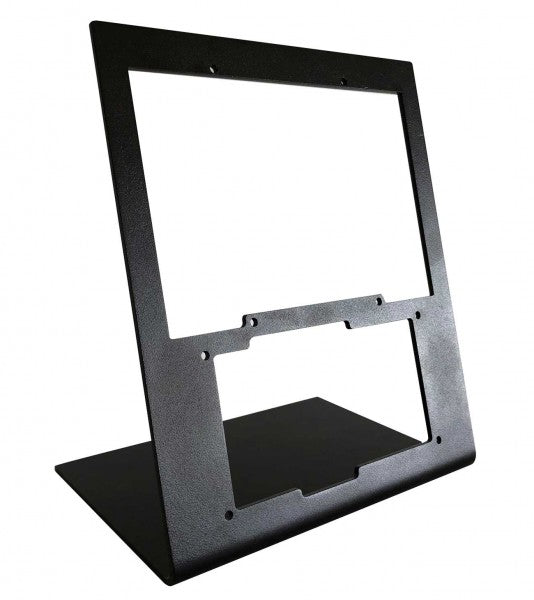
The RealSimGear - Desktop Stand for G1000 Suite offers an exceptional solution for flight simulation enthusiasts who demand stability and organization in their setup. Constructed from durable 3mm painted steel, this stand provides a stable, elevated position for the G1000 Suite's PFD, MFD, and audio panel. Its matte black finish complements any setup, while rubber non-slip feet and precise mounting compatibility ensure effortless integration. This stand is a must-have for those seeking a structured and ergonomic flight sim experience.
What sets the RealSimGear - Desktop Stand for G1000 Suite apart?
Purpose-Built for G1000 Suite This stand is specifically engineered to accommodate the G1000 PFD, MFD, and audio panel. Its tailored dimensions and secure mounting options make it a seamless addition to any flight sim rig, ensuring all three components are perfectly aligned for practical use.
Robust and Durable Construction Crafted from 3mm painted steel, the stand is built to withstand the demands of extended simulation sessions. Its sturdy design minimizes vibration and enhances the overall durability of your setup, providing peace of mind during intense flying scenarios.
Extensive Mounting Compatibility Featuring mounting holes compatible with Saitek/Logitech yokes, Honeycomb Alpha, and Bravo controls, this stand is designed to integrate effortlessly with popular hardware. Whether you're a seasoned pilot or a newcomer, the flexible compatibility simplifies hardware configuration.
Ergonomic Setup Support By elevating the G1000 Suite to an ideal height, this stand minimizes strain and enhances usability. It mirrors cockpit layouts found in actual aircraft, providing an organized and functional configuration for extended flight training or recreational use.
Pros and Cons
Pros
Cons
Perfectly accommodates PFD, MFD, and audio panel.
Higher cost compared to simpler stands.
Durable 3mm painted steel construction resists wear.
Designed exclusively for the G1000 Suite.
Compatible with Saitek/Logitech and Honeycomb systems.
Specifications
Specification
Value
Material
3mm painted steel
Finish
Matte black
Features
Non-slip rubber feet, mounting screws
Capacity
Holds G1000 PFD, MFD, and audio panel
Mounting Compatibility
Saitek/Logitech yokes, Honeycomb Alpha/Bravo
RealSimGear - Desktop Stand for G1000 Suite Compatibility
The RealSimGear - Desktop Stand for G1000 Suite is designed to perfectly accommodate the G1000 Suite's PFD, MFD, and audio panel. It features mounting holes that align with the Saitek/Logitech yoke mounting systems, as well as Honeycomb Alpha and Bravo throttle controls. This compatibility ensures seamless integration into existing setups, minimizing the need for additional hardware or customization. However, it is specifically tailored for the G1000 Suite, which limits its versatility for other configurations.
Designed for PC-based simulation setups, this stand works beautifully with platforms like X-Plane and Microsoft Flight Simulator. It does not directly support console gaming platforms, aligning with its primary focus on professional and enthusiast-grade PC configurations. This ensures an optimal experience when paired with popular flight simulation software.
Moza MTLP Take-off Landing Panel porta l'essenza delle operazioni dei jet da combattimento nel cockpit domestico con un sistema di controllo robusto e tattile progettato per i piloti di simulazione seri. Progettato sulla base del pannello di atterraggio dell'F/A-18, offre una disposizione degli interruttori intuitiva che consente input rapidi e istintivi senza fare affidamento sulla conferma visiva. Il meccanismo autentico del freno di stazionamento fornisce un rimbalzo solido e meccanico che sembra provenire da un vero jet da combattimento. Con 25 segnali di interruttore programmabili e sensori ad effetto Hall per una maggiore precisione, questo pannello colma il divario tra interazione virtuale e pratica manuale nel cockpit.
Cosa distingue il Moza MTLP Take-off Landing Panel?
Progettato per il controllo tattile – Modellato sul pannello di atterraggio dell'F/A-18, questa configurazione prioritizza un'operazione istintiva. La disposizione degli interruttori consente ai piloti di gestire le funzioni critiche dell'aereo tramite il tatto, riducendo la necessità di distogliere lo sguardo dallo schermo. Questo tipo di rafforzamento tattile è essenziale per ambienti ad alta velocità come i voli da combattimento e gli atterraggi su portaerei.
Precisione del sensore Hall per le funzioni principali – A differenza degli interruttori meccanici standard, il MTLP integra sensori ad effetto Hall negli input principali come le leve del carrello di atterraggio e dell'arresto di coda. Questi sensori garantiscono affidabilità a lungo termine e precisione costante degli input, eliminando la deriva o il degrado legato all'usura nel tempo.
Costruito per resistere all'uso ripetuto – La costruzione in lega di alluminio utilizzata nella leva del freno, nella leva dell'arresto di coda e nel carrello di atterraggio assicura durabilità. Questi componenti possono sopportare ingaggi ripetuti e vigorosi, rendendo il pannello un investimento a lungo termine per gli appassionati di volo che richiedono robustezza meccanica.
Integrazione senza soluzione di continuità con l'ecosistema Moza – Il MTLP è progettato per funzionare senza problemi con il Moza MTP Throttle Panel, formando una configurazione di controllo del jet da combattimento coesa. Tramite il software Moza Cockpit, gli utenti possono sincronizzare gli effetti di illuminazione legati alla telemetria e personalizzare la configurazione dei pulsanti per adattarla al proprio stile di volo.
Pro e Contro
Pro
Contro
Modellato sul pannello di atterraggio dell'F/A-18
Clamp da scrivania venduto separatamente
Sensori ad effetto Hall per precisione e longevità
Compatibilità limitata con PC
25 segnali di interruttore programmabili per un controllo esteso
Compatibile con l'ecosistema Moza per una configurazione completa da combattimento
Specifiche
Specifiche
Valore
Dimensioni
196,5 × 134,7 × 149 mm
Materiale della struttura
Materiali compositi
Materiale della leva del freno
Leghe di alluminio
Peso
680g
Segnali di interruttore
25
Illuminazione telemetrica
Sì (nessun plugin aggiuntivo richiesto)
Piattaforma supportata
PC
Clamp da scrivania
Accessorio opzionale
Accessori inclusi
Cavo dati, manuale utente
Compatibilità del Moza MTLP Take-off Landing Panel
Compatibile con
Non compatibile con
Moza MTP Throttle Panel
Pannelli di acceleratore di terze parti
Software Moza Cockpit per la personalizzazione
Piattaforme per console
Simulazioni di volo su PC
MacOS
Progettato per simulatori basati su PC, il MTLP si integra perfettamente con il Moza MTP Throttle Panel per creare una suite di controllo in stile jet da combattimento. Il pannello è configurato tramite il software Moza Cockpit, che consente ampie personalizzazioni, inclusi gli effetti di illuminazione legati alla telemetria. Tuttavia, non supporta i pannelli di acceleratore di terze parti, il che significa che la piena funzionalità è meglio ottenuta all'interno dell'ecosistema Moza.
Compatibilità solo con PC garantisce supporto per i principali simulatori di volo, ma MacOS e le console non sono supportate. Gli appassionati di simulazione di volo che utilizzano Microsoft Flight Simulator 2020, Microsoft Flight Simulator 2024 e X-Plane 12 troveranno il pannello riconosciuto nativamente, offrendo funzionalità plug-and-play diretta tramite USB. Tuttavia, gli utenti alla ricerca del supporto per Xbox o PlayStation dovranno considerare hardware alternativo.
Wingflex A320 EFIS Cube puts Airbus navigation and display management exactly where your hand expects it, combining full-function EFIS and glareshield controls with high-contrast dual-colour displays in a compact 80% scale design. From adjusting barometric pressure to selecting navigation modes, every rotary movement and button press feels deliberate and satisfying. The synchronized backlighting, integrated stand and simple USB connectivity make it an excellent addition to a desktop Airbus cockpit without demanding the space of a full-size flight deck.
What Sets the Wingflex A320 EFIS Cube apart?
More Than Just an EFIS Panel Unlike many desktop EFIS units that focus solely on navigation display controls, the EFIS Cube also integrates important glareshield functions such as Master Warning, Master Caution and CHRONO controls. Having these frequently used functions within easy reach creates a cleaner cockpit workflow and reduces the need to return to the virtual cockpit during busy phases of flight.
Compact Size Without Sacrificing Functionality The 80% scale design makes the panel much easier to accommodate on a typical desktop while preserving the familiar Airbus control layout. Buttons, rotary selectors and push-pull controls remain comfortably spaced, allowing quick adjustments without making the panel feel cramped. It strikes an effective balance between space efficiency and comfortable day-to-day operation.
Consistent Lighting Across Your Cockpit The synchronized brightness system keeps the displays and backlighting aligned with supported simulator lighting, creating a cohesive appearance throughout the cockpit. Combined with Airbus-style fonts and dual-colour displays, important flight information remains crisp and easy to read whether flying during bright daylight or on a dark nighttime arrival.
Built for Modular Cockpit Expansion The EFIS Cube performs perfectly as a standalone controller but is equally suited to growing cockpit projects. It integrates neatly alongside the Wingflex FCU Cube and RMP Combo Cube, allowing sim pilots to expand their Airbus setup gradually while maintaining a consistent appearance, matching lighting and a tidy desktop footprint.
Pros and Cons
Pros
Cons
Integrated glareshield controls reduce additional hardware.
Reduced scale differs from full-size Airbus dimensions.
Dual-colour displays remain easy to read.
Designed specifically for Airbus aircraft.
Synchronized lighting creates consistent cockpit appearance.
Plug-and-play USB connection simplifies installation.
Compact footprint fits comfortably beneath most monitors.
Specifications
Specification
Value
Product
Wingflex A320 EFIS Cube
Scale
80% scale
Primary Function
Airbus Electronic Flight Instrument System control panel
Integrated Functions
EFIS controls and glareshield controls
Display Type
High-contrast dual-colour LCD displays
Display Fonts
Airbus-style fonts
Controls
Buttons, rotary knobs and switches
Lighting
Fully synchronized adjustable backlighting
Connection
USB
Installation
Plug-and-play
Stand
Integrated low-profile desktop stand
Primary Use
Airbus flight simulation
Wingflex A320 EFIS Cube Compatibility
Simulator
Compatible Aircraft
X-Plane
ToLiss A319, A320, A330, A340; Laminar A330
Microsoft Flight Simulator
Fenix A3xx, FlyByWire A320 & A380, iniBuilds A320, A321, A330, A340, A350, Aerosoft A340, Headwind A330
Prepar3D
FSLabs A32x
The Wingflex A320 EFIS Cube connects through USB and can be used either as a standalone Airbus EFIS controller or alongside the Wingflex FCU Cube and Wingflex RMP Combo Cube. Its synchronized brightness allows all compatible Cube modules to maintain a consistent appearance, while the integrated stand provides a comfortable operating angle for desktop cockpits.
The published compatibility list covers a wide selection of Airbus aircraft across the major PC flight simulators. It supports Fenix A3xx, ToLiss Airbus aircraft, FlyByWire A320 and A380, multiple iniBuilds Airbus models, Laminar A330, Aerosoft A340, Headwind A330 and FSLabs A32x. The panel is designed specifically for Airbus aircraft and is not intended for Boeing flight decks or other aircraft with different EFIS layouts.
The EFIS Cube is compatible with Microsoft Flight Simulator 2020 and 2024, X-Plane 11 and 12 and Prepar3D on Windows PCs. It uses a USB connection with plug-and-play operation and is not compatible with Xbox or PlayStation consoles, as dedicated cockpit hardware requires PC-based simulator support.
Wingflex A320 FCU Cube brings Airbus autopilot management into a compact desktop format with full autopilot control functionality and a durable all-aluminum construction. Every heading adjustment, altitude selection and autopilot engagement is handled through tactile knobs and switches that encourage proper cockpit workflows instead of constant mouse clicks. The synchronized dimmer, adjustable backlighting and plug-and-play USB connection make it equally suited to quick evening flights or long IFR sessions, all without demanding the space of a full-size glareshield.
What Sets the Wingflex A320 FCU Cube apart?
Compact Airbus Autopilot Without Sacrificing Core Controls At 80% scale, the FCU Cube preserves the control layout Airbus pilots expect while significantly reducing the space required on a desktop. Independent reviews consistently note that this balance makes it much easier to fit beneath standard monitors than full-size panels, yet the spacing remains comfortable enough for deliberate heading, speed and altitude adjustments during demanding approaches.
Switches That Reward Every Input The AP1, AP2 and A/THR buttons use dedicated axial switches with a 2.5 mm travel, while the remaining controls employ Alps switches with a 2.0 mm stroke. Pilots frequently comment that well-designed tactile controls encourage proper use of the autopilot throughout a flight instead of relying on keyboard shortcuts once the novelty wears off.
Solid Metal Construction Built for Frequent Flying The aluminum housing and matching aluminum control knobs give the FCU Cube a reassuring weight that keeps it planted during repeated adjustments. Reviewers often highlight the rigid construction because it avoids the flex sometimes found in lighter desktop panels, making heading changes and rotary inputs feel consistent throughout longer flying sessions.
Designed to Grow Into a Complete Airbus Cockpit The FCU Cube works well as a standalone autopilot controller, but it is equally at home alongside the Wingflex EFIS Cube and RMP Combo Cube. Shared brightness synchronization creates a unified appearance across the glareshield, allowing cockpit builders to expand their setup gradually instead of replacing hardware every time a new module is added.
Pros and Cons
Pros
Cons
Aluminum housing provides excellent structural rigidity.
Reduced scale differs from full-size Airbus dimensions.
Autopilot switches deliver satisfying tactile feedback.
Designed specifically for Airbus aircraft families.
Plug-and-play USB installation minimizes setup time.
Synchronized lighting complements other Cube modules.
Broad Airbus simulator compatibility across major platforms.
Specifications
Specification
Value
Product
Wingflex A320 FCU Cube
Scale
80% scale
Primary Function
Airbus Flight Control Unit (FCU)
Construction
Aviation-grade aluminum body and knobs
Connection
USB
Installation
Plug-and-play
Autopilot Switches
AP1, AP2 and A/THR axial switches
Autopilot Switch Travel
2.5 mm
Other Button Switches
Japan Alps switches with 2.0 mm travel
Lighting
Adjustable backlighting with synchronized dimmer knob
Primary Use
Airbus flight simulation autopilot control
Wingflex A320 FCU Cube Compatibility
Simulator
Compatible Aircraft
X-Plane
ToLiss A319, A320, A330, A340; Laminar A330
Microsoft Flight Simulator
Fenix A3xx, FlyByWire A320 & A380, iniBuilds A320, A321, A330, A340, A350, Aerosoft A340, Headwind A330
Prepar3D
FSLabs A32x
The FCU Cube connects through USB and operates as either a standalone Airbus autopilot controller or as part of the broader Wingflex Cube ecosystem. It supports brightness synchronization with the Wingflex EFIS Cube and RMP Combo Cube, creating a consistent glareshield appearance. Its compact dimensions also make it easy to integrate into desktop cockpits or modular simulator builds without requiring a full-width Airbus panel.
The published compatibility list covers a broad range of Airbus simulations across the leading platforms. It supports Fenix A3xx, ToLiss Airbus aircraft, FlyByWire A320 and A380, multiple iniBuilds Airbus models, Laminar A330, Aerosoft A340, Headwind A330 and FSLabs A32x. Unlike the RMP Combo Cube, the FCU Cube also supports the FlyByWire A380 and iniBuilds A350, making it one of the most widely compatible Airbus autopilot panels in the Wingflex lineup.
The FCU Cube is designed for Microsoft Flight Simulator, X-Plane and Prepar3D on Windows PCs. It communicates through USB and works with supported Airbus aircraft using Wingflex software integration. It is not compatible with Xbox or PlayStation consoles, as dedicated USB cockpit peripherals of this type require PC-based simulator support.
Wingflex A320 RMP Combo Cube squeezes four useful Airbus control sections into one compact unit, combining RMP, ATC, TCAS and warning-panel functions with high-contrast dual-colour LCD screens. Its physical knobs and illuminated controls give frequency changes and transponder entries a satisfying mechanical rhythm, without consuming the entire desk. The 80% scale and 13-degree tilt keep everything comfortably visible, while USB connectivity makes installation refreshingly direct. Apparently, proper radio management does not require a full cockpit shell and several kilometres of wiring.
What Sets the Wingflex A320 RMP Combo Cube apart?
Four Control Sections Earn Their Desk Space Rather than reproducing only the radio management panel, the unit combines RMP, ATC, TCAS and glareshield warning functions behind one compact face. This gives solo pilots considerably more usable control than a single-purpose radio panel. Hands-on coverage particularly values the integrated radio section because it places communication and surveillance controls beside the Airbus autopilot hardware, where they can be reached without returning to the virtual cockpit.
Compact Dimensions Without Tiny Controls The 80% scale reduces the panel’s footprint while retaining physical rotary controls and readable displays. Review coverage of the complete Cube system found the format notably easier to position beneath a conventional monitor than full-width Airbus hardware. The compromise is sensible for desktop pilots: it saves space without shrinking everything into fiddly miniature controls that require the fingertips of a concert pianist and the patience of an air-traffic controller.
Lighting That Behaves as One Cockpit System The RMP Combo Cube can synchronize its brightness with the Wingflex FCU Cube and EFIS Cube, producing consistent illumination across the complete glareshield arrangement. Independent reporting also notes that each module can still operate separately, so the RMP does not require the complete Cube set. That flexibility is useful for gradual cockpit builds, while synchronized backlighting prevents one panel glowing like a supermarket sign beside two carefully dimmed instruments.
Straightforward Setup, With Aircraft-Specific Boundaries User feedback describes the initial setup as notably simple, and the panel operates through a direct USB connection with Wingflex integration software. However, reports also show that behaviour may vary between aircraft and simulator versions, particularly when a specific function has not yet been implemented. It is therefore far less troublesome than custom wiring, but compatibility should still be checked by aircraft rather than assumed from the presence of an Airbus badge.
Pros and Cons
Pros
Cons
Four integrated sections reduce separate hardware requirements.
Reduced scale differs from full-size cockpit dimensions.
Dual-colour displays provide clear frequency information.
Aircraft support varies between simulator platforms.
Synchronized lighting complements other Wingflex Cube modules.
USB connection keeps desktop installation straightforward.
Angled enclosure improves visibility from seated positions.
Specifications
Specification
Value
Product
Wingflex A320 RMP Combo Cube
Scale
80% scale
Integrated Functions
RMP, ATC, TCAS and glareshield warning panel
Display Type
Dual-colour LCD screens
Display Background
Black
Viewing Angle
13 degrees
Connection
USB
Installation
Plug-and-play
Lighting
Synchronized brightness adjustment
Compatible Lighting Modules
Wingflex A320 FCU Cube and A320 EFIS Cube
Primary Use
Airbus flight simulation cockpit control
Wingflex A320 RMP Combo Cube Compatibility
Simulator
Compatible Aircraft
Status
X-Plane
ToLiss A319, A320, A330 and A340; Laminar A330
Supported
Microsoft Flight Simulator
Fenix A3xx; FlyByWire A320; iniBuilds A320, A321, A330 and A340; Aerosoft A340; Headwind A330
Supported
Prepar3D
FSLabs A32x
Supported
Microsoft Flight Simulator
FlyByWire A380
Not supported
Microsoft Flight Simulator
iniBuilds A350
Not supported
The panel connects through a single USB connection and can be used independently as a desktop controller. It also integrates with the Wingflex A320 FCU Cube and Wingflex A320 EFIS Cube, including synchronized brightness across the modules. Within the optional Cube console, the panels can share an internal USB hub and run to the computer through one external cable. No universal mounting compatibility with third-party cockpit frames is specified.
Aircraft support is integration-specific rather than universal. The panel supports ToLiss, Fenix, FSLabs, FlyByWire A320 and several iniBuilds aircraft, alongside the listed Laminar, Aerosoft and Headwind models. The FlyByWire A380 is not supported, and the iniBuilds A350 is not supported. Reports of differing behaviour between Microsoft Flight Simulator and X-Plane also show why pilots should use the published aircraft list instead of assuming every Airbus add-on will communicate correctly.
For gaming platforms, the RMP Combo Cube is intended for Windows PC flight simulation and works with supported aircraft in Microsoft Flight Simulator, X-Plane and Prepar3D. It relies on PC-side USB communication and Wingflex software for integration and firmware management. It is not listed as compatible with Xbox or PlayStation, so console editions of Microsoft Flight Simulator should not be treated as supported platforms.
Wingflex A320 Combo Cube places the Airbus glareshield essentials into one tidy desktop system, combining EFIS, FCU and multifunction RMP controls with high-contrast dual-colour displays. The knobs click and turn with enough purpose to make heading changes, radio tuning and barometric adjustments feel far better than poking at a virtual cockpit. USB connectivity keeps installation straightforward, while the 13-degree viewing angle brings the panels naturally into sight. It is compact Airbus hardware for pilots whose desks already resemble a mildly concerned electronics workshop.
What Sets the Wingflex A320 Combo Cube apart?
Three Core Panels Without a Full-Size Glareshield The bundle combines an EFIS, FCU and RMP-based multifunction panel in an 80% scale layout, saving roughly eleven centimetres compared with a full-size arrangement. Reviewers have praised that reduction because it preserves practical control spacing while fitting more comfortably beneath ordinary monitors. The result feels substantial enough for deliberate operation without demanding the sort of desk usually reserved for air-traffic control or an exceptionally ambitious accountant.
A Smarter Use of the Right-Hand Position Instead of supplying a second EFIS that a solo pilot may rarely touch, Wingflex fills the right side with a four-in-one panel covering radio management, transponder, TCAS and warning functions. Review feedback identifies this as one of the bundle’s most practical decisions, since it places genuinely useful controls within reach. It sacrifices strict two-seat symmetry, but gains considerably more day-to-day function for single-pilot desktop flying.
Clear Displays and Cohesive Night Lighting Dual-colour screens provide sharp contrast against their dark backgrounds, while synchronized brightness allows the EFIS, FCU and RMP sections to behave like one connected panel. Independent testing found the displays notably crisp and the backlighting pleasant in darker rooms. That matters during evening approaches, when deciphering fuzzy digits is an unnecessary challenge and the weather already has enough creative ways to ruin a carefully prepared arrival.
Simple Assembly With a Stable Optional Console When paired with the Cube Stand, the three modules connect through internal USB-C cables and a built-in hub, leaving a single cable running to the PC. Reviewers found assembly straightforward and noted that the broad base remained firmly planted while pressing buttons and turning encoders. The stand also gives the separate modules a cleaner, unified appearance, although it is an optional bundle choice rather than standard equipment with every configuration.
Pros and Cons
Pros
Cons
Compact layout preserves valuable desktop space.
Reduced scale differs from full-size cockpit dimensions.
Three modules cover major glareshield functions.
Optional console increases the complete setup footprint.
Dual-colour displays remain clear in low light.
RMP module combines four useful control sections.
USB installation requires minimal external interface hardware.
Specifications
Specification
Value
Product
Wingflex A320 Combo Cube
Included Modules
A320 EFIS Cube, A320 FCU Cube and A320 RMP Combo Cube
Scale
80% scale
Interface
USB
Installation
Plug-and-play
Display Type
Dual-colour LCD screens
Viewing Angle
13 degrees
FCU Construction
Aluminium body and knobs
RMP Functions
RMP, ATC, TCAS and side-panel controls
Lighting
Synchronized brightness across compatible Cube modules
Product Dimensions
52.0 × 18.5 × 16.5 cm
Package Dimensions
64.0 × 24.0 × 20.5 cm
Bundle Options
Three-module bundle, or bundle with Cube Stand
Glareshield Housing
Not included with the standard three-module bundle
Wingflex A320 Combo Cube Compatibility
Simulator
Aircraft With Full Bundle Support
Microsoft Flight Simulator
Fenix A3xx, FSLabs A32x, FlyByWire A320, iniBuilds A320, A321, A330 and A340, Aerosoft A340, Headwind A330
X-Plane
ToLiss A319, A320, A330 and A340; Laminar A330
Prepar3D
FSLabs A32x and other listed aircraft where supported through Wingflex Bridge
Aircraft
Compatibility Limitation
FlyByWire A380
EFIS and FCU supported; RMP Combo Cube not supported
iniBuilds A350
EFIS and FCU supported; RMP Combo Cube not supported
The three modules connect through USB and can operate as separate desktop units or within the optional Cube Stand. That stand contains an internal USB hub, allowing its three module connections to exit through one PC cable. The bundle pairs naturally with Airbus throttles, sidesticks, MCDUs and overhead panels, but it does not include a full glareshield enclosure and no standard mounting compatibility with third-party cockpit shells is specified.
Full compatibility depends on all three modules supporting the selected aircraft, because the EFIS and FCU lists are slightly broader than the RMP list. The complete bundle supports Fenix, ToLiss, FlyByWire A320, FSLabs, several iniBuilds aircraft, Aerosoft A340 and Headwind A330. The FlyByWire A380 and iniBuilds A350 are not fully supported because their RMP integration is currently excluded, even though the EFIS and FCU modules list them individually.
For software platforms, the Combo Cube is built for Microsoft Flight Simulator 2020 and 2024, X-Plane 11 and 12 and Prepar3D on Windows PC. It uses Wingflex Bridge for aircraft communication and firmware management. It is not listed as compatible with Xbox or PlayStation, because the required PC-side integration software and dedicated USB panel support are not available on those console platforms.
Please note! The item may take 7-10 business days to ship!
Wingflex DAP 500 puts dedicated general aviation autopilot controls right where your hand expects them, combining fully customizable controls with plug-and-play USB connectivity for a clean desktop setup. Instead of reaching for on-screen knobs every few minutes, you can adjust heading, altitude and navigation modes through tactile buttons and encoders that feel purposeful. The aluminum stand, automatic aircraft configuration and ambient-light-controlled backlighting make it equally comfortable during a sunny VFR hop or a late-night IFR approach.
What Sets the Wingflex DAP 500 apart?
Designed Specifically for General Aviation While many autopilot panels focus on airliners, the DAP 500 is built around the aircraft most GA pilots actually fly. Its control layout suits piston singles, turboprops and light business aircraft, making routine autopilot adjustments feel intuitive. Pilots who regularly fly aircraft like the C172, TBM, Vision Jet or King Air often appreciate hardware that reflects their everyday flying instead of borrowing layouts from transport-category aircraft.
Flexible Controls That Adapt to Your Flying Style With twelve programmable push buttons, two pushable rotary encoders and an additional scroll-wheel encoder, the panel can be tailored well beyond its default assignments. Community discussions around configurable hardware consistently highlight this flexibility as a major advantage because it allows pilots to create workflows that match their preferred aircraft rather than forcing identical controls across every simulator.
Automatic Aircraft Profiles Reduce Setup Time WingFlex Bridge software automatically configures supported aircraft, helping users spend more time flying and less time assigning controls. Reviewers generally regard automatic profile detection as one of the biggest quality-of-life improvements in modern simulator hardware, particularly for pilots who regularly switch between multiple aircraft during the same week instead of flying a single favourite.
Built to Grow With Future Cockpit Expansions The DAP 500 is designed as part of a broader modular ecosystem, with support planned for additional DAP-series expansion panels. Combined with firmware updates delivered through OTA software, it offers a platform that can continue evolving without replacing the core autopilot unit. That modular philosophy appeals to cockpit builders who prefer expanding their simulator gradually rather than purchasing an entire panel stack in one go.
Pros and Cons
Pros
Cons
Automatic aircraft profiles simplify supported aircraft setup.
Designed primarily for general aviation aircraft.
Extensive programmable controls suit different flying styles.
Requires WingFlex Bridge for automatic configuration features.
Ambient light sensor adjusts backlighting automatically.
Aluminum stand provides stable desktop positioning.
OTA firmware updates add future functionality.
Specifications
Specification
Value
Product
Wingflex DAP 500 Digital Autopilot Panel
Primary Use
General aviation flight simulation
Connection
USB plug-and-play
Push Buttons
12
Pushable Rotary Encoders
2
Scroll-Wheel Encoder
1
Key Assignment
Fully user customizable
Configuration
Automatic via WingFlex Bridge software
Backlighting
Adjustable with ambient light sensor
Firmware
OTA firmware upgrade support
Construction
Aluminum alloy stand
Expandability
Supports future DAP-series auxiliary panels
Wingflex DAP 500 Compatibility
Simulator
Compatible Aircraft
X-Plane
Baron 58, King Air C90B, Citation XLS, Skyhawk G1000, Cirrus SR22, Vision SF50, Lancair Evolution, RV10
Microsoft Flight Simulator 2020
NXCub, XCub, King Air 350, Bonanza G36, C208B Grand Caravan EX, CJ4, C172 G1000, DA40 NG, Pilatus PC-6, TBM 930
Microsoft Flight Simulator 2024
TBM 930, Bonanza G36, King Air 350, C172 G1000, C208B Grand Caravan EX, C400 Corvalis, CJ4, DA62, DA40 NG, Draco X, Vision SF50, Archer, ES30, NXCub, PC-12 NGX, XCub
The DAP 500 connects through USB and uses WingFlex Bridge software to automatically configure supported aircraft profiles. It is designed for general aviation cockpits and works especially well alongside hardware such as G1000 panels, radio stacks, throttle quadrants and yokes. The panel also supports future DAP-series expansion modules, allowing users to gradually build a more complete general aviation cockpit instead of replacing existing hardware.
Compatibility is focused on aircraft equipped with autopilot systems commonly found in general aviation rather than commercial airliners. It supports a broad collection of Asobo, Laminar Research and Microsoft aircraft, including the C172 G1000, King Air, TBM 930, Vision Jet, DA62 and PC-12 NGX. It is not intended for Boeing or Airbus airliner autopilot systems, which use different control layouts and operating logic.
The DAP 500 is compatible with Microsoft Flight Simulator 2020, Microsoft Flight Simulator 2024 and X-Plane on PC. It connects as a USB peripheral and relies on WingFlex Bridge software for supported aircraft integration. It is not compatible with Xbox or PlayStation consoles, as those platforms do not support dedicated desktop flight simulation control panels of this type.
Please note! Shipping of this item may take 7-10 business days!
Wingflex B737NG CDU gives Boeing flight-deck workflows a proper physical home, combining 1:1 full-scale construction with plug-and-play USB operation. Its backlit keypad, crisp display and aircraft-style key structure make route changes and performance entries satisfyingly deliberate, rather than another round of mouse gymnastics. Left and right CDU positions can be selected through physical controls, while the slim housing and adjustable stand keep it practical for desktop use. It is serious cockpit hardware, but thankfully does not require rebuilding the entire flight deck around it.
What Sets the Wingflex B737NG CDU apart?
A Full-Scale Interface That Builds Useful Muscle Memory The 1:1 layout preserves the spacing and physical arrangement expected from a Boeing CDU, making repeated FMC procedures easier to perform without constantly checking hand position. Review coverage has particularly valued the full-size format because it feels substantial rather than like a reduced desktop keypad. That matters during departure preparation, when entering a route, checking performance pages and correcting one inevitable discontinuity already provide enough entertainment.
Broad Support Beyond a Single Boeing Add-On Many dedicated CDUs are tied closely to one aircraft package, but this unit covers PMDG, iFly, Zibo, LevelUp and IXEG aircraft across three simulator families. It even extends beyond the 737 through selected PMDG 747 and 777 support. That breadth gives Boeing-focused pilots more freedom to change aircraft without leaving an expensive screen and keypad sitting dark on the desk like a very specialised paperweight.
Physical Seat Switching for Flexible Cockpit Layouts Dedicated controls allow the CDU to switch between the captain and first-officer positions without rebuilding the installation or relying entirely on software menus. This is useful for single-unit home cockpits, shared training stations and desktop setups where buying two displays would be difficult to justify. The multi-angle stand also helps place the screen at a readable position, whether it sits beneath a monitor or beside a throttle quadrant.
Convenient USB Operation With One Initial Software Step The CDU uses a USB connection and accompanying bridge software rather than requiring a collection of separate display, controller and interface boards. Retail documentation notes that PMDG users may need to run the simulator, aircraft and bridge software through one complete initial session before the required parameters are available. After that first configuration, the arrangement is designed for routine use without rebuilding mappings before every flight.
Pros and Cons
Pros
Cons
Full-scale keypad supports familiar Boeing FMC workflows.
Supported aircraft require dedicated bridge software integration.
Backlit keys remain readable in dark cockpits.
Initial PMDG configuration requires a complete simulator session.
Physical controls switch between left and right seats.
Adjustable stand suits varied desktop viewing positions.
Firmware updates allow continuing compatibility improvements.
Specifications
Specification
Value
Product
Wingflex B737NG CDU
Scale
1:1 full scale
Aircraft Style
Boeing 737NG Control Display Unit
Construction
Aviation-grade materials
Interface
USB
Installation
Plug-and-play operation
Keypad
Backlit aircraft-style keyboard structure
Entry Effect
Customisable random input delay
Cockpit Position Selection
Physical switching between left and right seats
Firmware
Supports online firmware upgrades
Stand
Multi-angle adjustable stand
Form Factor
Slim, ultra-thin design
Supported Simulator Families
Microsoft Flight Simulator, X-Plane 11/12 and Prepar3D
Wingflex B737NG CDU Compatibility
Platform
Compatible Aircraft
Microsoft Flight Simulator
PMDG 737NG 600, 700, 800 and 900; PMDG 777-300ER, 777-200ER and 777-200F; iFly 737 MAX
X-Plane 11/12
Zibo 737NG, LevelUp 737NG and IXEG 737-300 Classic
Prepar3D
PMDG 737NGXu, PMDG 747 V2, PMDG 777, iFly 737NG and iFly 737 MAX
The CDU connects through USB and is designed to work with the manufacturer’s bridge software, so it does not require a separate video interface and controller board. Its physical seat-selection function supports both captain-side and first-officer-side operation, making one unit practical in a compact cockpit. It can sit on the supplied multi-angle desktop stand, although no compatibility with third-party cockpit mounting frames or standardised mounting patterns is specified.
Aircraft integration is limited to the explicitly supported add-ons rather than every Boeing or generic FMC simulation. It works with PMDG, iFly, Zibo, LevelUp and IXEG aircraft listed above, but unrelated Boeing products, default aircraft and unsupported avionics packages should not be treated as compatible. PMDG installations may require an initial full simulator session with the aircraft and bridge application running before normal communication begins.
For software platforms, the CDU supports Microsoft Flight Simulator on PC, X-Plane 11 and 12 and Prepar3D when paired with a listed aircraft package. It is a PC USB peripheral and is not presented as compatible with Xbox or PlayStation. Console editions of Microsoft Flight Simulator therefore fall outside its stated support, even when the corresponding aircraft family is available on the platform.