MOZA MA3F Flight Computer Display brings Airbus-style flight management into the home cockpit with a layout that rewards every button press and data entry. The 5.1-inch high-resolution IPS display keeps flight plans, procedures, and navigation pages crisp and easy to read, while the die-cast aluminum front panel gives every interaction a reassuring sense of solidity. Heavy-actuation keys, synchronized lighting, and thoughtful workflow tools make programming an arrival or revising a route feel satisfying from the first waypoint to the final approach.
What Sets the MOZA MA3F Flight Computer Display apart?
Keys That Feel Purpose-Built – Many flight management units focus almost entirely on appearance, but the MA3F pays equal attention to how every key behaves. The heavy-actuation dome switches and rigid silicone keycaps create a firm, deliberate press that users frequently appreciate during longer flights. The stable key action also helps reduce accidental inputs when quickly updating flight plans or changing performance data.
Practical Features Beyond Flight Planning – Built-in checklist pages and three integrated whiteboard pages make this more than a simple MCDU replica. Pilots can keep notes, approach briefings, frequencies, or clearance information directly on the unit instead of relying on paper or a second monitor. Many cockpit builders value these workflow additions because they reduce clutter while keeping important information close at hand.
Premium Construction Without Excessive Bulk – The die-cast aluminum front panel gives the MA3F a reassuringly solid feel while keeping overall weight manageable for desktop or cockpit installations. Combined with the sharp IPS display and clean surface finish, it stands out as a polished piece of hardware that integrates naturally into dedicated Airbus flight decks.
Broad Airbus Ecosystem Support – The MA3F supports numerous Airbus aircraft across Microsoft Flight Simulator and X-Plane, including respected third-party add-ons such as the Fenix A320, Toliss aircraft, and FlightFactor A320. Combined with customizable fonts and synchronized lighting, it adapts easily as simulator libraries continue to grow.
Pros and Cons
Pros
Cons
Excellent tactile keys with firm mechanical feel.
Limited to Airbus flight management systems.
Sharp IPS display with customizable fonts.
PC platform only.
Built-in checklist and whiteboard pages add utility.
Die-cast aluminum front panel feels exceptionally solid.
Specifications
Specification
Value
Product Type
Airbus-style Flight Computer Display (MCDU/FCD)
Display Size
5.1-inch IPS
Front Panel Material
Die-cast aluminum alloy
Body Material
ABS + PC
Connection
USB Type-C 2.0
Rated Voltage
5V
Rated Current
900mA
Supported Platform
PC
Mounting Options
Desktop stand, 75 × 75 mm VESA mount
Included Accessories
Data cable, desktop stand
MA3F Dimensions
277.9 × 145.5 × 29.6 mm
MA3F Weight
588 g
MB7F Dimensions
277.9 × 145.5 × 32 mm
MB7F Weight
646 g
MOZA MA3F Flight Computer Display Compatibility
Hardware
Compatibility
MOZA Cockpit Software
Supports telemetry synchronization and lighting control
Mounting
Desktop stand and 75 × 75 mm VESA mount
Connection
USB Type-C 2.0
Flight Simulator
Compatibility
Microsoft Flight Simulator
Supports Airbus A320/A330 family
X-Plane
Supports Airbus aircraft including Toliss models
Third-Party Aircraft
Compatible with Fenix A320, FlightFactor A320, and others
Built for PC flight simulation, the MA3F integrates with MOZA Cockpit software for synchronized lighting and configuration. A USB Type-C connection keeps installation straightforward, while the included desktop stand and 75 × 75 mm VESA compatibility make it equally suitable for desktop use or permanent cockpit installations.
The compact dimensions and lightweight construction make it easy to install alongside other Airbus controls without placing excessive strain on a cockpit frame. The display is intended to complement dedicated Airbus flight decks while remaining flexible enough for modular home cockpit projects.
Compatible with Microsoft Flight Simulator and X-Plane Airbus aircraft, the MA3F supports the A320 and A330 families along with respected third-party aircraft including Fenix A320, Toliss, and FlightFactor A320. The supported platform is PC; Mac systems and gaming consoles are not supported.
No disponible en stock,
Reservas disponibles. Envío en 2-2,5 semanas.
Honeycomb Alpha Flight Controls XPC brings a refined yoke experience to sim pilots seeking robust control and ergonomic design. The 180° yoke rotation with upgraded Hall Effect sensors ensures smooth handling without a center detent, while the multi-function switch panel gives instant access to critical aircraft systems. The damped, self-centering mechanism allows for fluid maneuvering, and the illuminated base provides visibility for night flights. With full Xbox and PC compatibility, it integrates seamlessly with Microsoft Flight Simulator and other major titles.
What Sets the Honeycomb Alpha Flight Controls XPC Apart?
Smooth and Accurate Hall Effect Sensors – Unlike traditional potentiometers, Hall Effect sensors provide longevity and reliability by eliminating physical wear. The result is consistent control input over time, free from degradation or calibration drift.
Comprehensive Switch Panel for Realistic Workflow – The built-in switch panel eliminates the need for extra hardware, featuring controls for master, alternator, avionics, and lights, plus a five-position ignition switch for proper startup sequences.
Ergonomic and Fully-Equipped Handles – The left handle features an 8-way hat switch and two-way rocker switches, while the right includes additional toggles and buttons. This ensures easy camera control, trim adjustment, and in-flight commands without lifting a hand off the yoke.
True Multi-Platform Support – Many yokes are PC-exclusive, but this one works with Xbox Series X|S as well, making it a rare option for console sim enthusiasts. It’s automatically recognized in Microsoft Flight Simulator, reducing setup time.
Pros and Cons
Pros
Cons
Durable Hall Effect sensors reduce calibration drift
No force feedback or haptic resistance
Integrated switch panel for electrical controls
Not compatible with PlayStation
Xbox compatibility expands beyond PC users
Mounting requires additional space
Specifications
Specification
Value
Yoke Rotation
180°
Sensor Type
Hall Effect
Switch Panel
Master, alternator, avionics, light switches
Ignition
5-position rotary switch
Connectivity
USB-C to USB-A
Dimensions
40 x 13 x 27 cm / 15.75 x 5.19 x 10.63 in
Compatibility
PC (Windows), Xbox Series X|S, Xbox One
Warranty
2 years
Honeycomb Alpha Flight Controls XPC Compatibility
Software Compatibility
Details
Full Compatibility
Microsoft Flight Simulator, X-Plane 11 & 12, Prepar3D
Hardware Compatibility
Details
PC (Windows)
Works with all major flight sims via USB connection
Xbox Series X|S
Full plug-and-play functionality with Microsoft Flight Simulator
Seamlessly integrates with Microsoft Flight Simulator, automatically detecting the yoke and eliminating the need for extensive setup. It also works with X-Plane and Prepar3D, making it a versatile choice for flight sim enthusiasts across multiple platforms.
Designed for PC and Xbox Series X|S, this yoke does not support PlayStation or MacOS. The direct USB connection ensures low latency input, while the integrated switches add extra functionality without requiring additional peripherals.
MOZA MA3F Electronic Flight Control Modules R capture the distinctive workflow of the Airbus A320 flight deck with hardware that feels satisfying every time you dial in a heading or adjust altitude. The dual-rail spring-loaded push/pull mechanism recreates the signature operation of Airbus autopilot controls, while custom segmented displays faithfully mirror Airbus-specific character formatting and spacing. Every knob, button, and illuminated indicator works together to make route management, climb planning, and approach setup feel remarkably natural throughout every stage of flight.
What Sets the MOZA MA3F Electronic Flight Control Modules R apart?
Airbus Push/Pull Controls Done Properly – One feature that consistently stands out is the custom dual-rail push/pull mechanism. Instead of using a basic spring-loaded encoder, the controls deliver distinct travel and resistance that closely match Airbus operating procedures. Many experienced Airbus sim pilots appreciate how this makes managed and selected mode changes feel much more deliberate while reducing accidental inputs during busy phases of flight.
Displays That Capture Airbus Character – The segmented displays have been carefully designed to reproduce the distinctive appearance of Airbus FCU readouts, including character spacing and formatting. Rather than looking like generic digital displays, they blend naturally into an Airbus cockpit. Enthusiasts often point to details like these as the difference between simply operating a simulator and enjoying a convincing airline cockpit environment.
Expandable to Match Your Cockpit – Whether you choose the FCU on its own, pair it with a single EFIS module, or install the complete Electronic Flight Control Module suite, the system grows alongside your cockpit. Builders appreciate this flexibility because it allows gradual upgrades while maintaining a consistent appearance and control layout throughout the simulator.
Purpose-Built for Dedicated Airbus Flying – Seamless integration with MOZA Cockpit software, synchronized lighting, and support for leading Airbus aircraft make the system especially attractive for airliner enthusiasts. Community feedback often highlights how easy it is to configure while still providing extensive customization for display lighting, controls, and cockpit organization.
Pros and Cons
Pros
Cons
Excellent Airbus-style push/pull autopilot controls.
Designed specifically for Airbus aircraft.
Displays accurately reproduce Airbus FCU formatting.
Requires a Windows PC.
Multiple configurations suit evolving cockpit builds.
Synchronized lighting enhances cockpit consistency.
Specifications
Specification
Value
Product Type
Airbus A320-style FCU and EFIS control system
Available Configurations
EFIS
Display Type
Custom Airbus-style segmented displays
Autopilot Control Mechanism
Dual-rail spring-loaded push/pull controls
Lighting
Independent display, character, and status illumination
Software Integration
MOZA Cockpit
Supported Platform
PC
Mounting Options
Included bracket, aluminum profile, 75 mm VESA mount
Extended Function
Optional EFIS extended-function control mode
MOZA MA3F Electronic Flight Control Modules R Compatibility
Hardware
Compatibility
Mounting Systems
Included bracket, aluminum-profile rigs, 75 × 75 mm VESA mounts
MOZA Cockpit Software
Supported for telemetry synchronization and configuration
Cockpit Layouts
FCU only, single EFIS, or complete EFCM suite
Flight Simulator
Compatibility
Microsoft Flight Simulator
Default Airbus A320/A330 and supported Airbus add-ons
X-Plane
Compatible with Airbus aircraft including ToLiss models
Third-Party Aircraft
Fenix A320, FlightFactor A320, ToLiss series, and other Airbus airliners
Built for PC flight simulation, the MA3F Electronic Flight Control Modules R work seamlessly with MOZA Cockpit software, providing synchronized lighting, telemetry integration, and straightforward configuration. Included bracket mounting, aluminum-profile compatibility, and 75 mm VESA support make installation simple whether you're assembling a desktop setup or a dedicated Airbus cockpit.
The modular design allows builders to begin with a single FCU or expand into a complete Electronic Flight Control Module suite over time. Independent adjustment of display brightness, character illumination, and status lighting helps maintain a consistent cockpit appearance during daytime departures and late-night arrivals.
Compatible with Microsoft Flight Simulator and X-Plane, the system supports default Airbus A320 and A330 aircraft together with leading third-party aircraft including Fenix A320, ToLiss, FlightFactor A320, and other popular Airbus airliners. The supported platform is PC; gaming consoles and macOS are not supported.
El Pack de Paneles MOZA FMP18 transforma un escritorio en una cabina inspirada en un portaaviones, con controles cuidadosamente diseñados, pantallas nítidas y una distribución basada en el legendario F/A-18. Las pantallas cuadradas de 7,1 pulgadas a tamaño real ofrecen imágenes nítidas con una resolución de 800 × 800, mientras que el sistema modular magnético de intercambio rápido permite cambiar la configuración de los paneles de forma rápida y sencilla. Cada botón, codificador giratorio e interruptor proporciona una sensación mecánica precisa, haciendo que los procedimientos de arranque, la navegación y las misiones de combate resulten inmersivos desde la primera lista de comprobación hasta el último apontaje en el portaaviones.
¿Qué distingue al Pack de Paneles MOZA FMP18?
Pantallas cuadradas que reproducen fielmente la distribución del avión: Muchos paneles de cabina de la competencia utilizan pantallas rectangulares convencionales que alteran las proporciones originales. El FMP18 apuesta por pantallas cuadradas dedicadas de 7,1 pulgadas, logrando una representación mucho más fiel de la disposición de las DDI y la AMPCD del avión. Los entusiastas de la simulación de vuelo valoran especialmente un hardware que evita gráficos estirados y ofrece una presentación más limpia durante todas las fases del vuelo.
Expansión modular magnética: El sistema magnético de intercambio rápido con conexiones pogo-pin integradas hace que cambiar la distribución de los paneles sea sorprendentemente sencillo. En lugar de reconstruir toda la cabina para cada aeronave, los usuarios pueden intercambiar módulos compatibles rápidamente mientras mantienen una instalación limpia y ordenada. Esta flexibilidad se ha vuelto especialmente popular entre quienes vuelan diferentes aeronaves con frecuencia sin disponer de espacio para una cabina permanente para cada una.
Controles diseñados para un manejo seguro y preciso: Con 95 botones, 16 codificadores giratorios y siete interruptores de palanca, cada acción ofrece una respuesta mecánica claramente definida. Los pilotos aprecian un hardware que permite confirmar cada acción mediante el tacto, reduciendo la necesidad de apartar la vista del parabrisas virtual durante aproximaciones a portaaviones o una gestión compleja del armamento. El resultado es un flujo de trabajo en cabina que se siente natural y altamente satisfactorio.
Integración sencilla en cabinas existentes: La compatibilidad con VESA estándar de 75 × 75 mm, la abrazadera de escritorio ajustable y el soporte para perfiles de aluminio permiten que el FMP18 se adapte fácilmente a una amplia variedad de configuraciones de simulador. El software MOZA Cockpit Software también permite asignar pantallas y personalizar los controles, haciendo que este pack sea igual de atractivo para una cabina dedicada de portaaviones como para ampliar un simulador existente.
Ventajas y desventajas
Ventajas
Desventajas
Las pantallas cuadradas reproducen fielmente las proporciones del avión.
Requiere bastante espacio en el escritorio o en la cabina.
El sistema magnético de intercambio rápido simplifica el cambio de paneles.
Compatible únicamente con PC.
Excelentes botones y controles giratorios con una respuesta táctil precisa.
El montaje VESA flexible se adapta a numerosas configuraciones de cabina.
Especificaciones
Especificación
Valor
Tipo de producto
Pack de paneles frontales para cabina con diseño inspirado en portaaviones
Dimensiones
527 × 456 × 212 mm (incluida la abrazadera)
Peso
4,15 kg
Material de la carcasa
Materiales compuestos
Pantallas
Tres pantallas cuadradas de 7,1 pulgadas
Resolución de la pantalla
800 × 800
Frecuencia de actualización
60 Hz
Botones
95
Controles giratorios
16
Interruptores de palanca
7
Frecuencia de sondeo USB
1000 Hz
Puertos de conexión
USB 3.0 Type-A ×3, USB Type-C ×4
Opciones de montaje
Abrazadera de escritorio, perfiles de aluminio, VESA estándar de 75 × 75 mm
Plataforma compatible
PC
Accesorios incluidos
Cables USB 3.0 Type-A (3), cables USB Type-C (4)
Compatibilidad del Pack de Paneles MOZA FMP18
Hardware
Compatibilidad
Sistemas de montaje
Abrazadera oficial de escritorio, estructuras de perfiles de aluminio, soportes VESA de 75 × 75 mm
Software MOZA Cockpit
Asignación de pantallas y configuración completa de los controles
Paneles modulares
Compatible con módulos que utilizan el sistema magnético de intercambio rápido
Plataforma
Compatibilidad
PC
Compatible
Diseñado para simulación de vuelo en PC, el FMP18 se integra perfectamente con el software MOZA Cockpit para la asignación de pantallas, la configuración de botones y la personalización de los controles giratorios. El sistema magnético de intercambio rápido permite sustituir rápidamente los módulos compatibles, mientras que el montaje VESA estándar y la compatibilidad con perfiles de aluminio facilitan la instalación en una gran variedad de cabinas.
La abrazadera ajustable incluida admite tanto el conjunto completo como los módulos individuales, permitiendo adaptar fácilmente su posición sin necesidad de cambiar el sistema de montaje. Además, la construcción ligera de materiales compuestos reduce la carga sobre la estructura del simulador manteniendo una excelente rigidez.
La plataforma compatible es PC, por lo que este pack es ideal para los principales simuladores de vuelo compatibles con hardware de cabina personalizado. Las consolas de videojuegos no son compatibles, ya que el sistema está diseñado para usuarios que construyen un entorno dedicado de simulación de vuelo sobre escritorio o en una cabina completa.
Moza MTP Throttle Panel ofrece una experiencia de control de vuelo robusta inspirada en los jets de combate basados en portaaviones. El sistema de detención ajustable permite un control preciso, ya sea gestionando postquemadores o simulando detenciones centrales en simuladores espaciales. El sistema de retroalimentación por vibración incorporado mejora la conciencia situacional, alertando a los pilotos sobre cambios aerodinámicos, advertencias de velocidad excesiva y condiciones de combate. Con 27 interruptores programables, un joystick con efecto Hall y empuñaduras de aleación de aluminio, este panel de acelerador está diseñado para entusiastas de los simuladores de vuelo que buscan control preciso en entornos de alto riesgo.
¿Qué distingue al Moza MTP Throttle Panel?
Sistema de detención personalizable para máximo control – El Moza MTP Throttle permite a los usuarios ajustar las posiciones de detención, lo que lo hace ideal para configuraciones de postquemadores, empuje inverso o maniobras de vuelo espacial precisas. Ya sea ajustando curvas de potencia o creando etapas de motor distintas, esta característica ofrece flexibilidad que no se encuentra comúnmente en otros configuraciones de aceleradores.
Retroalimentación por vibración incorporada para mayor conciencia – A diferencia de los aceleradores pasivos, el MTP incluye motores de vibración que reaccionan a los datos de telemetría del simulador. Este sistema de retroalimentación ofrece alertas hápticas para condiciones como resistencia aerodinámica, advertencias de velocidad excesiva y fallas del sistema, proporcionando a los pilotos una capa adicional de conciencia situacional.
27 interruptores programables para operaciones de vuelo complejas – La superficie de control está cargada con 27 interruptores, todos los cuales pueden ser configurados para funciones esenciales como el despliegue del tren de aterrizaje, el encendido de motores o los sistemas de combate. El diseño optimizado asegura que los comandos sigan siendo fácilmente accesibles sin tener que buscar mientras se vuela.
Joystick con efecto Hall para mayor flexibilidad de entrada – Integrado directamente en el acelerador, este joystick ofrece entradas sin deriva para ajustes finos del control. Ya sea asignado a ajustes de inclinación, entradas de timón o incluso navegación de la cámara, el sensor de efecto Hall asegura un rendimiento consistente sin el desgaste de los potenciómetros tradicionales.
Pros y Contras
Pros
Contras
Sistema de detención ajustable para postquemadores y simuladores espaciales
El soporte de escritorio se vende por separado
Retroalimentación por vibración incorporada reacciona a las condiciones de vuelo
Soporte solo para PC, no es compatible con consolas
27 interruptores programables para mapeo de control extenso
Empuñadura de aluminio duradera con sensación táctil
Especificaciones
Especificación
Valor
Dimensiones
277 × 194 × 216 mm
Material de la carcasa
Material compuesto
Material de la empuñadura del acelerador
Aleación de aluminio
Peso
2.1 kg
Interruptores físicos
27
Telemetría de vibración
Soportado (no requiere complementos)
Telemetría de iluminación
Soportado (no requiere complementos)
Plataforma compatible
PC
Soporte de escritorio
Accesorio opcional
Placa de montaje de escritorio
Accesorio opcional
Accesorios incluidos
Cable de datos, llave, manual de usuario
Compatibilidad del Moza MTP Throttle Panel
Compatible con
No compatible con
Software MOZA Cockpit para personalización
Plataformas de consola
MOZA MTLP Panel para configuración completa de avión de combate
Bases de acelerador de terceros
Simuladores de vuelo en PC
MacOS
Diseñado para simuladores de vuelo en PC, el Moza MTP Throttle se integra perfectamente con el software MOZA Cockpit, permitiendo ajustes finos para retroalimentación por vibración, mapeo de interruptores y efectos de iluminación basados en telemetría. También se empareja con el MOZA MTLP Panel, creando un sistema modular de control de avión de combate que mejora la experiencia de despegue y aterrizaje.
Compatibilidad solo con PC asegura funcionalidad plug-and-play con Microsoft Flight Simulator 2020, Microsoft Flight Simulator 2024 y X-Plane 12. Sin embargo, este sistema no es compatible con MacOS ni con consolas, lo que significa que los usuarios de Xbox y PlayStation deberán buscar otras soluciones de acelerador compatibles.
La Moza AY210 Force Feedback Yoke Base aporta un enfoque audaz a la simulación de vuelo, combinando una construcción robusta con tecnología avanzada de retroalimentación de fuerza. Con un torque de 9Nm y una fuerza de empuje de 210N, ofrece un nivel de control intenso, haciendo que cada cabeceo y alabeo se sientan como si estuvieras manejando una aeronave real. Su construcción de aleación de aluminio le da una sensación de calidad industrial, mientras que el sistema de yugo de liberación rápida permite intercambios fáciles. Diseñada con la versatilidad en mente, admite múltiples opciones de montaje y cuenta con un panel de interruptores completamente personalizable. Para aquellos que se toman en serio la simulación de vuelo, esta base de yugo es un cambio radical.
¿Qué distingue a la Moza AY210 Force Feedback Yoke Base?
Retroalimentación de fuerza impresionante – Con un torque de rollo continuo de 9Nm y un eje de cabeceo que entrega hasta 210N de fuerza, esta base de yugo ofrece un nivel de retroalimentación táctil que pocos otros pueden igualar. Ya sea que estés saliendo de una escalada empinada o sintiendo la resistencia de la turbulencia, el sistema de retroalimentación de fuerza proporciona una conexión profunda entre el piloto y la aeronave.
Mecanismo de liberación rápida para el yugo – A diferencia de la mayoría de los yugos que requieren un proceso tedioso de reensamblaje para la personalización, este cuenta con un mecanismo de liberación rápida al estilo de los deportes de motor. Cambia los yugos sin esfuerzo dependiendo del tipo de aeronave, reduciendo el tiempo de inactividad entre vuelos y permitiendo una transición fluida entre diferentes configuraciones de cabina.
Construcción de aluminio de alta resistencia – Fabricada completamente de aleación de aluminio, esta base de yugo está diseñada para soportar maniobras agresivas y vuelos largos sin flexión ni desgaste. Su construcción pesada proporciona estabilidad, asegurando que se mantenga fija incluso bajo cargas de retroalimentación de fuerza alta.
Personalización de software extensiva – El software MOZA Cockpit permite ajustes finos, desde perfiles de retroalimentación de fuerza hasta configuraciones del panel de interruptores. Los usuarios pueden ajustar la iluminación, la integración de telemetría e incluso los comandos de botones de presión prolongada para añadir más funcionalidades.
Pros y Contras
Pros
Contras
Retroalimentación de fuerza fuerte con 9Nm de torque y 210N de fuerza de empuje
Pesa 8kg, lo que dificulta la portabilidad
Construcción completamente de aluminio para durabilidad y estabilidad
Requiere un adaptador de potencia externo (incluido)
Diseño modular con mecanismo de liberación rápida del yugo
Panel de interruptores totalmente personalizable con el software MOZA Cockpit
Especificaciones
Especificación
Valor
Dimensiones
243 × 403 × 216 mm
Material de la carcasa
Aleación de aluminio
Peso
8.0 kg
Motores
Motores servo dobles
Fuerza máxima de cabeceo
210N
Torque de rollo sostenido
9Nm
Distancia de desplazamiento
150mm
Yugos compatibles
Serie MOZA Yoke
Potencia
216W
Voltaje
110~220V AC → 36V DC
Precisión del chip
Codificador magnético de 15 bits
Frecuencia de actualización USB
1000Hz
Opciones de montaje
Abrazadera para escritorio (opcional), montaje en cabina
Puertos de conexión
Potencia, USB, acelerador, pedales de timón, panel
Interruptor de parada de emergencia
Opcional
Retroalimentación de fuerza de telemetría
Compatible (sin necesidad de complementos)
Plataforma compatible
PC
Compatibilidad de la Moza AY210 Force Feedback Yoke Base
Compatible con
No compatible con
Serie MOZA Yoke
Yugos de terceros
Software MOZA Cockpit para personalización
Plataformas de consola
Configuraciones de simuladores de vuelo en PC
MacOS
La compatibilidad total con PC asegura una integración perfecta con los principales títulos de simulación, incluidos Microsoft Flight Simulator 2020, Microsoft Flight Simulator 2024 y X-Plane 12. El sistema de retroalimentación de fuerza de telemetría integrado significa que no se requieren complementos adicionales, ofreciendo a los usuarios retroalimentación háptica directa de su simulador de elección. Sin embargo, no es compatible con MacOS ni con consolas de videojuegos.
Diseñado exclusivamente para PC, este sistema ofrece soporte completo para simuladores de vuelo de alta gama. Microsoft Flight Simulator y X-Plane 12 funcionan de forma nativa, con amplias opciones de mapeo de controles. A diferencia de algunos productos de la competencia, esta base no ofrece funcionalidad plug-and-play para usuarios de Xbox o PlayStation, enfocándose en ofrecer una profunda personalización de software y retroalimentación de fuerza basada en telemetría.
El Moza MA3X Flightstick combina un diseño clásico inspirado en aeronaves con ingeniería moderna para ofrecer una experiencia de simulación de vuelo envolvente. Fabricado con material compuesto de ultra alta resistencia, mantiene un peso ligero pero es lo suficientemente duradero para soportar hasta 30 kg de fuerza. Los interruptores ALPS garantizan longevidad, con una calificación de 100,000 ciclos, brindando a los pilotos un control constante y confiable. Un tratamiento de spray multicapas y un tratamiento UV replican la sensación táctil de los materiales reales de las aeronaves, elevando la sensación general. Con una disposición de botones ampliada y una amplia compatibilidad, el MA3X se adapta perfectamente a cualquier configuración, ofreciendo tanto flexibilidad como fiabilidad.
¿Qué distingue al Moza MA3X Flightstick?
Construcción duradera pero ligera – A diferencia de los flightsticks más pesados basados en metal, el MA3X está fabricado con material compuesto de ultra alta resistencia. Esto le permite mantener un peso ligero de solo 220 g mientras soporta hasta 30 kg de fuerza sin comprometer la integridad estructural.
Disposición de botones mejorada – El MA3X viene con cuatro botones físicos pero puede expandirse para soportar hasta 12 señales de entrada. Esta flexibilidad adicional garantiza que los usuarios puedan configurar sus controles exactamente como los necesiten para diversos escenarios de simulación.
Interruptores ALPS para mayor longevidad – Muchos flightsticks sufren desgaste con el tiempo, pero el MA3X está equipado con interruptores ALPS con una calificación de 100,000 ciclos. Esto significa que los pilotos pueden contar con un funcionamiento suave y constante, incluso después de un uso extenso.
Amplia compatibilidad y configuración plug-and-play – Diseñado para funcionar con todas las bases Moza y la mayoría de las bases de terceros, el MA3X no requiere drivers adicionales ni configuraciones complejas. El conector de aviación de 5 pines asegura una conexión estable y segura.
Pros y Contras
Pros
Contras
El material compuesto duradero soporta un uso intensivo.
No hay soporte oficial para MacOS.
La disposición de botones es ampliable hasta 12 señales de entrada.
Funcionalidad limitada como unidad independiente sin una base compatible.
Los interruptores ALPS tienen una calificación de 100,000 ciclos.
Funciona con las bases Moza y la mayoría de las bases de terceros.
Especificaciones
Especificación
Valor
Material de la carcasa
Compuesto
Material de los interruptores
ABS
Peso
220 g
Interruptor de 8 posiciones
1
Disparador
1
Interruptor de cambio
1
Conector
Conector de aviación de 5 pines
Compatibilidad del Moza MA3X Flightstick
Compatible con
No compatible con
PC (sistemas basados en Windows)
MacOS
Todas las bases Moza
Consolas (PlayStation, Xbox)
La mayoría de las bases de terceros
Sistemas de entrada solo USB
El Moza MA3X Flightstick se integra sin esfuerzo con todas las bases Moza y es compatible con la mayoría de las bases de terceros utilizando su conector de aviación de 5 pines. A diferencia de otros flightsticks que restringen a los usuarios a ecosistemas específicos, el MA3X mantiene un diseño más flexible, permitiendo una mayor compatibilidad sin necesidad de adaptadores adicionales.
En cuanto al software, el MA3X es totalmente compatible con simuladores de vuelo basados en Windows, pero no es compatible con MacOS. Funciona bien con títulos líderes como MSFS2020, X-Plane y DCS. Sin embargo, los usuarios de consolas deberían buscar otras opciones, ya que el MA3X no es compatible con PlayStation o Xbox.
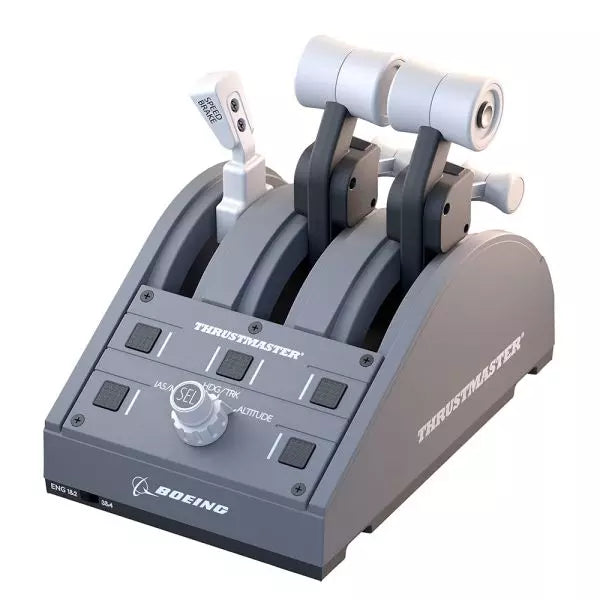
The TCA Quadrant Boeing Edition is a throttle quadrant that brings the iconic feel of Boeing airliners into your hands. With swappable levers for a customizable experience and magnetic technology ensuring smooth operation across all three axes, this device lets you experience the same tactile control as real Boeing pilots. Officially licensed by Boeing and Xbox, and compatible with PC, it’s a compact yet robust addition to any flight sim setup, designed to elevate your virtual cockpit.
What sets the TCA Quadrant Boeing Edition apart?
Swappable and Customizable Levers The TCA Quadrant Boeing Edition includes four interchangeable levers that can be arranged to suit your preference. Whether you need a speed brake, throttle, or flaps, the levers can adapt, making it ideal for left- or right-handed pilots seeking precise control over their setup.
Boeing-Inspired Linear Resistance The throttle levers are built to mimic the resistance you’d feel in the Dreamliner’s throttle quadrant. This subtle detail brings a sense of heft and deliberation to every adjustment, ensuring you feel each power setting in your fingertips.
Iconic Autopilot Controls The integrated autopilot rotary knob allows for intuitive adjustments to altitude, airspeed, and heading. This feature mirrors the functionality of real Boeing airliners, giving you an intuitive way to manage your flight path without additional peripherals.
Magnetic Technology for Smooth Operation Utilizing Thrustmaster’s H.E.A.R.T magnetic technology, this quadrant offers seamless movement with pinpoint accuracy. The lack of mechanical parts means no degradation over time, ensuring lasting performance in your flight simulator cockpit.
Pros and Cons
Pros
Cons
Swappable levers allow for a tailored setup.
Requires TCA Yoke Boeing Edition for Xbox use.
Boeing-inspired linear resistance adds tactile feedback.
Limited functionality without a matching yoke system.
Magnetic sensors ensure smooth, wear-free operation.
Autopilot control can be tricky to master initially.
Specifications
Specification
Value
Dimensions
130mm (W) x 195mm (D) x 150mm (H)
Weight
600 g / 1.3 lb
Included Components
Throttle quadrant, 4 levers, crossbar, attachment pieces
Connection Type
USB
Compatibility
Xbox (with TCA Yoke), PC
TCA Quadrant Boeing Edition Compatibility
The TCA Quadrant Boeing Edition is designed to work seamlessly with Thrustmaster’s TCA Yoke Boeing Edition, required for Xbox compatibility. When paired with the yoke, it connects directly to Xbox Series X|S or Xbox One. On PC, it integrates smoothly into flight simulators, making it an excellent choice for users of Microsoft Flight Simulator 2020. However, it’s not compatible with other yoke systems or standalone operation on Xbox platforms.
The quadrant is officially licensed by both Boeing and Xbox, ensuring a fully-supported experience across compatible systems. It supports Microsoft Windows PCs and works automatically with Microsoft Flight Simulator on Xbox Series X|S, delivering plug-and-play convenience. Unfortunately, it lacks Mac compatibility, so macOS users may need to explore alternative options for their flight sim needs.
The TCA Captain Pack X Airbus Edition is an exciting leap for flight sim enthusiasts who dream of commanding the cockpit of an Airbus A320. Combining the ergonomic replicas of the Airbus sidestick and quadrant, it delivers a feature-rich experience inspired by authentic aviation controls. From the tactile feedback of its 31 action buttons to the satisfying resistance of the throttle’s detents, this setup immerses you in every aspect of flight. Whether you're handling precise approaches or testing the thrust reverser, this package elevates your sim flights to a whole new level.
What sets the TCA Captain Pack X Airbus Edition apart?
Airbus-Authentic Design The sidestick and quadrant are true 1:1 scale replicas, giving you the same control layout and feel as the real Airbus A320. With this attention to detail, everything from the landing gear lever to the speed brake mimics the actual aircraft, making your setup as close to a real cockpit as possible.
Thrust Reverser Mechanism A rare addition to home flight sim controllers, the built-in thrust reverser adds depth to your landing sequences. It’s a unique feature that brings added realism to your sessions, especially when combined with the quadrant's detailed throttle detents.
Integrated Ecosystem Hub Simplified connectivity is a game-changer with the new hub design. Connect all your Thrustmaster Airbus accessories—rudder pedals, add-ons, and more—using a single USB cable. This design minimizes clutter and enhances compatibility with Xbox Series X|S and PC platforms.
Versatility and Modularity The sidestick offers customizable button head modules and can adapt for left-handed, right-handed, or central cockpit positions. This makes the controller versatile for solo flights or co-pilot setups, catering to both casual simmers and serious enthusiasts.
Pros and Cons
Pros
Cons
Authentic Airbus-inspired layout enhances flight realism.
Limited compatibility with non-Airbus-style setups.
Thrust reverser adds depth to landing procedures.
No force feedback or vibration features included.
Integrated hub reduces cable clutter significantly.
Specifications
Specification
Value
Sidestick Dimensions
7.7” x 7.7” x 8.9” (195 mm x 195 mm x 225 mm)
Quadrant Dimensions
7.5” x 9.3” x 3.3” (190 mm x 235 mm x 85 mm)
Sidestick Weight
1.7 lb (787 g)
Quadrant Weight
2 x 1.2 lb (2 x 530 g)
Package Contents
Sidestick, Quadrant, Add-on Modules, USB Cable, Connectors
Connectivity
USB-C to USB-A, 2x SATA cables
TCA Captain Pack X Airbus Edition Compatibility
The TCA Captain Pack X Airbus Edition integrates seamlessly with the Thrustmaster T.Flight Rudder Pedals (TFRP) and the Thrustmaster Pendular Rudder (TPR) systems, as well as with other add-ons like the TM Flying Clamp. Its Ecosystem Hub makes it easier than ever to connect all components using a single USB cable, supporting both Xbox Series X|S and PC platforms. However, the quadrant’s Airbus-specific design may not suit enthusiasts looking for a Boeing-style setup or generic controls.
On the gaming front, it’s fully compatible with Microsoft Flight Simulator 2020 and integrates automatically on both PC and Xbox Series X|S. This pack also supports various other titles on Xbox and PC with customizable mappings, though it may not work with older consoles or unsupported games.
Please note! The item may take 7-10 business days to ship!
Wingflex DAP 500 puts dedicated general aviation autopilot controls right where your hand expects them, combining fully customizable controls with plug-and-play USB connectivity for a clean desktop setup. Instead of reaching for on-screen knobs every few minutes, you can adjust heading, altitude and navigation modes through tactile buttons and encoders that feel purposeful. The aluminum stand, automatic aircraft configuration and ambient-light-controlled backlighting make it equally comfortable during a sunny VFR hop or a late-night IFR approach.
What Sets the Wingflex DAP 500 apart?
Designed Specifically for General Aviation While many autopilot panels focus on airliners, the DAP 500 is built around the aircraft most GA pilots actually fly. Its control layout suits piston singles, turboprops and light business aircraft, making routine autopilot adjustments feel intuitive. Pilots who regularly fly aircraft like the C172, TBM, Vision Jet or King Air often appreciate hardware that reflects their everyday flying instead of borrowing layouts from transport-category aircraft.
Flexible Controls That Adapt to Your Flying Style With twelve programmable push buttons, two pushable rotary encoders and an additional scroll-wheel encoder, the panel can be tailored well beyond its default assignments. Community discussions around configurable hardware consistently highlight this flexibility as a major advantage because it allows pilots to create workflows that match their preferred aircraft rather than forcing identical controls across every simulator.
Automatic Aircraft Profiles Reduce Setup Time WingFlex Bridge software automatically configures supported aircraft, helping users spend more time flying and less time assigning controls. Reviewers generally regard automatic profile detection as one of the biggest quality-of-life improvements in modern simulator hardware, particularly for pilots who regularly switch between multiple aircraft during the same week instead of flying a single favourite.
Built to Grow With Future Cockpit Expansions The DAP 500 is designed as part of a broader modular ecosystem, with support planned for additional DAP-series expansion panels. Combined with firmware updates delivered through OTA software, it offers a platform that can continue evolving without replacing the core autopilot unit. That modular philosophy appeals to cockpit builders who prefer expanding their simulator gradually rather than purchasing an entire panel stack in one go.
Pros and Cons
Pros
Cons
Automatic aircraft profiles simplify supported aircraft setup.
Designed primarily for general aviation aircraft.
Extensive programmable controls suit different flying styles.
Requires WingFlex Bridge for automatic configuration features.
Ambient light sensor adjusts backlighting automatically.
Aluminum stand provides stable desktop positioning.
OTA firmware updates add future functionality.
Specifications
Specification
Value
Product
Wingflex DAP 500 Digital Autopilot Panel
Primary Use
General aviation flight simulation
Connection
USB plug-and-play
Push Buttons
12
Pushable Rotary Encoders
2
Scroll-Wheel Encoder
1
Key Assignment
Fully user customizable
Configuration
Automatic via WingFlex Bridge software
Backlighting
Adjustable with ambient light sensor
Firmware
OTA firmware upgrade support
Construction
Aluminum alloy stand
Expandability
Supports future DAP-series auxiliary panels
Wingflex DAP 500 Compatibility
Simulator
Compatible Aircraft
X-Plane
Baron 58, King Air C90B, Citation XLS, Skyhawk G1000, Cirrus SR22, Vision SF50, Lancair Evolution, RV10
Microsoft Flight Simulator 2020
NXCub, XCub, King Air 350, Bonanza G36, C208B Grand Caravan EX, CJ4, C172 G1000, DA40 NG, Pilatus PC-6, TBM 930
Microsoft Flight Simulator 2024
TBM 930, Bonanza G36, King Air 350, C172 G1000, C208B Grand Caravan EX, C400 Corvalis, CJ4, DA62, DA40 NG, Draco X, Vision SF50, Archer, ES30, NXCub, PC-12 NGX, XCub
The DAP 500 connects through USB and uses WingFlex Bridge software to automatically configure supported aircraft profiles. It is designed for general aviation cockpits and works especially well alongside hardware such as G1000 panels, radio stacks, throttle quadrants and yokes. The panel also supports future DAP-series expansion modules, allowing users to gradually build a more complete general aviation cockpit instead of replacing existing hardware.
Compatibility is focused on aircraft equipped with autopilot systems commonly found in general aviation rather than commercial airliners. It supports a broad collection of Asobo, Laminar Research and Microsoft aircraft, including the C172 G1000, King Air, TBM 930, Vision Jet, DA62 and PC-12 NGX. It is not intended for Boeing or Airbus airliner autopilot systems, which use different control layouts and operating logic.
The DAP 500 is compatible with Microsoft Flight Simulator 2020, Microsoft Flight Simulator 2024 and X-Plane on PC. It connects as a USB peripheral and relies on WingFlex Bridge software for supported aircraft integration. It is not compatible with Xbox or PlayStation consoles, as those platforms do not support dedicated desktop flight simulation control panels of this type.
MOZA MA3F Electronic Flight Control Modules L bring the unmistakable Airbus A320 flight deck to your simulator with controls that make every heading change, altitude adjustment, and approach setup feel deliberate. The dual-rail spring-loaded push/pull mechanism recreates the distinctive operation of Airbus autopilot controls, while custom segmented displays faithfully mirror Airbus-specific character formatting and spacing. From the satisfying click of each selector to the coordinated cockpit lighting, every interaction encourages proper Airbus procedures throughout the entire flight.
What Sets the MOZA MA3F Electronic Flight Control Modules L apart?
Faithful Airbus Push/Pull Operation – The dual-rail spring-loaded push/pull mechanism delivers a noticeably more convincing feel than conventional encoder-based controls. Airbus enthusiasts often point out that having distinct push and pull actions makes switching between managed and selected modes feel far more intuitive, helping reproduce familiar cockpit workflows without relying on keyboard shortcuts or mouse clicks.
Displays That Match Airbus Presentation – Rather than using generic digital readouts, the custom segmented displays reproduce Airbus-style character spacing, typography, and formatting. Builders frequently appreciate these visual details because the modules blend naturally with other Airbus cockpit hardware, creating a clean and cohesive flight deck instead of a collection of mismatched peripherals.
Flexible Expansion for Growing Cockpits – Available as an FCU only, FCU with a single EFIS, or a complete Electronic Flight Control Module suite, the system adapts to different cockpit sizes and budgets. The optional extended-function EFIS mode adds further flexibility, allowing additional controls to be accessed without filling the cockpit with extra hardware.
Straightforward Installation and Configuration – The included mounting bracket, aluminum-profile compatibility, and standard 75 mm VESA support make installation simple across desktop and full-frame cockpits. Users also appreciate MOZA Cockpit software for its synchronized lighting, streamlined configuration process, and flexible control customization without requiring complicated setup procedures.
Pros and Cons
Pros
Cons
Excellent Airbus-style push/pull control mechanism.
Designed specifically for Airbus aircraft.
Displays closely match Airbus FCU formatting.
Requires a Windows PC.
Modular configurations support gradual cockpit upgrades.
Synchronized lighting creates a cohesive cockpit appearance.
Specifications
Specification
Value
Product Type
Airbus A320-style FCU and EFIS control system
Available Configurations
FCU only, FCU + single EFIS, complete EFCM suite
Display Type
Custom Airbus-style segmented displays
Autopilot Control Mechanism
Dual-rail spring-loaded push/pull controls
Lighting
Independent display, character, and status illumination
Software Integration
MOZA Cockpit
Supported Platform
PC
Mounting Options
Included bracket, aluminum profile, 75 mm VESA mount
Extended Function
Optional EFIS extended-function control mode
MOZA MA3F Electronic Flight Control Modules L Compatibility
Hardware
Compatibility
Mounting Systems
Included bracket, aluminum-profile rigs, 75 × 75 mm VESA mounts
MOZA Cockpit Software
Telemetry synchronization and configuration supported
Cockpit Configurations
FCU only, single EFIS, or complete EFCM suite
Flight Simulator
Compatibility
Microsoft Flight Simulator
Default Airbus A320/A330 and supported Airbus add-ons
X-Plane
Compatible with Airbus aircraft including ToLiss series
Third-Party Aircraft
Fenix A320, FlightFactor A320, ToLiss series, and other popular Airbus airliners
Designed for PC flight simulation, the MA3F Electronic Flight Control Modules L integrate with MOZA Cockpit software for telemetry synchronization, synchronized lighting, and simple configuration. Included bracket mounting, aluminum-profile compatibility, and 75 mm VESA support allow the modules to fit comfortably into desktop cockpits or larger Airbus flight deck projects.
The modular design allows builders to begin with a single FCU or expand into a complete Electronic Flight Control Module suite as their simulator grows. Independent adjustment of display brightness, character illumination, and status lighting helps maintain a consistent cockpit appearance during daytime departures and night operations alike.
Compatible with Microsoft Flight Simulator and X-Plane, the system supports default Airbus A320 and A330 aircraft together with leading third-party aircraft including Fenix A320, ToLiss, FlightFactor A320, and other popular Airbus airliners. The supported platform is PC; gaming consoles and macOS are not supported.
Honeycomb Foxtrot Aviation Stick está diseñado para pilotos que prefieren un sidestick en la mano y un escritorio despejado frente a ellos. Desde el primer movimiento, el sistema de resistencia lineal suave sin center detent se siente fluido y preciso, ideal para entradas al estilo Airbus y maniobras acrobáticas. En su interior, la resolución de 16-bit con tecnología de sensores Hall Effect traduce sutiles movimientos de muñeca en un control preciso en pantalla. Añade tensión ajustable y un diseño completamente ambidiestro, y obtendrás un stick con una sensación profesional y bien definida, no como un juguete.
¿Qué distingue al Honeycomb Foxtrot Aviation Stick?
Filosofía de Control Sin Center Detent Muchos sticks dependen de un punto central perceptible, lo que puede hacer que las pequeñas correcciones se sientan mecánicas. El sistema de resistencia lineal del Foxtrot elimina ese punto, creando una transición suave en todo el recorrido del eje. Los pilotos que vuelan aeronaves Airbus valoran especialmente este diseño, ya que reproduce con mayor fidelidad el comportamiento de un sidestick y permite correcciones suaves de cabeceo y alabeo sin luchar contra un “clic” con resorte en el centro.
Sinergia entre Sensores y Resolución Con una resolución de 16-bit combinada con sensores Hall Effect, el Foxtrot ofrece una detección de entrada limpia y sin contacto. Los entusiastas destacan a menudo su consistencia a lo largo del tiempo: sin picos, sin degradación progresiva típica de los potenciómetros físicos. Los ajustes sutiles de trim en aproximación o las entradas de alabeo cuidadosas en acrobacia se sienten estables y predecibles, especialmente en comparación con sticks de nivel básico que pueden mostrar vibraciones cerca del centro.
Resistencia y Ergonomía Configurables La tensión ajustable permite adaptar el stick a las preferencias personales, ya sea que prefieras entradas ligeras con la punta de los dedos o una resistencia más firme para movimientos controlados. Combinado con su diseño de empuñadura ambidiestro, el Foxtrot es adecuado tanto para configuraciones para zurdos como para diestros. Los usuarios con cockpits compactos suelen destacar lo adaptable que resulta en distintas posiciones de asiento, incluyendo montajes centrales o laterales.
Alta Densidad de Switches Sin Saturación Entre los 5 switches de dos vías, 4 botones de acción programables, POV hat, gatillo, rockers y panel rotativo multidireccional, el stick ofrece una gran flexibilidad de entradas. Lo que destaca es la distribución lógica de los controles; los sim pilots mencionan con frecuencia que funciones como trim, modos de piloto automático o controles de cámara pueden asignarse sin sensación de saturación ni necesidad de buscar botones a ciegas en pleno vuelo.
Pros y Contras
Pros
Contras
Resistencia lineal sin center detent con sensación suave.
Sin compatibilidad nativa con consolas.
Los sensores Hall Effect reducen el desgaste a largo plazo.
No incluye base de montaje dedicada.
Tensión ajustable para distintos estilos de vuelo.
Amplias opciones de configuración de switches y botones.
Especificaciones
Especificación
Valor
Product Name
Honeycomb Foxtrot Aviation Stick
Control System
Sistema de resistencia lineal sin center detent
Sensor Technology
Sensores Hall Effect
Resolution
16-bit
Tension Adjustment
Resistencia del stick ajustable
Switches
5 switches de dos vías
Action Buttons
4 botones programables
Rotary Panel
Controles rotativos de 3, 4 y 5 vías
Grip Design
Ambidiestro
Connection
USB-C to USB-A cable
System Compatibility
PC y Mac
Included in the Box
Foxtrot Aviation Stick, USB-C to USB-A Cable, Quick Start Guide (EFIGS)
Download Support
Perfiles Basic Bindings (XML) para MSFS 2024
Compatibilidad del Honeycomb Foxtrot Aviation Stick
Platform
Compatibility
Operating Systems
PC y Mac
Connection Type
USB-C to USB-A interfaz USB directa
Primary Sim Support
MSFS 2024 (XML bindings), MSFS, X-Plane, Prepar3D
El Foxtrot Aviation Stick se conecta mediante USB estándar, lo que permite integrarlo fácilmente en la mayoría de configuraciones de cockpit de escritorio. Funciona sin problemas junto a throttle quadrants, pedales de timón y paneles de radio de otras marcas importantes gracias a su arquitectura HID plug-and-play. Su diseño ambidiestro lo hace adecuado tanto para configuraciones de asiento izquierdo como derecho, incluido el montaje lateral al estilo Airbus. No es compatible con consolas Xbox y no funciona como dispositivo independiente sin un PC o Mac conectado.
En el apartado de software, es compatible con Microsoft Flight Simulator 2024 mediante perfiles XML dedicados y funciona con simuladores populares de PC como Microsoft Flight Simulator (2020), X-Plane y Prepar3D a través de configuraciones manuales o mapeos de la comunidad. No está diseñado para plataformas basadas en consola, ya que depende del reconocimiento de drivers nativos de PC/Mac en lugar de firmware certificado para consola.




