No disponible en stock,
Reservas disponibles. Envío en 2-2,5 semanas.
Honeycomb Bravo Throttle Quadrant Lite concentra la experiencia esencial del Bravo original en un paquete más compacto y enfocado. Las cuatro palancas intercambiables con tensión ajustable se deslizan con un peso mecánico tranquilizador, mientras que la rueda de trim integrada de perfil bajo y alta resolución permite ajustar el cabeceo con precisión con la punta de los dedos. Desde el clic firme de la palanca del tren de aterrizaje con indicación LED hasta la satisfactoria tracción del freno de estacionamiento, esta unidad ofrece una entrada fiable para configuraciones GA y bimotor sin abrumar a quienes están construyendo su cockpit por primera vez.
¿Qué distingue al Honeycomb Bravo Throttle Quadrant Lite?
Simplificado Sin Sentirse Limitado A diferencia de muchos throttle quadrants orientados a la gama de entrada que sacrifican flexibilidad, el Bravo Lite mantiene vivo su ADN modular. Los usuarios suelen destacar que conserva las palancas intercambiables y la personalización de los detents de flaps, reduciendo al mismo tiempo parte de la complejidad del Bravo completo. El resultado es una unidad compacta que sigue siendo compatible con configuraciones monomotor y bimotor, lo que la hace atractiva para pilotos que actualizan desde throttles básicos de plástico.
Tensión Ajustable con Sensación Mecánica La resistencia de las palancas puede ajustarse según las preferencias personales, lo que marca una diferencia notable durante los cambios de potencia en ascenso y los ajustes en final corta. Muchos sim pilots mencionan que el movimiento se siente suave y controlado en lugar de suelto o elástico. En comparación con quadrants más ligeros, el Bravo Lite ofrece una sensación más estable durante las transiciones de potencia, especialmente cuando está montado de forma segura con la dual mounting solution incluida.
Trim y Controles en Tierra Integrados La rueda de trim y el freno de estacionamiento integrados eliminan la necesidad de periféricos adicionales. La alta resolución de la rueda de trim es frecuentemente elogiada por ayudar a estabilizar aproximaciones sin microcorrecciones constantes mediante teclado o botones del yoke. Añade la palanca del tren de aterrizaje con indicador LED de estado, y obtendrás confirmación visual clara durante los ciclos del tren — un pequeño detalle que aporta gran confianza en circuitos con mucho tráfico.
Optimización Enfocada en MSFS Diseñado pensando en Microsoft Flight Simulator, el Bravo Lite cuenta con soporte de drivers dedicados y perfiles descargables. Los usuarios valoran la rapidez con la que se configura en MSFS 2020 y 2024 en comparación con algunos quadrants USB genéricos. Al mismo tiempo, sigue siendo compatible con X-Plane y Prepar3D, lo que le otorga un atractivo más amplio que muchas unidades throttle específicas de un solo simulador en este rango de precio.
Pros y Contras
Pros
Contras
Palancas intercambiables compatibles con múltiples tipos de aeronaves.
Menos controles que la versión completa Bravo.
La tensión ajustable mejora la sensación del throttle.
Solo PC y Mac, sin soporte para consolas.
La rueda de trim integrada añade control fino de cabeceo.
El indicador LED del tren proporciona un claro feedback de estado.
Especificaciones
Especificación
Valor
Product Name
Honeycomb Bravo Throttle Quadrant Lite
Dimensions (L x H x W)
40 x 13 x 27 cm (15.75 x 5.19 x 10.63 inches)
Throttle Levers
Cuatro palancas intercambiables con tensión ajustable
Flap System
Insertos de detent de flaps intercambiables incluidos
Trim Control
Rueda de trim integrada de perfil bajo y alta resolución
Landing Gear Lever
Con indicador LED de estado
Parking Brake
Palanca integrada
Connectivity
USB-C to USB-A (cable incluido)
System Compatibility
PC y Mac
Software Compatibility
Microsoft Flight Simulator 2020/2024, FSX, Prepar3D V3-V5, X-Plane 11/12
Included in the Box
Throttle Quadrant Lite, Flap detent inlays, Interchangeable levers (Commercial & GA), USB-C cable, Dual mounting solution, Quick Start Guide
Compatibilidad del Honeycomb Bravo Throttle Quadrant Lite
Categoría
Compatibilidad
Operating Systems
Microsoft Windows (64-bit), macOS
Connection
USB-C to USB-A (puerto USB estándar requerido)
Supported Simulators
MSFS 2020/2024, FSX, Prepar3D V3–V5, X-Plane 11/12
El Bravo Lite se conecta mediante USB estándar, lo que facilita su integración con yokes, sticks y pedales de timón de distintas marcas. Combina especialmente bien con los yokes Honeycomb Alpha y otros componentes modulares de cockpit gracias a la dual mounting solution. Está diseñado exclusivamente para sistemas PC y Mac y no funciona de forma independiente sin un ordenador conectado.
En el apartado de simulación, está optimizado para Microsoft Flight Simulator 2020 y 2024, con drivers LED dedicados y perfiles de aeronaves descargables. También funciona con X-Plane 11 y 12, FSX y Prepar3D V3–V5 mediante reconocimiento USB HID estándar. No es compatible con consolas Xbox, ya que depende de una arquitectura USB y drivers basados en PC en lugar de firmware certificado para consola.
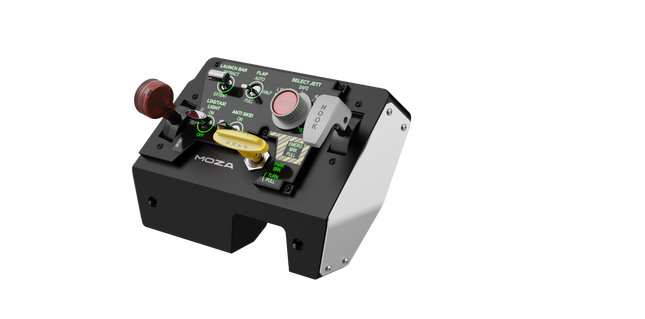
Moza MTLP Take-off Landing Panel lleva la esencia de las operaciones de aviones de combate a la cabina de simulación en casa con un sistema de control robusto y táctil diseñado para pilotos serios de simuladores. Modelado a partir del panel de aterrizaje del F/A-18, ofrece una disposición de interruptores intuitiva que permite entradas rápidas e instintivas sin depender de confirmaciones visuales. El mecanismo auténtico de freno de estacionamiento proporciona un rebote mecánico sólido que parece salido de un avión de combate real. Con 25 señales de interruptores programables y sensores de efecto Hall para precisión, este panel cierra la brecha entre la interacción virtual y la real en la cabina.
¿Qué distingue al Moza MTLP Take-off Landing Panel?
Diseñado para control táctil – Modelado a partir del panel de aterrizaje del F/A-18, esta configuración prioriza la operación instintiva. La disposición de los interruptores permite a los pilotos gestionar funciones críticas de la aeronave por sensación, reduciendo la necesidad de apartar la vista de la pantalla. Este tipo de refuerzo táctil es esencial para entornos de ritmo rápido, como vuelos de combate y aterrizajes en portaaviones.
Precisión del sensor Hall para funciones clave – A diferencia de los interruptores mecánicos estándar, el MTLP integra sensores de efecto Hall en entradas clave como las palancas del tren de aterrizaje y el gancho de cola. Estos sensores proporcionan fiabilidad a largo plazo y precisión consistente en las entradas, eliminando el deslizamiento o la degradación relacionados con el desgaste con el tiempo.
Construido para soportar un uso repetido – La construcción de aleación de aluminio utilizada en la palanca de freno, la palanca del gancho de cola y el tren de aterrizaje garantiza durabilidad. Estos componentes pueden soportar un uso repetido y forzoso, lo que hace que el panel sea una inversión a largo plazo para los entusiastas de los vuelos que exigen robustez mecánica.
Integración sin problemas con el ecosistema de Moza – El MTLP está diseñado para funcionar sin esfuerzo con el panel de acelerador Moza MTP, formando un conjunto cohesivo de control de avión de combate. A través del software Moza Cockpit, los usuarios pueden sincronizar los efectos de iluminación impulsados por telemetría y personalizar sus configuraciones de botones para adaptarse a su estilo de vuelo.
Pros y Contras
Pros
Contras
Modelado a partir del panel de aterrizaje del F/A-18
El soporte de escritorio se vende por separado
Sensores de efecto Hall para precisión y longevidad
Compatibilidad limitada solo para PC
25 señales de interruptores programables para un control extenso
Compatible con el ecosistema de Moza para un conjunto completo de control de avión de combate
Especificaciones
Especificación
Valor
Dimensiones
196.5 × 134.7 × 149 mm
Material de la carcasa
Materiales compuestos
Material de la palanca de freno
Aleación de aluminio
Peso
680g
Señales de interruptores
25
Iluminación por telemetría
Sí (no se requieren complementos adicionales)
Plataforma soportada
PC
Abrazadera de escritorio
Accesorio opcional
Accesorios incluidos
Cable de datos, manual de usuario
Compatibilidad del Moza MTLP Take-off Landing Panel
Compatible con
No compatible con
Panel Moza MTP Throttle
Paneles de acelerador de terceros
Software Moza Cockpit para personalización
Plataformas de consola
Simuladores de vuelo en PC
MacOS
Diseñado para simuladores en PC, el MTLP se integra perfectamente con el Panel Moza MTP Throttle para crear un conjunto de control estilo avión de combate. El panel se configura a través del software Moza Cockpit, lo que permite una amplia personalización, incluidos los efectos de iluminación vinculados a la telemetría. Sin embargo, no es compatible con paneles de acelerador de terceros, lo que significa que la funcionalidad completa se logra mejor dentro del ecosistema de Moza.
La compatibilidad solo con PC asegura soporte para los principales simuladores de vuelo, pero MacOS y las consolas no son compatibles. Los entusiastas de los simuladores de vuelo que utilicen Microsoft Flight Simulator 2020, Microsoft Flight Simulator 2024 y X-Plane 12 encontrarán que el panel es reconocido de forma nativa, ofreciendo funcionalidad plug-and-play directa a través de USB. Sin embargo, los usuarios que busquen soporte para Xbox o PlayStation deberán considerar otro hardware.
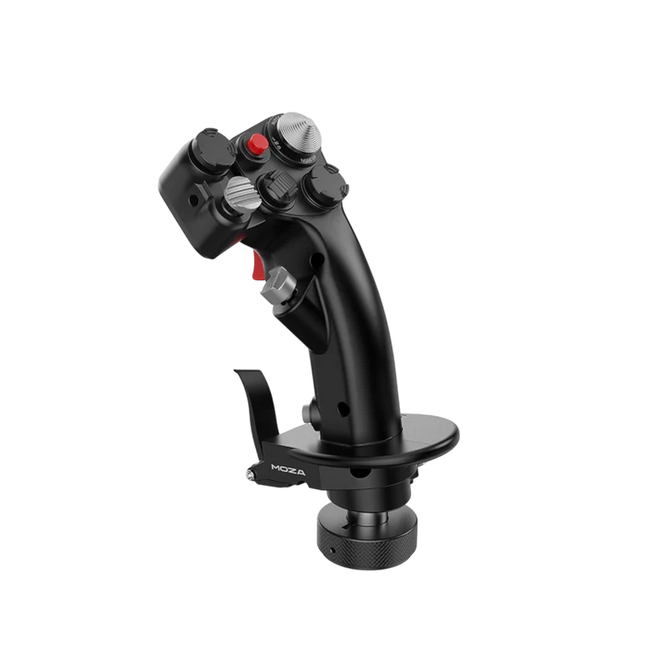
El Moza MH16 Flightstick aporta un enfoque audaz y sin concesiones a la simulación de vuelo. Diseñado con aleación de aluminio de grado aeroespacial, este flightstick no solo es estéticamente atractivo, sino que está construido para resistir sesiones intensas sin sudar. Con 27 señales de entrada y un joystick ALPS de 8 direcciones, cada comando está al alcance de tu mano, listo para maniobras precisas. Los componentes modulares desmontables permiten adaptar la configuración a tus necesidades, mientras que la construcción robusta garantiza estabilidad incluso en los combates más exigentes. Ya sea que estés volando a gran altitud o haciendo un giro cerrado, este flightstick ofrece un nivel de control que te mantiene completamente involucrado.
¿Qué distingue al Moza MH16 Flightstick?
Construido como el stick de un avión de combate real – El diseño completamente metálico no es solo para la estética; proporciona el peso y la sensación de un sistema de control de aeronave real. En comparación con los competidores de plástico, el MH16 ofrece un agarre más sustancial y robusto, reduciendo la flexión y garantizando durabilidad a largo plazo.
Modular y expansible – A diferencia de muchos flightsticks fijos, el MH16 cuenta con módulos desmontables con conexiones de pines pogo, lo que permite una fácil personalización. Esto significa que los usuarios pueden cambiar o actualizar los componentes sin la molestia de volver a cablear o desarmar toda la unidad.
Extensa personalización – Con 27 señales de entrada y un joystick ALPS de 8 direcciones, los pilotos pueden asignar los comandos exactamente como deseen. Este nivel de flexibilidad en la asignación de botones y funciones lo convierte en una opción destacada para quienes exigen control total sobre su experiencia de simulación.
Compatibilidad sin problemas y plug-and-play – No hay configuraciones complicadas, ni drivers adicionales necesarios: simplemente conecta y listo. El conector de aviación de 5 pines asegura una transmisión de entrada segura y estable, lo que lo hace operativo al instante con la mayoría de las bases de vuelo disponibles en el mercado.
Pros y Contras
Pros
Contras
El cuerpo de aluminio de grado aeroespacial ofrece durabilidad y un agarre sólido.
Fuera de stock; la disponibilidad puede ser un problema.
Los módulos desmontables permiten una fácil personalización.
No hay soporte oficial para MacOS.
27 entradas y joystick ALPS proporcionan control extenso.
Plug-and-play con la mayoría de las bases de vuelo.
Especificaciones
Especificación
Valor
Plataforma
PC
Material principal
Aleación de aluminio de grado aeroespacial
Voltaje nominal
3.3V
Corriente nominal
5A
Conector
Conector de aviación de 5 pines
Módulo Z-axis
Opcional
Dimensiones
99×213.5×132mm
Compatibilidad del Moza MH16 Flightstick
Compatible con
No compatible con
PC (sistemas basados en Windows)
MacOS
La mayoría de las bases de vuelo con conector de aviación de 5 pines
Consolas (PlayStation, Xbox)
Software de control de cockpit MOZA
Interfaces USB no estándar
El Moza MH16 Flightstick funciona perfectamente con la mayoría de las configuraciones de vuelo basadas en PC, gracias a su conector de aviación de 5 pines y a su capacidad plug-and-play. Sin embargo, los usuarios de Mac deberán buscar otras opciones, ya que no existe soporte oficial para macOS. Los usuarios han informado de una integración sólida con una variedad de bases, lo que lo convierte en una opción flexible para aquellos que desean combinar su equipo.
En cuanto a plataformas de juegos, el MH16 es estrictamente para usuarios de PC. Funciona sin problemas en simuladores de vuelo basados en Windows como DCS, MSFS2020 y X-Plane, pero los jugadores de consola no tienen suerte: no hay soporte nativo para PlayStation o Xbox. Sin embargo, si eres un apasionado de los simuladores de vuelo, esto no es un problema, ya que PC sigue siendo la plataforma preferida para pilotos serios.
The Virtual Fly Yoko+ is a meticulously crafted flight yoke designed for pilots who demand superior control and durability. Featuring magnetic Hall sensors for wear-free accuracy and a robust 90% metal construction, this yoke excels in precision and longevity. With a 14.4 cm pitch travel and 180° range of motion, it provides an expansive, fluid control experience. The addition of a POV hat switch ensures seamless camera management, making it a standout choice for serious sim pilots.
What sets the Virtual Fly Yoko+ apart?
Exceptional Build Quality The Yoko+ is constructed with 90% metal, giving it a rugged yet refined build that stands up to years of intense use. Its weight and solid design provide a dependable, substantial feel, elevating it beyond other yokes that rely heavily on plastic components.
Magnetic Hall Sensors Unlike potentiometers found in some yokes, the Yoko+ employs magnetic sensors, offering wear-free operation and consistent input accuracy. These sensors ensure long-lasting performance, making it a reliable choice for extended simulation sessions.
Wide Range of Motion With 14.4 cm of pitch travel and a 180° rotational range, the Yoko+ provides nuanced control for even the most demanding flight maneuvers. This extensive movement range mimics real-world yoke behavior, giving pilots an authentic experience.
POV Hat Switch The addition of a hat switch enables precise camera control, a feature absent in its predecessor. This improvement streamlines cockpit navigation, ensuring you maintain focus on critical flight controls without interruption.
Pros and Cons
Pros
Cons
Solid metal construction ensures durability and stability.
Does not include throttle control functionality.
Magnetic sensors provide accurate and wear-free operation.
Higher price point compared to other yokes.
Wide pitch and roll range for realistic input control.
POV hat switch simplifies cockpit camera management.
Specifications
Specification
Value
Material
90% metal construction
Pitch Travel
14.4 cm
Roll Range
180°
Sensors
Magnetic Hall sensors
Connectivity
USB
Virtual Fly Yoko+ Compatibility
The Virtual Fly Yoko+ is compatible with a wide range of flight simulators, including Microsoft Flight Simulator (FSX and MSFS), Prepar3D, and X-Plane. Its plug-and-play USB connection ensures easy integration, while tools like FSUIPC allow for advanced customization. However, it is not compatible with console platforms, focusing exclusively on PC setups.
In terms of hardware, the Yoko+ connects seamlessly to standard flight sim rigs and complements other Virtual Fly products. The metal build and smooth movement make it suitable for use with professional and enthusiast-grade setups. It is best paired with other high-quality peripherals for a cohesive experience.
On the platform side, the Yoko+ excels on PC, working perfectly with major simulation software. However, its USB-only connection means it cannot natively support gaming consoles. For PC users, this yoke delivers an exceptional flying experience across supported titles.
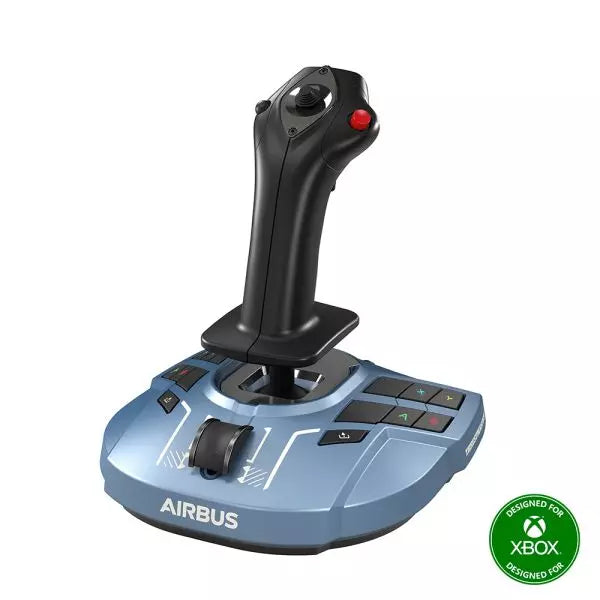
The TCA Sidestick X Airbus Edition is a sleek and versatile flight stick designed to bring Airbus-inspired handling into your hands. With an ergonomic design modeled on the Airbus A320, it offers an incredible feel for any virtual pilot. Featuring a built-in throttle with thrust reverser and 21 remappable buttons, this sidestick delivers control options galore for every phase of flight. Its integrated Ecosystem Hub simplifies setup, allowing seamless compatibility with Xbox Series X|S and PC. A perfect balance of function and flair, this sidestick is ready for takeoff!
What sets the TCA Sidestick X Airbus Edition apart?
1:1 Airbus Ergonomics Crafted as a true-to-life Airbus A320 sidestick replica, this device provides a tactile connection that mirrors the real-world aircraft. The design makes it ideal for Airbus enthusiasts or anyone wanting to elevate their sim experience with authentic shaping and layout.
Swappable Head Modules With four interchangeable head button modules, you can adapt the stick’s configuration for left-handed, right-handed, or central positioning. This modularity allows personalized setups, whether you're flying solo or as part of a crew.
Integrated Ecosystem Hub The built-in hub brings the entire Thrustmaster Airbus ecosystem to Xbox Series X|S. Connecting add-ons like throttles or pedals is now streamlined, reducing cable clutter to a single USB connection for the PC or console.
Enhanced Throttle with Thrust Reverser The improved throttle in the base features a thrust reverser, a rare addition for airliner flight sticks. It delivers greater control during landings, especially in demanding runway conditions.
Pros and Cons
Pros
Cons
Ergonomic Airbus-inspired design feels natural and intuitive.
Not compatible with PlayStation systems.
Swappable modules allow flexible configurations.
Some users report light base weight causing movement.
Integrated Ecosystem Hub simplifies connectivity across devices.
Throttle lacks fine adjustment for some sim setups.
Built-in throttle includes thrust reverser for better landing control.
Specifications
Specification
Value
Width
7.7 inches / 195 mm
Depth
7.7 inches / 195 mm
Height
8.9 inches / 225 mm
Weight
787 g
Package Contents
1 TCA Sidestick X, 4 swappable joystick head modules, 1 USB-C cable, User manual
TCA Sidestick X Airbus Edition Compatibility
The TCA Sidestick X Airbus Edition integrates smoothly into the Thrustmaster ecosystem. It connects to add-ons like the TCA Quadrant Airbus Edition and T.Flight Rudder Pedals, expanding its functionality. The built-in hub reduces clutter by allowing multiple devices to link through a single USB connection to your PC or Xbox Series X|S. However, this sidestick is not compatible with PlayStation systems, limiting its audience to PC and Xbox users.
On the gaming side, the sidestick is fully compatible with Microsoft Flight Simulator 2020 on both PC and Xbox, making it an excellent choice for simmers on those platforms. While its compatibility with other simulators like X-Plane and DCS World isn't officially listed, PC users should experience no issues thanks to its flexible design and connectivity options.
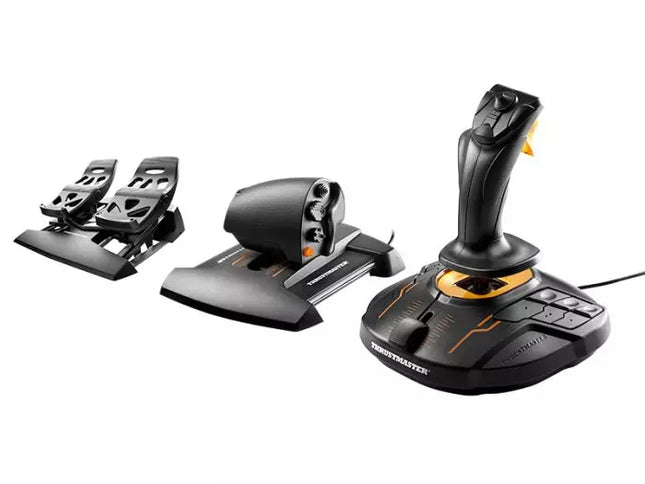
The T.16000M FCS Flight Pack is a standout choice for sim pilots who demand precise and versatile controls. This all-in-one pack features the T.16000M FCS joystick, TWCS throttle, and TFRP rudder pedals, delivering an intricate control setup ideal for aviation and space simulation. With its smooth sliding mechanisms, programmable software, and magnetic sensors for lasting accuracy, it’s a tactile and technical delight. From pitch-perfect inputs to ergonomic designs, this setup transforms your desk into a cockpit, putting you in command of every maneuver.
What sets the T.16000M FCS Flight Pack apart?
Unrivaled Longevity with Magnetic Sensors The H.E.A.R.T HallEffect technology relies on magnetic sensors for unmatched durability, ensuring the joystick’s accuracy remains unchanged over years of use. Unlike potentiometer-based systems, this design eliminates wear and tear, providing consistently smooth and precise inputs that hold steady even during intensive flight campaigns.
Comprehensive All-in-One Control System With a joystick, throttle, and rudder pedals included, the T.16000M FCS Flight Pack offers a complete setup for advanced simmers. This trio eliminates the need for additional peripherals, letting users seamlessly coordinate complex flight maneuvers while reducing clutter with integrated, ergonomic components.
Customizable for Every Pilot’s Needs The T.A.R.G.E.T programming software allows users to map buttons, axes, and macros to fit their unique playstyle. Whether flying civilian aircraft, jets, or navigating through space, this flexibility ensures optimal functionality tailored to specific games and scenarios, providing control tailored to your exact specifications.
Smooth and Comfortable Motion Both the TWCS throttle and TFRP rudder pedals utilize S.M.A.R.T technology for smooth sliding. These components provide intuitive resistance and glide, making every adjustment precise and comfortable. The ergonomic placement further enhances accessibility, even during extended play sessions.
Pros and Cons
Pros
Cons
Exceptional accuracy thanks to HallEffect magnetic sensors.
Not compatible with consoles like Xbox or PlayStation.
All-in-one system reduces need for additional peripherals.
Pedals may feel too small for larger feet.
Customizable controls via T.A.R.G.E.T software.
Throttle lacks a detent for afterburner or idle.
Smooth sliding motion enhances precision and comfort.
Specifications
Specification
Value
Components
Joystick, throttle, rudder pedals
Compatibility
Windows 10, 8, 7, Vista (32-bit & 64-bit)
Connection Type
USB
Joystick Axes
4 (including twist rudder)
Buttons
30 across all components
Rudder Technology
S.M.A.R.T sliding motion
Throttle Travel Range
3.2 inches (80 mm)
Color
Black with orange accents
T.16000M FCS Flight Pack Compatibility
The T.16000M FCS Flight Pack is fully compatible with PCs running Windows 10, 8, 7, and Vista (both 32-bit and 64-bit). Its USB connection ensures straightforward integration with most setups, while the T.A.R.G.E.T software enhances compatibility by allowing users to program the system to function as a single USB device. The pack seamlessly integrates with other Thrustmaster peripherals, such as the MFD panels, providing a cohesive ecosystem for ambitious flight sim setups.
While this system excels on PC, it is not compatible with consoles like Xbox or PlayStation, making it unsuitable for console-based simmers. The pack also works harmoniously with popular simulation titles like Microsoft Flight Simulator, X-Plane, and Elite Dangerous. However, its lack of native support for MacOS limits its use for Apple users, so check your platform’s compatibility before diving into your next flight adventure.
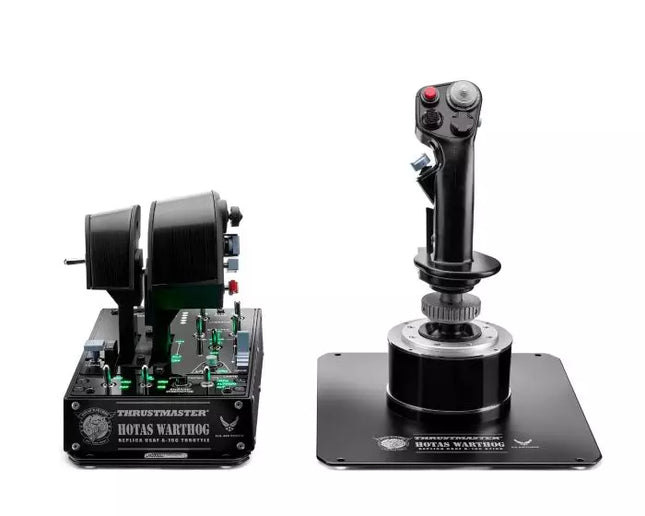
HOTAS WARTHOG is a flight simulation enthusiast’s dream. Designed to replicate the U.S. Air Force A-10C joystick and throttle controls, this joystick brings realistic functionality and impressive precision to the virtual cockpit. With its fully metal construction, H.E.A.R.T Hall Effect AccuRate Technology sensors, and magnetic throttle sensors, the HOTAS WARTHOG delivers a solid, immersive feel that lasts for years. Whether you’re flying for hours or fine-tuning every input, this joystick setup offers a satisfying and durable experience that stands out in the world of flight sims.
What sets the HOTAS WARTHOG apart?
Authentic A-10C Aircraft Replica The HOTAS WARTHOG features an exact replica of the U.S. Air Force's A-10C joystick, dual throttles, and control panel. The attention to detail extends to the metal construction and accurate button placements, which create a more convincing and rewarding flying experience. This level of realism is rare in the world of flight sim peripherals and appeals to users who demand precision in both design and function.
Durable All-Metal Construction Unlike many competitors, the HOTAS WARTHOG boasts a full metal frame across the joystick and throttle, making it a tank in terms of durability and feel. Users frequently note the substantial weight and the robust, industrial-quality switches and buttons. This sturdy design ensures the HOTAS WARTHOG will handle intensive use for years without showing signs of wear and tear, while also offering a premium tactile experience that’s hard to match.
Advanced Sensor Technology The H.E.A.R.T (HallEffect AccuRate Technology) ensures that the joystick and throttles provide superior precision with 16-bit resolution. This results in inputs that remain accurate and smooth over time without degrading, even after extended use. The technology behind this setup guarantees that every movement you make is reflected instantly in the simulation, with no mechanical drift or wear as you continue flying.
Customizable and Programmable Features With 55 fully programmable buttons, 2 four-way hats, and even 5 programmable LEDs, the HOTAS WARTHOG offers an extraordinary level of customization. Whether you need to tweak functions for different aircraft or streamline your setup for specific missions, the T.A.R.G.E.T software suite ensures that all these controls can be easily configured to match your preferences and provide seamless integration with flight simulators.
Pros and Cons
Pros
Cons
All-metal construction for durability and realism.
Heavy design may not be suitable for all setups.
Highly precise H.E.A.R.T sensor technology for accurate inputs.
Large form factor may take up significant desk space.
Extensive customization with 55 programmable buttons.
Specifications
Specification
Value
Joystick Construction
Metal
Throttle System
Dual throttle, metal handles
Total Buttons
55 programmable buttons
Weight
14 lbs
Control Panel
15 buttons, TRIM wheel, backlighting
Hats and Switches
2 four-way hats, 1 POV hat, 1 mouse hat
Sensor Technology
H.E.A.R.T Hall Effect AccuRate Technology
Detachable Components
Joystick and throttle handles
HOTAS WARTHOG Compatibility
The HOTAS WARTHOG is primarily designed for use with PC and features comprehensive software support through the T.A.R.G.E.T programming suite, which allows for deep customization and integration across various flight simulators. While it does not support console gaming, it is compatible with many popular flight simulation games available on PC, including DCS World and Microsoft Flight Simulator. Additionally, the HOTAS WARTHOG works seamlessly with other Thrustmaster flight peripherals like rudder pedals and MFD cockpit panels, providing a cohesive simulation experience.
As a USB-connected device, the HOTAS WARTHOG is plug-and-play with Windows PCs, and users can rely on the T.A.R.G.E.T software to further personalize their setup. Unfortunately, it is not compatible with consoles, including PlayStation and Xbox. However, for serious sim pilots who are dedicated to PC flight simulation, this is less of a limitation and more of a focus on fine-tuning the experience for desktop enthusiasts.
The Alpha Flight Controls by Honeycomb Aeronautical is a feature-rich, durable yoke designed to elevate your flight simulation experience. Built with aerospace-grade internal components, it offers a buttery-smooth 180° turn radius and 15 cm of travel along its steel shaft, delivering precision and fluidity in every maneuver. Its integrated switch panel with red LED backlighting replicates real-world avionics, while the ergonomic handle design packs an array of tactile buttons and switches for versatile control. This is a simulator tool for those who appreciate robust design and reliable performance.
What sets the Alpha Flight Controls apart?
Robust Construction Built with a steel shaft and aerospace-grade components, the yoke ensures durability for years of regular use. This sturdiness gives users the confidence to push boundaries without worrying about wear and tear, a significant advantage over its plastic-heavy competitors.
Comprehensive Switch Panel The integrated switch panel with master, alternator, avionics, and light switches is a standout feature. Coupled with an ignition switch, it allows users to simulate pre-flight checks and engine starts accurately, adding a layer of realism many products overlook.
Ergonomic Design and Customization Thoughtfully designed handles include multiple buttons, hat switches, and a push-to-talk button for intuitive control. The array of functions and customizable software profiles cater to both casual sim enthusiasts and aspiring pilots looking to fine-tune their experience.
Cross-Compatible and Future-Ready Mounting points and brackets allow seamless integration with other Honeycomb and Saitek products, making it ideal for those with an expanding home cockpit. Its compatibility with popular simulators ensures versatility for any flight sim setup.
Pros and Cons
Pros
Cons
Durable steel shaft with aerospace-grade components.
Not compatible with older operating systems like Windows 7.
Integrated switch panel with LED backlighting.
Software required for full functionality can be complex to set up.
Compatible with major flight simulators and accessories.
Limited adjustability for handle ergonomics.
Wide 180° turn radius for smooth control inputs.
No included mount for desk setups, requires separate purchase.
Specifications
Specification
Value
Dimensions (Sleeve)
44.8 x 31.4 x 23.7 cm
Dimensions (Carton)
46.2 x 32.7 x 25.5 cm
Travel Length
15 cm
Turn Radius
180°
Compatibility
Windows 10 (64-bit), macOS
Package Contents
Alpha Flight Controls unit, drivers
Alpha Flight Controls Compatibility
The Alpha Flight Controls is compatible with major flight simulators, including Microsoft Flight Simulator 2020, X-Plane 11, and Lockheed Martin Prepar3D (v3-v5). It supports both Windows 10 (64-bit) and macOS, although some features require the Honeycomb Config Tool for optimal use. Notably, older operating systems like Windows 7 and FSX are not supported, which may limit users with legacy setups.
For hardware compatibility, it includes mounting points and brackets designed to pair seamlessly with Honeycomb Bravo Throttle Quadrant and Saitek panels. The yoke integrates effortlessly into a range of cockpit builds, making it an excellent choice for expandable setups. However, note that desk clamps or mounts are sold separately.
In terms of gaming platforms, the Alpha Flight Controls is PC-centric, with no console support. It’s optimized for simulation platforms requiring USB connections and doesn’t cater to Xbox or PlayStation. Its compatibility with varied simulators ensures a flexible and robust option for PC-based flight enthusiasts.
No disponible en stock,
Reservas disponibles. Envío en 2-2,5 semanas.
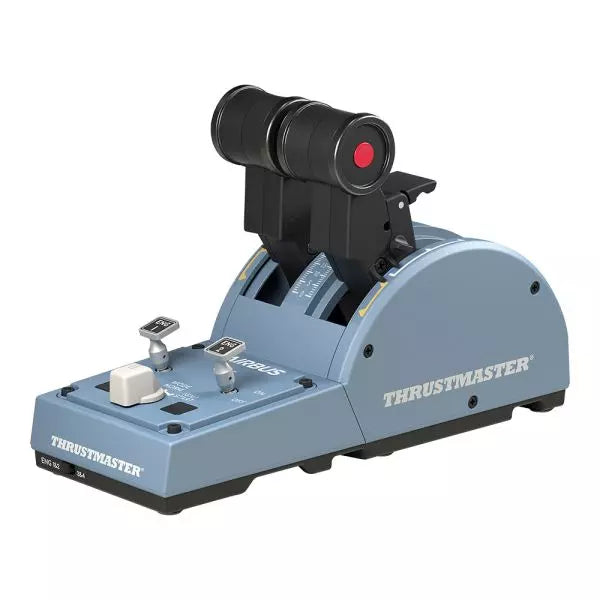
The TCA Quadrant Airbus Edition is a dream come true for flight sim enthusiasts who crave a tactile, civil aviation throttle experience. Featuring dual thrust levers with the iconic Airbus detents and a thrust reverser mechanism, it offers unparalleled control for everything from smooth takeoffs to precise landings. With 16 assignable buttons and contactless magnetic sensor technology ensuring an unlimited lifespan, this throttle quadrant delivers versatility and durability. Its mechanical selectors enable seamless adaptability across various aircraft types, putting endless possibilities at your fingertips.
What sets the TCA Quadrant Airbus Edition apart?
Iconic Airbus Detents and Thrust Reverser The quadrant’s detents replicate the flight modes of Airbus airliners, from "Idle" to "TO/GA." Paired with the thrust reverser mechanism, these details make transitions between power settings a tactile delight, giving users fine-tuned control that’s intuitive and deeply satisfying.
Contactless Magnetic Sensor Technology Unlike many competing products that rely on potentiometers, the TCA Quadrant Airbus Edition uses HallEffect magnetic sensors. These sensors provide an extended lifespan, superior sensitivity, and smoother operation, even during demanding and frequent use.
Expandable Ecosystem The quadrant’s compatibility with additional accessories, like the TCA Quadrant Add-On Airbus Edition or Thrustmaster T.Flight rudder systems, offers an upgrade path for four-engine aircraft setups and advanced control schemes. This modular approach ensures long-term value for dedicated sim pilots.
Customizable Tension and Modes The built-in tensioning screw lets users adjust the throttle feel to match their preferences. Additionally, mechanical selectors allow detents to be disabled, enabling smooth axis transitions for other types of aircraft, such as fighter jets or general aviation planes.
Pros and Cons
Pros
Cons
Accurate Airbus detents for mode-specific control.
Limited compatibility with non-Windows platforms.
Contactless magnetic sensors ensure long-term durability.
Requires additional accessories for multi-engine setups.
Expandable with Thrustmaster’s TCA ecosystem.
Includes 16 buttons for extensive customization.
Specifications
Specification
Value
Width
10.0” / 255 mm
Depth
5.7” / 145 mm
Height
3.3” / 85 mm
Weight
1.2 lb / 530 g
Box Contents
TCA Quadrant, USB cable, attachment rod, connectors
Technology
HallEffect AccuRate Technology (contactless magnetic sensors)
Buttons
16 physical and virtual buttons
TCA Quadrant Airbus Edition Compatibility
Compatible Devices
Details
TCA Sidestick Airbus Edition
Works seamlessly for a full Airbus cockpit experience.
Thrustmaster T.Flight Rudder Pedals
Provides enhanced control for ground and in-flight maneuvers.
Thrustmaster T.A.R.G.E.T Software
Allows programming and testing of complex setups.
The TCA Quadrant Airbus Edition is compatible with Windows 10 and Windows 8 PCs, ensuring integration with popular sim setups. While it excels with the Thrustmaster T.A.R.G.E.T software for added customization, it does not offer native console compatibility, making it ideal for PC-exclusive pilots. Pairing it with accessories like the T.Flight rudder pedals enhances the experience further.
In gaming platforms, the quadrant shines in Microsoft Flight Simulator and X-Plane. Compatibility with games that support multiple button configurations, along with its detent and axis settings, ensures flexibility. It is less suitable for general-purpose gaming setups due to its civil aviation-focused design.
No disponible en stock,
Reservas disponibles. Envío en 2-2,5 semanas.
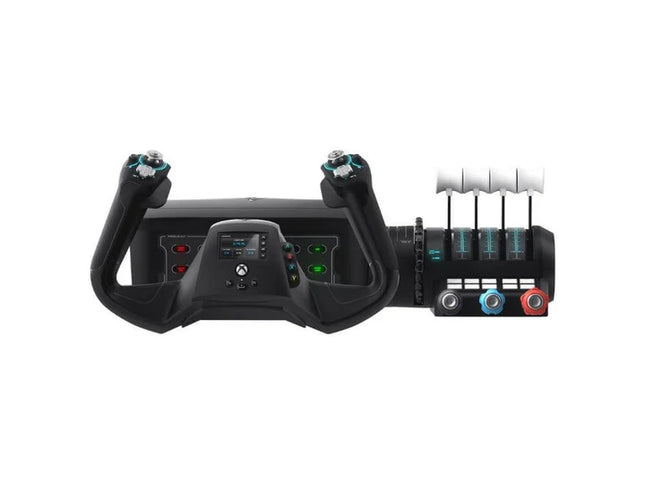
The VelocityOne Flight System is a robust all-in-one solution for flight enthusiasts on PC and Xbox. With its dual throttle system and status indicator panel, it caters to pilots flying everything from Cessnas to jetliners. The smooth 180° rotating yoke with hall-effect sensors delivers a tactile, dependable feel, while the trim wheel and programmable buttons allow for customization that mirrors real-world operations. Whether you’re cruising through clouds or nailing precision landings, this system ensures you’re in full control.
What sets the VelocityOne Flight System apart?
Versatile Throttle System The VelocityOne Flight System features dual throttle options—four interchangeable levers for airliners and Vernier-style controls for smaller planes like the Cessna 172. This flexibility allows for accurate power management across different aircraft types, catering to both general aviation and commercial piloting styles.
Integrated Annunciator Panel The included Status Indicator Panel adds a layer of realism with its ability to monitor critical systems. With interchangeable plates, it adapts to various aircraft, providing visual feedback on engine issues, warnings, or system states without requiring additional hardware.
Rudder Control via Yoke Integrated rudder pedal control on the yoke lets you manage the tail rudder, nose wheel, and brakes with fingertip precision. While it doesn’t replace dedicated pedals, it’s a practical and effective solution for players seeking simplicity without sacrificing control.
Flight Management Display The built-in screen serves as a Flight Management Display for Microsoft Flight Simulator, allowing seamless switching between profiles and providing essential data during flight. This feature minimizes reliance on external screens and keeps your focus on piloting.
Pros and Cons
Pros
Cons
Includes dual throttle options for diverse aircraft types.
Rudder control on yoke lacks realism compared to pedals.
Annunciator panel offers visual feedback on system status.
Pricier than other entry-level flight controllers.
Compatible with PC and Xbox Series X|S systems.
Not compatible with PlayStation platforms.
Specifications
Specification
Value
Brand
Turtle Beach
Yoke Rotation
180°
Throttle Type
Dual (Airliner and Vernier-style)
Platform Compatibility
PC, Xbox Series X|S, Xbox One
Sensor Type
Hall-effect
Programmable Buttons
10
Annunciator Panel
Included with interchangeable plates
VelocityOne Flight System Compatibility
The VelocityOne Flight System is designed for PC and Xbox platforms, making it an excellent choice for both console and desktop users. It connects seamlessly to Microsoft Flight Simulator on Xbox Series X|S, and its hall-effect sensors ensure smooth, dependable input for precision maneuvers. While it provides button-based rudder control, users seeking a more immersive setup can pair it with dedicated rudder pedals, though this may require additional hardware.
For gaming platforms, the VelocityOne is optimized for Xbox Series X|S and Xbox One, as well as Windows-based PCs running modern simulators. Unfortunately, it lacks compatibility with PlayStation consoles or Mac operating systems. While the Flight Management Display works particularly well with Microsoft Flight Simulator, it also integrates with other flight simulators, giving pilots an adaptable and feature-rich experience regardless of their preferred game.
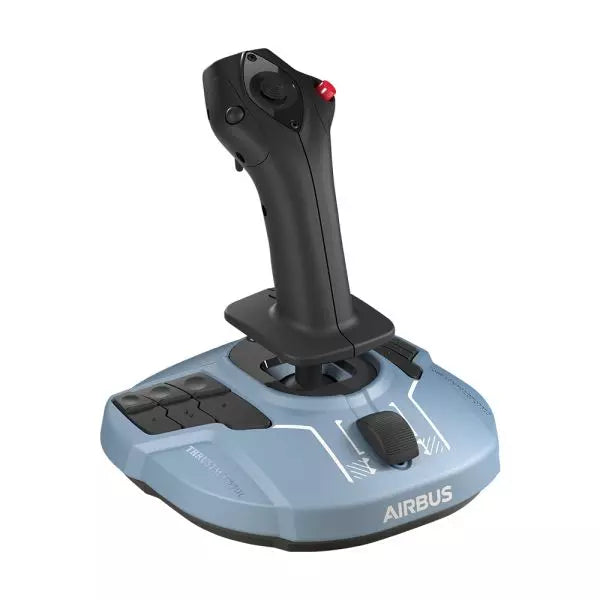
The TCA Sidestick Airbus Edition is a robust and versatile sidestick, capturing the essence of Airbus flight controls. With its ergonomic 1:1 scale design inspired by the Airbus A320, this sidestick brings a tactile and customizable edge to your flight simulation. Boasting a built-in throttle axis with a unique thrust reverser mechanism, and 12 remappable buttons, it’s engineered to adapt to your style—be it captain, co-pilot, or central solo position. With the added benefit of contactless magnetic sensor technology, every maneuver feels smooth and natural.
What sets the TCA Sidestick Airbus Edition apart?
Swappable Joystick Head Modules The sidestick’s head is modular, allowing you to customize it for captain, co-pilot, or solo use. This flexibility makes it a favorite among users who value adaptability, particularly for varied flight scenarios or setups.
Built-in Throttle with Thrust Reverser A built-in throttle axis, complete with a thrust reverser mechanism, sets this stick apart. It's a rare inclusion on sidesticks, providing better control during landings and ground maneuvers.
HallEffect Magnetic Sensors Using contactless magnetic technology, this sidestick eliminates wear and tear while providing precise inputs over its lifetime. Users consistently praise its longevity and smooth operation.
Integrated Rudder Control The twist-rudder mechanism, with an optional lock, offers versatile control for multitasking pilots, enhancing usability in diverse flight conditions.
Pros and Cons
Pros
Cons
Modular head design suits different pilot roles.
Limited to PC compatibility only.
Built-in throttle with thrust reverser adds utility.
Smaller base may feel less stable to some.
Magnetic sensors ensure long-lasting reliability.
No additional programmable dials or sliders.
Ergonomic Airbus-inspired design enhances grip and comfort.
Specifications
Specification
Value
Width
7.7” / 195 mm
Depth
7.7” / 195 mm
Height
8.9” / 225 mm
Weight
2.0 lb / 920 g
Box Contents
1 x Sidestick, 4 x Joystick Head Modules
TCA Sidestick Airbus Edition Compatibility
The TCA Sidestick Airbus Edition works seamlessly with other components of the Thrustmaster Airbus ecosystem, such as the TCA Quadrant Airbus Edition and the TCA Quadrant Add-On. It also pairs effectively with the T.Flight Rudder Pedals and the TM Flying Clamp for a more stable setup. However, it lacks compatibility with consoles like Xbox or PlayStation, making it ideal for PC users only. This sidestick integrates into setups requiring a versatile input device but isn't suitable for console-based flight simulators.
For gaming platforms, the sidestick supports PC (Windows 10 and 8), but does not function with macOS or Linux-based systems. It’s compatible with popular flight simulators like Microsoft Flight Simulator and X-Plane. However, its use is restricted to games that support configurable flight controls, as it lacks plug-and-play support for casual or arcade titles.
MOZA MFY Pro Yoke lleva al cockpit una geometría de control inspirada en los aviones comerciales, con un agarre amplio y seguro y suficientes entradas físicas para mantener las manos alejadas del teclado. Su pantalla táctil integrada de 4,3 pulgadas muestra datos de vuelo, listas de comprobación, información de tiempo y posiciones de los ejes, mientras que 26 señales de salida programables ofrecen espacio de sobra para perfiles de control específicos de cada aeronave. El material compuesto reforzado con fibra de carbono mantiene la estructura ligera pero resistente, y los thumbsticks con efecto Hall ofrecen un movimiento suave y deliberado, en lugar de sentirse como pequeños controles de gamepad añadidos a última hora.
¿Qué distingue al MOZA MFY Pro Yoke?
Una pantalla táctil que se gana su espacio en el cockpit La pantalla táctil de 4,3 pulgadas y 480 × 800 es mucho más que un simple toque de color decorativo en el centro del yoke. Puede mostrar datos de vuelo esenciales, listas de comprobación, un reloj de vuelo y lecturas de los ejes en tiempo real sin obligar al piloto a mirar entre varios monitores. Esto mantiene la información útil cerca de las manos y hace que el yoke resulte especialmente práctico en configuraciones compactas donde cada centímetro del panel de instrumentos ya ha presentado una queja formal.
Geometría de avión comercial con una estructura sólida y ligera La forma toma como referencia los aviones comerciales en lugar de los controles compactos de aviación general, proporcionando a ambas manos una posición de trabajo amplia y natural durante ascensos, aproximaciones y ajustes prolongados en crucero. Su construcción de material compuesto reforzado con fibra de carbono mantiene el peso en 1,2 kg y soporta cargas de hasta 30 kg. El resultado es un yoke que transmite solidez durante movimientos firmes sin añadir una tensión innecesaria a la base o a la estructura de montaje.
Más control sin recurrir al teclado Dos hat switches de ocho direcciones, dos thumbsticks con efecto Hall, bumpers y gatillos multifunción generan 26 señales de salida configurables directamente en el yoke. Los gatillos y thumbsticks pueden funcionar como ejes o botones a través de MOZA Cockpit, permitiendo controlar el timón, el movimiento de la cámara, el push-to-talk, el trim u otras funciones de la aeronave. Los distintos perfiles también hacen que cambiar entre aviones comerciales y aeronaves ligeras resulte mucho menos tedioso que reasignar todos los controles antes de cada vuelo.
Cambios rápidos sin holgura mecánica El Quick Release de aleación de aluminio permite desmontar o cambiar el yoke sin herramientas, manteniendo al mismo tiempo una conexión firme con una base MOZA compatible. Esto resulta especialmente útil para pilotos que alternan entre configuraciones de aviones comerciales, aviación general y controles especializados. Un Quick Release solo es útil cuando no introduce movimiento en el punto de conexión, y su diseño rígido está pensado para mantenerse estable durante correcciones fuertes de alabeo y bajo las cargas del Force Feedback.
Ventajas y desventajas
Ventajas
Desventajas
La pantalla táctil integrada mantiene la información de vuelo directamente a la vista.
Las funciones de la pantalla táctil dependen de la compatibilidad del software y del firmware.
Las 26 señales programables permiten crear perfiles de control complejos para distintas aeronaves.
La forma de avión comercial es menos adecuada para aeronaves tradicionales de aviación general.
Los thumbsticks con efecto Hall proporcionan una entrada de eje suave y sin contacto.
La ligera carcasa de material compuesto soporta cargas de control considerables.
Especificaciones
Especificación
Valor
Nombre del producto
MOZA MFY Pro Flight Yoke
Dimensiones
142,5 × 202 × 313 mm
Peso
1,2 kg
Material de la carcasa
Material compuesto reforzado con fibra de carbono
Material del Quick Release
Aleación de aluminio
Material de las tapas de los botones
ABS
Carga máxima soportada
Hasta 30 kg
Tamaño de la pantalla
4,3 pulgadas
Resolución de la pantalla
480 × 800
Total de señales de salida
26
Hat switches de 8 direcciones
2
Thumbsticks con efecto Hall
2
Bumpers
2
Gatillos
2
Iluminación
Iluminación RGB personalizable con 16 millones de colores
Software de configuración
MOZA Cockpit
Accesorios incluidos
Manual de usuario
Compatibilidad del MOZA MFY Pro Yoke
Categoría
Compatibilidad
Conexión a la base del yoke
Sistema Quick Release MOZA de aleación de aluminio
Software de configuración
MOZA Cockpit
Controles asignables
Botones, ejes, gatillos, thumbsticks y asignaciones de perfiles
Funciones de la pantalla
Información PFD, listas de comprobación, reloj de vuelo y lecturas de los ejes
Perfiles de control
Varios perfiles de asignación específicos para distintas aeronaves
El MFY Pro está diseñado para conectarse mediante el sistema Quick Release MOZA de aleación de aluminio, lo que permite una instalación sin herramientas en una base de yoke MOZA compatible. Su forma inspirada en aeronaves comerciales se adapta especialmente bien a configuraciones de aviones de pasajeros y transporte, mientras que las 26 señales de salida programables también pueden configurarse para aviones turbohélice y aeronaves de aviación general. No funciona como un controlador independiente y, por tanto, necesita una base compatible para proporcionar el movimiento de alabeo y cabeceo.
Las funciones adicionales se configuran mediante el software MOZA Cockpit, incluidas las asignaciones de botones, el comportamiento de los ejes, la iluminación RGB, las vistas de la pantalla táctil y los distintos perfiles de asignación. Los dos thumbsticks con efecto Hall y los gatillos multifunción pueden configurarse como ejes o botones, por lo que resultan adecuados para controlar el timón, mover la cámara, ajustar el trim, gestionar las comunicaciones o accionar funciones de aviónica. El yoke no utiliza una conexión mecánica universal y no está diseñado para instalarse directamente en bases de yoke de otros fabricantes.
El MFY Pro forma parte de un sistema de control para simulación de vuelo basado en PC y depende de la base MOZA conectada y del software MOZA Cockpit para su configuración. Sus controles programables pueden asignarse en simuladores de vuelo para PC que admitan la configuración convencional de botones y ejes. No está diseñado como controlador para PlayStation o Xbox, y las funciones de la pantalla integrada requieren software compatible para PC en lugar de funcionar de forma independiente del simulador.