Flight Simulator Controls

51 Produkte

  • WINCTRL URSA MINOR Airline Joystick R

    WINCTRL WINCTRL URSA MINOR Airline Joystick R

    Nicht vorrätig, Pre-Orders Available. Shipped in 2-2.5 weeks from now.

    WINCTRL URSA MINOR Airline Joystick R brings airline-style control to the desktop with a clever mix of tactile feedback and thoughtful engineering. The standout feature is the flight-data-linked vibration engine, which adds subtle physical cues during events like flap deployment, airflow changes, and touchdown. Pair that with non-contact magnetic resistance sensors on the X and Y axes, and the stick delivers smooth, stable inputs without the wear issues common in cheaper mechanisms. The result is a joystick that feels lively in hand yet technically grounded under the hood. What Sets the WINCTRL URSA MINOR Airline Joystick R apart? Flight Data Driven Vibration Feedback The URSA MINOR stands out with a vibration motor tied directly to in-sim flight data. Instead of generic rumble, the stick reacts to events like landing contact, airflow changes, or flap movement. Pilots online often mention how this adds subtle physical cues during phases like flare or speed changes, providing a tactile reminder of what the aircraft is doing without constantly glancing at instruments. Robust Gimbal With Magnetic Sensors At the core of the stick is a glass-fiber-reinforced nylon gimbal running on ball bearings, paired with non-contact magnetic sensors for the primary axes. This combination helps maintain smooth motion over time without the jitter common in potentiometer-based designs. Enthusiasts frequently note that the stick movement feels stable across the entire travel range, particularly during small pitch adjustments on final approach. Airliner-Inspired Grip Layout The grip design borrows cues from airline sidestick ergonomics, offering a balanced control layout that includes a PTT trigger, autopilot disconnect switch, and a concealed five-way switch beneath a magnetic cover. Pilots often highlight how practical this arrangement is for everyday flying tasks—radio calls, autopilot overrides, and camera views can all be handled without reaching for the keyboard. Flexible Mounting and Maintenance Design The base includes anti-slip pads for desktop use along with pre-drilled mounting holes for cockpit rigs. A quick-release base cover allows access to internal adjustments without dismantling the entire unit. This detail is frequently appreciated by sim cockpit builders who prefer gear that can be tuned or serviced easily rather than permanently sealed hardware. Pros and Cons Pros Cons Flight-data vibration feedback adds tactile flight cues. Plastic construction compared to metal joystick designs. Magnetic sensors reduce wear and input drift. Limited axis travel compared to extended bases. Good button layout for airliner-style flying tasks. Desk or cockpit mounting options included. Specifications Specification Value Product Model URSA MINOR-Airline-Joystick R Material Industrial ABS plastic (PC + ABS) Controller 32-bit ARM controller X/Y Axis Movement Angle ±15° Z Axis Rotation Angle ±20° X/Y Sensors Non-contact magnetic resistance sensors Gimbal Construction Glass fiber reinforced nylon with ball bearings Operating Force (X/Y) Approximately 6N Rotation Torque (Z) ~4 kgf·cm Throttle Axis Type Long-travel sliding potentiometer Throttle Axis Travel 38 mm Buttons 14 buttons (250gf press force, 0.25 mm travel) Special Controls Hidden 5-way switch, PTT trigger, autopilot disconnect Vibration Feature Adjustable amplitude levels from 0–255 Mounting Options Anti-slip desktop pads and cockpit mounting holes Item Weight 3 kg Included in Box J5-BASE-BLACK + JGRIP-C1-R, Data Cable, Toolkit, Accessories Pack WINCTRL URSA MINOR Airline Joystick R Compatibility Platform Compatibility Connection Type USB plug-and-play connection Software Configuration WW SIMAPP Pro software for button mapping Mounting Desktop use or cockpit mounting The URSA MINOR Airline Joystick R connects via standard USB, allowing it to integrate easily with throttle quadrants, rudder pedals, and other flight hardware from many manufacturers. The base supports both desktop placement with anti-slip pads and cockpit mounting using pre-drilled holes, which is useful for sim rigs or permanent setups. Configuration is handled through WW SIMAPP Pro software, enabling button assignments and vibration adjustments directly from a visual interface. Within a flight setup, the joystick works well alongside external throttles, radio panels, or pedal systems because it behaves as a standard USB HID controller. It does not require proprietary ecosystems and can coexist with other brands in the same cockpit. However, it is intended for PC-based simulation environments and does not integrate directly with console platforms. In terms of simulators, the stick supports Microsoft Flight Simulator 2020, X-Plane, Prepar3D, and also space or combat titles like Star Citizen, Elite Dangerous, and War Thunder. Its plug-and-play USB design allows quick recognition in most PC simulation platforms. It is not designed for Xbox or PlayStation consoles, as those systems typically require licensed hardware and different firmware structures.

    Nicht vorrätig, Pre-Orders Available. Shipped in 2-2.5 weeks from now.

    €99,00

  • WINCTRL URSA MINOR Airline Joystick L

    WINCTRL WINCTRL URSA MINOR Airline Joystick L

    Nicht vorrätig, Pre-Orders Available. Shipped in 2-2.5 weeks from now.

    WINCTRL URSA MINOR Airline Joystick L brings airline-style control to the desktop with a clever mix of tactile feedback and thoughtful engineering. The standout feature is the flight-data-linked vibration engine, which adds subtle physical cues during events like flap deployment, airflow changes, and touchdown. Pair that with non-contact magnetic resistance sensors on the X and Y axes, and the stick delivers smooth, stable inputs without the wear issues common in cheaper mechanisms. The result is a joystick that feels lively in hand yet technically grounded under the hood. What Sets the WINCTRL URSA MINOR Airline Joystick L apart? Flight Data Driven Vibration Feedback The URSA MINOR stands out with a vibration motor tied directly to in-sim flight data. Instead of generic rumble, the stick reacts to events like landing contact, airflow changes, or flap movement. Pilots online often mention how this adds subtle physical cues during phases like flare or speed changes, providing a tactile reminder of what the aircraft is doing without constantly glancing at instruments. Robust Gimbal With Magnetic Sensors At the core of the stick is a glass-fiber-reinforced nylon gimbal running on ball bearings, paired with non-contact magnetic sensors for the primary axes. This combination helps maintain smooth motion over time without the jitter common in potentiometer-based designs. Enthusiasts frequently note that the stick movement feels stable across the entire travel range, particularly during small pitch adjustments on final approach. Airliner-Inspired Grip Layout The grip design borrows cues from airline sidestick ergonomics, offering a balanced control layout that includes a PTT trigger, autopilot disconnect switch, and a concealed five-way switch beneath a magnetic cover. Pilots often highlight how practical this arrangement is for everyday flying tasks—radio calls, autopilot overrides, and camera views can all be handled without reaching for the keyboard. Flexible Mounting and Maintenance Design The base includes anti-slip pads for desktop use along with pre-drilled mounting holes for cockpit rigs. A quick-release base cover allows access to internal adjustments without dismantling the entire unit. This detail is frequently appreciated by sim cockpit builders who prefer gear that can be tuned or serviced easily rather than permanently sealed hardware. Pros and Cons Pros Cons Flight-data vibration feedback adds tactile flight cues. Plastic construction compared to metal joystick designs. Magnetic sensors reduce wear and input drift. Limited axis travel compared to extended bases. Good button layout for airliner-style flying tasks. Desk or cockpit mounting options included. Specifications Specification Value Product Model URSA MINOR-Airline-Joystick L Material Industrial ABS plastic (PC + ABS) Controller 32-bit ARM controller X/Y Axis Movement Angle ±15° Z Axis Rotation Angle ±20° X/Y Sensors Non-contact magnetic resistance sensors Gimbal Construction Glass fiber reinforced nylon with ball bearings Operating Force (X/Y) Approximately 6N Rotation Torque (Z) ~4 kgf·cm Throttle Axis Type Long-travel sliding potentiometer Throttle Axis Travel 38 mm Buttons 14 buttons (250gf press force, 0.25 mm travel) Special Controls Hidden 5-way switch, PTT trigger, autopilot disconnect Vibration Feature Adjustable amplitude levels from 0–255 Mounting Options Anti-slip desktop pads and cockpit mounting holes Item Weight 3 kg Included in Box J5-BASE-BLACK + JGRIP-C1-R, Data Cable, Toolkit, Accessories Pack WINCTRL URSA MINOR Airline Joystick L Compatibility Platform Compatibility Connection Type USB plug-and-play connection Software Configuration WW SIMAPP Pro software for button mapping Mounting Desktop use or cockpit mounting The URSA MINOR Airline Joystick L connects via standard USB, allowing it to integrate easily with throttle quadrants, rudder pedals, and other flight hardware from many manufacturers. The base supports both desktop placement with anti-slip pads and cockpit mounting using pre-drilled holes, which is useful for sim rigs or permanent setups. Configuration is handled through WW SIMAPP Pro software, enabling button assignments and vibration adjustments directly from a visual interface. Within a flight setup, the joystick works well alongside external throttles, radio panels, or pedal systems because it behaves as a standard USB HID controller. It does not require proprietary ecosystems and can coexist with other brands in the same cockpit. However, it is intended for PC-based simulation environments and does not integrate directly with console platforms. In terms of simulators, the stick supports Microsoft Flight Simulator 2020, X-Plane, Prepar3D, and also space or combat titles like Star Citizen, Elite Dangerous, and War Thunder. Its plug-and-play USB design allows quick recognition in most PC simulation platforms. It is not designed for Xbox or PlayStation consoles, as those systems typically require licensed hardware and different firmware structures.

    Nicht vorrätig, Pre-Orders Available. Shipped in 2-2.5 weeks from now.

    €99,00

  • Honeycomb Echo Aviation Controller

    Fly Honeycomb Honeycomb Echo Aviation Controller

    Nicht vorrätig, Pre-Orders Available. Shipped in 2-2.5 weeks from now.

    Honeycomb Echo Aviation Controller is one of those devices that makes you rethink how much hardware you actually need to fly properly. Everything sits in your hands—pitch, roll, yaw, throttle, trim—all within reach, anchored by a 16-bit Hall-effect thumbstick that feels smooth and consistent through every movement. Pair that with a complete all-in-one flight control layout, and you’ve got a compact cockpit that works just as well on a desk as it does on the couch. It’s clever, tactile, and surprisingly capable for its size. What Sets the Honeycomb Echo Aviation Controller apart? All-in-One Without Feeling Compromised – Many compact controllers try to do everything and end up feeling like a gamepad with extra buttons. The Echo stands out because each control has a defined purpose and physical identity. Users often mention how the dedicated trim wheel, levers, and rudder system make it feel closer to a proper flight control setup, rather than a simplified alternative. Mechanical Rudder Integration – Instead of relying on twist input or triggers, the Echo uses mechanically linked rudder pedals with Hall-effect sensing. This is something pilots quickly notice, especially during coordinated turns or crosswind landings. The self-centering action gives a consistent feel that’s easier to manage than digital-style inputs found on many compact controllers. Designed for Flexible Flying Spaces – Feedback from users consistently highlights how freeing it is to fly without a fixed rig. Whether sitting at a desk, relaxing on a couch, or traveling, the Echo adapts without needing mounts or external peripherals. It’s particularly appealing for sim pilots who don’t have space for a full yoke, throttle quadrant, and pedal setup. Thoughtful Control Layout for MSFS – The layout feels intentionally designed around Microsoft Flight Simulator workflows. Common functions like gear, flaps, trim, and camera controls are placed where fingers naturally rest. Many users note that once muscle memory develops, cockpit interaction becomes quicker and more fluid compared to mapping everything onto a generic controller. Pros and Cons Pros Cons All flight controls integrated into one compact unit Less tactile separation than full-size hardware setups Hall-effect sensors provide smooth, drift-free input Limited physical range compared to dedicated yokes Wireless operation with long battery life Portable design works without dedicated sim rig Specifications Specification Value Control Type All-in-one flight controller (pitch, roll, yaw, throttle, trim, flaps, gear) Primary Input 16-bit Hall-effect thumbstick Rudder System Mechanically linked Hall-effect rudder pedals Throttle/Sliders Four detented sliders with interchangeable caps Connectivity Wireless (2.4 GHz dongle) or USB-C wired Battery 1200 mAh, up to 15 hours usage System Compatibility PC and Mac Software Compatibility Microsoft Flight Simulator, X-Plane 11/12, Prepar3D Included Accessories Travel case, lever caps, wireless dongle, USB cable Warranty 2-year limited warranty Honeycomb Echo Aviation Controller Compatibility The Echo is built with flexibility in mind. It is compatible with PC and Mac systems and connects either through USB-C wired connection or a 2.4 GHz wireless dongle. Because it operates as a standalone controller, it does not require additional yokes, pedals, or throttle quadrants, making it ideal for compact setups or portable use. It is not designed to integrate directly with traditional hardware ecosystems like separate yokes or external rudder pedals. Its all-in-one design means fewer cables and simpler setups, but it also means less modular expansion compared to full cockpit systems. Pilots who prefer mixing and matching hardware may find it less suited to complex multi-device configurations, as the Echo is intended to replace, rather than complement, those components. On the software side, the controller is fully compatible with Microsoft Flight Simulator and also supports X-Plane 11, X-Plane 12, and Prepar3D. It is not designed for console use, focusing entirely on PC-based simulation platforms where full input mapping and customization are available.

    Nicht vorrätig, Pre-Orders Available. Shipped in 2-2.5 weeks from now.

    €150,00

Flight Simulator Controls for sale at FlightSimZone

Beim Eintauchen in die Welt der virtuellen Luftfahrt dienen Flugsimulator-Steuerungen als physische Verbindung zum virtuellen Cockpit. Diese hochentwickelten Eingabegeräte verwandeln Ihren Schreibtisch in ein realistisches Flugdeck und bieten das taktile Feedback und die Präzision, die für ein immersives Flugerlebnis erforderlich sind.

Flugsteuerungen für Flugsimulatoren

Moderne Flugsteuerungen haben sich erheblich weiterentwickelt und bieten ein noch nie dagewesenes Maß an Präzision und Funktionalität. Das TCA Captain Pack X Airbus Edition ist ein Beispiel für diese Entwicklung und verfügt über authentische Airbus-Style-Steuerungen, die ihre realen Gegenstücke perfekt nachbilden. Diese professionellen Peripheriegeräte nutzen modernste Sensortechnologie für präzise Eingabedetektion und eine reibungslose Bedienung auf allen Achsen.

Zugänglichkeit von Flugsimulator-Steuerungen

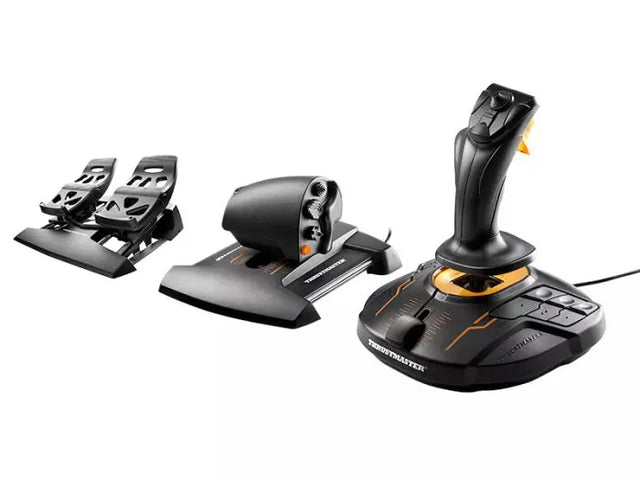
Die Zugänglichkeit in der Flugsimulation hat enorme Fortschritte gemacht, da Hersteller modulare Systeme entwickeln, die verschiedene Erfahrungsstufen und physische Anforderungen berücksichtigen. Diese adaptiven Steuerungslösungen sorgen dafür, dass die virtuelle Luftfahrt einem breiten Publikum zugänglich bleibt. Das T16000M FCS Flight Pack demonstriert diese Vielseitigkeit mit seinem ergonomischen Design und anpassbaren Tastenlayouts, die es Piloten ermöglichen, ihr ideales Steuerungs-Setup zu erstellen.

Flugsimulator-Steuerungen für Xbox

Die Flugsimulation auf Konsolen hat sich rasant entwickelt, insbesondere mit den Xbox-Plattformen, die anspruchsvolle Steuerungsmöglichkeiten bieten. Das Turtle Beach VelocityOne Flight System führt dieses Segment an und bietet Xbox-Nutzern eine umfassende Steuerungslösung, die traditionellen PC-Setups in nichts nachsteht. Diese speziell für Konsolen entwickelten Steuerungen behalten professionelle Funktionen bei und sorgen gleichzeitig für eine nahtlose Kompatibilität mit Xbox-Systemen.

Flugsimulator-Steuerungen für PC

PC-Plattformen bieten die umfangreichste Auswahl an Flugsimulator-Steuerungen und unterstützen alles von einfachen Joysticks bis hin zu vollständigen Cockpit-Setups. Moderne PC-Flugsteuerungen nutzen USB-Konnektivität und hochauflösende Sensoren, um präzise Eingabeerkennung zu gewährleisten. Diese Systeme bieten oft umfangreiche Anpassungsoptionen durch proprietäre Software, mit der Benutzer ihre Steuerreaktionen und Tastenbelegungen feinabstimmen können.

Microsoft Flight Simulator Steuerungen

Die neueste Version des Microsoft Flight Simulator hat die Interaktion von Steuerungssystemen mit virtuellen Flugzeugen revolutioniert. Die fortschrittliche Physik-Engine der Plattform erfordert gleichermaßen hochentwickelte Steuerungshardware, um das volle Potenzial der Simulation auszuschöpfen. Moderne Steuerungssysteme sind speziell für den Microsoft Flight Simulator optimiert und bieten Plug-and-Play-Funktionalität sowie spezielle Funktionen, die die Möglichkeiten der Plattform erweitern.

Hardware-Entwicklung und Integration

Die aktuelle Generation von Flugsimulator-Steuerungen umfasst mehrere technologische Fortschritte:

Sensor-Technologie

  • Hall-Effekt-Magnetsensoren
  • Kontaktlose Positionsverfolgung
  • Hochauflösende Achsenerkennung

Bauqualität

  • Industrielle Hochleistungsmaterialien
  • Präzisionsfertigung
  • Langlebiges Design

Software-Integration

  • Individuelle Programmieroptionen
  • Synchronisation mehrerer Geräte
  • Echtzeit-Eingabekalibrierung

Diese Innovationen sorgen dafür, dass moderne Flugsteuerungen die Präzision und Zuverlässigkeit bieten, die sowohl für Unterhaltung als auch für Trainingszwecke erforderlich sind. Der Einsatz fortschrittlicher Materialien und Sensoren führt zu Steuerungssystemen, die Tausende von Flugstunden überstehen und dabei ihre Genauigkeit und ihr Steuergefühl beibehalten.

Kaufen Sie Ihre Flugsimulator-Steuerungen bei FlightSimZone

Flugsimulator-Steuerungen sind das Herzstück eines authentischen virtuellen Flugerlebnisses. Die richtige Kombination aus Steuergeräten kann ein einfaches Setup in ein hochentwickeltes Heimcockpit verwandeln und die notwendigen Werkzeuge für Unterhaltung und Schulung bereitstellen. Bei FlightSimZone wissen wir, wie wichtig hochwertige Steuerungssysteme für eine immersive Simulation sind.

Kaufen Sie Ihre Flugsimulator-Steuerungen noch heute bei FlightSimZone und erleben Sie die perfekte Kombination aus Realismus und Funktionalität in Ihrem virtuellen Cockpit.


Anmeldung

Haben Sie Ihr Passwort vergessen?

Sie haben noch kein Konto?
Konto erstellen


