Flight Simulator Kontroller

50 products

  • WINCTRL URSA MINOR Airline Joystick R

    WINCTRL WINCTRL URSA MINOR Airline Joystick R

    Out of stock, Förbeställningar tillgängliga. Levereras om 2–2,5 veckor.

    WINCTRL URSA MINOR Airline Joystick R brings airline-style control to the desktop with a clever mix of tactile feedback and thoughtful engineering. The standout feature is the flight-data-linked vibration engine, which adds subtle physical cues during events like flap deployment, airflow changes, and touchdown. Pair that with non-contact magnetic resistance sensors on the X and Y axes, and the stick delivers smooth, stable inputs without the wear issues common in cheaper mechanisms. The result is a joystick that feels lively in hand yet technically grounded under the hood. What Sets the WINCTRL URSA MINOR Airline Joystick R apart? Flight Data Driven Vibration Feedback The URSA MINOR stands out with a vibration motor tied directly to in-sim flight data. Instead of generic rumble, the stick reacts to events like landing contact, airflow changes, or flap movement. Pilots online often mention how this adds subtle physical cues during phases like flare or speed changes, providing a tactile reminder of what the aircraft is doing without constantly glancing at instruments. Robust Gimbal With Magnetic Sensors At the core of the stick is a glass-fiber-reinforced nylon gimbal running on ball bearings, paired with non-contact magnetic sensors for the primary axes. This combination helps maintain smooth motion over time without the jitter common in potentiometer-based designs. Enthusiasts frequently note that the stick movement feels stable across the entire travel range, particularly during small pitch adjustments on final approach. Airliner-Inspired Grip Layout The grip design borrows cues from airline sidestick ergonomics, offering a balanced control layout that includes a PTT trigger, autopilot disconnect switch, and a concealed five-way switch beneath a magnetic cover. Pilots often highlight how practical this arrangement is for everyday flying tasks—radio calls, autopilot overrides, and camera views can all be handled without reaching for the keyboard. Flexible Mounting and Maintenance Design The base includes anti-slip pads for desktop use along with pre-drilled mounting holes for cockpit rigs. A quick-release base cover allows access to internal adjustments without dismantling the entire unit. This detail is frequently appreciated by sim cockpit builders who prefer gear that can be tuned or serviced easily rather than permanently sealed hardware. Pros and Cons Pros Cons Flight-data vibration feedback adds tactile flight cues. Plastic construction compared to metal joystick designs. Magnetic sensors reduce wear and input drift. Limited axis travel compared to extended bases. Good button layout for airliner-style flying tasks. Desk or cockpit mounting options included. Specifications Specification Value Product Model URSA MINOR-Airline-Joystick R Material Industrial ABS plastic (PC + ABS) Controller 32-bit ARM controller X/Y Axis Movement Angle ±15° Z Axis Rotation Angle ±20° X/Y Sensors Non-contact magnetic resistance sensors Gimbal Construction Glass fiber reinforced nylon with ball bearings Operating Force (X/Y) Approximately 6N Rotation Torque (Z) ~4 kgf·cm Throttle Axis Type Long-travel sliding potentiometer Throttle Axis Travel 38 mm Buttons 14 buttons (250gf press force, 0.25 mm travel) Special Controls Hidden 5-way switch, PTT trigger, autopilot disconnect Vibration Feature Adjustable amplitude levels from 0–255 Mounting Options Anti-slip desktop pads and cockpit mounting holes Item Weight 3 kg Included in Box J5-BASE-BLACK + JGRIP-C1-R, Data Cable, Toolkit, Accessories Pack WINCTRL URSA MINOR Airline Joystick R Compatibility Platform Compatibility Connection Type USB plug-and-play connection Software Configuration WW SIMAPP Pro software for button mapping Mounting Desktop use or cockpit mounting The URSA MINOR Airline Joystick R connects via standard USB, allowing it to integrate easily with throttle quadrants, rudder pedals, and other flight hardware from many manufacturers. The base supports both desktop placement with anti-slip pads and cockpit mounting using pre-drilled holes, which is useful for sim rigs or permanent setups. Configuration is handled through WW SIMAPP Pro software, enabling button assignments and vibration adjustments directly from a visual interface. Within a flight setup, the joystick works well alongside external throttles, radio panels, or pedal systems because it behaves as a standard USB HID controller. It does not require proprietary ecosystems and can coexist with other brands in the same cockpit. However, it is intended for PC-based simulation environments and does not integrate directly with console platforms. In terms of simulators, the stick supports Microsoft Flight Simulator 2020, X-Plane, Prepar3D, and also space or combat titles like Star Citizen, Elite Dangerous, and War Thunder. Its plug-and-play USB design allows quick recognition in most PC simulation platforms. It is not designed for Xbox or PlayStation consoles, as those systems typically require licensed hardware and different firmware structures.

    Out of stock, Förbeställningar tillgängliga. Levereras om 2–2,5 veckor.

    €99,00

  • WINCTRL URSA MINOR Airline Joystick L

    WINCTRL WINCTRL URSA MINOR Airline Joystick L

    Out of stock, Förbeställningar tillgängliga. Levereras om 2–2,5 veckor.

    WINCTRL URSA MINOR Airline Joystick L brings airline-style control to the desktop with a clever mix of tactile feedback and thoughtful engineering. The standout feature is the flight-data-linked vibration engine, which adds subtle physical cues during events like flap deployment, airflow changes, and touchdown. Pair that with non-contact magnetic resistance sensors on the X and Y axes, and the stick delivers smooth, stable inputs without the wear issues common in cheaper mechanisms. The result is a joystick that feels lively in hand yet technically grounded under the hood. What Sets the WINCTRL URSA MINOR Airline Joystick L apart? Flight Data Driven Vibration Feedback The URSA MINOR stands out with a vibration motor tied directly to in-sim flight data. Instead of generic rumble, the stick reacts to events like landing contact, airflow changes, or flap movement. Pilots online often mention how this adds subtle physical cues during phases like flare or speed changes, providing a tactile reminder of what the aircraft is doing without constantly glancing at instruments. Robust Gimbal With Magnetic Sensors At the core of the stick is a glass-fiber-reinforced nylon gimbal running on ball bearings, paired with non-contact magnetic sensors for the primary axes. This combination helps maintain smooth motion over time without the jitter common in potentiometer-based designs. Enthusiasts frequently note that the stick movement feels stable across the entire travel range, particularly during small pitch adjustments on final approach. Airliner-Inspired Grip Layout The grip design borrows cues from airline sidestick ergonomics, offering a balanced control layout that includes a PTT trigger, autopilot disconnect switch, and a concealed five-way switch beneath a magnetic cover. Pilots often highlight how practical this arrangement is for everyday flying tasks—radio calls, autopilot overrides, and camera views can all be handled without reaching for the keyboard. Flexible Mounting and Maintenance Design The base includes anti-slip pads for desktop use along with pre-drilled mounting holes for cockpit rigs. A quick-release base cover allows access to internal adjustments without dismantling the entire unit. This detail is frequently appreciated by sim cockpit builders who prefer gear that can be tuned or serviced easily rather than permanently sealed hardware. Pros and Cons Pros Cons Flight-data vibration feedback adds tactile flight cues. Plastic construction compared to metal joystick designs. Magnetic sensors reduce wear and input drift. Limited axis travel compared to extended bases. Good button layout for airliner-style flying tasks. Desk or cockpit mounting options included. Specifications Specification Value Product Model URSA MINOR-Airline-Joystick L Material Industrial ABS plastic (PC + ABS) Controller 32-bit ARM controller X/Y Axis Movement Angle ±15° Z Axis Rotation Angle ±20° X/Y Sensors Non-contact magnetic resistance sensors Gimbal Construction Glass fiber reinforced nylon with ball bearings Operating Force (X/Y) Approximately 6N Rotation Torque (Z) ~4 kgf·cm Throttle Axis Type Long-travel sliding potentiometer Throttle Axis Travel 38 mm Buttons 14 buttons (250gf press force, 0.25 mm travel) Special Controls Hidden 5-way switch, PTT trigger, autopilot disconnect Vibration Feature Adjustable amplitude levels from 0–255 Mounting Options Anti-slip desktop pads and cockpit mounting holes Item Weight 3 kg Included in Box J5-BASE-BLACK + JGRIP-C1-R, Data Cable, Toolkit, Accessories Pack WINCTRL URSA MINOR Airline Joystick L Compatibility Platform Compatibility Connection Type USB plug-and-play connection Software Configuration WW SIMAPP Pro software for button mapping Mounting Desktop use or cockpit mounting The URSA MINOR Airline Joystick L connects via standard USB, allowing it to integrate easily with throttle quadrants, rudder pedals, and other flight hardware from many manufacturers. The base supports both desktop placement with anti-slip pads and cockpit mounting using pre-drilled holes, which is useful for sim rigs or permanent setups. Configuration is handled through WW SIMAPP Pro software, enabling button assignments and vibration adjustments directly from a visual interface. Within a flight setup, the joystick works well alongside external throttles, radio panels, or pedal systems because it behaves as a standard USB HID controller. It does not require proprietary ecosystems and can coexist with other brands in the same cockpit. However, it is intended for PC-based simulation environments and does not integrate directly with console platforms. In terms of simulators, the stick supports Microsoft Flight Simulator 2020, X-Plane, Prepar3D, and also space or combat titles like Star Citizen, Elite Dangerous, and War Thunder. Its plug-and-play USB design allows quick recognition in most PC simulation platforms. It is not designed for Xbox or PlayStation consoles, as those systems typically require licensed hardware and different firmware structures.

    Out of stock, Förbeställningar tillgängliga. Levereras om 2–2,5 veckor.

    €99,00

Flight Simulator Controls for sale at FlightSimZone

När du ger dig in i den virtuella flygvärlden utgör flight simulator kontroller din fysiska koppling till det virtuella cockpit. Dessa avancerade inmatningsenheter omvandlar ditt skrivbord till ett realistiskt flygdäck och ger den taktila återkoppling och precision som krävs för en uppslukande flygupplevelse.

Flygkontroller till flygsimulator

Moderna flygkontroller har utvecklats kraftigt och erbjuder enastående nivåer av noggrannhet och funktionalitet. TCA Captain Pack X Airbus Edition är ett exempel på denna utveckling, med autentiska Airbus-inspirerade kontroller som perfekt kopierar sina verkliga motsvarigheter. Dessa professionella tillbehör har avancerad sensorteknik för exakt inmatning och smidig drift över alla rörelseaxlar.

Tillgång till flygsimulatorkontroller

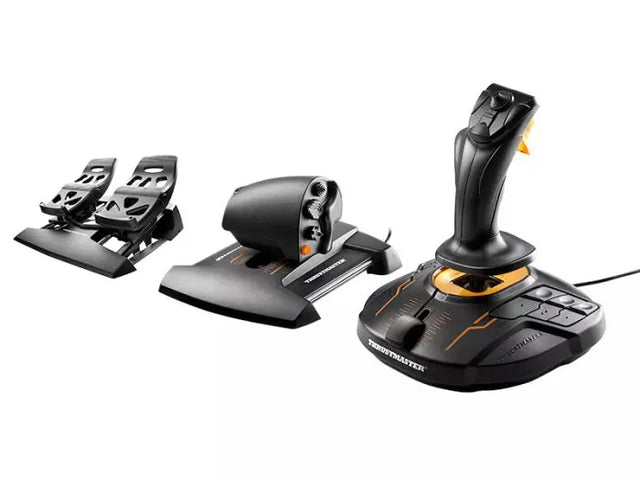
Tillgängligheten inom flygsimulering har gjort stora framsteg, där tillverkare utvecklar modulära system som passar olika färdighetsnivåer och fysiska behov. Dessa anpassade kontroller håller den virtuella flygningen tillgänglig för en bred publik. T16000M FCS Flight Pack visar denna mångsidighet genom sin ergonomiska design och anpassningsbara knappuppsättning, vilket gör det möjligt för piloter att skapa en optimal kontrolleruppsättning.

Xbox-kontroller för flygsimulator

Konsolbaserad flygsimulering har vuxit kraftigt, särskilt på Xbox där avancerade kontroller nu erbjuds. Turtle Beach VelocityOne Flight System är ledande och ger Xbox-användare en komplett kontrollösning som matchar traditionella PC-system. Dessa konsolspecifika kontroller behåller proffsfunktioner och ger sömlös kompatibilitet med Xbox-plattformen.

Flygsimulatorkontroller för PC

PC-plattformar erbjuder störst utbud och flexibilitet, från enkla joysticks till kompletta cockpitlösningar. Med USB-anslutning och högupplösta sensorer ger moderna kontroller exakt inmatningsigenkänning. Ofta finns stora möjligheter till anpassning via egen programvara, så att användare kan finjustera kontrollrespons och knappfunktioner.

Microsoft Flight Simulator-kontroller

Den senaste versionen av Microsoft Flight Simulator har förändrat hur kontroller interagerar med virtuella flygplan. Den avancerade fysikmotorn kräver lika avancerad hårdvara för att utnyttja simulatorkänslan fullt ut. Moderna kontroller är optimerade för Microsoft Flight Simulator och ger plug-and-play-funktion samt specialfunktioner som förbättrar upplevelsen.

Jämförelsetabell

Egenskap TCA Captain Pack X Airbus T16000M FCS Flight Pack VelocityOne Flight System
Plattforms-kompatibilitet PC PC Xbox Series X|S, PC
Kontrolltyp Sidestick + gasreglage HOTAS + sidroderspedaler Yoke + throttlesystem
Knappar/reglage 21+ programmerbara 16 + HAT Switch 18 + statuspanel
Sensorteknik H.E.A.R.T Hall Effect Hall Effect-sensorer Hall Effect-sensorer
Ytterligare hårdvara Dubbla dragreglage, klaffar, fartbroms Throttle, sidroderspedaler Integrerad paneldisplay
Programvarufunktioner T.A.R.G.E.T-programvara T.A.R.G.E.T-programvara Anpassad management-app
Byggmaterial Industriell plast Förstärkt plast Förstärkt plast
Särskilda egenskaper - Autentisk Airbus-design
- Modulärt system
- Ambidextrous
- Full HOTAS-system
- Precision på roder
- Militärinspirerat grepp
- Statusdisplaypanel
- Trimhjul ingår
- Modulär design

Utveckling och integration av hårdvara

Dagens flight simulator kontroller bygger på flera tekniska innovationer:

Sensorteknik

  • Hall effect-magnetiska sensorer
  • Kontaktlös positionsavkänning
  • Högupplöst axeligenkänning

Byggkvalitet

  • Industriella material
  • Precisionsproduktion
  • Hållbarhetsfokus

Programvaruintegration

  • Anpassningsbara programmeringsmöjligheter
  • Synkronisering mellan flera enheter
  • Kalibrering i realtid

Dessa innovationer gör att moderna kontroller erbjuder den precision och tillförlitlighet som krävs för både nöje och träning. Med avancerade material och sensorer håller systemen hög precision och känsla även efter tusentals timmars användning.

Köp dina flight simulator kontroller hos FlightSimZone

Flight simulator kontroller utgör grunden för en autentisk virtuell flygupplevelse. Rätt kombination av styrdon kan förvandla en enkel uppsättning till en avancerad hemmacockpit och ge de verktyg som krävs både för nöje och kompetensutveckling. Hos FlightSimZone förstår vi vikten av kvalitativa styrsystem för en uppslukande simuleringsmiljö.

Köp dina flight simulator kontroller hos FlightSimZone redan idag och upplev en perfekt kombination av realism och funktionalitet i din virtuella cockpit.


Login

Forgot your password?

Don't have an account yet?
Create account


