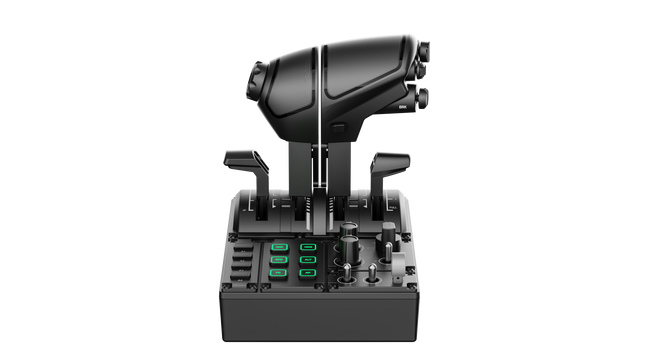
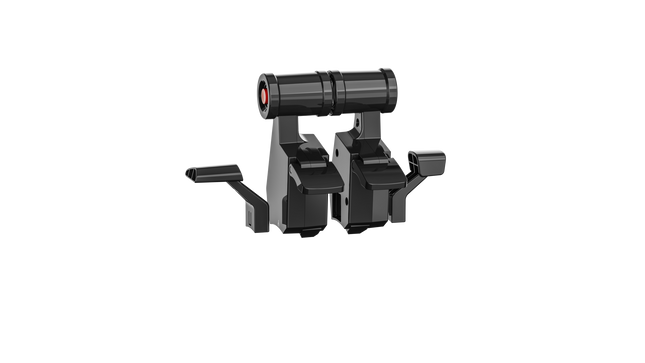
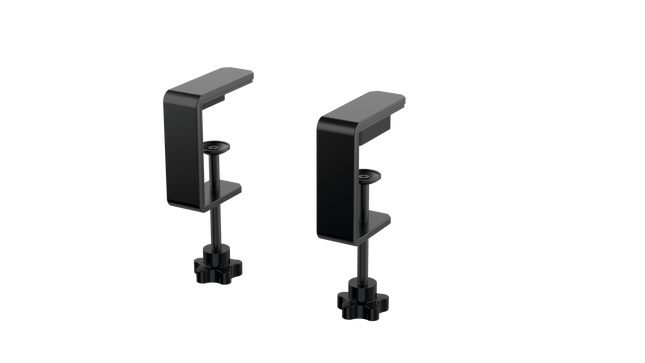
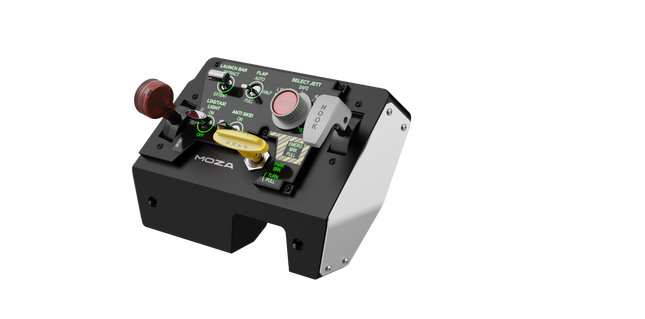
MOZA MTQ Throttle Panel to modułowy system sterowania lotem stworzony dla pilotów, którzy oczekują dotykowego zaangażowania i mechanicznej precyzji przy każdym ruchu przepustnicy. Dzięki modułowemu systemowi dźwigni przepustnicy oraz wszechstronnemu układowi sterowania przekształca każdy zestaw symulatora lotu w doświadczenie na poziomie kokpitu. Satysfakcjonujące detenty, metalowa konstrukcja oraz konfigurowalne podświetlenie RGB nadają każdej dźwigni wyraźny charakter—niezależnie od tego, czy uruchamiasz silniki w Airbusie, czy aktywujesz dopalacze w myśliwcu. To mechaniczna satysfakcja połączona z funkcjonalną wszechstronnością.
Co wyróżnia MOZA MTQ Throttle Panel?
Autentyczne modułowe doświadczenie dźwigni — W przeciwieństwie do stałych przepustnic, MTQ umożliwia pilotom przełączanie się między stylami dźwigni Airbus, Boeing i myśliwca dzięki systemowi montażu na prowadnicy. Każda dźwignia posiada własne mechaniczne detenty, pozwalając odczuć punkty przejścia, takie jak aktywacja odwróconego ciągu czy blokady dopalacza. Precyzja dotykowa tych detentów jest szeroko chwalona przez pilotów symulatorów za wprowadzanie fizycznej przejrzystości w sterowaniu przepustnicą.
Ergonomiczny układ z przemyślanym designem — Panel sterowania zawiera 10 przycisków, 3 pokrętła obrotowe i 3 przełączniki typu toggle, wszystkie rozmieszczone w naturalnych strefach dłoni. Entuzjaści doceniają brak chaosu i intuicyjny dostęp do kluczowych funkcji lotu bez utraty skupienia. Dodanie dedykowanej dźwigni podwozia zwiększa realizm i sprawia, że przejścia między fazami lotu są płynniejsze i bardziej intuicyjne.
Konfigurowalne RGB i integracja z oprogramowaniem — Oprogramowanie MOZA Cockpit zapewnia pełną kontrolę nad jasnością RGB, logiką kolorów oraz efektami świetlnymi opartymi na telemetrii. Opinie sugerują, że oświetlenie nie tylko wygląda imponująco w ciemnym kokpicie, ale może być zaprogramowane tak, aby odzwierciedlać stany lotu, takie jak pozycja podwozia czy strefy detentów przepustnicy, czyniąc je funkcjonalnym elementem informacji, a nie tylko dekoracją.
Mechaniczny feedback na wielu osiach — MTQ oferuje cztery osie, z których każda posiada unikalne detenty dla funkcji takich jak klapy i hamulce aerodynamiczne. Charakterystyka każdej osi została dostrojona do różnych poziomów oporu, a wirtualny detent przycisku na ramieniu hamulca aerodynamicznego zapewnia satysfakcjonujące kliknięcie podczas użycia. Piloci uznają spójność między osiami za kluczową zaletę, dzięki której panel sprawdza się zarówno w lotnictwie cywilnym, wojskowym, jak i ogólnym.
Zalety i wady
Zalety
Wady
Wymienne moduły dźwigni umożliwiają różnorodne konfiguracje lotu.
Brak niezależnego połączenia USB; wymaga połączenia z bazą MOZA.
Doskonałe detenty na osiach przepustnicy i klap.
Ograniczone wsparcie dla ekosystemów firm trzecich.
Intuicyjny układ z konfigurowalnym podświetleniem RGB.
Wytrzymała konstrukcja mechaniczna z płynnym tłumieniem ruchu.
Specyfikacja
Specyfikacja
Wartość
System dźwigni
Modułowe dźwignie przepustnicy z mechanizmem prowadnicowym
Dołączone style przepustnicy
TQF (myśliwiec), TQA (Airbus), TQB (Boeing)
Osie
Cztery niezależne osie z detentami
Przyciski i kontrolki
10 przycisków, 3 pokrętła obrotowe, 3 przełączniki toggle, dźwignia podwozia
Podświetlenie RGB
Sześć przycisków RGB, 16.7 miliona kolorów
Łączność
Połączenie RJ11 do MOZA flight bases
Oprogramowanie
MOZA Cockpit z efektami świetlnymi opartymi na telemetrii
Kompatybilność MOZA MTQ Throttle Panel
Kompatybilny sprzęt
Szczegóły
MOZA Flight Bases (np. AB6)
Bezpośrednie połączenie RJ11 dla integracji plug-and-play
Komponenty ekosystemu MOZA
Bezproblemowe działanie poprzez oprogramowanie MOZA Cockpit
Systemy firm trzecich
Ograniczone wsparcie; może wymagać adapterów lub mapowania w oprogramowaniu
MOZA MTQ Throttle Panel łączy się bezpośrednio z MOZA flight bases przez RJ11, redukując ilość kabli i zapewniając niskie opóźnienia. Jego modułowa konstrukcja dźwigni sprawia, że jest kompatybilny z wariantami przepustnicy TQF, TQA i TQB, z których każdy zaprojektowano pod konkretne typy statków powietrznych. Choć został stworzony głównie dla ekosystemu MOZA, użytkownicy zauważają ograniczoną kompatybilność z systemami firm trzecich—często wymagającą adapterów lub niestandardowego mapowania. MTQ integruje się bezproblemowo z aluminiowymi kokpitami i modułowymi rigami dzięki stabilnej, łatwej w montażu podstawie.
Po stronie oprogramowania MTQ współpracuje z MOZA Cockpit software i integruje się bezpośrednio z popularnymi symulatorami lotu, takimi jak Microsoft Flight Simulator 2020/2024, X-Plane 11/12 oraz DCS World. Jest w pełni kompatybilny z komputerami PC z systemem Windows, ale nie jest obsługiwany przez konsole takie jak Xbox czy PlayStation. Dzięki modułowemu podejściu i szerokiej kompatybilności w symulatorach MTQ jest stworzony dla pilotów PC, którzy oczekują zarówno elastyczności, jak i mechanicznej precyzji.
Brak w magazynie,
Zamówienia w przedsprzedaży dostępne. Wysyłka w ciągu 2-2,5 tygodnia.
Honeycomb Sierra TPM Module brings the tactile charm of classic general aviation straight to your desk, with a lockable metal throttle vernier that feels satisfyingly mechanical in hand and a high-resolution integrated trim wheel that lets you dial in attitude with fingertip finesse. Designed with single-prop aircraft like the Cessna 172 in mind, it combines all-metal construction, integrated flap and parking brake controls, and LED landing gear indicators into a compact module that slots neatly into a serious home cockpit.
What Sets the Honeycomb Sierra TPM Module apart?
True General Aviation Vernier Feel The lockable metal throttle vernier with fine-tune prop and mixture knobs doesn’t just look the part—it delivers that push-pull, twist-to-adjust sensation pilots associate with classic GA cockpits. Many users highlight how the incremental adjustment allows smoother power changes during climb and approach, especially in piston aircraft, compared to sliding lever-based throttles that can feel too abrupt for delicate engine management.
Integrated Cockpit Workflow Instead of scattering controls across separate panels, the Sierra TPM places trim, flaps, parking brake, and landing gear in one cohesive layout. The low-profile, high-resolution trim wheel earns particular praise for its smooth rotation and granular input, making pitch adjustments during cruise or final approach feel natural. It reduces reliance on keyboard shortcuts and keeps hands where they belong—on dedicated hardware.
Solid All-Metal Construction Built with Honeycomb-grade components and a durable all-metal chassis, this module has noticeable heft and rigidity. Enthusiasts frequently mention that it feels planted on the desk, with minimal flex during aggressive throttle movements. Compared to lighter plastic alternatives, the Sierra TPM maintains structural stability over time, which is especially appreciated in permanent or semi-permanent cockpit setups.
Seamless Integration with Honeycomb Ecosystem Designed to pair cleanly with Honeycomb yokes and mounting systems, the included dual mounting solution simplifies alignment and positioning. Users who already run Alpha or Bravo units often comment on how the design language and control spacing feel unified, creating a visually coherent and ergonomically consistent flight deck without mismatched modules.
Pros and Cons
Pros
Cons
Metal vernier throttle offers fine incremental control.
Designed primarily for single-engine GA aircraft.
Integrated trim wheel provides smooth pitch adjustments.
Requires desk space for full mounting solution.
All-metal chassis feels stable and durable.
LED gear indicators add clear visual feedback.
Specifications
Specification
Value
Product Name
Honeycomb Sierra TPM Module
EAN
4039621003998
Construction
All-metal construction with Honeycomb-grade components
Throttle Type
Lockable metal throttle vernier with prop and mixture knobs
Integrated Controls
Trim wheel, parking brake, flap lever, landing gear lever with LED indicators
Layout
General aviation style for single prop airplanes
Mounting
Dual mounting solution included
Connection
USB-C to USB-A cable
Compatibility
PC and Mac
Drivers
MSFS 2020 Driver, MSFS 2024 Driver
Included in the Box
Sierra TPM Module, Dual Mounting Solution, USB-C to USB-A Cable, Quick Start Guide (EFIGS)
Honeycomb Sierra TPM Module Compatibility
Platform
Compatibility
Operating Systems
PC and Mac
Connection Type
USB-C to USB-A (direct USB connection)
Primary Ecosystem Pairing
Honeycomb Alpha and Bravo hardware
The Sierra TPM Module connects via direct USB, making it straightforward to integrate into most desktop cockpit builds. It pairs especially well with Honeycomb Alpha yokes and Bravo throttle quadrants, sharing the same design philosophy and mounting ecosystem. Thanks to its dual mounting solution, it can be desk-mounted alongside other Honeycomb units for a unified layout. It is not intended for console setups and does not interface directly with standalone hardware without a compatible PC or Mac.
On the software side, it supports Microsoft Flight Simulator 2020 and Microsoft Flight Simulator 2024 through dedicated drivers, and it also works with simulators like X-Plane and Prepar3D on PC. It is not compatible with Xbox consoles, as it relies on standard USB PC/Mac drivers rather than console-certified firmware. For desktop sim pilots focused on general aviation, it slots cleanly into modern PC-based sim platforms.
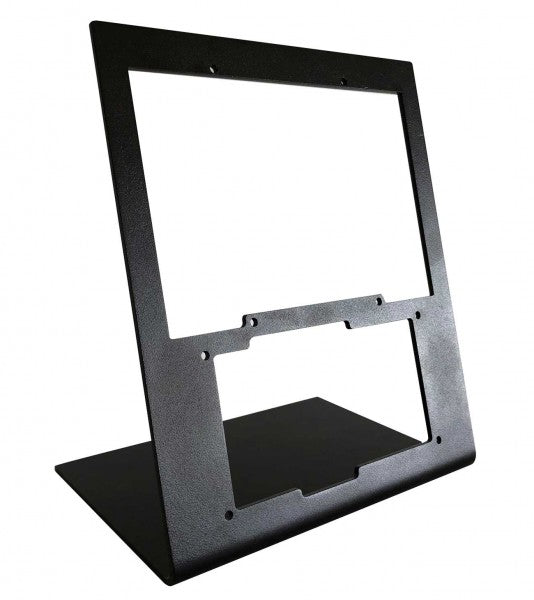
The RealSimGear - Desktop Stand for G1000 Suite offers an exceptional solution for flight simulation enthusiasts who demand stability and organization in their setup. Constructed from durable 3mm painted steel, this stand provides a stable, elevated position for the G1000 Suite's PFD, MFD, and audio panel. Its matte black finish complements any setup, while rubber non-slip feet and precise mounting compatibility ensure effortless integration. This stand is a must-have for those seeking a structured and ergonomic flight sim experience.
What sets the RealSimGear - Desktop Stand for G1000 Suite apart?
Purpose-Built for G1000 Suite This stand is specifically engineered to accommodate the G1000 PFD, MFD, and audio panel. Its tailored dimensions and secure mounting options make it a seamless addition to any flight sim rig, ensuring all three components are perfectly aligned for practical use.
Robust and Durable Construction Crafted from 3mm painted steel, the stand is built to withstand the demands of extended simulation sessions. Its sturdy design minimizes vibration and enhances the overall durability of your setup, providing peace of mind during intense flying scenarios.
Extensive Mounting Compatibility Featuring mounting holes compatible with Saitek/Logitech yokes, Honeycomb Alpha, and Bravo controls, this stand is designed to integrate effortlessly with popular hardware. Whether you're a seasoned pilot or a newcomer, the flexible compatibility simplifies hardware configuration.
Ergonomic Setup Support By elevating the G1000 Suite to an ideal height, this stand minimizes strain and enhances usability. It mirrors cockpit layouts found in actual aircraft, providing an organized and functional configuration for extended flight training or recreational use.
Pros and Cons
Pros
Cons
Perfectly accommodates PFD, MFD, and audio panel.
Higher cost compared to simpler stands.
Durable 3mm painted steel construction resists wear.
Designed exclusively for the G1000 Suite.
Compatible with Saitek/Logitech and Honeycomb systems.
Specifications
Specification
Value
Material
3mm painted steel
Finish
Matte black
Features
Non-slip rubber feet, mounting screws
Capacity
Holds G1000 PFD, MFD, and audio panel
Mounting Compatibility
Saitek/Logitech yokes, Honeycomb Alpha/Bravo
RealSimGear - Desktop Stand for G1000 Suite Compatibility
The RealSimGear - Desktop Stand for G1000 Suite is designed to perfectly accommodate the G1000 Suite's PFD, MFD, and audio panel. It features mounting holes that align with the Saitek/Logitech yoke mounting systems, as well as Honeycomb Alpha and Bravo throttle controls. This compatibility ensures seamless integration into existing setups, minimizing the need for additional hardware or customization. However, it is specifically tailored for the G1000 Suite, which limits its versatility for other configurations.
Designed for PC-based simulation setups, this stand works beautifully with platforms like X-Plane and Microsoft Flight Simulator. It does not directly support console gaming platforms, aligning with its primary focus on professional and enthusiast-grade PC configurations. This ensures an optimal experience when paired with popular flight simulation software.
Moza MTLP Take-off Landing Panel brings the essence of fighter jet operations to the home cockpit with a rugged, tactile control system built for serious sim pilots. Designed after the F/A-18 landing panel, it offers an intuitive switch layout that allows for quick, instinctive inputs without relying on visual confirmation. The authentic parking brake mechanism delivers a solid, mechanical rebound that feels straight out of a real fighter jet. With 25 programmable switch signals and Hall effect sensors for accuracy, this panel bridges the gap between virtual and hands-on cockpit interaction.
What Sets the Moza MTLP Take-off Landing Panel apart?
Designed for Hands-On Control Modeled after the F/A-18 landing panel, this setup prioritizes instinctive operation. The switch layout allows pilots to manage critical aircraft functions by feel, reducing the need to glance away from the screen. This kind of tactile reinforcement is essential for fast-paced environments like combat flights and carrier landings.
Hall Sensor Precision for Key Functions Unlike standard mechanical switches, the MTLP integrates Hall effect sensors into key inputs like the landing gear and tailhook levers. These sensors provide long-term reliability and consistent input accuracy, eliminating wear-related drift or degradation over time.
Built to Handle Repeated Use The aluminum alloy construction used in the brake lever, tailhook lever, and landing gear ensures durability. These components can withstand repeated, forceful engagement, making the panel a long-term investment for flight enthusiasts who demand mechanical robustness.
Seamless Integration with Moza's Ecosystem The MTLP is designed to work effortlessly with the Moza MTP Throttle Panel, forming a cohesive fighter jet control setup. Through Moza Cockpit software, users can synchronize telemetry-driven lighting effects and customize their button configurations to match their flying style.
Pros and Cons
Pros
Cons
Modeled after the F/A-18 landing panel
Desk clamp sold separately
Hall effect sensors for accuracy and longevity
Limited to PC compatibility
25 programmable switch signals for extensive control
Compatible with Moza’s ecosystem for full fighter setup
Specifications
Specification
Value
Dimensions
196.5 × 134.7 × 149 mm
Housing Material
Composite materials
Brake Lever Material
Aluminum alloy
Weight
680g
Switch Signals
25
Telemetry Lighting
Yes (no additional plugins required)
Supported Platform
PC
Desk Clamp
Optional accessory
Included Accessories
Data cable, user manual
Moza MTLP Take-off Landing Panel Compatibility
Compatible With
Not Compatible With
Moza MTP Throttle Panel
Third-party throttle panels
Moza Cockpit software for customization
Console platforms
PC-based flight simulators
MacOS
Designed for PC-based simulators, the MTLP integrates seamlessly with Moza's MTP Throttle Panel to create a fighter jet-style control suite. The panel is configured through Moza Cockpit software, allowing for extensive customization, including telemetry-linked lighting effects. However, it does not support third-party throttle panels, meaning full functionality is best achieved within the Moza ecosystem.
PC-only compatibility ensures support for major flight simulators, but MacOS and consoles are not supported. Flight sim enthusiasts using Microsoft Flight Simulator 2020, Microsoft Flight Simulator 2024, and X-Plane 12 will find the panel natively recognized, offering direct plug-and-play functionality through USB. However, users looking for Xbox or PlayStation support will need to consider alternative hardware.
Wingflex A320 EFIS Cube puts Airbus navigation and display management exactly where your hand expects it, combining full-function EFIS and glareshield controls with high-contrast dual-colour displays in a compact 80% scale design. From adjusting barometric pressure to selecting navigation modes, every rotary movement and button press feels deliberate and satisfying. The synchronized backlighting, integrated stand and simple USB connectivity make it an excellent addition to a desktop Airbus cockpit without demanding the space of a full-size flight deck.
What Sets the Wingflex A320 EFIS Cube apart?
More Than Just an EFIS Panel Unlike many desktop EFIS units that focus solely on navigation display controls, the EFIS Cube also integrates important glareshield functions such as Master Warning, Master Caution and CHRONO controls. Having these frequently used functions within easy reach creates a cleaner cockpit workflow and reduces the need to return to the virtual cockpit during busy phases of flight.
Compact Size Without Sacrificing Functionality The 80% scale design makes the panel much easier to accommodate on a typical desktop while preserving the familiar Airbus control layout. Buttons, rotary selectors and push-pull controls remain comfortably spaced, allowing quick adjustments without making the panel feel cramped. It strikes an effective balance between space efficiency and comfortable day-to-day operation.
Consistent Lighting Across Your Cockpit The synchronized brightness system keeps the displays and backlighting aligned with supported simulator lighting, creating a cohesive appearance throughout the cockpit. Combined with Airbus-style fonts and dual-colour displays, important flight information remains crisp and easy to read whether flying during bright daylight or on a dark nighttime arrival.
Built for Modular Cockpit Expansion The EFIS Cube performs perfectly as a standalone controller but is equally suited to growing cockpit projects. It integrates neatly alongside the Wingflex FCU Cube and RMP Combo Cube, allowing sim pilots to expand their Airbus setup gradually while maintaining a consistent appearance, matching lighting and a tidy desktop footprint.
Pros and Cons
Pros
Cons
Integrated glareshield controls reduce additional hardware.
Reduced scale differs from full-size Airbus dimensions.
Dual-colour displays remain easy to read.
Designed specifically for Airbus aircraft.
Synchronized lighting creates consistent cockpit appearance.
Plug-and-play USB connection simplifies installation.
Compact footprint fits comfortably beneath most monitors.
Specifications
Specification
Value
Product
Wingflex A320 EFIS Cube
Scale
80% scale
Primary Function
Airbus Electronic Flight Instrument System control panel
Integrated Functions
EFIS controls and glareshield controls
Display Type
High-contrast dual-colour LCD displays
Display Fonts
Airbus-style fonts
Controls
Buttons, rotary knobs and switches
Lighting
Fully synchronized adjustable backlighting
Connection
USB
Installation
Plug-and-play
Stand
Integrated low-profile desktop stand
Primary Use
Airbus flight simulation
Wingflex A320 EFIS Cube Compatibility
Simulator
Compatible Aircraft
X-Plane
ToLiss A319, A320, A330, A340; Laminar A330
Microsoft Flight Simulator
Fenix A3xx, FlyByWire A320 & A380, iniBuilds A320, A321, A330, A340, A350, Aerosoft A340, Headwind A330
Prepar3D
FSLabs A32x
The Wingflex A320 EFIS Cube connects through USB and can be used either as a standalone Airbus EFIS controller or alongside the Wingflex FCU Cube and Wingflex RMP Combo Cube. Its synchronized brightness allows all compatible Cube modules to maintain a consistent appearance, while the integrated stand provides a comfortable operating angle for desktop cockpits.
The published compatibility list covers a wide selection of Airbus aircraft across the major PC flight simulators. It supports Fenix A3xx, ToLiss Airbus aircraft, FlyByWire A320 and A380, multiple iniBuilds Airbus models, Laminar A330, Aerosoft A340, Headwind A330 and FSLabs A32x. The panel is designed specifically for Airbus aircraft and is not intended for Boeing flight decks or other aircraft with different EFIS layouts.
The EFIS Cube is compatible with Microsoft Flight Simulator 2020 and 2024, X-Plane 11 and 12 and Prepar3D on Windows PCs. It uses a USB connection with plug-and-play operation and is not compatible with Xbox or PlayStation consoles, as dedicated cockpit hardware requires PC-based simulator support.
Wingflex A320 FCU Cube brings Airbus autopilot management into a compact desktop format with full autopilot control functionality and a durable all-aluminum construction. Every heading adjustment, altitude selection and autopilot engagement is handled through tactile knobs and switches that encourage proper cockpit workflows instead of constant mouse clicks. The synchronized dimmer, adjustable backlighting and plug-and-play USB connection make it equally suited to quick evening flights or long IFR sessions, all without demanding the space of a full-size glareshield.
What Sets the Wingflex A320 FCU Cube apart?
Compact Airbus Autopilot Without Sacrificing Core Controls At 80% scale, the FCU Cube preserves the control layout Airbus pilots expect while significantly reducing the space required on a desktop. Independent reviews consistently note that this balance makes it much easier to fit beneath standard monitors than full-size panels, yet the spacing remains comfortable enough for deliberate heading, speed and altitude adjustments during demanding approaches.
Switches That Reward Every Input The AP1, AP2 and A/THR buttons use dedicated axial switches with a 2.5 mm travel, while the remaining controls employ Alps switches with a 2.0 mm stroke. Pilots frequently comment that well-designed tactile controls encourage proper use of the autopilot throughout a flight instead of relying on keyboard shortcuts once the novelty wears off.
Solid Metal Construction Built for Frequent Flying The aluminum housing and matching aluminum control knobs give the FCU Cube a reassuring weight that keeps it planted during repeated adjustments. Reviewers often highlight the rigid construction because it avoids the flex sometimes found in lighter desktop panels, making heading changes and rotary inputs feel consistent throughout longer flying sessions.
Designed to Grow Into a Complete Airbus Cockpit The FCU Cube works well as a standalone autopilot controller, but it is equally at home alongside the Wingflex EFIS Cube and RMP Combo Cube. Shared brightness synchronization creates a unified appearance across the glareshield, allowing cockpit builders to expand their setup gradually instead of replacing hardware every time a new module is added.
Pros and Cons
Pros
Cons
Aluminum housing provides excellent structural rigidity.
Reduced scale differs from full-size Airbus dimensions.
Autopilot switches deliver satisfying tactile feedback.
Designed specifically for Airbus aircraft families.
Plug-and-play USB installation minimizes setup time.
Synchronized lighting complements other Cube modules.
Broad Airbus simulator compatibility across major platforms.
Specifications
Specification
Value
Product
Wingflex A320 FCU Cube
Scale
80% scale
Primary Function
Airbus Flight Control Unit (FCU)
Construction
Aviation-grade aluminum body and knobs
Connection
USB
Installation
Plug-and-play
Autopilot Switches
AP1, AP2 and A/THR axial switches
Autopilot Switch Travel
2.5 mm
Other Button Switches
Japan Alps switches with 2.0 mm travel
Lighting
Adjustable backlighting with synchronized dimmer knob
Primary Use
Airbus flight simulation autopilot control
Wingflex A320 FCU Cube Compatibility
Simulator
Compatible Aircraft
X-Plane
ToLiss A319, A320, A330, A340; Laminar A330
Microsoft Flight Simulator
Fenix A3xx, FlyByWire A320 & A380, iniBuilds A320, A321, A330, A340, A350, Aerosoft A340, Headwind A330
Prepar3D
FSLabs A32x
The FCU Cube connects through USB and operates as either a standalone Airbus autopilot controller or as part of the broader Wingflex Cube ecosystem. It supports brightness synchronization with the Wingflex EFIS Cube and RMP Combo Cube, creating a consistent glareshield appearance. Its compact dimensions also make it easy to integrate into desktop cockpits or modular simulator builds without requiring a full-width Airbus panel.
The published compatibility list covers a broad range of Airbus simulations across the leading platforms. It supports Fenix A3xx, ToLiss Airbus aircraft, FlyByWire A320 and A380, multiple iniBuilds Airbus models, Laminar A330, Aerosoft A340, Headwind A330 and FSLabs A32x. Unlike the RMP Combo Cube, the FCU Cube also supports the FlyByWire A380 and iniBuilds A350, making it one of the most widely compatible Airbus autopilot panels in the Wingflex lineup.
The FCU Cube is designed for Microsoft Flight Simulator, X-Plane and Prepar3D on Windows PCs. It communicates through USB and works with supported Airbus aircraft using Wingflex software integration. It is not compatible with Xbox or PlayStation consoles, as dedicated USB cockpit peripherals of this type require PC-based simulator support.
Wingflex A320 RMP Combo Cube squeezes four useful Airbus control sections into one compact unit, combining RMP, ATC, TCAS and warning-panel functions with high-contrast dual-colour LCD screens. Its physical knobs and illuminated controls give frequency changes and transponder entries a satisfying mechanical rhythm, without consuming the entire desk. The 80% scale and 13-degree tilt keep everything comfortably visible, while USB connectivity makes installation refreshingly direct. Apparently, proper radio management does not require a full cockpit shell and several kilometres of wiring.
What Sets the Wingflex A320 RMP Combo Cube apart?
Four Control Sections Earn Their Desk Space Rather than reproducing only the radio management panel, the unit combines RMP, ATC, TCAS and glareshield warning functions behind one compact face. This gives solo pilots considerably more usable control than a single-purpose radio panel. Hands-on coverage particularly values the integrated radio section because it places communication and surveillance controls beside the Airbus autopilot hardware, where they can be reached without returning to the virtual cockpit.
Compact Dimensions Without Tiny Controls The 80% scale reduces the panel’s footprint while retaining physical rotary controls and readable displays. Review coverage of the complete Cube system found the format notably easier to position beneath a conventional monitor than full-width Airbus hardware. The compromise is sensible for desktop pilots: it saves space without shrinking everything into fiddly miniature controls that require the fingertips of a concert pianist and the patience of an air-traffic controller.
Lighting That Behaves as One Cockpit System The RMP Combo Cube can synchronize its brightness with the Wingflex FCU Cube and EFIS Cube, producing consistent illumination across the complete glareshield arrangement. Independent reporting also notes that each module can still operate separately, so the RMP does not require the complete Cube set. That flexibility is useful for gradual cockpit builds, while synchronized backlighting prevents one panel glowing like a supermarket sign beside two carefully dimmed instruments.
Straightforward Setup, With Aircraft-Specific Boundaries User feedback describes the initial setup as notably simple, and the panel operates through a direct USB connection with Wingflex integration software. However, reports also show that behaviour may vary between aircraft and simulator versions, particularly when a specific function has not yet been implemented. It is therefore far less troublesome than custom wiring, but compatibility should still be checked by aircraft rather than assumed from the presence of an Airbus badge.
Pros and Cons
Pros
Cons
Four integrated sections reduce separate hardware requirements.
Reduced scale differs from full-size cockpit dimensions.
Dual-colour displays provide clear frequency information.
Aircraft support varies between simulator platforms.
Synchronized lighting complements other Wingflex Cube modules.
USB connection keeps desktop installation straightforward.
Angled enclosure improves visibility from seated positions.
Specifications
Specification
Value
Product
Wingflex A320 RMP Combo Cube
Scale
80% scale
Integrated Functions
RMP, ATC, TCAS and glareshield warning panel
Display Type
Dual-colour LCD screens
Display Background
Black
Viewing Angle
13 degrees
Connection
USB
Installation
Plug-and-play
Lighting
Synchronized brightness adjustment
Compatible Lighting Modules
Wingflex A320 FCU Cube and A320 EFIS Cube
Primary Use
Airbus flight simulation cockpit control
Wingflex A320 RMP Combo Cube Compatibility
Simulator
Compatible Aircraft
Status
X-Plane
ToLiss A319, A320, A330 and A340; Laminar A330
Supported
Microsoft Flight Simulator
Fenix A3xx; FlyByWire A320; iniBuilds A320, A321, A330 and A340; Aerosoft A340; Headwind A330
Supported
Prepar3D
FSLabs A32x
Supported
Microsoft Flight Simulator
FlyByWire A380
Not supported
Microsoft Flight Simulator
iniBuilds A350
Not supported
The panel connects through a single USB connection and can be used independently as a desktop controller. It also integrates with the Wingflex A320 FCU Cube and Wingflex A320 EFIS Cube, including synchronized brightness across the modules. Within the optional Cube console, the panels can share an internal USB hub and run to the computer through one external cable. No universal mounting compatibility with third-party cockpit frames is specified.
Aircraft support is integration-specific rather than universal. The panel supports ToLiss, Fenix, FSLabs, FlyByWire A320 and several iniBuilds aircraft, alongside the listed Laminar, Aerosoft and Headwind models. The FlyByWire A380 is not supported, and the iniBuilds A350 is not supported. Reports of differing behaviour between Microsoft Flight Simulator and X-Plane also show why pilots should use the published aircraft list instead of assuming every Airbus add-on will communicate correctly.
For gaming platforms, the RMP Combo Cube is intended for Windows PC flight simulation and works with supported aircraft in Microsoft Flight Simulator, X-Plane and Prepar3D. It relies on PC-side USB communication and Wingflex software for integration and firmware management. It is not listed as compatible with Xbox or PlayStation, so console editions of Microsoft Flight Simulator should not be treated as supported platforms.
Wingflex A320 Combo Cube places the Airbus glareshield essentials into one tidy desktop system, combining EFIS, FCU and multifunction RMP controls with high-contrast dual-colour displays. The knobs click and turn with enough purpose to make heading changes, radio tuning and barometric adjustments feel far better than poking at a virtual cockpit. USB connectivity keeps installation straightforward, while the 13-degree viewing angle brings the panels naturally into sight. It is compact Airbus hardware for pilots whose desks already resemble a mildly concerned electronics workshop.
What Sets the Wingflex A320 Combo Cube apart?
Three Core Panels Without a Full-Size Glareshield The bundle combines an EFIS, FCU and RMP-based multifunction panel in an 80% scale layout, saving roughly eleven centimetres compared with a full-size arrangement. Reviewers have praised that reduction because it preserves practical control spacing while fitting more comfortably beneath ordinary monitors. The result feels substantial enough for deliberate operation without demanding the sort of desk usually reserved for air-traffic control or an exceptionally ambitious accountant.
A Smarter Use of the Right-Hand Position Instead of supplying a second EFIS that a solo pilot may rarely touch, Wingflex fills the right side with a four-in-one panel covering radio management, transponder, TCAS and warning functions. Review feedback identifies this as one of the bundle’s most practical decisions, since it places genuinely useful controls within reach. It sacrifices strict two-seat symmetry, but gains considerably more day-to-day function for single-pilot desktop flying.
Clear Displays and Cohesive Night Lighting Dual-colour screens provide sharp contrast against their dark backgrounds, while synchronized brightness allows the EFIS, FCU and RMP sections to behave like one connected panel. Independent testing found the displays notably crisp and the backlighting pleasant in darker rooms. That matters during evening approaches, when deciphering fuzzy digits is an unnecessary challenge and the weather already has enough creative ways to ruin a carefully prepared arrival.
Simple Assembly With a Stable Optional Console When paired with the Cube Stand, the three modules connect through internal USB-C cables and a built-in hub, leaving a single cable running to the PC. Reviewers found assembly straightforward and noted that the broad base remained firmly planted while pressing buttons and turning encoders. The stand also gives the separate modules a cleaner, unified appearance, although it is an optional bundle choice rather than standard equipment with every configuration.
Pros and Cons
Pros
Cons
Compact layout preserves valuable desktop space.
Reduced scale differs from full-size cockpit dimensions.
Three modules cover major glareshield functions.
Optional console increases the complete setup footprint.
Dual-colour displays remain clear in low light.
RMP module combines four useful control sections.
USB installation requires minimal external interface hardware.
Specifications
Specification
Value
Product
Wingflex A320 Combo Cube
Included Modules
A320 EFIS Cube, A320 FCU Cube and A320 RMP Combo Cube
Scale
80% scale
Interface
USB
Installation
Plug-and-play
Display Type
Dual-colour LCD screens
Viewing Angle
13 degrees
FCU Construction
Aluminium body and knobs
RMP Functions
RMP, ATC, TCAS and side-panel controls
Lighting
Synchronized brightness across compatible Cube modules
Product Dimensions
52.0 × 18.5 × 16.5 cm
Package Dimensions
64.0 × 24.0 × 20.5 cm
Bundle Options
Three-module bundle, or bundle with Cube Stand
Glareshield Housing
Not included with the standard three-module bundle
Wingflex A320 Combo Cube Compatibility
Simulator
Aircraft With Full Bundle Support
Microsoft Flight Simulator
Fenix A3xx, FSLabs A32x, FlyByWire A320, iniBuilds A320, A321, A330 and A340, Aerosoft A340, Headwind A330
X-Plane
ToLiss A319, A320, A330 and A340; Laminar A330
Prepar3D
FSLabs A32x and other listed aircraft where supported through Wingflex Bridge
Aircraft
Compatibility Limitation
FlyByWire A380
EFIS and FCU supported; RMP Combo Cube not supported
iniBuilds A350
EFIS and FCU supported; RMP Combo Cube not supported
The three modules connect through USB and can operate as separate desktop units or within the optional Cube Stand. That stand contains an internal USB hub, allowing its three module connections to exit through one PC cable. The bundle pairs naturally with Airbus throttles, sidesticks, MCDUs and overhead panels, but it does not include a full glareshield enclosure and no standard mounting compatibility with third-party cockpit shells is specified.
Full compatibility depends on all three modules supporting the selected aircraft, because the EFIS and FCU lists are slightly broader than the RMP list. The complete bundle supports Fenix, ToLiss, FlyByWire A320, FSLabs, several iniBuilds aircraft, Aerosoft A340 and Headwind A330. The FlyByWire A380 and iniBuilds A350 are not fully supported because their RMP integration is currently excluded, even though the EFIS and FCU modules list them individually.
For software platforms, the Combo Cube is built for Microsoft Flight Simulator 2020 and 2024, X-Plane 11 and 12 and Prepar3D on Windows PC. It uses Wingflex Bridge for aircraft communication and firmware management. It is not listed as compatible with Xbox or PlayStation, because the required PC-side integration software and dedicated USB panel support are not available on those console platforms.