Take your flight simulation to the next level with the TCA Yoke Boeing Edition. Designed with official Boeing licensing, this yoke is a 1:1 ergonomic replica of the 787 Dreamliner controls. Its suspended PENDUL_R mechanism delivers a smooth, pendular motion for authentic maneuvering, while the 100% metal frame ensures stability and long-lasting durability. Complete with adjustable springs and two additional axes, this yoke is perfect for takeoffs, landings, and everything in between. If you're serious about flight simulation, this is an experience that’s hard to ignore.
What sets the TCA Yoke Boeing Edition apart?
Licensed Boeing Replica Design The TCA Yoke Boeing Edition replicates the ergonomic design and controls of a Boeing 787 cockpit, offering enthusiasts the opportunity to feel like they’re gripping the real deal. This level of accuracy is rare in the sim market and appeals to those who demand authenticity in their setups.
Suspended PENDUL_R Mechanism Unlike conventional yoke systems, the suspended PENDUL_R mechanism simulates the pendular movement of a genuine airliner yoke, offering a fluid and realistic range of motion. This feature is especially appreciated for its natural feel during pitch and roll adjustments.
Customizable Spring Resistance The adjustable spring system allows you to fine-tune the tension to your preference, making it suitable for both novice and seasoned pilots. This flexibility ensures comfort and precision regardless of your flying style or aircraft type.
Versatile Control Options With 18 action buttons, 6 axes, and a built-in mini-stick, the yoke provides ample mapping possibilities for various aircraft types. Whether navigating a jumbo jet or a small propeller plane, you’ll have the tools to control it all.
Pros and Cons
Pros
Cons
Official Boeing-licensed design for an authentic feel.
Higher price point compared to other yokes.
Suspended PENDUL_R mechanism offers fluid movement.
Bulky design may be difficult to mount in tight spaces.
Adjustable springs for tailored resistance preferences.
18 action buttons and versatile mapping possibilities.
Specifications
Specification
Value
Dimensions (Yoke)
11.8" W x 15.4" D x 15.0" H
Weight (Yoke)
14.8 lb / 6,700 g
Additional Axes
2 built-in
Frame Material
100% Metal
Action Buttons
18
Box Contents
Yoke, USB Cable, Extra Spring, Tablet Stand
TCA Yoke Boeing Edition Compatibility
The TCA Yoke Boeing Edition is fully compatible with Xbox One, Xbox Series X|S, and PC. Its integration with Microsoft Flight Simulator ensures a seamless connection right out of the box. However, it may lack compatibility with older systems or non-Xbox consoles, making it essential to confirm your setup before purchase.
Its USB-C to USB-A connection broadens compatibility with modern PC hardware. Users appreciate the plug-and-play convenience for supported systems. While the yoke lacks native support for macOS or Linux platforms, its design is tailored for a rich experience on officially supported devices.
For gaming platforms, the TCA Yoke integrates naturally with Microsoft Flight Simulator, making it an ideal choice for sim enthusiasts. It’s also likely compatible with other simulation software, provided they support generic joystick input devices. However, it's worth noting that its advanced features may require dedicated profiles or configurations in less popular software.
Brak w magazynie,
Zamówienia w przedsprzedaży dostępne. Wysyłka w ciągu 2-2,5 tygodnia.
Honeycomb Alpha Flight Controls XPC brings a refined yoke experience to sim pilots seeking robust control and ergonomic design. The 180° yoke rotation with upgraded Hall Effect sensors ensures smooth handling without a center detent, while the multi-function switch panel gives instant access to critical aircraft systems. The damped, self-centering mechanism allows for fluid maneuvering, and the illuminated base provides visibility for night flights. With full Xbox and PC compatibility, it integrates seamlessly with Microsoft Flight Simulator and other major titles.
What Sets the Honeycomb Alpha Flight Controls XPC Apart?
Smooth and Accurate Hall Effect Sensors – Unlike traditional potentiometers, Hall Effect sensors provide longevity and reliability by eliminating physical wear. The result is consistent control input over time, free from degradation or calibration drift.
Comprehensive Switch Panel for Realistic Workflow – The built-in switch panel eliminates the need for extra hardware, featuring controls for master, alternator, avionics, and lights, plus a five-position ignition switch for proper startup sequences.
Ergonomic and Fully-Equipped Handles – The left handle features an 8-way hat switch and two-way rocker switches, while the right includes additional toggles and buttons. This ensures easy camera control, trim adjustment, and in-flight commands without lifting a hand off the yoke.
True Multi-Platform Support – Many yokes are PC-exclusive, but this one works with Xbox Series X|S as well, making it a rare option for console sim enthusiasts. It’s automatically recognized in Microsoft Flight Simulator, reducing setup time.
Pros and Cons
Pros
Cons
Durable Hall Effect sensors reduce calibration drift
No force feedback or haptic resistance
Integrated switch panel for electrical controls
Not compatible with PlayStation
Xbox compatibility expands beyond PC users
Mounting requires additional space
Specifications
Specification
Value
Yoke Rotation
180°
Sensor Type
Hall Effect
Switch Panel
Master, alternator, avionics, light switches
Ignition
5-position rotary switch
Connectivity
USB-C to USB-A
Dimensions
40 x 13 x 27 cm / 15.75 x 5.19 x 10.63 in
Compatibility
PC (Windows), Xbox Series X|S, Xbox One
Warranty
2 years
Honeycomb Alpha Flight Controls XPC Compatibility
Software Compatibility
Details
Full Compatibility
Microsoft Flight Simulator, X-Plane 11 & 12, Prepar3D
Hardware Compatibility
Details
PC (Windows)
Works with all major flight sims via USB connection
Xbox Series X|S
Full plug-and-play functionality with Microsoft Flight Simulator
Seamlessly integrates with Microsoft Flight Simulator, automatically detecting the yoke and eliminating the need for extensive setup. It also works with X-Plane and Prepar3D, making it a versatile choice for flight sim enthusiasts across multiple platforms.
Designed for PC and Xbox Series X|S, this yoke does not support PlayStation or MacOS. The direct USB connection ensures low latency input, while the integrated switches add extra functionality without requiring additional peripherals.
Brak w magazynie,
Zamówienia w przedsprzedaży dostępne. Wysyłka w ciągu 2-2,5 tygodnia.
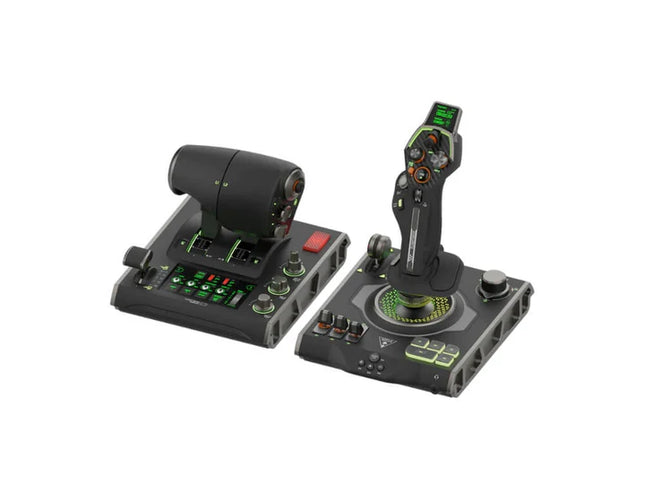
VelocityOne Flightdeck delivers an exceptional HOTAS experience, built for sim pilots who crave full control. The Flight Touch Display puts real-time status updates and extra input options at your fingertips, while the adjustable stick height ensures a comfortable grip for every hand size. Its Hall-effect sensors promise long-lasting accuracy, and the customizable OLED HUD offers on-the-fly tuning. Whether you're maneuvering through dogfights or exploring deep space, this setup provides a comprehensive set of controls designed for seamless integration with major flight sims.
What Sets the VelocityOne Flightdeck Apart?
Flight Touch Display Adds Layers of Control – Unlike traditional HOTAS setups, this system introduces a dedicated touchscreen for managing in-flight status and input commands. It effectively expands your cockpit controls, allowing you to assign up to 39 extra button functions for customized interactions.
Fully Adjustable Stick for Comfort and Ergonomics – Many setups lock users into a single grip position, but this one features an adjustable stick height. That means pilots with different hand sizes can fine-tune the control feel, ensuring maximum precision without hand fatigue.
Modular Design with Dual USB Connectivity – While some HOTAS systems cram everything into a single unit, this setup consists of two independently connected USB devices. This allows for greater flexibility in mounting options and ensures reliable input recognition without interference.
Deep Customization Through the Flight Hangar App – Unlike many competitors, this system comes with a dedicated configuration app that allows users to tweak lighting, input sensitivity, and firmware updates. The ability to save and load profiles for different aircraft ensures consistency across multiple simulations.
Pros and Cons
Pros
Cons
Touchscreen display provides extra controls and customization
Requires manual mapping for full function in some games
Modular design with independent throttle and stick
Button layout can feel overwhelming for beginners
Adjustable stick height for better ergonomics
Limited compatibility with certain space sims
Specifications
Specification
Value
Connection Type
USB-C to USB-A (Throttle and Stick)
Weight (Stick)
1.46kg / 3.22lbs
Weight (Throttle)
1.51kg / 3.33lbs
Dimensions (Stick)
177 x 215.8 x 234.3 mm / 6.97” x 8.50” x 9.22”
Dimensions (Throttle)
177.9 x 207.6 x 134.2 mm / 7.00” x 8.17” x 5.28”
Programmable Buttons
139
Throttle Type
Dual-engine with independent or linked control
Included Accessories
2x USB-C to USB-A cables, mounting screws
VelocityOne Flightdeck Compatibility
Software Compatibility
Details
Full Compatibility
Microsoft Flight Simulator 2020, X-Plane 11 & 12, DCS World, Prepar3D, Star Citizen, War Thunder
Limited Compatibility
Star Wars Squadrons, Elite: Dangerous (requires manual mapping)
Hardware Compatibility
Details
PC (Windows 10 & 11)
Requires USB connection; no support for Mac or consoles
Designed exclusively for Windows 10 & 11 PCs, this HOTAS system does not support MacOS or gaming consoles. The dual USB design allows separate recognition of the throttle and stick, reducing input lag and ensuring stable connection across all supported simulators.
Best suited for Microsoft Flight Simulator, X-Plane, and DCS World, the VelocityOne Flightdeck also supports Star Citizen and War Thunder with full button mapping. While it works with Elite: Dangerous and Star Wars Squadrons, manual configuration is required due to button limitations.
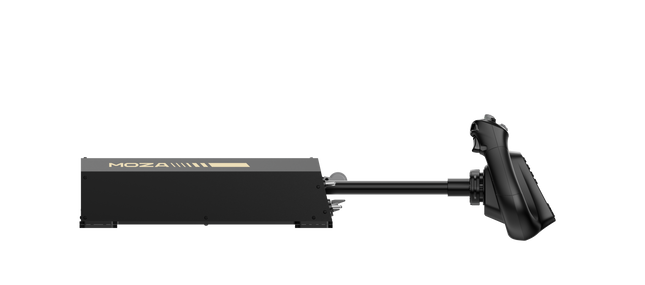
Baza Jarzma Moza AY210 Force Feedback wprowadza odważne podejście do symulacji lotu, łącząc solidną konstrukcję z zaawansowaną technologią force feedback. Moment obrotowy 9Nm oraz siła nacisku 210N zapewniają intensywny poziom kontroli, sprawiając, że każdy ruch w osi pitch i roll przypomina sterowanie prawdziwym samolotem. Konstrukcja w całości z aluminium nadaje jej przemysłowy charakter, a system szybkiego zwalniania wolantu umożliwia łatwą wymianę. Zaprojektowana z myślą o wszechstronności, obsługuje różne opcje montażu i oferuje w pełni konfigurowalny panel przełączników. Dla osób, które poważnie traktują symulację lotu, ta baza wolantu to prawdziwy przełom.
Co wyróżnia Baza Jarzma Moza AY210 Force Feedback?
Force feedback o ogromnej mocy Dzięki stałemu momentowi przechyłu 9Nm oraz sile do 210N na osi pitch, ta baza wolantu oferuje poziom sprzężenia zwrotnego, z którym niewiele innych produktów może się równać. Niezależnie od tego, czy wychodzisz ze stromego wznoszenia, czy odczuwasz turbulencje, system force feedback zapewnia głębokie połączenie między pilotem a samolotem.
Mechanizm quick-release wolantu W przeciwieństwie do większości wolantów wymagających czasochłonnego demontażu przy personalizacji, ten model posiada mechanizm szybkiego zwalniania inspirowany motorsportem. Umożliwia to błyskawiczną wymianę wolantów w zależności od typu samolotu, skracając czas przygotowania i umożliwiając płynne przełączanie między konfiguracjami kokpitu.
Wytrzymała konstrukcja z aluminium Wykonana w całości ze stopu aluminium, baza wolantu została zaprojektowana tak, aby wytrzymać intensywne manewry i długie sesje bez odkształceń czy zużycia. Jej duża masa zapewnia stabilność, utrzymując urządzenie na miejscu nawet przy wysokich obciążeniach force feedback.
Rozbudowana personalizacja w oprogramowaniu Oprogramowanie MOZA Cockpit umożliwia precyzyjne dostosowanie ustawień, od profili force feedback po konfigurację panelu przełączników. Użytkownicy mogą regulować oświetlenie, integrację z telemetrią, a nawet funkcje przycisków przy długim naciśnięciu.
Zalety i wady
Zalety
Wady
Mocny force feedback z momentem 9Nm i siłą 210N
Waga 8kg utrudnia przenoszenie
Konstrukcja w całości z aluminium zapewnia trwałość i stabilność
Wymaga zewnętrznego zasilacza (w zestawie)
Modułowa konstrukcja z mechanizmem quick-release
W pełni konfigurowalny panel przełączników z oprogramowaniem MOZA Cockpit
Specyfikacja
Specyfikacja
Wartość
Wymiary
243 × 403 × 216 mm
Materiał obudowy
Stop aluminium
Waga
8.0 kg
Silniki
Podwójne silniki serwo
Maksymalna siła pitch
210N
Stały moment przechyłu
9Nm
Zakres ruchu
150mm
Kompatybilne wolanty
MOZA Yoke Series
Moc
216W
Napięcie
110~220V AC → 36V DC
Precyzja układu
15-bitowy enkoder magnetyczny
Częstotliwość odświeżania USB
1000Hz
Opcje montażu
Uchwyt biurkowy (opcjonalny), montaż w kokpicie
Porty połączeń
Zasilanie, USB, throttle, rudder pedals, panel
Wyłącznik awaryjny
Opcjonalny
Telemetryczny force feedback
Obsługiwany (bez potrzeby wtyczek)
Obsługiwane platformy
PC
Kompatybilność Baza Jarzma Moza AY210 Force Feedback
Kompatybilne z
Niekompatybilne z
MOZA Yoke Series
Wolanty firm trzecich
Oprogramowanie MOZA Cockpit do personalizacji
Platformy konsolowe
Konfiguracje symulatorów lotu na PC
MacOS
Pełna kompatybilność z PC zapewnia bezproblemową integrację z głównymi symulatorami, w tym Microsoft Flight Simulator 2020, Microsoft Flight Simulator 2024 oraz X-Plane 12. Wbudowany system telemetrycznego force feedback oznacza brak konieczności instalowania dodatkowych wtyczek, zapewniając bezpośrednie sprzężenie zwrotne z wybranego symulatora. Jednak urządzenie nie obsługuje MacOS ani konsol.
Choć zaprojektowany wyłącznie dla PC, system oferuje pełne wsparcie dla zaawansowanych symulatorów lotu. Microsoft Flight Simulator i X-Plane 12 działają natywnie, z szerokimi możliwościami mapowania sterowania. W przeciwieństwie do niektórych konkurencyjnych produktów, baza ta nie oferuje funkcji plug-and-play dla użytkowników Xbox lub PlayStation, koncentrując się zamiast tego na głębokiej personalizacji oprogramowania i telemetrycznym force feedback.
The RealSimGear GFC700 Autopilot brings precision and simplicity to your flight simulation setup. Modeled after the GFC700 unit found in Cirrus SR20/SR22 aircraft, it features functioning rubber buttons for all modes and an adjustable wheel for fine-tuning airspeed, vertical speed, or altitude. With integrated LED indicators and dedicated mode controls, it ensures an intuitive, tactile experience. Connecting effortlessly via USB and compatible with both MSFS 2020 and X-Plane 11/12, this autopilot unit is a versatile addition for general aviation sim enthusiasts.
What sets the RealSimGear GFC700 Autopilot apart?
Authentic Mode Controls and Feedback The GFC700 includes functioning rubber buttons that mimic those found on real autopilot systems. Each button activates distinct modes, complemented by LED indicators, giving users direct operational feedback and reducing reliance on on-screen prompts during critical adjustments.
Adjustable Wheel for Flight Parameters The integrated wheel allows pilots to fine-tune their airspeed, vertical speed, or altitude with precision. This tactile control provides an engaging, hands-on experience that is both functional and satisfying, ideal for those who value detailed input adjustments.
Effortless USB Integration The GFC700 connects via a single USB cable, streamlining setup and eliminating clutter. Its compatibility with the RealSimGear plugin ensures smooth performance and a seamless connection to popular simulators like MSFS 2020 and X-Plane 11/12.
Purpose-Built for General Aviation Enthusiasts Designed to replicate the autopilot found in Cirrus SR20/SR22 aircraft, it excels in offering a tailored experience for fans of general aviation, focusing on specific features that align with these aircraft models.
Pros and Cons
Pros
Cons
Replicates the GFC700 found in real Cirrus aircraft.
Limited functionality beyond general aviation setups.
Includes tactile, fully functional rubber buttons.
No support for Mac operating systems.
Easy to integrate with USB and plugin support.
LED indicators provide clear feedback on modes.
Specifications
Specification
Value
Unit Type
GFC700 Autopilot Replica
Connectivity
USB
Included Components
GFC700 Autopilot unit, USB cable
LED Indicators
Active mode display
Operating Systems
Windows 64-bit
Simulator Compatibility
X-Plane 11/12, MSFS 2020
RealSimGear GFC700 Autopilot Compatibility
The RealSimGear GFC700 Autopilot is designed with general aviation enthusiasts in mind. It is highly compatible with MSFS 2020 and X-Plane 11/12, ensuring excellent integration with these simulators. Its single USB connection simplifies setup, but it is important to note that it is tailored for aircraft such as the Cirrus SR20/SR22. However, its functionality may be limited with other aircraft types.
When it comes to operating systems, the GFC700 supports Windows 64-bit, but it does not work on Mac platforms. This device focuses on enhancing general aviation simulation rather than catering to broader simulator applications, making it a specialized tool for a niche audience.
RealSimGear GMA Audio Panel dla G1000 podnosi jakość Twojego wirtualnego kokpitu, oferując intuicyjną kontrolę nad źródłami audio COM i NAV. Dzięki gumowym przyciskom i wskaźnikom LED umożliwia bezproblemowe zarządzanie komunikacją radiową podczas lotu. Projekt tego panelu, oparty na dotykowych elementach, nie tylko spełnia swoją funkcję, ale także wzmacnia Twoje połączenie z wirtualnymi usługami ATC, takimi jak PilotEdge. To idealny towarzysz dla zestawu G1000, który wprowadza więcej funkcjonalności i interakcji do Twojego doświadczenia symulacyjnego.
Co wyróżnia RealSimGear GMA Audio Panel dla G1000?
Zintegrowana kontrola audio W przeciwieństwie do innych rozwiązań audio, ten panel pozwala na precyzyjną kontrolę nad źródłami COM i NAV za pomocą gumowych przycisków i wskaźników LED. Możesz monitorować wiele radii i zapewnić klarowną komunikację, co czyni go niezbędnym narzędziem dla poważnych pilotów symulatorów.
Możliwość personalizacji funkcji Dodatkowe przyciski i pokrętło głośności mogą zostać przypisane do innych funkcji, gdy nie są używane do audio. Ta elastyczność zwiększa wartość urządzenia, pozwalając użytkownikom dostosować panel do swoich specyficznych potrzeb w symulacji.
Idealne dopasowanie do zestawu G1000 Zaprojektowany wyłącznie do współpracy z modułami RealSimGear G1000 PFD/MFD, ten panel łączy się bezproblemowo, dopełniając Twoje ustawienie kokpitu. Zapewnia doświadczenie, które odzwierciedla rzeczywiste konfiguracje awioniki.
Stworzony z myślą o usługach wirtualnego ATC Panel działa najlepiej w połączeniu z narzędziami ATC, takimi jak PilotEdge, gdzie skuteczne zarządzanie komunikacją jest kluczowe. Jego dedykowane przyciski zapewniają płynne przełączanie między radiami, pozwalając Ci skupić się na locie.
Plusy i minusy
Plusy
Minusy
Zapewnia dedykowaną kontrolę nad źródłami audio COM i NAV.
Ograniczona kompatybilność z zestawami innych firm niż RealSimGear.
Personalizowane przyciski dodają wszechstronności kokpitu.
Niekompatybilny z systemami MacOS.
Wskaźniki LED zapewniają wyraźny status w czasie rzeczywistym.
Specyfikacja
Specyfikacja
Wartość
Kompatybilność
Moduły RealSimGear G1000 PFD/MFD
W zestawie
Panel audio GMA, akcesoria montażowe, kabel USB
System operacyjny
Microsoft Windows 64-bit
Kompatybilne symulatory
Microsoft Flight Simulator 2020, X-Plane 11/12
Opcjonalne akcesoria
Uchwyty boczne i środkowe GMA
Kompatybilność RealSimGear GMA Audio Panel dla G1000
RealSimGear GMA Audio Panel dla G1000 zaprojektowano wyłącznie do współpracy z modułami RealSimGear G1000 PFD i MFD, co czyni go specjalistycznym dodatkiem do uzupełnienia Twojego kokpitu. Łączy się bezproblemowo przez kabel USB, zapewniając szybki montaż i bezproblemową integrację z systemem G1000. Panel nie jest urządzeniem samodzielnym i nie jest kompatybilny z innymi markami sprzętu ani konfiguracjami, co podkreśla jego rolę jako dedykowanego rozszerzenia zestawu G1000.
Panel współpracuje z Microsoft Flight Simulator 2020 i X-Plane 11/12 na systemach Windows 64-bit, zapewniając niezawodną funkcjonalność na popularnych platformach. Nie jest kompatybilny z systemami MacOS ani konsolami PlayStation czy Xbox. Piloci symulatorów, którzy korzystają z tych obsługiwanych symulatorów, znajdą ten panel jako bardzo funkcjonalny dodatek do swojego zestawu, zwłaszcza podczas pracy w wirtualnych środowiskach ATC.
RealSimGear GMA350 Audio Panel wprowadza nowy poziom kontroli w wirtualnym lotnictwie, umożliwiając płynne zarządzanie źródłami radia COM i NAV. Wyposażony w przyciski gumowe i wskaźniki LED, ten panel sprawia, że monitorowanie i przełączanie kanałów radiowych jest proste, poprawiając Twoje połączenie z wirtualnymi usługami ATC, takimi jak PilotEdge. Dodatkowe przyciski i pokrętło głośności oferują dodatkową personalizację dla innych funkcji, zapewniając wszechstronność w różnych konfiguracjach symulatorów lotniczych. Kompaktowy, ale wpływowy, to idealne narzędzie do bardziej interaktywnego doświadczenia w kokpicie.
Co wyróżnia RealSimGear GMA350 Audio Panel?
Dedykowana kontrola COM i NAV W przeciwieństwie do ogólnych paneli audio, to urządzenie pozwala na niezależne monitorowanie i przełączanie pomiędzy źródłami radia COM i NAV z wyraźnymi wskaźnikami LED. To precyzyjne, dotykowe doświadczenie, które upraszcza komunikację podczas skomplikowanych scenariuszy lotu.
Bezproblemowa integracja z systemami G1000 Zbudowany specjalnie do uzupełniania zestawu RealSimGear G1000, działa bez wysiłku z ich modułami PFD i MFD, oferując zjednoczone poczucie kokpitu w zaawansowanych konfiguracjach symulatorów.
Możliwość personalizacji przycisków do dodatkowych funkcji Pokrętło głośności i inne przyciski mogą być przypisane do różnych poleceń, dodając wszechstronność dla pilotów symulatorów, którzy chcą więcej kontroli bez zaśmiecania kokpitu.
Kompaktowy i solidny design Panel o szerokości zaledwie 158 mm jest wystarczająco kompaktowy do ciasnych konfiguracji, zachowując jednocześnie solidną jakość wykonania. Jego konstrukcja z aluminium zapewnia wytrzymałość na intensywne użytkowanie bez oznak zużycia.
Plusy i minusy
Plusy
Minusy
Bezproblemowo monitoruje i przełącza pomiędzy źródłami radia.
Ograniczona funkcjonalność poza systemami G1000.
Personalizowane przyciski dodają wszechstronności kokpitu.
Niekompatybilny z systemami MacOS.
Wskaźniki LED zapewniają wyraźny, rzeczywisty feedback w czasie rzeczywistym.
Konieczność zakupu dodatkowego sprzętu montażowego w niektórych konfiguracjach.
Specyfikacja
Specyfikacja
Wartość
Wymiary
158mm (S) x 32mm (W) x 84mm (G)
W zestawie
Panel audio GMA350, kabel USB
Kompatybilność
Moduły RealSimGear G1000 PFD i MFD
System operacyjny
Microsoft Windows 64-bit
Kompatybilne symulatory
Microsoft Flight Simulator (2020), X-Plane 11/12
Kompatybilność RealSimGear GMA350 Audio Panel
RealSimGear GMA350 Audio Panel został zaprojektowany wyłącznie do użytku z modułami RealSimGear G1000 PFD i MFD. Łączy się bezproblemowo przez interfejs USB, zapewniając szybki montaż i bezproblemową integrację z zestawem G1000. Jego specjalistyczna konstrukcja sprawia, że jest niezastąpionym narzędziem dla pilotów używających modularnych systemów kokpitów RealSimGear, ale nie jest kompatybilny z samodzielnymi konfiguracjami ani innymi zestawami innych firm.
Panel współpracuje z Microsoft Flight Simulator (2020) i X-Plane 11/12 na systemach Windows 64-bit. Niestety, nie obsługuje systemów MacOS, co ogranicza jego wszechstronność dla użytkowników niebędących na systemach Windows. Jednak na obsługiwanych platformach stanowi niezastąpione uzupełnienie dla tych, którzy szukają lepszej kontroli audio w swoich wirtualnych lotach.
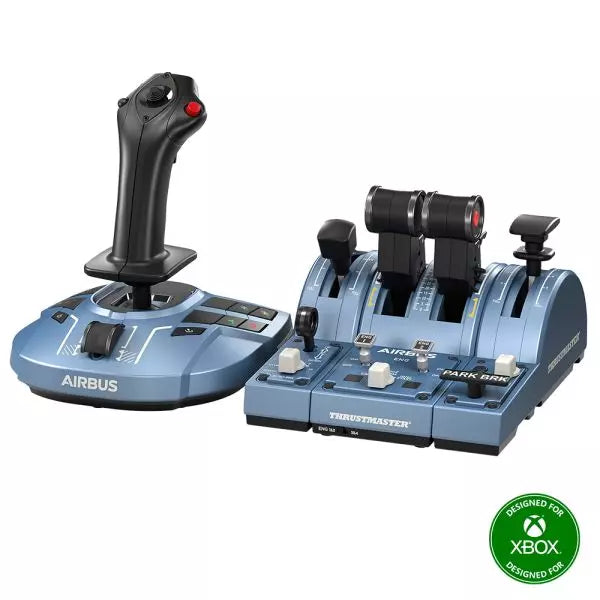
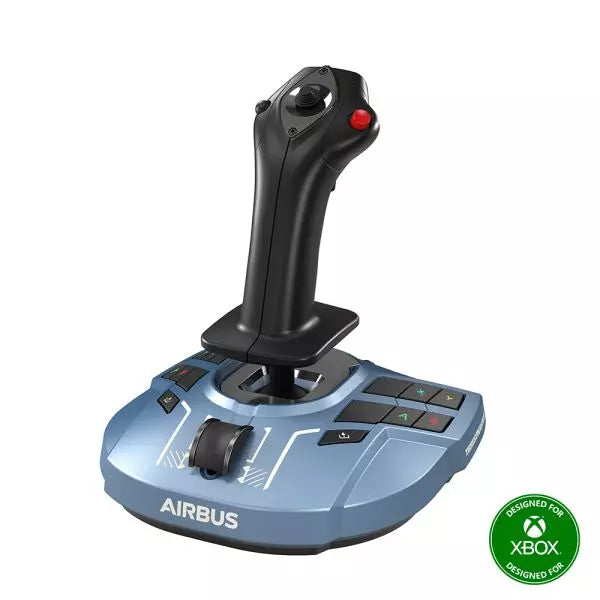
The TCA Captain Pack X Airbus Edition is an exciting leap for flight sim enthusiasts who dream of commanding the cockpit of an Airbus A320. Combining the ergonomic replicas of the Airbus sidestick and quadrant, it delivers a feature-rich experience inspired by authentic aviation controls. From the tactile feedback of its 31 action buttons to the satisfying resistance of the throttle’s detents, this setup immerses you in every aspect of flight. Whether you're handling precise approaches or testing the thrust reverser, this package elevates your sim flights to a whole new level.
What sets the TCA Captain Pack X Airbus Edition apart?
Airbus-Authentic Design The sidestick and quadrant are true 1:1 scale replicas, giving you the same control layout and feel as the real Airbus A320. With this attention to detail, everything from the landing gear lever to the speed brake mimics the actual aircraft, making your setup as close to a real cockpit as possible.
Thrust Reverser Mechanism A rare addition to home flight sim controllers, the built-in thrust reverser adds depth to your landing sequences. It’s a unique feature that brings added realism to your sessions, especially when combined with the quadrant's detailed throttle detents.
Integrated Ecosystem Hub Simplified connectivity is a game-changer with the new hub design. Connect all your Thrustmaster Airbus accessories—rudder pedals, add-ons, and more—using a single USB cable. This design minimizes clutter and enhances compatibility with Xbox Series X|S and PC platforms.
Versatility and Modularity The sidestick offers customizable button head modules and can adapt for left-handed, right-handed, or central cockpit positions. This makes the controller versatile for solo flights or co-pilot setups, catering to both casual simmers and serious enthusiasts.
Pros and Cons
Pros
Cons
Authentic Airbus-inspired layout enhances flight realism.
Limited compatibility with non-Airbus-style setups.
Thrust reverser adds depth to landing procedures.
No force feedback or vibration features included.
Integrated hub reduces cable clutter significantly.
Specifications
Specification
Value
Sidestick Dimensions
7.7” x 7.7” x 8.9” (195 mm x 195 mm x 225 mm)
Quadrant Dimensions
7.5” x 9.3” x 3.3” (190 mm x 235 mm x 85 mm)
Sidestick Weight
1.7 lb (787 g)
Quadrant Weight
2 x 1.2 lb (2 x 530 g)
Package Contents
Sidestick, Quadrant, Add-on Modules, USB Cable, Connectors
Connectivity
USB-C to USB-A, 2x SATA cables
TCA Captain Pack X Airbus Edition Compatibility
The TCA Captain Pack X Airbus Edition integrates seamlessly with the Thrustmaster T.Flight Rudder Pedals (TFRP) and the Thrustmaster Pendular Rudder (TPR) systems, as well as with other add-ons like the TM Flying Clamp. Its Ecosystem Hub makes it easier than ever to connect all components using a single USB cable, supporting both Xbox Series X|S and PC platforms. However, the quadrant’s Airbus-specific design may not suit enthusiasts looking for a Boeing-style setup or generic controls.
On the gaming front, it’s fully compatible with Microsoft Flight Simulator 2020 and integrates automatically on both PC and Xbox Series X|S. This pack also supports various other titles on Xbox and PC with customizable mappings, though it may not work with older consoles or unsupported games.
The Honeycomb Bravo Throttle Quadrant is a versatile all-in-one control system that lets you soar through the skies in virtual aviation with precision. Designed for both casual pilots and seasoned simmers, it adapts to your flying style, offering configurations for small aircraft and large airliners alike. Featuring a fully functional autopilot panel and customizable thrust levers, it puts essential controls at your fingertips. Whether you're managing thrust reversers or adjusting flaps, this sleek device is built to elevate your cockpit setup and make every flight unforgettable.
What sets the Bravo Throttle Quadrant apart?
Unmatched Versatility The Honeycomb Bravo Throttle Quadrant adapts to a variety of aircraft configurations, from single-engine planes to four-engine airliners. This flexibility means it can handle piston, jet, and turboprop controls seamlessly, catering to both general aviation enthusiasts and commercial flight sim fans.
Enhanced Physical Feedback With its sturdy levers, clickable buttons, and smooth trim wheel, the tactile experience feels as close as it gets to operating a real cockpit. The gear lever and annunciator panel add an extra layer of functionality, keeping your hands busy and your keyboard untouched.
Comprehensive Autopilot and Annunciator Features The included autopilot panel mimics the functionality of systems found in real aircraft, while the annunciator panel delivers vital status alerts. These features reduce reliance on on-screen controls and make managing complex systems much easier.
Expandable Design With integrated mounting points, the Bravo works seamlessly with other Honeycomb and Saitek products. This modularity allows users to grow their setup over time, creating a cohesive and customizable virtual cockpit.
Pros and Cons
Pros
Cons
Wide range of configuration options for all aircraft types.
Annunciator lights and some features don’t work on Xbox.
Durable design with a solid, professional feel.
Relatively large footprint, requires space for optimal use.
Comprehensive autopilot and annunciator panels included.
Requires external software for optimal customization.
Compatible with multiple simulators on PC and Mac.
No support for FSX on the latest version of the Config Tool.
Specifications
Specification
Value
Package Contents
Throttle quadrant, mounting points, brackets
Compatibility
Microsoft Flight Simulator, X-Plane 11, Prepar3D V3-V5
Operating Systems
Windows 10 (64-bit), macOS Catalina+
Warranty
2 years
Bravo Throttle Quadrant Compatibility
Simulator
Compatibility
Microsoft Flight Simulator
Fully supported with Config Tool
X-Plane 11
Fully supported, with Windows and Mac versions
Prepar3D
Supported for versions 3, 4, and 5
The Honeycomb Bravo Throttle Quadrant is engineered for compatibility with popular simulator platforms, including Microsoft Flight Simulator 2020, X-Plane 11, and Prepar3D. While PC users can enjoy full functionality, Xbox users must note that some features, such as the annunciator lights, won't work when connected via the XPC Hub. This makes it an excellent choice for PC-based setups but requires consideration for console users.
When it comes to hardware, the Bravo pairs seamlessly with other Honeycomb products, like the Alpha Flight Controls, and integrates with Saitek peripherals through its mounting points. These features ensure a cohesive and expandable setup. However, it’s not compatible with older FSX versions unless you're running the older Config Tool, so check your software version before diving in.
The Alpha Flight Controls by Honeycomb Aeronautical is a feature-rich, durable yoke designed to elevate your flight simulation experience. Built with aerospace-grade internal components, it offers a buttery-smooth 180° turn radius and 15 cm of travel along its steel shaft, delivering precision and fluidity in every maneuver. Its integrated switch panel with red LED backlighting replicates real-world avionics, while the ergonomic handle design packs an array of tactile buttons and switches for versatile control. This is a simulator tool for those who appreciate robust design and reliable performance.
What sets the Alpha Flight Controls apart?
Robust Construction Built with a steel shaft and aerospace-grade components, the yoke ensures durability for years of regular use. This sturdiness gives users the confidence to push boundaries without worrying about wear and tear, a significant advantage over its plastic-heavy competitors.
Comprehensive Switch Panel The integrated switch panel with master, alternator, avionics, and light switches is a standout feature. Coupled with an ignition switch, it allows users to simulate pre-flight checks and engine starts accurately, adding a layer of realism many products overlook.
Ergonomic Design and Customization Thoughtfully designed handles include multiple buttons, hat switches, and a push-to-talk button for intuitive control. The array of functions and customizable software profiles cater to both casual sim enthusiasts and aspiring pilots looking to fine-tune their experience.
Cross-Compatible and Future-Ready Mounting points and brackets allow seamless integration with other Honeycomb and Saitek products, making it ideal for those with an expanding home cockpit. Its compatibility with popular simulators ensures versatility for any flight sim setup.
Pros and Cons
Pros
Cons
Durable steel shaft with aerospace-grade components.
Not compatible with older operating systems like Windows 7.
Integrated switch panel with LED backlighting.
Software required for full functionality can be complex to set up.
Compatible with major flight simulators and accessories.
Limited adjustability for handle ergonomics.
Wide 180° turn radius for smooth control inputs.
No included mount for desk setups, requires separate purchase.
Specifications
Specification
Value
Dimensions (Sleeve)
44.8 x 31.4 x 23.7 cm
Dimensions (Carton)
46.2 x 32.7 x 25.5 cm
Travel Length
15 cm
Turn Radius
180°
Compatibility
Windows 10 (64-bit), macOS
Package Contents
Alpha Flight Controls unit, drivers
Alpha Flight Controls Compatibility
The Alpha Flight Controls is compatible with major flight simulators, including Microsoft Flight Simulator 2020, X-Plane 11, and Lockheed Martin Prepar3D (v3-v5). It supports both Windows 10 (64-bit) and macOS, although some features require the Honeycomb Config Tool for optimal use. Notably, older operating systems like Windows 7 and FSX are not supported, which may limit users with legacy setups.
For hardware compatibility, it includes mounting points and brackets designed to pair seamlessly with Honeycomb Bravo Throttle Quadrant and Saitek panels. The yoke integrates effortlessly into a range of cockpit builds, making it an excellent choice for expandable setups. However, note that desk clamps or mounts are sold separately.
In terms of gaming platforms, the Alpha Flight Controls is PC-centric, with no console support. It’s optimized for simulation platforms requiring USB connections and doesn’t cater to Xbox or PlayStation. Its compatibility with varied simulators ensures a flexible and robust option for PC-based flight enthusiasts.
Brak w magazynie,
Zamówienia w przedsprzedaży dostępne. Wysyłka w ciągu 2-2,5 tygodnia.
The VelocityOne Rudder Pedals from Turtle Beach bring precision control and ergonomic design to your flight simulation setup. With a smooth rudder axis supported by non-contact hall-effect sensors, they offer durable, low-maintenance performance for the long haul. Adjustable pedal width and interchangeable springs let you tailor the feel for different aircraft, while the differential brakes add tight control on the ground. Whether you’re taxiing a heavy jet or maneuvering a fighter, these pedals offer an intuitive and customizable flying experience.
What sets the VelocityOne Rudder Pedals apart?
Non-Contact Hall Effect Sensors These sensors deliver exceptional durability by eliminating wear-prone parts like potentiometers. With consistent, fluid performance and no need for frequent recalibration, the pedals remain reliable even after countless flight hours.
Customizable Setup Options Featuring adjustable pedal width, swappable pedal styles, and interchangeable springs, the VelocityOne Rudder Pedals cater to a wide range of aircraft types. You can fine-tune the resistance and setup for optimal comfort and functionality, whether you're flying a small prop plane or a commercial airliner.
Differential Braking for Ground Control The integrated differential brakes allow for precise taxiing and smooth braking during landing. This feature enhances realism and control when navigating tight turns on taxiways or bringing your aircraft to a safe stop on the runway.
Stable, Versatile Mounting Options A non-slip base and multiple mounting solutions ensure these pedals stay firmly planted during use. Whether on carpet, hardwood, or a custom cockpit setup, they provide a secure and consistent foundation for immersive flight control.
Pros and Cons
Pros
Cons
Hall-effect sensors reduce maintenance and improve durability.
Requires the VelocityOne Flight system for Xbox use.
Swappable pedals and springs for customization.
No native support for PlayStation platforms.
Includes differential braking for enhanced ground control.
Limited compatibility with non-Turtle Beach ecosystems.
Specifications
Specification
Value
Pedal Axis Type
Hall-Effect Sensors
Adjustable Pedal Width
Yes
Swappable Pedals
2 styles (2 mounted, 2 extra included)
Swappable Springs
2 installed, 2 extra included
Cables
2m USB-A to USB-C, 2.5m USB-C to USB-C
Additional Accessories
M4 Screws (4), Grip Pads (8), Allen Key
Compatibility
PC (Windows 10/11), Xbox (Series X|S, One)*
VelocityOne Rudder Pedals Compatibility
The VelocityOne Rudder Pedals are designed for use with Windows 10 and 11 PCs and Xbox Series X|S and Xbox One consoles. Xbox compatibility requires the VelocityOne Flight Universal Control System or the VelocityOne Flightstick, making this an excellent addition for existing Turtle Beach ecosystem users. On PC, they integrate seamlessly via USB, making them versatile for most flight sim setups. However, they do not support PlayStation platforms or standalone Xbox use without the VelocityOne base system.
The pedals are compatible with popular flight simulators, including Microsoft Flight Simulator 2020 and X-Plane 11/12, delivering a smooth experience for both casual and hardcore sim pilots. The inclusion of USB-A and USB-C cables ensures easy connectivity with modern hardware, but compatibility with older systems or alternative control bases is not guaranteed. They work best in setups designed specifically around the VelocityOne ecosystem.
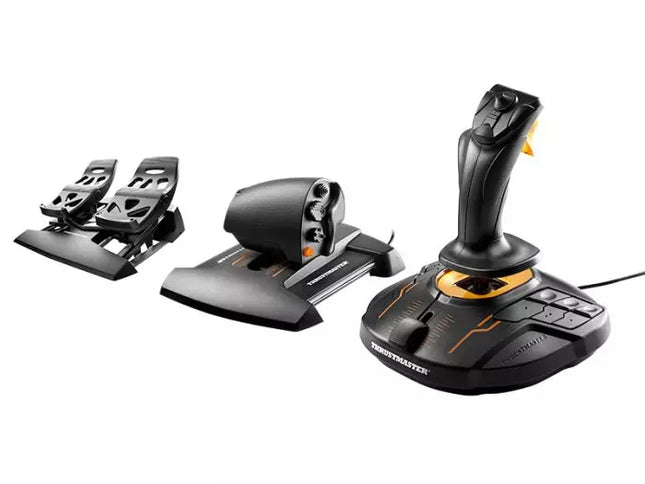
The T.16000M FCS Flight Pack is a standout choice for sim pilots who demand precise and versatile controls. This all-in-one pack features the T.16000M FCS joystick, TWCS throttle, and TFRP rudder pedals, delivering an intricate control setup ideal for aviation and space simulation. With its smooth sliding mechanisms, programmable software, and magnetic sensors for lasting accuracy, it’s a tactile and technical delight. From pitch-perfect inputs to ergonomic designs, this setup transforms your desk into a cockpit, putting you in command of every maneuver.
What sets the T.16000M FCS Flight Pack apart?
Unrivaled Longevity with Magnetic Sensors The H.E.A.R.T HallEffect technology relies on magnetic sensors for unmatched durability, ensuring the joystick’s accuracy remains unchanged over years of use. Unlike potentiometer-based systems, this design eliminates wear and tear, providing consistently smooth and precise inputs that hold steady even during intensive flight campaigns.
Comprehensive All-in-One Control System With a joystick, throttle, and rudder pedals included, the T.16000M FCS Flight Pack offers a complete setup for advanced simmers. This trio eliminates the need for additional peripherals, letting users seamlessly coordinate complex flight maneuvers while reducing clutter with integrated, ergonomic components.
Customizable for Every Pilot’s Needs The T.A.R.G.E.T programming software allows users to map buttons, axes, and macros to fit their unique playstyle. Whether flying civilian aircraft, jets, or navigating through space, this flexibility ensures optimal functionality tailored to specific games and scenarios, providing control tailored to your exact specifications.
Smooth and Comfortable Motion Both the TWCS throttle and TFRP rudder pedals utilize S.M.A.R.T technology for smooth sliding. These components provide intuitive resistance and glide, making every adjustment precise and comfortable. The ergonomic placement further enhances accessibility, even during extended play sessions.
Pros and Cons
Pros
Cons
Exceptional accuracy thanks to HallEffect magnetic sensors.
Not compatible with consoles like Xbox or PlayStation.
All-in-one system reduces need for additional peripherals.
Pedals may feel too small for larger feet.
Customizable controls via T.A.R.G.E.T software.
Throttle lacks a detent for afterburner or idle.
Smooth sliding motion enhances precision and comfort.
Specifications
Specification
Value
Components
Joystick, throttle, rudder pedals
Compatibility
Windows 10, 8, 7, Vista (32-bit & 64-bit)
Connection Type
USB
Joystick Axes
4 (including twist rudder)
Buttons
30 across all components
Rudder Technology
S.M.A.R.T sliding motion
Throttle Travel Range
3.2 inches (80 mm)
Color
Black with orange accents
T.16000M FCS Flight Pack Compatibility
The T.16000M FCS Flight Pack is fully compatible with PCs running Windows 10, 8, 7, and Vista (both 32-bit and 64-bit). Its USB connection ensures straightforward integration with most setups, while the T.A.R.G.E.T software enhances compatibility by allowing users to program the system to function as a single USB device. The pack seamlessly integrates with other Thrustmaster peripherals, such as the MFD panels, providing a cohesive ecosystem for ambitious flight sim setups.
While this system excels on PC, it is not compatible with consoles like Xbox or PlayStation, making it unsuitable for console-based simmers. The pack also works harmoniously with popular simulation titles like Microsoft Flight Simulator, X-Plane, and Elite Dangerous. However, its lack of native support for MacOS limits its use for Apple users, so check your platform’s compatibility before diving into your next flight adventure.




