Instrument Panels

26 products

  • Siste lager! MOZA MA3F Electronic Flight Control Modules R for sale on FlightSimZone

    Moza MOZA MA3F Electronic Flight Control Modules R (Pre-Order! Shipping Starts mid-to-late-August)

    5 på lager Sendes innen 1–3 virkedager.

    MOZA MA3F Electronic Flight Control Modules R capture the distinctive workflow of the Airbus A320 flight deck with hardware that feels satisfying every time you dial in a heading or adjust altitude. The dual-rail spring-loaded push/pull mechanism recreates the signature operation of Airbus autopilot controls, while custom segmented displays faithfully mirror Airbus-specific character formatting and spacing. Every knob, button, and illuminated indicator works together to make route management, climb planning, and approach setup feel remarkably natural throughout every stage of flight. What Sets the MOZA MA3F Electronic Flight Control Modules R apart? Airbus Push/Pull Controls Done Properly – One feature that consistently stands out is the custom dual-rail push/pull mechanism. Instead of using a basic spring-loaded encoder, the controls deliver distinct travel and resistance that closely match Airbus operating procedures. Many experienced Airbus sim pilots appreciate how this makes managed and selected mode changes feel much more deliberate while reducing accidental inputs during busy phases of flight. Displays That Capture Airbus Character – The segmented displays have been carefully designed to reproduce the distinctive appearance of Airbus FCU readouts, including character spacing and formatting. Rather than looking like generic digital displays, they blend naturally into an Airbus cockpit. Enthusiasts often point to details like these as the difference between simply operating a simulator and enjoying a convincing airline cockpit environment. Expandable to Match Your Cockpit – Whether you choose the FCU on its own, pair it with a single EFIS module, or install the complete Electronic Flight Control Module suite, the system grows alongside your cockpit. Builders appreciate this flexibility because it allows gradual upgrades while maintaining a consistent appearance and control layout throughout the simulator. Purpose-Built for Dedicated Airbus Flying – Seamless integration with MOZA Cockpit software, synchronized lighting, and support for leading Airbus aircraft make the system especially attractive for airliner enthusiasts. Community feedback often highlights how easy it is to configure while still providing extensive customization for display lighting, controls, and cockpit organization. Pros and Cons Pros Cons Excellent Airbus-style push/pull autopilot controls. Designed specifically for Airbus aircraft. Displays accurately reproduce Airbus FCU formatting. Requires a Windows PC. Multiple configurations suit evolving cockpit builds. Synchronized lighting enhances cockpit consistency. Specifications Specification Value Product Type Airbus A320-style FCU and EFIS control system Available Configurations EFIS Display Type Custom Airbus-style segmented displays Autopilot Control Mechanism Dual-rail spring-loaded push/pull controls Lighting Independent display, character, and status illumination Software Integration MOZA Cockpit Supported Platform PC Mounting Options Included bracket, aluminum profile, 75 mm VESA mount Extended Function Optional EFIS extended-function control mode MOZA MA3F Electronic Flight Control Modules R Compatibility Hardware Compatibility Mounting Systems Included bracket, aluminum-profile rigs, 75 × 75 mm VESA mounts MOZA Cockpit Software Supported for telemetry synchronization and configuration Cockpit Layouts FCU only, single EFIS, or complete EFCM suite Flight Simulator Compatibility Microsoft Flight Simulator Default Airbus A320/A330 and supported Airbus add-ons X-Plane Compatible with Airbus aircraft including ToLiss models Third-Party Aircraft Fenix A320, FlightFactor A320, ToLiss series, and other Airbus airliners Built for PC flight simulation, the MA3F Electronic Flight Control Modules R work seamlessly with MOZA Cockpit software, providing synchronized lighting, telemetry integration, and straightforward configuration. Included bracket mounting, aluminum-profile compatibility, and 75 mm VESA support make installation simple whether you're assembling a desktop setup or a dedicated Airbus cockpit. The modular design allows builders to begin with a single FCU or expand into a complete Electronic Flight Control Module suite over time. Independent adjustment of display brightness, character illumination, and status lighting helps maintain a consistent cockpit appearance during daytime departures and late-night arrivals. Compatible with Microsoft Flight Simulator and X-Plane, the system supports default Airbus A320 and A330 aircraft together with leading third-party aircraft including Fenix A320, ToLiss, FlightFactor A320, and other popular Airbus airliners. The supported platform is PC; gaming consoles and macOS are not supported.

    5 på lager Sendes innen 1–3 virkedager.

    €109,00

  • Siste lager! MOZA MA3F Electronic Flight Control Modules L for sale on FlightSimZone

    Moza MOZA MA3F Electronic Flight Control Modules L (Pre-Order! Shipping Starts mid-to-late-August)

    5 på lager Sendes innen 1–3 virkedager.

    MOZA MA3F Electronic Flight Control Modules L bring the unmistakable Airbus A320 flight deck to your simulator with controls that make every heading change, altitude adjustment, and approach setup feel deliberate. The dual-rail spring-loaded push/pull mechanism recreates the distinctive operation of Airbus autopilot controls, while custom segmented displays faithfully mirror Airbus-specific character formatting and spacing. From the satisfying click of each selector to the coordinated cockpit lighting, every interaction encourages proper Airbus procedures throughout the entire flight. What Sets the MOZA MA3F Electronic Flight Control Modules L apart? Faithful Airbus Push/Pull Operation – The dual-rail spring-loaded push/pull mechanism delivers a noticeably more convincing feel than conventional encoder-based controls. Airbus enthusiasts often point out that having distinct push and pull actions makes switching between managed and selected modes feel far more intuitive, helping reproduce familiar cockpit workflows without relying on keyboard shortcuts or mouse clicks. Displays That Match Airbus Presentation – Rather than using generic digital readouts, the custom segmented displays reproduce Airbus-style character spacing, typography, and formatting. Builders frequently appreciate these visual details because the modules blend naturally with other Airbus cockpit hardware, creating a clean and cohesive flight deck instead of a collection of mismatched peripherals. Flexible Expansion for Growing Cockpits – Available as an FCU only, FCU with a single EFIS, or a complete Electronic Flight Control Module suite, the system adapts to different cockpit sizes and budgets. The optional extended-function EFIS mode adds further flexibility, allowing additional controls to be accessed without filling the cockpit with extra hardware. Straightforward Installation and Configuration – The included mounting bracket, aluminum-profile compatibility, and standard 75 mm VESA support make installation simple across desktop and full-frame cockpits. Users also appreciate MOZA Cockpit software for its synchronized lighting, streamlined configuration process, and flexible control customization without requiring complicated setup procedures. Pros and Cons Pros Cons Excellent Airbus-style push/pull control mechanism. Designed specifically for Airbus aircraft. Displays closely match Airbus FCU formatting. Requires a Windows PC. Modular configurations support gradual cockpit upgrades. Synchronized lighting creates a cohesive cockpit appearance. Specifications Specification Value Product Type Airbus A320-style FCU and EFIS control system Available Configurations FCU only, FCU + single EFIS, complete EFCM suite Display Type Custom Airbus-style segmented displays Autopilot Control Mechanism Dual-rail spring-loaded push/pull controls Lighting Independent display, character, and status illumination Software Integration MOZA Cockpit Supported Platform PC Mounting Options Included bracket, aluminum profile, 75 mm VESA mount Extended Function Optional EFIS extended-function control mode MOZA MA3F Electronic Flight Control Modules L Compatibility Hardware Compatibility Mounting Systems Included bracket, aluminum-profile rigs, 75 × 75 mm VESA mounts MOZA Cockpit Software Telemetry synchronization and configuration supported Cockpit Configurations FCU only, single EFIS, or complete EFCM suite Flight Simulator Compatibility Microsoft Flight Simulator Default Airbus A320/A330 and supported Airbus add-ons X-Plane Compatible with Airbus aircraft including ToLiss series Third-Party Aircraft Fenix A320, FlightFactor A320, ToLiss series, and other popular Airbus airliners Designed for PC flight simulation, the MA3F Electronic Flight Control Modules L integrate with MOZA Cockpit software for telemetry synchronization, synchronized lighting, and simple configuration. Included bracket mounting, aluminum-profile compatibility, and 75 mm VESA support allow the modules to fit comfortably into desktop cockpits or larger Airbus flight deck projects. The modular design allows builders to begin with a single FCU or expand into a complete Electronic Flight Control Module suite as their simulator grows. Independent adjustment of display brightness, character illumination, and status lighting helps maintain a consistent cockpit appearance during daytime departures and night operations alike. Compatible with Microsoft Flight Simulator and X-Plane, the system supports default Airbus A320 and A330 aircraft together with leading third-party aircraft including Fenix A320, ToLiss, FlightFactor A320, and other popular Airbus airliners. The supported platform is PC; gaming consoles and macOS are not supported.

    5 på lager Sendes innen 1–3 virkedager.

    €109,00

Flight Simulator Instrument Panels for Sale at FlightSimZone

Transform your flight simulation experience with our comprehensive selection of professional-grade flight simulator instrument panels. Whether you're a seasoned virtual pilot or just beginning your journey into flight simulation, our collection offers the perfect balance of realism and functionality.

Comparison table

Product Type Display Compatibility Key Features
GFC700 Autopilot Digital MSFS, X-Plane, P3D Advanced autopilot system, Altitude preselect, Vertical speed control
GCU47X Control Unit LCD MSFS, X-Plane Digital display, Integrated controls, Mode selection
GTN650 Navigation Touchscreen MSFS, X-Plane, P3D GPS/NAV/COM, Touch interface, Weather display
GNS430 Navigation LCD All major sims GPS/NAV/COM, Integrated navigator, Flight planning
GNS530 Navigation LCD All major sims Enhanced GPS/NAV/COM, Larger display, Advanced navigation
GFC500 Autopilot Digital MSFS, X-Plane Digital autopilot, ESP, Flight director
GTN750 Navigation Touchscreen MSFS, X-Plane, P3D Premium GPS/NAV/COM, Large touch display, Charts
G1000 PFD/MFD Glass Cockpit LCD All major sims Primary/Multi-function displays, Synthetic vision, Engine monitoring
G500 Glass Cockpit LCD MSFS, X-Plane Dual display system, Weather overlay, Terrain mapping
G1000 Suite Integrated System LCD All major sims Complete glass cockpit solution, Full integration, Advanced autopilot

Microsoft Flight Simulator Instrument Panels

Step into the next generation of virtual aviation with instrument panels specifically designed for Microsoft Flight Simulator. Our selection seamlessly integrates with MSFS 2024, providing unprecedented levels of immersion and control. Experience the satisfaction of manipulating physical knobs and buttons that perfectly mirror their virtual counterparts, including the sophisticated G1000 system and intuitive GTN750 interface.

RealSimGear Instrument Panels

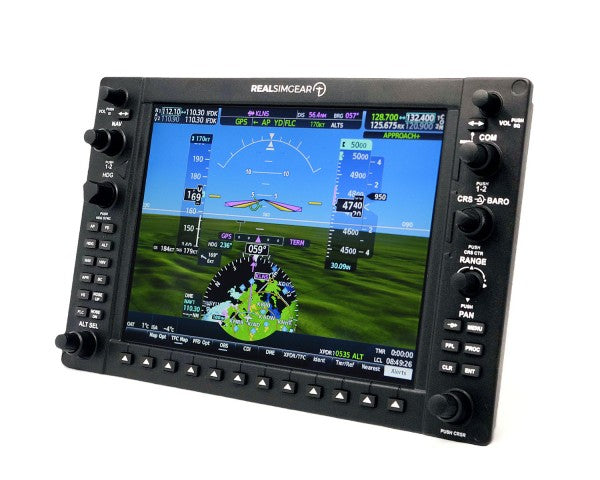
RealSimGear stands at the forefront of flight simulation hardware, delivering professional-grade solutions that bridge the gap between virtual and real aviation. Their commitment to quality is evident in every product, from the precise calibration of the GTN750 to the authentic feel of the G1000 suite. The GFC500 autopilot system rounds out their impressive lineup, offering realistic flight control and advanced navigation capabilities.

Flight Instrument Panels

  • Hardware integration: Our instrument panels feature plug-and-play USB connectivity, ensuring straightforward installation and immediate compatibility with popular flight simulation platforms. Each panel undergoes rigorous testing to guarantee reliable performance during extended flight sessions.
  • Build quality and materials: Premium-grade materials and robust construction ensure these panels withstand countless hours of use. Backlit displays provide excellent visibility in various lighting conditions, while high-quality switches and encoders deliver tactile feedback that matches real aircraft components.
  • Software compatibility: Beyond basic compatibility, these panels offer deep integration with multiple flight simulation platforms. Advanced features include automatic panel detection, customizable button mapping, and real-time system updates.
  • Training value: Whether you're maintaining proficiency or working toward your pilot's license, these instrument panels provide valuable training benefits. Practice procedures and build muscle memory in a risk-free environment that closely mirrors actual aircraft instrumentation.

Expert Recommendations

For the ultimate general aviation setup, we recommend combining the G1000 suite with the GFC500 autopilot system. This configuration provides comprehensive flight instrumentation and automated flight control capabilities. The GTN750 serves as an excellent supplementary navigation system, offering advanced features like detailed mapping and weather information.

Installation and Support

Every instrument panel comes with detailed installation instructions and access to our technical support team. We provide regular firmware updates to ensure optimal performance and compatibility with the latest simulation software versions.

Complete your flight simulator

Your flight simulator isn't ready with just an instrument panel. Take a look at our yokes, throttles, and rudder pedals to get your plane off the ground! Want to have the ultimate flight simulator experience? A flight simulator cockpit does wonders for immersion.


Login

Forgot your password?

Don't have an account yet?
Create account


