
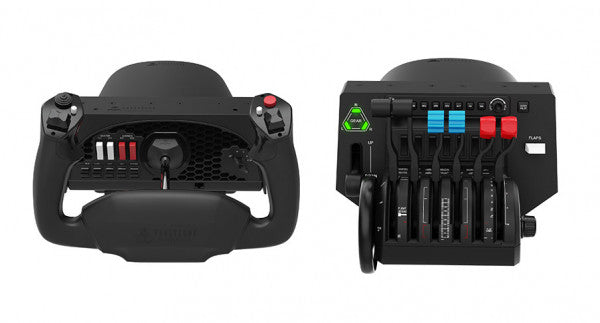



Welcome to FlightSimZone's Honeycomb Aeronautical collection, where precision meets passion in flight simulation. As Europe's largest flight sim shop, we proudly offer the complete range of Honeycomb's flight controls, designed to deliver an authentic aviation experience for both enthusiasts and professional pilots in training.
Honeycomb product comparison table
| Feature | Alpha Flight Controls | Alpha Flight Controls XPC | Bravo Throttle Quadrant | Bravo Throttle Quadrant Lite | Sierra TPM Module | Foxtrot Aviation Stick | Echo Aviation Controller | Bundle (Yoke & Throttle) |
|---|---|---|---|---|---|---|---|---|
| Price | €289 | €399 | €300 | €209 | €269 | €165 | €150 | €509 |
| Type | Yoke | Yoke | Throttle Quadrant | Throttle Quadrant | TPM Module | Joystick | All-in-One Controller | Bundle |
| Engine Support | — | — | Single to 4-engine | Single to twin-engine | Single-engine | — | — | Single to 4-engine |
| Hall Effect Sensors | No | Yes | No | No | No | Yes | Yes | No |
| Autopilot Panel | No | No | Yes | No | No | No | No | Yes (via Bravo) |
| Switch Panel | Yes (master, alt, avionics, lights, ignition) | Yes (master, alt, avionics, lights, ignition) | Annunciator panel | No | Flap & parking brake | 5 two-way switches + 4 buttons | Gear, flaps, trim, camera | Yes (both units) |
| Trim Wheel | No | No | Yes | Yes | Yes (high-res) | No | Yes (integrated) | Yes (via Bravo) |
| Connectivity | USB-A | USB-C to USB-A | USB | USB-C to USB-A | USB-C to USB-A | USB-C to USB-A | Wireless (2.4 GHz) or USB-C | USB |
| Console Support | No | Xbox Series X|S, Xbox One | Xbox (limited) | No | No | No | No | Xbox (limited) |
| Compatibility | MSFS, X-Plane, P3D (Win/Mac) | MSFS, X-Plane, P3D (Win/Xbox) | MSFS, X-Plane 11, P3D V3-V5 | MSFS 2020/2024, X-Plane 11/12, P3D, FSX | MSFS 2020/2024, X-Plane, P3D | MSFS 2024, X-Plane, P3D | MSFS, X-Plane 11/12, P3D | MSFS, X-Plane 11, P3D |
| Warranty | 2 years | 2 years | 2 years | 2 years | 2 years | 2 years | 2 years | 2 years |
Professional-grade flight controls
Honeycomb Aeronautical has revolutionized the flight simulation industry with their commitment to creating authentic, aviation-grade hardware. Each product undergoes rigorous testing and development in collaboration with professional pilots, ensuring unparalleled realism and functionality. Their attention to detail and use of aerospace-grade materials sets a new standard in home flight simulation equipment.
Honeycomb yokes
The Alpha Flight Controls series represents Honeycomb's flagship yoke system, engineered to replicate the exact feel of aircraft controls. These yokes feature:
- All-steel shaft construction with dual ball bearings, providing smooth operation and precise control inputs that mirror real aircraft handling characteristics
- 180-degree rotation with adjustable tension settings, allowing pilots to customize their experience based on different aircraft types
- Integrated switch panel featuring authentic avionic controls, including magneto switches, alternator controls, and light operations, reducing the need for additional hardware
Honeycomb throttles
The Bravo Throttle Quadrant exemplifies Honeycomb's dedication to versatility and precision in flight controls. This advanced throttle system delivers:
- Configurable throttle setup supporting various aircraft configurations, from single-engine planes to complex multi-engine aircraft
- Commercial-grade components ensuring long-term durability and consistent performance throughout thousands of flight hours
- Detented thrust reverser functionality, providing realistic feedback during critical landing phases
You can also buy a Honeycomb bundle where the Alpha and Bravo products are included.
Honeycomb flight controls
Honeycomb's product ecosystem is designed to work seamlessly together, creating a complete cockpit environment. Their modular approach allows pilots to build their setup gradually while maintaining professional quality throughout. The integration capabilities extend to major flight simulation platforms, including Microsoft Flight Simulator, X-Plane, and Prepar3D, ensuring compatibility across your preferred simulation environment.
Quality and durability
Honeycomb Aeronautical's commitment to quality is evident in every aspect of their products. The use of industrial-grade materials and components ensures longevity and consistent performance. Their products undergo extensive quality control processes, including:
- Individual testing of each unit before shipment
- Multi-stage quality assurance checks during manufacturing
- Stress testing under various environmental conditions
Why choose Honeycomb at FlightSimZone
As Europe's leading flight simulation retailer, we maintain close relationships with Honeycomb Aeronautical, ensuring our customers receive the latest products and updates. Our expertise in flight simulation equipment allows us to provide detailed guidance on product selection and setup optimization.
Whether you're building your first home flight cockpit or upgrading your existing setup, Honeycomb Aeronautical's range of products offers the perfect balance of realism, durability, and value. With FlightSimZone's extensive inventory and expert support, you can be confident in finding the right Honeycomb products to elevate your flight simulation experience.
Explore our complete Honeycomb Aeronautical collection today and take the first step toward professional-grade flight simulation at home. Our team is ready to assist you in selecting the perfect combination of Honeycomb products to match your specific needs and preferences.
P.S. Besides Honeycomb, we also offer Thrustmaster, Turtle Beach, Moza and many other!
Frequently Asked Questions
How do you set up Honeycomb Aeronautical flight controls?
Honeycomb flight controls are set up by connecting the device via USB and assigning buttons and axes inside your flight simulator’s control settings. According to user discussions, each switch and axis must be manually mapped, and conflicts with other devices should be cleared to ensure proper functionality.
Are Honeycomb Aeronautical products compatible with Microsoft Flight Simulator?
Yes, Honeycomb Aeronautical products are compatible with Microsoft Flight Simulator on PC, but they require manual configuration. According to user reports, the hardware works like standard input devices, meaning users must assign controls and sometimes install additional profiles or software for full functionality.
Is Honeycomb Alpha and Bravo worth it for flight simulation?
Yes, the Honeycomb Alpha yoke and Bravo throttle quadrant are considered worth it for users seeking realistic flight simulation controls. Reviews highlight their premium build quality, smooth control inputs, and realistic cockpit feel, especially for general aviation and multi-engine training scenarios.
Why is the Honeycomb Bravo throttle quadrant hard to set up?
The Honeycomb Bravo throttle quadrant can be difficult to set up because it requires detailed control mapping and configuration within the simulator. User feedback indicates that incorrect bindings or conflicts with other peripherals are the most common causes of setup issues.
What makes Honeycomb flight controls realistic?
Honeycomb flight controls are realistic because they use features like a 180° yoke rotation, steel shaft mechanisms, and configurable throttle systems. According to the manufacturer’s specifications, these components are designed to replicate real aircraft control movement and provide precise, smooth input.




