Flight Simulator Joysticks

19 Produkte

  • VelocityOne Flightdeck

    Turtle Beach VelocityOne Flightdeck

    Nicht vorrätig, Pre-Orders Available. Shipped in 2-2.5 weeks from now.

    VelocityOne Flightdeck delivers an exceptional HOTAS experience, built for sim pilots who crave full control. The Flight Touch Display puts real-time status updates and extra input options at your fingertips, while the adjustable stick height ensures a comfortable grip for every hand size. Its Hall-effect sensors promise long-lasting accuracy, and the customizable OLED HUD offers on-the-fly tuning. Whether you're maneuvering through dogfights or exploring deep space, this setup provides a comprehensive set of controls designed for seamless integration with major flight sims. What Sets the VelocityOne Flightdeck Apart? Flight Touch Display Adds Layers of Control – Unlike traditional HOTAS setups, this system introduces a dedicated touchscreen for managing in-flight status and input commands. It effectively expands your cockpit controls, allowing you to assign up to 39 extra button functions for customized interactions. Fully Adjustable Stick for Comfort and Ergonomics – Many setups lock users into a single grip position, but this one features an adjustable stick height. That means pilots with different hand sizes can fine-tune the control feel, ensuring maximum precision without hand fatigue. Modular Design with Dual USB Connectivity – While some HOTAS systems cram everything into a single unit, this setup consists of two independently connected USB devices. This allows for greater flexibility in mounting options and ensures reliable input recognition without interference. Deep Customization Through the Flight Hangar App – Unlike many competitors, this system comes with a dedicated configuration app that allows users to tweak lighting, input sensitivity, and firmware updates. The ability to save and load profiles for different aircraft ensures consistency across multiple simulations. Pros and Cons Pros Cons Touchscreen display provides extra controls and customization Requires manual mapping for full function in some games Modular design with independent throttle and stick Button layout can feel overwhelming for beginners Adjustable stick height for better ergonomics Limited compatibility with certain space sims Specifications Specification Value Connection Type USB-C to USB-A (Throttle and Stick) Weight (Stick) 1.46kg / 3.22lbs Weight (Throttle) 1.51kg / 3.33lbs Dimensions (Stick) 177 x 215.8 x 234.3 mm / 6.97” x 8.50” x 9.22” Dimensions (Throttle) 177.9 x 207.6 x 134.2 mm / 7.00” x 8.17” x 5.28” Programmable Buttons 139 Throttle Type Dual-engine with independent or linked control Included Accessories 2x USB-C to USB-A cables, mounting screws VelocityOne Flightdeck Compatibility Software Compatibility Details Full Compatibility Microsoft Flight Simulator 2020, X-Plane 11 & 12, DCS World, Prepar3D, Star Citizen, War Thunder Limited Compatibility Star Wars Squadrons, Elite: Dangerous (requires manual mapping) Hardware Compatibility Details PC (Windows 10 & 11) Requires USB connection; no support for Mac or consoles Designed exclusively for Windows 10 & 11 PCs, this HOTAS system does not support MacOS or gaming consoles. The dual USB design allows separate recognition of the throttle and stick, reducing input lag and ensuring stable connection across all supported simulators. Best suited for Microsoft Flight Simulator, X-Plane, and DCS World, the VelocityOne Flightdeck also supports Star Citizen and War Thunder with full button mapping. While it works with Elite: Dangerous and Star Wars Squadrons, manual configuration is required due to button limitations.

    Nicht vorrätig, Pre-Orders Available. Shipped in 2-2.5 weeks from now.

    €419,00

  • letzter Vorrat VelocityOne Flightstick

    Turtle Beach VelocityOne Flightstick

    3 auf Lager Shipped in 1-3 business days.

    VelocityOne Flightstick ist ein vielseitiger und funktionsreicher Joystick, der Ihre Flugerlebnisse auf ein neues Niveau hebt. Mit einem integrierten Throttle-Quadranten und anpassbaren Tasten bietet er präzise Steuerungsmöglichkeiten sowohl für Gelegenheitspiloten als auch für erfahrene Flugsimulationsfans. Sein ergonomisches Design sorgt für Komfort bei langen Sitzungen, während das integrierte OLED-Display wichtige Daten stets im Blick hält. Ob auf PC oder Xbox – dieser Flightstick kombiniert Funktionalität mit einem erstklassigen Steuergefühl für ein immersives Flugerlebnis. Was macht den VelocityOne Flightstick besonders? Integriertes OLED-Display Das eingebaute OLED-Display zeigt in Echtzeit wichtige Fluginformationen an und ermöglicht den Zugriff auf essenzielle Einstellungen, ohne das Geschehen aus den Augen zu verlieren. Dies erleichtert die Steuerung und verbessert den Spielfluss. Umfangreiche Anpassungsmöglichkeiten Dank mehrerer programmierbarer Tasten und Profile passt sich der VelocityOne Flightstick verschiedenen Flugstilen und Flugzeugtypen an. Das integrierte Trimmrad und die dualen Hat-Switches ermöglichen präzise Steuerungsanpassungen und machen ihn sowohl für Einsteiger als auch für erfahrene Piloten attraktiv. Plattformübergreifende Kompatibilität Der Joystick ist sowohl mit PC als auch mit Xbox-Plattformen kompatibel und lässt sich nahtlos in beliebte Flugsimulatoren integrieren. Durch die USB-C-Verbindung wird eine niedrige Latenz gewährleistet, was für eine reaktionsschnelle Steuerung sorgt. Ergonomisches Design und robuste Bauweise Entwickelt für Langlebigkeit und Komfort, bietet der Flightstick eine intuitive Tastenanordnung und eine stabile Konstruktion. Sein leichtes Design sorgt für hohe Mobilität, ohne dabei an Stabilität einzubüßen. Vor- und Nachteile Vorteile Nachteile OLED-Display für schnellen Zugriff auf wichtige Informationen. Ersteinrichtung kann für Anfänger herausfordernd sein. Programmierbare Tasten für individuelle Anpassungen. Nicht kompatibel mit PlayStation-Konsolen. Funktioniert nahtlos mit PC und Xbox-Plattformen. Technische Daten Technische Spezifikation Wert Produkttyp Joystick Rudersteuerung Ja Magnetische Sensoren Ja RGB-Beleuchtung Ja Farbe Schwarz Gewicht 0,8 kg Plattform PC, Xbox One, Xbox Series X|S Betriebssystem Windows 10 oder höher Verbindung USB-C auf USB-A Garantie 2 Jahre (Carry-in) VelocityOne Flightstick Kompatibilität Der VelocityOne Flightstick ist mit PC- und Xbox-Plattformen kompatibel und somit eine vielseitige Wahl für Flugsimulationsfans. Entwickelt für Windows 10 oder höher, verbindet er sich über USB-C für schnelle und zuverlässige Eingaben. Allerdings ist er nicht mit PlayStation-Systemen kompatibel, was seine plattformübergreifende Nutzung einschränkt. Der Flightstick integriert sich nahtlos in führende Flugsimulatoren wie Microsoft Flight Simulator 2020 und nutzt seine präzisen Steuerungsmöglichkeiten für ein erstklassiges Spielerlebnis. Durch seine programmierbaren Tasten und das integrierte Trimmrad eignet sich der Flightstick hervorragend für unterschiedliche Flugzeugtypen und Steuerungsstile. Dank seiner Unterstützung für Xbox Series X|S und Xbox One können auch Konsolenspieler von einer robusten und immersiven Flugsimulation profitieren. Er erfordert jedoch einen Windows-PC oder eine Xbox-Konsole, da weder Linux noch macOS unterstützt werden. Die Features sind speziell auf die genannten Systeme optimiert.

    3 auf Lager Shipped in 1-3 business days.

    €169,00

  • letzter Vorrat TCA Officer Pack Airbus Edition for sale on FlightSimzone

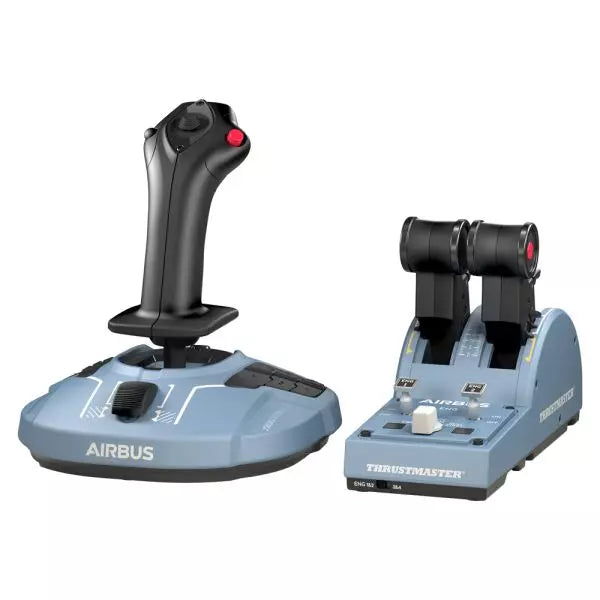
    Thrustmaster TCA Officer Pack Airbus Edition

    5 auf Lager Shipped in 1-3 business days.

    TCA Officer Pack Airbus Edition ist ein unverzichtbares Set für alle, die das Gefühl der kommerziellen Luftfahrt in ihr Setup bringen möchten. Mit seinem ergonomischen Design, inspiriert vom Airbus A320, umfasst es sowohl den TCA Sidestick als auch das Throttle Quadrant für unübertroffene Kontrolle. Dank magnetischer Sensortechnologie für präzise Eingaben und einem modularen Sidestick für vielseitige Konfigurationen können Sie den Himmel mit höchster Präzision beherrschen. Egal, ob Sie einen Airliner oder einen Kampfjet steuern, dieses Set passt sich nahtlos an Ihre Bedürfnisse an. Was macht das TCA Officer Pack Airbus Edition besonders? Modulares Sidestick-Design Der Sidestick verfügt über austauschbare Kopfmodule, die eine Anpassung für Kapitäns-, Co-Pilot- oder Solo-Flugkonfigurationen ermöglichen. Diese Modularität ist eine Seltenheit und bietet maximale Flexibilität für verschiedene Spielstile und Setups. Schubumkehr und exakte Schubrasten Das Throttle Quadrant enthält präzise Schubrasten und einen integrierten Schubumkehrmechanismus, der realistisches Feedback bietet und die Steuerung noch authentischer macht. Die Möglichkeit, in den linearen Modus zu wechseln, erhöht die Vielseitigkeit für unterschiedliche Flugzeugtypen. Langlebige Magnettechnologie Beide Geräte nutzen kontaktlose Magnetsensoren, die Potentiometer überflüssig machen und eine lange Lebensdauer garantieren. Dies sorgt für höchste Zuverlässigkeit und minimiert Eingabeverzögerungen bei kritischen Manövern. Nahtlose Kompatibilität mit mehreren Geräten Das Set lässt sich problemlos mit Zubehör wie den Thrustmaster T.Flight Rudder Pedals und der TM Flying Clamp kombinieren, um ein immersives und stabiles Cockpit-Erlebnis zu schaffen. Vor- und Nachteile Vorteile Nachteile Ergonomisches Design, inspiriert von Airbus A320-Steuerungen. Häufige Lagerengpässe aufgrund hoher Nachfrage. Modularer Sidestick für verschiedene Konfigurationen. Throttle Quadrant ohne Hintergrundbeleuchtung für Nachtsimulationen. Magnetische Sensoren für langlebige und präzise Steuerung. Keine native Unterstützung für Konsolen, nur PC-kompatibel. Unterstützt Dual-Throttle für Vierstrahlige Flugzeuge. Zusätzlicher Throttle Quadrant erforderlich für vollständige Steuerung von vier Triebwerken. Technische Daten Technische Spezifikation Wert Sidestick Breite 195 mm Sidestick Tiefe 225 mm Sidestick Höhe 195 mm Sidestick Gewicht 920 g Quadrant Breite 255 mm Quadrant Tiefe 145 mm Quadrant Höhe 85 mm Quadrant Gewicht 530 g Lieferumfang TCA Sidestick, TCA Quadrant, 4 austauschbare Joystick-Kopfmodule, USB-Kabel, Aufkleber, Verbindungselemente, Befestigungsstange TCA Officer Pack Airbus Edition Kompatibilität Hardware Kompatibilität Ruderpedale Kompatibel mit Thrustmaster T.Flight und Pendular Rudder Montageklemme Kompatibel mit Thrustmaster TM Flying Clamp Das TCA Officer Pack Airbus Edition wurde entwickelt, um sich nahtlos in das Thrustmaster-Ökosystem einzufügen, was es zu einer vielseitigen Ergänzung für bestehende Setups macht. Das Throttle Quadrant ermöglicht die Kopplung zweier Einheiten für die Steuerung von viermotorigen Flugzeugen, während der modulare Sidestick problemlos an verschiedene Cockpit-Konfigurationen angepasst werden kann. Allerdings ist dieses Set nur mit dem PC kompatibel und bietet keine native Unterstützung für Konsolennutzer. Auf Gaming-Plattformen ist dieses Set vollständig kompatibel mit Windows 10 und 8 und unterstützt gängige Flugsimulatoren wie Microsoft Flight Simulator und X-Plane. Es bietet jedoch keine native Unterstützung für Konsolenplattformen wie Xbox oder PlayStation, wodurch es ausschließlich für PC-Spieler geeignet ist.

    5 auf Lager Shipped in 1-3 business days.

    €179,00

  • letzter Vorrat Honeycomb Foxtrot Aviation Stick

    Fly Honeycomb Honeycomb Foxtrot Aviation Stick

    4 auf Lager Shipped in 1-3 business days.

    Honeycomb Foxtrot Aviation Stick wurde für Piloten entwickelt, die einen Sidestick in der Hand und einen aufgeräumten Schreibtisch vor sich bevorzugen. Schon bei der ersten Bewegung fühlt sich das sanfte lineare Widerstandssystem ohne Center-Detent flüssig und kontrolliert an – ideal für Airbus-typische Eingaben und Kunstflugmanöver. Im Inneren sorgt die 16-Bit-Auflösung mit Hall-Effekt-Sensortechnologie dafür, dass selbst feinste Handgelenkbewegungen präzise in Steuerbefehle auf dem Bildschirm umgesetzt werden. Mit einstellbarer Spannung und vollständig beidhändigem Design entsteht ein Stick, der sich durchdacht und hochwertig anfühlt – nicht wie ein Spielzeug. Was zeichnet den Honeycomb Foxtrot Aviation Stick aus? Steuerphilosophie ohne Center-Detent Viele Sticks verfügen über eine spürbare Mittelrastung, die kleine Korrekturen mechanisch wirken lassen kann. Das lineare Widerstandssystem des Foxtrot verzichtet auf diese Rastung und ermöglicht einen gleichmäßigen Übergang über den gesamten Achsenbereich. Besonders Piloten von Airbus-Flugzeugen schätzen dieses Design, da es das Verhalten eines echten Sidesticks realistischer widerspiegelt und sanfte Nick- und Rollkorrekturen ohne ein federbelastetes „Klicken“ in der Mitte erlaubt. Synergie aus Sensorik und Auflösung Mit 16-Bit-Auflösung in Kombination mit Hall-Effekt-Sensoren liefert der Foxtrot eine saubere, berührungslose Eingabeerkennung. Enthusiasten heben häufig die langfristige Konstanz hervor – kein Spiking, keine schleichende Abnutzung wie bei mechanischen Potentiometern. Feine Trimmkorrekturen im Anflug oder präzise Rollbewegungen im Kunstflug bleiben stabil und vorhersehbar, insbesondere im Vergleich zu Einsteiger-Sticks, die nahe der Mittelstellung zu Zittern neigen können. Konfigurierbarer Widerstand und Ergonomie Dank einstellbarer Spannung lässt sich der Stick individuell anpassen – egal ob leichte Fingerspitzensteuerung oder höherer Widerstand für kontrollierte Bewegungen bevorzugt wird. In Verbindung mit dem beidhändigen Griffdesign eignet sich der Foxtrot sowohl für Links- als auch für Rechtshänder. Nutzer mit kompakten Cockpit-Setups betonen häufig seine Flexibilität in unterschiedlichen Sitzpositionen, einschließlich Mittel- oder Seitenmontage. Hohe Schalterdichte ohne Überladung Mit 5 Zwei-Wege-Schaltern, 4 programmierbaren Aktionstasten, POV-Hat, Trigger, Rockern und einem Mehrwege-Drehregler-Panel bietet der Stick umfangreiche Eingabemöglichkeiten. Besonders hervorzuheben ist die logische Anordnung der Bedienelemente; Sim-Piloten berichten häufig, dass Funktionen wie Trimmung, Autopilot-Modi oder Kamerasteuerung zugewiesen werden können, ohne dass es beengt wirkt oder man im Flug nach Tasten suchen muss. Vor- und Nachteile Vorteile Nachteile Linearer Widerstand ohne Center-Detent fühlt sich gleichmäßig an. Keine native Konsolenkompatibilität. Hall-Effekt-Sensoren reduzieren langfristigen Verschleiß. Keine dedizierte Montagebasis im Lieferumfang enthalten. Einstellbare Spannung für unterschiedliche Flugstile. Umfangreiche Konfigurationsmöglichkeiten für Schalter und Tasten. Spezifikationen Spezifikation Wert Product Name Honeycomb Foxtrot Aviation Stick Control System Lineares Widerstandssystem ohne Center-Detent Sensor Technology Hall-Effekt-Sensoren Resolution 16-bit Tension Adjustment Einstellbarer Stick-Widerstand Switches 5 Zwei-Wege-Schalter Action Buttons 4 programmierbare Tasten Rotary Panel 3-, 4- und 5-Wege-Drehregler Grip Design Beidhändig Connection USB-C to USB-A cable System Compatibility PC und Mac Included in the Box Foxtrot Aviation Stick, USB-C to USB-A Cable, Quick Start Guide (EFIGS) Download Support Basic Bindings Profiles (XML) für MSFS 2024 Honeycomb Foxtrot Aviation Stick Kompatibilität Platform Compatibility Operating Systems PC und Mac Connection Type USB-C to USB-A direkte USB-Schnittstelle Primary Sim Support MSFS 2024 (XML Bindings), MSFS, X-Plane, Prepar3D Der Foxtrot Aviation Stick wird über Standard-USB angeschlossen und lässt sich dadurch problemlos in die meisten Desktop-Cockpit-Setups integrieren. Dank seiner Plug-and-Play-HID-Architektur arbeitet er nahtlos mit Schubquadranten, Seitenrudern und Funkpanels anderer großer Marken zusammen. Sein beidhändiges Design eignet sich für Links- oder Rechtskonfigurationen, einschließlich seitlicher Montage im Airbus-Stil. Er ist nicht mit Xbox-Konsolen kompatibel und funktioniert nicht als eigenständiges Gerät ohne angeschlossenen PC oder Mac. Auf Softwareseite unterstützt er Microsoft Flight Simulator 2024 mit dedizierten XML-Bindings und arbeitet mit beliebten PC-Simulatoren wie Microsoft Flight Simulator (2020), X-Plane und Prepar3D über manuelle oder Community-Mappings. Er ist nicht für konsolenbasierte Plattformen ausgelegt, da er auf nativer PC/Mac-Treibererkennung statt auf konsolenzertifizierter Firmware basiert.

    4 auf Lager Shipped in 1-3 business days.

    €165,00

  • WINCTRL URSA MINOR Airline Joystick R

    WINCTRL WINCTRL URSA MINOR Airline Joystick R

    Nicht vorrätig, Pre-Orders Available. Shipped in 2-2.5 weeks from now.

    WINCTRL URSA MINOR Airline Joystick R brings airline-style control to the desktop with a clever mix of tactile feedback and thoughtful engineering. The standout feature is the flight-data-linked vibration engine, which adds subtle physical cues during events like flap deployment, airflow changes, and touchdown. Pair that with non-contact magnetic resistance sensors on the X and Y axes, and the stick delivers smooth, stable inputs without the wear issues common in cheaper mechanisms. The result is a joystick that feels lively in hand yet technically grounded under the hood. What Sets the WINCTRL URSA MINOR Airline Joystick R apart? Flight Data Driven Vibration Feedback The URSA MINOR stands out with a vibration motor tied directly to in-sim flight data. Instead of generic rumble, the stick reacts to events like landing contact, airflow changes, or flap movement. Pilots online often mention how this adds subtle physical cues during phases like flare or speed changes, providing a tactile reminder of what the aircraft is doing without constantly glancing at instruments. Robust Gimbal With Magnetic Sensors At the core of the stick is a glass-fiber-reinforced nylon gimbal running on ball bearings, paired with non-contact magnetic sensors for the primary axes. This combination helps maintain smooth motion over time without the jitter common in potentiometer-based designs. Enthusiasts frequently note that the stick movement feels stable across the entire travel range, particularly during small pitch adjustments on final approach. Airliner-Inspired Grip Layout The grip design borrows cues from airline sidestick ergonomics, offering a balanced control layout that includes a PTT trigger, autopilot disconnect switch, and a concealed five-way switch beneath a magnetic cover. Pilots often highlight how practical this arrangement is for everyday flying tasks—radio calls, autopilot overrides, and camera views can all be handled without reaching for the keyboard. Flexible Mounting and Maintenance Design The base includes anti-slip pads for desktop use along with pre-drilled mounting holes for cockpit rigs. A quick-release base cover allows access to internal adjustments without dismantling the entire unit. This detail is frequently appreciated by sim cockpit builders who prefer gear that can be tuned or serviced easily rather than permanently sealed hardware. Pros and Cons Pros Cons Flight-data vibration feedback adds tactile flight cues. Plastic construction compared to metal joystick designs. Magnetic sensors reduce wear and input drift. Limited axis travel compared to extended bases. Good button layout for airliner-style flying tasks. Desk or cockpit mounting options included. Specifications Specification Value Product Model URSA MINOR-Airline-Joystick R Material Industrial ABS plastic (PC + ABS) Controller 32-bit ARM controller X/Y Axis Movement Angle ±15° Z Axis Rotation Angle ±20° X/Y Sensors Non-contact magnetic resistance sensors Gimbal Construction Glass fiber reinforced nylon with ball bearings Operating Force (X/Y) Approximately 6N Rotation Torque (Z) ~4 kgf·cm Throttle Axis Type Long-travel sliding potentiometer Throttle Axis Travel 38 mm Buttons 14 buttons (250gf press force, 0.25 mm travel) Special Controls Hidden 5-way switch, PTT trigger, autopilot disconnect Vibration Feature Adjustable amplitude levels from 0–255 Mounting Options Anti-slip desktop pads and cockpit mounting holes Item Weight 3 kg Included in Box J5-BASE-BLACK + JGRIP-C1-R, Data Cable, Toolkit, Accessories Pack WINCTRL URSA MINOR Airline Joystick R Compatibility Platform Compatibility Connection Type USB plug-and-play connection Software Configuration WW SIMAPP Pro software for button mapping Mounting Desktop use or cockpit mounting The URSA MINOR Airline Joystick R connects via standard USB, allowing it to integrate easily with throttle quadrants, rudder pedals, and other flight hardware from many manufacturers. The base supports both desktop placement with anti-slip pads and cockpit mounting using pre-drilled holes, which is useful for sim rigs or permanent setups. Configuration is handled through WW SIMAPP Pro software, enabling button assignments and vibration adjustments directly from a visual interface. Within a flight setup, the joystick works well alongside external throttles, radio panels, or pedal systems because it behaves as a standard USB HID controller. It does not require proprietary ecosystems and can coexist with other brands in the same cockpit. However, it is intended for PC-based simulation environments and does not integrate directly with console platforms. In terms of simulators, the stick supports Microsoft Flight Simulator 2020, X-Plane, Prepar3D, and also space or combat titles like Star Citizen, Elite Dangerous, and War Thunder. Its plug-and-play USB design allows quick recognition in most PC simulation platforms. It is not designed for Xbox or PlayStation consoles, as those systems typically require licensed hardware and different firmware structures.

    Nicht vorrätig, Pre-Orders Available. Shipped in 2-2.5 weeks from now.

    €99,00

  • WINCTRL URSA MINOR Airline Joystick L

    WINCTRL WINCTRL URSA MINOR Airline Joystick L

    Nicht vorrätig, Pre-Orders Available. Shipped in 2-2.5 weeks from now.

    WINCTRL URSA MINOR Airline Joystick L brings airline-style control to the desktop with a clever mix of tactile feedback and thoughtful engineering. The standout feature is the flight-data-linked vibration engine, which adds subtle physical cues during events like flap deployment, airflow changes, and touchdown. Pair that with non-contact magnetic resistance sensors on the X and Y axes, and the stick delivers smooth, stable inputs without the wear issues common in cheaper mechanisms. The result is a joystick that feels lively in hand yet technically grounded under the hood. What Sets the WINCTRL URSA MINOR Airline Joystick L apart? Flight Data Driven Vibration Feedback The URSA MINOR stands out with a vibration motor tied directly to in-sim flight data. Instead of generic rumble, the stick reacts to events like landing contact, airflow changes, or flap movement. Pilots online often mention how this adds subtle physical cues during phases like flare or speed changes, providing a tactile reminder of what the aircraft is doing without constantly glancing at instruments. Robust Gimbal With Magnetic Sensors At the core of the stick is a glass-fiber-reinforced nylon gimbal running on ball bearings, paired with non-contact magnetic sensors for the primary axes. This combination helps maintain smooth motion over time without the jitter common in potentiometer-based designs. Enthusiasts frequently note that the stick movement feels stable across the entire travel range, particularly during small pitch adjustments on final approach. Airliner-Inspired Grip Layout The grip design borrows cues from airline sidestick ergonomics, offering a balanced control layout that includes a PTT trigger, autopilot disconnect switch, and a concealed five-way switch beneath a magnetic cover. Pilots often highlight how practical this arrangement is for everyday flying tasks—radio calls, autopilot overrides, and camera views can all be handled without reaching for the keyboard. Flexible Mounting and Maintenance Design The base includes anti-slip pads for desktop use along with pre-drilled mounting holes for cockpit rigs. A quick-release base cover allows access to internal adjustments without dismantling the entire unit. This detail is frequently appreciated by sim cockpit builders who prefer gear that can be tuned or serviced easily rather than permanently sealed hardware. Pros and Cons Pros Cons Flight-data vibration feedback adds tactile flight cues. Plastic construction compared to metal joystick designs. Magnetic sensors reduce wear and input drift. Limited axis travel compared to extended bases. Good button layout for airliner-style flying tasks. Desk or cockpit mounting options included. Specifications Specification Value Product Model URSA MINOR-Airline-Joystick L Material Industrial ABS plastic (PC + ABS) Controller 32-bit ARM controller X/Y Axis Movement Angle ±15° Z Axis Rotation Angle ±20° X/Y Sensors Non-contact magnetic resistance sensors Gimbal Construction Glass fiber reinforced nylon with ball bearings Operating Force (X/Y) Approximately 6N Rotation Torque (Z) ~4 kgf·cm Throttle Axis Type Long-travel sliding potentiometer Throttle Axis Travel 38 mm Buttons 14 buttons (250gf press force, 0.25 mm travel) Special Controls Hidden 5-way switch, PTT trigger, autopilot disconnect Vibration Feature Adjustable amplitude levels from 0–255 Mounting Options Anti-slip desktop pads and cockpit mounting holes Item Weight 3 kg Included in Box J5-BASE-BLACK + JGRIP-C1-R, Data Cable, Toolkit, Accessories Pack WINCTRL URSA MINOR Airline Joystick L Compatibility Platform Compatibility Connection Type USB plug-and-play connection Software Configuration WW SIMAPP Pro software for button mapping Mounting Desktop use or cockpit mounting The URSA MINOR Airline Joystick L connects via standard USB, allowing it to integrate easily with throttle quadrants, rudder pedals, and other flight hardware from many manufacturers. The base supports both desktop placement with anti-slip pads and cockpit mounting using pre-drilled holes, which is useful for sim rigs or permanent setups. Configuration is handled through WW SIMAPP Pro software, enabling button assignments and vibration adjustments directly from a visual interface. Within a flight setup, the joystick works well alongside external throttles, radio panels, or pedal systems because it behaves as a standard USB HID controller. It does not require proprietary ecosystems and can coexist with other brands in the same cockpit. However, it is intended for PC-based simulation environments and does not integrate directly with console platforms. In terms of simulators, the stick supports Microsoft Flight Simulator 2020, X-Plane, Prepar3D, and also space or combat titles like Star Citizen, Elite Dangerous, and War Thunder. Its plug-and-play USB design allows quick recognition in most PC simulation platforms. It is not designed for Xbox or PlayStation consoles, as those systems typically require licensed hardware and different firmware structures.

    Nicht vorrätig, Pre-Orders Available. Shipped in 2-2.5 weeks from now.

    €99,00

  • Honeycomb Echo Aviation Controller

    Fly Honeycomb Honeycomb Echo Aviation Controller

    Nicht vorrätig, Pre-Orders Available. Shipped in 2-2.5 weeks from now.

    Honeycomb Echo Aviation Controller is one of those devices that makes you rethink how much hardware you actually need to fly properly. Everything sits in your hands—pitch, roll, yaw, throttle, trim—all within reach, anchored by a 16-bit Hall-effect thumbstick that feels smooth and consistent through every movement. Pair that with a complete all-in-one flight control layout, and you’ve got a compact cockpit that works just as well on a desk as it does on the couch. It’s clever, tactile, and surprisingly capable for its size. What Sets the Honeycomb Echo Aviation Controller apart? All-in-One Without Feeling Compromised – Many compact controllers try to do everything and end up feeling like a gamepad with extra buttons. The Echo stands out because each control has a defined purpose and physical identity. Users often mention how the dedicated trim wheel, levers, and rudder system make it feel closer to a proper flight control setup, rather than a simplified alternative. Mechanical Rudder Integration – Instead of relying on twist input or triggers, the Echo uses mechanically linked rudder pedals with Hall-effect sensing. This is something pilots quickly notice, especially during coordinated turns or crosswind landings. The self-centering action gives a consistent feel that’s easier to manage than digital-style inputs found on many compact controllers. Designed for Flexible Flying Spaces – Feedback from users consistently highlights how freeing it is to fly without a fixed rig. Whether sitting at a desk, relaxing on a couch, or traveling, the Echo adapts without needing mounts or external peripherals. It’s particularly appealing for sim pilots who don’t have space for a full yoke, throttle quadrant, and pedal setup. Thoughtful Control Layout for MSFS – The layout feels intentionally designed around Microsoft Flight Simulator workflows. Common functions like gear, flaps, trim, and camera controls are placed where fingers naturally rest. Many users note that once muscle memory develops, cockpit interaction becomes quicker and more fluid compared to mapping everything onto a generic controller. Pros and Cons Pros Cons All flight controls integrated into one compact unit Less tactile separation than full-size hardware setups Hall-effect sensors provide smooth, drift-free input Limited physical range compared to dedicated yokes Wireless operation with long battery life Portable design works without dedicated sim rig Specifications Specification Value Control Type All-in-one flight controller (pitch, roll, yaw, throttle, trim, flaps, gear) Primary Input 16-bit Hall-effect thumbstick Rudder System Mechanically linked Hall-effect rudder pedals Throttle/Sliders Four detented sliders with interchangeable caps Connectivity Wireless (2.4 GHz dongle) or USB-C wired Battery 1200 mAh, up to 15 hours usage System Compatibility PC and Mac Software Compatibility Microsoft Flight Simulator, X-Plane 11/12, Prepar3D Included Accessories Travel case, lever caps, wireless dongle, USB cable Warranty 2-year limited warranty Honeycomb Echo Aviation Controller Compatibility The Echo is built with flexibility in mind. It is compatible with PC and Mac systems and connects either through USB-C wired connection or a 2.4 GHz wireless dongle. Because it operates as a standalone controller, it does not require additional yokes, pedals, or throttle quadrants, making it ideal for compact setups or portable use. It is not designed to integrate directly with traditional hardware ecosystems like separate yokes or external rudder pedals. Its all-in-one design means fewer cables and simpler setups, but it also means less modular expansion compared to full cockpit systems. Pilots who prefer mixing and matching hardware may find it less suited to complex multi-device configurations, as the Echo is intended to replace, rather than complement, those components. On the software side, the controller is fully compatible with Microsoft Flight Simulator and also supports X-Plane 11, X-Plane 12, and Prepar3D. It is not designed for console use, focusing entirely on PC-based simulation platforms where full input mapping and customization are available.

    Nicht vorrätig, Pre-Orders Available. Shipped in 2-2.5 weeks from now.

    €150,00

Flight Simulator Joysticks for sale at FlightSImZone

Beim Einstieg in die Welt der Flugsimulation dient ein hochwertiger Flugsimulator-Joystick als primäre Verbindung zum virtuellen Flugzeug. Diese Präzisionsinstrumente wandeln selbst kleinste Bewegungen in präzise Flugsteuerungseingaben um und sind somit sowohl für gelegentliche Flüge als auch für ernsthaftes Flugtraining unverzichtbar.

Beste Joysticks für Flugsimulatoren

Der heutige Markt bietet verschiedene Joysticks, die unterschiedlichen Bedürfnissen und Vorlieben gerecht werden. Der HOTAS Warthog repräsentiert das Premium-Segment mit seiner Ganzmetall-Konstruktion und militärischer Präzision, während der T.Flight Stick X eine exzellente Einstiegsoption für Anfänger darstellt. Der TCA Sidestick X Airbus Edition schlägt eine Brücke zwischen diesen Segmenten mit seinem authentischen Airliner-Gefühl und professionellen Sensoren.

Microsoft Flight Simulator Joystick

Die ausgefeilte Physik-Engine des Microsoft Flight Simulator erfordert präzise Eingabegeräte für eine optimale Steuerung. Der T16000M FCS ist eine beliebte Wahl für diese Plattform und bietet hervorragende Präzision dank seiner Hall-Effekt-Sensoren und seines ergonomischen Designs. Der VelocityOne Flightstick ergänzt diese Auswahl mit speziellen Funktionen, die für Microsofts Plattform optimiert sind.

Flugsimulator-Joystick für PC

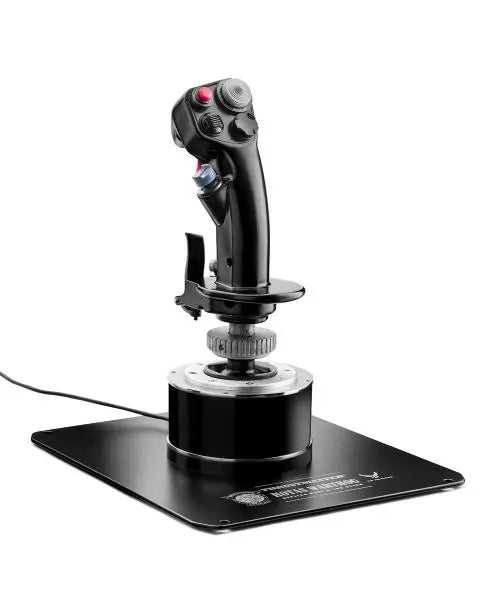
PC-Plattformen bieten die größte Kompatibilität mit Flugsteuerungssystemen und ermöglichen es Piloten, aus einer Vielzahl von Optionen zu wählen. Der AVA F/A-18 Super Hornet Flightstick steht für moderne PC-Flugsteuerungstechnologie und kombiniert fortschrittliche Sensoren mit programmierbaren Funktionen, die das Simulationserlebnis verbessern. Diese PC-fokussierten Controller beinhalten oft Anpassungssoftware zur Erstellung individueller Steuerprofile und zur Feinabstimmung der Empfindlichkeitseinstellungen.

Flugsimulator-Joystick für Xbox

Die Flugsimulation auf Konsolen, insbesondere im Xbox-Universum, hat sich erheblich weiterentwickelt. Moderne Xbox-kompatible Joysticks bieten ausgefeilte Funktionen, die zuvor nur PC-Systemen vorbehalten waren. Diese Controller kombinieren einfache Plug-and-Play-Funktionalität mit professionellen Features, sodass auch Konsolenpiloten dieselbe Präzision in der Steuerung erleben wie PC-Nutzer.

Erweiterte Steuerungstechnologien

Moderne Flugsimulator-Joysticks integrieren mehrere technologische Innovationen, die ihre Leistung und Haltbarkeit verbessern. Hochauflösende Sensoren liefern präzise Positionsdaten, während fortschrittliche Materialien eine gleichbleibende Funktion über Tausende von Flugstunden gewährleisten. Hersteller setzen zunehmend auf militärinspirierte Designs, um Controller zu entwickeln, die sich authentisch anfühlen und gleichzeitig hervorragende Ergonomie bieten.

Diese Innovationen erstrecken sich auch auf die Software-Integration. Viele Joysticks verfügen über spezielle Programme zur individuellen Konfiguration. Diese Tools ermöglichen es den Nutzern, benutzerdefinierte Steuerprofile zu erstellen, Empfindlichkeitskurven anzupassen und erweiterte Tastenbelegungen für verschiedene Flugzeugtypen zu konfigurieren. Die Integration mehrerer Steuerachsen ermöglicht eine realistischere Simulation komplexer Flugmanöver, von Formationsflügen bis hin zu anspruchsvollen Luftkampfszenarien.

Kaufen Sie Ihren Flugsimulator-Joystick bei FlightSimZone

Ein hochwertiger Flugsimulator-Joystick ist eine entscheidende Investition für Ihr virtuelles Luftfahrt-Erlebnis. Egal, ob Sie Verfahren für die reale Flugausbildung üben oder entspannte Flüge genießen – der richtige Joystick kann Ihr Simulationserlebnis erheblich verbessern. Bei FlightSimZone verstehen wir, wie wichtig es ist, Piloten mit der idealen Steuerungslösung auszustatten.

Kaufen Sie noch heute Ihren Flugsimulator-Joystick bei FlightSimZone und erleben Sie die perfekte Balance aus Präzision und Kontrolle in Ihrem virtuellen Cockpit.


Anmeldung

Haben Sie Ihr Passwort vergessen?

Sie haben noch kein Konto?
Konto erstellen


