Udsolgt,
Forudbestillinger tilgængelige. Sendes om 2-2,5 uger fra nu.
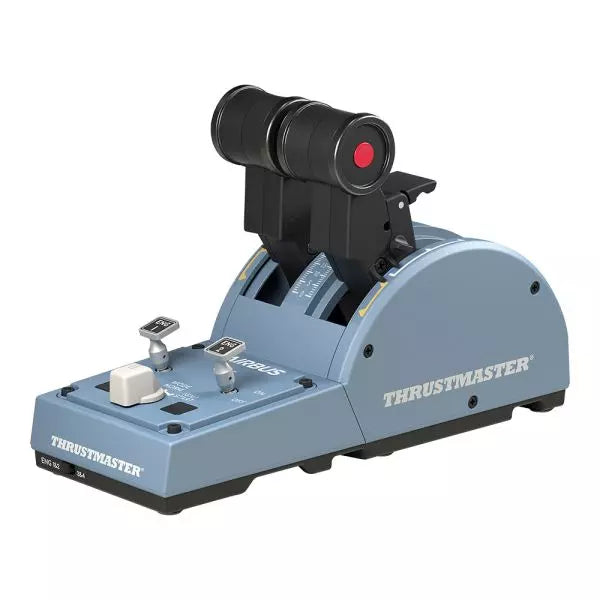
TCA Quadrant Airbus Edition er en drøm, der går i opfyldelse for flight sim-entusiaster, der ønsker en taktil, civil luftfarts-throttle-oplevelse. Med duale thrust-lever med de ikoniske Airbus-detents og et thrust reverser-mekanisme tilbyder den uovertruffen kontrol til alt fra glatte start til præcise landinger. Med 16 tildelbare knapper og kontaktløs magnetisk sensorteknologi, der sikrer en ubegrænset levetid, leverer denne throttle-quadrant alsidighed og holdbarhed. Dens mekaniske vælgere muliggør problemfri tilpasning til forskellige flytyper og giver uendelige muligheder lige ved dine fingerspidser.
Hvad adskiller TCA Quadrant Airbus Edition fra andre?
Ikoniske Airbus Detents og Thrust Reverser Quadrantens detents replikerer flytilstandene på Airbus-fly, fra "Idle" til "TO/GA". Sammen med thrust reverser-mekanismen gør disse detaljer overgangen mellem kraftindstillinger til en taktil fornøjelse, hvilket giver brugerne finjusteret kontrol, der er intuitiv og dybt tilfredsstillende.
Kontaktløs Magnetisk Sensorteknologi I modsætning til mange konkurrerende produkter, der bruger potentiometre, bruger TCA Quadrant Airbus Edition HallEffect magnetiske sensorer. Disse sensorer giver en forlænget levetid, overlegen følsomhed og en glattere drift, selv under krævende og hyppig brug.
Udvideligt Økosystem Quadrantens kompatibilitet med ekstra tilbehør, som TCA Quadrant Add-On Airbus Edition eller Thrustmaster T.Flight ruddersystemer, tilbyder en opgraderingsmulighed for fire-motor flyopsætninger og avancerede kontrolordninger. Denne modulære tilgang sikrer langvarig værdi for dedikerede sim-piloter.
Tilpasningsbare Tension og Modes Den indbyggede spændingsskrue giver brugerne mulighed for at justere throttle-følelsen til deres præferencer. Derudover tillader mekaniske vælgere, at detents kan deaktiveres, hvilket muliggør glatte akselovergange for andre typer fly, såsom jagerfly eller generel luftfart.
Fordele og Ulemper
Fordele
Ulemper
Præcise Airbus detents til mode-specifik kontrol.
Begrænset kompatibilitet med ikke-Windows platforme.
Kontaktløs magnetisk sensorteknologi sikrer langvarig holdbarhed.
Kræver ekstra tilbehør til multi-engine opsætninger.
Udvideligt med Thrustmaster TCA økosystemet.
Inkluderer 16 knapper for omfattende tilpasning.
Specifikationer
Specifikation
Værdi
Bredde
10,0” / 255 mm
Dybdemål
5,7” / 145 mm
Højde
3,3” / 85 mm
Vægt
1,2 lb / 530 g
Indhold i æsken
TCA Quadrant, USB-kabel, monteringsstang, stikforbindelser
Teknologi
HallEffect AccuRate Technology (kontaktløs magnetisk sensorteknologi)
Knappper
16 fysiske og virtuelle knapper
TCA Quadrant Airbus Edition Kompatibilitet
Kompatible Enheder
Detaljer
TCA Sidestick Airbus Edition
Fungerer problemfrit for en komplet Airbus cockpit-oplevelse.
Thrustmaster T.Flight Rudder Pedals
Giver forbedret kontrol til landings- og flyve-manøvrer.
Thrustmaster T.A.R.G.E.T Software
Muliggør programmering og test af komplekse opsætninger.
TCA Quadrant Airbus Edition er kompatibel med Windows 10 og Windows 8 PC'er, og sikrer integration med populære sim-opsætninger. Selvom den udmærker sig med Thrustmaster T.A.R.G.E.T software for yderligere tilpasning, tilbyder den ikke native konsol-kompatibilitet, hvilket gør den ideel for PC-eksklusive piloter. At parre den med tilbehør som T.Flight rudder pedals forbedrer oplevelsen yderligere.
På spilleplatforme udmærker quadrant’en sig i Microsoft Flight Simulator og X-Plane. Kompatibilitet med spil, der understøtter flere knapkonfigurationer, sammen med dens detents og akselindstillinger, sikrer fleksibilitet. Den er mindre egnet til generelle spilopsætninger på grund af dens design, der er fokuseret på civil luftfart.
Udsolgt,
Forudbestillinger tilgængelige. Sendes om 2-2,5 uger fra nu.
The VelocityOne Flight System is a robust all-in-one solution for flight enthusiasts on PC and Xbox. With its dual throttle system and status indicator panel, it caters to pilots flying everything from Cessnas to jetliners. The smooth 180° rotating yoke with hall-effect sensors delivers a tactile, dependable feel, while the trim wheel and programmable buttons allow for customization that mirrors real-world operations. Whether you’re cruising through clouds or nailing precision landings, this system ensures you’re in full control.
What sets the VelocityOne Flight System apart?
Versatile Throttle System The VelocityOne Flight System features dual throttle options—four interchangeable levers for airliners and Vernier-style controls for smaller planes like the Cessna 172. This flexibility allows for accurate power management across different aircraft types, catering to both general aviation and commercial piloting styles.
Integrated Annunciator Panel The included Status Indicator Panel adds a layer of realism with its ability to monitor critical systems. With interchangeable plates, it adapts to various aircraft, providing visual feedback on engine issues, warnings, or system states without requiring additional hardware.
Rudder Control via Yoke Integrated rudder pedal control on the yoke lets you manage the tail rudder, nose wheel, and brakes with fingertip precision. While it doesn’t replace dedicated pedals, it’s a practical and effective solution for players seeking simplicity without sacrificing control.
Flight Management Display The built-in screen serves as a Flight Management Display for Microsoft Flight Simulator, allowing seamless switching between profiles and providing essential data during flight. This feature minimizes reliance on external screens and keeps your focus on piloting.
Pros and Cons
Pros
Cons
Includes dual throttle options for diverse aircraft types.
Rudder control on yoke lacks realism compared to pedals.
Annunciator panel offers visual feedback on system status.
Pricier than other entry-level flight controllers.
Compatible with PC and Xbox Series X|S systems.
Not compatible with PlayStation platforms.
Specifications
Specification
Value
Brand
Turtle Beach
Yoke Rotation
180°
Throttle Type
Dual (Airliner and Vernier-style)
Platform Compatibility
PC, Xbox Series X|S, Xbox One
Sensor Type
Hall-effect
Programmable Buttons
10
Annunciator Panel
Included with interchangeable plates
VelocityOne Flight System Compatibility
The VelocityOne Flight System is designed for PC and Xbox platforms, making it an excellent choice for both console and desktop users. It connects seamlessly to Microsoft Flight Simulator on Xbox Series X|S, and its hall-effect sensors ensure smooth, dependable input for precision maneuvers. While it provides button-based rudder control, users seeking a more immersive setup can pair it with dedicated rudder pedals, though this may require additional hardware.
For gaming platforms, the VelocityOne is optimized for Xbox Series X|S and Xbox One, as well as Windows-based PCs running modern simulators. Unfortunately, it lacks compatibility with PlayStation consoles or Mac operating systems. While the Flight Management Display works particularly well with Microsoft Flight Simulator, it also integrates with other flight simulators, giving pilots an adaptable and feature-rich experience regardless of their preferred game.
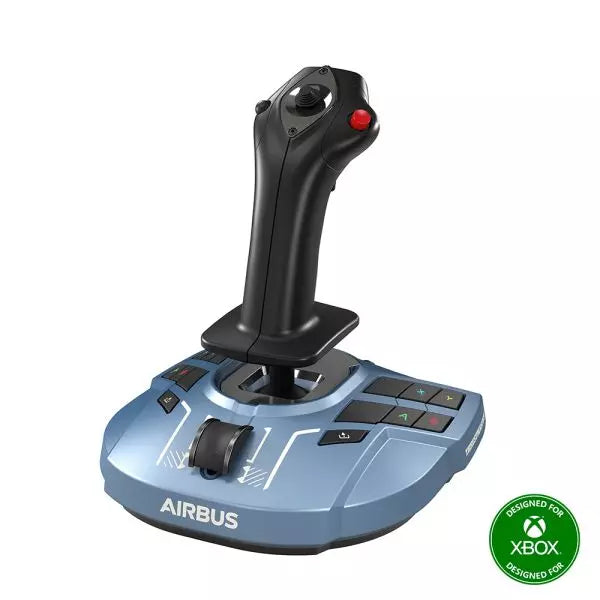
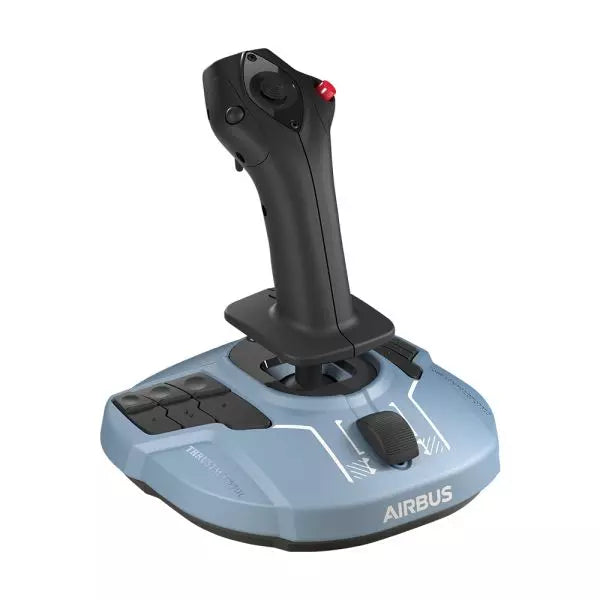
TCA Sidestick Airbus Edition er et robust og alsidigt sidestick, der indfanger essensen af Airbus flykontroller. Med sit ergonomiske 1:1 skala design inspireret af Airbus A320, bringer dette sidestick en taktil og tilpasselig kant til din flysimulering. Med en indbygget gashåndtagsakse og en unik thrust reverser mekanisme, samt 12 omprogrammerbare knapper, er det designet til at tilpasse sig din stil – hvad enten du er kaptajn, co-pilot eller i en central solo position. Med den ekstra fordel af kontaktløs magnetisk sensorteknologi, føles hver manøvre glat og naturlig.
Hvad adskiller TCA Sidestick Airbus Edition fra andre?
Udskiftelige Joystick Hovedmoduler Sidestick’ens hoved er modulært, hvilket giver dig mulighed for at tilpasse det til kaptajn, co-pilot eller solo brug. Denne fleksibilitet gør det til en favorit blandt brugere, der værdsætter tilpasningsevne, især til varierende flyscenarier eller opsætninger.
Indbygget Gashåndtag med Thrust Reverser Et indbygget gashåndtag, komplet med en thrust reverser mekanisme, adskiller dette stick fra andre. Det er en sjælden funktion på sidesticks, som giver bedre kontrol under landinger og jorden manøvrer.
HallEffect Magnetiske Sensorer Ved at bruge kontaktløs magnetisk teknologi eliminerer dette sidestick slid og giver præcise inputs gennem hele dets levetid. Brugere roser konsekvent dets lang levetid og glatte funktionalitet.
Integreret Rudder Kontrol Twist-rudder mekanismen, med en valgfri lås, tilbyder alsidig kontrol for multitaskende piloter og forbedrer anvendeligheden under forskellige flyforhold.
Fordele og Ulemper
Fordele
Ulemper
Modulært hoveddesign passer til forskellige pilotroller.
Kun kompatibel med PC.
Indbygget gashåndtag med thrust reverser tilføjer funktionalitet.
Den mindre base kan føles mindre stabil for nogle.
Magnetiske sensorer sikrer langvarig pålidelighed.
Ingen ekstra programmerbare drejeknapper eller skydeknapper.
Ergonomisk Airbus-inspireret design forbedrer greb og komfort.
Specifikationer
Specifikation
Værdi
Bredde
7.7” / 195 mm
Dybde
7.7” / 195 mm
Højde
8.9” / 225 mm
Vægt
2.0 lb / 920 g
Indhold i pakken
1 x Sidestick, 4 x Joystick Hovedmoduler
TCA Sidestick Airbus Edition Kompatibilitet
TCA Sidestick Airbus Edition fungerer problemfrit sammen med andre komponenter i Thrustmaster Airbus-økosystemet, såsom TCA Quadrant Airbus Edition og TCA Quadrant Add-On. Den fungerer også effektivt med T.Flight Rudder Pedals og TM Flying Clamp for et mere stabilt setup. Den mangler dog kompatibilitet med konsoller som Xbox eller PlayStation, hvilket gør den ideel for PC-brugere. Dette sidestick integreres i opsætninger, der kræver en alsidig inputenhed, men er ikke egnet til konsolbaserede flysimulatorer.
For gamingplatforme understøtter sidestick PC (Windows 10 og 8), men fungerer ikke med macOS eller Linux-baserede systemer. Den er kompatibel med populære flysimulatorer som Microsoft Flight Simulator og X-Plane. Dog er dens brug begrænset til spil, der understøtter konfigurerbare flykontroller, da den mangler plug-and-play support til casual eller arkadespil.
MOZA MA3F Electronic Flight Control Modules L bring the unmistakable Airbus A320 flight deck to your simulator with controls that make every heading change, altitude adjustment, and approach setup feel deliberate. The dual-rail spring-loaded push/pull mechanism recreates the distinctive operation of Airbus autopilot controls, while custom segmented displays faithfully mirror Airbus-specific character formatting and spacing. From the satisfying click of each selector to the coordinated cockpit lighting, every interaction encourages proper Airbus procedures throughout the entire flight.
What Sets the MOZA MA3F Electronic Flight Control Modules L apart?
Faithful Airbus Push/Pull Operation – The dual-rail spring-loaded push/pull mechanism delivers a noticeably more convincing feel than conventional encoder-based controls. Airbus enthusiasts often point out that having distinct push and pull actions makes switching between managed and selected modes feel far more intuitive, helping reproduce familiar cockpit workflows without relying on keyboard shortcuts or mouse clicks.
Displays That Match Airbus Presentation – Rather than using generic digital readouts, the custom segmented displays reproduce Airbus-style character spacing, typography, and formatting. Builders frequently appreciate these visual details because the modules blend naturally with other Airbus cockpit hardware, creating a clean and cohesive flight deck instead of a collection of mismatched peripherals.
Flexible Expansion for Growing Cockpits – Available as an FCU only, FCU with a single EFIS, or a complete Electronic Flight Control Module suite, the system adapts to different cockpit sizes and budgets. The optional extended-function EFIS mode adds further flexibility, allowing additional controls to be accessed without filling the cockpit with extra hardware.
Straightforward Installation and Configuration – The included mounting bracket, aluminum-profile compatibility, and standard 75 mm VESA support make installation simple across desktop and full-frame cockpits. Users also appreciate MOZA Cockpit software for its synchronized lighting, streamlined configuration process, and flexible control customization without requiring complicated setup procedures.
Pros and Cons
Pros
Cons
Excellent Airbus-style push/pull control mechanism.
Designed specifically for Airbus aircraft.
Displays closely match Airbus FCU formatting.
Requires a Windows PC.
Modular configurations support gradual cockpit upgrades.
Synchronized lighting creates a cohesive cockpit appearance.
Specifications
Specification
Value
Product Type
Airbus A320-style FCU and EFIS control system
Available Configurations
FCU only, FCU + single EFIS, complete EFCM suite
Display Type
Custom Airbus-style segmented displays
Autopilot Control Mechanism
Dual-rail spring-loaded push/pull controls
Lighting
Independent display, character, and status illumination
Software Integration
MOZA Cockpit
Supported Platform
PC
Mounting Options
Included bracket, aluminum profile, 75 mm VESA mount
Extended Function
Optional EFIS extended-function control mode
MOZA MA3F Electronic Flight Control Modules L Compatibility
Hardware
Compatibility
Mounting Systems
Included bracket, aluminum-profile rigs, 75 × 75 mm VESA mounts
MOZA Cockpit Software
Telemetry synchronization and configuration supported
Cockpit Configurations
FCU only, single EFIS, or complete EFCM suite
Flight Simulator
Compatibility
Microsoft Flight Simulator
Default Airbus A320/A330 and supported Airbus add-ons
X-Plane
Compatible with Airbus aircraft including ToLiss series
Third-Party Aircraft
Fenix A320, FlightFactor A320, ToLiss series, and other popular Airbus airliners
Designed for PC flight simulation, the MA3F Electronic Flight Control Modules L integrate with MOZA Cockpit software for telemetry synchronization, synchronized lighting, and simple configuration. Included bracket mounting, aluminum-profile compatibility, and 75 mm VESA support allow the modules to fit comfortably into desktop cockpits or larger Airbus flight deck projects.
The modular design allows builders to begin with a single FCU or expand into a complete Electronic Flight Control Module suite as their simulator grows. Independent adjustment of display brightness, character illumination, and status lighting helps maintain a consistent cockpit appearance during daytime departures and night operations alike.
Compatible with Microsoft Flight Simulator and X-Plane, the system supports default Airbus A320 and A330 aircraft together with leading third-party aircraft including Fenix A320, ToLiss, FlightFactor A320, and other popular Airbus airliners. The supported platform is PC; gaming consoles and macOS are not supported.
MOZA MA3F Electronic Flight Control Modules R capture the distinctive workflow of the Airbus A320 flight deck with hardware that feels satisfying every time you dial in a heading or adjust altitude. The dual-rail spring-loaded push/pull mechanism recreates the signature operation of Airbus autopilot controls, while custom segmented displays faithfully mirror Airbus-specific character formatting and spacing. Every knob, button, and illuminated indicator works together to make route management, climb planning, and approach setup feel remarkably natural throughout every stage of flight.
What Sets the MOZA MA3F Electronic Flight Control Modules R apart?
Airbus Push/Pull Controls Done Properly – One feature that consistently stands out is the custom dual-rail push/pull mechanism. Instead of using a basic spring-loaded encoder, the controls deliver distinct travel and resistance that closely match Airbus operating procedures. Many experienced Airbus sim pilots appreciate how this makes managed and selected mode changes feel much more deliberate while reducing accidental inputs during busy phases of flight.
Displays That Capture Airbus Character – The segmented displays have been carefully designed to reproduce the distinctive appearance of Airbus FCU readouts, including character spacing and formatting. Rather than looking like generic digital displays, they blend naturally into an Airbus cockpit. Enthusiasts often point to details like these as the difference between simply operating a simulator and enjoying a convincing airline cockpit environment.
Expandable to Match Your Cockpit – Whether you choose the FCU on its own, pair it with a single EFIS module, or install the complete Electronic Flight Control Module suite, the system grows alongside your cockpit. Builders appreciate this flexibility because it allows gradual upgrades while maintaining a consistent appearance and control layout throughout the simulator.
Purpose-Built for Dedicated Airbus Flying – Seamless integration with MOZA Cockpit software, synchronized lighting, and support for leading Airbus aircraft make the system especially attractive for airliner enthusiasts. Community feedback often highlights how easy it is to configure while still providing extensive customization for display lighting, controls, and cockpit organization.
Pros and Cons
Pros
Cons
Excellent Airbus-style push/pull autopilot controls.
Designed specifically for Airbus aircraft.
Displays accurately reproduce Airbus FCU formatting.
Requires a Windows PC.
Multiple configurations suit evolving cockpit builds.
Synchronized lighting enhances cockpit consistency.
Specifications
Specification
Value
Product Type
Airbus A320-style FCU and EFIS control system
Available Configurations
EFIS
Display Type
Custom Airbus-style segmented displays
Autopilot Control Mechanism
Dual-rail spring-loaded push/pull controls
Lighting
Independent display, character, and status illumination
Software Integration
MOZA Cockpit
Supported Platform
PC
Mounting Options
Included bracket, aluminum profile, 75 mm VESA mount
Extended Function
Optional EFIS extended-function control mode
MOZA MA3F Electronic Flight Control Modules R Compatibility
Hardware
Compatibility
Mounting Systems
Included bracket, aluminum-profile rigs, 75 × 75 mm VESA mounts
MOZA Cockpit Software
Supported for telemetry synchronization and configuration
Cockpit Layouts
FCU only, single EFIS, or complete EFCM suite
Flight Simulator
Compatibility
Microsoft Flight Simulator
Default Airbus A320/A330 and supported Airbus add-ons
X-Plane
Compatible with Airbus aircraft including ToLiss models
Third-Party Aircraft
Fenix A320, FlightFactor A320, ToLiss series, and other Airbus airliners
Built for PC flight simulation, the MA3F Electronic Flight Control Modules R work seamlessly with MOZA Cockpit software, providing synchronized lighting, telemetry integration, and straightforward configuration. Included bracket mounting, aluminum-profile compatibility, and 75 mm VESA support make installation simple whether you're assembling a desktop setup or a dedicated Airbus cockpit.
The modular design allows builders to begin with a single FCU or expand into a complete Electronic Flight Control Module suite over time. Independent adjustment of display brightness, character illumination, and status lighting helps maintain a consistent cockpit appearance during daytime departures and late-night arrivals.
Compatible with Microsoft Flight Simulator and X-Plane, the system supports default Airbus A320 and A330 aircraft together with leading third-party aircraft including Fenix A320, ToLiss, FlightFactor A320, and other popular Airbus airliners. The supported platform is PC; gaming consoles and macOS are not supported.
MOZA MA3F Electronic Flight Control Modules bring the Airbus A320 flight deck to your simulator with controls that feel satisfying from the first heading change to the final approach. The dual-rail spring-loaded push/pull mechanism recreates the distinct operation of Airbus autopilot controls, while custom segmented displays faithfully reproduce the unique FCU character layout and formatting. Every knob rotation, button press, and display update feels purposeful, making long IFR flights far more engaging than relying on virtual cockpit controls alone.
What Sets the MOZA MA3F Electronic Flight Control Modules apart?
Autopilot Controls That Feel Convincing – One feature frequently praised by experienced Airbus sim pilots is the dual-rail spring-loaded push/pull mechanism. Rather than relying on a basic push button behind a rotary encoder, the controls provide distinct travel and resistance that better reflect Airbus workflow. During climbs, descents, and approach changes, every input feels deliberate and encourages proper cockpit procedures.
Displays Designed Around Airbus Styling – The segmented displays do more than simply show numbers. Character spacing, formatting, and typography closely mirror Airbus FCU presentation, creating a cockpit appearance that immediately feels familiar to Airbus enthusiasts. Builders often appreciate this level of visual detail because it helps the hardware blend naturally with other cockpit panels instead of standing out as a generic controller.
Flexible Configurations for Every Cockpit – The system is available as an FCU alone, an FCU paired with a single EFIS, or as a complete EFCM suite. This flexibility allows builders to expand gradually instead of purchasing everything at once. The optional extended-function capability also gives one EFIS module additional duties, reducing unnecessary mouse interaction during busy phases of flight.
Designed to Fit Existing Flight Decks – Standard 75 mm VESA compatibility, the included mounting bracket, and aluminum-profile support make installation straightforward across a wide variety of simulator frames. Users also appreciate the seamless integration with MOZA Cockpit software, where synchronized lighting and control configuration can be managed without lengthy setup procedures.
Pros and Cons
Pros
Cons
Excellent Airbus-style push/pull control mechanism.
Focused exclusively on Airbus aircraft.
Segmented displays closely match Airbus formatting.
PC platform only.
Multiple configurations suit different cockpit budgets.
Integrated lighting synchronization enhances cockpit consistency.
Specifications
Specification
Value
Product Type
Airbus A320-style FCU and EFIS control system
Configuration
FCU only
Display Type
Custom segmented Airbus-style displays
Autopilot Controls
Dual-rail spring-loaded push/pull mechanism
Lighting
Independent screen, character, and status illumination
Software
MOZA Cockpit integration
Supported Platform
PC
Mounting Options
Included bracket, aluminum profile, 75 mm VESA mount
Extended Functions
Optional EFIS extended-function control mode
MOZA MA3F Electronic Flight Control Modules Compatibility
Hardware
Compatibility
Mounting Systems
Included bracket, aluminum-profile rigs, 75 mm VESA mounts
MOZA Cockpit Software
Telemetry synchronization and configuration supported
Cockpit Configurations
FCU only, single EFIS, or complete EFCM suite
Flight Simulator
Compatibility
Microsoft Flight Simulator
Default A320/A330 aircraft and compatible Airbus add-ons
X-Plane
Compatible Airbus aircraft including ToLiss series
Third-Party Aircraft
Fenix A320, FlightFactor A320, and other popular Airbus airliners
Designed for PC flight simulation, the MA3F Electronic Flight Control Modules integrate with MOZA Cockpit software for telemetry synchronization, lighting control, and straightforward configuration. 75 mm VESA compatibility, aluminum-profile support, and the included mounting bracket allow the modules to fit easily into desktop cockpits or larger simulator frames.
The modular design allows builders to start with a single FCU or expand to a complete EFCM suite as their cockpit grows. Independent lighting adjustment for displays, characters, and status indicators helps the modules blend naturally with surrounding instruments during both daytime and night operations.
Compatible with Microsoft Flight Simulator and X-Plane, the system supports default Airbus A320 and A330 aircraft alongside leading third-party add-ons including Fenix A320, ToLiss, and FlightFactor A320. The modules are intended for PC use and are not compatible with gaming consoles.
MOZA FMP18 Panelpakke forvandler et skrivebord til et cockpit i hangarskibsstil med gennemtænkte betjeningselementer, skarpe skærme og et layout inspireret af den legendariske F/A-18. De 7,1-tommer kvadratiske skærme i korrekt størrelse leverer skarpe billeder i en opløsning på 800 × 800, mens det magnetiske modulære hurtigskiftesystem gør det bemærkelsesværdigt nemt at ændre panelkonfigurationen. Hver knap, drejekontrol og kontakt giver en præcis mekanisk fornemmelse, som gør opstartsprocedurer, navigation og kampmissioner tilfredsstillende fra den første tjekliste til den sidste landing på hangarskibet.
Hvad adskiller MOZA FMP18 Panelpakke?
Kvadratiske skærme, der matcher flyets layout: Mange konkurrerende cockpitpaneler anvender traditionelle rektangulære skærme, som går på kompromis med proportionerne. FMP18 benytter i stedet dedikerede kvadratiske 7,1-tommer skærme, der giver en langt mere præcis gengivelse af flyets DDI- og AMPCD-layout. Flysimulationsentusiaster værdsætter især hardware, der undgår forvrænget grafik og leverer en mere autentisk præsentation gennem hele flyvningen.
Magnetisk modulær udvidelse: Det magnetiske hurtigskiftesystem med integrerede pogo-pin-forbindelser gør det enkelt at ændre panelopsætningen. I stedet for at ombygge hele cockpittet til forskellige fly kan brugeren hurtigt udskifte kompatible moduler og samtidig bevare en ryddelig installation. Denne fleksibilitet er blevet særligt populær blandt entusiaster, som regelmæssigt flyver forskellige fly uden at dedikere permanent plads til hver enkelt cockpitopsætning.
Betjeningselementer udviklet til sikker og præcis brug: Med 95 knapper, 16 drejekontroller og syv vippekontakter giver hver kommando en tydelig mekanisk feedback. Piloter sætter pris på hardware, der bekræfter hver handling gennem berøring alene, hvilket reducerer behovet for at kigge ned under krævende hangarskibslandinger eller kompleks våbenstyring. Resultatet er et cockpitworkflow, der føles både naturligt og yderst tilfredsstillende.
Nem integration i eksisterende cockpits: Standard VESA-kompatibilitet på 75 × 75 mm, en justerbar bordklemme og understøttelse af aluminiumsprofiler gør FMP18 let at integrere i mange forskellige simulatoropsætninger. MOZA Cockpit Software gør det desuden muligt at tildele skærme og tilpasse betjeningselementerne, hvilket gør panelpakken lige velegnet til dedikerede hangarskibscockpits som til udvidelse af en eksisterende simulator.
Fordele og ulemper
Fordele
Ulemper
Kvadratiske skærme matcher flyets proportioner meget præcist.
Kræver en del plads på skrivebordet eller i cockpittet.
Det magnetiske hurtigskiftesystem gør panelskift hurtigt og enkelt.
Kun kompatibel med PC.
Fremragende taktile knapper og drejekontroller.
Fleksibel VESA-montering passer til mange cockpitopsætninger.
Specifikationer
Specifikation
Værdi
Produkttype
Frontpanelpakke i hangarskibsstil
Mål
527 × 456 × 212 mm (inkl. klemme)
Vægt
4,15 kg
Kabinetmateriale
Kompositmaterialer
Skærme
Tre kvadratiske 7,1-tommer skærme
Skærmopløsning
800 × 800
Opdateringsfrekvens
60 Hz
Knapper
95
Drejekontroller
16
Vippekontakter
7
USB-pollingfrekvens
1000 Hz
Tilslutningsporte
USB 3.0 Type-A ×3, USB Type-C ×4
Monteringsmuligheder
Bordklemme, aluminiumsprofiler, standard VESA 75 × 75 mm
Understøttet platform
PC
Medfølgende tilbehør
USB 3.0 Type-A-kabler (3), USB Type-C-kabler (4)
Kompatibilitet for MOZA FMP18 Panelpakke
Hardware
Kompatibilitet
Monteringssystemer
Officiel bordklemme, simulatorrigs med aluminiumsprofiler, VESA-beslag 75 × 75 mm
MOZA Cockpit Software
Skærmtildeling og komplet konfiguration af betjeningselementer
Modulære paneler
Understøtter kompatible moduler med magnetisk hurtigskiftesystem
Platform
Kompatibilitet
PC
Understøttet
Udviklet til flysimulering på PC, integreres FMP18 problemfrit med MOZA Cockpit Software, hvor brugeren kan tildele skærme, konfigurere knapper og tilpasse drejekontroller. Det magnetiske hurtigskiftesystem gør det muligt hurtigt at udskifte kompatible moduler, mens standard VESA-montering og understøttelse af aluminiumsprofiler gør installationen enkel i mange forskellige cockpitopsætninger.
Den medfølgende vinkeljusterbare bordklemme understøtter både den komplette enhed og individuelle moduler, så placeringen nemt kan tilpasses uden at udskifte monteringsudstyret. Den lette kompositkonstruktion reducerer samtidig belastningen på simulatorrammen uden at gå på kompromis med stivheden.
PC er den understøttede platform, hvilket gør panelpakken ideel til de mest populære flysimulatorer med understøttelse af specialiseret cockpithardware. Spillekonsoller understøttes ikke, og systemet er udviklet til brugere, der bygger dedikerede flysimuleringsmiljøer på skrivebordet eller i et komplet cockpit.
MOZA MB7F Flight Computer Display captures the look and workflow of the Boeing 737 CDU, giving home cockpit builders a satisfying way to manage routes, arrivals, and aircraft performance. The 5.1-inch high-resolution IPS display presents crisp text that remains easy to read during every phase of flight, while the die-cast aluminum front panel provides a solid feel every time you press a key. From pre-flight programming to descent planning, each button press and display update adds confidence to the experience without needing to reach for a mouse.
What Sets the MOZA MB7F Flight Computer Display apart?
Built Around Boeing 737 Workflows – Rather than serving as a generic keypad, the MB7F is designed around the layout and operating flow of the Boeing 737 CDU. Pilots who regularly fly PMDG and similar aircraft appreciate having dedicated hardware that keeps route programming, performance entries, and FMC changes within easy reach instead of relying on on-screen pop-up windows.
Excellent Mechanical Feel – The combination of heavy-actuation dome switches and rigid silicone keycaps gives every press a confident, positive response. Many cockpit builders value hardware that communicates each input through touch alone, making it easier to work through lengthy flight plans and data entries while keeping attention focused on the flight deck.
Useful Beyond Flight Planning – The integrated checklist pages and three built-in whiteboard pages transform the MB7F into more than a CDU replica. Frequencies, clearance notes, approach briefings, and operating reminders can all be stored directly on the unit, reducing the need for paper notes or additional displays during longer flights.
Designed to Grow With Your Cockpit – The included desktop stand offers an easy starting point, while standard 75 × 75 mm VESA compatibility makes permanent installation equally straightforward. Combined with synchronized lighting through MOZA Cockpit software, the display fits naturally into compact desktop setups and full Boeing-style cockpit builds alike.
Pros and Cons
Pros
Cons
Excellent tactile keys with minimal wobble.
Designed primarily for Boeing 737 aircraft.
Sharp IPS display keeps text easy to read.
PC platform only.
Integrated checklist and whiteboard functions.
Solid die-cast aluminum front panel.
Specifications
Specification
Value
Product Type
Boeing 737 Flight Computer Display (CDU)
Dimensions
277.9 × 145.5 × 32 mm
Weight
646 g
Display Size
5.1-inch IPS
Housing Material
Die-cast aluminum alloy, ABS, PC
Connection
USB Type-C 2.0
Rated Voltage
5 V
Rated Current
900 mA
Supported Platform
PC
Mounting Options
Desktop stand, 75 × 75 mm VESA mount
Included Accessories
Data cable, desktop stand
MOZA MB7F Flight Computer Display Compatibility
Hardware
Compatibility
MOZA Cockpit Software
Supports synchronized lighting and configuration
Mounting Systems
Desktop stand and 75 × 75 mm VESA mount
Connection
USB Type-C 2.0
Flight Simulator
Compatibility
Microsoft Flight Simulator
Supports PMDG and other Boeing 737 add-ons
X-Plane
Compatible with supported Boeing 737 add-ons
Designed for PC flight simulation, the MB7F integrates with MOZA Cockpit software for synchronized lighting and configuration. A USB Type-C connection keeps installation straightforward, while the included desktop stand and 75 × 75 mm VESA compatibility make it easy to move between a desktop setup and a dedicated cockpit.
The compact footprint and sturdy metal front panel make the MB7F well suited to multi-panel installations without placing excessive load on mounting frames. It works comfortably alongside yokes, throttles, radio panels, and other cockpit hardware, whether installed on a desk or an aluminum-profile simulator frame.
Compatible with Microsoft Flight Simulator and X-Plane, the MB7F is designed for PMDG and other leading Boeing 737 add-ons. PC is the supported platform; Mac systems and gaming consoles are not supported.
MOZA MA3F Flight Computer Display brings Airbus-style flight management into the home cockpit with a layout that rewards every button press and data entry. The 5.1-inch high-resolution IPS display keeps flight plans, procedures, and navigation pages crisp and easy to read, while the die-cast aluminum front panel gives every interaction a reassuring sense of solidity. Heavy-actuation keys, synchronized lighting, and thoughtful workflow tools make programming an arrival or revising a route feel satisfying from the first waypoint to the final approach.
What Sets the MOZA MA3F Flight Computer Display apart?
Keys That Feel Purpose-Built – Many flight management units focus almost entirely on appearance, but the MA3F pays equal attention to how every key behaves. The heavy-actuation dome switches and rigid silicone keycaps create a firm, deliberate press that users frequently appreciate during longer flights. The stable key action also helps reduce accidental inputs when quickly updating flight plans or changing performance data.
Practical Features Beyond Flight Planning – Built-in checklist pages and three integrated whiteboard pages make this more than a simple MCDU replica. Pilots can keep notes, approach briefings, frequencies, or clearance information directly on the unit instead of relying on paper or a second monitor. Many cockpit builders value these workflow additions because they reduce clutter while keeping important information close at hand.
Premium Construction Without Excessive Bulk – The die-cast aluminum front panel gives the MA3F a reassuringly solid feel while keeping overall weight manageable for desktop or cockpit installations. Combined with the sharp IPS display and clean surface finish, it stands out as a polished piece of hardware that integrates naturally into dedicated Airbus flight decks.
Broad Airbus Ecosystem Support – The MA3F supports numerous Airbus aircraft across Microsoft Flight Simulator and X-Plane, including respected third-party add-ons such as the Fenix A320, Toliss aircraft, and FlightFactor A320. Combined with customizable fonts and synchronized lighting, it adapts easily as simulator libraries continue to grow.
Pros and Cons
Pros
Cons
Excellent tactile keys with firm mechanical feel.
Limited to Airbus flight management systems.
Sharp IPS display with customizable fonts.
PC platform only.
Built-in checklist and whiteboard pages add utility.
Die-cast aluminum front panel feels exceptionally solid.
Specifications
Specification
Value
Product Type
Airbus-style Flight Computer Display (MCDU/FCD)
Display Size
5.1-inch IPS
Front Panel Material
Die-cast aluminum alloy
Body Material
ABS + PC
Connection
USB Type-C 2.0
Rated Voltage
5V
Rated Current
900mA
Supported Platform
PC
Mounting Options
Desktop stand, 75 × 75 mm VESA mount
Included Accessories
Data cable, desktop stand
MA3F Dimensions
277.9 × 145.5 × 29.6 mm
MA3F Weight
588 g
MB7F Dimensions
277.9 × 145.5 × 32 mm
MB7F Weight
646 g
MOZA MA3F Flight Computer Display Compatibility
Hardware
Compatibility
MOZA Cockpit Software
Supports telemetry synchronization and lighting control
Mounting
Desktop stand and 75 × 75 mm VESA mount
Connection
USB Type-C 2.0
Flight Simulator
Compatibility
Microsoft Flight Simulator
Supports Airbus A320/A330 family
X-Plane
Supports Airbus aircraft including Toliss models
Third-Party Aircraft
Compatible with Fenix A320, FlightFactor A320, and others
Built for PC flight simulation, the MA3F integrates with MOZA Cockpit software for synchronized lighting and configuration. A USB Type-C connection keeps installation straightforward, while the included desktop stand and 75 × 75 mm VESA compatibility make it equally suitable for desktop use or permanent cockpit installations.
The compact dimensions and lightweight construction make it easy to install alongside other Airbus controls without placing excessive strain on a cockpit frame. The display is intended to complement dedicated Airbus flight decks while remaining flexible enough for modular home cockpit projects.
Compatible with Microsoft Flight Simulator and X-Plane Airbus aircraft, the MA3F supports the A320 and A330 families along with respected third-party aircraft including Fenix A320, Toliss, and FlightFactor A320. The supported platform is PC; Mac systems and gaming consoles are not supported.
Udsolgt,
Forudbestillinger tilgængelige. Sendes om 2-2,5 uger fra nu.
Honeycomb Echo Aviation Controller is one of those devices that makes you rethink how much hardware you actually need to fly properly. Everything sits in your hands—pitch, roll, yaw, throttle, trim—all within reach, anchored by a 16-bit Hall-effect thumbstick that feels smooth and consistent through every movement. Pair that with a complete all-in-one flight control layout, and you’ve got a compact cockpit that works just as well on a desk as it does on the couch. It’s clever, tactile, and surprisingly capable for its size.
What Sets the Honeycomb Echo Aviation Controller apart?
All-in-One Without Feeling Compromised – Many compact controllers try to do everything and end up feeling like a gamepad with extra buttons. The Echo stands out because each control has a defined purpose and physical identity. Users often mention how the dedicated trim wheel, levers, and rudder system make it feel closer to a proper flight control setup, rather than a simplified alternative.
Mechanical Rudder Integration – Instead of relying on twist input or triggers, the Echo uses mechanically linked rudder pedals with Hall-effect sensing. This is something pilots quickly notice, especially during coordinated turns or crosswind landings. The self-centering action gives a consistent feel that’s easier to manage than digital-style inputs found on many compact controllers.
Designed for Flexible Flying Spaces – Feedback from users consistently highlights how freeing it is to fly without a fixed rig. Whether sitting at a desk, relaxing on a couch, or traveling, the Echo adapts without needing mounts or external peripherals. It’s particularly appealing for sim pilots who don’t have space for a full yoke, throttle quadrant, and pedal setup.
Thoughtful Control Layout for MSFS – The layout feels intentionally designed around Microsoft Flight Simulator workflows. Common functions like gear, flaps, trim, and camera controls are placed where fingers naturally rest. Many users note that once muscle memory develops, cockpit interaction becomes quicker and more fluid compared to mapping everything onto a generic controller.
Pros and Cons
Pros
Cons
All flight controls integrated into one compact unit
Less tactile separation than full-size hardware setups
Hall-effect sensors provide smooth, drift-free input
Limited physical range compared to dedicated yokes
Wireless operation with long battery life
Portable design works without dedicated sim rig
Specifications
Specification
Value
Control Type
All-in-one flight controller (pitch, roll, yaw, throttle, trim, flaps, gear)
Primary Input
16-bit Hall-effect thumbstick
Rudder System
Mechanically linked Hall-effect rudder pedals
Throttle/Sliders
Four detented sliders with interchangeable caps
Connectivity
Wireless (2.4 GHz dongle) or USB-C wired
Battery
1200 mAh, up to 15 hours usage
System Compatibility
PC and Mac
Software Compatibility
Microsoft Flight Simulator, X-Plane 11/12, Prepar3D
Included Accessories
Travel case, lever caps, wireless dongle, USB cable
Warranty
2-year limited warranty
Honeycomb Echo Aviation Controller Compatibility
The Echo is built with flexibility in mind. It is compatible with PC and Mac systems and connects either through USB-C wired connection or a 2.4 GHz wireless dongle. Because it operates as a standalone controller, it does not require additional yokes, pedals, or throttle quadrants, making it ideal for compact setups or portable use. It is not designed to integrate directly with traditional hardware ecosystems like separate yokes or external rudder pedals.
Its all-in-one design means fewer cables and simpler setups, but it also means less modular expansion compared to full cockpit systems. Pilots who prefer mixing and matching hardware may find it less suited to complex multi-device configurations, as the Echo is intended to replace, rather than complement, those components.
On the software side, the controller is fully compatible with Microsoft Flight Simulator and also supports X-Plane 11, X-Plane 12, and Prepar3D. It is not designed for console use, focusing entirely on PC-based simulation platforms where full input mapping and customization are available.
Udsolgt,
Forudbestillinger tilgængelige. Sendes om 2-2,5 uger fra nu.
WINCTRL URSA MINOR Airline Joystick L brings airline-style control to the desktop with a clever mix of tactile feedback and thoughtful engineering. The standout feature is the flight-data-linked vibration engine, which adds subtle physical cues during events like flap deployment, airflow changes, and touchdown. Pair that with non-contact magnetic resistance sensors on the X and Y axes, and the stick delivers smooth, stable inputs without the wear issues common in cheaper mechanisms. The result is a joystick that feels lively in hand yet technically grounded under the hood.
What Sets the WINCTRL URSA MINOR Airline Joystick L apart?
Flight Data Driven Vibration Feedback The URSA MINOR stands out with a vibration motor tied directly to in-sim flight data. Instead of generic rumble, the stick reacts to events like landing contact, airflow changes, or flap movement. Pilots online often mention how this adds subtle physical cues during phases like flare or speed changes, providing a tactile reminder of what the aircraft is doing without constantly glancing at instruments.
Robust Gimbal With Magnetic Sensors At the core of the stick is a glass-fiber-reinforced nylon gimbal running on ball bearings, paired with non-contact magnetic sensors for the primary axes. This combination helps maintain smooth motion over time without the jitter common in potentiometer-based designs. Enthusiasts frequently note that the stick movement feels stable across the entire travel range, particularly during small pitch adjustments on final approach.
Airliner-Inspired Grip Layout The grip design borrows cues from airline sidestick ergonomics, offering a balanced control layout that includes a PTT trigger, autopilot disconnect switch, and a concealed five-way switch beneath a magnetic cover. Pilots often highlight how practical this arrangement is for everyday flying tasks—radio calls, autopilot overrides, and camera views can all be handled without reaching for the keyboard.
Flexible Mounting and Maintenance Design The base includes anti-slip pads for desktop use along with pre-drilled mounting holes for cockpit rigs. A quick-release base cover allows access to internal adjustments without dismantling the entire unit. This detail is frequently appreciated by sim cockpit builders who prefer gear that can be tuned or serviced easily rather than permanently sealed hardware.
Pros and Cons
Pros
Cons
Flight-data vibration feedback adds tactile flight cues.
Plastic construction compared to metal joystick designs.
Magnetic sensors reduce wear and input drift.
Limited axis travel compared to extended bases.
Good button layout for airliner-style flying tasks.
Desk or cockpit mounting options included.
Specifications
Specification
Value
Product Model
URSA MINOR-Airline-Joystick L
Material
Industrial ABS plastic (PC + ABS)
Controller
32-bit ARM controller
X/Y Axis Movement Angle
±15°
Z Axis Rotation Angle
±20°
X/Y Sensors
Non-contact magnetic resistance sensors
Gimbal Construction
Glass fiber reinforced nylon with ball bearings
Operating Force (X/Y)
Approximately 6N
Rotation Torque (Z)
~4 kgf·cm
Throttle Axis Type
Long-travel sliding potentiometer
Throttle Axis Travel
38 mm
Buttons
14 buttons (250gf press force, 0.25 mm travel)
Special Controls
Hidden 5-way switch, PTT trigger, autopilot disconnect
Vibration Feature
Adjustable amplitude levels from 0–255
Mounting Options
Anti-slip desktop pads and cockpit mounting holes
Item Weight
3 kg
Included in Box
J5-BASE-BLACK + JGRIP-C1-R, Data Cable, Toolkit, Accessories Pack
WINCTRL URSA MINOR Airline Joystick L Compatibility
Platform
Compatibility
Connection Type
USB plug-and-play connection
Software Configuration
WW SIMAPP Pro software for button mapping
Mounting
Desktop use or cockpit mounting
The URSA MINOR Airline Joystick L connects via standard USB, allowing it to integrate easily with throttle quadrants, rudder pedals, and other flight hardware from many manufacturers. The base supports both desktop placement with anti-slip pads and cockpit mounting using pre-drilled holes, which is useful for sim rigs or permanent setups. Configuration is handled through WW SIMAPP Pro software, enabling button assignments and vibration adjustments directly from a visual interface.
Within a flight setup, the joystick works well alongside external throttles, radio panels, or pedal systems because it behaves as a standard USB HID controller. It does not require proprietary ecosystems and can coexist with other brands in the same cockpit. However, it is intended for PC-based simulation environments and does not integrate directly with console platforms.
In terms of simulators, the stick supports Microsoft Flight Simulator 2020, X-Plane, Prepar3D, and also space or combat titles like Star Citizen, Elite Dangerous, and War Thunder. Its plug-and-play USB design allows quick recognition in most PC simulation platforms. It is not designed for Xbox or PlayStation consoles, as those systems typically require licensed hardware and different firmware structures.
Udsolgt,
Forudbestillinger tilgængelige. Sendes om 2-2,5 uger fra nu.
WINCTRL URSA MINOR Airline Joystick R brings airline-style control to the desktop with a clever mix of tactile feedback and thoughtful engineering. The standout feature is the flight-data-linked vibration engine, which adds subtle physical cues during events like flap deployment, airflow changes, and touchdown. Pair that with non-contact magnetic resistance sensors on the X and Y axes, and the stick delivers smooth, stable inputs without the wear issues common in cheaper mechanisms. The result is a joystick that feels lively in hand yet technically grounded under the hood.
What Sets the WINCTRL URSA MINOR Airline Joystick R apart?
Flight Data Driven Vibration Feedback The URSA MINOR stands out with a vibration motor tied directly to in-sim flight data. Instead of generic rumble, the stick reacts to events like landing contact, airflow changes, or flap movement. Pilots online often mention how this adds subtle physical cues during phases like flare or speed changes, providing a tactile reminder of what the aircraft is doing without constantly glancing at instruments.
Robust Gimbal With Magnetic Sensors At the core of the stick is a glass-fiber-reinforced nylon gimbal running on ball bearings, paired with non-contact magnetic sensors for the primary axes. This combination helps maintain smooth motion over time without the jitter common in potentiometer-based designs. Enthusiasts frequently note that the stick movement feels stable across the entire travel range, particularly during small pitch adjustments on final approach.
Airliner-Inspired Grip Layout The grip design borrows cues from airline sidestick ergonomics, offering a balanced control layout that includes a PTT trigger, autopilot disconnect switch, and a concealed five-way switch beneath a magnetic cover. Pilots often highlight how practical this arrangement is for everyday flying tasks—radio calls, autopilot overrides, and camera views can all be handled without reaching for the keyboard.
Flexible Mounting and Maintenance Design The base includes anti-slip pads for desktop use along with pre-drilled mounting holes for cockpit rigs. A quick-release base cover allows access to internal adjustments without dismantling the entire unit. This detail is frequently appreciated by sim cockpit builders who prefer gear that can be tuned or serviced easily rather than permanently sealed hardware.
Pros and Cons
Pros
Cons
Flight-data vibration feedback adds tactile flight cues.
Plastic construction compared to metal joystick designs.
Magnetic sensors reduce wear and input drift.
Limited axis travel compared to extended bases.
Good button layout for airliner-style flying tasks.
Desk or cockpit mounting options included.
Specifications
Specification
Value
Product Model
URSA MINOR-Airline-Joystick R
Material
Industrial ABS plastic (PC + ABS)
Controller
32-bit ARM controller
X/Y Axis Movement Angle
±15°
Z Axis Rotation Angle
±20°
X/Y Sensors
Non-contact magnetic resistance sensors
Gimbal Construction
Glass fiber reinforced nylon with ball bearings
Operating Force (X/Y)
Approximately 6N
Rotation Torque (Z)
~4 kgf·cm
Throttle Axis Type
Long-travel sliding potentiometer
Throttle Axis Travel
38 mm
Buttons
14 buttons (250gf press force, 0.25 mm travel)
Special Controls
Hidden 5-way switch, PTT trigger, autopilot disconnect
Vibration Feature
Adjustable amplitude levels from 0–255
Mounting Options
Anti-slip desktop pads and cockpit mounting holes
Item Weight
3 kg
Included in Box
J5-BASE-BLACK + JGRIP-C1-R, Data Cable, Toolkit, Accessories Pack
WINCTRL URSA MINOR Airline Joystick R Compatibility
Platform
Compatibility
Connection Type
USB plug-and-play connection
Software Configuration
WW SIMAPP Pro software for button mapping
Mounting
Desktop use or cockpit mounting
The URSA MINOR Airline Joystick R connects via standard USB, allowing it to integrate easily with throttle quadrants, rudder pedals, and other flight hardware from many manufacturers. The base supports both desktop placement with anti-slip pads and cockpit mounting using pre-drilled holes, which is useful for sim rigs or permanent setups. Configuration is handled through WW SIMAPP Pro software, enabling button assignments and vibration adjustments directly from a visual interface.
Within a flight setup, the joystick works well alongside external throttles, radio panels, or pedal systems because it behaves as a standard USB HID controller. It does not require proprietary ecosystems and can coexist with other brands in the same cockpit. However, it is intended for PC-based simulation environments and does not integrate directly with console platforms.
In terms of simulators, the stick supports Microsoft Flight Simulator 2020, X-Plane, Prepar3D, and also space or combat titles like Star Citizen, Elite Dangerous, and War Thunder. Its plug-and-play USB design allows quick recognition in most PC simulation platforms. It is not designed for Xbox or PlayStation consoles, as those systems typically require licensed hardware and different firmware structures.




