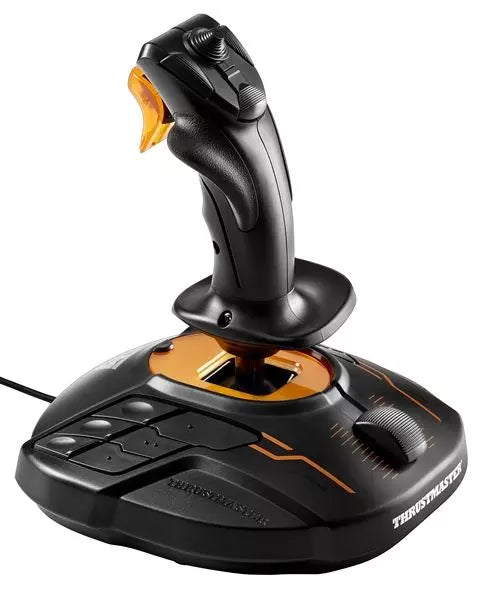
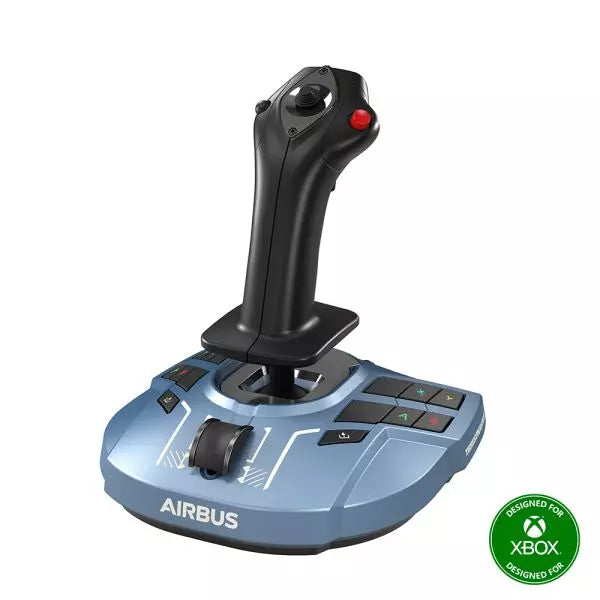
T16000M FCS er en alsidig flykontrolstick designet til piloter, der kræver større kontrol og fleksibilitet. Med den innovative H.E.A.R.T HallEffect AccuRate Technology™ leverer den en opløsning på 16.000 x 16.000 værdier for præcis nøjagtighed. Dens ambidextrøse design passer til både venstre- og højrehåndede brugere, med aftagelige komponenter for tilpasning. Med 16 aktionsknapper, en 8-vejs hat switch og twist-rudder funktionalitet, er T16000M FCS et ergonomisk vidunder, der sikrer, at hver input føles målrettet og kontrolleret.
Hvad adskiller T16000M FCS fra andre?
Ambidextrøst Design T16000M FCS tilbyder ægte alsidighed med et fuldt ambidextrøst design, der kan tilpasses til venstre- eller højrehåndet brug. Dette gør det til en af de få joysticks, der fungerer problemfrit til dual-stick opsætninger, hvilket giver dig fleksibilitet til både traditionel flysimulering og komplekse rumsim-konfigurationer.
H.E.A.R.T. Teknologi Dens HallEffect sensorer sikrer langtidsholdbar nøjagtighed, fri for slid- og tæringsproblemer, som plager potentiometer-baserede systemer. Med 16-bit opløsning giver det utrolig fin kontrol over pitch, roll og yaw, og adskiller sig fra mange af sine konkurrenter i den mid-range joystick kategori.
Omfattende Knapper Layout Med 16 knapper udstyret med taktile "braille"-style identifikatorer, en 8-vejs PoV hat switch og flere akser, leverer T16000M FCS en cockpit-lignende oplevelse. Dette rige inputkort gør det ideelt til komplekse kontrolskemaer, som dem, der findes i kampsimulatorer eller rumfarts-simulatorer.
T.A.R.G.E.T. Software Integration Ved at kombinere med Thrustmasters T.A.R.G.E.T. software, kan brugere skabe brugerdefinerede profiler og integrere joystick’en med andre Thrustmaster periferiudstyr. Denne funktion giver uovertruffen fleksibilitet til at finjustere dit hardware-setup, så det opfylder kravene til specifikke spil.
Fordele og Ulemper
Fordele
Ulemper
Ambidextrøst design passer til både venstre- og højrehåndede brugere.
Begrænset kompatibilitet med konsoller; kun til PC.
HallEffect sensorer sikrer holdbar og præcis ydeevne.
Byggematerialet føles mindre robust sammenlignet med dyrere modeller.
Overkommelig pris i forhold til de funktioner, der tilbydes.
Specifikationer
Specifikation
Værdi
Teknologi
H.E.A.R.T. HallEffect AccuRate Technology™
Akser
4 uafhængige akser, inklusive twist-rudder
Knappper
16 aktionsknapper + 8-vejs hat switch
Kompatibilitet
PC via USB, Windows 7/8/10
Tilpasningsbart Design
Ambidextrøst med 3 aftagelige komponenter
T16000M FCS Kompatibilitet
T16000M FCS er designet til brug på PC, og understøtter USB-forbindelse på Windows 7, 8 og 10. Det fungerer problemfrit med Thrustmasters T.A.R.G.E.T. software, som giver dig mulighed for at integrere det med andre Thrustmaster periferiudstyr, som f.eks. TWCS Throttle eller TFRP Rudder Pedals, for en samlet kontroloplevelse. Selvom joystick’en ikke er kompatibel med konsoller som Xbox eller PlayStation, gør dens fleksibilitet med PC-baserede spil det til et populært valg for dedikerede sim-piloter.
På spilleplatforme udmærker T16000M FCS sig i fly- og rumfartssimulatorer, med fuld kompatibilitet i titler som Microsoft Flight Simulator, Elite Dangerous og Star Citizen. Det mangler officiel understøttelse for konsoller eller mobile enheder, men dets integration med PC-spil forbedres af dens høje tilpasningsevne og programmérbare input-profiler, hvilket gør det til et foretrukket valg til komplekse simulationer.
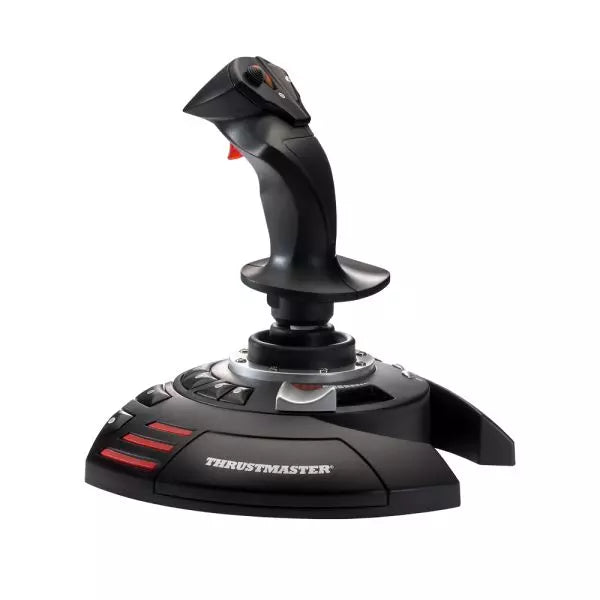
T.Flight Stick X er en alsidig og prisvenlig joystick, der er designet til PC-flysimulatorentusiaster. Med 12 programmerbare aktionsknapper og en twist-rudder funktion, tilpasser denne joystick sig problemfrit til alle flyscenarier – fra dogfights til kommerciel luftfart. Dens ergonomiske design sikrer komfort under lange sessioner, mens den integrerede gasregulering og låsbare twist-rudder giver præcis kontrol. Uanset om du navigerer i civil luftfart eller deltager i rummissionskampe, giver T.Flight Stick X en intuitiv oplevelse, der holder dig fuldt engageret i din mission.
Hvad adskiller T.Flight Stick X fra andre?
Programmerbare kontroller for fuld tilpasning T.Flight Stick X har 12 programmerbare knapper og 4 akser, hvilket giver brugerne mulighed for at konfigurere joystick’en efter deres præferencer. Dette niveau af kontrol sikrer kompatibilitet med forskellige flysimulator-spil og gør det muligt at foretage hurtige justeringer under gameplay, hvilket gør det velegnet både til begyndere og erfarne piloter.
Twist-rudder med låsemekanisme Twist-rudder funktionen tilføjer et ekstra kontrollag, især under skarpe manøvrer. For dem, der foretrækker traditionelle rudder-pedaler eller en mere stabil oplevelse, giver den låsbare håndtag mulighed for enkel, fast akselkontrol, hvilket giver fleksibilitet til forskellige spillemønstre.
Ergonomisk design for komfortabel brug Dens ergonomiske opbygning tilpasser sig lange spilsessioner ved at reducere håndtræthed. Den omhyggeligt konturerede greb og de intuitive knapplaceringer sikrer, at alle essentielle kontroller er lige ved hånden, hvilket forbedrer både komfort og funktionalitet.
Plug-and-Play enkelhed Designet til problemfri opsætning er T.Flight Stick X fuldt kompatibel med Plug-and-Play på PC, hvilket eliminerer behovet for komplicerede installationer. Den fungerer direkte med de fleste populære flysimulator-spil og er et fremragende valg for nybegyndere i genren.
Fordele og ulemper
Fordele
Ulemper
Programmerbare knapper giver omfattende tilpasningsmuligheder for gameplay.
Byggematerialerne føles mindre premium sammenlignet med konkurrenterne.
Låsbar twist-rudder tilbyder alsidige håndteringsmuligheder.
Ingen separat gasreguleringsenhed inkluderet.
Plug-and-Play sikrer nem opsætning for PC-brugere.
Specifikationer
Specifikation
Værdi
Aktionsknapper
12 programmerbare
Akser
4
Gasregulering
Integreret
Rudder
Twist med låsemekanisme
Kompatibilitet
PC (Plug-and-Play)
T.Flight Stick X Kompatibilitet
Kompatibilitet
Detaljer
Platforme
PC (Plug-and-Play)
Spil
Kompatibel med de fleste PC flysimulatorer
T.Flight Stick X er designet til PC og fungerer problemfrit med et bredt udvalg af flysimulatorspil, herunder populære titler som Microsoft Flight Simulator og X-Plane. Dens Plug-and-Play funktionalitet betyder, at der ikke er behov for drivere eller speciel software – tilslut og spil. Selvom den ikke understøtter konsoller, excellerer den i at levere simpel kompatibilitet til PC gaming.
Med dens integrerede gasregulering og programmerbare knapper, tilpasser T.Flight Stick X sig godt til både moderne og klassiske flysimulatorer. Selvom den ikke inkluderer ekstra hardware som rudder-pedaler, sikrer dens indbyggede twist-rudder og låsemekanisme alsidige kontrolmuligheder, hvilket gør det til et fremragende indgangspunkt for aspirerende flysim-piloter.
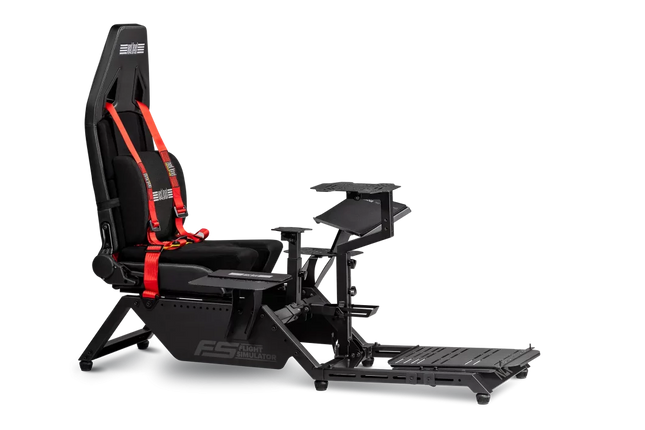
The Next Level Racing Flight Simulator offers an unparalleled platform for aviation enthusiasts, whether you're soaring through commercial airspace or locked in a dogfight. With its wide range of adjustments and official Boeing licensing, this cockpit combines versatility with precision engineering. Its ergonomic seat design ensures comfort for long-haul adventures, while its compatibility with major flight accessories transforms your simulation into a comprehensive aviation experience. This cockpit isn't just a setup; it's a gateway to a whole new flight perspective.
What sets the Next Level Racing Flight Simulator apart?
Unmatched Configurability This cockpit caters to all types of flight scenarios, from commercial to combat. The inclusion of multiple adaptor plates allows seamless integration of yokes, rudders, and joysticks, while the Hotas center pole and lateral adjustments provide personalized control setups that mirror real-world conditions.
Ergonomic Long-Haul Design High-density foam, PU leather, and suede combine for comfort and durability during extended sessions. The adjustable seat slider and double recliner ensure that pilots of all sizes can find their ideal position, making those Atlantic crossings feel less taxing.
Official Boeing Partnership The cockpit features exclusive Military and Commercial Boeing Editions, giving aviation aficionados a chance to experience the design ethos of one of the world's leading aircraft manufacturers. This attention to branding detail elevates the entire experience.
Robust Build Quality Tested by institutions like NASA and the Australian Air Force Cadets, this cockpit is built to endure the demands of both casual users and professional training environments, offering reliability that others struggle to match.
Pros and Cons
Pros
Cons
Wide configurability for multiple flight styles.
Heavy and challenging to move.
Compatible with major flight accessory brands.
Price point may deter casual users.
Comfortable for long-haul flights and extended use.
Specifications
Specification
Value
Supported Height
120 - 210 cm (4ft – 6ft 9 inches)
Supported Max Weight
150 kg (330 lbs)
Dimensions (Product)
153 cm x 99 cm x 122 cm (LxWxH)
Dimensions (Box)
100 cm x 54 cm x 48 cm (LxWxH)
Weight (Product)
49.5 kg (109.1 lbs)
Weight (Boxed)
56.3 kg (124.1 lbs)
Package Contents
Frame, seat, harness, lumbar cushion, Buttkicker adaptor, sliders, assembly hardware.
Next Level Racing Flight Simulator Compatibility
The Next Level Racing Flight Simulator boasts broad compatibility with flight peripherals, supporting major brands like Thrustmaster, Logitech, and Saitek. Its adaptable mounting solutions allow users to integrate a variety of yokes, rudders, throttles, and joysticks seamlessly. The cockpit’s thoughtful design also accommodates less common setups like Virtual Fly and Crosswind accessories, though its bulkier design may limit compatibility with smaller workspaces.
PC gaming enthusiasts will appreciate its straightforward connection setup, making it ideal for popular titles like Microsoft Flight Simulator and X-Plane. However, console users should verify their hardware compatibility as this cockpit focuses primarily on PC ecosystems. Its motion platform compatibility is another plus for those looking to expand into more tactile simulation experiences.
The Single Monitor Stand is a sleek and sturdy solution for any flight simulation setup, keeping your monitor free from vibration while delivering the flexibility you need. With its easy-to-adjust VESA mount that supports both 75x75 and 100x100mm patterns, it’s perfect for ultrawide displays like the 49" Samsung. The height of this stand reaches up to 122 cm, offering excellent visibility while staying rock-solid. If you want a dedicated stand that keeps your screen stable and separate from your rig’s motion, this is a serious contender.
What sets the Single Monitor Stand apart?
Vibration-free display experience Unlike many integrated monitor mounts, this stand keeps your screen completely separate from your racing rig. No matter how much force your direct drive wheel generates, your monitor stays perfectly still, offering a smooth visual experience without the distraction of movement.
Wide compatibility with different screens The VESA mount supports both 75x75 and 100x100mm patterns, making it compatible with a broad range of monitors. Whether you’re running a smaller screen or a massive ultrawide, this stand can handle it, making it a versatile addition to any setup.
Solid, adjustable frame The monitor stand’s adjustable height, reaching up to 122 cm, allows for easy customization of your display position. The sturdy frame, reinforced with rubber feet, provides both stability and flexibility, letting you set it up exactly where you want without worrying about it tipping or wobbling.
Easy to assemble This stand doesn’t require any complicated tools or hours of assembly. With the included Allen keys and screws, you can have it up and running quickly, giving you more time to focus on what matters—racing. Plus, the straightforward design is clean and minimal, fitting seamlessly into any sim racing space.
Pros and Cons
Pros
Cons
Keeps monitor completely vibration-free from the rig.
Height adjustment may not suit all setups.
Compatible with 75x75 and 100x100 VESA patterns.
Limited to single monitor configurations.
Quick and easy assembly process.
Not ideal for multi-monitor setups.
Stable design with rubber feet for extra grip.
Specifications
Specification
Value
Material
Steel frame with rubber feet
Height
Up to 122 cm
Width between upright profiles
Up to 795 mm
VESA Compatibility
75x75 mm, 100x100 mm
Included Components
Single Monitor Stand, M4 Screws, Spacers, Rubber Feet
Single Monitor Stand Compatibility
The Single Monitor Stand is built to support a wide range of monitor sizes, thanks to its compatibility with both 75x75 mm and 100x100 mm VESA patterns. This means it can easily accommodate screens from smaller monitors to large ultrawides, including popular models like the Samsung 49" curved display. The stand is stable enough for heavier screens, though larger screens might need additional care in alignment to ensure perfect balance.
While the stand is perfect for a single screen setup, it’s not designed to handle multi-monitor configurations. Its frame is optimized for standalone screens, keeping your display vibration-free, but for those looking to expand to triples, a different solution might be necessary. This product offers great flexibility in positioning but isn't adjustable horizontally like some multi-arm stands.
The monitor stand doesn’t directly connect to gaming platforms or systems, but it will work seamlessly with any PC or console that supports HDMI or DisplayPort connections for your monitor. As long as your gaming rig supports your chosen monitor, this stand will keep it rock-solid in your racing setup.
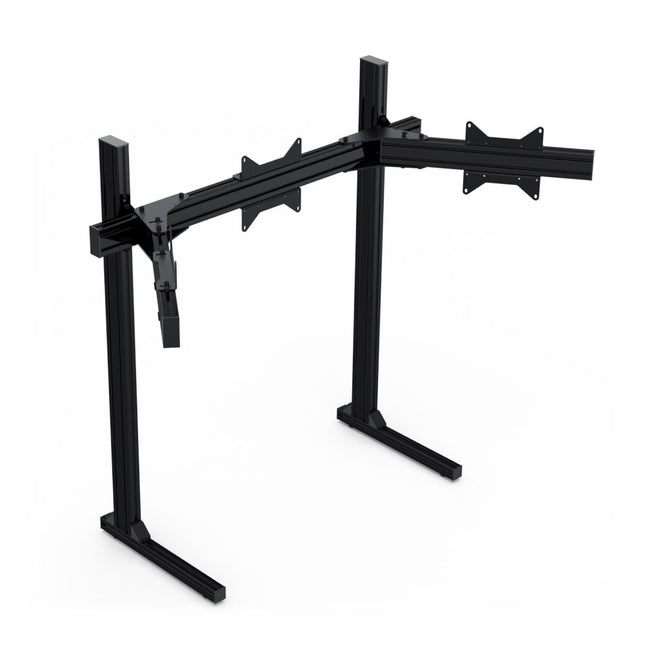
The Triple Monitor Stand 75-100 is the ideal solution for sim racers using screens up to 27 inches, or lightweight 32-inch monitors. This freestanding design keeps your setup stable, even during those intense racing moments. With its VESA compatibility for 75x75 and 100x100, and a height of up to 124 cm, it allows flexible screen positioning. The stand is simple to adjust, and its versatile connector plates make aligning your monitors a breeze—no additional tools required!
What sets the Triple Monitor Stand 75-100 apart?
Perfect for Smaller Setups Designed with screens up to 27 inches in mind, this stand offers an excellent solution for compact racing rigs. If you're working with limited space but want that seamless triple-screen setup, this stand is tailored for you. It supports lighter 32-inch monitors, but its sweet spot is really in the 27-inch range.
Adjustability Without Tools Many stands require extra tools to get the alignment just right. Not this one. Thanks to its easy-to-use VESA plates, you can adjust the angle and positioning of your monitors without needing any extra tools. For sim racers who are picky about their screen angles, this is a big win.
Freestanding for Vibration-Free Gaming By keeping the stand separate from your sim rig, you eliminate the risk of vibration shaking your monitors. This is especially crucial if you’re running powerful force feedback wheels. Your display stays locked in place, no matter how much you're cranking on the steering wheel.
Easy Monitor Alignment Kit Available For those who want their monitors perfectly leveled and aligned, there’s an optional Easy Monitor Alignment Kit. This makes sure everything lines up flawlessly, offering an additional layer of precision for those who demand pixel-perfect monitor positioning.
Pros and Cons
Pros
Cons
Ideal for 27-inch and light 32-inch monitors.
Not suitable for monitors larger than 32 inches.
No tools needed for monitor adjustment.
Alignment might be tricky without the additional kit.
Freestanding design avoids vibration from rig.
Can feel slightly less stable with very light monitors.
Compatible with VESA 75x75 and 100x100 patterns.
May require extra parts for perfect screen alignment.
Specifications
Specification
Value
Product Name
Triple Monitor Stand 75-100
Max Monitor Size
Up to 27 inches, light 32-inch
VESA Compatibility
75x75mm, 100x100mm
Height
124 cm
Width (for 27-inch setup)
130-140 cm
Vertical Uprights Distance
Up to 100 cm
Included Accessories
All mounting materials
Tools Required
Allen key 6mm, 5mm, screwdriver, spirit level
Triple Monitor Stand 75-100 Compatibility
The Triple Monitor Stand 75-100 is compatible with monitors that support VESA patterns of 75x75 and 100x100, making it highly flexible for most 27-inch and light 32-inch monitors. The stand offers a 124 cm height and can fit over rigs that are up to 100 cm wide, ensuring compatibility with most sim racing setups. However, monitors larger than 32 inches might not work as well with this stand due to its lightweight build.
For those who want additional flexibility, the optional Easy Monitor Alignment Kit helps fine-tune the screen alignment even further. Without this kit, aligning large or ultra-light monitors may be challenging. With these features, the stand is well-suited for casual sim racers looking for a solid multi-screen setup that doesn’t overpower their rig.
The Triple Monitor Stand 75-100 doesn’t directly connect to gaming platforms or consoles, but it's compatible with PC and console setups that use multi-screen displays. It’s great for triple-screen racing simulators like iRacing or Assetto Corsa, providing racers with more flexibility in screen positioning for a wider field of view. Be sure your gaming platform can support multiple screens before purchasing.
The Triple Monitor Stand 100-200 is designed to give your sim racing setup the stability it deserves. This freestanding mount is built to eliminate any screen vibration caused by your wheel, offering rock-solid support for monitors up to 42 inches. With its sturdy 80x40 aluminum profile construction, it’s perfect for those running larger displays. Compatible with VESA patterns of 200x200, 200x100, and 100x100, this stand provides both durability and flexibility for racers who want to dial in their viewing experience.
What sets the Triple Monitor Stand 100-200 apart?
Freestanding Design This stand isn’t attached to your rig, so there’s zero risk of vibrations from your steering wheel reaching your monitors. It stays grounded, even during intense sessions, giving you that extra layer of stability that’s hard to find with other setups.
Handles Larger Monitors Unlike many other triple monitor stands, this one supports screens up to 42 inches. That’s a huge advantage for those wanting a more expansive field of view without worrying about the weight or size of their displays.
Sturdy Aluminum Construction Built from 80x40 aluminum profiles, this stand has a robust and industrial feel that’s made to last. Its weight and material ensure that it can handle heavier screens without sagging or flexing over time.
Flexible VESA Compatibility Supporting VESA patterns of 200x200, 200x100, and 100x100, this stand fits a wide range of monitors. The downside? It doesn’t support 75x75 by default, but you can fix that with the Easy Monitor Alignment Kit.
Pros and Cons
Pros
Cons
Freestanding design eliminates screen vibration.
Does not support VESA 75x75 without an adapter.
Supports monitors up to 42 inches in size.
Larger monitors might be difficult to align perfectly.
Solid aluminum construction for durability.
Heavier setup compared to smaller stands.
VESA compatibility up to 200x200.
Not ideal for 27-inch monitors or smaller.
Specifications
Specification
Value
Product Name
Triple Monitor Stand 100-200
Max Monitor Size
Up to 42 inches
VESA Compatibility
200x200mm, 200x100mm, 100x100mm
Material
80x40 aluminum profiles
Included Accessories
All mounting materials
Tools Required
Allen key 6mm, 5mm, screwdriver, spirit level
Triple Monitor Stand 100-200 Compatibility
The Triple Monitor Stand 100-200 is compatible with monitors supporting VESA patterns of 200x200, 200x100, and 100x100, covering a wide range of medium to large screens. It’s perfect for monitors up to 42 inches, but if you’re running smaller screens (under 27 inches), it might not be the best fit. Importantly, 75x75 VESA isn’t supported out of the box, but you can use the Easy Monitor Alignment Kit for smaller monitors if needed.
This stand works with most modern monitors, especially those designed for larger setups, but it’s worth noting that if you’re planning on using 27-inch or smaller displays, you should probably opt for a smaller version of the stand. Screens that support M6 or M4 VESA mounting will attach smoothly, and the sturdy aluminum frame provides excellent support for heavier displays, ensuring they stay in place during use.
The Triple Monitor Stand 100-200 doesn’t directly interface with gaming platforms, but it sets you up perfectly for PC and console-based racing simulators. It’s especially suited for multi-screen racing setups with games like iRacing and Assetto Corsa, and the larger screens it supports will give you a more immersive experience. Just make sure your PC or console can handle the monitor configuration you're aiming for!
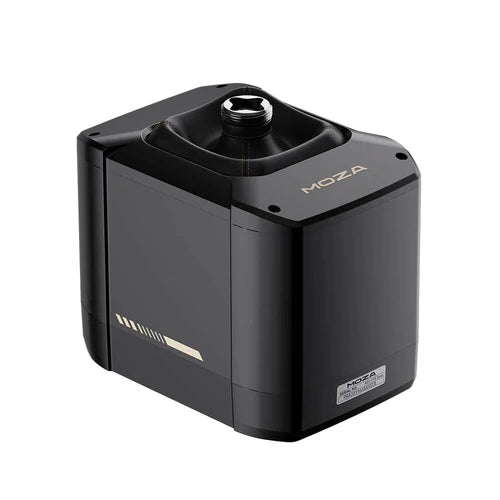
Moza AB9 FFB Base er et ingeniørmesterværk for flight simulation-entusiaster, der kræver præcision og kraft i hænderne. Med sine dobbelt servo-motorer, der leverer et bemærkelsesværdigt spidst moment på 12Nm, fanger denne base turbulensens, startens og alle manøvrernes subtiliteter. Den er bygget af luftfartsaluminiumlegering og lover holdbarhed, mens dens fanløse design minimerer distraktioner. Uanset om du mestrer barrel rolls eller jævne nedstigninger, giver denne flight stick base en taktil og visuelt elegant oplevelse, der omdefinerer kontrol.
Hvad adskiller Moza AB9 FFB Base fra andre?
Uforligneligt Moment og Kontrol De dobbelt servo-motorer leverer et spidst moment på 12Nm, hvilket giver dig uovertruffen feedback til at efterligne realistiske flydynamik. Uanset om du navigerer i turbulens eller udfører komplekse manøvrer, sikrer følsomheden, at du kan mærke hver detalje, lige ned til de mindste kræfter, der virker på dit fly.
Åben Økosystem for Alsidig Brug Med støtte for tredjeparts flight sticks og flere installationsmuligheder integreres Moza AB9 problemfrit i en række opsætninger. Dens tilpasningsevne henvender sig til piloter, der værdsætter valg og fleksibilitet i deres udstyr, hvilket giver mulighed for desktop-klæbning eller dedikeret rigmontering.
Minimalistisk, Men Holdbart Design Bygget med luftfartsaluminiumlegering og afsluttet med bilkvalitetsmaling, ser denne enhed ikke kun slank ud, men kan modstå tung brug. Det forseglede, fanløse design sikrer en lang levetid ved at beskytte de interne komponenter mod støv og slid.
Præcis Justering og Feedback Den højopløselige encoderchip og MOZA Control Loading System giver detaljerede justeringer og præcis replikation af flyveforhold. Denne præcision gør det muligt at skræddersy din flyoplevelse til at matche ethvert scenarie eller personlig præference.
Fordele og Ulemper
Fordele
Ulemper
Dobbelt servo-motorer leverer et exceptionelt moment for nuanceret feedback.
Tungere end nogle sammenlignelige baser med 12Nm moment.
Kompatibel med tredjeparts flight sticks og rigs.
Premium materialer kan øge prisen.
Fanløs design reducerer driftsstøjen markant.
Ingen trådløse tilslutningsmuligheder.
Specifikationer
Specifikation
Værdi
Spidst Moment
12Nm
Konstant Moment
9Nm
Byggemateriale
Luftfartsaluminiumlegering
Encoder
Højopløselig Encoderchip
Kompatibilitet
Tredjeparts flight sticks, forskellige rigs
Design
Fanløs, forseglede struktur
Moza AB9 Base Kompatibilitet
Moza AB9 er kompatibel med et bredt udvalg af tredjeparts flight sticks og tilbyder problemfri integration i forskellige opsætninger. Dens åbne økosystemdesign understøtter klæbning til desktops eller montering på rigs, hvilket gør den tilpasningsdygtig til forskellige miljøer. Derudover fungerer det høje moment-system perfekt med førende flysimulatorplatforme som MSFS2020, X-Plane 12 og DCS, hvilket sikrer, at simpiloter kan bruge deres foretrukne værktøjer uden restriktioner.
Denne enhed skiller sig ud i sin kompatibilitet med gamingplatforme og software. Designet til PC-brug, præsterer den fremragende i simulatorer som IL-2 Sturmovik og War Thunder. Dog er den ikke nativt kompatibel med konsoller, hvilket kan kræve ekstra perifere enheder eller softwarejusteringer. PC-brugere vil nyde problemfri integration og ydeevne, der er skræddersyet til krævende simulationer.
The Virtual Fly TQ6+ is a robust throttle quadrant designed for sim pilots who value smooth control and precise inputs. With its magnetic hall effect sensors ensuring accurate, frictionless operation and adjustable lever resistance, this all-metal unit delivers a tactile experience like no other. Weighing in at 3 kilos, it feels substantial and reliable in your setup. Whether you're fine-tuning power or cutting engines, the TQ6+ offers nuanced control for multi-engine prop aircraft enthusiasts.
What sets the Virtual Fly TQ6+ apart?
Robust All-Metal Construction Unlike many plastic competitors, the TQ6+ is built entirely from metal, offering durability and a weighty, premium feel. This makes it not only reliable for long-term use but also gives it a steady presence on your desk or rig, even during intense sessions.
Magnetic Hall Effect Sensors The use of hall effect sensors ensures frictionless and wear-free operation, providing consistent accuracy over time. These sensors are praised by users for their reliability and ability to maintain smooth operation without degradation.
Adjustable Lever Resistance Customizing the resistance of each throttle lever lets you match the controls to your flying preferences. Whether you prefer a light touch or a firm resistance, this feature allows for a tailored experience.
Plug-and-Play Convenience Compatible with major simulators like MSFS, X-Plane, and P3D, the TQ6+ is easy to set up. Recognized automatically by most software, it saves time while still offering advanced customization options for those who want more control.
Pros and Cons
Pros
Cons
Durable all-metal construction ensures long-term reliability.
Colored lever buttons are not interchangeable.
Magnetic sensors provide smooth and accurate operation.
Higher price point than some competitors.
Adjustable lever resistance allows for personalized control feel.
Specifications
Specification
Value
Material
All-metal construction
Weight
3 kg
Sensors
Magnetic hall effect sensors
Adjustable Resistance
Yes
Compatibility
MSFS, X-Plane, P3D
Virtual Fly TQ6+ Compatibility
The Virtual Fly TQ6+ is designed to integrate seamlessly with major flight simulators. It works perfectly with Microsoft Flight Simulator (FSX and MSFS), X-Plane, and Prepar3D, ensuring broad compatibility for sim enthusiasts. Its plug-and-play nature means it is recognized automatically by most simulators, while also supporting advanced customization through tools like FSUIPC.
In terms of hardware, the TQ6+ supports various flight setups, thanks to its solid build and standard USB connection. However, it’s primarily geared for PC use and does not offer native console compatibility. PC pilots will appreciate its straightforward connection and the ability to configure settings to their exact preferences within their simulator's controls menu.
The Virtual Fly Yoko+ is a meticulously crafted flight yoke designed for pilots who demand superior control and durability. Featuring magnetic Hall sensors for wear-free accuracy and a robust 90% metal construction, this yoke excels in precision and longevity. With a 14.4 cm pitch travel and 180° range of motion, it provides an expansive, fluid control experience. The addition of a POV hat switch ensures seamless camera management, making it a standout choice for serious sim pilots.
What sets the Virtual Fly Yoko+ apart?
Exceptional Build Quality The Yoko+ is constructed with 90% metal, giving it a rugged yet refined build that stands up to years of intense use. Its weight and solid design provide a dependable, substantial feel, elevating it beyond other yokes that rely heavily on plastic components.
Magnetic Hall Sensors Unlike potentiometers found in some yokes, the Yoko+ employs magnetic sensors, offering wear-free operation and consistent input accuracy. These sensors ensure long-lasting performance, making it a reliable choice for extended simulation sessions.
Wide Range of Motion With 14.4 cm of pitch travel and a 180° rotational range, the Yoko+ provides nuanced control for even the most demanding flight maneuvers. This extensive movement range mimics real-world yoke behavior, giving pilots an authentic experience.
POV Hat Switch The addition of a hat switch enables precise camera control, a feature absent in its predecessor. This improvement streamlines cockpit navigation, ensuring you maintain focus on critical flight controls without interruption.
Pros and Cons
Pros
Cons
Solid metal construction ensures durability and stability.
Does not include throttle control functionality.
Magnetic sensors provide accurate and wear-free operation.
Higher price point compared to other yokes.
Wide pitch and roll range for realistic input control.
POV hat switch simplifies cockpit camera management.
Specifications
Specification
Value
Material
90% metal construction
Pitch Travel
14.4 cm
Roll Range
180°
Sensors
Magnetic Hall sensors
Connectivity
USB
Virtual Fly Yoko+ Compatibility
The Virtual Fly Yoko+ is compatible with a wide range of flight simulators, including Microsoft Flight Simulator (FSX and MSFS), Prepar3D, and X-Plane. Its plug-and-play USB connection ensures easy integration, while tools like FSUIPC allow for advanced customization. However, it is not compatible with console platforms, focusing exclusively on PC setups.
In terms of hardware, the Yoko+ connects seamlessly to standard flight sim rigs and complements other Virtual Fly products. The metal build and smooth movement make it suitable for use with professional and enthusiast-grade setups. It is best paired with other high-quality peripherals for a cohesive experience.
On the platform side, the Yoko+ excels on PC, working perfectly with major simulation software. However, its USB-only connection means it cannot natively support gaming consoles. For PC users, this yoke delivers an exceptional flying experience across supported titles.
The Virtual Fly TQ3+ throttle quadrant is an expertly engineered piece of equipment designed to elevate your simulation experience. Featuring adjustable resistance and advanced Hall sensors, this unit offers an unparalleled tactile feel and remarkable accuracy. Its all-metal construction not only ensures durability but also delivers a robust and satisfying weight under your hand. This throttle quadrant is tailored for single-engine aircraft, offering dedicated levers for throttle, propeller, and mixture control, making it an essential tool for serious flight sim enthusiasts.
What sets the Virtual Fly TQ3+ apart?
Durable Metal Construction The TQ3+ is crafted from sustainable metal, ensuring it remains sturdy and dependable over years of use. Its solid build distinguishes it from competitors that often rely on lightweight plastic, giving it a reassuring heft that enhances the overall simulation experience.
Adjustable Resistance The throttle levers allow for fine-tuning resistance, letting users tailor the feel to their exact preferences. This customization feature ensures that every movement feels natural and intentional, especially useful for prolonged flight sessions.
Advanced Hall Sensors Equipped with magnetic Hall sensors, the TQ3+ delivers smooth and wear-free performance. These sensors are more accurate and durable than traditional potentiometers, ensuring consistent input detection even after extended use.
Dedicated Reverse and Feather Positions The throttle levers include physical detents for reverse, feather, and idle cutoff, adding a tactile element that simulates real-world aviation controls. This attention to detail enhances the operational fidelity of single-engine aircraft simulations.
Pros and Cons
Pros
Cons
Durable metal build ensures longevity and stability.
Only supports single-engine aircraft setups.
Adjustable resistance provides personalized control feel.
Higher cost compared to entry-level throttle quadrants.
Hall sensors offer wear-free and precise operation.
Detents for reverse and feather add tactile accuracy.
Specifications
Specification
Value
Material
Sustainable metal construction
Sensors
Magnetic Hall sensors
Adjustable Resistance
Yes
Throttle Configuration
Throttle, Propeller, Mixture
Engine Compatibility
Single-engine only
Connectivity
USB
Virtual Fly TQ3+ Compatibility
The Virtual Fly TQ3+ is compatible with popular flight simulation software, including Microsoft Flight Simulator (FSX and MSFS), Prepar3D, and X-Plane. The throttle is recognized natively by most simulators, allowing for seamless integration. Users can further customize settings using tools like FSUIPC for additional control over the input configuration. However, it is designed for single-engine setups, limiting its scope for multi-engine aircraft enthusiasts.
This throttle quadrant connects via USB, making it compatible with a wide range of PC-based simulation systems. It works excellently as part of a complete flight rig, particularly when paired with other Virtual Fly components. Console compatibility is not supported, as the TQ3+ is focused on delivering exceptional functionality for PC users and simulators.
On the platform side, the TQ3+ excels on PC, where it integrates flawlessly with simulation software. It is not compatible with gaming consoles or casual flight games, ensuring its appeal remains focused on dedicated flight simulation enthusiasts.
The Virtual Fly V3RNIO TPM brings classic throttle control to your flight simulation setup with incredible accuracy and tactile charm. This Vernier-style throttle quadrant is perfect for single-engine piston aircraft, offering levers that replicate the feel and functionality of real aircraft controls. Made from durable metal and equipped with Hall effect sensors, it combines longevity with precision. With adjustable resistance and fine-tuning dials, every movement feels deliberate, making it a remarkable addition to any sim enthusiast's setup.
What sets the Virtual Fly V3RNIO TPM apart?
Authentic Vernier Design The Vernier-style control system replicates the distinct push-pull and rotary adjustments found in real single-engine aircraft. This design makes it uniquely suitable for fine-tuning throttle, propeller, and mixture settings with unmatched accuracy.
Hall Effect Sensors Unlike conventional potentiometers, the magnetic Hall sensors used in the V3RNIO TPM are wear-free and provide incredibly precise inputs. This ensures consistent performance, even after extensive use, making it a dependable choice for long-term sim enthusiasts.
Durable Metal Construction Built entirely from metal, the V3RNIO TPM is rugged and built to last. Its weight and solidity not only make it durable but also contribute to a grounded, realistic feel during use.
Adjustable Resistance The throttle lever features adjustable resistance, allowing users to customize the feel to their preference. Whether you prefer a light touch or a firmer grip, this feature lets you fine-tune the control experience to match your style.
Pros and Cons
Pros
Cons
Durable metal build ensures long-term reliability.
Limited to single-engine piston aircraft setups.
Hall sensors provide wear-free and accurate operation.
Higher price point compared to simpler alternatives.
Authentic Vernier-style controls for precise adjustments.
Adjustable resistance allows for personalized control feel.
Specifications
Specification
Value
Material
Durable metal construction
Sensors
Magnetic Hall effect sensors
Control Type
Throttle, Propeller, Mixture (Vernier-style)
Adjustable Resistance
Yes
Engine Compatibility
Single-engine piston aircraft
Connectivity
USB
Virtual Fly V3RNIO TPM Compatibility
The Virtual Fly V3RNIO TPM is compatible with major flight simulation platforms, including Microsoft Flight Simulator (FSX and MSFS2020), Prepar3D, and X-Plane. With USB connectivity, it is easy to integrate into most PC-based simulation systems. The drivers ensure plug-and-play functionality, while tools like FSUIPC allow for additional customization to suit your preferences. This unit is tailored specifically for single-engine piston aircraft, making it less versatile for other types of setups.
This throttle quadrant is optimized for PC-based simulation, ensuring excellent compatibility with a wide range of hardware. It does not support console platforms, emphasizing its focus on delivering precise control for dedicated flight simulation environments. Users seeking a unit for casual or multi-platform gaming should consider alternatives better suited to those needs.
The Virtual Fly Switcho Radios is a feature-packed radiostack module designed to elevate your simulation experience with incredible control and versatility. With a vibrant touch screen display offering detailed indicators for navigation, autopilot, and annunciators, it seamlessly integrates into your cockpit. The metal construction and robust rotaries feel rock solid, while its Plug&Fly setup minimizes hassle. Whether you're flying VFR or IFR in piston or turboprop aircraft, this radiostack ensures every interaction feels deliberate and satisfying.
What sets the Virtual Fly Switcho Radios apart?
Touchscreen with Extensive Indicators The 1024x600 resolution touchscreen offers an intuitive interface with draggable screens. It displays a wealth of information, including navigation frequencies, autopilot modes, trim indicators, and annunciator panels with prioritization for critical alarms.
Designed for Both VFR and IFR Flights Whether you're navigating a short hop or managing long-range flights, the Switcho Radios is tailored for both. Its versatility extends to handling single and twin-engine aircraft, ensuring compatibility across a broad range of flying scenarios.
Rugged Build with Anti-Slip Features The full-metal construction ensures durability, while anti-slip and anti-tip systems keep the module stable, whether mounted on a desktop or integrated into a cockpit panel.
Highly Detailed Autopilot Controls With switches and rotaries for HDG, NAV, APR, and more, the autopilot section delivers precise control. The tactile feedback from encoders adds a layer of engagement, making it a pilot's dream for fine-tuned adjustments.
Pros and Cons
Pros
Cons
Comprehensive touch screen with draggable interface.
Higher price point compared to simpler options.
Durable full-metal construction with anti-slip features.
Requires USB connection, no wireless option.
Versatile for VFR, IFR, and various aircraft types.
Highly tactile rotaries and switches for precise control.
Specifications
Specification
Value
Material
Full-metal construction
Screen Resolution
1024x600
Connectivity
USB (cable included)
System Requirements
MSFS, P3D, XP
Aircraft Types
Single and Twin-Engine Piston and Turboprop
Mounting Options
Desktop or cockpit-panel integration
Touch Screen Features
Draggable screens, tactile audio panel
Virtual Fly Switcho Radios Compatibility
The Virtual Fly Switcho Radios is fully compatible with MSFS (Microsoft Flight Simulator), P3D (Prepar3D), and X-Plane, ensuring seamless operation across these popular platforms. Using USB connectivity and the included VFHub software, it offers Plug&Fly functionality, eliminating the need for manual configuration. Its design caters specifically to desktop and integrated cockpit setups, making it ideal for both casual flyers and serious simmers alike.
This radiostack is best suited for PC-based simulation systems and does not support console platforms. It pairs well with other Virtual Fly hardware and many third-party peripherals, thanks to its standardized USB interface. Users focused on multi-platform or console gaming may need to look elsewhere for a broader compatibility range.