Out of stock,
Pre-Orders Available. Shipped in 2-2.5 weeks from now.
Honeycomb Bravo Throttle Quadrant Lite distills the core experience of the original Bravo into a tighter, more focused package. The four interchangeable levers with adjustable tension glide with reassuring mechanical weight, while the integrated low-profile, high-resolution trim wheel lets you fine-tune pitch with fingertip control. From the firm click of the landing gear lever with LED indication to the satisfying pull of the parking brake, this unit delivers dependable input for GA and twin-engine setups without overwhelming newer cockpit builders.
What Sets the Honeycomb Bravo Throttle Quadrant Lite apart?
Streamlined Without Feeling Stripped Unlike many entry-focused throttle quadrants that sacrifice flexibility, the Bravo Lite keeps the modular DNA alive. Users often highlight how it maintains interchangeable levers and flap detent customization while shedding some of the complexity of the full Bravo. The result is a compact unit that still supports single-engine and twin-engine layouts, making it appealing for pilots upgrading from basic plastic throttles.
Adjustable Tension with Mechanical Feedback The lever resistance can be tuned to personal taste, which makes a noticeable difference during climb power changes and short final adjustments. Many sim pilots mention that the movement feels smooth and controlled rather than loose or springy. Compared to lighter quadrants, the Bravo Lite offers a more planted sensation during throttle transitions, especially when mounted securely with the included dual mounting solution.
Integrated Trim and Ground Controls The built-in trim wheel and parking brake eliminate the need for separate peripherals. The trim wheel’s fine resolution is frequently praised for helping stabilize approaches without constant micro-corrections via keyboard or yoke buttons. Add the landing gear lever with LED status indicator, and you get clear visual confirmation during gear cycles—small detail, big confidence boost during busy patterns.
Focused MSFS Optimization Designed with Microsoft Flight Simulator in mind, the Bravo Lite benefits from dedicated driver support and downloadable profiles. Users appreciate how quickly it maps in MSFS 2020 and 2024 compared to some generic USB quadrants. At the same time, it remains compatible with X-Plane and Prepar3D, giving it broader appeal than many simulator-specific throttle units in this price bracket.
Pros and Cons
Pros
Cons
Interchangeable levers support multiple aircraft types.
Fewer controls than full Bravo version.
Adjustable tension improves throttle feel.
PC and Mac only, no console support.
Integrated trim wheel adds fine pitch control.
LED gear indicator provides clear status feedback.
Specifications
Specification
Value
Product Name
Honeycomb Bravo Throttle Quadrant Lite
Dimensions (L x H x W)
40 x 13 x 27 cm (15.75 x 5.19 x 10.63 inches)
Throttle Levers
Four interchangeable levers with adjustable tension
Flap System
Swappable flap detent inlays included
Trim Control
Integrated low-profile, high-resolution trim wheel
Landing Gear Lever
With LED status indicator
Parking Brake
Integrated lever
Connectivity
USB-C to USB-A (cable included)
System Compatibility
PC and Mac
Software Compatibility
Microsoft Flight Simulator 2020/2024, FSX, Prepar3D V3-V5, X-Plane 11/12
Included in the Box
Throttle Quadrant Lite, Flap detent inlays, Interchangeable levers (Commercial & GA), USB-C cable, Dual mounting solution, Quick Start Guide
Honeycomb Bravo Throttle Quadrant Lite Compatibility
Category
Compatibility
Operating Systems
Microsoft Windows (64-bit), macOS
Connection
USB-C to USB-A (standard USB port required)
Supported Simulators
MSFS 2020/2024, FSX, Prepar3D V3–V5, X-Plane 11/12
The Bravo Lite connects through standard USB, making it easy to integrate with yokes, sticks, and rudder pedals from various brands. It pairs especially well with Honeycomb Alpha yokes and other modular cockpit hardware thanks to the dual mounting solution. It is designed strictly for PC and Mac systems and does not function independently without a connected computer.
On the simulator side, it is optimized for Microsoft Flight Simulator 2020 and 2024, with dedicated LED drivers and downloadable aircraft profiles. It also works with X-Plane 11 and 12, FSX, and Prepar3D V3–V5 through standard USB HID recognition. It is not compatible with Xbox consoles, as it relies on PC-based driver and USB architecture rather than console-certified firmware.
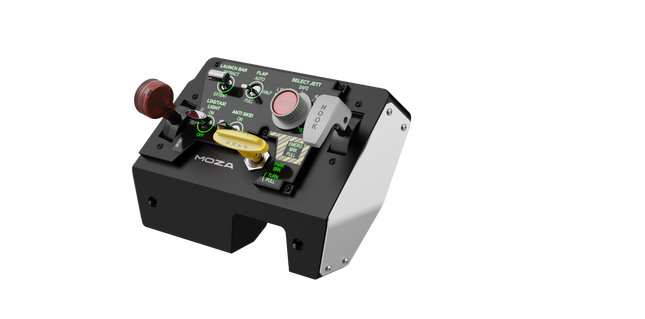
Moza MTLP Take-off Landing Panel brings the essence of fighter jet operations to the home cockpit with a rugged, tactile control system built for serious sim pilots. Designed after the F/A-18 landing panel, it offers an intuitive switch layout that allows for quick, instinctive inputs without relying on visual confirmation. The authentic parking brake mechanism delivers a solid, mechanical rebound that feels straight out of a real fighter jet. With 25 programmable switch signals and Hall effect sensors for accuracy, this panel bridges the gap between virtual and hands-on cockpit interaction.
What Sets the Moza MTLP Take-off Landing Panel apart?
Designed for Hands-On Control Modeled after the F/A-18 landing panel, this setup prioritizes instinctive operation. The switch layout allows pilots to manage critical aircraft functions by feel, reducing the need to glance away from the screen. This kind of tactile reinforcement is essential for fast-paced environments like combat flights and carrier landings.
Hall Sensor Precision for Key Functions Unlike standard mechanical switches, the MTLP integrates Hall effect sensors into key inputs like the landing gear and tailhook levers. These sensors provide long-term reliability and consistent input accuracy, eliminating wear-related drift or degradation over time.
Built to Handle Repeated Use The aluminum alloy construction used in the brake lever, tailhook lever, and landing gear ensures durability. These components can withstand repeated, forceful engagement, making the panel a long-term investment for flight enthusiasts who demand mechanical robustness.
Seamless Integration with Moza's Ecosystem The MTLP is designed to work effortlessly with the Moza MTP Throttle Panel, forming a cohesive fighter jet control setup. Through Moza Cockpit software, users can synchronize telemetry-driven lighting effects and customize their button configurations to match their flying style.
Pros and Cons
Pros
Cons
Modeled after the F/A-18 landing panel
Desk clamp sold separately
Hall effect sensors for accuracy and longevity
Limited to PC compatibility
25 programmable switch signals for extensive control
Compatible with Moza’s ecosystem for full fighter setup
Specifications
Specification
Value
Dimensions
196.5 × 134.7 × 149 mm
Housing Material
Composite materials
Brake Lever Material
Aluminum alloy
Weight
680g
Switch Signals
25
Telemetry Lighting
Yes (no additional plugins required)
Supported Platform
PC
Desk Clamp
Optional accessory
Included Accessories
Data cable, user manual
Moza MTLP Take-off Landing Panel Compatibility
Compatible With
Not Compatible With
Moza MTP Throttle Panel
Third-party throttle panels
Moza Cockpit software for customization
Console platforms
PC-based flight simulators
MacOS
Designed for PC-based simulators, the MTLP integrates seamlessly with Moza's MTP Throttle Panel to create a fighter jet-style control suite. The panel is configured through Moza Cockpit software, allowing for extensive customization, including telemetry-linked lighting effects. However, it does not support third-party throttle panels, meaning full functionality is best achieved within the Moza ecosystem.
PC-only compatibility ensures support for major flight simulators, but MacOS and consoles are not supported. Flight sim enthusiasts using Microsoft Flight Simulator 2020, Microsoft Flight Simulator 2024, and X-Plane 12 will find the panel natively recognized, offering direct plug-and-play functionality through USB. However, users looking for Xbox or PlayStation support will need to consider alternative hardware.
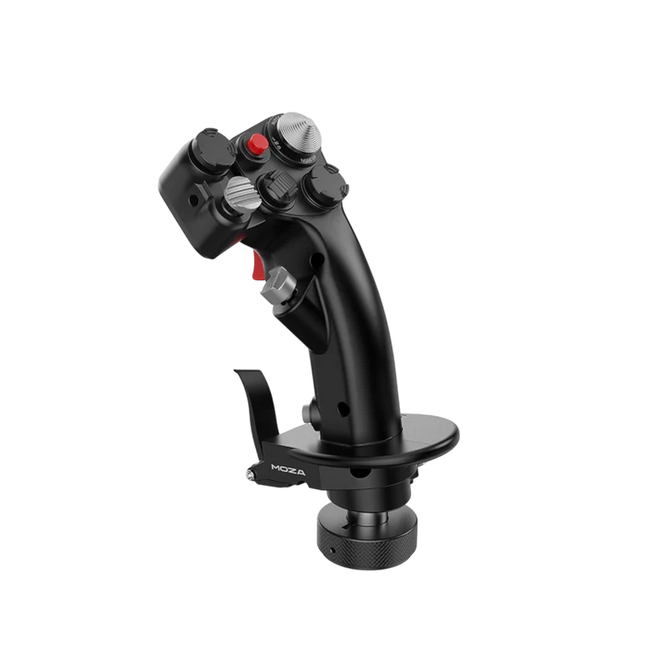
Moza MH16 Flightstick brings a bold, no-compromise approach to flight simulation. Designed with aerospace-grade aluminum alloy, this flightstick isn’t just about looks—it’s built to withstand intense sessions without breaking a sweat. With 27 input signals and an 8-way ALPS thumbstick, every command is at your fingertips, ready for precision maneuvers. Detachable modular components mean you can tailor the setup to your needs, while the sturdy construction ensures stability even in the most demanding dogfights. Whether you're cruising at altitude or locking into a tight turn, this flightstick offers a level of control that keeps you fully engaged.
What Sets the Moza MH16 Flightstick Apart?
Built Like a Real Fighter Jet Stick – The all-metal design isn't just for aesthetics—it provides the heft and feel of a real aircraft control system. Compared to plastic-based competitors, the MH16 gives a more substantial and robust grip, reducing flex and ensuring long-term durability.
Modular and Expandable – Unlike many fixed flightsticks, the MH16 features detachable modules with pogo pin connections, allowing for easy customization. This means users can swap out or upgrade components without the hassle of rewiring or disassembling the entire unit.
Extensive Customization – With 27 input signals and an 8-way ALPS thumbstick, pilots can map commands exactly how they want. This level of button and function assignment flexibility makes it a standout choice for those who demand complete control over their simulation experience.
Seamless Plug-and-Play Compatibility – No convoluted setup, no extra drivers needed—just connect and go. The 5-pin aviation connector ensures secure and stable input transmission, making it instantly operational with most flight bases on the market.
Pros and Cons
Pros
Cons
Aerospace-grade aluminum body offers durability and solid grip.
Out of stock—availability can be an issue.
Detachable modules allow for easy customization.
No official MacOS support.
27 inputs and ALPS thumbstick provide extensive control.
Plug-and-play with most flight bases.
Specifications
Specification
Value
Platform
PC
Main Material
Aerospace-grade aluminum alloy
Rated Voltage
3.3V
Rated Current
5A
Connector
5-pin aviation connector
Z-axis Module
Optional
Dimensions
99×213.5×132mm
Moza MH16 Flightstick Compatibility
Compatible With
Not Compatible With
PC (Windows-based systems)
MacOS
Most flight bases with a 5-pin aviation connector
Consoles (PlayStation, Xbox)
MOZA Cockpit Control Software
Non-standard USB interfaces
The Moza MH16 Flightstick works seamlessly with most PC-based flight setups, thanks to its 5-pin aviation connector and plug-and-play capability. However, Mac users will need to look elsewhere, as no official support exists for macOS. Users have reported solid integration with a variety of bases, making it a flexible option for those who like to mix and match their gear.
As for gaming platforms, the MH16 is strictly for PC users. It runs smoothly on Windows-based flight simulators like DCS, MSFS2020, and X-Plane, but console gamers are out of luck—there’s no native PlayStation or Xbox support. If you're deep into flight sims, though, this is a non-issue, as PC remains the go-to platform for serious pilots.
The Virtual Fly Yoko+ is a meticulously crafted flight yoke designed for pilots who demand superior control and durability. Featuring magnetic Hall sensors for wear-free accuracy and a robust 90% metal construction, this yoke excels in precision and longevity. With a 14.4 cm pitch travel and 180° range of motion, it provides an expansive, fluid control experience. The addition of a POV hat switch ensures seamless camera management, making it a standout choice for serious sim pilots.
What sets the Virtual Fly Yoko+ apart?
Exceptional Build Quality The Yoko+ is constructed with 90% metal, giving it a rugged yet refined build that stands up to years of intense use. Its weight and solid design provide a dependable, substantial feel, elevating it beyond other yokes that rely heavily on plastic components.
Magnetic Hall Sensors Unlike potentiometers found in some yokes, the Yoko+ employs magnetic sensors, offering wear-free operation and consistent input accuracy. These sensors ensure long-lasting performance, making it a reliable choice for extended simulation sessions.
Wide Range of Motion With 14.4 cm of pitch travel and a 180° rotational range, the Yoko+ provides nuanced control for even the most demanding flight maneuvers. This extensive movement range mimics real-world yoke behavior, giving pilots an authentic experience.
POV Hat Switch The addition of a hat switch enables precise camera control, a feature absent in its predecessor. This improvement streamlines cockpit navigation, ensuring you maintain focus on critical flight controls without interruption.
Pros and Cons
Pros
Cons
Solid metal construction ensures durability and stability.
Does not include throttle control functionality.
Magnetic sensors provide accurate and wear-free operation.
Higher price point compared to other yokes.
Wide pitch and roll range for realistic input control.
POV hat switch simplifies cockpit camera management.
Specifications
Specification
Value
Material
90% metal construction
Pitch Travel
14.4 cm
Roll Range
180°
Sensors
Magnetic Hall sensors
Connectivity
USB
Virtual Fly Yoko+ Compatibility
The Virtual Fly Yoko+ is compatible with a wide range of flight simulators, including Microsoft Flight Simulator (FSX and MSFS), Prepar3D, and X-Plane. Its plug-and-play USB connection ensures easy integration, while tools like FSUIPC allow for advanced customization. However, it is not compatible with console platforms, focusing exclusively on PC setups.
In terms of hardware, the Yoko+ connects seamlessly to standard flight sim rigs and complements other Virtual Fly products. The metal build and smooth movement make it suitable for use with professional and enthusiast-grade setups. It is best paired with other high-quality peripherals for a cohesive experience.
On the platform side, the Yoko+ excels on PC, working perfectly with major simulation software. However, its USB-only connection means it cannot natively support gaming consoles. For PC users, this yoke delivers an exceptional flying experience across supported titles.
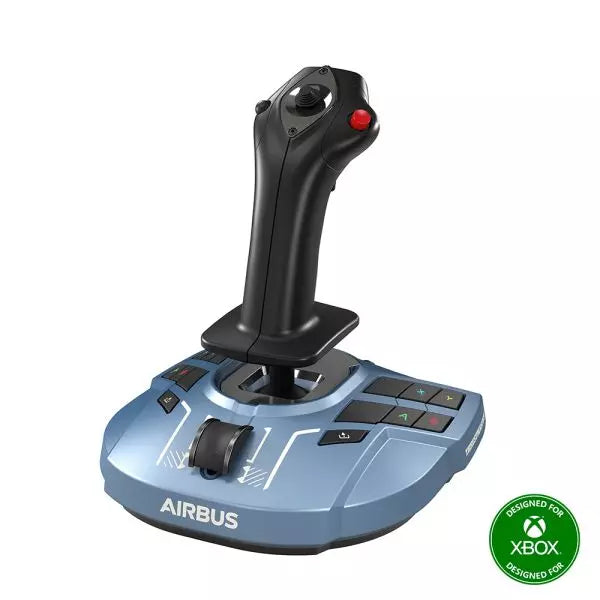
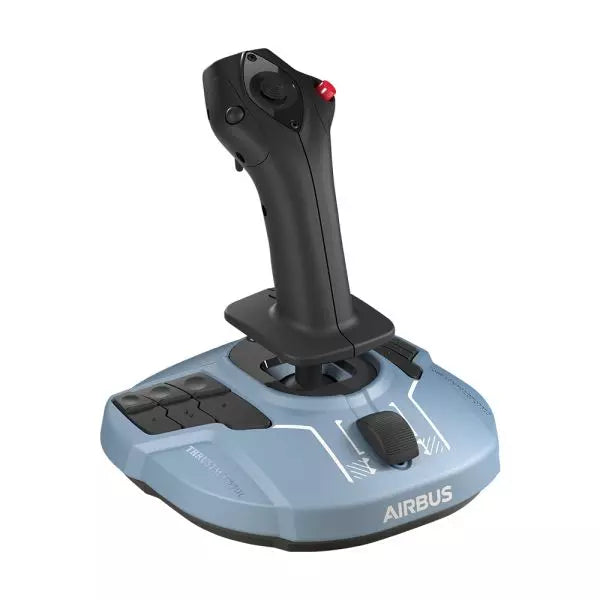
The TCA Sidestick X Airbus Edition is a sleek and versatile flight stick designed to bring Airbus-inspired handling into your hands. With an ergonomic design modeled on the Airbus A320, it offers an incredible feel for any virtual pilot. Featuring a built-in throttle with thrust reverser and 21 remappable buttons, this sidestick delivers control options galore for every phase of flight. Its integrated Ecosystem Hub simplifies setup, allowing seamless compatibility with Xbox Series X|S and PC. A perfect balance of function and flair, this sidestick is ready for takeoff!
What sets the TCA Sidestick X Airbus Edition apart?
1:1 Airbus Ergonomics Crafted as a true-to-life Airbus A320 sidestick replica, this device provides a tactile connection that mirrors the real-world aircraft. The design makes it ideal for Airbus enthusiasts or anyone wanting to elevate their sim experience with authentic shaping and layout.
Swappable Head Modules With four interchangeable head button modules, you can adapt the stick’s configuration for left-handed, right-handed, or central positioning. This modularity allows personalized setups, whether you're flying solo or as part of a crew.
Integrated Ecosystem Hub The built-in hub brings the entire Thrustmaster Airbus ecosystem to Xbox Series X|S. Connecting add-ons like throttles or pedals is now streamlined, reducing cable clutter to a single USB connection for the PC or console.
Enhanced Throttle with Thrust Reverser The improved throttle in the base features a thrust reverser, a rare addition for airliner flight sticks. It delivers greater control during landings, especially in demanding runway conditions.
Pros and Cons
Pros
Cons
Ergonomic Airbus-inspired design feels natural and intuitive.
Not compatible with PlayStation systems.
Swappable modules allow flexible configurations.
Some users report light base weight causing movement.
Integrated Ecosystem Hub simplifies connectivity across devices.
Throttle lacks fine adjustment for some sim setups.
Built-in throttle includes thrust reverser for better landing control.
Specifications
Specification
Value
Width
7.7 inches / 195 mm
Depth
7.7 inches / 195 mm
Height
8.9 inches / 225 mm
Weight
787 g
Package Contents
1 TCA Sidestick X, 4 swappable joystick head modules, 1 USB-C cable, User manual
TCA Sidestick X Airbus Edition Compatibility
The TCA Sidestick X Airbus Edition integrates smoothly into the Thrustmaster ecosystem. It connects to add-ons like the TCA Quadrant Airbus Edition and T.Flight Rudder Pedals, expanding its functionality. The built-in hub reduces clutter by allowing multiple devices to link through a single USB connection to your PC or Xbox Series X|S. However, this sidestick is not compatible with PlayStation systems, limiting its audience to PC and Xbox users.
On the gaming side, the sidestick is fully compatible with Microsoft Flight Simulator 2020 on both PC and Xbox, making it an excellent choice for simmers on those platforms. While its compatibility with other simulators like X-Plane and DCS World isn't officially listed, PC users should experience no issues thanks to its flexible design and connectivity options.
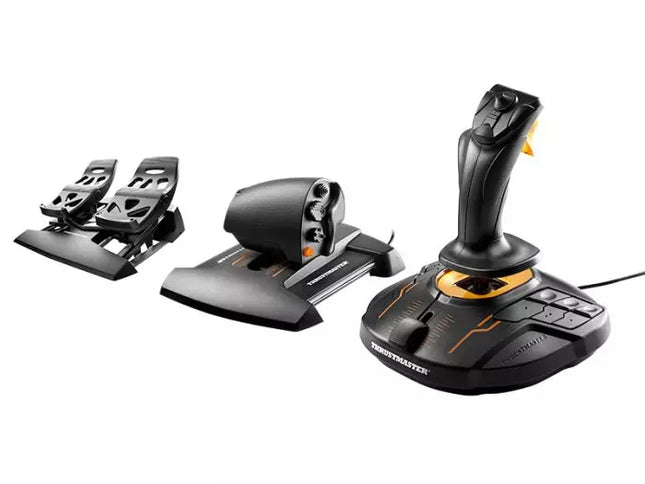
The T.16000M FCS Flight Pack is a standout choice for sim pilots who demand precise and versatile controls. This all-in-one pack features the T.16000M FCS joystick, TWCS throttle, and TFRP rudder pedals, delivering an intricate control setup ideal for aviation and space simulation. With its smooth sliding mechanisms, programmable software, and magnetic sensors for lasting accuracy, it’s a tactile and technical delight. From pitch-perfect inputs to ergonomic designs, this setup transforms your desk into a cockpit, putting you in command of every maneuver.
What sets the T.16000M FCS Flight Pack apart?
Unrivaled Longevity with Magnetic Sensors The H.E.A.R.T HallEffect technology relies on magnetic sensors for unmatched durability, ensuring the joystick’s accuracy remains unchanged over years of use. Unlike potentiometer-based systems, this design eliminates wear and tear, providing consistently smooth and precise inputs that hold steady even during intensive flight campaigns.
Comprehensive All-in-One Control System With a joystick, throttle, and rudder pedals included, the T.16000M FCS Flight Pack offers a complete setup for advanced simmers. This trio eliminates the need for additional peripherals, letting users seamlessly coordinate complex flight maneuvers while reducing clutter with integrated, ergonomic components.
Customizable for Every Pilot’s Needs The T.A.R.G.E.T programming software allows users to map buttons, axes, and macros to fit their unique playstyle. Whether flying civilian aircraft, jets, or navigating through space, this flexibility ensures optimal functionality tailored to specific games and scenarios, providing control tailored to your exact specifications.
Smooth and Comfortable Motion Both the TWCS throttle and TFRP rudder pedals utilize S.M.A.R.T technology for smooth sliding. These components provide intuitive resistance and glide, making every adjustment precise and comfortable. The ergonomic placement further enhances accessibility, even during extended play sessions.
Pros and Cons
Pros
Cons
Exceptional accuracy thanks to HallEffect magnetic sensors.
Not compatible with consoles like Xbox or PlayStation.
All-in-one system reduces need for additional peripherals.
Pedals may feel too small for larger feet.
Customizable controls via T.A.R.G.E.T software.
Throttle lacks a detent for afterburner or idle.
Smooth sliding motion enhances precision and comfort.
Specifications
Specification
Value
Components
Joystick, throttle, rudder pedals
Compatibility
Windows 10, 8, 7, Vista (32-bit & 64-bit)
Connection Type
USB
Joystick Axes
4 (including twist rudder)
Buttons
30 across all components
Rudder Technology
S.M.A.R.T sliding motion
Throttle Travel Range
3.2 inches (80 mm)
Color
Black with orange accents
T.16000M FCS Flight Pack Compatibility
The T.16000M FCS Flight Pack is fully compatible with PCs running Windows 10, 8, 7, and Vista (both 32-bit and 64-bit). Its USB connection ensures straightforward integration with most setups, while the T.A.R.G.E.T software enhances compatibility by allowing users to program the system to function as a single USB device. The pack seamlessly integrates with other Thrustmaster peripherals, such as the MFD panels, providing a cohesive ecosystem for ambitious flight sim setups.
While this system excels on PC, it is not compatible with consoles like Xbox or PlayStation, making it unsuitable for console-based simmers. The pack also works harmoniously with popular simulation titles like Microsoft Flight Simulator, X-Plane, and Elite Dangerous. However, its lack of native support for MacOS limits its use for Apple users, so check your platform’s compatibility before diving into your next flight adventure.
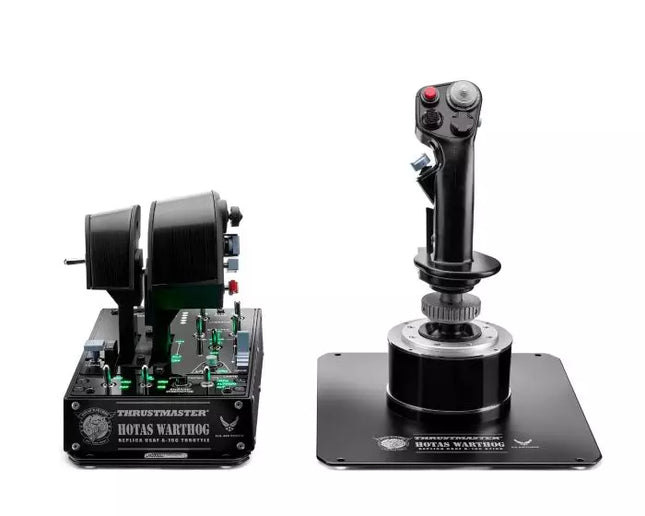
HOTAS WARTHOG is a flight simulation enthusiast’s dream. Designed to replicate the U.S. Air Force A-10C joystick and throttle controls, this joystick brings realistic functionality and impressive precision to the virtual cockpit. With its fully metal construction, H.E.A.R.T Hall Effect AccuRate Technology sensors, and magnetic throttle sensors, the HOTAS WARTHOG delivers a solid, immersive feel that lasts for years. Whether you’re flying for hours or fine-tuning every input, this joystick setup offers a satisfying and durable experience that stands out in the world of flight sims.
What sets the HOTAS WARTHOG apart?
Authentic A-10C Aircraft Replica The HOTAS WARTHOG features an exact replica of the U.S. Air Force's A-10C joystick, dual throttles, and control panel. The attention to detail extends to the metal construction and accurate button placements, which create a more convincing and rewarding flying experience. This level of realism is rare in the world of flight sim peripherals and appeals to users who demand precision in both design and function.
Durable All-Metal Construction Unlike many competitors, the HOTAS WARTHOG boasts a full metal frame across the joystick and throttle, making it a tank in terms of durability and feel. Users frequently note the substantial weight and the robust, industrial-quality switches and buttons. This sturdy design ensures the HOTAS WARTHOG will handle intensive use for years without showing signs of wear and tear, while also offering a premium tactile experience that’s hard to match.
Advanced Sensor Technology The H.E.A.R.T (HallEffect AccuRate Technology) ensures that the joystick and throttles provide superior precision with 16-bit resolution. This results in inputs that remain accurate and smooth over time without degrading, even after extended use. The technology behind this setup guarantees that every movement you make is reflected instantly in the simulation, with no mechanical drift or wear as you continue flying.
Customizable and Programmable Features With 55 fully programmable buttons, 2 four-way hats, and even 5 programmable LEDs, the HOTAS WARTHOG offers an extraordinary level of customization. Whether you need to tweak functions for different aircraft or streamline your setup for specific missions, the T.A.R.G.E.T software suite ensures that all these controls can be easily configured to match your preferences and provide seamless integration with flight simulators.
Pros and Cons
Pros
Cons
All-metal construction for durability and realism.
Heavy design may not be suitable for all setups.
Highly precise H.E.A.R.T sensor technology for accurate inputs.
Large form factor may take up significant desk space.
Extensive customization with 55 programmable buttons.
Specifications
Specification
Value
Joystick Construction
Metal
Throttle System
Dual throttle, metal handles
Total Buttons
55 programmable buttons
Weight
14 lbs
Control Panel
15 buttons, TRIM wheel, backlighting
Hats and Switches
2 four-way hats, 1 POV hat, 1 mouse hat
Sensor Technology
H.E.A.R.T Hall Effect AccuRate Technology
Detachable Components
Joystick and throttle handles
HOTAS WARTHOG Compatibility
The HOTAS WARTHOG is primarily designed for use with PC and features comprehensive software support through the T.A.R.G.E.T programming suite, which allows for deep customization and integration across various flight simulators. While it does not support console gaming, it is compatible with many popular flight simulation games available on PC, including DCS World and Microsoft Flight Simulator. Additionally, the HOTAS WARTHOG works seamlessly with other Thrustmaster flight peripherals like rudder pedals and MFD cockpit panels, providing a cohesive simulation experience.
As a USB-connected device, the HOTAS WARTHOG is plug-and-play with Windows PCs, and users can rely on the T.A.R.G.E.T software to further personalize their setup. Unfortunately, it is not compatible with consoles, including PlayStation and Xbox. However, for serious sim pilots who are dedicated to PC flight simulation, this is less of a limitation and more of a focus on fine-tuning the experience for desktop enthusiasts.
The Alpha Flight Controls by Honeycomb Aeronautical is a feature-rich, durable yoke designed to elevate your flight simulation experience. Built with aerospace-grade internal components, it offers a buttery-smooth 180° turn radius and 15 cm of travel along its steel shaft, delivering precision and fluidity in every maneuver. Its integrated switch panel with red LED backlighting replicates real-world avionics, while the ergonomic handle design packs an array of tactile buttons and switches for versatile control. This is a simulator tool for those who appreciate robust design and reliable performance.
What sets the Alpha Flight Controls apart?
Robust Construction Built with a steel shaft and aerospace-grade components, the yoke ensures durability for years of regular use. This sturdiness gives users the confidence to push boundaries without worrying about wear and tear, a significant advantage over its plastic-heavy competitors.
Comprehensive Switch Panel The integrated switch panel with master, alternator, avionics, and light switches is a standout feature. Coupled with an ignition switch, it allows users to simulate pre-flight checks and engine starts accurately, adding a layer of realism many products overlook.
Ergonomic Design and Customization Thoughtfully designed handles include multiple buttons, hat switches, and a push-to-talk button for intuitive control. The array of functions and customizable software profiles cater to both casual sim enthusiasts and aspiring pilots looking to fine-tune their experience.
Cross-Compatible and Future-Ready Mounting points and brackets allow seamless integration with other Honeycomb and Saitek products, making it ideal for those with an expanding home cockpit. Its compatibility with popular simulators ensures versatility for any flight sim setup.
Pros and Cons
Pros
Cons
Durable steel shaft with aerospace-grade components.
Not compatible with older operating systems like Windows 7.
Integrated switch panel with LED backlighting.
Software required for full functionality can be complex to set up.
Compatible with major flight simulators and accessories.
Limited adjustability for handle ergonomics.
Wide 180° turn radius for smooth control inputs.
No included mount for desk setups, requires separate purchase.
Specifications
Specification
Value
Dimensions (Sleeve)
44.8 x 31.4 x 23.7 cm
Dimensions (Carton)
46.2 x 32.7 x 25.5 cm
Travel Length
15 cm
Turn Radius
180°
Compatibility
Windows 10 (64-bit), macOS
Package Contents
Alpha Flight Controls unit, drivers
Alpha Flight Controls Compatibility
The Alpha Flight Controls is compatible with major flight simulators, including Microsoft Flight Simulator 2020, X-Plane 11, and Lockheed Martin Prepar3D (v3-v5). It supports both Windows 10 (64-bit) and macOS, although some features require the Honeycomb Config Tool for optimal use. Notably, older operating systems like Windows 7 and FSX are not supported, which may limit users with legacy setups.
For hardware compatibility, it includes mounting points and brackets designed to pair seamlessly with Honeycomb Bravo Throttle Quadrant and Saitek panels. The yoke integrates effortlessly into a range of cockpit builds, making it an excellent choice for expandable setups. However, note that desk clamps or mounts are sold separately.
In terms of gaming platforms, the Alpha Flight Controls is PC-centric, with no console support. It’s optimized for simulation platforms requiring USB connections and doesn’t cater to Xbox or PlayStation. Its compatibility with varied simulators ensures a flexible and robust option for PC-based flight enthusiasts.
Out of stock,
Pre-Orders Available. Shipped in 2-2.5 weeks from now.
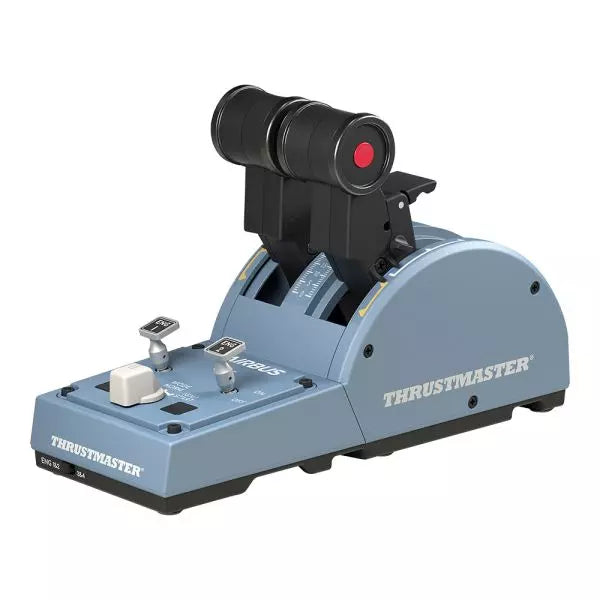
The TCA Quadrant Airbus Edition is a dream come true for flight sim enthusiasts who crave a tactile, civil aviation throttle experience. Featuring dual thrust levers with the iconic Airbus detents and a thrust reverser mechanism, it offers unparalleled control for everything from smooth takeoffs to precise landings. With 16 assignable buttons and contactless magnetic sensor technology ensuring an unlimited lifespan, this throttle quadrant delivers versatility and durability. Its mechanical selectors enable seamless adaptability across various aircraft types, putting endless possibilities at your fingertips.
What sets the TCA Quadrant Airbus Edition apart?
Iconic Airbus Detents and Thrust Reverser The quadrant’s detents replicate the flight modes of Airbus airliners, from "Idle" to "TO/GA." Paired with the thrust reverser mechanism, these details make transitions between power settings a tactile delight, giving users fine-tuned control that’s intuitive and deeply satisfying.
Contactless Magnetic Sensor Technology Unlike many competing products that rely on potentiometers, the TCA Quadrant Airbus Edition uses HallEffect magnetic sensors. These sensors provide an extended lifespan, superior sensitivity, and smoother operation, even during demanding and frequent use.
Expandable Ecosystem The quadrant’s compatibility with additional accessories, like the TCA Quadrant Add-On Airbus Edition or Thrustmaster T.Flight rudder systems, offers an upgrade path for four-engine aircraft setups and advanced control schemes. This modular approach ensures long-term value for dedicated sim pilots.
Customizable Tension and Modes The built-in tensioning screw lets users adjust the throttle feel to match their preferences. Additionally, mechanical selectors allow detents to be disabled, enabling smooth axis transitions for other types of aircraft, such as fighter jets or general aviation planes.
Pros and Cons
Pros
Cons
Accurate Airbus detents for mode-specific control.
Limited compatibility with non-Windows platforms.
Contactless magnetic sensors ensure long-term durability.
Requires additional accessories for multi-engine setups.
Expandable with Thrustmaster’s TCA ecosystem.
Includes 16 buttons for extensive customization.
Specifications
Specification
Value
Width
10.0” / 255 mm
Depth
5.7” / 145 mm
Height
3.3” / 85 mm
Weight
1.2 lb / 530 g
Box Contents
TCA Quadrant, USB cable, attachment rod, connectors
Technology
HallEffect AccuRate Technology (contactless magnetic sensors)
Buttons
16 physical and virtual buttons
TCA Quadrant Airbus Edition Compatibility
Compatible Devices
Details
TCA Sidestick Airbus Edition
Works seamlessly for a full Airbus cockpit experience.
Thrustmaster T.Flight Rudder Pedals
Provides enhanced control for ground and in-flight maneuvers.
Thrustmaster T.A.R.G.E.T Software
Allows programming and testing of complex setups.
The TCA Quadrant Airbus Edition is compatible with Windows 10 and Windows 8 PCs, ensuring integration with popular sim setups. While it excels with the Thrustmaster T.A.R.G.E.T software for added customization, it does not offer native console compatibility, making it ideal for PC-exclusive pilots. Pairing it with accessories like the T.Flight rudder pedals enhances the experience further.
In gaming platforms, the quadrant shines in Microsoft Flight Simulator and X-Plane. Compatibility with games that support multiple button configurations, along with its detent and axis settings, ensures flexibility. It is less suitable for general-purpose gaming setups due to its civil aviation-focused design.
Out of stock,
Pre-Orders Available. Shipped in 2-2.5 weeks from now.
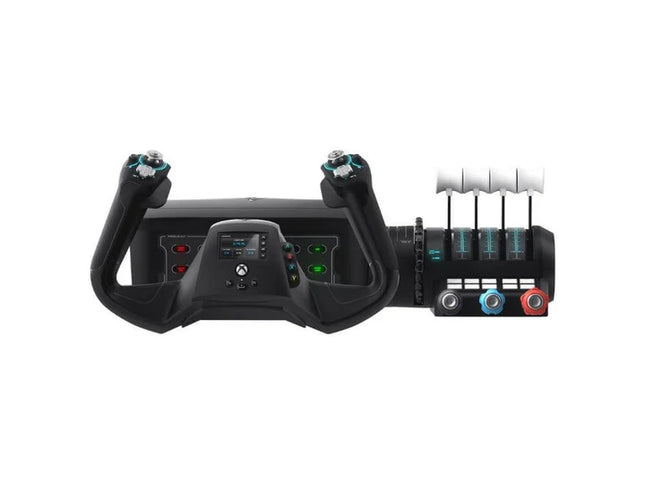
The VelocityOne Flight System is a robust all-in-one solution for flight enthusiasts on PC and Xbox. With its dual throttle system and status indicator panel, it caters to pilots flying everything from Cessnas to jetliners. The smooth 180° rotating yoke with hall-effect sensors delivers a tactile, dependable feel, while the trim wheel and programmable buttons allow for customization that mirrors real-world operations. Whether you’re cruising through clouds or nailing precision landings, this system ensures you’re in full control.
What sets the VelocityOne Flight System apart?
Versatile Throttle System The VelocityOne Flight System features dual throttle options—four interchangeable levers for airliners and Vernier-style controls for smaller planes like the Cessna 172. This flexibility allows for accurate power management across different aircraft types, catering to both general aviation and commercial piloting styles.
Integrated Annunciator Panel The included Status Indicator Panel adds a layer of realism with its ability to monitor critical systems. With interchangeable plates, it adapts to various aircraft, providing visual feedback on engine issues, warnings, or system states without requiring additional hardware.
Rudder Control via Yoke Integrated rudder pedal control on the yoke lets you manage the tail rudder, nose wheel, and brakes with fingertip precision. While it doesn’t replace dedicated pedals, it’s a practical and effective solution for players seeking simplicity without sacrificing control.
Flight Management Display The built-in screen serves as a Flight Management Display for Microsoft Flight Simulator, allowing seamless switching between profiles and providing essential data during flight. This feature minimizes reliance on external screens and keeps your focus on piloting.
Pros and Cons
Pros
Cons
Includes dual throttle options for diverse aircraft types.
Rudder control on yoke lacks realism compared to pedals.
Annunciator panel offers visual feedback on system status.
Pricier than other entry-level flight controllers.
Compatible with PC and Xbox Series X|S systems.
Not compatible with PlayStation platforms.
Specifications
Specification
Value
Brand
Turtle Beach
Yoke Rotation
180°
Throttle Type
Dual (Airliner and Vernier-style)
Platform Compatibility
PC, Xbox Series X|S, Xbox One
Sensor Type
Hall-effect
Programmable Buttons
10
Annunciator Panel
Included with interchangeable plates
VelocityOne Flight System Compatibility
The VelocityOne Flight System is designed for PC and Xbox platforms, making it an excellent choice for both console and desktop users. It connects seamlessly to Microsoft Flight Simulator on Xbox Series X|S, and its hall-effect sensors ensure smooth, dependable input for precision maneuvers. While it provides button-based rudder control, users seeking a more immersive setup can pair it with dedicated rudder pedals, though this may require additional hardware.
For gaming platforms, the VelocityOne is optimized for Xbox Series X|S and Xbox One, as well as Windows-based PCs running modern simulators. Unfortunately, it lacks compatibility with PlayStation consoles or Mac operating systems. While the Flight Management Display works particularly well with Microsoft Flight Simulator, it also integrates with other flight simulators, giving pilots an adaptable and feature-rich experience regardless of their preferred game.
The TCA Sidestick Airbus Edition is a robust and versatile sidestick, capturing the essence of Airbus flight controls. With its ergonomic 1:1 scale design inspired by the Airbus A320, this sidestick brings a tactile and customizable edge to your flight simulation. Boasting a built-in throttle axis with a unique thrust reverser mechanism, and 12 remappable buttons, it’s engineered to adapt to your style—be it captain, co-pilot, or central solo position. With the added benefit of contactless magnetic sensor technology, every maneuver feels smooth and natural.
What sets the TCA Sidestick Airbus Edition apart?
Swappable Joystick Head Modules The sidestick’s head is modular, allowing you to customize it for captain, co-pilot, or solo use. This flexibility makes it a favorite among users who value adaptability, particularly for varied flight scenarios or setups.
Built-in Throttle with Thrust Reverser A built-in throttle axis, complete with a thrust reverser mechanism, sets this stick apart. It's a rare inclusion on sidesticks, providing better control during landings and ground maneuvers.
HallEffect Magnetic Sensors Using contactless magnetic technology, this sidestick eliminates wear and tear while providing precise inputs over its lifetime. Users consistently praise its longevity and smooth operation.
Integrated Rudder Control The twist-rudder mechanism, with an optional lock, offers versatile control for multitasking pilots, enhancing usability in diverse flight conditions.
Pros and Cons
Pros
Cons
Modular head design suits different pilot roles.
Limited to PC compatibility only.
Built-in throttle with thrust reverser adds utility.
Smaller base may feel less stable to some.
Magnetic sensors ensure long-lasting reliability.
No additional programmable dials or sliders.
Ergonomic Airbus-inspired design enhances grip and comfort.
Specifications
Specification
Value
Width
7.7” / 195 mm
Depth
7.7” / 195 mm
Height
8.9” / 225 mm
Weight
2.0 lb / 920 g
Box Contents
1 x Sidestick, 4 x Joystick Head Modules
TCA Sidestick Airbus Edition Compatibility
The TCA Sidestick Airbus Edition works seamlessly with other components of the Thrustmaster Airbus ecosystem, such as the TCA Quadrant Airbus Edition and the TCA Quadrant Add-On. It also pairs effectively with the T.Flight Rudder Pedals and the TM Flying Clamp for a more stable setup. However, it lacks compatibility with consoles like Xbox or PlayStation, making it ideal for PC users only. This sidestick integrates into setups requiring a versatile input device but isn't suitable for console-based flight simulators.
For gaming platforms, the sidestick supports PC (Windows 10 and 8), but does not function with macOS or Linux-based systems. It’s compatible with popular flight simulators like Microsoft Flight Simulator and X-Plane. However, its use is restricted to games that support configurable flight controls, as it lacks plug-and-play support for casual or arcade titles.
MOZA MFY Pro Yoke brings airliner-style control geometry into the cockpit with a broad, reassuring grip and enough physical inputs to keep your hands away from the keyboard. Its integrated 4.3-inch touchscreen displays flight data, checklists, timing information, and axis positions, while 26 programmable output signals provide plenty of room for aircraft-specific control profiles. Carbon-fibre-reinforced composite keeps the structure light but sturdy, and the Hall-effect thumbsticks feel smooth and deliberate rather than like tiny gamepad controls bolted on as an afterthought.
What Sets the Moza MFY Pro Yoke apart?
A Touchscreen That Earns Its Cockpit Space The 4.3-inch, 480 × 800 touchscreen is more than a decorative splash of colour in the middle of the yoke. It can display essential flight data, checklists, a flight clock, and live axis readings without forcing the pilot to look across several monitors. That keeps useful information close to the hands and makes the yoke especially practical in compact setups where every centimetre of instrument-panel space has already filed a formal complaint.
Airliner Geometry with a Solid, Lightweight Structure The shape takes its cues from commercial aircraft rather than compact general-aviation controls, giving both hands a broad and natural working position during climbs, approaches, and extended cruise adjustments. Its carbon-fibre-reinforced composite construction keeps weight to 1.2 kg while supporting loads up to 30 kg. The result is a yoke that feels substantial during firm inputs without placing unnecessary strain on the base or mounting structure.
More Control Without Reaching for the Keyboard Two eight-way hat switches, two Hall-effect thumbsticks, bumpers, and multifunction triggers create 26 configurable output signals directly on the yoke. The triggers and thumbsticks can operate as axes or buttons through MOZA Cockpit, allowing them to handle rudder input, camera movement, push-to-talk, trim, or other aircraft functions. Multiple profiles also make switching between airliners and lighter aircraft far less tedious than remapping everything before each flight.
Quick Swaps Without Mechanical Wobble The aluminium-alloy quick-release allows the yoke to be removed or exchanged without tools while maintaining a firm connection to a compatible MOZA base. This is particularly useful for pilots who alternate between airliner, general-aviation, and specialist control shapes. A quick-release is only useful when it does not introduce movement at the connection point, and the rigid design is intended to remain secure during heavy roll corrections and force-feedback loads.
Pros and Cons
Pros
Cons
Integrated touchscreen keeps flight information directly within view.
Touchscreen functions depend on software and firmware support.
Twenty-six programmable signals support complex aircraft control profiles.
Airliner shape is less suited to traditional GA aircraft.
Hall-effect thumbsticks provide smooth, contactless axis input.
Lightweight composite housing supports substantial control loads.
Specifications
Specification
Value
Product Name
MOZA MFY Pro Flight Yoke
Dimensions
142.5 × 202 × 313 mm
Weight
1.2 kg
Housing Material
Carbon Fiber Reinforced Composite
Quick-Release Material
Aluminum Alloy
Button Cap Material
ABS
Maximum Supported Load
Up to 30 kg
Screen Size
4.3 inches
Screen Resolution
480 × 800
Total Output Signals
26
8-Way Hat Switches
2
Hall-Effect Thumbsticks
2
Bumpers
2
Triggers
2
Lighting
Customisable 16-million-colour RGB illumination
Configuration Software
MOZA Cockpit
Included Accessories
User manual
Moza MFY Pro Yoke Compatibility
Category
Compatibility
Yoke Base Connection
MOZA aluminium-alloy quick-release system
Configuration Software
MOZA Cockpit
Assignable Controls
Buttons, axes, triggers, thumbsticks, and profile mappings
Display Functions
PFD information, checklists, flight clock, and axis readouts
Control Profiles
Multiple aircraft-specific mapping profiles
The MFY Pro is designed to attach through the MOZA aluminium-alloy quick-release system, allowing tool-free installation on a compatible MOZA yoke base. Its commercial-aircraft shape pairs particularly well with airliner and transport-aircraft configurations, while the 26 programmable output signals can also be adapted for turboprops and general-aviation aircraft. It is not a standalone controller and therefore requires a compatible base to provide roll and pitch movement.
Additional functions are configured through MOZA Cockpit software, including button assignments, axis behaviour, RGB lighting, touchscreen views, and multiple mapping profiles. The two Hall-effect thumbsticks and multifunction triggers can be configured as either axes or buttons, making them suitable for rudder control, camera movement, trim, communication, or avionics inputs. The yoke does not use a universal mechanical attachment and is not intended for direct installation on unrelated third-party yoke bases.
The MFY Pro forms part of a PC-based flight simulation control system and relies on the connected MOZA base and MOZA Cockpit software for configuration. Its programmable controls can be assigned within PC flight simulators that support conventional button and axis mapping. It is not designed as a PlayStation or Xbox controller, and the integrated display features require compatible PC software rather than operating independently from the simulator.




