
Honeycomb

5 products

  • Last stock! Honeycomb Bundle (Yoke & Throttle) For Sale On FlightSimZone

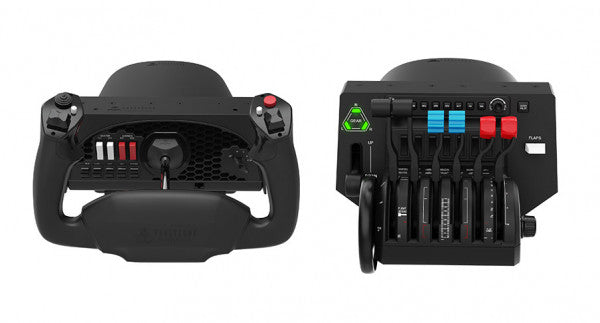
    Fly Honeycomb Honeycomb Bundle (Yoke & Throttle)

    14 reviews

    2 w magazynie Shipped in 1-3 business days.

    The Honeycomb Bundle (Yoke & Throttle) is a dream package for flight simulation enthusiasts, combining the acclaimed Alpha Flight Controls and Bravo Throttle Quadrant into a single, cost-saving package. Designed with input from professional pilots and aerospace engineers, it boasts a robust all-metal yoke mechanism and customizable throttle configurations. Whether you're fine-tuning a smooth landing or managing multi-engine systems, the bundle’s intuitive controls and comprehensive switch panels offer unparalleled control and versatility. This isn’t just gear; it’s your co-pilot for a truly elevated sim experience. What sets the Honeycomb Bundle (Yoke & Throttle) apart? Durable Build for Long-Term Use The bundle is built with aerospace-grade components and an all-metal yoke mechanism, ensuring it withstands hours of intensive use. This makes it a trusted companion for both aspiring pilots and seasoned sim enthusiasts seeking equipment that doesn’t flinch under pressure. Incredibly Versatile Throttle Configuration The Bravo Throttle Quadrant is a standout, accommodating single-engine to four-engine setups with ease. Its detailed customization options include thrust reversers, autopilot systems, and a trim wheel, offering flexibility across different aircraft types. Enhanced Switch and Control Panels The switch panel on the Alpha yoke and the annunciator panel on the Bravo throttle provide a plethora of controls, making external keyboard usage almost obsolete. The clear LED backlighting ensures visibility in any lighting conditions. Seamless Integration with Popular Simulators The bundle is compatible with all major flight simulators like Microsoft Flight Simulator and X-Plane 11, providing plug-and-play functionality with profiles designed to simplify setup and maximize control precision. Pros and Cons Pros Cons Exceptional durability with all-metal yoke mechanism. Throttle quadrant levers feel slightly stiff initially. Versatile throttle configurations for various aircraft types. LED backlighting is not adjustable in brightness. Comprehensive switch and annunciator panels reduce keyboard reliance. Compatible with multiple operating systems and platforms. Specifications Specification Value Yoke Turn Radius 180° Yoke Shaft Travel 15 cm Throttle Configurations Single to four-engine, piston or jet Mounting Compatibility Honeycomb and Saitek products Supported OS Windows 10 (64-bit), macOS, Linux Warranty 2 years Honeycomb Bundle (Yoke & Throttle) Compatibility The Honeycomb Bundle (Yoke & Throttle) offers seamless compatibility with major flight simulation software, including Microsoft Flight Simulator, X-Plane 11, and Prepar3D. While the Alpha yoke functions without additional software for X-Plane 11, the Bravo throttle requires the Honeycomb Config Tool for full functionality on Windows and macOS. It lacks support for older simulators like FSX/P3D v3, but profiles are available for more recent platforms, ensuring a hassle-free experience. In terms of hardware, the bundle integrates easily with Honeycomb and Saitek mounting systems, adding versatility to your cockpit setup. While it doesn’t support consoles, it connects effortlessly to PCs through USB and offers plug-and-play functionality for supported games. This makes it a solid choice for simmers who value flexibility in their cockpit configuration. For gaming platforms, the bundle is focused on PC-based simulators and is not compatible with consoles like Xbox or PlayStation. It shines when paired with games like Microsoft Flight Simulator, offering robust support for both general aviation and airliner setups, allowing simmers to explore skies with exceptional control.

    2 w magazynie Shipped in 1-3 business days.

    €509,00

  • Sale -3%Last stock! Honeycomb Bravo Throttle Quadrant For Sale On FlightSimZone

    Fly Honeycomb Honeycomb Bravo Throttle Quadrant

    2 w magazynie Shipped in 1-3 business days.

    The Honeycomb Bravo Throttle Quadrant is a versatile all-in-one control system that lets you soar through the skies in virtual aviation with precision. Designed for both casual pilots and seasoned simmers, it adapts to your flying style, offering configurations for small aircraft and large airliners alike. Featuring a fully functional autopilot panel and customizable thrust levers, it puts essential controls at your fingertips. Whether you're managing thrust reversers or adjusting flaps, this sleek device is built to elevate your cockpit setup and make every flight unforgettable. What sets the Bravo Throttle Quadrant apart? Unmatched Versatility The Honeycomb Bravo Throttle Quadrant adapts to a variety of aircraft configurations, from single-engine planes to four-engine airliners. This flexibility means it can handle piston, jet, and turboprop controls seamlessly, catering to both general aviation enthusiasts and commercial flight sim fans. Enhanced Physical Feedback With its sturdy levers, clickable buttons, and smooth trim wheel, the tactile experience feels as close as it gets to operating a real cockpit. The gear lever and annunciator panel add an extra layer of functionality, keeping your hands busy and your keyboard untouched. Comprehensive Autopilot and Annunciator Features The included autopilot panel mimics the functionality of systems found in real aircraft, while the annunciator panel delivers vital status alerts. These features reduce reliance on on-screen controls and make managing complex systems much easier. Expandable Design With integrated mounting points, the Bravo works seamlessly with other Honeycomb and Saitek products. This modularity allows users to grow their setup over time, creating a cohesive and customizable virtual cockpit. Pros and Cons Pros Cons Wide range of configuration options for all aircraft types. Annunciator lights and some features don’t work on Xbox. Durable design with a solid, professional feel. Relatively large footprint, requires space for optimal use. Comprehensive autopilot and annunciator panels included. Requires external software for optimal customization. Compatible with multiple simulators on PC and Mac. No support for FSX on the latest version of the Config Tool. Specifications Specification Value Package Contents Throttle quadrant, mounting points, brackets Compatibility Microsoft Flight Simulator, X-Plane 11, Prepar3D V3-V5 Operating Systems Windows 10 (64-bit), macOS Catalina+ Warranty 2 years Bravo Throttle Quadrant Compatibility Simulator Compatibility Microsoft Flight Simulator Fully supported with Config Tool X-Plane 11 Fully supported, with Windows and Mac versions Prepar3D Supported for versions 3, 4, and 5 The Honeycomb Bravo Throttle Quadrant is engineered for compatibility with popular simulator platforms, including Microsoft Flight Simulator 2020, X-Plane 11, and Prepar3D. While PC users can enjoy full functionality, Xbox users must note that some features, such as the annunciator lights, won't work when connected via the XPC Hub. This makes it an excellent choice for PC-based setups but requires consideration for console users. When it comes to hardware, the Bravo pairs seamlessly with other Honeycomb products, like the Alpha Flight Controls, and integrates with Saitek peripherals through its mounting points. These features ensure a cohesive and expandable setup. However, it’s not compatible with older FSX versions unless you're running the older Config Tool, so check your software version before diving in.

    2 w magazynie Shipped in 1-3 business days.

    €309,00 €300,00

  • Last stock! Honeycomb Sierra TPM Module

    Fly Honeycomb Honeycomb Sierra TPM Module

    2 w magazynie Shipped in 1-3 business days.

    Honeycomb Sierra TPM Module brings the tactile charm of classic general aviation straight to your desk, with a lockable metal throttle vernier that feels satisfyingly mechanical in hand and a high-resolution integrated trim wheel that lets you dial in attitude with fingertip finesse. Designed with single-prop aircraft like the Cessna 172 in mind, it combines all-metal construction, integrated flap and parking brake controls, and LED landing gear indicators into a compact module that slots neatly into a serious home cockpit. What Sets the Honeycomb Sierra TPM Module apart? True General Aviation Vernier Feel The lockable metal throttle vernier with fine-tune prop and mixture knobs doesn’t just look the part—it delivers that push-pull, twist-to-adjust sensation pilots associate with classic GA cockpits. Many users highlight how the incremental adjustment allows smoother power changes during climb and approach, especially in piston aircraft, compared to sliding lever-based throttles that can feel too abrupt for delicate engine management. Integrated Cockpit Workflow Instead of scattering controls across separate panels, the Sierra TPM places trim, flaps, parking brake, and landing gear in one cohesive layout. The low-profile, high-resolution trim wheel earns particular praise for its smooth rotation and granular input, making pitch adjustments during cruise or final approach feel natural. It reduces reliance on keyboard shortcuts and keeps hands where they belong—on dedicated hardware. Solid All-Metal Construction Built with Honeycomb-grade components and a durable all-metal chassis, this module has noticeable heft and rigidity. Enthusiasts frequently mention that it feels planted on the desk, with minimal flex during aggressive throttle movements. Compared to lighter plastic alternatives, the Sierra TPM maintains structural stability over time, which is especially appreciated in permanent or semi-permanent cockpit setups. Seamless Integration with Honeycomb Ecosystem Designed to pair cleanly with Honeycomb yokes and mounting systems, the included dual mounting solution simplifies alignment and positioning. Users who already run Alpha or Bravo units often comment on how the design language and control spacing feel unified, creating a visually coherent and ergonomically consistent flight deck without mismatched modules. Pros and Cons Pros Cons Metal vernier throttle offers fine incremental control. Designed primarily for single-engine GA aircraft. Integrated trim wheel provides smooth pitch adjustments. Requires desk space for full mounting solution. All-metal chassis feels stable and durable. LED gear indicators add clear visual feedback. Specifications Specification Value Product Name Honeycomb Sierra TPM Module EAN 4039621003998 Construction All-metal construction with Honeycomb-grade components Throttle Type Lockable metal throttle vernier with prop and mixture knobs Integrated Controls Trim wheel, parking brake, flap lever, landing gear lever with LED indicators Layout General aviation style for single prop airplanes Mounting Dual mounting solution included Connection USB-C to USB-A cable Compatibility PC and Mac Drivers MSFS 2020 Driver, MSFS 2024 Driver Included in the Box Sierra TPM Module, Dual Mounting Solution, USB-C to USB-A Cable, Quick Start Guide (EFIGS) Honeycomb Sierra TPM Module Compatibility Platform Compatibility Operating Systems PC and Mac Connection Type USB-C to USB-A (direct USB connection) Primary Ecosystem Pairing Honeycomb Alpha and Bravo hardware The Sierra TPM Module connects via direct USB, making it straightforward to integrate into most desktop cockpit builds. It pairs especially well with Honeycomb Alpha yokes and Bravo throttle quadrants, sharing the same design philosophy and mounting ecosystem. Thanks to its dual mounting solution, it can be desk-mounted alongside other Honeycomb units for a unified layout. It is not intended for console setups and does not interface directly with standalone hardware without a compatible PC or Mac. On the software side, it supports Microsoft Flight Simulator 2020 and Microsoft Flight Simulator 2024 through dedicated drivers, and it also works with simulators like X-Plane and Prepar3D on PC. It is not compatible with Xbox consoles, as it relies on standard USB PC/Mac drivers rather than console-certified firmware. For desktop sim pilots focused on general aviation, it slots cleanly into modern PC-based sim platforms.

    2 w magazynie Shipped in 1-3 business days.

    €269,00

  • Sale -3%Last stock! Honeycomb Alpha Flight Controls For Sale On FlightSimZone

    Fly Honeycomb Honeycomb Alpha Flight Controls

    4 w magazynie Shipped in 1-3 business days.

    The Alpha Flight Controls by Honeycomb Aeronautical is a feature-rich, durable yoke designed to elevate your flight simulation experience. Built with aerospace-grade internal components, it offers a buttery-smooth 180° turn radius and 15 cm of travel along its steel shaft, delivering precision and fluidity in every maneuver. Its integrated switch panel with red LED backlighting replicates real-world avionics, while the ergonomic handle design packs an array of tactile buttons and switches for versatile control. This is a simulator tool for those who appreciate robust design and reliable performance. What sets the Alpha Flight Controls apart? Robust Construction Built with a steel shaft and aerospace-grade components, the yoke ensures durability for years of regular use. This sturdiness gives users the confidence to push boundaries without worrying about wear and tear, a significant advantage over its plastic-heavy competitors. Comprehensive Switch Panel The integrated switch panel with master, alternator, avionics, and light switches is a standout feature. Coupled with an ignition switch, it allows users to simulate pre-flight checks and engine starts accurately, adding a layer of realism many products overlook. Ergonomic Design and Customization Thoughtfully designed handles include multiple buttons, hat switches, and a push-to-talk button for intuitive control. The array of functions and customizable software profiles cater to both casual sim enthusiasts and aspiring pilots looking to fine-tune their experience. Cross-Compatible and Future-Ready Mounting points and brackets allow seamless integration with other Honeycomb and Saitek products, making it ideal for those with an expanding home cockpit. Its compatibility with popular simulators ensures versatility for any flight sim setup. Pros and Cons Pros Cons Durable steel shaft with aerospace-grade components. Not compatible with older operating systems like Windows 7. Integrated switch panel with LED backlighting. Software required for full functionality can be complex to set up. Compatible with major flight simulators and accessories. Limited adjustability for handle ergonomics. Wide 180° turn radius for smooth control inputs. No included mount for desk setups, requires separate purchase. Specifications Specification Value Dimensions (Sleeve) 44.8 x 31.4 x 23.7 cm Dimensions (Carton) 46.2 x 32.7 x 25.5 cm Travel Length 15 cm Turn Radius 180° Compatibility Windows 10 (64-bit), macOS Package Contents Alpha Flight Controls unit, drivers Alpha Flight Controls Compatibility The Alpha Flight Controls is compatible with major flight simulators, including Microsoft Flight Simulator 2020, X-Plane 11, and Lockheed Martin Prepar3D (v3-v5). It supports both Windows 10 (64-bit) and macOS, although some features require the Honeycomb Config Tool for optimal use. Notably, older operating systems like Windows 7 and FSX are not supported, which may limit users with legacy setups. For hardware compatibility, it includes mounting points and brackets designed to pair seamlessly with Honeycomb Bravo Throttle Quadrant and Saitek panels. The yoke integrates effortlessly into a range of cockpit builds, making it an excellent choice for expandable setups. However, note that desk clamps or mounts are sold separately. In terms of gaming platforms, the Alpha Flight Controls is PC-centric, with no console support. It’s optimized for simulation platforms requiring USB connections and doesn’t cater to Xbox or PlayStation. Its compatibility with varied simulators ensures a flexible and robust option for PC-based flight enthusiasts.

    4 w magazynie Shipped in 1-3 business days.

    €299,00 €289,00

  • Last stock! Honeycomb Foxtrot Aviation Stick

    Fly Honeycomb Honeycomb Foxtrot Aviation Stick

    4 w magazynie Shipped in 1-3 business days.

    Honeycomb Foxtrot Aviation Stick is built for pilots who prefer a sidestick in hand and a clean desk in front of them. From the first movement, the smooth linear resistance system with no center detent feels fluid and deliberate, ideal for Airbus-style inputs and aerobatic maneuvers. Under the hood, 16-bit resolution with Hall Effect sensor technology translates subtle wrist movements into accurate on-screen control. Add adjustable tension and a fully ambidextrous layout, and you’ve got a stick that feels purposeful rather than toy-like. What Sets the Honeycomb Foxtrot Aviation Stick apart? Center-Detent-Free Control Philosophy Many sticks rely on a noticeable center bump, which can make small corrections feel mechanical. The Foxtrot’s linear resistance system eliminates that notch, creating a smooth transition across the full axis range. Pilots flying Airbus aircraft in particular appreciate this design, as it mirrors sidestick behavior more closely and allows gentle pitch and roll corrections without fighting a spring-loaded “click” at center. Sensor and Resolution Synergy With 16-bit resolution paired to Hall Effect sensors, the Foxtrot delivers clean, contactless input detection. Enthusiasts often point out the consistency over time—no spiking, no gradual degradation from physical potentiometers. Subtle trim adjustments during approach or careful roll inputs in aerobatics feel steady and predictable, especially when compared to entry-level sticks that can show jitter near center. Configurable Resistance and Ergonomics Adjustable tension allows the stick to be tuned to personal preference, whether you prefer lighter fingertip inputs or firmer resistance for controlled movements. Combined with its ambidextrous grip design, the Foxtrot suits both left- and right-handed setups. Users with compact cockpit builds often highlight how adaptable it feels in different seating positions, including center-mounted or side-mounted configurations. Switch Density Without Clutter Between the 5 two-way switches, 4 programmable action buttons, POV hat, trigger, rockers, and multi-way rotary panel, the stick offers serious input flexibility. What stands out is how logically the controls are spaced; sim pilots frequently mention that functions like trim, autopilot modes, or camera controls can be assigned without feeling cramped or hunting blindly mid-flight. Pros and Cons Pros Cons Linear resistance without center detent feels smooth. No native console compatibility. Hall Effect sensors reduce long-term wear. No included dedicated mounting base. Adjustable tension suits different flying styles. Extensive switch and button configuration options. Specifications Specification Value Product Name Honeycomb Foxtrot Aviation Stick Control System Linear resistance system with no center detent Sensor Technology Hall Effect sensors Resolution 16-bit Tension Adjustment Adjustable stick resistance Switches 5 two-way switches Action Buttons 4 programmable buttons Rotary Panel 3-, 4-, and 5-way rotary controls Grip Design Ambidextrous Connection USB-C to USB-A cable System Compatibility PC and Mac Included in the Box Foxtrot Aviation Stick, USB-C to USB-A Cable, Quick Start Guide (EFIGS) Download Support Basic Bindings Profiles (XML) for MSFS 2024 Honeycomb Foxtrot Aviation Stick Compatibility Platform Compatibility Operating Systems PC and Mac Connection Type USB-C to USB-A direct USB interface Primary Sim Support MSFS 2024 (XML bindings), MSFS, X-Plane, Prepar3D The Foxtrot Aviation Stick connects via standard USB, allowing it to integrate easily into most desktop cockpit setups. It works seamlessly alongside throttle quadrants, rudder pedals, and radio panels from other major brands thanks to its plug-and-play HID architecture. Its ambidextrous design makes it suitable for left- or right-seat configurations, including Airbus-style side mounting. It is not compatible with Xbox consoles and does not function as a standalone device without a connected PC or Mac. On the software side, it supports Microsoft Flight Simulator 2024 with dedicated XML binding profiles and operates with popular PC simulators such as Microsoft Flight Simulator (2020), X-Plane, and Prepar3D through manual or community mappings. It is not designed for console-based platforms, as it relies on native PC/Mac driver recognition rather than console-certified firmware.

    4 w magazynie Shipped in 1-3 business days.

    €165,00

Honeycomb Aeronautical flight simulator hardware for sale at FlightSimZone

Witamy w kolekcji Honeycomb Aeronautical w FlightSimZone, gdzie precyzja spotyka pasję w świecie symulacji lotu. Jako największy sklep z symulatorami lotu w Europie, oferujemy pełen wybór kontrolerów Honeycomb – zaprojektowanych, by zapewnić autentyczne wrażenia zarówno entuzjastom, jak i szkolącym się pilotom.

Tabela porównawcza


Funkcje Alpha Flight Controls XPC Bravo Throttle Quadrant Charlie Rudder Pedals
Cena €299.99 €279.99 €349.99
Funkcja główna System sterowania wolantem 180° Panel przepustnicy System pedałów kierunku
Materiał wykonania Aluminium lotnicze i stal Polimer przemysłowy i metal Całkowicie metalowa konstrukcja
Łączność USB
Czujniki Hall Effect
Konfigurowalne przyciski 13 przycisków 9 przycisków + 3 osie Oś hamulca palcowego
Panel przełączników
Podświetlany wyświetlacz
Opcje montażu Mocowanie do biurka, panelu Mocowanie do biurka, panelu Mocowanie do podłogi, biurka
Gwarancja 5 lat 5 lat 5 lat
Zgodność z MSFS
Zgodność z X-Plane

Sprzęt lotniczy klasy profesjonalnej

Honeycomb Aeronautical zrewolucjonizował branżę symulatorów lotu tworząc autentyczny, lotniczy hardware. Każdy produkt jest testowany i rozwijany we współpracy z zawodowymi pilotami, co gwarantuje realizm i funkcjonalność najwyższej klasy. Dbałość o szczegóły i materiały lotnicze wyznaczają nowe standardy na rynku domowego sprzętu symulacji.

Wolanty Honeycomb

Seria Alpha Flight Controls to flagowe wolanty Honeycomb – projektowane by odwzorować każde uderzenie kontrolera samolotowego. Cechy:

  • Wał ze stali, łożyska kulkowe podwójne – płynność i precyzja jak w prawdziwym samolocie
  • Obrót 180° ze zmiennym oporem, możliwość personalizacji pod konkretny typ maszyny
  • Panel przełączników zawierający realistyczne sterowanie avioniką: magneto, alternator, oświetlenie – redukcja zewnętrznych akcesoriów

Przepustnice Honeycomb

Bravo Throttle Quadrant to ukoronowanie precyzji i wszechstronności Honeycomb w sterowaniu mocą maszyny. Kluczowe cechy:

  • Konfigurowalny setup pod różne typy samolotów – od jednosilnikowych po maszyny wielosilnikowe
  • Komponenty klasy komercyjnej zapewniające trwałość i wydajność przez tysiące godzin symulacji
  • Zatrzaskowy mechanizm reversera – realizm podczas lądowania

Możesz także kupić zestaw Honeycomb z seryjnymi produktami Alpha i Bravo.

Sterowniki lotnicze Honeycomb

Ekosystem produktów Honeycomb tworzony jest pod kątem pełnej współpracy i rozbudowy stanowiska. Modularna konstrukcja pozwala budować kokpit etapami bez utraty profesjonalnej jakości. Zintegrowane sterowniki działają z głównymi symulatorami: MSFS, X-Plane, Prepar3D – gwarancja kompatybilności.

Jakość i trwałość

Zaangażowanie Honeycomb Aeronautical w jakość widoczne jest w każdym aspekcie produktu. Materiały i komponenty klasy przemysłowej zapewniają długą żywotność i stabilną funkcję. Produkty przechodzą rozbudowane testy kontroli jakości:

  • Indywidualna weryfikacja każdej sztuki przed wysyłką
  • Wielostopniowa kontrola podczas produkcji
  • Testy wytrzymałości w różnych warunkach środowiskowych

Dlaczego Honeycomb w FlightSimZone?

Jako największy sprzedawca sprzętu symulacyjnego w Europie, utrzymujemy bliską współpracę z Honeycomb Aeronautical, zapewniając klientom najnowsze produkty i aktualizacje. Nasza wiedza pozwala służyć doradztwem przy wyborze sprzętu i optymalizacji stanowiska.

Budujesz pierwszy domowy kokpit lotniczy albo rozbudowujesz obecny? Honeycomb zapewni idealny balans realizmu, trwałości i ceny. Dzięki magazynowi FlightSimZone oraz doradztwu ekspertów, bez trudu dopasujesz Honeycomb do swoich potrzeb.

Poznaj naszą kolekcję Honeycomb już dziś i zrób pierwszy krok do profesjonalnej symulacji lotniczej w domu. Nasi specjaliści pomogą Ci dopasować idealną konfigurację według indywidualnych potrzeb.

P.S. Oprócz Honeycomb oferujemy także Thrustmaster, Turtle Beach, Moza oraz wiele innych!

Login

Forgot your password?

Don't have an account yet?
Create account



