Konfiguracja Symulatora Lotu

17 products

  • Last stock! TM Flying Clamp

    Thrustmaster TM Flying Clamp

    2 w magazynie Wysyłka w ciągu 1–3 dni roboczych.

    TM Flying Clamp is a rock-solid solution for securing flight controls without the need for a full cockpit setup. The 100% metal structure ensures long-term durability, while the adjustable height and depth settings provide a fully customizable positioning experience. With two anchor screws gripping desks between 15 and 45 mm thick, this clamp locks flight peripherals into place, eliminating unwanted movement. Whether you're banking hard in a dogfight or smoothly guiding an airliner in for landing, this clamp keeps everything where it should be. What Sets the TM Flying Clamp Apart? All-Metal Construction for Lasting Durability – Unlike plastic mounts that flex under pressure, this clamp is built entirely from metal. That means it can handle intense use without weakening, offering a secure mount for your flight controls every session. Adjustable Positioning for Personalized Comfort – Some desk clamps force you into a fixed setup, but this one allows height and depth adjustments. Whether you need to lower your throttle quadrant or bring your sidestick closer, it adapts to your preferences. Firm Grip with Dual Anchor Screws – Stability is key in flight sims, and the dual anchor screws provide an extra layer of security. Once tightened, the clamp won’t budge, even during aggressive maneuvers or forceful inputs. Wide Compatibility with Thrustmaster Peripherals – Designed specifically for Thrustmaster gear, this clamp supports the TCA Sidestick Airbus Edition, TCA Quadrant Airbus Edition, T.16000M FCS joystick, and TWCS throttle. It integrates seamlessly with these devices for a hassle-free mounting experience. Pros and Cons Pros Cons Metal construction provides excellent durability Only fits desks between 15-45mm thick Adjustable depth and height for better positioning Not universally compatible with non-Thrustmaster products Dual anchor screws offer solid grip No included padding for desk protection Specifications Specification Value Material 100% metal Clamp Thickness Range 15 - 45 mm Adjustment Options Height and depth adjustable Mounting System Dual anchor screws Compatible Products Thrustmaster TCA Sidestick, Quadrant, T.16000M, TWCS TM Flying Clamp Compatibility Compatible Thrustmaster Products Details TCA Sidestick Airbus Edition Attaches securely for stable joystick control TCA Quadrant Airbus Edition Allows ergonomic positioning of throttle quadrant T.16000M FCS Joystick Mounts joystick for steady handling TWCS Power Controller Supports throttle attachment for better desk organization Designed specifically for Thrustmaster peripherals, this clamp offers a seamless fit for supported joysticks and throttles. If you’re using a TCA Sidestick, Quadrant, or TWCS throttle, expect rock-solid mounting with minimal hassle. However, it may not be universally compatible with other brands due to its tailored design. Strictly a hardware mounting solution, the TM Flying Clamp does not require PC or console connectivity. It works purely as a stabilizing accessory for supported flight sim peripherals, keeping them secured for precise control without requiring a full cockpit setup.

    2 w magazynie Wysyłka w ciągu 1–3 dni roboczych.

    €79,00

  • Last stock! Honeycomb Sierra TPM Module

    Fly Honeycomb Honeycomb Sierra TPM Module

    5 w magazynie Wysyłka w ciągu 1–3 dni roboczych.

    Honeycomb Sierra TPM Module brings the tactile charm of classic general aviation straight to your desk, with a lockable metal throttle vernier that feels satisfyingly mechanical in hand and a high-resolution integrated trim wheel that lets you dial in attitude with fingertip finesse. Designed with single-prop aircraft like the Cessna 172 in mind, it combines all-metal construction, integrated flap and parking brake controls, and LED landing gear indicators into a compact module that slots neatly into a serious home cockpit. What Sets the Honeycomb Sierra TPM Module apart? True General Aviation Vernier Feel The lockable metal throttle vernier with fine-tune prop and mixture knobs doesn’t just look the part—it delivers that push-pull, twist-to-adjust sensation pilots associate with classic GA cockpits. Many users highlight how the incremental adjustment allows smoother power changes during climb and approach, especially in piston aircraft, compared to sliding lever-based throttles that can feel too abrupt for delicate engine management. Integrated Cockpit Workflow Instead of scattering controls across separate panels, the Sierra TPM places trim, flaps, parking brake, and landing gear in one cohesive layout. The low-profile, high-resolution trim wheel earns particular praise for its smooth rotation and granular input, making pitch adjustments during cruise or final approach feel natural. It reduces reliance on keyboard shortcuts and keeps hands where they belong—on dedicated hardware. Solid All-Metal Construction Built with Honeycomb-grade components and a durable all-metal chassis, this module has noticeable heft and rigidity. Enthusiasts frequently mention that it feels planted on the desk, with minimal flex during aggressive throttle movements. Compared to lighter plastic alternatives, the Sierra TPM maintains structural stability over time, which is especially appreciated in permanent or semi-permanent cockpit setups. Seamless Integration with Honeycomb Ecosystem Designed to pair cleanly with Honeycomb yokes and mounting systems, the included dual mounting solution simplifies alignment and positioning. Users who already run Alpha or Bravo units often comment on how the design language and control spacing feel unified, creating a visually coherent and ergonomically consistent flight deck without mismatched modules. Pros and Cons Pros Cons Metal vernier throttle offers fine incremental control. Designed primarily for single-engine GA aircraft. Integrated trim wheel provides smooth pitch adjustments. Requires desk space for full mounting solution. All-metal chassis feels stable and durable. LED gear indicators add clear visual feedback. Specifications Specification Value Product Name Honeycomb Sierra TPM Module EAN 4039621003998 Construction All-metal construction with Honeycomb-grade components Throttle Type Lockable metal throttle vernier with prop and mixture knobs Integrated Controls Trim wheel, parking brake, flap lever, landing gear lever with LED indicators Layout General aviation style for single prop airplanes Mounting Dual mounting solution included Connection USB-C to USB-A cable Compatibility PC and Mac Drivers MSFS 2020 Driver, MSFS 2024 Driver Included in the Box Sierra TPM Module, Dual Mounting Solution, USB-C to USB-A Cable, Quick Start Guide (EFIGS) Honeycomb Sierra TPM Module Compatibility Platform Compatibility Operating Systems PC and Mac Connection Type USB-C to USB-A (direct USB connection) Primary Ecosystem Pairing Honeycomb Alpha and Bravo hardware The Sierra TPM Module connects via direct USB, making it straightforward to integrate into most desktop cockpit builds. It pairs especially well with Honeycomb Alpha yokes and Bravo throttle quadrants, sharing the same design philosophy and mounting ecosystem. Thanks to its dual mounting solution, it can be desk-mounted alongside other Honeycomb units for a unified layout. It is not intended for console setups and does not interface directly with standalone hardware without a compatible PC or Mac. On the software side, it supports Microsoft Flight Simulator 2020 and Microsoft Flight Simulator 2024 through dedicated drivers, and it also works with simulators like X-Plane and Prepar3D on PC. It is not compatible with Xbox consoles, as it relies on standard USB PC/Mac drivers rather than console-certified firmware. For desktop sim pilots focused on general aviation, it slots cleanly into modern PC-based sim platforms.

    5 w magazynie Wysyłka w ciągu 1–3 dni roboczych.

    €269,00

  • Last stock! Moza AB9 FFB Base for Sale FlightSimZone

    Moza Moza AB9 FFB Base

    1 w magazynie Wysyłka w ciągu 1–3 dni roboczych.

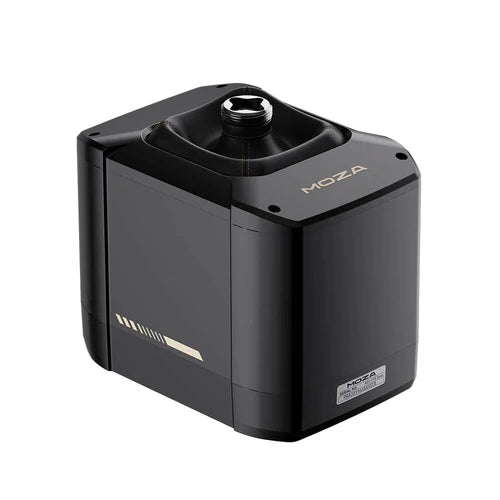
    The Moza AB9 FFB Base is a masterpiece of engineering for flight simulation enthusiasts who crave precision and power in their hands. With its dual servo motors delivering a remarkable peak torque of 12Nm, this base captures the subtleties of turbulence, takeoff, and every maneuver in between. Its aviation-grade aluminum alloy construction promises durability while its seamless, fanless design minimizes distractions. Whether you're mastering barrel rolls or steady descents, this flight stick base offers a tactile and visually sleek experience that redefines control. What sets the Moza AB9 FFB Base apart? Unmatched Torque and Control The dual servo motors deliver a peak torque of 12Nm, giving you unparalleled feedback to replicate realistic flight dynamics. Whether you're navigating turbulence or executing intricate maneuvers, the responsiveness ensures you feel every detail, right down to the smallest forces acting on your aircraft. Open Ecosystem for Versatile Use With support for third-party flight sticks and multiple installation options, the Moza AB9 integrates seamlessly into a variety of setups. Its adaptability caters to pilots who value choice and flexibility in their equipment, allowing for desktop clamping or dedicated rig mounting. Minimalist Yet Durable Design Built with aviation-grade aluminum alloy and finished with automotive-quality paint, this device not only looks sleek but withstands heavy use. The sealed, fanless design ensures a long lifespan by protecting internal components from dust and wear. Precise Adjustment and Feedback The high-resolution encoder chip and MOZA Control Loading System provide detailed adjustments and accurate replication of flight conditions. This precision lets you tailor your flight experience to match any scenario or personal preference. Pros and Cons Pros Cons Dual servo motors deliver exceptional torque for nuanced feedback. Heavier than some comparable bases at 12Nm torque. Compatible with third-party flight sticks and rigs. Premium materials may raise the price point. Fanless design reduces operational noise significantly. No wireless connectivity options. Specifications Specification Value Peak Torque 12Nm Constant Torque 9Nm Construction Material Aviation-Grade Aluminum Alloy Encoder High-Resolution Encoder Chip Compatibility Third-party flight sticks, various rigs Design Fanless, sealed structure Moza AB9 Base Compatibility The Moza AB9 is compatible with a wide range of third-party flight sticks and offers seamless integration into diverse setups. Its open ecosystem design supports clamping to desktops or mounting on rigs, making it adaptable to different environments. Additionally, the high-torque system is fully functional with leading flight simulation platforms like MSFS2020, X-Plane 12, and DCS, ensuring that sim pilots can use their favorite tools without restrictions. This device shines in its compatibility with gaming platforms and software. Designed for PC use, it performs excellently in simulators like IL-2 Sturmovik and War Thunder. However, it's not natively compatible with consoles, which may require additional peripherals or software adjustments. PC users will enjoy effortless integration and performance tailored to demanding simulations.

    1 w magazynie Wysyłka w ciągu 1–3 dni roboczych.

    €649,00

  • Last stock! Turtle Beach VelocityOne Flight System

    Turtle Beach Turtle Beach VelocityOne Flight System

    4 w magazynie Wysyłka w ciągu 1–3 dni roboczych.

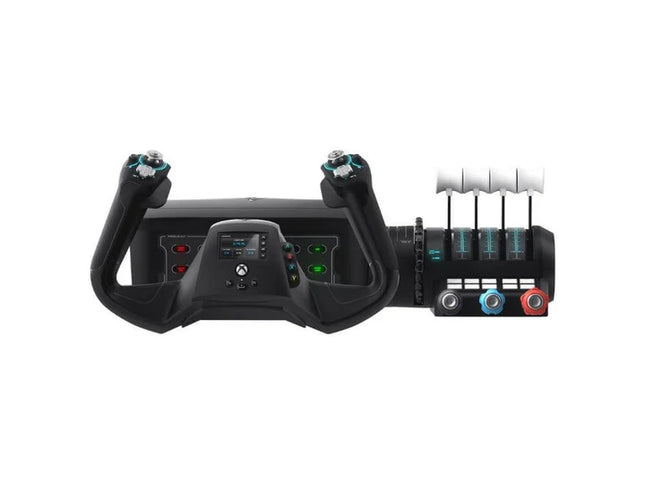
    The VelocityOne Flight System is a robust all-in-one solution for flight enthusiasts on PC and Xbox. With its dual throttle system and status indicator panel, it caters to pilots flying everything from Cessnas to jetliners. The smooth 180° rotating yoke with hall-effect sensors delivers a tactile, dependable feel, while the trim wheel and programmable buttons allow for customization that mirrors real-world operations. Whether you’re cruising through clouds or nailing precision landings, this system ensures you’re in full control. What sets the VelocityOne Flight System apart? Versatile Throttle System The VelocityOne Flight System features dual throttle options—four interchangeable levers for airliners and Vernier-style controls for smaller planes like the Cessna 172. This flexibility allows for accurate power management across different aircraft types, catering to both general aviation and commercial piloting styles. Integrated Annunciator Panel The included Status Indicator Panel adds a layer of realism with its ability to monitor critical systems. With interchangeable plates, it adapts to various aircraft, providing visual feedback on engine issues, warnings, or system states without requiring additional hardware. Rudder Control via Yoke Integrated rudder pedal control on the yoke lets you manage the tail rudder, nose wheel, and brakes with fingertip precision. While it doesn’t replace dedicated pedals, it’s a practical and effective solution for players seeking simplicity without sacrificing control. Flight Management Display The built-in screen serves as a Flight Management Display for Microsoft Flight Simulator, allowing seamless switching between profiles and providing essential data during flight. This feature minimizes reliance on external screens and keeps your focus on piloting. Pros and Cons Pros Cons Includes dual throttle options for diverse aircraft types. Rudder control on yoke lacks realism compared to pedals. Annunciator panel offers visual feedback on system status. Pricier than other entry-level flight controllers. Compatible with PC and Xbox Series X|S systems. Not compatible with PlayStation platforms. Specifications Specification Value Brand Turtle Beach Yoke Rotation 180° Throttle Type Dual (Airliner and Vernier-style) Platform Compatibility PC, Xbox Series X|S, Xbox One Sensor Type Hall-effect Programmable Buttons 10 Annunciator Panel Included with interchangeable plates VelocityOne Flight System Compatibility The VelocityOne Flight System is designed for PC and Xbox platforms, making it an excellent choice for both console and desktop users. It connects seamlessly to Microsoft Flight Simulator on Xbox Series X|S, and its hall-effect sensors ensure smooth, dependable input for precision maneuvers. While it provides button-based rudder control, users seeking a more immersive setup can pair it with dedicated rudder pedals, though this may require additional hardware. For gaming platforms, the VelocityOne is optimized for Xbox Series X|S and Xbox One, as well as Windows-based PCs running modern simulators. Unfortunately, it lacks compatibility with PlayStation consoles or Mac operating systems. While the Flight Management Display works particularly well with Microsoft Flight Simulator, it also integrates with other flight simulators, giving pilots an adaptable and feature-rich experience regardless of their preferred game.

    4 w magazynie Wysyłka w ciągu 1–3 dni roboczych.

    €379,00

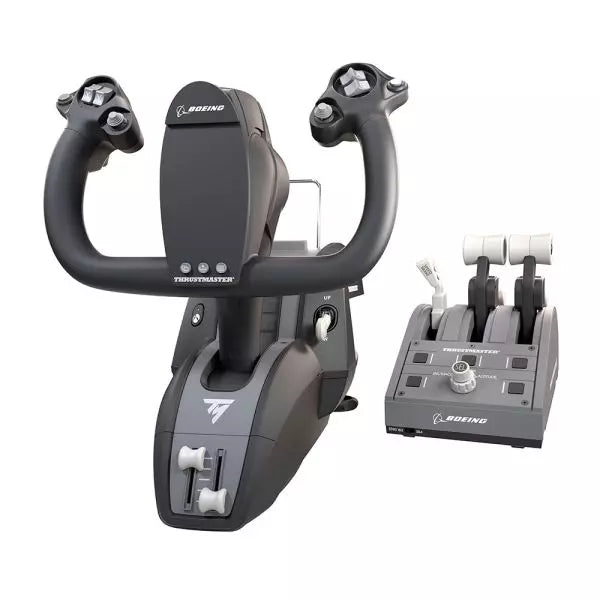
  • Last stock! TCA Yoke Boeing Edition Pack for sale at FlightSimZone

    Thrustmaster TCA Yoke Pack Boeing Edition

    5 w magazynie Wysyłka w ciągu 1–3 dni roboczych.

    Step into the captain’s seat with the TCA Yoke Pack Boeing Edition, a flight system designed to emulate the controls of a Boeing 787. With its suspended PENDUL_R mechanism providing fluid motion and a 100% metal internal structure, this yoke system offers durability and balance that will make you feel like you're piloting the real thing. Paired with a throttle quadrant featuring swappable levers and an iconic Boeing autopilot knob, it's an aviation enthusiast's dream grounded in technical brilliance. What sets the TCA Yoke Pack Boeing Edition apart? Boeing-Approved Design and Feel Designed with official Boeing licensing, the TCA Yoke Pack mirrors the ergonomic and operational feel of a 787 cockpit. The PENDUL_R mechanism mimics the genuine pendular motion of a Dreamliner’s yoke, offering an unmatched connection between pilot and machine. Adjustable Resistance for Tailored Control Its customizable spring system allows for precise resistance adjustments, catering to both beginner and experienced aviators. Whether you prefer a light touch or robust tension, the system adapts seamlessly to your needs. Durable All-Metal Construction With a 100% metal frame, this yoke delivers robustness and longevity. Users praise its sturdiness, ensuring it remains a reliable part of your setup for countless flight hours without losing its balanced feel. Swappable and Ambidextrous Throttle Quadrant The throttle levers can be swapped for speed brake and flaps levers, ensuring an ambidextrous setup. This flexibility is particularly lauded by users who need configurations suited to varied aircraft. Pros and Cons Pros Cons Robust metal construction ensures lasting durability. Expensive compared to many flight yoke systems. Suspended PENDUL_R mechanism provides smooth movement. Setup may be challenging for smaller spaces. Swappable levers offer exceptional customization options. Limited throttle quadrant size for complex setups. Compatible with both Xbox and PC for versatile use. Heavier weight makes portability difficult. Specifications Specification Value Yoke Dimensions 11.8" W x 15.4" D x 15.0" H Yoke Weight 14.8 lb / 6,700 g Quadrant Dimensions 5.1" W x 7.7" D x 5.9" H Quadrant Weight 1.3 lb / 600 g Box Contents Yoke, Quadrant, USB Cable, Mount, Levers, Flyers TCA Yoke Pack Boeing Edition Compatibility The TCA Yoke Pack Boeing Edition is officially licensed for use with Xbox One and Xbox Series X|S, making it an excellent choice for console-based aviators. Its PC compatibility adds flexibility, allowing for use with Microsoft Flight Simulator and other popular platforms. However, it may not be directly compatible with older Xbox models or PlayStation systems, so plan accordingly. The yoke and quadrant integrate automatically with Microsoft Flight Simulator, ensuring quick setup and recognition. It supports USB-C to USB-A connections, broadening its range of hardware compatibility. Be mindful of the need for supported software, as its advanced features require compatible simulation environments. With its seamless integration into modern gaming systems, the TCA Yoke Pack elevates the experience for casual flyers and hardcore enthusiasts alike. Whether flying on console or PC, it delivers the tools needed to take virtual aviation to new heights.

    5 w magazynie Wysyłka w ciągu 1–3 dni roboczych.

    €499,00

Flight Simulator Setup for sale at FlightSimZone

Witamy w FlightSimZone, największym sklepie z symulatorami lotu w Europie. Niezależnie czy jesteś pasjonatem lotnictwa, szkolisz się na pilota zawodowego, czy po prostu chcesz przeżyć dreszczyk emocji lotu nie wychodząc z domu, znajdziesz u nas wszystko do stworzenia idealnego stanowiska do symulatora lotu.

Nasza starannie dobrana kolekcja wysokiej klasy sprzętu do symulatorów lotu pozwala na zbudowanie zestawu dopasowanego do Twoich potrzeb, umiejętności i budżetu. Od prostych kontrolerów po profesjonalne komponenty kokpitu – mamy wszystko.

Profesjonalne stanowisko do symulatora lotu

Dla osób szukających najwyższego poziomu realizmu i funkcjonalności, profesjonalne stanowisko symulatora lotu to prawdziwe doświadczenie. Zazwyczaj obejmuje ono wiele monitorów, kompletne sterowanie kokpitem oraz systemy force feedback wiernie odwzorowujące odczucia prawdziwego lotu.

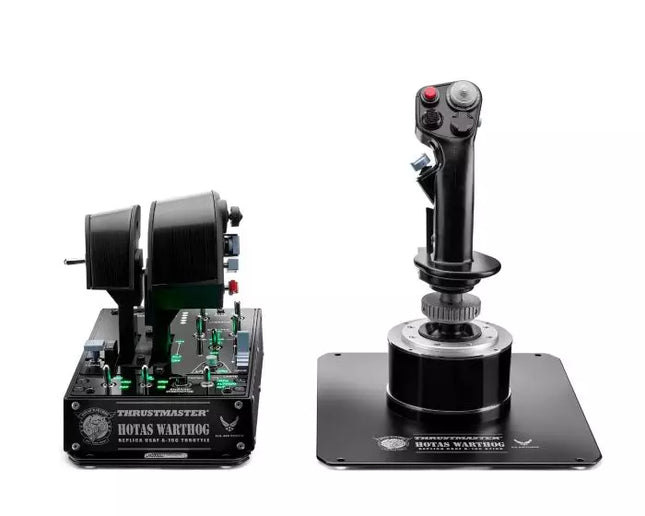
Moza AB9 Force Feedback Flight Stick Base (€599,00) zapewnia niezwykłą precyzję oraz realistyczny opór, będąc filarem każdego profesjonalnego zestawu. Razem z HOTAS WARTHOG™ (€449,00) otrzymujesz bezkonkurencyjną dokładność sterowania w cywilnych i wojskowych maszynach.

Dla pełnego rozwiązania profesjonalnego, Next Level Racing Flight Simulator (€899,00) zapewnia solidną ramę na wszystkie urządzenia sterujące i zachowanie odpowiedniej ergonomii podczas długich lotów. Ten zestaw to idealny wybór dla zaawansowanych entuzjastów i do celów szkoleniowych.

Najlepsze stanowisko do Microsoft Flight Simulator

Microsoft Flight Simulator zrewolucjonizował domową symulację lotów zachwycającą grafiką i realistyczną fizyką. Aby w pełni wykorzystać możliwości tego programu, potrzebujesz sprzętu, który dorówna jego poziomowi.

Rozpocznij od Honeycomb Bundle (Yoke & Throttle) (€459,00), który zapewnia wyjątkową jakość wykonania i precyzję sterowania cywilnymi samolotami. Wolant oferuje płynne, dokładne ruchy, a panel przepustnicy pozwala na perfekcyjne zarządzanie mocą silnika.

Dla większej immersji dodaj TCA Captain Pack X Airbus Edition (€299,00) lub TCA Yoke Pack Boeing Edition (€499,00) – zależnie od preferowanego samolotu. Oficjalnie licencjonowane produkty doskonale odwzorowują odczucia z latania tymi legendarnymi maszynami.

Dla pełnej wygody w symulatorze MSFS polecamy montaż sterowników na TM Flying Clamp (€69,00) – zapewnia stabilność i komfort podczas wielogodzinnych lotów.

Stwórz idealne stanowisko do symulatora lotu

W FlightSimZone rozumiemy, że każdy pilot ma inne potrzeby. Dlatego oferujemy szeroką gamę podzespołów, które można łączyć wedle uznania:

  • Systemy sterowania: Od wolantów, poprzez joysticki, po panele przepustnicy
  • Pedały kierunku: Do precyzyjnej kontroli kierunku lotu
  • Konstrukcje kokpitu: Od prostych uchwytów aż po pełne ramy do symulatorów
  • Systemy force feedback: Dla realistycznych wrażeń i oporu na sterownikach
  • Specjalistyczne kontrolery: Do określonych typów samolotów i zadań symulacyjnych

Turtle Beach VelocityOne Flight System (€359,00) to doskonałe rozwiązanie all-in-one dla tych, którzy chcą uprościć swoje stanowisko bez utraty jakości i funkcjonalności.

FAQ: Stanowisko do symulatora lotu

Ile kosztuje stanowisko do symulatora lotu?

Koszty stanowiska do symulatora lotu są bardzo zróżnicowane:

  • Podstawowy zestaw: €300-600 – proste sterowniki i mocowania
  • Średnia półka: €600-1,200 – dobre kontrolery, pedały kierunku oraz porządne mocowania
  • Profesjonalny zestaw: €1,500-5,000+ – pełny kokpit z force feedback, wieloma systemami sterowania i specjalistycznym sprzętem

W FlightSimZone znajdziesz propozycje na każdą kieszeń – by zbudować zestaw dopasowany do budżetu i gwarantujący najlepsze wrażenia z lotu.

Jak zbudować stanowisko symulatora lotu w domu?

Budowa domowego stanowiska symulatora lotu to kilka etapów:

  1. Wybierz miejsce: Przeznacz przestrzeń, gdzie Twój zestaw będzie mógł być postawiony na stałe
  2. Wybierz sterowniki: Zacznij od porządnego wolanta/joysticka i panelu przepustnicy
  3. Zadbaj o montaż: Zamontuj sprzęt na biurku lub w dedykowanej ramie kokpitu
  4. Skonfiguruj oprogramowanie: Zainstaluj preferowany symulator i skonfiguruj sterowniki
  5. Stopniowo rozbudowuj zestaw: Zacznij od podstaw i dokładaj kolejne kontrolery, gdy Twoje umiejętności rosną

Dla optymalnej ergonomii domowego stanowiska polecamy Next Level Racing Flight Simulator (€899,00) – daje kompletną ramę pod wszystkie urządzenia w wygodnej pozycji.

Jaka specyfikacja komputera dla symulatora lotu?

Dla nowoczesnych symulatorów jak Microsoft Flight Simulator 2020:

  • Minimalna: procesor Core i5, 16GB RAM, GTX 1070 lub odpowiednik, SSD minimum 150GB
  • Zalecana: procesor Core i7/Ryzen 7, 32GB RAM, RTX 3070 lub lepszy, SSD 256GB+
  • Optymalna: procesor Core i9/Ryzen 9, 64GB RAM, RTX 3080/4080 lub lepszy, SSD 512GB+

Wolant czy joystick do mojego symulatora?

Decyzja zależy od rodzaju najczęściej używanych maszyn:

  • Wolant (np. Honeycomb Bundle za €459,00): Najlepszy dla samolotów cywilnych, zwłaszcza większych typu Boeing i Airbus
  • Joystick (np. Moza AB9 za €599,00): Idealny do myśliwców, lekkich maszyn cywilnych i śmigłowców

Wielu zaawansowanych użytkowników finalnie posiada oba rozwiązania, symulując różne typy samolotów.

Jak zwiększyć immersję w symulatorze lotu?

Aby poprawić zanurzenie:

  1. Użyj kilku monitorów lub gogli VR
  2. Zainstaluj TrackIR do śledzenia głowy
  3. Zadbaj o wysokiej jakości dźwięk przestrzenny
  4. Wybierz kontrolery force feedback, np. Moza AB9 (€599,00)
  5. Dodaj oświetlenie i akcesoria kokpitu dla realizmu

Odwiedź FlightSimZone i zobacz pełną ofertę sprzętu do symulatorów lotu – zacznij budować wymarzony kokpit już dziś!


Login

Forgot your password?

Don't have an account yet?
Create account


