Joysticki do symulatorów lotu

19 products

  • VelocityOne Flightdeck

    Turtle Beach VelocityOne Flightdeck

    Brak w magazynie, Pre-Orders Available. Shipped in 2-2.5 weeks from now.

    VelocityOne Flightdeck delivers an exceptional HOTAS experience, built for sim pilots who crave full control. The Flight Touch Display puts real-time status updates and extra input options at your fingertips, while the adjustable stick height ensures a comfortable grip for every hand size. Its Hall-effect sensors promise long-lasting accuracy, and the customizable OLED HUD offers on-the-fly tuning. Whether you're maneuvering through dogfights or exploring deep space, this setup provides a comprehensive set of controls designed for seamless integration with major flight sims. What Sets the VelocityOne Flightdeck Apart? Flight Touch Display Adds Layers of Control – Unlike traditional HOTAS setups, this system introduces a dedicated touchscreen for managing in-flight status and input commands. It effectively expands your cockpit controls, allowing you to assign up to 39 extra button functions for customized interactions. Fully Adjustable Stick for Comfort and Ergonomics – Many setups lock users into a single grip position, but this one features an adjustable stick height. That means pilots with different hand sizes can fine-tune the control feel, ensuring maximum precision without hand fatigue. Modular Design with Dual USB Connectivity – While some HOTAS systems cram everything into a single unit, this setup consists of two independently connected USB devices. This allows for greater flexibility in mounting options and ensures reliable input recognition without interference. Deep Customization Through the Flight Hangar App – Unlike many competitors, this system comes with a dedicated configuration app that allows users to tweak lighting, input sensitivity, and firmware updates. The ability to save and load profiles for different aircraft ensures consistency across multiple simulations. Pros and Cons Pros Cons Touchscreen display provides extra controls and customization Requires manual mapping for full function in some games Modular design with independent throttle and stick Button layout can feel overwhelming for beginners Adjustable stick height for better ergonomics Limited compatibility with certain space sims Specifications Specification Value Connection Type USB-C to USB-A (Throttle and Stick) Weight (Stick) 1.46kg / 3.22lbs Weight (Throttle) 1.51kg / 3.33lbs Dimensions (Stick) 177 x 215.8 x 234.3 mm / 6.97” x 8.50” x 9.22” Dimensions (Throttle) 177.9 x 207.6 x 134.2 mm / 7.00” x 8.17” x 5.28” Programmable Buttons 139 Throttle Type Dual-engine with independent or linked control Included Accessories 2x USB-C to USB-A cables, mounting screws VelocityOne Flightdeck Compatibility Software Compatibility Details Full Compatibility Microsoft Flight Simulator 2020, X-Plane 11 & 12, DCS World, Prepar3D, Star Citizen, War Thunder Limited Compatibility Star Wars Squadrons, Elite: Dangerous (requires manual mapping) Hardware Compatibility Details PC (Windows 10 & 11) Requires USB connection; no support for Mac or consoles Designed exclusively for Windows 10 & 11 PCs, this HOTAS system does not support MacOS or gaming consoles. The dual USB design allows separate recognition of the throttle and stick, reducing input lag and ensuring stable connection across all supported simulators. Best suited for Microsoft Flight Simulator, X-Plane, and DCS World, the VelocityOne Flightdeck also supports Star Citizen and War Thunder with full button mapping. While it works with Elite: Dangerous and Star Wars Squadrons, manual configuration is required due to button limitations.

    Brak w magazynie, Pre-Orders Available. Shipped in 2-2.5 weeks from now.

    €419,00

  • Last stock! VelocityOne Flightstick

    Turtle Beach VelocityOne Flightstick

    3 w magazynie Shipped in 1-3 business days.

    The VelocityOne Flightstick is a versatile and feature-rich joystick designed to elevate your flight sim adventures. With a dedicated throttle quadrant and customizable buttons, it offers detailed control for both casual and experienced pilots. Its ergonomic design ensures comfort during marathon sessions, while the integrated OLED display keeps critical data at your fingertips. Whether navigating the skies on PC or Xbox, this Flightstick combines functionality and flair, delivering a tactile experience that keeps you engaged from takeoff to landing. What sets the VelocityOne Flightstick apart? Integrated OLED Display The built-in OLED screen provides essential flight information in real-time, streamlining access to critical settings without distracting from the action. This feature is especially useful for adjusting configurations mid-flight, enhancing control fluidity. Extensive Customization With multiple programmable buttons and profiles, the VelocityOne Flightstick adapts to various flight styles and aircraft. Its dedicated trim wheel and dual hat switches allow for meticulous control adjustments, catering to both beginners and seasoned sim pilots. Dual-Platform Compatibility Seamlessly compatible with both PC and Xbox platforms, this joystick integrates effortlessly with popular simulators. Its USB-C connection ensures low-latency input and modern connectivity standards for hassle-free operation. Ergonomic Design and Build Built with durability and comfort in mind, the Flightstick’s intuitive layout and sturdy construction make it a dependable companion for long flight sessions. Its lightweight design adds portability without sacrificing stability during intense use. Pros and Cons Pros Cons OLED screen offers quick access to critical information. Initial setup may be challenging for beginners. Programmable buttons allow for extensive customization. Not compatible with PlayStation consoles. Works seamlessly with PC and Xbox platforms. Specifications Specification Value Product Type Joystick Rudder Control Yes Magnetic Sensors Yes RGB Lighting Yes Color Black Weight 0.8 kg Platform PC, Xbox One, Xbox Series X|S Operating System Windows 10 or higher Connection USB-C to USB-A Warranty 2 years (Carry-in) VelocityOne Flightstick Compatibility The VelocityOne Flightstick boasts compatibility with both PC and Xbox platforms, making it a versatile choice for flight sim enthusiasts. Designed for Windows 10 or higher, it connects seamlessly via USB-C, ensuring fast and reliable data transmission. However, it is not compatible with PlayStation systems, limiting cross-platform use for some users. The Flightstick integrates effortlessly with major flight simulators such as Microsoft Flight Simulator 2020, leveraging its precision controls to provide an exceptional experience. The joystick’s programmable buttons and trim wheel make it an excellent choice for various aircraft and playstyles. Its compatibility with both Xbox Series X|S and Xbox One ensures that console players can enjoy a robust and immersive flight simulation setup. However, it requires a Windows PC or Xbox, as Linux or macOS compatibility is not supported, and its features are optimized for the listed systems.

    3 w magazynie Shipped in 1-3 business days.

    €169,00

  • Last stock! TCA Officer Pack Airbus Edition for sale on FlightSimzone

    Thrustmaster TCA Officer Pack Airbus Edition

    5 w magazynie Shipped in 1-3 business days.

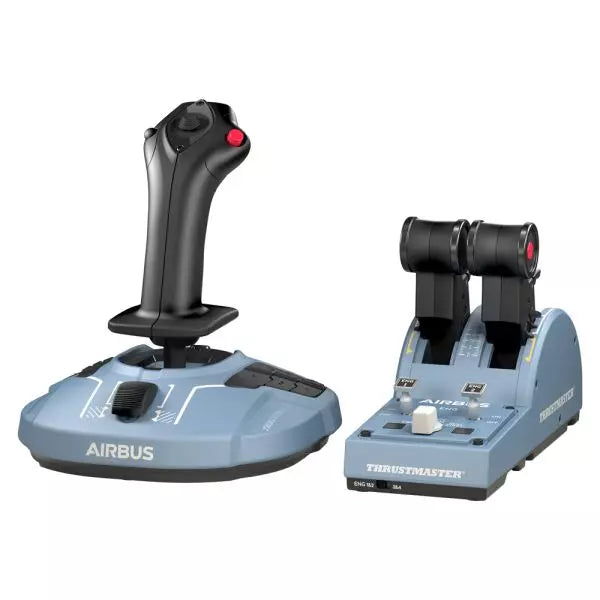
    The TCA Officer Pack Airbus Edition is a must-have for anyone looking to bring the feel of commercial aviation into their setup. Featuring an ergonomic design inspired by the Airbus A320, it includes both the TCA Sidestick and Throttle Quadrant for unparalleled control. With magnetic sensor technology ensuring smooth input and a modular sidestick for versatile configurations, this pack allows you to command the skies with precision. Whether you're piloting an airliner or a fighter jet, this pack adapts seamlessly to your needs. What sets the TCA Officer Pack Airbus Edition apart? Modular Sidestick Design The sidestick features swappable head button modules, letting you configure it for captain, co-pilot, or solo flight setups. This modularity is a rarity, offering flexibility for various playstyles and gaming environments. Detents and Thrust Reverser Mechanisms The throttle quadrant includes precise detents and a built-in thrust reverser, creating tactile feedback that simulates real-world controls. The ability to switch to linear mode adds even more versatility for diverse aircraft. Durable Magnetic Technology Both devices leverage contactless magnetic sensors, eliminating potentiometers and ensuring longevity. This design improves reliability and minimizes input lag during critical maneuvers. Seamless Multi-Device Compatibility The pack integrates smoothly with peripherals like the Thrustmaster T.Flight Rudder Pedals and TM Flying Clamp. This ensures a cohesive and immersive setup for dedicated aviation enthusiasts. Pros and Cons Pros Cons Ergonomic design inspired by Airbus A320 controls. Out of stock frequently due to demand. Modular sidestick supports various configurations. Throttle quadrant lacks backlighting for night sessions. Magnetic sensors ensure long-lasting durability. No native console support; PC only. Supports dual throttle for four-engine aircraft. Additional throttle quadrant required for full four-engine control. Specifications Specification Value TCA Sidestick Width 7.7” / 195 mm TCA Sidestick Depth 8.9” / 225 mm TCA Sidestick Height 7.7” / 195 mm TCA Sidestick Weight 2.0 lb / 920 g TCA Quadrant Width 10.0” / 255 mm TCA Quadrant Depth 5.7” / 145 mm TCA Quadrant Height 3.3” / 85 mm TCA Quadrant Weight 1.2 lb / 530 g Box Contents TCA Sidestick, TCA Quadrant, 4 swappable joystick head modules, USB cable, sticker, connectors, attachment rod TCA Officer Pack Airbus Edition Compatibility Hardware Compatibility Rudder Pedals Compatible with Thrustmaster T.Flight and Pendular Rudder Mounting Clamp Compatible with Thrustmaster TM Flying Clamp The TCA Officer Pack Airbus Edition is designed to integrate seamlessly with other Thrustmaster peripherals, making it a versatile addition to an established setup. The throttle quadrant allows for linking two units to handle four-engine aircraft, and the sidestick's modularity adapts easily to a variety of cockpit configurations. However, its PC compatibility means users seeking console integration will need to look elsewhere. On the gaming platform front, this pack is fully compatible with Windows 10 and 8 systems and works well across major flight simulators like Microsoft Flight Simulator and X-Plane. However, it does not natively support console platforms, limiting its use for Xbox or PlayStation users.

    5 w magazynie Shipped in 1-3 business days.

    €179,00

  • Last stock! Honeycomb Foxtrot Aviation Stick

    Fly Honeycomb Honeycomb Foxtrot Aviation Stick

    4 w magazynie Shipped in 1-3 business days.

    Honeycomb Foxtrot Aviation Stick is built for pilots who prefer a sidestick in hand and a clean desk in front of them. From the first movement, the smooth linear resistance system with no center detent feels fluid and deliberate, ideal for Airbus-style inputs and aerobatic maneuvers. Under the hood, 16-bit resolution with Hall Effect sensor technology translates subtle wrist movements into accurate on-screen control. Add adjustable tension and a fully ambidextrous layout, and you’ve got a stick that feels purposeful rather than toy-like. What Sets the Honeycomb Foxtrot Aviation Stick apart? Center-Detent-Free Control Philosophy Many sticks rely on a noticeable center bump, which can make small corrections feel mechanical. The Foxtrot’s linear resistance system eliminates that notch, creating a smooth transition across the full axis range. Pilots flying Airbus aircraft in particular appreciate this design, as it mirrors sidestick behavior more closely and allows gentle pitch and roll corrections without fighting a spring-loaded “click” at center. Sensor and Resolution Synergy With 16-bit resolution paired to Hall Effect sensors, the Foxtrot delivers clean, contactless input detection. Enthusiasts often point out the consistency over time—no spiking, no gradual degradation from physical potentiometers. Subtle trim adjustments during approach or careful roll inputs in aerobatics feel steady and predictable, especially when compared to entry-level sticks that can show jitter near center. Configurable Resistance and Ergonomics Adjustable tension allows the stick to be tuned to personal preference, whether you prefer lighter fingertip inputs or firmer resistance for controlled movements. Combined with its ambidextrous grip design, the Foxtrot suits both left- and right-handed setups. Users with compact cockpit builds often highlight how adaptable it feels in different seating positions, including center-mounted or side-mounted configurations. Switch Density Without Clutter Between the 5 two-way switches, 4 programmable action buttons, POV hat, trigger, rockers, and multi-way rotary panel, the stick offers serious input flexibility. What stands out is how logically the controls are spaced; sim pilots frequently mention that functions like trim, autopilot modes, or camera controls can be assigned without feeling cramped or hunting blindly mid-flight. Pros and Cons Pros Cons Linear resistance without center detent feels smooth. No native console compatibility. Hall Effect sensors reduce long-term wear. No included dedicated mounting base. Adjustable tension suits different flying styles. Extensive switch and button configuration options. Specifications Specification Value Product Name Honeycomb Foxtrot Aviation Stick Control System Linear resistance system with no center detent Sensor Technology Hall Effect sensors Resolution 16-bit Tension Adjustment Adjustable stick resistance Switches 5 two-way switches Action Buttons 4 programmable buttons Rotary Panel 3-, 4-, and 5-way rotary controls Grip Design Ambidextrous Connection USB-C to USB-A cable System Compatibility PC and Mac Included in the Box Foxtrot Aviation Stick, USB-C to USB-A Cable, Quick Start Guide (EFIGS) Download Support Basic Bindings Profiles (XML) for MSFS 2024 Honeycomb Foxtrot Aviation Stick Compatibility Platform Compatibility Operating Systems PC and Mac Connection Type USB-C to USB-A direct USB interface Primary Sim Support MSFS 2024 (XML bindings), MSFS, X-Plane, Prepar3D The Foxtrot Aviation Stick connects via standard USB, allowing it to integrate easily into most desktop cockpit setups. It works seamlessly alongside throttle quadrants, rudder pedals, and radio panels from other major brands thanks to its plug-and-play HID architecture. Its ambidextrous design makes it suitable for left- or right-seat configurations, including Airbus-style side mounting. It is not compatible with Xbox consoles and does not function as a standalone device without a connected PC or Mac. On the software side, it supports Microsoft Flight Simulator 2024 with dedicated XML binding profiles and operates with popular PC simulators such as Microsoft Flight Simulator (2020), X-Plane, and Prepar3D through manual or community mappings. It is not designed for console-based platforms, as it relies on native PC/Mac driver recognition rather than console-certified firmware.

    4 w magazynie Shipped in 1-3 business days.

    €165,00

  • WINCTRL URSA MINOR Airline Joystick R

    WINCTRL WINCTRL URSA MINOR Airline Joystick R

    Brak w magazynie, Pre-Orders Available. Shipped in 2-2.5 weeks from now.

    WINCTRL URSA MINOR Airline Joystick R brings airline-style control to the desktop with a clever mix of tactile feedback and thoughtful engineering. The standout feature is the flight-data-linked vibration engine, which adds subtle physical cues during events like flap deployment, airflow changes, and touchdown. Pair that with non-contact magnetic resistance sensors on the X and Y axes, and the stick delivers smooth, stable inputs without the wear issues common in cheaper mechanisms. The result is a joystick that feels lively in hand yet technically grounded under the hood. What Sets the WINCTRL URSA MINOR Airline Joystick R apart? Flight Data Driven Vibration Feedback The URSA MINOR stands out with a vibration motor tied directly to in-sim flight data. Instead of generic rumble, the stick reacts to events like landing contact, airflow changes, or flap movement. Pilots online often mention how this adds subtle physical cues during phases like flare or speed changes, providing a tactile reminder of what the aircraft is doing without constantly glancing at instruments. Robust Gimbal With Magnetic Sensors At the core of the stick is a glass-fiber-reinforced nylon gimbal running on ball bearings, paired with non-contact magnetic sensors for the primary axes. This combination helps maintain smooth motion over time without the jitter common in potentiometer-based designs. Enthusiasts frequently note that the stick movement feels stable across the entire travel range, particularly during small pitch adjustments on final approach. Airliner-Inspired Grip Layout The grip design borrows cues from airline sidestick ergonomics, offering a balanced control layout that includes a PTT trigger, autopilot disconnect switch, and a concealed five-way switch beneath a magnetic cover. Pilots often highlight how practical this arrangement is for everyday flying tasks—radio calls, autopilot overrides, and camera views can all be handled without reaching for the keyboard. Flexible Mounting and Maintenance Design The base includes anti-slip pads for desktop use along with pre-drilled mounting holes for cockpit rigs. A quick-release base cover allows access to internal adjustments without dismantling the entire unit. This detail is frequently appreciated by sim cockpit builders who prefer gear that can be tuned or serviced easily rather than permanently sealed hardware. Pros and Cons Pros Cons Flight-data vibration feedback adds tactile flight cues. Plastic construction compared to metal joystick designs. Magnetic sensors reduce wear and input drift. Limited axis travel compared to extended bases. Good button layout for airliner-style flying tasks. Desk or cockpit mounting options included. Specifications Specification Value Product Model URSA MINOR-Airline-Joystick R Material Industrial ABS plastic (PC + ABS) Controller 32-bit ARM controller X/Y Axis Movement Angle ±15° Z Axis Rotation Angle ±20° X/Y Sensors Non-contact magnetic resistance sensors Gimbal Construction Glass fiber reinforced nylon with ball bearings Operating Force (X/Y) Approximately 6N Rotation Torque (Z) ~4 kgf·cm Throttle Axis Type Long-travel sliding potentiometer Throttle Axis Travel 38 mm Buttons 14 buttons (250gf press force, 0.25 mm travel) Special Controls Hidden 5-way switch, PTT trigger, autopilot disconnect Vibration Feature Adjustable amplitude levels from 0–255 Mounting Options Anti-slip desktop pads and cockpit mounting holes Item Weight 3 kg Included in Box J5-BASE-BLACK + JGRIP-C1-R, Data Cable, Toolkit, Accessories Pack WINCTRL URSA MINOR Airline Joystick R Compatibility Platform Compatibility Connection Type USB plug-and-play connection Software Configuration WW SIMAPP Pro software for button mapping Mounting Desktop use or cockpit mounting The URSA MINOR Airline Joystick R connects via standard USB, allowing it to integrate easily with throttle quadrants, rudder pedals, and other flight hardware from many manufacturers. The base supports both desktop placement with anti-slip pads and cockpit mounting using pre-drilled holes, which is useful for sim rigs or permanent setups. Configuration is handled through WW SIMAPP Pro software, enabling button assignments and vibration adjustments directly from a visual interface. Within a flight setup, the joystick works well alongside external throttles, radio panels, or pedal systems because it behaves as a standard USB HID controller. It does not require proprietary ecosystems and can coexist with other brands in the same cockpit. However, it is intended for PC-based simulation environments and does not integrate directly with console platforms. In terms of simulators, the stick supports Microsoft Flight Simulator 2020, X-Plane, Prepar3D, and also space or combat titles like Star Citizen, Elite Dangerous, and War Thunder. Its plug-and-play USB design allows quick recognition in most PC simulation platforms. It is not designed for Xbox or PlayStation consoles, as those systems typically require licensed hardware and different firmware structures.

    Brak w magazynie, Pre-Orders Available. Shipped in 2-2.5 weeks from now.

    €99,00

  • WINCTRL URSA MINOR Airline Joystick L

    WINCTRL WINCTRL URSA MINOR Airline Joystick L

    Brak w magazynie, Pre-Orders Available. Shipped in 2-2.5 weeks from now.

    WINCTRL URSA MINOR Airline Joystick L brings airline-style control to the desktop with a clever mix of tactile feedback and thoughtful engineering. The standout feature is the flight-data-linked vibration engine, which adds subtle physical cues during events like flap deployment, airflow changes, and touchdown. Pair that with non-contact magnetic resistance sensors on the X and Y axes, and the stick delivers smooth, stable inputs without the wear issues common in cheaper mechanisms. The result is a joystick that feels lively in hand yet technically grounded under the hood. What Sets the WINCTRL URSA MINOR Airline Joystick L apart? Flight Data Driven Vibration Feedback The URSA MINOR stands out with a vibration motor tied directly to in-sim flight data. Instead of generic rumble, the stick reacts to events like landing contact, airflow changes, or flap movement. Pilots online often mention how this adds subtle physical cues during phases like flare or speed changes, providing a tactile reminder of what the aircraft is doing without constantly glancing at instruments. Robust Gimbal With Magnetic Sensors At the core of the stick is a glass-fiber-reinforced nylon gimbal running on ball bearings, paired with non-contact magnetic sensors for the primary axes. This combination helps maintain smooth motion over time without the jitter common in potentiometer-based designs. Enthusiasts frequently note that the stick movement feels stable across the entire travel range, particularly during small pitch adjustments on final approach. Airliner-Inspired Grip Layout The grip design borrows cues from airline sidestick ergonomics, offering a balanced control layout that includes a PTT trigger, autopilot disconnect switch, and a concealed five-way switch beneath a magnetic cover. Pilots often highlight how practical this arrangement is for everyday flying tasks—radio calls, autopilot overrides, and camera views can all be handled without reaching for the keyboard. Flexible Mounting and Maintenance Design The base includes anti-slip pads for desktop use along with pre-drilled mounting holes for cockpit rigs. A quick-release base cover allows access to internal adjustments without dismantling the entire unit. This detail is frequently appreciated by sim cockpit builders who prefer gear that can be tuned or serviced easily rather than permanently sealed hardware. Pros and Cons Pros Cons Flight-data vibration feedback adds tactile flight cues. Plastic construction compared to metal joystick designs. Magnetic sensors reduce wear and input drift. Limited axis travel compared to extended bases. Good button layout for airliner-style flying tasks. Desk or cockpit mounting options included. Specifications Specification Value Product Model URSA MINOR-Airline-Joystick L Material Industrial ABS plastic (PC + ABS) Controller 32-bit ARM controller X/Y Axis Movement Angle ±15° Z Axis Rotation Angle ±20° X/Y Sensors Non-contact magnetic resistance sensors Gimbal Construction Glass fiber reinforced nylon with ball bearings Operating Force (X/Y) Approximately 6N Rotation Torque (Z) ~4 kgf·cm Throttle Axis Type Long-travel sliding potentiometer Throttle Axis Travel 38 mm Buttons 14 buttons (250gf press force, 0.25 mm travel) Special Controls Hidden 5-way switch, PTT trigger, autopilot disconnect Vibration Feature Adjustable amplitude levels from 0–255 Mounting Options Anti-slip desktop pads and cockpit mounting holes Item Weight 3 kg Included in Box J5-BASE-BLACK + JGRIP-C1-R, Data Cable, Toolkit, Accessories Pack WINCTRL URSA MINOR Airline Joystick L Compatibility Platform Compatibility Connection Type USB plug-and-play connection Software Configuration WW SIMAPP Pro software for button mapping Mounting Desktop use or cockpit mounting The URSA MINOR Airline Joystick L connects via standard USB, allowing it to integrate easily with throttle quadrants, rudder pedals, and other flight hardware from many manufacturers. The base supports both desktop placement with anti-slip pads and cockpit mounting using pre-drilled holes, which is useful for sim rigs or permanent setups. Configuration is handled through WW SIMAPP Pro software, enabling button assignments and vibration adjustments directly from a visual interface. Within a flight setup, the joystick works well alongside external throttles, radio panels, or pedal systems because it behaves as a standard USB HID controller. It does not require proprietary ecosystems and can coexist with other brands in the same cockpit. However, it is intended for PC-based simulation environments and does not integrate directly with console platforms. In terms of simulators, the stick supports Microsoft Flight Simulator 2020, X-Plane, Prepar3D, and also space or combat titles like Star Citizen, Elite Dangerous, and War Thunder. Its plug-and-play USB design allows quick recognition in most PC simulation platforms. It is not designed for Xbox or PlayStation consoles, as those systems typically require licensed hardware and different firmware structures.

    Brak w magazynie, Pre-Orders Available. Shipped in 2-2.5 weeks from now.

    €99,00

  • Honeycomb Echo Aviation Controller

    Fly Honeycomb Honeycomb Echo Aviation Controller

    Brak w magazynie, Pre-Orders Available. Shipped in 2-2.5 weeks from now.

    Honeycomb Echo Aviation Controller is one of those devices that makes you rethink how much hardware you actually need to fly properly. Everything sits in your hands—pitch, roll, yaw, throttle, trim—all within reach, anchored by a 16-bit Hall-effect thumbstick that feels smooth and consistent through every movement. Pair that with a complete all-in-one flight control layout, and you’ve got a compact cockpit that works just as well on a desk as it does on the couch. It’s clever, tactile, and surprisingly capable for its size. What Sets the Honeycomb Echo Aviation Controller apart? All-in-One Without Feeling Compromised – Many compact controllers try to do everything and end up feeling like a gamepad with extra buttons. The Echo stands out because each control has a defined purpose and physical identity. Users often mention how the dedicated trim wheel, levers, and rudder system make it feel closer to a proper flight control setup, rather than a simplified alternative. Mechanical Rudder Integration – Instead of relying on twist input or triggers, the Echo uses mechanically linked rudder pedals with Hall-effect sensing. This is something pilots quickly notice, especially during coordinated turns or crosswind landings. The self-centering action gives a consistent feel that’s easier to manage than digital-style inputs found on many compact controllers. Designed for Flexible Flying Spaces – Feedback from users consistently highlights how freeing it is to fly without a fixed rig. Whether sitting at a desk, relaxing on a couch, or traveling, the Echo adapts without needing mounts or external peripherals. It’s particularly appealing for sim pilots who don’t have space for a full yoke, throttle quadrant, and pedal setup. Thoughtful Control Layout for MSFS – The layout feels intentionally designed around Microsoft Flight Simulator workflows. Common functions like gear, flaps, trim, and camera controls are placed where fingers naturally rest. Many users note that once muscle memory develops, cockpit interaction becomes quicker and more fluid compared to mapping everything onto a generic controller. Pros and Cons Pros Cons All flight controls integrated into one compact unit Less tactile separation than full-size hardware setups Hall-effect sensors provide smooth, drift-free input Limited physical range compared to dedicated yokes Wireless operation with long battery life Portable design works without dedicated sim rig Specifications Specification Value Control Type All-in-one flight controller (pitch, roll, yaw, throttle, trim, flaps, gear) Primary Input 16-bit Hall-effect thumbstick Rudder System Mechanically linked Hall-effect rudder pedals Throttle/Sliders Four detented sliders with interchangeable caps Connectivity Wireless (2.4 GHz dongle) or USB-C wired Battery 1200 mAh, up to 15 hours usage System Compatibility PC and Mac Software Compatibility Microsoft Flight Simulator, X-Plane 11/12, Prepar3D Included Accessories Travel case, lever caps, wireless dongle, USB cable Warranty 2-year limited warranty Honeycomb Echo Aviation Controller Compatibility The Echo is built with flexibility in mind. It is compatible with PC and Mac systems and connects either through USB-C wired connection or a 2.4 GHz wireless dongle. Because it operates as a standalone controller, it does not require additional yokes, pedals, or throttle quadrants, making it ideal for compact setups or portable use. It is not designed to integrate directly with traditional hardware ecosystems like separate yokes or external rudder pedals. Its all-in-one design means fewer cables and simpler setups, but it also means less modular expansion compared to full cockpit systems. Pilots who prefer mixing and matching hardware may find it less suited to complex multi-device configurations, as the Echo is intended to replace, rather than complement, those components. On the software side, the controller is fully compatible with Microsoft Flight Simulator and also supports X-Plane 11, X-Plane 12, and Prepar3D. It is not designed for console use, focusing entirely on PC-based simulation platforms where full input mapping and customization are available.

    Brak w magazynie, Pre-Orders Available. Shipped in 2-2.5 weeks from now.

    €150,00

Flight Simulator Joysticks for sale at FlightSImZone

Rozpoczynając przygodę z symulatorami lotu, wysokiej jakości joystick do symulatora lotu to Twój główny kontakt z wirtualnym statkiem powietrznym. Te precyzyjne urządzenia przekładają najmniejsze ruchy na dokładne sygnały sterowania, co czyni je nieodzownymi zarówno dla rekreacyjnych lotów, jak i zaawansowanego szkolenia lotniczego.

Najlepsze joysticki do symulatorów lotu

Dzisiejszy rynek oferuje joysticki dopasowane do różnych potrzeb i preferencji. HOTAS Warthog to sprzęt z najwyższej półki – pełnometalowa konstrukcja i precyzja klasy wojskowej. T.Flight Stick X świetnie sprawdzi się jako sprzęt startowy. TCA Sidestick X Airbus Edition to kompromis: autentyczne wrażenia sterowania airlinerem oraz profesjonalne czujniki.

Joystick do Microsoft Flight Simulator

Zaawansowany silnik fizyczny Microsoft Flight Simulator wymaga precyzyjnych kontrolerów dla pełnej kontroli maszyny. T16000M FCS to bardzo popularny wybór – Hall Effect, ergonomia i dokładność. VelocityOne Flightstick zaś to dedykowane rozwiązanie zoptymalizowane dla MSFS.

Joystick do symulatora lotu na PC

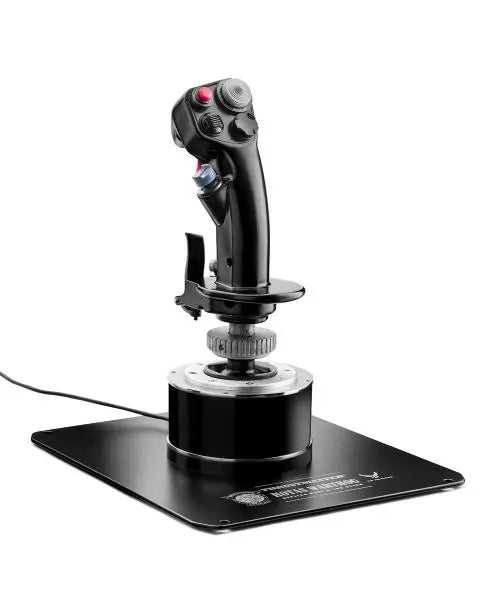
Platformy PC dają największą kompatybilność z systemami sterowania lotu, a użytkownik ma wybór spośród wielu zaawansowanych rozwiązań. AVA F/A-18 Super Hornet Flightstick pokazuje nowoczesną technologię PC – zaawansowane czujniki, programowalne funkcje, i oprogramowanie do personalizowania ustawień kontrolera.

Tabela porównawcza

Funkcja HOTAS Warthog TCA Sidestick X Airbus T16000M FCS VelocityOne Flightstick T.Flight Stick X AVA F/A-18 Super Hornet
Kompatybilność platformy PC PC PC Xbox Series X|S, PC PC, PS3 PC
Konstrukcja Pełen metal Plastik przemysłowy Wzmocniony plastik Plastik premium Plastik Hybryda metal/plastik
Rodzaj czujnika H.E.A.R.T Hall Effect H.E.A.R.T Hall Effect Hall Effect Hall Effect Potenjcjometr Hall Effect
Liczba przycisków 19 + Hat Switch 17 + Hat Switch 16 + Hat Switch 12 + Hat Switch 12 + Hat Switch 19 + Dual Hat Switch
Przepustnica w zestawie Tak (osobna) Nie Opcjonalnie Nie Nie Nie
Funkcje oprogramowania T.A.R.G.E.T Software T.A.R.G.E.T Software T.A.R.G.E.T Software Aplikacja dedykowana Podstawowa kalibracja Zaawansowane programowanie
Rozdzielczość osi 16-bit 16-bit 16-bit 16-bit 8-bit 16-bit
Cechy specjalne • Konstrukcja wojskowa
• Podwójna przepustnica
• Metalowa podstawa
• Design Airbus
• System modularny
• Dwustronny
• Dwustronny
• Szeroka podstawa
• Regulowane napięcie
• Optymalizacja Xbox
• Panel statusu
• Szybkie sterowanie
• Podstawowe funkcje
• Kompaktowe rozmiary
• Niedrogie
• Replika F/A-18
• Gotowość bojowa
• Premium grip

Kluczowe cechy techniczne:

Technologia precyzyjna

  • Magnetyczne czujniki Hall Effect
  • 16-bitowa rozdzielczość osi
  • Wielokierunkowe przełączniki HAT

Elementy wytrzymałości

  • Wzmocniona podstawa
  • Komponenty klasy przemysłowej
  • Mechanizmy metalowych dźwigni

Joystick do symulatora lotu Xbox

W symulacji lotu na konsoli, szczególnie Xbox, technologia poszła znacznie do przodu. Nowoczesne joysticki do Xbox oferują zaawansowane funkcje, które wcześniej były dostępne wyłącznie na PC. Te kontrolery łączą prostotę plug-and-play z cechami profesjonalnych urządzeń, gwarantując pilotom konsoli precyzję sterowania jak na komputerach.

Zaawansowane technologie sterowania

Współczesne joysticki do symulatorów lotu oferują innowacje podnoszące jakość i trwałość sterowania. Czujniki wysokiej rozdzielczości gwarantują precyzję pozycji, a nowoczesne materiały stabilność pracy przez tysiące godzin. Producenci wprowadzają elementy designu inspirowane sprzętem wojskowym – ergonomia, realizm, wytrzymałość.

Te innowacje obejmują integrację z oprogramowaniem – joysticki mają dedykowane aplikacje do programowania, ustawiania czułości i konfigurowania mapowania przycisków pod konkretne rodzaje samolotów. Wieloosiowe sterowanie pozwala realistycznie odwzorować zaawansowane manewry lotnicze – od lotów precyzyjnych po symulacje bojowe.

Kup joystick do symulatora lotu w FlightSimZone

Wysokiej jakości joystick do symulatora lotu to kluczowa inwestycja w Twoją wirtualną przygodę lotniczą. Niezależnie czy ćwiczysz procedury lotnicze do realnych egzaminów, czy po prostu latasz rekreacyjnie – właściwy joystick znacząco polepszy jakość doznań. W FlightSimZone zawsze dobieramy sterowniki tak, by odpowiadały indywidualnym potrzebom pilota.

Kup joystick do symulatora lotu w FlightSimZone i poczuj idealną równowagę precyzji oraz kontroli w swoim wirtualnym kokpicie.


Login

Forgot your password?

Don't have an account yet?
Create account


