Flight Simulator Joysticks

19 products

  • VelocityOne Flightdeck

    Turtle Beach VelocityOne Flightdeck

    Ikke på lager, Pre-Orders Available. Shipped in 2-2.5 weeks from now.

    VelocityOne Flightdeck leverer en eksepsjonell HOTAS-opplevelse, laget for sim-piloter som ønsker full kontroll. Flight Touch Display gir sanntidsstatusoppdateringer og ekstra inputalternativer rett ved fingertuppene, mens justerbar spakhøyde sikrer et komfortabelt grep for alle håndstørrelser. Hall-effekt sensorene lover langvarig presisjon, og den tilpassbare OLED HUD-en gir mulighet for justering i sanntid. Enten du manøvrerer gjennom hundeslag eller utforsker verdensrommet, gir dette systemet et omfattende sett med kontroller designet for sømløs integrasjon med de største flysimulatorene. Hva skiller VelocityOne Flightdeck fra andre? Flight Touch Display Gir Ekstra Kontroll – I motsetning til tradisjonelle HOTAS-systemer, introduserer dette systemet en dedikert berøringsskjerm for å administrere status under flyvning og input-kommandoer. Det utvider effektivt cockpit-kontrollene, slik at du kan tildele opptil 39 ekstra knappfunksjoner for tilpasset interaksjon. Fullt Justerbar Spak for Komfort og Ergonomi – Mange systemer låser brukere i én posisjon, men dette har en justerbar spakhøyde. Det betyr at piloter med forskjellige håndstørrelser kan finjustere kontrollfølelsen, og sikrer maksimal presisjon uten håndtretthet. Modulær Design med Dual USB-Tilkobling – Mens noen HOTAS-systemer pakker alt inn i én enhet, består dette systemet av to uavhengig tilkoblede USB-enheter. Dette gir større fleksibilitet i monteringsalternativer og sikrer pålitelig input-gjenkjenning uten interferens. Dyp Tilpasning Gjennom Flight Hangar App – I motsetning til mange konkurrenter, leveres dette systemet med en dedikert konfigurasjonsapp som lar brukere justere belysning, inputfølsomhet og firmwareoppdateringer. Muligheten til å lagre og laste profiler for forskjellige fly sikrer konsistens på tvers av flere simulatorer. Fordeler og Ulemper Fordeler Ulemper Berøringsskjerm gir ekstra kontroller og tilpasning Manuell kartlegging kan være nødvendig for full funksjonalitet i noen spill Modulær design med uavhengig gass og spak Knappoppsettet kan føles overveldende for nybegynnere Justerbar spakhøyde for bedre ergonomi Begrenset kompatibilitet med enkelte romfartsimulatorer Spesifikasjoner Spesifikasjon Verdi Tilkoblingstype USB-C til USB-A (Gass og Spak) Vekt (Spak) 1.46kg / 3.22lbs Vekt (Gass) 1.51kg / 3.33lbs Dimensjoner (Spak) 177 x 215.8 x 234.3 mm / 6.97” x 8.50” x 9.22” Dimensjoner (Gass) 177.9 x 207.6 x 134.2 mm / 7.00” x 8.17” x 5.28” Programmerbare knapper 139 Gassystem Dual-engine med uavhengig eller sammenkoblet kontroll Inkluderte tilbehør 2x USB-C til USB-A kabler, monteringsskruer VelocityOne Flightdeck Kompatibilitet Programvarekompatibilitet Detaljer Full kompatibilitet Microsoft Flight Simulator 2020, X-Plane 11 & 12, DCS World, Prepar3D, Star Citizen, War Thunder Begrenset kompatibilitet Star Wars Squadrons, Elite: Dangerous (krever manuell kartlegging) Maskinvarekompatibilitet Detaljer PC (Windows 10 & 11) Krever USB-tilkobling; ingen støtte for Mac eller konsoller Designet eksklusivt for Windows 10 & 11 PC-er, støtter ikke MacOS eller spillkonsoller. Den duale USB-designen muliggjør separat gjenkjenning av gass og spak, noe som reduserer input-latenstid og sikrer stabil tilkobling på tvers av alle støttede simulatorer. Best egnet for Microsoft Flight Simulator, X-Plane og DCS World, støtter VelocityOne Flightdeck også Star Citizen og War Thunder med full knappkartlegging. Selv om det fungerer med Elite: Dangerous og Star Wars Squadrons, kreves manuell konfigurasjon på grunn av knappbegrensninger.

    Ikke på lager, Pre-Orders Available. Shipped in 2-2.5 weeks from now.

    €419,00

  • Siste lager! VelocityOne Flightstick

    Turtle Beach VelocityOne Flightstick

    3 på lager Shipped in 1-3 business days.

    VelocityOne Flightstick er en allsidig og funksjonsrik joystick designet for å løfte dine flysimulatoropplevelser. Med et dedikert gasshendelsessystem og tilpassbare knapper, gir det detaljert kontroll for både nybegynnere og erfarne piloter. Den ergonomiske designen sikrer komfort under maratonøkter, mens den integrerte OLED-skjermen holder kritisk informasjon lett tilgjengelig. Enten du navigerer på PC eller Xbox, kombinerer denne Flightstick funksjonalitet og stil, og leverer en taktil opplevelse som holder deg engasjert fra takeoff til landing. Hva skiller VelocityOne Flightstick fra andre? Integrert OLED-skjerm Den innebygde OLED-skjermen gir essensiell flyinformasjon i sanntid, og strømlinjeformer tilgangen til kritiske innstillinger uten å distrahere fra handlingen. Denne funksjonen er spesielt nyttig for å justere konfigurasjoner midt i flyvningen, noe som forbedrer kontrollflyten. Omfattende Tilpasning Med flere programmerbare knapper og profiler tilpasser VelocityOne Flightstick seg forskjellige flystiler og fly. Dens dedikerte trimhjul og doble hatbrytere gir mulighet for presise kontrolljusteringer, og passer både for nybegynnere og erfarne sim-piloter. Dual-Platform Kompatibilitet Sømløst kompatibel med både PC og Xbox-plattformer, integreres denne joysticken lett med populære simulatorer. Den USB-C-tilkoblingen sikrer lav latens og moderne tilkoblingsstandarder for enkel bruk. Ergonomisk Design og Bygg Bygget med holdbarhet og komfort i tankene, gjør Flightstickens intuitive layout og robuste konstruksjon den til en pålitelig følgesvenn for lange flyøkter. Den lette designen gir bærbarhet uten å ofre stabilitet under intensiv bruk. Fordeler og Ulemper Fordeler Ulemper OLED-skjerm gir rask tilgang til viktig informasjon. Initial oppsett kan være utfordrende for nybegynnere. Programmerbare knapper gir omfattende tilpasning. Ikke kompatibel med PlayStation-konsoller. Fungerer sømløst med PC og Xbox-plattformer. Spesifikasjoner Spesifikasjon Verdi Produkt Type Joystick Rorpedalkontroll Ja Magnetiske sensorer Ja RGB-belysning Ja Farge Svart Vekt 0.8 kg Plattform PC, Xbox One, Xbox Series X|S Operativsystem Windows 10 eller høyere Tilkobling USB-C til USB-A Garanti 2 år (Carry-in) VelocityOne Flightstick Kompatibilitet VelocityOne Flightstick har kompatibilitet med både PC og Xbox-plattformer, og gjør det til et utmerket valg for flysim-entusiaster. Designet for Windows 10 eller høyere, kobles det sømløst til via USB-C, og sikrer rask og pålitelig datatransmisjon. Det er imidlertid ikke kompatibelt med PlayStation-systemer, noe som begrenser kryssplattform-bruken for noen brukere. Flightstick integreres lett med store flysimulatorer som Microsoft Flight Simulator 2020, og utnytter sine presisjonskontroller for å gi en eksepsjonell opplevelse. Joysticken med sine programmerbare knapper og trimhjul gjør det til et utmerket valg for forskjellige fly og spillestiler. Den er kompatibel med både Xbox Series X|S og Xbox One, og sikrer at konsollspillere kan nyte et robust og oppslukende flysimulatorsystem. Den krever imidlertid en Windows-PC eller Xbox, da Linux- eller macOS-kompatibilitet ikke støttes, og dens funksjoner er optimalisert for de listede systemene.

    3 på lager Shipped in 1-3 business days.

    €169,00

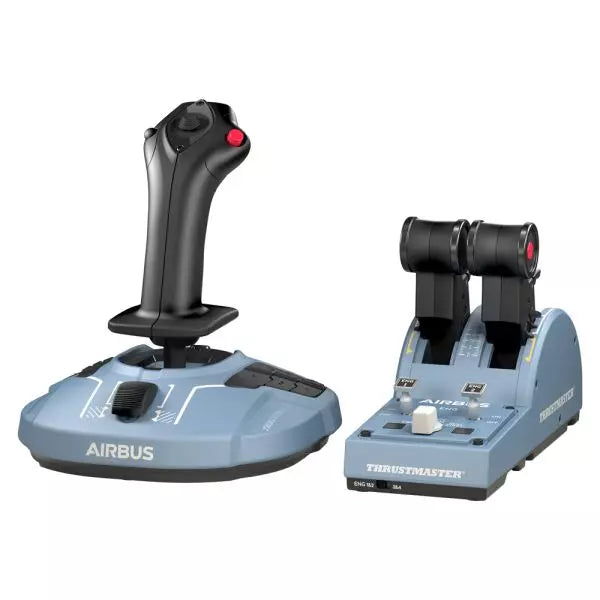
  • Siste lager! TCA Officer Pack Airbus Edition for sale on FlightSimzone

    Thrustmaster TCA Officer Pack Airbus Edition

    5 på lager Shipped in 1-3 business days.

    TCA Officer Pack Airbus Edition er et must-have for alle som ønsker å bringe følelsen av kommersiell luftfart inn i sitt oppsett. Med et ergonomisk design inspirert av Airbus A320, inkluderer dette settet både TCA Sidestick og Throttle Quadrant for uovertruffen kontroll. Med magnetisk sensorteknologi som sikrer jevn inngang og en modulær sidestick for fleksible konfigurasjoner, gir dette settet deg muligheten til å kommandere himmelen med presisjon. Enten du styrer et passasjerfly eller et jagerfly, tilpasser dette settet seg sømløst til dine behov. Hva skiller TCA Officer Pack Airbus Edition fra andre? Modulært Sidestick Design Sidesticken har byttbare hodeknappmoduler, som lar deg konfigurere den for kaptein-, co-pilot- eller solo-flyoppsett. Denne modulæriteten er sjelden og gir fleksibilitet for ulike spillestiler og spillmiljøer. Detenter og Thrust Reverser Mekanismer Throttle-quadranten har presise detenter og en innebygd thrust reverser, som gir taktil tilbakemelding og simulerer ekte kontroll. Muligheten til å bytte til lineær modus gir enda mer allsidighet for ulike flytyper. Holdbar Magnetisk Teknologi Begge enhetene benytter kontaktløse magnetiske sensorer, som eliminerer potensiometere og sikrer lang levetid. Denne designen forbedrer påliteligheten og minimerer inngangsforsinkelse under kritiske manøvrer. Seamless Multi-Device Kompatibilitet Settet integreres sømløst med periferier som Thrustmaster T.Flight Rudder Pedals og TM Flying Clamp. Dette sikrer et sammenhengende og oppslukende oppsett for dedikerte luftfart entusiaster. Fordeler og Ulemper Fordeler Ulemper Ergonomisk design inspirert av Airbus A320-kontroller. Utsolgt ofte på grunn av høy etterspørsel. Modulær sidestick støtter ulike konfigurasjoner. Throttle-quadranten har ikke bakgrunnsbelysning for nattøkter. Magnetiske sensorer sikrer langvarig holdbarhet. Ingen støtte for konsoller; kun PC. Støtter dobbelt throttle for fire-motors fly. Ekstra throttle-quadrant kreves for full kontroll av fire-motors fly. Spesifikasjoner Spesifikasjon Verdi TCA Sidestick Bredde 7,7” / 195 mm TCA Sidestick Dybde 8,9” / 225 mm TCA Sidestick Høyde 7,7” / 195 mm TCA Sidestick Vekt 2,0 lb / 920 g TCA Quadrant Bredde 10,0” / 255 mm TCA Quadrant Dybde 5,7” / 145 mm TCA Quadrant Høyde 3,3” / 85 mm TCA Quadrant Vekt 1,2 lb / 530 g Innhold i pakken TCA Sidestick, TCA Quadrant, 4 byttbare joystick hode-moduler, USB-kabel, klistremerke, koblinger, festestang TCA Officer Pack Airbus Edition Kompatibilitet Maskinvare Kompatibilitet Rorpedaler Kompatibel med Thrustmaster T.Flight og Pendular Rudder Monteringsklemme Kompatibel med Thrustmaster TM Flying Clamp TCA Officer Pack Airbus Edition er designet for å integreres sømløst med andre Thrustmaster periferienheter, noe som gjør det til et allsidig tillegg til et etablert oppsett. Throttle-quadranten tillater tilkobling av to enheter for håndtering av fire-motors fly, og sidestickens modulæritet tilpasser seg lett ulike cockpit-oppsett. Men med sin PC-kompatibilitet, betyr det at brukere som ønsker konsollintegrering, må se andre steder. Når det gjelder spillplattformer, er dette settet fullt kompatibelt med Windows 10 og 8 systemer og fungerer godt med store flight simulators som Microsoft Flight Simulator og X-Plane. Imidlertid støtter det ikke konsollplattformer, noe som begrenser bruken for Xbox eller PlayStation-brukere.

    5 på lager Shipped in 1-3 business days.

    €179,00

  • Siste lager! Honeycomb Foxtrot Aviation Stick

    Fly Honeycomb Honeycomb Foxtrot Aviation Stick

    4 på lager Shipped in 1-3 business days.

    Honeycomb Foxtrot Aviation Stick is built for pilots who prefer a sidestick in hand and a clean desk in front of them. From the first movement, the smooth linear resistance system with no center detent feels fluid and deliberate, ideal for Airbus-style inputs and aerobatic maneuvers. Under the hood, 16-bit resolution with Hall Effect sensor technology translates subtle wrist movements into accurate on-screen control. Add adjustable tension and a fully ambidextrous layout, and you’ve got a stick that feels purposeful rather than toy-like. What Sets the Honeycomb Foxtrot Aviation Stick apart? Center-Detent-Free Control Philosophy Many sticks rely on a noticeable center bump, which can make small corrections feel mechanical. The Foxtrot’s linear resistance system eliminates that notch, creating a smooth transition across the full axis range. Pilots flying Airbus aircraft in particular appreciate this design, as it mirrors sidestick behavior more closely and allows gentle pitch and roll corrections without fighting a spring-loaded “click” at center. Sensor and Resolution Synergy With 16-bit resolution paired to Hall Effect sensors, the Foxtrot delivers clean, contactless input detection. Enthusiasts often point out the consistency over time—no spiking, no gradual degradation from physical potentiometers. Subtle trim adjustments during approach or careful roll inputs in aerobatics feel steady and predictable, especially when compared to entry-level sticks that can show jitter near center. Configurable Resistance and Ergonomics Adjustable tension allows the stick to be tuned to personal preference, whether you prefer lighter fingertip inputs or firmer resistance for controlled movements. Combined with its ambidextrous grip design, the Foxtrot suits both left- and right-handed setups. Users with compact cockpit builds often highlight how adaptable it feels in different seating positions, including center-mounted or side-mounted configurations. Switch Density Without Clutter Between the 5 two-way switches, 4 programmable action buttons, POV hat, trigger, rockers, and multi-way rotary panel, the stick offers serious input flexibility. What stands out is how logically the controls are spaced; sim pilots frequently mention that functions like trim, autopilot modes, or camera controls can be assigned without feeling cramped or hunting blindly mid-flight. Pros and Cons Pros Cons Linear resistance without center detent feels smooth. No native console compatibility. Hall Effect sensors reduce long-term wear. No included dedicated mounting base. Adjustable tension suits different flying styles. Extensive switch and button configuration options. Specifications Specification Value Product Name Honeycomb Foxtrot Aviation Stick Control System Linear resistance system with no center detent Sensor Technology Hall Effect sensors Resolution 16-bit Tension Adjustment Adjustable stick resistance Switches 5 two-way switches Action Buttons 4 programmable buttons Rotary Panel 3-, 4-, and 5-way rotary controls Grip Design Ambidextrous Connection USB-C to USB-A cable System Compatibility PC and Mac Included in the Box Foxtrot Aviation Stick, USB-C to USB-A Cable, Quick Start Guide (EFIGS) Download Support Basic Bindings Profiles (XML) for MSFS 2024 Honeycomb Foxtrot Aviation Stick Compatibility Platform Compatibility Operating Systems PC and Mac Connection Type USB-C to USB-A direct USB interface Primary Sim Support MSFS 2024 (XML bindings), MSFS, X-Plane, Prepar3D The Foxtrot Aviation Stick connects via standard USB, allowing it to integrate easily into most desktop cockpit setups. It works seamlessly alongside throttle quadrants, rudder pedals, and radio panels from other major brands thanks to its plug-and-play HID architecture. Its ambidextrous design makes it suitable for left- or right-seat configurations, including Airbus-style side mounting. It is not compatible with Xbox consoles and does not function as a standalone device without a connected PC or Mac. On the software side, it supports Microsoft Flight Simulator 2024 with dedicated XML binding profiles and operates with popular PC simulators such as Microsoft Flight Simulator (2020), X-Plane, and Prepar3D through manual or community mappings. It is not designed for console-based platforms, as it relies on native PC/Mac driver recognition rather than console-certified firmware.

    4 på lager Shipped in 1-3 business days.

    €165,00

  • WINCTRL URSA MINOR Airline Joystick R

    WINCTRL WINCTRL URSA MINOR Airline Joystick R

    Ikke på lager, Pre-Orders Available. Shipped in 2-2.5 weeks from now.

    WINCTRL URSA MINOR Airline Joystick R brings airline-style control to the desktop with a clever mix of tactile feedback and thoughtful engineering. The standout feature is the flight-data-linked vibration engine, which adds subtle physical cues during events like flap deployment, airflow changes, and touchdown. Pair that with non-contact magnetic resistance sensors on the X and Y axes, and the stick delivers smooth, stable inputs without the wear issues common in cheaper mechanisms. The result is a joystick that feels lively in hand yet technically grounded under the hood. What Sets the WINCTRL URSA MINOR Airline Joystick R apart? Flight Data Driven Vibration Feedback The URSA MINOR stands out with a vibration motor tied directly to in-sim flight data. Instead of generic rumble, the stick reacts to events like landing contact, airflow changes, or flap movement. Pilots online often mention how this adds subtle physical cues during phases like flare or speed changes, providing a tactile reminder of what the aircraft is doing without constantly glancing at instruments. Robust Gimbal With Magnetic Sensors At the core of the stick is a glass-fiber-reinforced nylon gimbal running on ball bearings, paired with non-contact magnetic sensors for the primary axes. This combination helps maintain smooth motion over time without the jitter common in potentiometer-based designs. Enthusiasts frequently note that the stick movement feels stable across the entire travel range, particularly during small pitch adjustments on final approach. Airliner-Inspired Grip Layout The grip design borrows cues from airline sidestick ergonomics, offering a balanced control layout that includes a PTT trigger, autopilot disconnect switch, and a concealed five-way switch beneath a magnetic cover. Pilots often highlight how practical this arrangement is for everyday flying tasks—radio calls, autopilot overrides, and camera views can all be handled without reaching for the keyboard. Flexible Mounting and Maintenance Design The base includes anti-slip pads for desktop use along with pre-drilled mounting holes for cockpit rigs. A quick-release base cover allows access to internal adjustments without dismantling the entire unit. This detail is frequently appreciated by sim cockpit builders who prefer gear that can be tuned or serviced easily rather than permanently sealed hardware. Pros and Cons Pros Cons Flight-data vibration feedback adds tactile flight cues. Plastic construction compared to metal joystick designs. Magnetic sensors reduce wear and input drift. Limited axis travel compared to extended bases. Good button layout for airliner-style flying tasks. Desk or cockpit mounting options included. Specifications Specification Value Product Model URSA MINOR-Airline-Joystick R Material Industrial ABS plastic (PC + ABS) Controller 32-bit ARM controller X/Y Axis Movement Angle ±15° Z Axis Rotation Angle ±20° X/Y Sensors Non-contact magnetic resistance sensors Gimbal Construction Glass fiber reinforced nylon with ball bearings Operating Force (X/Y) Approximately 6N Rotation Torque (Z) ~4 kgf·cm Throttle Axis Type Long-travel sliding potentiometer Throttle Axis Travel 38 mm Buttons 14 buttons (250gf press force, 0.25 mm travel) Special Controls Hidden 5-way switch, PTT trigger, autopilot disconnect Vibration Feature Adjustable amplitude levels from 0–255 Mounting Options Anti-slip desktop pads and cockpit mounting holes Item Weight 3 kg Included in Box J5-BASE-BLACK + JGRIP-C1-R, Data Cable, Toolkit, Accessories Pack WINCTRL URSA MINOR Airline Joystick R Compatibility Platform Compatibility Connection Type USB plug-and-play connection Software Configuration WW SIMAPP Pro software for button mapping Mounting Desktop use or cockpit mounting The URSA MINOR Airline Joystick R connects via standard USB, allowing it to integrate easily with throttle quadrants, rudder pedals, and other flight hardware from many manufacturers. The base supports both desktop placement with anti-slip pads and cockpit mounting using pre-drilled holes, which is useful for sim rigs or permanent setups. Configuration is handled through WW SIMAPP Pro software, enabling button assignments and vibration adjustments directly from a visual interface. Within a flight setup, the joystick works well alongside external throttles, radio panels, or pedal systems because it behaves as a standard USB HID controller. It does not require proprietary ecosystems and can coexist with other brands in the same cockpit. However, it is intended for PC-based simulation environments and does not integrate directly with console platforms. In terms of simulators, the stick supports Microsoft Flight Simulator 2020, X-Plane, Prepar3D, and also space or combat titles like Star Citizen, Elite Dangerous, and War Thunder. Its plug-and-play USB design allows quick recognition in most PC simulation platforms. It is not designed for Xbox or PlayStation consoles, as those systems typically require licensed hardware and different firmware structures.

    Ikke på lager, Pre-Orders Available. Shipped in 2-2.5 weeks from now.

    €99,00

  • WINCTRL URSA MINOR Airline Joystick L

    WINCTRL WINCTRL URSA MINOR Airline Joystick L

    Ikke på lager, Pre-Orders Available. Shipped in 2-2.5 weeks from now.

    WINCTRL URSA MINOR Airline Joystick L brings airline-style control to the desktop with a clever mix of tactile feedback and thoughtful engineering. The standout feature is the flight-data-linked vibration engine, which adds subtle physical cues during events like flap deployment, airflow changes, and touchdown. Pair that with non-contact magnetic resistance sensors on the X and Y axes, and the stick delivers smooth, stable inputs without the wear issues common in cheaper mechanisms. The result is a joystick that feels lively in hand yet technically grounded under the hood. What Sets the WINCTRL URSA MINOR Airline Joystick L apart? Flight Data Driven Vibration Feedback The URSA MINOR stands out with a vibration motor tied directly to in-sim flight data. Instead of generic rumble, the stick reacts to events like landing contact, airflow changes, or flap movement. Pilots online often mention how this adds subtle physical cues during phases like flare or speed changes, providing a tactile reminder of what the aircraft is doing without constantly glancing at instruments. Robust Gimbal With Magnetic Sensors At the core of the stick is a glass-fiber-reinforced nylon gimbal running on ball bearings, paired with non-contact magnetic sensors for the primary axes. This combination helps maintain smooth motion over time without the jitter common in potentiometer-based designs. Enthusiasts frequently note that the stick movement feels stable across the entire travel range, particularly during small pitch adjustments on final approach. Airliner-Inspired Grip Layout The grip design borrows cues from airline sidestick ergonomics, offering a balanced control layout that includes a PTT trigger, autopilot disconnect switch, and a concealed five-way switch beneath a magnetic cover. Pilots often highlight how practical this arrangement is for everyday flying tasks—radio calls, autopilot overrides, and camera views can all be handled without reaching for the keyboard. Flexible Mounting and Maintenance Design The base includes anti-slip pads for desktop use along with pre-drilled mounting holes for cockpit rigs. A quick-release base cover allows access to internal adjustments without dismantling the entire unit. This detail is frequently appreciated by sim cockpit builders who prefer gear that can be tuned or serviced easily rather than permanently sealed hardware. Pros and Cons Pros Cons Flight-data vibration feedback adds tactile flight cues. Plastic construction compared to metal joystick designs. Magnetic sensors reduce wear and input drift. Limited axis travel compared to extended bases. Good button layout for airliner-style flying tasks. Desk or cockpit mounting options included. Specifications Specification Value Product Model URSA MINOR-Airline-Joystick L Material Industrial ABS plastic (PC + ABS) Controller 32-bit ARM controller X/Y Axis Movement Angle ±15° Z Axis Rotation Angle ±20° X/Y Sensors Non-contact magnetic resistance sensors Gimbal Construction Glass fiber reinforced nylon with ball bearings Operating Force (X/Y) Approximately 6N Rotation Torque (Z) ~4 kgf·cm Throttle Axis Type Long-travel sliding potentiometer Throttle Axis Travel 38 mm Buttons 14 buttons (250gf press force, 0.25 mm travel) Special Controls Hidden 5-way switch, PTT trigger, autopilot disconnect Vibration Feature Adjustable amplitude levels from 0–255 Mounting Options Anti-slip desktop pads and cockpit mounting holes Item Weight 3 kg Included in Box J5-BASE-BLACK + JGRIP-C1-R, Data Cable, Toolkit, Accessories Pack WINCTRL URSA MINOR Airline Joystick L Compatibility Platform Compatibility Connection Type USB plug-and-play connection Software Configuration WW SIMAPP Pro software for button mapping Mounting Desktop use or cockpit mounting The URSA MINOR Airline Joystick L connects via standard USB, allowing it to integrate easily with throttle quadrants, rudder pedals, and other flight hardware from many manufacturers. The base supports both desktop placement with anti-slip pads and cockpit mounting using pre-drilled holes, which is useful for sim rigs or permanent setups. Configuration is handled through WW SIMAPP Pro software, enabling button assignments and vibration adjustments directly from a visual interface. Within a flight setup, the joystick works well alongside external throttles, radio panels, or pedal systems because it behaves as a standard USB HID controller. It does not require proprietary ecosystems and can coexist with other brands in the same cockpit. However, it is intended for PC-based simulation environments and does not integrate directly with console platforms. In terms of simulators, the stick supports Microsoft Flight Simulator 2020, X-Plane, Prepar3D, and also space or combat titles like Star Citizen, Elite Dangerous, and War Thunder. Its plug-and-play USB design allows quick recognition in most PC simulation platforms. It is not designed for Xbox or PlayStation consoles, as those systems typically require licensed hardware and different firmware structures.

    Ikke på lager, Pre-Orders Available. Shipped in 2-2.5 weeks from now.

    €99,00

  • Honeycomb Echo Aviation Controller

    Fly Honeycomb Honeycomb Echo Aviation Controller

    Ikke på lager, Pre-Orders Available. Shipped in 2-2.5 weeks from now.

    Honeycomb Echo Aviation Controller is one of those devices that makes you rethink how much hardware you actually need to fly properly. Everything sits in your hands—pitch, roll, yaw, throttle, trim—all within reach, anchored by a 16-bit Hall-effect thumbstick that feels smooth and consistent through every movement. Pair that with a complete all-in-one flight control layout, and you’ve got a compact cockpit that works just as well on a desk as it does on the couch. It’s clever, tactile, and surprisingly capable for its size. What Sets the Honeycomb Echo Aviation Controller apart? All-in-One Without Feeling Compromised – Many compact controllers try to do everything and end up feeling like a gamepad with extra buttons. The Echo stands out because each control has a defined purpose and physical identity. Users often mention how the dedicated trim wheel, levers, and rudder system make it feel closer to a proper flight control setup, rather than a simplified alternative. Mechanical Rudder Integration – Instead of relying on twist input or triggers, the Echo uses mechanically linked rudder pedals with Hall-effect sensing. This is something pilots quickly notice, especially during coordinated turns or crosswind landings. The self-centering action gives a consistent feel that’s easier to manage than digital-style inputs found on many compact controllers. Designed for Flexible Flying Spaces – Feedback from users consistently highlights how freeing it is to fly without a fixed rig. Whether sitting at a desk, relaxing on a couch, or traveling, the Echo adapts without needing mounts or external peripherals. It’s particularly appealing for sim pilots who don’t have space for a full yoke, throttle quadrant, and pedal setup. Thoughtful Control Layout for MSFS – The layout feels intentionally designed around Microsoft Flight Simulator workflows. Common functions like gear, flaps, trim, and camera controls are placed where fingers naturally rest. Many users note that once muscle memory develops, cockpit interaction becomes quicker and more fluid compared to mapping everything onto a generic controller. Pros and Cons Pros Cons All flight controls integrated into one compact unit Less tactile separation than full-size hardware setups Hall-effect sensors provide smooth, drift-free input Limited physical range compared to dedicated yokes Wireless operation with long battery life Portable design works without dedicated sim rig Specifications Specification Value Control Type All-in-one flight controller (pitch, roll, yaw, throttle, trim, flaps, gear) Primary Input 16-bit Hall-effect thumbstick Rudder System Mechanically linked Hall-effect rudder pedals Throttle/Sliders Four detented sliders with interchangeable caps Connectivity Wireless (2.4 GHz dongle) or USB-C wired Battery 1200 mAh, up to 15 hours usage System Compatibility PC and Mac Software Compatibility Microsoft Flight Simulator, X-Plane 11/12, Prepar3D Included Accessories Travel case, lever caps, wireless dongle, USB cable Warranty 2-year limited warranty Honeycomb Echo Aviation Controller Compatibility The Echo is built with flexibility in mind. It is compatible with PC and Mac systems and connects either through USB-C wired connection or a 2.4 GHz wireless dongle. Because it operates as a standalone controller, it does not require additional yokes, pedals, or throttle quadrants, making it ideal for compact setups or portable use. It is not designed to integrate directly with traditional hardware ecosystems like separate yokes or external rudder pedals. Its all-in-one design means fewer cables and simpler setups, but it also means less modular expansion compared to full cockpit systems. Pilots who prefer mixing and matching hardware may find it less suited to complex multi-device configurations, as the Echo is intended to replace, rather than complement, those components. On the software side, the controller is fully compatible with Microsoft Flight Simulator and also supports X-Plane 11, X-Plane 12, and Prepar3D. It is not designed for console use, focusing entirely on PC-based simulation platforms where full input mapping and customization are available.

    Ikke på lager, Pre-Orders Available. Shipped in 2-2.5 weeks from now.

    €150,00

Flight Simulator Joysticks for sale at FlightSImZone

When stepping into the world of flight simulation, a quality flight simulator joystick serves as your primary link to the virtual aircraft. These precision instruments translate your smallest movements into accurate flight control inputs, making them essential for both casual flying and serious flight training applications.

Best Joysticks for Flight Simulator

Today's market offers various joysticks designed to meet different needs and preferences. The HOTAS Warthog represents the premium segment with its all-metal construction and military-grade precision, while the T.Flight Stick X provides an excellent entry point for newcomers. The TCA Sidestick X Airbus Edition bridges these segments with its authentic airliner feel and professional-grade sensors.

Microsoft Flight Simulator Joystick

Microsoft Flight Simulator's sophisticated physics engine demands precise input devices for optimal control. The T16000M FCS has become a popular choice for this platform, offering excellent precision through its Hall Effect sensors and ergonomic design. The VelocityOne Flightstick complements this selection with its dedicated features optimized for Microsoft's platform.

Flight Simulator Joystick for PC

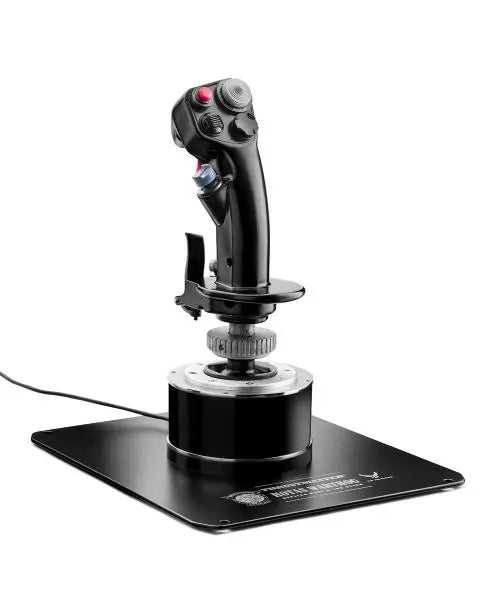
PC platforms offer the widest compatibility with flight control systems, enabling pilots to choose from an extensive range of options. The AVA F/A-18 Super Hornet Flightstick exemplifies modern PC flight control technology, incorporating advanced sensors and programmable features that enhance the simulation experience. These PC-focused controllers often include customization software for creating personal control profiles and adjusting sensitivity settings.

Comparison Table

Feature HOTAS Warthog TCA Sidestick X Airbus T16000M FCS VelocityOne Flightstick T.Flight Stick X AVA F/A-18 Super Hornet
Platform Compatibility PC PC PC Xbox Series X|S, PC PC, PS3 PC
Construction All-Metal Industrial Plastic Reinforced Plastic Premium Plastic Plastic Metal/Plastic Hybrid
Sensor Type H.E.A.R.T Hall Effect H.E.A.R.T Hall Effect Hall Effect Hall Effect Potentiometer Hall Effect
Button Count 19 + Hat Switch 17 + Hat Switch 16 + Hat Switch 12 + Hat Switch 12 + Hat Switch 19 + Dual Hat Switch
Throttle Included Yes (Separate) No Optional No No No
Software Features T.A.R.G.E.T Software T.A.R.G.E.T Software T.A.R.G.E.T Software Custom App Basic Calibration Advanced Programming
Axis Resolution 16-bit 16-bit 16-bit 16-bit 8-bit 16-bit
Special Features • Military-Grade Design
• Dual Throttle System
• Metal Plate Mount
• Airbus Design
• Modular System
• Ambidextrous
• Ambidextrous Design
• Wide Base
• Adjustable Tension
• Xbox Optimized
• Status Display
• Quick Controls
• Basic Features
• Compact Design
• Budget-Friendly
• F/A-18 Replica
• Combat Ready
• Premium Grip

Key Technical Features:

Precision Technology

  • Hall Effect magnetic sensors
  • 16-bit resolution axes
  • Multi-directional hat switches

Durability Elements

  • Reinforced base construction
  • Industrial-grade components
  • Metal gimbal mechanisms

Flight Simulator Joystick for Xbox

Console-based flight simulation has evolved significantly, particularly in the Xbox ecosystem. Modern Xbox-compatible joysticks offer sophisticated features previously exclusive to PC systems. These controllers combine plug-and-play simplicity with professional-grade features, ensuring console pilots can experience the same level of control precision as their PC counterparts.

Advanced Control Technologies

Modern flight simulator joysticks incorporate several technological innovations that enhance their performance and durability. High-resolution sensors provide precise positional data, while advanced materials ensure consistent operation over thousands of flight hours. Manufacturers now implement military-inspired design elements, creating controllers that feel authentic while maintaining excellent ergonomics.

These innovations extend to software integration, with many joysticks offering dedicated programming applications. These tools allow users to create custom control profiles, adjust sensitivity curves, and configure advanced button mappings for different aircraft types. The integration of multiple control axes enables more realistic simulation of complex flight maneuvers, from precision formation flying to advanced combat scenarios.

Buy your Flight Simulator Joystick at FlightSimZone

A quality flight simulator joystick represents a crucial investment in your virtual aviation journey. Whether you're practicing procedures for real-world flight training or enjoying casual flying sessions, the right joystick can significantly enhance your experience. At FlightSimZone, we understand the importance of matching pilots with their ideal control solutions.

Buy your Flight Simulator Joystick at FlightSimZone today and experience the perfect balance of precision and control in your virtual cockpit.


Login

Forgot your password?

Don't have an account yet?
Create account


