We have a wide range of instrument panel accessories for sale. Our most populair brand is RealSimGear because of their real-life replicas.
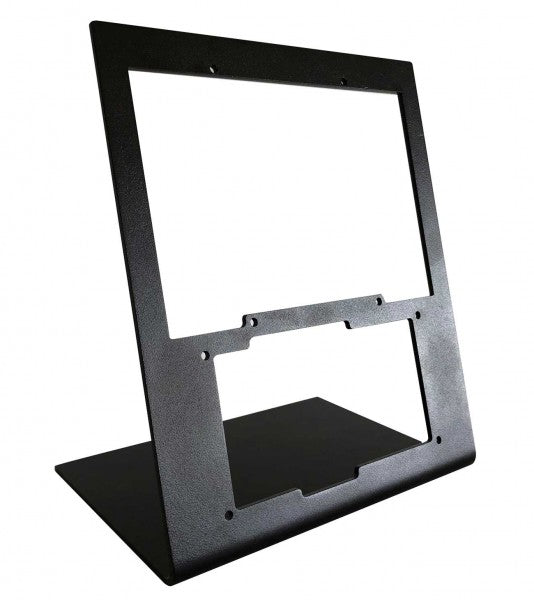
RealSimGear - Desktop Stand for G1000 Suite biedt een uitstekende oplossing voor flightsim-liefhebbers die stabiliteit en organisatie in hun opstelling eisen. Gemaakt van duurzaam 3mm geverfd staal, biedt deze standaard een stabiele, verhoogde positie voor de G1000 Suite's PFD, MFD en audiopaneel. De matte zwarte afwerking past in elke setup, terwijl rubberen antislipvoeten en precieze montagecompatibiliteit zorgen voor moeiteloze integratie. Deze standaard is een must-have voor wie een gestructureerde en ergonomische flightsim-ervaring zoekt. Wat maakt de RealSimGear - Desktop Stand for G1000 Suite uniek? Speciaal ontworpen voor de G1000 Suite Deze standaard is specifiek ontworpen om de G1000 PFD, MFD en het audiopaneel te huisvesten. De op maat gemaakte afmetingen en stevige montageopties maken het een naadloze aanvulling op elke flightsim-opstelling, zodat alle drie de componenten perfect zijn uitgelijnd voor praktisch gebruik. Robuuste en duurzame constructie Gemaakt van 3mm geverfd staal, is de standaard gebouwd om de eisen van lange simulatiesessies te weerstaan. Het stevige ontwerp minimaliseert trillingen en verhoogt de duurzaamheid van je opstelling, waardoor je zonder zorgen kunt vliegen. Uitgebreide montagecompatibiliteit Met montagegaten die compatibel zijn met Saitek/Logitech yokes, Honeycomb Alpha en Bravo bedieningen, integreert deze standaard moeiteloos met populaire hardware. Of je nu een ervaren piloot of een beginner bent, de flexibele compatibiliteit vereenvoudigt de hardwareconfiguratie. Ergonomische ondersteuning Door de G1000 Suite op een ideale hoogte te plaatsen, vermindert deze standaard belasting en verhoogt het gebruiksgemak. Het weerspiegelt cockpitindelingen die in echte vliegtuigen worden gebruikt en biedt een georganiseerde en functionele configuratie voor zowel training als recreatief gebruik. Voor- en Nadelen Voordelen Nadelen Geschikt voor PFD, MFD en audiopaneel. Hogere prijs vergeleken met eenvoudigere standaarden. Duurzaam 3mm geverfd staal dat slijtage weerstaat. Specifiek ontworpen voor de G1000 Suite. Compatibel met Saitek/Logitech en Honeycomb systemen. Specificaties Specificatie Waarde Materiaal 3mm geverfd staal Afwerking Mat zwart Kenmerken Antislip rubberen voeten, montageschroeven Capaciteit Geschikt voor G1000 PFD, MFD en audiopaneel Montagecompatibiliteit Saitek/Logitech yokes, Honeycomb Alpha/Bravo RealSimGear - Desktop Stand for G1000 Suite Compatibiliteit De RealSimGear - Desktop Stand for G1000 Suite is ontworpen om perfect te passen bij de G1000 Suite's PFD, MFD en audiopaneel. De montagegaten komen overeen met de Saitek/Logitech yoke-montagesystemen en de Honeycomb Alpha en Bravo throttle controls. Deze compatibiliteit zorgt voor een naadloze integratie in bestaande opstellingen, waardoor extra hardware of aanpassingen overbodig zijn. Echter, de standaard is specifiek gericht op de G1000 Suite, wat de veelzijdigheid voor andere configuraties beperkt. Ontworpen voor pc-gebaseerde simulatie-opstellingen, werkt deze standaard perfect met platforms zoals X-Plane en Microsoft Flight Simulator. Hij biedt geen directe ondersteuning voor console gaming-platforms, maar richt zich primair op professionele en enthousiaste pc-configuraties. Dit garandeert een optimale ervaring wanneer deze wordt gecombineerd met populaire flightsim-software.
€259,00
The RealSimGear - Desktop Stand for RealSimGear G1000 PFD/MFD is the ideal companion for bringing order and functionality to your flight simulation setup. Designed with durable 3mm painted steel, it offers a stable and elevated mounting position for the G1000 PFD and MFD components. With its sleek matte black finish, rubber non-slip feet, and compatibility with leading yoke systems, this stand enhances both the look and feel of your cockpit, making long flying sessions feel seamless and well-organized. What sets the RealSimGear - Desktop Stand for RealSimGear G1000 PFD/MFD apart? Specialized Design for G1000 PFD/MFD This stand is crafted specifically for the G1000 PFD and MFD, ensuring a precise and snug fit. Its design eliminates the need for adjustments, letting you focus on simulation without worrying about stability or awkward placements. Robust and Practical Build Made from 3mm steel with a matte black finish, this stand combines durability with a professional appearance. It withstands wear from frequent use while offering a neat and tidy addition to your sim environment. Broad Compatibility with Popular Hardware Featuring mounting holes that align with Saitek/Logitech and Honeycomb Alpha and Bravo systems, it integrates effortlessly with widely used flight controls. This compatibility expands its utility for enthusiasts with diverse setups. Ergonomic Elevation By elevating the PFD and MFD components, the stand provides a more comfortable and natural viewing angle. This helps reduce strain during extended sessions and mimics the layout of a real cockpit for practical use. Pros and Cons Pros Cons Precise fit for G1000 PFD and MFD components. Exclusively designed for the G1000 Suite. Durable 3mm steel construction resists wear and tear. Price may deter casual users. Compatible with Saitek/Logitech and Honeycomb controls. Specifications Specification Value Material 3mm painted steel Finish Matte black Features Non-slip rubber feet, mounting screws Capacity Holds G1000 PFD and MFD Mounting Compatibility Saitek/Logitech yokes, Honeycomb Alpha/Bravo RealSimGear - Desktop Stand for RealSimGear G1000 PFD/MFD Compatibility The RealSimGear - Desktop Stand for RealSimGear G1000 PFD/MFD is tailored for the G1000 PFD and MFD, with mounting holes perfectly matching the Saitek/Logitech yoke system and Honeycomb Alpha and Bravo throttles. This broad compatibility ensures it works well with widely used controls, making it a valuable addition for dedicated flight sim enthusiasts. However, it is not designed for use with other brands or non-G1000 configurations, which limits its adaptability for custom setups. This stand pairs seamlessly with PC-based flight simulators such as Microsoft Flight Simulator and X-Plane. While it does not directly support console platforms, its focus on PC integration ensures precise compatibility with popular flight sim software, allowing users to achieve a consistent and effective experience in their virtual cockpit.
€115,00
De RealSimGear - Desktop Stand voor RealSimGear GTN750 is ontworpen om een stabiele en verhoogde basis te bieden voor je GTN750-opstelling. Gemaakt van duurzaam 3 mm staal en afgewerkt in matzwart, is hij zowel stevig als stijlvol. Met zijn rubberen anti-slipvoetjes en compatibiliteit met verschillende montagesystemen zoals de Honeycomb Alpha en Bravo, zorgt deze standaard ervoor dat je vluchtsimulatiehardware stevig op zijn plaats blijft, zodat je je volledig kunt concentreren op je volgende virtuele vliegavontuur. Wat maakt de RealSimGear - Desktop Stand voor RealSimGear GTN750 bijzonder? Gebouwd voor stabiliteit Gemaakt van 3 mm staal met een matzwarte afwerking, is deze standaard uiterst stevig en behoudt hij een strakke en professionele uitstraling. De rubberen anti-slipvoetjes verbeteren de stabiliteit, waardoor hij ideaal is voor zelfs de meest intense vluchtsimulatiesessies. Veelzijdige montagemogelijkheden Ontworpen met voorgeboorde gaten, ondersteunt de standaard montagesystemen zoals de Honeycomb Alpha en Bravo, Saitek/Logitech yoke en RealSimGear Flight Deck Mounting Plate. Dankzij deze flexibiliteit kan hij naadloos worden geïntegreerd in diverse cockpitopstellingen. Compact en praktisch ontwerp Het ontwerp van de standaard verhoogt de GTN750 tot een ergonomische hoogte, waardoor belasting tijdens gebruik wordt verminderd. De compacte voetafdruk houdt je werkruimte opgeruimd en voegt een vleugje verfijning toe aan je simulatieomgeving. Voor- en nadelen Voordelen Nadelen Stevige 3 mm stalen constructie met een strakke matte afwerking. Bevat geen montagemateriaal in de verpakking. Compatibel met verschillende yoke- en throttle-montagesystemen. Beperkt tot gebruik met de RealSimGear GTN750. Anti-slipvoetjes zorgen voor uitstekende stabiliteit op elk oppervlak. Specificaties Specificatie Waarde Materiaal 3 mm staal Afwerking Matzwart Type voet Rubberen anti-slipvoetjes Montagegaten Compatibel met Honeycomb Alpha/Bravo, Saitek/Logitech yoke, RealSimGear Flight Deck RealSimGear - Desktop Stand voor RealSimGear GTN750 compatibiliteit De RealSimGear - Desktop Stand voor RealSimGear GTN750 is exclusief ontworpen voor de GTN750 en biedt een veilige en verhoogde basis voor dit apparaat. De voorgeboorde gaten maken montage mogelijk op een Honeycomb Alpha- of Bravo-systeem, de Saitek/Logitech yoke of de RealSimGear Flight Deck Mounting Plate. Hij is echter niet bedoeld voor apparaten buiten deze systemen, wat de bredere compatibiliteit beperkt tot GTN750-gebruikers. Deze standaard is ideaal voor het verbeteren van PC-gebaseerde vluchtsimulatie-opstellingen en werkt perfect samen met de RealSimGear GTN750 voor spellen zoals Microsoft Flight Simulator en X-Plane. Vanwege het specifieke ontwerp voor PC-compatibele vluchtsimulatiehardware is hij niet geschikt voor consolegaming, waardoor een gerichte ervaring wordt geboden voor simulatieliefhebbers.
€72,00
De Dual Desktop Stand voor RealSimGear GNS530 & GNS430 is ontworpen om een stabiele en verhoogde basis te bieden voor je avionica-opstelling. Gemaakt van stevig 3 mm roestvrij staal en afgewerkt met een duurzame, poedergecoate matzwarte afwerking, biedt deze standaard zowel duurzaamheid als een strakke uitstraling. Met rubberen anti-slipvoetjes blijven je apparaten stevig op hun plaats, zelfs tijdens de meest intensieve vluchten. Het doordachte ontwerp bootst de plaatsing in een echte cockpit na, zodat je GNS530 en GNS430 op een comfortabele en praktische hoek zijn gemonteerd. Wat maakt de Dual Desktop Stand voor RealSimGear GNS530 & GNS430 bijzonder? Duurzame en robuuste constructie Gemaakt van 3 mm roestvrij staal, is deze standaard gebouwd om lang mee te gaan. De poedergecoate matzwarte afwerking zorgt niet alleen voor een strakke uitstraling, maar beschermt de standaard ook tegen corrosie en slijtage. Een betrouwbare keuze die bestand is tegen regelmatig opzetten en afbreken zonder vorm- of stabiliteitsverlies. Doordachte montagecompatibiliteit De basis is voorzien van montagegaten die geschikt zijn voor verschillende opstellingen, waaronder de Honeycomb Alpha yoke, Bravo throttle en Saitek/Logitech yoke-systemen. Dankzij deze veelzijdigheid is de standaard eenvoudig te integreren in een bredere vluchtsimulatieconfiguratie zonder compatibiliteitsproblemen. Realistische plaatsingshoek Deze standaard biedt een verhoogde montagepositie die vergelijkbaar is met de lay-out in algemene luchtvaarttoestellen. Dit zorgt voor een intuïtieve en comfortabele trainingservaring, waardoor je vertrouwd raakt met de juiste positionering tijdens simulatie- en trainingssessies. Solide stabiliteitsfuncties De rubberen anti-slipvoetjes zorgen ervoor dat de standaard stevig op je bureau blijft staan, zelfs bij intensieve manoeuvres. Geen verschuiving of glijden, zodat je je volledig kunt richten op het vliegen zonder constant je opstelling te hoeven aanpassen. Dit kleine detail maakt een groot verschil in een stabiele simervaring. Voor- en nadelen Voordelen Nadelen Stevige 3 mm roestvrijstalen constructie met matzwarte afwerking. Specifiek ontworpen voor GNS530 & GNS430. Rubberen anti-slipvoetjes bieden uitstekende stabiliteit op elk oppervlak. Kan meer ruimte innemen dan standaarden voor één unit. Compatibel met meerdere yoke-systemen en montageplaten. Specificaties Specificatie Waarde Materiaal 3 mm roestvrij staal Afwerking Poedergecoate matzwarte afwerking Type voet Rubberen anti-slipvoetjes Montagegaten Compatibel met Honeycomb Alpha/Bravo, Saitek/Logitech yoke Dual Desktop Stand voor RealSimGear GNS530 & GNS430 compatibiliteit De Dual Desktop Stand voor RealSimGear GNS530 & GNS430 is ontworpen om perfect te passen bij zowel de GNS530 als de GNS430, waardoor een samenhangende montageoplossing ontstaat. Hij beschikt over voorgeboorde gaten die compatibel zijn met een reeks populaire systemen, waaronder de Honeycomb Alpha yoke, Bravo throttle en Saitek/Logitech yoke-montageplaten. Dit zorgt ervoor dat hij naadloos kan worden geïntegreerd in diverse cockpitconfiguraties, waardoor het een veelzijdige optie is voor veel simpiloten. Deze standaard is geoptimaliseerd voor PC-gebaseerde vluchtsimulaties en werkt uitstekend samen met simulatoren zoals X-Plane en Microsoft Flight Simulator. Hij is niet ontworpen voor gebruik met consoles, waardoor hij het meest geschikt is voor gebruikers met een toegewijde PC-opstelling en realistische avionica-add-ons.
€82,00
RealSimGear - Desktop Stand voor GMA350/GNS530/GNS430 is een robuuste en doordachte toevoeging aan elke flight simulator-opstelling. Gemaakt van stevig 3mm gepoedercoat staal, biedt het een stabiel en verhoogd platform voor de GMA350, GNS530 en GNS430, in lijn met de lay-out die te vinden is in algemene luchtvaarttoestellen. De rubberen antislipvoeten en het precieze montagesysteem zorgen ervoor dat je avionica stevig op zijn plaats blijft, zodat je je volledig kunt richten op het perfectioneren van je virtuele vliegvaardigheden. Wat maakt de RealSimGear - Desktop Stand voor GMA350/GNS530/GNS430 uniek? Multi-device Integratie Deze standaard is ontworpen om drie afzonderlijke apparaten tegelijk te ondersteunen—de GMA350, GNS530 en GNS430. De lay-out weerspiegelt echte cockpitconfiguraties, waardoor het ideaal is voor simmers die een functionele en samenhangende opstelling voor hun avionica willen. Duurzaam en Stijlvol Ontwerp Gemaakt van 3mm gepoedercoat staal, biedt deze standaard langdurige duurzaamheid met een strakke matte afwerking die bestand is tegen slijtage en perfect past bij de meeste sim-opstellingen. Ergonomische en Verhoogde Positionering De standaard plaatst je avionica op een comfortabele kijkhoogte, vergelijkbaar met de plaatsing in echte vliegtuigen. Dit vermindert de belasting en verbetert de toegankelijkheid van de bedieningselementen, zodat je gefocust blijft op nauwkeurige manoeuvres. Veilige en Stabiele Opstelling Uitgerust met antislip rubberen voeten blijft de standaard stevig op zijn plaats, zelfs tijdens intensieve simulatiesessies. Dit voorkomt ongewenste bewegingen en zorgt ervoor dat je besturingselementen stabiel blijven. Voor- en Nadelen Voordelen Nadelen Ondersteunt drie apparaten voor een multifunctionele setup. Niet draagbaar voor mobiele simulatie-opstellingen. Duurzame stalen constructie met een strakke matte afwerking. Beperkt tot bureau-gebaseerd gebruik. Antislipvoeten zorgen voor uitstekende stabiliteit tijdens gebruik. Specificaties Specificatie Waarde Materiaal 3mm staal Afwerking Gepoedercoat matzwart Kenmerken Antislip rubberen voeten, montageschroeven Apparaatcapaciteit GMA350, GNS530, GNS430 RealSimGear - Desktop Stand voor GMA350/GNS530/GNS430 Compatibiliteit De RealSimGear - Desktop Stand voor GMA350/GNS530/GNS430 is ontworpen voor naadloze integratie met specifieke RealSimGear avionica, waaronder de GMA350 Audio Panel, GNS530 en GNS430. De op maat gemaakte lay-out weerspiegelt de configuratie van algemene luchtvaartcockpits, waardoor het een uitstekende keuze is voor enthousiastelingen die een samenhangende en realistische ervaring willen. Deze standaard is compatibel met de meeste pc-gebaseerde simulatie-opstellingen, maar biedt geen ondersteuning voor consoles. Of je nu Microsoft Flight Simulator of X-Plane gebruikt, de standaard sluit perfect aan bij de avionica-bedieningselementen van deze titels. Het ontwerp is echter minder geschikt voor hybride of niet-bureau-gebaseerde setups, omdat de focus ligt op een stabiele en professionele configuratie.
€102,00
€159,00
€189,00
Wingflex A320 Combo Cube places the Airbus glareshield essentials into one tidy desktop system, combining EFIS, FCU and multifunction RMP controls with high-contrast dual-colour displays. The knobs click and turn with enough purpose to make heading changes, radio tuning and barometric adjustments feel far better than poking at a virtual cockpit. USB connectivity keeps installation straightforward, while the 13-degree viewing angle brings the panels naturally into sight. It is compact Airbus hardware for pilots whose desks already resemble a mildly concerned electronics workshop. What Sets the Wingflex A320 Combo Cube apart? Three Core Panels Without a Full-Size Glareshield The bundle combines an EFIS, FCU and RMP-based multifunction panel in an 80% scale layout, saving roughly eleven centimetres compared with a full-size arrangement. Reviewers have praised that reduction because it preserves practical control spacing while fitting more comfortably beneath ordinary monitors. The result feels substantial enough for deliberate operation without demanding the sort of desk usually reserved for air-traffic control or an exceptionally ambitious accountant. A Smarter Use of the Right-Hand Position Instead of supplying a second EFIS that a solo pilot may rarely touch, Wingflex fills the right side with a four-in-one panel covering radio management, transponder, TCAS and warning functions. Review feedback identifies this as one of the bundle’s most practical decisions, since it places genuinely useful controls within reach. It sacrifices strict two-seat symmetry, but gains considerably more day-to-day function for single-pilot desktop flying. Clear Displays and Cohesive Night Lighting Dual-colour screens provide sharp contrast against their dark backgrounds, while synchronized brightness allows the EFIS, FCU and RMP sections to behave like one connected panel. Independent testing found the displays notably crisp and the backlighting pleasant in darker rooms. That matters during evening approaches, when deciphering fuzzy digits is an unnecessary challenge and the weather already has enough creative ways to ruin a carefully prepared arrival. Simple Assembly With a Stable Optional Console When paired with the Cube Stand, the three modules connect through internal USB-C cables and a built-in hub, leaving a single cable running to the PC. Reviewers found assembly straightforward and noted that the broad base remained firmly planted while pressing buttons and turning encoders. The stand also gives the separate modules a cleaner, unified appearance, although it is an optional bundle choice rather than standard equipment with every configuration. Pros and Cons Pros Cons Compact layout preserves valuable desktop space. Reduced scale differs from full-size cockpit dimensions. Three modules cover major glareshield functions. Optional console increases the complete setup footprint. Dual-colour displays remain clear in low light. RMP module combines four useful control sections. USB installation requires minimal external interface hardware. Specifications Specification Value Product Wingflex A320 Combo Cube Included Modules A320 EFIS Cube, A320 FCU Cube and A320 RMP Combo Cube Scale 80% scale Interface USB Installation Plug-and-play Display Type Dual-colour LCD screens Viewing Angle 13 degrees FCU Construction Aluminium body and knobs RMP Functions RMP, ATC, TCAS and side-panel controls Lighting Synchronized brightness across compatible Cube modules Product Dimensions 52.0 × 18.5 × 16.5 cm Package Dimensions 64.0 × 24.0 × 20.5 cm Bundle Options Three-module bundle, or bundle with Cube Stand Glareshield Housing Not included with the standard three-module bundle Wingflex A320 Combo Cube Compatibility Simulator Aircraft With Full Bundle Support Microsoft Flight Simulator Fenix A3xx, FSLabs A32x, FlyByWire A320, iniBuilds A320, A321, A330 and A340, Aerosoft A340, Headwind A330 X-Plane ToLiss A319, A320, A330 and A340; Laminar A330 Prepar3D FSLabs A32x and other listed aircraft where supported through Wingflex Bridge Aircraft Compatibility Limitation FlyByWire A380 EFIS and FCU supported; RMP Combo Cube not supported iniBuilds A350 EFIS and FCU supported; RMP Combo Cube not supported The three modules connect through USB and can operate as separate desktop units or within the optional Cube Stand. That stand contains an internal USB hub, allowing its three module connections to exit through one PC cable. The bundle pairs naturally with Airbus throttles, sidesticks, MCDUs and overhead panels, but it does not include a full glareshield enclosure and no standard mounting compatibility with third-party cockpit shells is specified. Full compatibility depends on all three modules supporting the selected aircraft, because the EFIS and FCU lists are slightly broader than the RMP list. The complete bundle supports Fenix, ToLiss, FlyByWire A320, FSLabs, several iniBuilds aircraft, Aerosoft A340 and Headwind A330. The FlyByWire A380 and iniBuilds A350 are not fully supported because their RMP integration is currently excluded, even though the EFIS and FCU modules list them individually. For software platforms, the Combo Cube is built for Microsoft Flight Simulator 2020 and 2024, X-Plane 11 and 12 and Prepar3D on Windows PC. It uses Wingflex Bridge for aircraft communication and firmware management. It is not listed as compatible with Xbox or PlayStation, because the required PC-side integration software and dedicated USB panel support are not available on those console platforms.
€550,00 - €740,00
Please note! Shipping of this item may take 7-10 business days! Wingflex B777 CDU brings long-haul flight management onto a dedicated physical interface, combining 1:1 full-scale construction with plug-and-play USB connectivity. The illuminated aircraft-style keypad gives route entries, performance calculations and arrival changes a satisfyingly deliberate rhythm, while the slim enclosure avoids swallowing half the desk. Physical captain and first-officer selection adds useful flexibility, and the adjustable stand keeps the screen readable from several seating positions. It is considerably more convincing than wrestling with a tiny pop-out window somewhere between cruise altitude and dinner service. What Sets the Wingflex B777 CDU apart? Full-Scale Controls for Proper Boeing Workflows The 1:1 layout preserves the spacing, key placement and proportions expected from a Boeing 777 CDU. That makes frequent tasks such as route entry, performance setup and arrival amendments easier to complete through muscle memory. Independent video coverage also shows the unit functioning as a substantial desktop control rather than a reduced keypad, which should please pilots whose fingers have grown tired of negotiating tiny virtual buttons with a mouse. Useful Support Beyond the Boeing 777 Despite its B777-specific face and operating style, the unit supports selected PMDG, iFly, Zibo, LevelUp and IXEG aircraft. This includes several 737 variants and the PMDG 747 V2 alongside the supported 777 family. That broader integration gives Boeing-focused pilots more value from one device, although the physical legends and layout naturally remain best matched to the 777 rather than every aircraft in the compatibility list. One Unit Can Serve Either Cockpit Seat Physical left-and-right selection allows the CDU to represent the captain or first-officer position without requiring a second unit. This is particularly useful for compact home cockpits, shared training stations and desktop layouts where space disappears faster than fuel during a badly planned diversion. The multi-angle stand further improves placement flexibility, letting the display sit below a monitor, beside a throttle quadrant or within a developing cockpit structure. Desktop-Friendly Construction Without a Wiring Project The USB interface combines the display and physical controls into one self-contained unit, avoiding the separate controller boards, video connections and custom wiring common in more elaborate cockpit components. Its 1.25 kg weight provides enough substance to remain planted during data entry, while the slim housing remains portable. Review footage also demonstrates straightforward stand assembly and operation with Microsoft Flight Simulator, making the unit approachable for pilots who prefer flying to cable archaeology. Pros and Cons Pros Cons Full-scale keypad supports familiar Boeing flight-management procedures. Physical layout remains specifically tailored to Boeing aircraft. Backlit keys improve operation in dark cockpit setups. Compatibility is restricted to explicitly supported aircraft packages. Physical switch selects captain or first-officer operation. Adjustable stand provides several practical viewing positions. USB connection reduces separate interface hardware requirements. Specifications Specification Value Product Wingflex B777 CDU Aircraft Style Boeing 777 Control Display Unit Scale 1:1 full scale Construction Aviation-grade materials Interface USB Installation Plug-and-play design Keyboard Aircraft-style internal structure with backlighting Input Behaviour Customisable random entry-delay effect Cockpit Position Selection Physical switching between left and right seats Firmware Supports online firmware upgrades Stand Multi-angle adjustable stand Form Factor Slim, ultra-thin design Length 33 cm Height 24 cm Width 10 cm Weight 1.25 kg Supported Simulator Families Microsoft Flight Simulator, X-Plane 11/12 and Prepar3D Wingflex B777 CDU Compatibility Platform Compatible Aircraft Microsoft Flight Simulator PMDG 737NG 600, 700, 800 and 900; PMDG 777-300ER, 777-200ER and 777-200F; iFly 737 MAX X-Plane 11/12 Zibo 737NG, LevelUp 737NG and IXEG 737-300 Classic Prepar3D PMDG 777, PMDG 737NGXu, PMDG 747 V2, iFly 737NG and iFly 737 MAX The CDU connects through a USB interface and combines its screen, illuminated keypad and seat-selection controls in one enclosure. Its physical captain and first-officer switching allows one device to serve either CDU position, while the multi-angle desktop stand supports several installation positions. No standard cockpit mounting pattern or direct compatibility with third-party CDU frames is specified, so permanent cockpit installation may require a purpose-made bracket or shelf. Software integration covers PMDG, iFly, Zibo, LevelUp and IXEG aircraft, including selected 737, 747 and 777 packages. The B777 layout is naturally best suited to PMDG 777 operations, although supported 737 software can also communicate with the unit. Aircraft not included in the published compatibility table, generic FMC implementations and unrelated Airbus packages should not be considered supported merely because they use a superficially similar flight-management interface. For simulation platforms, the CDU supports Microsoft Flight Simulator on PC, X-Plane 11 and 12 and Prepar3D when used with a listed aircraft package. Independent review footage demonstrates operation in both Microsoft Flight Simulator 2020 and 2024. It is a PC-focused USB peripheral and is not listed for Xbox or PlayStation, so console versions of Microsoft Flight Simulator fall outside its published compatibility.
€599,00
De RealSimGear - Desktop Stand voor RealSimGear GTN650 biedt een solide en ergonomische basis voor je GTN650. Gemaakt van 3 mm staal met een duurzame poedergecoate matzwarte afwerking, combineert het stevigheid met stijl. De rubberen anti-slipvoetjes zorgen voor stabiliteit tijdens gebruik, terwijl de montagegaten compatibiliteit bieden met systemen zoals Honeycomb Alpha, Bravo en Saitek/Logitech yokes. Deze standaard is een game-changer voor iedereen die een betrouwbare en opgeruimde cockpitopstelling wil creëren voor hun simulatieluchtvaartavonturen. Wat maakt de RealSimGear - Desktop Stand voor RealSimGear GTN650 bijzonder? Duurzame stalen constructie Gemaakt van 3 mm staal en afgewerkt met een poedergecoate matzwarte laag, is deze standaard bestand tegen slijtage en voegt het een strakke uitstraling toe aan je setup. Het robuuste ontwerp zorgt ervoor dat het de eisen van regelmatig gebruik aankan zonder te wiebelen of te buigen. Anti-slip stabiliteit De standaard is voorzien van rubberen anti-slipvoetjes, die ervoor zorgen dat hij stevig op je bureau blijft staan. Dit ontwerp minimaliseert beweging tijdens gebruik, zelfs bij intensieve vluchtsimulaties, wat gemoedsrust biedt. Veelzijdige montagecompatibiliteit Met voorgeboorde gaten is de standaard compatibel met de Honeycomb Alpha en Bravo systemen, Saitek/Logitech yokes en de RealSimGear Flight Deck Mounting Plate. Deze veelzijdigheid maakt het een uitstekende keuze voor diverse opstellingen. Compact en praktisch ontwerp De standaard tilt de GTN650 op tot een ergonomische kijkhoek en behoudt tegelijkertijd een minimale voetafdruk. Het houdt je werkruimte georganiseerd en voorkomt onnodige rommel, perfect voor gestroomlijnde cockpitomgevingen. Voor- en nadelen Voordelen Nadelen Duurzame 3 mm stalen constructie met poedergecoate afwerking. Alleen compatibel met de RealSimGear GTN650. Rubberen voetjes bieden uitstekende anti-slip stabiliteit. Bevat geen extra montagemateriaal. Compatibel met meerdere montagesystemen. Specificaties Specificatie Waarde Materiaal 3 mm staal Afwerking Poedergecoate matzwart Type voet Rubberen anti-slipvoetjes Montagegaten Compatibel met Honeycomb Alpha/Bravo, Saitek/Logitech yoke, RealSimGear Flight Deck RealSimGear - Desktop Stand voor RealSimGear GTN650 compatibiliteit De RealSimGear - Desktop Stand voor RealSimGear GTN650 is speciaal ontworpen voor de GTN650 en zorgt voor een veilige en verhoogde positie van dit apparaat. Hij is uitgerust met montagegaten die ondersteuning bieden voor systemen zoals de Honeycomb Alpha en Bravo, evenals Saitek/Logitech yokes en de RealSimGear Flight Deck Mounting Plate. Het is echter niet geschikt voor apparaten buiten dit ecosysteem, waardoor het een toegewijde keuze is voor GTN650-gebruikers. Deze standaard integreert naadloos met PC-gebaseerde vluchtsimulatie-opstellingen en is compatibel met platforms zoals Microsoft Flight Simulator en X-Plane. Het is echter niet ontworpen voor compatibiliteit met consoles, waardoor het zich volledig richt op het leveren van een geoptimaliseerde ervaring voor PC-gebaseerde vluchtsimulatie-enthousiastelingen.
€62,00
De RealSimGear - GCU Stack Bracket voor GCU47X, GFC700 & GMA350 is een robuuste en veelzijdige oplossing die is ontworpen om belangrijke vluchtsimulatiecomponenten te huisvesten. Deze beugel is speciaal ontworpen voor de GCU47X, GFC700 Autopilot en GMA350 Audio Panel en zorgt voor een stabiele installatie terwijl je cockpit strak en georganiseerd blijft. Hij kan worden bevestigd aan het RealSimGear Flight Deck of een GCU Foot Plate voor gebruik op een bureau, wat zowel flexibiliteit als functionaliteit biedt voor simulatieliefhebbers die streven naar een verfijnde en praktische configuratie. Wat maakt de RealSimGear - GCU Stack Bracket voor GCU47X, GFC700 & GMA350 bijzonder? Op maat gemaakt voor belangrijke vluchtcomponenten Ontworpen om de GCU47X, GFC700 Autopilot en GMA350 Audio Panel perfect te passen, biedt deze beugel een nauwkeurige en veilige montagemogelijkheid. Het op maat gemaakte ontwerp elimineert onnodige aanpassingen en zorgt ervoor dat je hardware stevig op zijn plaats blijft tijdens lange simulatiesessies. Veelzijdige montagemogelijkheden Of je hem nu bevestigt aan het RealSimGear Flight Deck of combineert met de GCU Foot Plate voor zelfstandig gebruik op een bureau, deze beugel past zich aan jouw opstellingsbehoeften aan. De flexibiliteit maakt het een uitstekende keuze voor gebruikers die een verfijnde en gebruiksvriendelijke simomgeving willen creëren. Duurzaam en ruimtebesparend ontwerp Ontworpen om langdurig gebruik te weerstaan, biedt deze beugel een compact ontwerp zonder in te boeten op duurzaamheid. Het bespaart ruimte en zorgt ervoor dat je componenten veilig gemonteerd blijven, wat zowel functioneel als esthetisch ten goede komt aan je simcockpit. Naadloze integratie met sim-opstellingen Het nauwkeurige ontwerp sluit perfect aan bij andere RealSimGear-producten, waardoor een naadloze integratie in bestaande vluchtsimulatieopstellingen wordt gewaarborgd. Bovendien vermindert het installatieproblemen, zodat je je meer kunt concentreren op vliegen en minder op installatiecomplexiteiten. Voor- en nadelen Voordelen Nadelen Speciaal ontworpen voor GCU47X, GFC700 en GMA350. Extra hardware nodig voor zelfstandig gebruik. Compact ontwerp bespaart waardevolle bureau- of cockpitruimte. Niet compatibel met niet-RealSimGear-componenten. Compatibel met RealSimGear Flight Deck en GCU Foot Plate. Specificaties Specificatie Waarde Compatibele componenten GCU47X, GFC700 Autopilot, GMA350 Audio Panel Montageopties RealSimGear Flight Deck, GCU Foot Plate Materiaal Metaal (details niet gespecificeerd) Kleur Zwart RealSimGear - GCU Stack Bracket voor GCU47X, GFC700 & GMA350 compatibiliteit De RealSimGear - GCU Stack Bracket voor GCU47X, GFC700 & GMA350 is ontworpen om perfect te passen bij de GCU47X, GFC700 Autopilot en GMA350 Audio Panel. Hij integreert naadloos met het RealSimGear Flight Deck en creëert een uniforme en stabiele opstelling. Voor gebruikers zonder Flight Deck kan hij worden gecombineerd met de GCU Foot Plate voor zelfstandig gebruik op een bureau, hoewel hiervoor extra hardware nodig is. Deze beugel is niet bedoeld voor niet-RealSimGear-componenten, wat de bredere compatibiliteit beperkt. Deze beugel is specifiek ontworpen voor simulatiehardware en sluit niet direct aan op gamingplatforms. De ondersteunde componenten, zoals de GCU47X, zijn echter compatibel met PC-gebaseerde vluchtsimulatoren, waaronder Microsoft Flight Simulator en X-Plane. Hierdoor blijft de beugel een essentieel onderdeel van een goed geïntegreerde simomgeving, hoewel hij niet bedoeld is voor consolegebruik of niet-PC-opstellingen.
€103,00
RealSimGear - Dual Desktop Stand voor RealSimGear G5 brengt duurzaamheid en veelzijdigheid naar je flightsimulator-opstelling. Gemaakt van robuust 3mm gepoedercoat staal, tilt deze standaard twee G5-units op en houdt ze stevig vast, zodat ze stabiel blijven tijdens je sessies. Met rubberen antislipvoeten en precieze montagecompatibiliteit biedt het een ergonomische en betrouwbare manier om je instrumenten te configureren, waardoor je een realistische cockpitopstelling kunt creëren. Wat maakt de RealSimGear - Dual Desktop Stand voor RealSimGear G5 uniek? Ontworpen voor twee G5-units Deze standaard is speciaal gebouwd om twee G5-units te huisvesten, waardoor hij perfect is voor setups die zowel een Primary Flight Display (PFD) als een Horizontal Situation Indicator (HSI) vereisen. Het ontwerp zorgt voor naadloze integratie en de juiste afstand, zodat gebruikers de indeling kunnen nabootsen die te vinden is in veel vliegtuigpanelen. Robuuste bouwkwaliteit Gemaakt van 3mm gepoedercoat staal, biedt de standaard uitzonderlijke duurzaamheid. De matte zwarte afwerking is bestand tegen slijtage en past perfect bij de strakke esthetiek van moderne simulatie-opstellingen, zodat hij jarenlang meegaat. Ergonomische plaatsing De verhoogde positionering van deze standaard vermindert belasting tijdens lange sessies en zorgt voor eenvoudige toegang tot beide G5-units. Het doordachte ontwerp weerspiegelt echte cockpitconfiguraties, wat de functionaliteit van je setup verbetert. Flexibele montagecompatibiliteit Met voorgeboorde gaten die compatibel zijn met de RealSimGear Flight Deck Mounting Plate, Saitek/Logitech yoke-systemen en Honeycomb Alpha en Bravo bedieningen, integreert deze standaard moeiteloos in de meeste flightsim-configuraties, waardoor extra montagemateriaal overbodig wordt. Voor- en Nadelen Voordelen Nadelen Houdt twee G5-units stevig vast voor een samenhangende setup. Niet ontworpen voor configuraties met één unit. Duurzame stalen constructie met een matte zwarte afwerking. Beperkt tot bureau-gebaseerde toepassingen. Compatibel met meerdere populaire montagesystemen. Specificaties Specificatie Waarde Materiaal 3mm staal Afwerking Gepoedercoat matzwart Kenmerken Antislip rubberen voeten, montageschroeven Capaciteit Houdt 2 x RealSimGear G5-units Montagecompatibiliteit Flight Deck Plate, Saitek/Logitech, Honeycomb Alpha/Bravo RealSimGear - Dual Desktop Stand voor RealSimGear G5 Compatibiliteit De RealSimGear - Dual Desktop Stand voor RealSimGear G5 is speciaal ontworpen om twee G5-units te huisvesten, waardoor hij perfect is voor gebruikers die een PFD/HSI-opstelling gebruiken. De montagegaten komen overeen met de RealSimGear Flight Deck Mounting Plate, Saitek/Logitech yoke-systemen en Honeycomb Alpha en Bravo bedieningen. Dit zorgt voor een naadloze integratie met populaire hardwareconfiguraties terwijl een stabiele en ergonomische lay-out behouden blijft. De standaard is geoptimaliseerd voor pc-gebaseerde simulatie-opstellingen en ondersteunt platforms zoals X-Plane en Microsoft Flight Simulator. Hij biedt echter geen directe ondersteuning voor consoles, maar richt zich in plaats daarvan op professionele en enthousiaste pc-configuraties. Dankzij de brede compatibiliteit is de standaard direct klaar voor gebruik met bekende flightsim-software.
€82,00
We have a wide range of instrument panel accessories for sale. Our most populair brand is RealSimGear because of their real-life replicas.




