Flight Simulator Joysticks

19 producten

  • VelocityOne Flightdeck

    Turtle Beach VelocityOne Flightdeck

    Niet op voorraad, Pre-Orders Available. Shipped in 2-2.5 weeks from now.

    VelocityOne Flightdeck biedt een uitzonderlijke HOTAS-ervaring, ontworpen voor simpiloten die volledige controle willen. Het Flight Touch Display houdt real-time statusupdates en extra invoeropties binnen handbereik, terwijl de verstelbare stickhoogte Wat maakt de VelocityOne Flightdeck uniek? Flight Touch Display voor extra controle – In tegenstelling tot traditionele HOTAS-systemen introduceert deze set een speciale touchscreen voor het beheren van vluchtstatus en invoercommando’s. Hiermee breid je jouw cockpitbediening uit en kun je tot 39 extra functies toewijzen voor een gepersonaliseerde ervaring. Volledig verstelbare stick voor comfort en ergonomie – Waar sommige HOTAS-sets gebruikers in een vaste grippositie dwingen, heeft dit systeem een verstelbare stickhoogte. Hierdoor kunnen piloten de controle aanpassen aan hun handgrootte, voor maximale precisie zonder vermoeidheid. Modulair ontwerp met dubbele USB-connectiviteit – In plaats van alles in één unit te proppen, bestaat dit systeem uit twee onafhankelijk verbonden USB-apparaten. Dit zorgt voor meer flexibiliteit bij montageopties en garandeert een betrouwbare invoer zonder interferentie. Diepe aanpassing via de Flight Hangar-app – In tegenstelling tot veel concurrenten wordt dit systeem geleverd met een speciale configuratie-app waarmee gebruikers verlichting, invoergevoeligheid en firmware-updates kunnen aanpassen. De mogelijkheid om profielen op te slaan en te laden voor verschillende vliegtuigen zorgt voor consistentie in meerdere simulaties. Voordelen en Nadelen Voordelen Nadelen Touchscreen-display biedt extra bediening en personalisatie. Handmatige toewijzing vereist in sommige games. Modulair ontwerp met onafhankelijke throttle en stick. Knoppenindeling kan overweldigend zijn voor beginners. Verstelbare stickhoogte voor betere ergonomie. Beperkte compatibiliteit met sommige ruimte-simulators. Specificaties Specificatie Waarde Verbindingstype USB-C naar USB-A (Throttle en Stick) Gewicht (Stick) 1.46kg / 3.22lbs Gewicht (Throttle) 1.51kg / 3.33lbs Afmetingen (Stick) 177 x 215.8 x 234.3 mm / 6.97” x 8.50” x 9.22” Afmetingen (Throttle) 177.9 x 207.6 x 134.2 mm / 7.00” x 8.17” x 5.28” Programmeerbare knoppen 139 Throttle-type Dubbelmotorig met onafhankelijke of gekoppelde controle Inbegrepen accessoires 2x USB-C naar USB-A kabels, montagemateriaal VelocityOne Flightdeck Compatibiliteit Softwarecompatibiliteit Details Volledige compatibiliteit Microsoft Flight Simulator 2020, X-Plane 11 & 12, DCS World, Prepar3D, Star Citizen, War Thunder Beperkte compatibiliteit Star Wars Squadrons, Elite: Dangerous (vereist handmatige toewijzing) Hardwarecompatibiliteit Details PC (Windows 10 & 11) Vereist USB-verbinding; geen ondersteuning voor Mac of consoles Ontworpen exclusief voor Windows 10 & 11 PC’s, ondersteunt dit HOTAS-systeem geen macOS of spelconsoles. Dankzij het dubbele USB-ontwerp worden throttle en stick afzonderlijk herkend, wat invoervertraging vermindert en een stabiele verbinding garandeert in alle ondersteunde simulators. Beste prestaties met Microsoft Flight Simulator, X-Plane en DCS World, maar de VelocityOne Flightdeck ondersteunt ook Star Citizen en War Thunder met volledige knoptoewijzing. Hoewel het compatibel is met Elite: Dangerous en Star Wars Squadrons, is handmatige configuratie vereist vanwege knopbeperkingen.

    Niet op voorraad, Pre-Orders Available. Shipped in 2-2.5 weeks from now.

    €419,00

  • Bijna uitverkocht VelocityOne Flightstick

    Turtle Beach VelocityOne Flightstick

    Nog 3 op voorraad Shipped in 1-3 business days.

    VelocityOne Flightstick is een veelzijdige en geavanceerde joystick die je vluchtsimulatie-ervaring naar een hoger niveau tilt. Met een toegewijde throttle-quadrant en aanpasbare knoppen biedt het gedetailleerde controle voor zowel casual als ervaren piloten. Het ergonomische ontwerp zorgt voor comfort tijdens lange vluchten, terwijl het geïntegreerde OLED-display cruciale gegevens binnen handbereik houdt. Of je nu de lucht verkent op PC of Xbox, deze Flightstick combineert functionaliteit en stijl, waardoor je volledig betrokken blijft van opstijgen tot landen. Wat maakt de VelocityOne Flightstick uniek? Geïntegreerd OLED-display – Het ingebouwde OLED-scherm biedt essentiële vluchtinformatie in real-time, waardoor je snel toegang hebt tot instellingen zonder de immersie te onderbreken. Deze functie is vooral handig voor aanpassingen tijdens de vlucht en verhoogt de nauwkeurigheid van de besturing. Uitgebreide aanpasbaarheid – Met meerdere programmeerbare knoppen en profielen past de VelocityOne Flightstick zich aan verschillende vliegstijlen en vliegtuigtypen aan. De toegewijde trimwiel en dubbele hat-switches maken gedetailleerde aanpassingen mogelijk, ideaal voor zowel beginners als ervaren sim-piloten. Dubbele platformcompatibiliteit – Naadloos compatibel met zowel PC als Xbox-platforms, integreert deze joystick moeiteloos met populaire simulatoren. De USB-C-verbinding zorgt voor een snelle respons en moderne connectiviteit zonder vertragingen. Ergonomisch ontwerp en stevige constructie – Gebouwd voor duurzaamheid en comfort, biedt de Flightstick een intuïtieve lay-out en robuuste bouwkwaliteit. Het lichte ontwerp maakt het draagbaar zonder stabiliteit te verliezen tijdens intensieve sessies. Voordelen en Nadelen Voordelen Nadelen OLED-scherm biedt snelle toegang tot cruciale informatie. Initiële installatie kan uitdagend zijn voor beginners. Programmeerkoppen maken uitgebreide aanpassingen mogelijk. Niet compatibel met PlayStation-consoles. Werkt naadloos met PC en Xbox-platforms. Specificaties Specificatie Waarde Producttype Joystick Roerbesturing Ja Magnetische sensoren Ja RGB-verlichting Ja Kleur Zwart Gewicht 0.8 kg Platform PC, Xbox One, Xbox Series X|S Besturingssysteem Windows 10 of hoger Verbinding USB-C naar USB-A Garantie 2 jaar (Carry-in) VelocityOne Flightstick Compatibiliteit De VelocityOne Flightstick biedt compatibiliteit met zowel PC als Xbox-platforms, waardoor het een veelzijdige keuze is voor vluchtsim-enthousiastelingen. Ontworpen voor Windows 10 of hoger, zorgt de USB-C-verbinding voor een snelle en betrouwbare gegevensoverdracht. Echter, het is niet compatibel met PlayStation-systemen, wat de mogelijkheden voor cross-platformgebruik beperkt. De Flightstick integreert naadloos met belangrijke vluchtsimulatoren zoals Microsoft Flight Simulator 2020 en biedt precieze controle voor een uitstekende ervaring. Dankzij de programmeerbare knoppen en het trimwiel is deze joystick een uitstekende keuze voor diverse vliegtuigtypen en speelstijlen. De compatibiliteit met zowel Xbox Series X|S als Xbox One garandeert dat consolegebruikers kunnen genieten van een uitgebreide en meeslepende vliegervaring. Voor Linux- of macOS-gebruikers is deze joystick echter niet geschikt, aangezien de functies zijn geoptimaliseerd voor Windows en Xbox-systemen.

    Nog 3 op voorraad Shipped in 1-3 business days.

    €169,00

  • Bijna uitverkocht TCA Officer Pack Airbus Edition for sale on FlightSimzone

    Thrustmaster TCA Officer Pack Airbus Edition

    Nog 5 op voorraad Shipped in 1-3 business days.

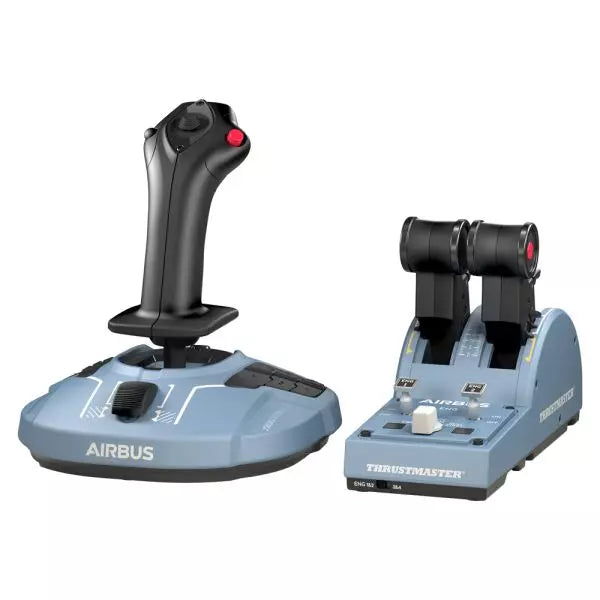
    TCA Officer Pack Airbus Edition is een must-have voor iedereen die de ervaring van commerciële luchtvaart naar zijn setup wil brengen. Met een ergonomisch ontwerp geïnspireerd op de Airbus A320 bevat deze set zowel de TCA Sidestick als de Throttle Quadrant voor ongeëvenaarde controle. Dankzij magnetische sensortechnologie voor soepele invoer en een modulaire sidestick voor veelzijdige configuraties, biedt dit pakket precisie in de lucht. Of je nu een passagiersvliegtuig of een gevechtsvliegtuig bestuurt, deze set past zich naadloos aan jouw behoeften aan. Wat maakt de TCA Officer Pack Airbus Edition uniek? Modulair ontwerp van de sidestick – De sidestick beschikt over verwisselbare knopmodules, waardoor je hem kunt configureren voor een captain-, co-piloot- of solovluchtopstelling. Deze modulariteit is uniek en biedt flexibiliteit voor verschillende speelstijlen en simulatoropstellingen. Throttle met standen en thrust-reverser – De throttle quadrant heeft precieze standen en een ingebouwde thrust-reverser, wat een realistische terugkoppeling geeft die echte besturing nabootst. De mogelijkheid om over te schakelen naar lineaire modus voegt extra veelzijdigheid toe voor verschillende vliegtuigtypen. Duurzame magnetische technologie – Beide apparaten maken gebruik van contactloze magnetische sensoren, waardoor slijtage wordt geëlimineerd en de betrouwbaarheid toeneemt. Dit ontwerp voorkomt invoervertraging en zorgt voor een nauwkeurige besturing tijdens kritieke manoeuvres. Naadloze compatibiliteit met meerdere apparaten – Dit pakket werkt perfect samen met randapparatuur zoals de Thrustmaster T.Flight Rudder Pedals en TM Flying Clamp. Dit zorgt voor een samenhangende en meeslepende opstelling voor serieuze luchtvaartliefhebbers. Voordelen en Nadelen Voordelen Nadelen Ergonomisch ontwerp gebaseerd op Airbus A320-besturing. Vaak uitverkocht door hoge vraag. Modulaire sidestick ondersteunt diverse configuraties. Throttle quadrant heeft geen achtergrondverlichting voor nachtvliegen. Magnetische sensoren garanderen langdurige betrouwbaarheid. Geen native console-ondersteuning; alleen voor PC. Ondersteunt dual throttle voor viermotorige vliegtuigen. Extra throttle quadrant nodig voor volledige viermotorige controle. Specificaties Specificatie Waarde Breedte Sidestick 7.7” / 195 mm Diepte Sidestick 8.9” / 225 mm Hoogte Sidestick 7.7” / 195 mm Gewicht Sidestick 2.0 lb / 920 g Breedte Quadrant 10.0” / 255 mm Diepte Quadrant 5.7” / 145 mm Hoogte Quadrant 3.3” / 85 mm Gewicht Quadrant 1.2 lb / 530 g Inhoud verpakking TCA Sidestick, TCA Quadrant, 4 verwisselbare joystickknopmodules, USB-kabel, sticker, connectoren, bevestigingsstang TCA Officer Pack Airbus Edition Compatibiliteit Hardware Compatibiliteit Roerpedalen Compatibel met Thrustmaster T.Flight en Pendular Rudder Montageklem Compatibel met Thrustmaster TM Flying Clamp De TCA Officer Pack Airbus Edition is ontworpen om naadloos samen te werken met andere Thrustmaster-randapparatuur, waardoor het een veelzijdige toevoeging is aan een bestaande opstelling. De throttle quadrant maakt het mogelijk om twee eenheden te koppelen voor de bediening van viermotorige vliegtuigen, en de modulaire sidestick past zich gemakkelijk aan verschillende cockpitconfiguraties aan. Echter, vanwege de PC-compatibiliteit zullen gebruikers die op zoek zijn naar console-integratie elders moeten kijken. Op gamingplatforms is dit pakket volledig compatibel met Windows 10 en 8 en werkt het goed met belangrijke vluchtsimulatoren zoals Microsoft Flight Simulator en X-Plane. Het biedt geen native ondersteuning voor consoles zoals Xbox of PlayStation, waardoor het minder geschikt is voor consolepiloten.

    Nog 5 op voorraad Shipped in 1-3 business days.

    €179,00

  • Bijna uitverkocht Honeycomb Foxtrot Aviation Stick

    Fly Honeycomb Honeycomb Foxtrot Aviation Stick

    Nog 4 op voorraad Shipped in 1-3 business days.

    Honeycomb Foxtrot Aviation Stick is gebouwd voor piloten die een sidestick in de hand verkiezen en een opgeruimd bureau voor zich willen. Vanaf de eerste beweging voelt het soepele lineaire weerstandssysteem zonder center detent vloeiend en gecontroleerd aan, ideaal voor Airbus-achtige inputs en aerobatische manoeuvres. Onder de motorkap vertaalt de 16-bit resolutie met Hall Effect sensortechnologie subtiele polsbewegingen naar nauwkeurige besturing op het scherm. Voeg daar instelbare spanning en een volledig ambidextere lay-out aan toe, en je krijgt een stick die doelgericht en professioneel aanvoelt in plaats van speelgoedachtig. Wat onderscheidt de Honeycomb Foxtrot Aviation Stick? Besturingsfilosofie Zonder Center Detent Veel sticks vertrouwen op een voelbare middenklik, wat kleine correcties mechanisch kan laten aanvoelen. Het lineaire weerstandssysteem van de Foxtrot elimineert die inkeping en zorgt voor een soepele overgang over het volledige asbereik. Vooral piloten die Airbus-toestellen vliegen waarderen dit ontwerp, omdat het het gedrag van een sidestick nauwkeuriger benadert en zachte pitch- en rolcorrecties mogelijk maakt zonder tegen een veerbelaste “klik” in het midden te werken. Synergie Tussen Sensoren en Resolutie Met 16-bit resolutie in combinatie met Hall Effect sensoren levert de Foxtrot een schone, contactloze inputdetectie. Enthousiastelingen wijzen vaak op de consistentie op lange termijn — geen spiking, geen geleidelijke slijtage zoals bij fysieke potentiometers. Subtiele trimaanpassingen tijdens de nadering of zorgvuldige rolinvoer bij aerobatics voelen stabiel en voorspelbaar aan, vooral vergeleken met instapsticks die rond het midden jitter kunnen vertonen. Instelbare Weerstand en Ergonomie Dankzij de instelbare spanning kan de stick worden afgestemd op persoonlijke voorkeur, of je nu lichte vingertopinputs verkiest of een stevigere weerstand voor gecontroleerde bewegingen. In combinatie met het ambidextere gripontwerp is de Foxtrot geschikt voor zowel links- als rechtshandige configuraties. Gebruikers met compacte cockpitopstellingen benadrukken vaak hoe aanpasbaar hij aanvoelt in verschillende zitposities, inclusief centrale of zijdelingse montage. Veel Schakelaars Zonder Overbelasting Met 5 tweerichtingsschakelaars, 4 programmeerbare actieknoppen, een POV hat, trigger, rockers en een meerweg roterend paneel biedt de stick uitgebreide inputflexibiliteit. Wat opvalt is de logische plaatsing van de bedieningselementen; sim pilots vermelden vaak dat functies zoals trim, autopilot-modi of camerabediening kunnen worden toegewezen zonder dat het krap aanvoelt of dat je tijdens de vlucht blind moet zoeken. Voor- en Nadelen Voordelen Nadelen Lineaire weerstand zonder center detent voelt soepel aan. Geen native consolecompatibiliteit. Hall Effect sensoren verminderen slijtage op lange termijn. Geen speciale montagebasis inbegrepen. Instelbare spanning geschikt voor verschillende vliegstylen. Uitgebreide configuratiemogelijkheden voor schakelaars en knoppen. Specificaties Specificatie Waarde Product Name Honeycomb Foxtrot Aviation Stick Control System Lineair weerstandssysteem zonder center detent Sensor Technology Hall Effect sensoren Resolution 16-bit Tension Adjustment Instelbare stickweerstand Switches 5 tweerichtingsschakelaars Action Buttons 4 programmeerbare knoppen Rotary Panel 3-, 4- en 5-weg roterende bedieningselementen Grip Design Ambidexter Connection USB-C to USB-A cable System Compatibility PC en Mac Included in the Box Foxtrot Aviation Stick, USB-C to USB-A Cable, Quick Start Guide (EFIGS) Download Support Basic Bindings Profiles (XML) voor MSFS 2024 Honeycomb Foxtrot Aviation Stick Compatibiliteit Platform Compatibiliteit Operating Systems PC en Mac Connection Type USB-C to USB-A directe USB-interface Primary Sim Support MSFS 2024 (XML bindings), MSFS, X-Plane, Prepar3D De Foxtrot Aviation Stick wordt aangesloten via standaard USB, waardoor hij eenvoudig kan worden geïntegreerd in de meeste desktop cockpitopstellingen. Hij werkt naadloos samen met throttle quadrants, rudderpedalen en radiopanelen van andere grote merken dankzij zijn plug-and-play HID-architectuur. Het ambidextere ontwerp maakt hem geschikt voor configuraties aan de linker- of rechterzijde, inclusief zijdelingse montage in Airbus-stijl. Hij is niet compatibel met Xbox-consoles en functioneert niet als zelfstandig apparaat zonder een aangesloten PC of Mac. Op softwaregebied ondersteunt hij Microsoft Flight Simulator 2024 met speciale XML-bindingsprofielen en werkt hij met populaire PC-simulators zoals Microsoft Flight Simulator (2020), X-Plane en Prepar3D via handmatige of community-mappings. Hij is niet ontworpen voor consoleplatforms, omdat hij afhankelijk is van native PC/Mac driverherkenning in plaats van console-gecertificeerde firmware.

    Nog 4 op voorraad Shipped in 1-3 business days.

    €165,00

  • WINCTRL URSA MINOR Airline Joystick R

    WINCTRL WINCTRL URSA MINOR Airline Joystick R

    Niet op voorraad, Pre-Orders Available. Shipped in 2-2.5 weeks from now.

    WINCTRL URSA MINOR Airline Joystick R brings airline-style control to the desktop with a clever mix of tactile feedback and thoughtful engineering. The standout feature is the flight-data-linked vibration engine, which adds subtle physical cues during events like flap deployment, airflow changes, and touchdown. Pair that with non-contact magnetic resistance sensors on the X and Y axes, and the stick delivers smooth, stable inputs without the wear issues common in cheaper mechanisms. The result is a joystick that feels lively in hand yet technically grounded under the hood. What Sets the WINCTRL URSA MINOR Airline Joystick R apart? Flight Data Driven Vibration Feedback The URSA MINOR stands out with a vibration motor tied directly to in-sim flight data. Instead of generic rumble, the stick reacts to events like landing contact, airflow changes, or flap movement. Pilots online often mention how this adds subtle physical cues during phases like flare or speed changes, providing a tactile reminder of what the aircraft is doing without constantly glancing at instruments. Robust Gimbal With Magnetic Sensors At the core of the stick is a glass-fiber-reinforced nylon gimbal running on ball bearings, paired with non-contact magnetic sensors for the primary axes. This combination helps maintain smooth motion over time without the jitter common in potentiometer-based designs. Enthusiasts frequently note that the stick movement feels stable across the entire travel range, particularly during small pitch adjustments on final approach. Airliner-Inspired Grip Layout The grip design borrows cues from airline sidestick ergonomics, offering a balanced control layout that includes a PTT trigger, autopilot disconnect switch, and a concealed five-way switch beneath a magnetic cover. Pilots often highlight how practical this arrangement is for everyday flying tasks—radio calls, autopilot overrides, and camera views can all be handled without reaching for the keyboard. Flexible Mounting and Maintenance Design The base includes anti-slip pads for desktop use along with pre-drilled mounting holes for cockpit rigs. A quick-release base cover allows access to internal adjustments without dismantling the entire unit. This detail is frequently appreciated by sim cockpit builders who prefer gear that can be tuned or serviced easily rather than permanently sealed hardware. Pros and Cons Pros Cons Flight-data vibration feedback adds tactile flight cues. Plastic construction compared to metal joystick designs. Magnetic sensors reduce wear and input drift. Limited axis travel compared to extended bases. Good button layout for airliner-style flying tasks. Desk or cockpit mounting options included. Specifications Specification Value Product Model URSA MINOR-Airline-Joystick R Material Industrial ABS plastic (PC + ABS) Controller 32-bit ARM controller X/Y Axis Movement Angle ±15° Z Axis Rotation Angle ±20° X/Y Sensors Non-contact magnetic resistance sensors Gimbal Construction Glass fiber reinforced nylon with ball bearings Operating Force (X/Y) Approximately 6N Rotation Torque (Z) ~4 kgf·cm Throttle Axis Type Long-travel sliding potentiometer Throttle Axis Travel 38 mm Buttons 14 buttons (250gf press force, 0.25 mm travel) Special Controls Hidden 5-way switch, PTT trigger, autopilot disconnect Vibration Feature Adjustable amplitude levels from 0–255 Mounting Options Anti-slip desktop pads and cockpit mounting holes Item Weight 3 kg Included in Box J5-BASE-BLACK + JGRIP-C1-R, Data Cable, Toolkit, Accessories Pack WINCTRL URSA MINOR Airline Joystick R Compatibility Platform Compatibility Connection Type USB plug-and-play connection Software Configuration WW SIMAPP Pro software for button mapping Mounting Desktop use or cockpit mounting The URSA MINOR Airline Joystick R connects via standard USB, allowing it to integrate easily with throttle quadrants, rudder pedals, and other flight hardware from many manufacturers. The base supports both desktop placement with anti-slip pads and cockpit mounting using pre-drilled holes, which is useful for sim rigs or permanent setups. Configuration is handled through WW SIMAPP Pro software, enabling button assignments and vibration adjustments directly from a visual interface. Within a flight setup, the joystick works well alongside external throttles, radio panels, or pedal systems because it behaves as a standard USB HID controller. It does not require proprietary ecosystems and can coexist with other brands in the same cockpit. However, it is intended for PC-based simulation environments and does not integrate directly with console platforms. In terms of simulators, the stick supports Microsoft Flight Simulator 2020, X-Plane, Prepar3D, and also space or combat titles like Star Citizen, Elite Dangerous, and War Thunder. Its plug-and-play USB design allows quick recognition in most PC simulation platforms. It is not designed for Xbox or PlayStation consoles, as those systems typically require licensed hardware and different firmware structures.

    Niet op voorraad, Pre-Orders Available. Shipped in 2-2.5 weeks from now.

    €99,00

  • WINCTRL URSA MINOR Airline Joystick L

    WINCTRL WINCTRL URSA MINOR Airline Joystick L

    Niet op voorraad, Pre-Orders Available. Shipped in 2-2.5 weeks from now.

    WINCTRL URSA MINOR Airline Joystick L brings airline-style control to the desktop with a clever mix of tactile feedback and thoughtful engineering. The standout feature is the flight-data-linked vibration engine, which adds subtle physical cues during events like flap deployment, airflow changes, and touchdown. Pair that with non-contact magnetic resistance sensors on the X and Y axes, and the stick delivers smooth, stable inputs without the wear issues common in cheaper mechanisms. The result is a joystick that feels lively in hand yet technically grounded under the hood. What Sets the WINCTRL URSA MINOR Airline Joystick L apart? Flight Data Driven Vibration Feedback The URSA MINOR stands out with a vibration motor tied directly to in-sim flight data. Instead of generic rumble, the stick reacts to events like landing contact, airflow changes, or flap movement. Pilots online often mention how this adds subtle physical cues during phases like flare or speed changes, providing a tactile reminder of what the aircraft is doing without constantly glancing at instruments. Robust Gimbal With Magnetic Sensors At the core of the stick is a glass-fiber-reinforced nylon gimbal running on ball bearings, paired with non-contact magnetic sensors for the primary axes. This combination helps maintain smooth motion over time without the jitter common in potentiometer-based designs. Enthusiasts frequently note that the stick movement feels stable across the entire travel range, particularly during small pitch adjustments on final approach. Airliner-Inspired Grip Layout The grip design borrows cues from airline sidestick ergonomics, offering a balanced control layout that includes a PTT trigger, autopilot disconnect switch, and a concealed five-way switch beneath a magnetic cover. Pilots often highlight how practical this arrangement is for everyday flying tasks—radio calls, autopilot overrides, and camera views can all be handled without reaching for the keyboard. Flexible Mounting and Maintenance Design The base includes anti-slip pads for desktop use along with pre-drilled mounting holes for cockpit rigs. A quick-release base cover allows access to internal adjustments without dismantling the entire unit. This detail is frequently appreciated by sim cockpit builders who prefer gear that can be tuned or serviced easily rather than permanently sealed hardware. Pros and Cons Pros Cons Flight-data vibration feedback adds tactile flight cues. Plastic construction compared to metal joystick designs. Magnetic sensors reduce wear and input drift. Limited axis travel compared to extended bases. Good button layout for airliner-style flying tasks. Desk or cockpit mounting options included. Specifications Specification Value Product Model URSA MINOR-Airline-Joystick L Material Industrial ABS plastic (PC + ABS) Controller 32-bit ARM controller X/Y Axis Movement Angle ±15° Z Axis Rotation Angle ±20° X/Y Sensors Non-contact magnetic resistance sensors Gimbal Construction Glass fiber reinforced nylon with ball bearings Operating Force (X/Y) Approximately 6N Rotation Torque (Z) ~4 kgf·cm Throttle Axis Type Long-travel sliding potentiometer Throttle Axis Travel 38 mm Buttons 14 buttons (250gf press force, 0.25 mm travel) Special Controls Hidden 5-way switch, PTT trigger, autopilot disconnect Vibration Feature Adjustable amplitude levels from 0–255 Mounting Options Anti-slip desktop pads and cockpit mounting holes Item Weight 3 kg Included in Box J5-BASE-BLACK + JGRIP-C1-R, Data Cable, Toolkit, Accessories Pack WINCTRL URSA MINOR Airline Joystick L Compatibility Platform Compatibility Connection Type USB plug-and-play connection Software Configuration WW SIMAPP Pro software for button mapping Mounting Desktop use or cockpit mounting The URSA MINOR Airline Joystick L connects via standard USB, allowing it to integrate easily with throttle quadrants, rudder pedals, and other flight hardware from many manufacturers. The base supports both desktop placement with anti-slip pads and cockpit mounting using pre-drilled holes, which is useful for sim rigs or permanent setups. Configuration is handled through WW SIMAPP Pro software, enabling button assignments and vibration adjustments directly from a visual interface. Within a flight setup, the joystick works well alongside external throttles, radio panels, or pedal systems because it behaves as a standard USB HID controller. It does not require proprietary ecosystems and can coexist with other brands in the same cockpit. However, it is intended for PC-based simulation environments and does not integrate directly with console platforms. In terms of simulators, the stick supports Microsoft Flight Simulator 2020, X-Plane, Prepar3D, and also space or combat titles like Star Citizen, Elite Dangerous, and War Thunder. Its plug-and-play USB design allows quick recognition in most PC simulation platforms. It is not designed for Xbox or PlayStation consoles, as those systems typically require licensed hardware and different firmware structures.

    Niet op voorraad, Pre-Orders Available. Shipped in 2-2.5 weeks from now.

    €99,00

  • Honeycomb Echo Aviation Controller

    Fly Honeycomb Honeycomb Echo Aviation Controller

    Niet op voorraad, Pre-Orders Available. Shipped in 2-2.5 weeks from now.

    Honeycomb Echo Aviation Controller is one of those devices that makes you rethink how much hardware you actually need to fly properly. Everything sits in your hands—pitch, roll, yaw, throttle, trim—all within reach, anchored by a 16-bit Hall-effect thumbstick that feels smooth and consistent through every movement. Pair that with a complete all-in-one flight control layout, and you’ve got a compact cockpit that works just as well on a desk as it does on the couch. It’s clever, tactile, and surprisingly capable for its size. What Sets the Honeycomb Echo Aviation Controller apart? All-in-One Without Feeling Compromised – Many compact controllers try to do everything and end up feeling like a gamepad with extra buttons. The Echo stands out because each control has a defined purpose and physical identity. Users often mention how the dedicated trim wheel, levers, and rudder system make it feel closer to a proper flight control setup, rather than a simplified alternative. Mechanical Rudder Integration – Instead of relying on twist input or triggers, the Echo uses mechanically linked rudder pedals with Hall-effect sensing. This is something pilots quickly notice, especially during coordinated turns or crosswind landings. The self-centering action gives a consistent feel that’s easier to manage than digital-style inputs found on many compact controllers. Designed for Flexible Flying Spaces – Feedback from users consistently highlights how freeing it is to fly without a fixed rig. Whether sitting at a desk, relaxing on a couch, or traveling, the Echo adapts without needing mounts or external peripherals. It’s particularly appealing for sim pilots who don’t have space for a full yoke, throttle quadrant, and pedal setup. Thoughtful Control Layout for MSFS – The layout feels intentionally designed around Microsoft Flight Simulator workflows. Common functions like gear, flaps, trim, and camera controls are placed where fingers naturally rest. Many users note that once muscle memory develops, cockpit interaction becomes quicker and more fluid compared to mapping everything onto a generic controller. Pros and Cons Pros Cons All flight controls integrated into one compact unit Less tactile separation than full-size hardware setups Hall-effect sensors provide smooth, drift-free input Limited physical range compared to dedicated yokes Wireless operation with long battery life Portable design works without dedicated sim rig Specifications Specification Value Control Type All-in-one flight controller (pitch, roll, yaw, throttle, trim, flaps, gear) Primary Input 16-bit Hall-effect thumbstick Rudder System Mechanically linked Hall-effect rudder pedals Throttle/Sliders Four detented sliders with interchangeable caps Connectivity Wireless (2.4 GHz dongle) or USB-C wired Battery 1200 mAh, up to 15 hours usage System Compatibility PC and Mac Software Compatibility Microsoft Flight Simulator, X-Plane 11/12, Prepar3D Included Accessories Travel case, lever caps, wireless dongle, USB cable Warranty 2-year limited warranty Honeycomb Echo Aviation Controller Compatibility The Echo is built with flexibility in mind. It is compatible with PC and Mac systems and connects either through USB-C wired connection or a 2.4 GHz wireless dongle. Because it operates as a standalone controller, it does not require additional yokes, pedals, or throttle quadrants, making it ideal for compact setups or portable use. It is not designed to integrate directly with traditional hardware ecosystems like separate yokes or external rudder pedals. Its all-in-one design means fewer cables and simpler setups, but it also means less modular expansion compared to full cockpit systems. Pilots who prefer mixing and matching hardware may find it less suited to complex multi-device configurations, as the Echo is intended to replace, rather than complement, those components. On the software side, the controller is fully compatible with Microsoft Flight Simulator and also supports X-Plane 11, X-Plane 12, and Prepar3D. It is not designed for console use, focusing entirely on PC-based simulation platforms where full input mapping and customization are available.

    Niet op voorraad, Pre-Orders Available. Shipped in 2-2.5 weeks from now.

    €150,00

Flight Simulator Joysticks for sale at FlightSImZone

Wanneer je de wereld van vluchtsimulatie betreedt, is een hoogwaardige vluchtsimulator-joystick je primaire verbinding met het virtuele vliegtuig. Deze precisie-instrumenten vertalen je kleinste bewegingen in nauwkeurige vluchtcontrole-inputs, waardoor ze essentieel zijn voor zowel recreatieve als serieuze trainingsdoeleinden.

Beste joysticks voor vluchtsimulatoren

De markt biedt tegenwoordig verschillende joysticks die inspelen op uiteenlopende behoeften en voorkeuren. De HOTAS Warthog behoort tot het premium segment met zijn volledig metalen constructie en militaire precisie, terwijl de T.Flight Stick X een uitstekend instappunt vormt voor beginners. De TCA Sidestick X Airbus Edition bevindt zich tussen deze segmenten en biedt een authentiek airliner-gevoel met professionele sensoren.

Microsoft Flight Simulator Joystick

De geavanceerde physics-engine van Microsoft Flight Simulator vereist precieze invoerapparaten voor optimale controle. De T16000M FCS is een populaire keuze, dankzij de nauwkeurige Hall Effect-sensoren en ergonomisch ontwerp. De VelocityOne Flightstick is een andere uitstekende optie met functies die specifiek zijn geoptimaliseerd voor deze simulator.

Flight Simulator Joystick voor PC

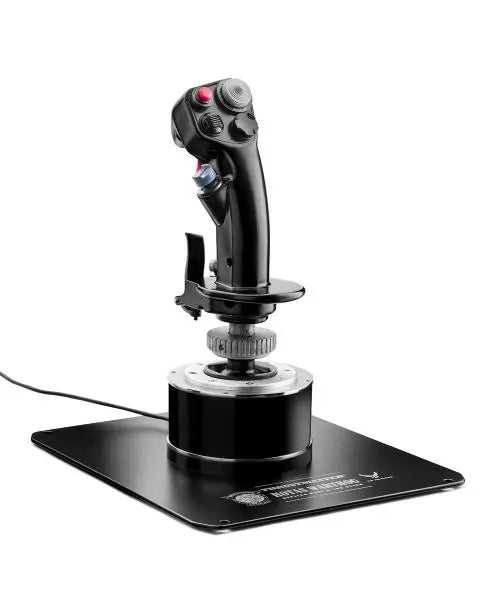
PC-platforms bieden de breedste compatibiliteit met vluchtcontrollers en stellen piloten in staat om uit een breed scala aan opties te kiezen. De AVA F/A-18 Super Hornet Flightstick is een voorbeeld van moderne PC-vluchtcontroletechnologie, met geavanceerde sensoren en programmeerbare functies die de simulatie-ervaring verbeteren.

Vergelijkingstabel

Kenmerk HOTAS Warthog TCA Sidestick X Airbus T16000M FCS VelocityOne Flightstick T.Flight Stick X AVA F/A-18 Super Hornet
Platformcompatibiliteit PC PC PC Xbox Series X|S, PC PC, PS3 PC
Constructie Volledig metaal Industriële kunststof Versterkte kunststof Premium kunststof Kunststof Metaal/Kunststof hybride
Sensor type H.E.A.R.T Hall Effect H.E.A.R.T Hall Effect Hall Effect Hall Effect Potentiometer Hall Effect
Aantal knoppen 19 + Hat Switch 17 + Hat Switch 16 + Hat Switch 12 + Hat Switch 12 + Hat Switch 19 + Dual Hat Switch
Throttle inbegrepen Ja (afzonderlijk) Nee Optioneel Nee Nee Nee
Software functies T.A.R.G.E.T Software T.A.R.G.E.T Software T.A.R.G.E.T Software Aangepaste app Basis kalibratie Geavanceerde programmering
As resolutie 16-bit 16-bit 16-bit 16-bit 8-bit 16-bit

Belangrijke technische kenmerken:

Precisie Technologie

  • Hall Effect magnetische sensoren
  • 16-bit resolutie assen
  • Multi-directionele hat switches

Duurzaamheidselementen

  • Versterkte basisconstructie
  • Industriële componenten
  • Metalen gimbal-mechanismen

Flight Simulator Joystick voor Xbox

Vluchtsimulatie op consoles, met name in het Xbox-ecosysteem, heeft zich sterk ontwikkeld. Moderne Xbox-compatibele joysticks bieden geavanceerde functies die voorheen exclusief waren voor PC-systemen.

Geavanceerde besturingstechnologieën

Moderne vluchtsimulator-joysticks bevatten verschillende technologische innovaties die hun prestaties en duurzaamheid verbeteren. Hoogwaardige sensoren zorgen voor nauwkeurige positiebepaling, terwijl robuuste materialen een consistente werking garanderen over duizenden vlieguren.

Koop je Flight Simulator Joystick bij FlightSimZone

Een kwalitatieve vluchtsimulator-joystick is een essentiële investering in je virtuele luchtvaartreis. Bij FlightSimZone helpen we je graag bij het vinden van de ideale besturingsoplossing.

Koop je Flight Simulator Joystick vandaag nog bij FlightSimZone en ervaar de perfecte balans tussen precisie en controle in je virtuele cockpit.


Login

Wachtwoord vergeten?

Heb je nog geen account?
Maak gratis een account aan en geniet van vele voordelen.


