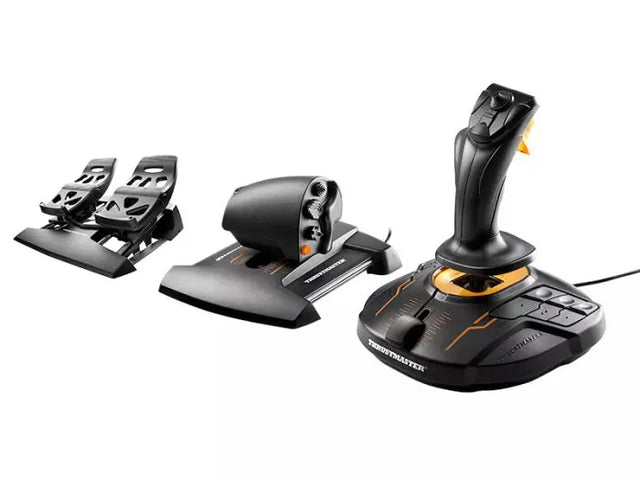
Flight Simulator Controls

50 producten

  • WINCTRL URSA MINOR Airline Joystick R

    WINCTRL WINCTRL URSA MINOR Airline Joystick R

    Niet op voorraad, Pre-orders beschikbaar. Verzending binnen 2-2,5 weken.

    WINCTRL URSA MINOR Airline Joystick R brings airline-style control to the desktop with a clever mix of tactile feedback and thoughtful engineering. The standout feature is the flight-data-linked vibration engine, which adds subtle physical cues during events like flap deployment, airflow changes, and touchdown. Pair that with non-contact magnetic resistance sensors on the X and Y axes, and the stick delivers smooth, stable inputs without the wear issues common in cheaper mechanisms. The result is a joystick that feels lively in hand yet technically grounded under the hood. What Sets the WINCTRL URSA MINOR Airline Joystick R apart? Flight Data Driven Vibration Feedback The URSA MINOR stands out with a vibration motor tied directly to in-sim flight data. Instead of generic rumble, the stick reacts to events like landing contact, airflow changes, or flap movement. Pilots online often mention how this adds subtle physical cues during phases like flare or speed changes, providing a tactile reminder of what the aircraft is doing without constantly glancing at instruments. Robust Gimbal With Magnetic Sensors At the core of the stick is a glass-fiber-reinforced nylon gimbal running on ball bearings, paired with non-contact magnetic sensors for the primary axes. This combination helps maintain smooth motion over time without the jitter common in potentiometer-based designs. Enthusiasts frequently note that the stick movement feels stable across the entire travel range, particularly during small pitch adjustments on final approach. Airliner-Inspired Grip Layout The grip design borrows cues from airline sidestick ergonomics, offering a balanced control layout that includes a PTT trigger, autopilot disconnect switch, and a concealed five-way switch beneath a magnetic cover. Pilots often highlight how practical this arrangement is for everyday flying tasks—radio calls, autopilot overrides, and camera views can all be handled without reaching for the keyboard. Flexible Mounting and Maintenance Design The base includes anti-slip pads for desktop use along with pre-drilled mounting holes for cockpit rigs. A quick-release base cover allows access to internal adjustments without dismantling the entire unit. This detail is frequently appreciated by sim cockpit builders who prefer gear that can be tuned or serviced easily rather than permanently sealed hardware. Pros and Cons Pros Cons Flight-data vibration feedback adds tactile flight cues. Plastic construction compared to metal joystick designs. Magnetic sensors reduce wear and input drift. Limited axis travel compared to extended bases. Good button layout for airliner-style flying tasks. Desk or cockpit mounting options included. Specifications Specification Value Product Model URSA MINOR-Airline-Joystick R Material Industrial ABS plastic (PC + ABS) Controller 32-bit ARM controller X/Y Axis Movement Angle ±15° Z Axis Rotation Angle ±20° X/Y Sensors Non-contact magnetic resistance sensors Gimbal Construction Glass fiber reinforced nylon with ball bearings Operating Force (X/Y) Approximately 6N Rotation Torque (Z) ~4 kgf·cm Throttle Axis Type Long-travel sliding potentiometer Throttle Axis Travel 38 mm Buttons 14 buttons (250gf press force, 0.25 mm travel) Special Controls Hidden 5-way switch, PTT trigger, autopilot disconnect Vibration Feature Adjustable amplitude levels from 0–255 Mounting Options Anti-slip desktop pads and cockpit mounting holes Item Weight 3 kg Included in Box J5-BASE-BLACK + JGRIP-C1-R, Data Cable, Toolkit, Accessories Pack WINCTRL URSA MINOR Airline Joystick R Compatibility Platform Compatibility Connection Type USB plug-and-play connection Software Configuration WW SIMAPP Pro software for button mapping Mounting Desktop use or cockpit mounting The URSA MINOR Airline Joystick R connects via standard USB, allowing it to integrate easily with throttle quadrants, rudder pedals, and other flight hardware from many manufacturers. The base supports both desktop placement with anti-slip pads and cockpit mounting using pre-drilled holes, which is useful for sim rigs or permanent setups. Configuration is handled through WW SIMAPP Pro software, enabling button assignments and vibration adjustments directly from a visual interface. Within a flight setup, the joystick works well alongside external throttles, radio panels, or pedal systems because it behaves as a standard USB HID controller. It does not require proprietary ecosystems and can coexist with other brands in the same cockpit. However, it is intended for PC-based simulation environments and does not integrate directly with console platforms. In terms of simulators, the stick supports Microsoft Flight Simulator 2020, X-Plane, Prepar3D, and also space or combat titles like Star Citizen, Elite Dangerous, and War Thunder. Its plug-and-play USB design allows quick recognition in most PC simulation platforms. It is not designed for Xbox or PlayStation consoles, as those systems typically require licensed hardware and different firmware structures.

    Niet op voorraad, Pre-orders beschikbaar. Verzending binnen 2-2,5 weken.

    €99,00

  • WINCTRL URSA MINOR Airline Joystick L

    WINCTRL WINCTRL URSA MINOR Airline Joystick L

    Niet op voorraad, Pre-orders beschikbaar. Verzending binnen 2-2,5 weken.

    WINCTRL URSA MINOR Airline Joystick L brings airline-style control to the desktop with a clever mix of tactile feedback and thoughtful engineering. The standout feature is the flight-data-linked vibration engine, which adds subtle physical cues during events like flap deployment, airflow changes, and touchdown. Pair that with non-contact magnetic resistance sensors on the X and Y axes, and the stick delivers smooth, stable inputs without the wear issues common in cheaper mechanisms. The result is a joystick that feels lively in hand yet technically grounded under the hood. What Sets the WINCTRL URSA MINOR Airline Joystick L apart? Flight Data Driven Vibration Feedback The URSA MINOR stands out with a vibration motor tied directly to in-sim flight data. Instead of generic rumble, the stick reacts to events like landing contact, airflow changes, or flap movement. Pilots online often mention how this adds subtle physical cues during phases like flare or speed changes, providing a tactile reminder of what the aircraft is doing without constantly glancing at instruments. Robust Gimbal With Magnetic Sensors At the core of the stick is a glass-fiber-reinforced nylon gimbal running on ball bearings, paired with non-contact magnetic sensors for the primary axes. This combination helps maintain smooth motion over time without the jitter common in potentiometer-based designs. Enthusiasts frequently note that the stick movement feels stable across the entire travel range, particularly during small pitch adjustments on final approach. Airliner-Inspired Grip Layout The grip design borrows cues from airline sidestick ergonomics, offering a balanced control layout that includes a PTT trigger, autopilot disconnect switch, and a concealed five-way switch beneath a magnetic cover. Pilots often highlight how practical this arrangement is for everyday flying tasks—radio calls, autopilot overrides, and camera views can all be handled without reaching for the keyboard. Flexible Mounting and Maintenance Design The base includes anti-slip pads for desktop use along with pre-drilled mounting holes for cockpit rigs. A quick-release base cover allows access to internal adjustments without dismantling the entire unit. This detail is frequently appreciated by sim cockpit builders who prefer gear that can be tuned or serviced easily rather than permanently sealed hardware. Pros and Cons Pros Cons Flight-data vibration feedback adds tactile flight cues. Plastic construction compared to metal joystick designs. Magnetic sensors reduce wear and input drift. Limited axis travel compared to extended bases. Good button layout for airliner-style flying tasks. Desk or cockpit mounting options included. Specifications Specification Value Product Model URSA MINOR-Airline-Joystick L Material Industrial ABS plastic (PC + ABS) Controller 32-bit ARM controller X/Y Axis Movement Angle ±15° Z Axis Rotation Angle ±20° X/Y Sensors Non-contact magnetic resistance sensors Gimbal Construction Glass fiber reinforced nylon with ball bearings Operating Force (X/Y) Approximately 6N Rotation Torque (Z) ~4 kgf·cm Throttle Axis Type Long-travel sliding potentiometer Throttle Axis Travel 38 mm Buttons 14 buttons (250gf press force, 0.25 mm travel) Special Controls Hidden 5-way switch, PTT trigger, autopilot disconnect Vibration Feature Adjustable amplitude levels from 0–255 Mounting Options Anti-slip desktop pads and cockpit mounting holes Item Weight 3 kg Included in Box J5-BASE-BLACK + JGRIP-C1-R, Data Cable, Toolkit, Accessories Pack WINCTRL URSA MINOR Airline Joystick L Compatibility Platform Compatibility Connection Type USB plug-and-play connection Software Configuration WW SIMAPP Pro software for button mapping Mounting Desktop use or cockpit mounting The URSA MINOR Airline Joystick L connects via standard USB, allowing it to integrate easily with throttle quadrants, rudder pedals, and other flight hardware from many manufacturers. The base supports both desktop placement with anti-slip pads and cockpit mounting using pre-drilled holes, which is useful for sim rigs or permanent setups. Configuration is handled through WW SIMAPP Pro software, enabling button assignments and vibration adjustments directly from a visual interface. Within a flight setup, the joystick works well alongside external throttles, radio panels, or pedal systems because it behaves as a standard USB HID controller. It does not require proprietary ecosystems and can coexist with other brands in the same cockpit. However, it is intended for PC-based simulation environments and does not integrate directly with console platforms. In terms of simulators, the stick supports Microsoft Flight Simulator 2020, X-Plane, Prepar3D, and also space or combat titles like Star Citizen, Elite Dangerous, and War Thunder. Its plug-and-play USB design allows quick recognition in most PC simulation platforms. It is not designed for Xbox or PlayStation consoles, as those systems typically require licensed hardware and different firmware structures.

    Niet op voorraad, Pre-orders beschikbaar. Verzending binnen 2-2,5 weken.

    €99,00

Flight Simulator Controls for sale at FlightSimZone

Wanneer je de wereld van virtuele luchtvaart betreedt, vormen vliegsimulator besturingen jouw fysieke verbinding met de virtuele cockpit. Deze geavanceerde invoerapparaten transformeren je bureau in een realistisch flight deck en bieden de tactiele feedback en precisie die nodig zijn voor een meeslepende vliegervaring.

Vliegsimulator Besturingen

Moderne besturingssystemen voor vliegsimulators hebben een enorme evolutie doorgemaakt en bieden ongeëvenaarde nauwkeurigheid en functionaliteit. De TCA Captain Pack X Airbus Edition belichaamt deze vooruitgang en biedt authentieke Airbus-stijl besturingen die perfect de realiteit nabootsen. Deze professionele randapparatuur bevat geavanceerde sensortechnologie voor nauwkeurige invoerdetectie en soepele bediening over alle bewegingsassen.

Vliegsimulator Besturing voor PC

PC-platformen bieden de breedste compatibiliteit met vliegsimulator besturingen, van eenvoudige joysticks tot complete cockpit setups. Moderne PC-besturingen maken gebruik van USB-connectiviteit en hogeresolutie sensoren om een precieze invoerherkenning te garanderen. Veel systemen bevatten uitgebreide aanpassingsmogelijkheden via eigen software, waardoor gebruikers hun besturingsreacties en knoppenindelingen kunnen afstemmen op hun behoeften.

Vliegsimulator Besturing voor Xbox

De populariteit van vliegsimulatie op consoles zoals Xbox is enorm gegroeid, met gespecialiseerde besturingsopties die traditionele PC-opstellingen evenaren. De Turtle Beach VelocityOne Flight System leidt deze categorie en biedt Xbox-gebruikers een uitgebreide besturingsoplossing met professionele functies en naadloze compatibiliteit.

Vergelijkingstabel

Kenmerk TCA Captain Pack X Airbus T16000M FCS Flight Pack VelocityOne Flight System
Platform Compatibiliteit PC PC Xbox Series X|S, PC
Type Besturing Sidestick + Throttle Quadrant HOTAS + Roerpedalen Yoke + Throttle System
Knoppen/Besturingen 21+ Programmeerbaar 16 + HAT Switch 18 + Statuspaneel
Sensor Technologie H.E.A.R.T Hall Effect Hall Effect Sensoren Hall Effect Sensoren
Extra Hardware Dubbele gashefbomen, Flaps, SPD BRK Throttle, Roerpedalen Geïntegreerd Paneel Display
Software Functies T.A.R.G.E.T Software T.A.R.G.E.T Software Aangepaste Beheerapp
Bouwmateriaal Industrieel Kunststof Versterkt Kunststof Versterkt Kunststof
Speciale Kenmerken • Authentiek Airbus Design
• Modulair Systeem
• Ambidextrisch
• Volledig HOTAS Systeem
• Nauwkeurige Roerbesturing
• Militaire Grip
• Status Weergavepaneel
• Trimwiel inbegrepen
• Modulair Design

Koop je Vliegsimulator Besturing bij FlightSimZone

Vliegsimulator besturingen vormen de ruggengraat van een realistische virtuele luchtvaartbeleving. De juiste combinatie van besturingsapparaten kan een eenvoudige opstelling omtoveren tot een geavanceerde thuiscockpit. Bij FlightSimZone begrijpen we het belang van kwalitatieve besturingen in het creëren van een meeslepende simulatieomgeving.

Koop je Vliegsimulator besturing vandaag nog bij FlightSimZone en ervaar de perfecte balans tussen realisme en functionaliteit in je virtuele cockpit.


Login

Wachtwoord vergeten?

Heb je nog geen account?
Maak gratis een account aan en geniet van vele voordelen.


