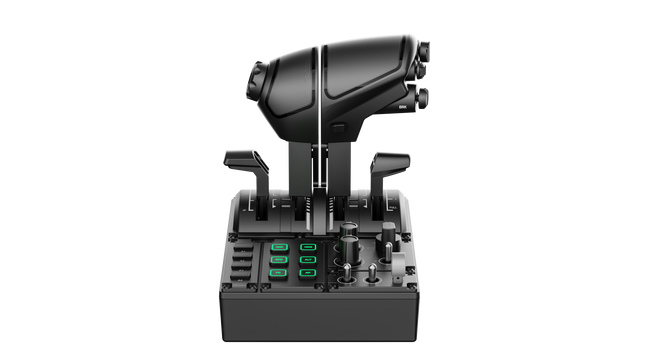
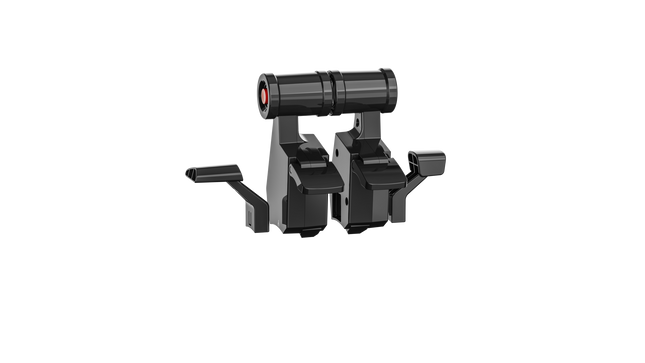
Het MOZA MTQ Throttle Panel is een modulair vluchtcontrolesysteem dat is ontworpen voor piloten die hunkeren naar tastbare interactie en mechanische precisie bij elke gashendelbeweging. Met zijn modulaire gashendelsysteem en veelzijdige controle-indeling verandert het elke vluchtsimulatoropstelling in een cockpitwaardige ervaring. De bevredigende weerstanden, metalen constructie en aanpasbare RGB-verlichting geven elke hendel een doelgericht gevoel — of je nu motoren opstart in een Airbus of naverbranders activeert in een straaljager. Het is mechanische voldoening gecombineerd met functionele veelzijdigheid.
Wat onderscheidt het MOZA MTQ Throttle Panel?
Echte modulaire hendelervaring — In tegenstelling tot vaste gashendels stelt de MTQ piloten in staat om te wisselen tussen Airbus-, Boeing- en straaljagerhendelstijlen via een railsysteem. Elke hendel biedt zijn eigen mechanische weerstanden, waardoor gebruikers de overgangspunten voelen, zoals het inschakelen van omgekeerde stuwkracht of het vergrendelen van de naverbrander. De tastbare precisie van deze weerstanden wordt door simpiloten geprezen omdat het fysieke duidelijkheid toevoegt aan de gasklepbediening.
Ergonomische indeling met doordacht ontwerp — Het controleoppervlak beschikt over 10 knoppen, 3 draaiknoppen en 3 tuimelschakelaars, allemaal binnen natuurlijke handzones geplaatst. Enthousiastelingen waarderen dat het ontwerp overzichtelijk blijft en intuïtieve toegang biedt tot belangrijke vluchtfuncties zonder de focus te verliezen. De toevoeging van een aparte landingsgestelhendel verhoogt de realiteit en maakt de overgangen tussen vluchtfasen soepeler en instinctiever.
Aanpasbare RGB-verlichting en software-integratie — De MOZA Cockpit-software biedt volledige controle over RGB-helderheid, kleurinstellingen en telemetrie-gebaseerde lichteffecten. Feedback suggereert dat de verlichting niet alleen prachtig oogt in een gedimde cockpit, maar ook kan worden geprogrammeerd om vluchtstatussen zoals landingsgestelpositie of gasklepzones weer te geven, waardoor de verlichting functionele feedback wordt in plaats van puur decoratie.
Mechanische feedback over meerdere assen — De MTQ beschikt over vier assen, elk met unieke tastbare weerstanden voor functies zoals kleppen en luchtremmen. Het gevoel van elke as is afgestemd op verschillende weerstanden, en de virtuele weerstandsknop op de luchtremarm geeft een bevredigend klikgeluid bij het uitklappen. Piloten merken op dat de consistentie tussen de assen dit paneel geschikt maakt voor zowel commerciële, militaire als algemene luchtvaartopstellingen.
Voordelen en Nadelen
Voordelen
Nadelen
Verwisselbare hendelmodules bieden veelzijdige vluchtconfiguraties.
Geen zelfstandige USB-verbinding; vereist MOZA-basislink.
Uitstekende tastbare weerstanden op gasklep- en klepassen.
Beperkte ondersteuning voor ecosystemen van derden.
Intuïtieve indeling met aanpasbare RGB-verlichting.
Duurzaam mechanisch ontwerp met soepele bewegingsdemping.
Specificaties
Specificatie
Waarde
Hendelsysteem
Modulaire gasklephendels met schuifrailsmechanisme
Inbegrepen gasklepstijlen
TQF (Straaljager), TQA (Airbus), TQB (Boeing)
Assen
Vier onafhankelijke assen met weerstanden
Knoppen en bedieningselementen
10 knoppen, 3 draaiknoppen, 3 tuimelschakelaars, landingsgestelhendel
RGB-verlichting
Zes RGB-knoppen, 16,7 miljoen kleuropties
Connectiviteit
RJ11-verbinding met MOZA Flight Bases
Software
MOZA Cockpit met telemetrie-gebaseerde lichteffecten
MOZA MTQ Throttle Panel Compatibiliteit
Compatibele hardware
Details
MOZA Flight Bases (bijv. AB6)
Directe RJ11-verbinding voor plug-and-play-integratie
MOZA-ecosysteemcomponenten
Naadloze werking via MOZA Cockpit-software
Systemen van derden
Beperkte ondersteuning; mogelijk adapters of softwaremapping vereist
Het MOZA MTQ Throttle Panel sluit rechtstreeks aan op MOZA Flight Bases via RJ11, waardoor kabelrommel wordt verminderd en communicatie met lage latentie wordt gegarandeerd. Het modulaire hendelontwerp maakt het compatibel met de TQF-, TQA- en TQB-gasklepvarianten, elk ontworpen voor specifieke vliegtuigtypen. Hoewel het primair is ontwikkeld voor het MOZA-ecosysteem, melden gebruikers beperkte compatibiliteit met systemen van derden, vaak met adapteroplossingen of aangepaste toewijzing. Dankzij de stabiele, montagevriendelijke basis integreert de MTQ moeiteloos met aluminium cockpitframes en modulaire rigs.
Aan de softwarezijde werkt de MTQ naadloos samen met de MOZA Cockpit-software en integreert het direct met populaire vluchtsimulaties zoals Microsoft Flight Simulator 2020/2024, X-Plane 11/12 en DCS World. Het is volledig compatibel met Windows-pc’s, maar niet ondersteund op consolesystemen zoals Xbox of PlayStation. Met zijn modulaire aanpak en brede compatibiliteit binnen simulaties is de MTQ ontworpen voor elke pc-piloot die zowel flexibiliteit als mechanische verfijning verlangt.
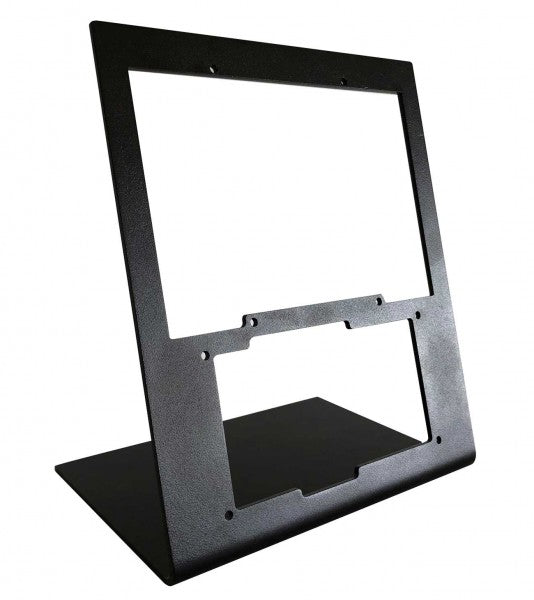
RealSimGear - Desktop Stand for G1000 Suite biedt een uitstekende oplossing voor flightsim-liefhebbers die stabiliteit en organisatie in hun opstelling eisen. Gemaakt van duurzaam 3mm geverfd staal, biedt deze standaard een stabiele, verhoogde positie voor de G1000 Suite's PFD, MFD en audiopaneel. De matte zwarte afwerking past in elke setup, terwijl rubberen antislipvoeten en precieze montagecompatibiliteit zorgen voor moeiteloze integratie. Deze standaard is een must-have voor wie een gestructureerde en ergonomische flightsim-ervaring zoekt.
Wat maakt de RealSimGear - Desktop Stand for G1000 Suite uniek?
Speciaal ontworpen voor de G1000 Suite Deze standaard is specifiek ontworpen om de G1000 PFD, MFD en het audiopaneel te huisvesten. De op maat gemaakte afmetingen en stevige montageopties maken het een naadloze aanvulling op elke flightsim-opstelling, zodat alle drie de componenten perfect zijn uitgelijnd voor praktisch gebruik.
Robuuste en duurzame constructie Gemaakt van 3mm geverfd staal, is de standaard gebouwd om de eisen van lange simulatiesessies te weerstaan. Het stevige ontwerp minimaliseert trillingen en verhoogt de duurzaamheid van je opstelling, waardoor je zonder zorgen kunt vliegen.
Uitgebreide montagecompatibiliteit Met montagegaten die compatibel zijn met Saitek/Logitech yokes, Honeycomb Alpha en Bravo bedieningen, integreert deze standaard moeiteloos met populaire hardware. Of je nu een ervaren piloot of een beginner bent, de flexibele compatibiliteit vereenvoudigt de hardwareconfiguratie.
Ergonomische ondersteuning Door de G1000 Suite op een ideale hoogte te plaatsen, vermindert deze standaard belasting en verhoogt het gebruiksgemak. Het weerspiegelt cockpitindelingen die in echte vliegtuigen worden gebruikt en biedt een georganiseerde en functionele configuratie voor zowel training als recreatief gebruik.
Voor- en Nadelen
Voordelen
Nadelen
Geschikt voor PFD, MFD en audiopaneel.
Hogere prijs vergeleken met eenvoudigere standaarden.
Duurzaam 3mm geverfd staal dat slijtage weerstaat.
Specifiek ontworpen voor de G1000 Suite.
Compatibel met Saitek/Logitech en Honeycomb systemen.
Specificaties
Specificatie
Waarde
Materiaal
3mm geverfd staal
Afwerking
Mat zwart
Kenmerken
Antislip rubberen voeten, montageschroeven
Capaciteit
Geschikt voor G1000 PFD, MFD en audiopaneel
Montagecompatibiliteit
Saitek/Logitech yokes, Honeycomb Alpha/Bravo
RealSimGear - Desktop Stand for G1000 Suite Compatibiliteit
De RealSimGear - Desktop Stand for G1000 Suite is ontworpen om perfect te passen bij de G1000 Suite's PFD, MFD en audiopaneel. De montagegaten komen overeen met de Saitek/Logitech yoke-montagesystemen en de Honeycomb Alpha en Bravo throttle controls. Deze compatibiliteit zorgt voor een naadloze integratie in bestaande opstellingen, waardoor extra hardware of aanpassingen overbodig zijn. Echter, de standaard is specifiek gericht op de G1000 Suite, wat de veelzijdigheid voor andere configuraties beperkt.
Ontworpen voor pc-gebaseerde simulatie-opstellingen, werkt deze standaard perfect met platforms zoals X-Plane en Microsoft Flight Simulator. Hij biedt geen directe ondersteuning voor console gaming-platforms, maar richt zich primair op professionele en enthousiaste pc-configuraties. Dit garandeert een optimale ervaring wanneer deze wordt gecombineerd met populaire flightsim-software.
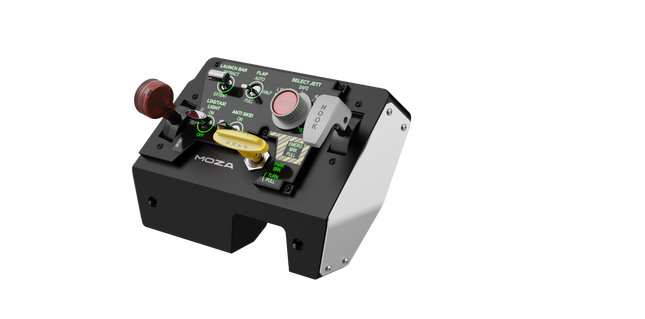
Moza MTLP Take-off Landing Panel brengt de essentie van gevechtsvliegtuigoperaties naar de thuiscockpit met een robuust, tactiel controlesysteem voor serieuze simpiloten. Geïnspireerd door het landingspaneel van de F/A-18, biedt het een intuïtieve schakelindeling waarmee snelle, instinctieve invoer mogelijk is zonder visuele bevestiging. Het authentieke parkeerremmechanisme levert een stevige, mechanische terugslag die direct uit een echt gevechtsvliegtuig lijkt te komen. Met 25 programmeerbare schakelsignalen en Hall-effect sensoren voor nauwkeurigheid, overbrugt dit paneel de kloof tussen virtuele en hands-on cockpitinteractie.
Wat Maakt de Moza MTLP Take-off Landing Panel Uniek?
Ontworpen voor Hands-on Controle Gemodelleerd naar het F/A-18 landingspaneel, is deze setup geoptimaliseerd voor instinctieve bediening. De schakelindeling stelt piloten in staat om essentiële vliegtuigfuncties op gevoel te beheren, waardoor ze minder vaak van het scherm hoeven weg te kijken. Dit soort tactiele ondersteuning is cruciaal voor snelle omgevingen zoals gevechtsvluchten en carrierlandingen.
Hall Sensor Precisie voor Belangrijke Functies In tegenstelling tot standaard mechanische schakelaars, integreert de MTLP Hall-effect sensoren in kritieke invoeren zoals het landingsgestel en de tailhook-hendels. Deze sensoren bieden langdurige betrouwbaarheid en consistente invoernauwkeurigheid, zonder de slijtage of drift van conventionele mechanische schakelaars.
Gebouwd voor Intensief Gebruik De aluminiumlegering die wordt gebruikt voor de remhendel, tailhook-hendel en het landingsgestel zorgt voor duurzaamheid. Deze componenten zijn ontworpen om herhaaldelijk, krachtig gebruik te weerstaan, waardoor het paneel een langdurige investering is voor vluchtsimliefhebbers die mechanische robuustheid eisen.
Naadloze Integratie met het Moza-ecosysteem De MTLP is ontworpen om moeiteloos samen te werken met het Moza MTP Throttle Panel, waardoor een samenhangende gevechtsvliegtuigbesturing ontstaat. Via Moza Cockpit-software kunnen gebruikers telemetriegestuurde lichteffecten synchroniseren en hun knopconfiguraties aanpassen aan hun vliegstijl.
Voordelen en Nadelen
Voordelen
Nadelen
Gebaseerd op het F/A-18 landingspaneel
Bureauklem wordt apart verkocht
Hall-effect sensoren voor nauwkeurigheid en lange levensduur
Alleen compatibel met PC
25 programmeerbare schakelsignalen voor uitgebreide controle
Compatibel met het Moza-ecosysteem voor een complete gevechtsconfiguratie
Specificaties
Specificatie
Waarde
Afmetingen
196.5 × 134.7 × 149 mm
Behuizingsmateriaal
Composietmaterialen
Remhendelmateriaal
Aluminiumlegering
Gewicht
680g
Schakelsignalen
25
Telemetrie Verlichting
Ja (geen extra plug-ins vereist)
Ondersteund Platform
PC
Bureauklem
Optioneel accessoire
Inbegrepen Accessoires
Datakabel, gebruikershandleiding
Moza MTLP Take-off Landing Panel Compatibiliteit
Compatibel Met
Niet Compatibel Met
Moza MTP Throttle Panel
Third-party throttle panels
Moza Cockpit-software voor aanpassingen
Consoleplatforms
PC-gebaseerde vluchtsimulatoren
MacOS
Ontworpen voor PC-gebaseerde simulatoren, integreert de MTLP naadloos met Moza's MTP Throttle Panel om een gevechtsvliegtuig-stijl besturingssysteem te creëren. Het paneel wordt geconfigureerd via Moza Cockpit-software, waarmee uitgebreide aanpassingen mogelijk zijn, waaronder telemetriegestuurde lichteffecten. Het ondersteunt echter geen third-party throttle panels, waardoor de volledige functionaliteit het best wordt benut binnen het Moza-ecosysteem.
Exclusieve PC-compatibiliteit zorgt voor ondersteuning van grote vluchtsimulators, maar MacOS en consoles worden niet ondersteund. Vluchtsimliefhebbers die Microsoft Flight Simulator 2020, Microsoft Flight Simulator 2024 en X-Plane 12 gebruiken, zullen merken dat het paneel direct wordt herkend en plug-and-play functionaliteit biedt via USB. Gebruikers die compatibiliteit zoeken met Xbox of PlayStation zullen echter alternatieve hardware moeten overwegen.
MOZA MFY Pro Yoke brengt een besturingsgeometrie in airliner-stijl naar de cockpit, met een brede, vertrouwde greep en voldoende fysieke bedieningselementen om de handen van het toetsenbord weg te houden. Het geïntegreerde 4,3-inch touchscreen toont vluchtgegevens, checklists, tijdinformatie en asposities, terwijl 26 programmeerbare uitgangssignalen volop ruimte bieden voor vliegtuigspecifieke bedieningsprofielen. Met koolstofvezel versterkt composiet houdt de constructie licht maar stevig, terwijl de Hall-effect-thumbsticks soepel en gecontroleerd aanvoelen in plaats van als kleine gamepad-bedieningen die er achteraf op zijn gezet.
Wat onderscheidt de MOZA MFY Pro Yoke?
Een touchscreen dat zijn plaats in de cockpit verdient Het 4,3-inch touchscreen met een resolutie van 480 × 800 is meer dan alleen een decoratieve kleurvlek in het midden van de yoke. Het kan essentiële vluchtgegevens, checklists, een vluchtklok en live aswaarden tonen zonder dat de piloot over meerdere monitoren hoeft te kijken. Daardoor blijft nuttige informatie dicht bij de handen en is de yoke bijzonder praktisch in compacte opstellingen waar elke centimeter instrumentenpaneel al officieel bezwaar heeft aangetekend.
Airliner-geometrie met een solide en lichte constructie De vorm is geïnspireerd op commerciële vliegtuigen in plaats van compacte bedieningselementen voor general aviation, waardoor beide handen tijdens klimmen, naderen en langere aanpassingen in de kruisvlucht een brede en natuurlijke werkpositie hebben. De constructie van met koolstofvezel versterkt composiet houdt het gewicht op 1,2 kg en ondersteunt tegelijkertijd belastingen tot 30 kg. Het resultaat is een yoke die stevig aanvoelt bij krachtige stuurbewegingen zonder de base of montagestructuur onnodig te belasten.
Meer controle zonder naar het toetsenbord te grijpen Twee achtweg-hat switches, twee Hall-effect-thumbsticks, bumpers en multifunctionele triggers leveren rechtstreeks op de yoke 26 configureerbare uitgangssignalen. De triggers en thumbsticks kunnen via MOZA Cockpit als assen of knoppen functioneren, zodat ze gebruikt kunnen worden voor roerbesturing, camerabewegingen, push-to-talk, trim of andere vliegtuigfuncties. Meerdere profielen maken het wisselen tussen airliners en lichtere vliegtuigen bovendien veel minder omslachtig dan vóór elke vlucht alles opnieuw toewijzen.
Snel wisselen zonder mechanische speling De Quick Release van aluminiumlegering maakt het mogelijk om de yoke zonder gereedschap te verwijderen of te vervangen, terwijl de verbinding met een compatibele MOZA-base stevig blijft. Dit is vooral handig voor piloten die afwisselen tussen besturingsvormen voor airliners, general aviation en specialistische configuraties. Een Quick Release is alleen nuttig wanneer deze geen beweging op het verbindingspunt introduceert, en het stijve ontwerp is bedoeld om ook bij krachtige rolcorrecties en Force Feedback-belastingen stabiel te blijven.
Voor- en nadelen
Voordelen
Nadelen
Het geïntegreerde touchscreen houdt vluchtinformatie direct in beeld.
De functies van het touchscreen zijn afhankelijk van software- en firmwareondersteuning.
De 26 programmeerbare signalen ondersteunen complexe bedieningsprofielen voor verschillende vliegtuigen.
De airliner-vorm is minder geschikt voor traditionele GA-vliegtuigen.
Hall-effect-thumbsticks bieden soepele, contactloze asinvoer.
De lichte composietbehuizing ondersteunt aanzienlijke stuurbelastingen.
Specificaties
Specificatie
Waarde
Productnaam
MOZA MFY Pro Flight Yoke
Afmetingen
142,5 × 202 × 313 mm
Gewicht
1,2 kg
Materiaal van de behuizing
Met koolstofvezel versterkt composiet
Materiaal van de Quick Release
Aluminiumlegering
Materiaal van de knopkapjes
ABS
Maximaal ondersteunde belasting
Tot 30 kg
Schermformaat
4,3 inch
Schermresolutie
480 × 800
Totaal aantal uitgangssignalen
26
Achtweg-hat switches
2
Hall-effect-thumbsticks
2
Bumpers
2
Triggers
2
Verlichting
Aanpasbare RGB-verlichting met 16 miljoen kleuren
Configuratiesoftware
MOZA Cockpit
Meegeleverde accessoires
Gebruikershandleiding
Compatibiliteit van de MOZA MFY Pro Yoke
Categorie
Compatibiliteit
Aansluiting op de yoke-base
MOZA Quick Release-systeem van aluminiumlegering
Configuratiesoftware
MOZA Cockpit
Toewijsbare bedieningselementen
Knoppen, assen, triggers, thumbsticks en profieltoewijzingen
Schermfuncties
PFD-informatie, checklists, vluchtklok en aswaarden
Bedieningsprofielen
Meerdere vliegtuigspecifieke toewijzingsprofielen
De MFY Pro is ontworpen voor bevestiging via het MOZA Quick Release-systeem van aluminiumlegering, waardoor montage zonder gereedschap op een compatibele MOZA yoke-base mogelijk is. De op commerciële vliegtuigen geïnspireerde vorm past bijzonder goed bij configuraties voor airliners en transportvliegtuigen, terwijl de 26 programmeerbare uitgangssignalen ook kunnen worden aangepast voor turboprops en general-aviationvliegtuigen. Het is geen zelfstandige controller en vereist daarom een compatibele base om rol- en pitchbewegingen te leveren.
Extra functies worden geconfigureerd via de MOZA Cockpit-software, waaronder knoptoewijzingen, asgedrag, RGB-verlichting, touchscreenweergaven en meerdere toewijzingsprofielen. De twee Hall-effect-thumbsticks en multifunctionele triggers kunnen als assen of knoppen worden ingesteld, waardoor ze geschikt zijn voor roerbesturing, camerabewegingen, trim, communicatie of avionica-invoer. De yoke gebruikt geen universele mechanische aansluiting en is niet bedoeld voor directe montage op yoke-bases van andere fabrikanten.
De MFY Pro maakt deel uit van een pc-gebaseerd besturingssysteem voor vluchtsimulatie en is voor de configuratie afhankelijk van de aangesloten MOZA-base en de MOZA Cockpit-software. De programmeerbare bedieningselementen kunnen worden toegewezen in pc-vluchtsimulators die conventionele knop- en astoewijzing ondersteunen. Het systeem is niet ontworpen als controller voor PlayStation of Xbox, en de geïntegreerde schermfuncties vereisen compatibele pc-software in plaats van onafhankelijk van de simulator te werken.
Wingflex A320 EFIS Cube puts Airbus navigation and display management exactly where your hand expects it, combining full-function EFIS and glareshield controls with high-contrast dual-colour displays in a compact 80% scale design. From adjusting barometric pressure to selecting navigation modes, every rotary movement and button press feels deliberate and satisfying. The synchronized backlighting, integrated stand and simple USB connectivity make it an excellent addition to a desktop Airbus cockpit without demanding the space of a full-size flight deck.
What Sets the Wingflex A320 EFIS Cube apart?
More Than Just an EFIS Panel Unlike many desktop EFIS units that focus solely on navigation display controls, the EFIS Cube also integrates important glareshield functions such as Master Warning, Master Caution and CHRONO controls. Having these frequently used functions within easy reach creates a cleaner cockpit workflow and reduces the need to return to the virtual cockpit during busy phases of flight.
Compact Size Without Sacrificing Functionality The 80% scale design makes the panel much easier to accommodate on a typical desktop while preserving the familiar Airbus control layout. Buttons, rotary selectors and push-pull controls remain comfortably spaced, allowing quick adjustments without making the panel feel cramped. It strikes an effective balance between space efficiency and comfortable day-to-day operation.
Consistent Lighting Across Your Cockpit The synchronized brightness system keeps the displays and backlighting aligned with supported simulator lighting, creating a cohesive appearance throughout the cockpit. Combined with Airbus-style fonts and dual-colour displays, important flight information remains crisp and easy to read whether flying during bright daylight or on a dark nighttime arrival.
Built for Modular Cockpit Expansion The EFIS Cube performs perfectly as a standalone controller but is equally suited to growing cockpit projects. It integrates neatly alongside the Wingflex FCU Cube and RMP Combo Cube, allowing sim pilots to expand their Airbus setup gradually while maintaining a consistent appearance, matching lighting and a tidy desktop footprint.
Pros and Cons
Pros
Cons
Integrated glareshield controls reduce additional hardware.
Reduced scale differs from full-size Airbus dimensions.
Dual-colour displays remain easy to read.
Designed specifically for Airbus aircraft.
Synchronized lighting creates consistent cockpit appearance.
Plug-and-play USB connection simplifies installation.
Compact footprint fits comfortably beneath most monitors.
Specifications
Specification
Value
Product
Wingflex A320 EFIS Cube
Scale
80% scale
Primary Function
Airbus Electronic Flight Instrument System control panel
Integrated Functions
EFIS controls and glareshield controls
Display Type
High-contrast dual-colour LCD displays
Display Fonts
Airbus-style fonts
Controls
Buttons, rotary knobs and switches
Lighting
Fully synchronized adjustable backlighting
Connection
USB
Installation
Plug-and-play
Stand
Integrated low-profile desktop stand
Primary Use
Airbus flight simulation
Wingflex A320 EFIS Cube Compatibility
Simulator
Compatible Aircraft
X-Plane
ToLiss A319, A320, A330, A340; Laminar A330
Microsoft Flight Simulator
Fenix A3xx, FlyByWire A320 & A380, iniBuilds A320, A321, A330, A340, A350, Aerosoft A340, Headwind A330
Prepar3D
FSLabs A32x
The Wingflex A320 EFIS Cube connects through USB and can be used either as a standalone Airbus EFIS controller or alongside the Wingflex FCU Cube and Wingflex RMP Combo Cube. Its synchronized brightness allows all compatible Cube modules to maintain a consistent appearance, while the integrated stand provides a comfortable operating angle for desktop cockpits.
The published compatibility list covers a wide selection of Airbus aircraft across the major PC flight simulators. It supports Fenix A3xx, ToLiss Airbus aircraft, FlyByWire A320 and A380, multiple iniBuilds Airbus models, Laminar A330, Aerosoft A340, Headwind A330 and FSLabs A32x. The panel is designed specifically for Airbus aircraft and is not intended for Boeing flight decks or other aircraft with different EFIS layouts.
The EFIS Cube is compatible with Microsoft Flight Simulator 2020 and 2024, X-Plane 11 and 12 and Prepar3D on Windows PCs. It uses a USB connection with plug-and-play operation and is not compatible with Xbox or PlayStation consoles, as dedicated cockpit hardware requires PC-based simulator support.
Wingflex A320 FCU Cube brings Airbus autopilot management into a compact desktop format with full autopilot control functionality and a durable all-aluminum construction. Every heading adjustment, altitude selection and autopilot engagement is handled through tactile knobs and switches that encourage proper cockpit workflows instead of constant mouse clicks. The synchronized dimmer, adjustable backlighting and plug-and-play USB connection make it equally suited to quick evening flights or long IFR sessions, all without demanding the space of a full-size glareshield.
What Sets the Wingflex A320 FCU Cube apart?
Compact Airbus Autopilot Without Sacrificing Core Controls At 80% scale, the FCU Cube preserves the control layout Airbus pilots expect while significantly reducing the space required on a desktop. Independent reviews consistently note that this balance makes it much easier to fit beneath standard monitors than full-size panels, yet the spacing remains comfortable enough for deliberate heading, speed and altitude adjustments during demanding approaches.
Switches That Reward Every Input The AP1, AP2 and A/THR buttons use dedicated axial switches with a 2.5 mm travel, while the remaining controls employ Alps switches with a 2.0 mm stroke. Pilots frequently comment that well-designed tactile controls encourage proper use of the autopilot throughout a flight instead of relying on keyboard shortcuts once the novelty wears off.
Solid Metal Construction Built for Frequent Flying The aluminum housing and matching aluminum control knobs give the FCU Cube a reassuring weight that keeps it planted during repeated adjustments. Reviewers often highlight the rigid construction because it avoids the flex sometimes found in lighter desktop panels, making heading changes and rotary inputs feel consistent throughout longer flying sessions.
Designed to Grow Into a Complete Airbus Cockpit The FCU Cube works well as a standalone autopilot controller, but it is equally at home alongside the Wingflex EFIS Cube and RMP Combo Cube. Shared brightness synchronization creates a unified appearance across the glareshield, allowing cockpit builders to expand their setup gradually instead of replacing hardware every time a new module is added.
Pros and Cons
Pros
Cons
Aluminum housing provides excellent structural rigidity.
Reduced scale differs from full-size Airbus dimensions.
Autopilot switches deliver satisfying tactile feedback.
Designed specifically for Airbus aircraft families.
Plug-and-play USB installation minimizes setup time.
Synchronized lighting complements other Cube modules.
Broad Airbus simulator compatibility across major platforms.
Specifications
Specification
Value
Product
Wingflex A320 FCU Cube
Scale
80% scale
Primary Function
Airbus Flight Control Unit (FCU)
Construction
Aviation-grade aluminum body and knobs
Connection
USB
Installation
Plug-and-play
Autopilot Switches
AP1, AP2 and A/THR axial switches
Autopilot Switch Travel
2.5 mm
Other Button Switches
Japan Alps switches with 2.0 mm travel
Lighting
Adjustable backlighting with synchronized dimmer knob
Primary Use
Airbus flight simulation autopilot control
Wingflex A320 FCU Cube Compatibility
Simulator
Compatible Aircraft
X-Plane
ToLiss A319, A320, A330, A340; Laminar A330
Microsoft Flight Simulator
Fenix A3xx, FlyByWire A320 & A380, iniBuilds A320, A321, A330, A340, A350, Aerosoft A340, Headwind A330
Prepar3D
FSLabs A32x
The FCU Cube connects through USB and operates as either a standalone Airbus autopilot controller or as part of the broader Wingflex Cube ecosystem. It supports brightness synchronization with the Wingflex EFIS Cube and RMP Combo Cube, creating a consistent glareshield appearance. Its compact dimensions also make it easy to integrate into desktop cockpits or modular simulator builds without requiring a full-width Airbus panel.
The published compatibility list covers a broad range of Airbus simulations across the leading platforms. It supports Fenix A3xx, ToLiss Airbus aircraft, FlyByWire A320 and A380, multiple iniBuilds Airbus models, Laminar A330, Aerosoft A340, Headwind A330 and FSLabs A32x. Unlike the RMP Combo Cube, the FCU Cube also supports the FlyByWire A380 and iniBuilds A350, making it one of the most widely compatible Airbus autopilot panels in the Wingflex lineup.
The FCU Cube is designed for Microsoft Flight Simulator, X-Plane and Prepar3D on Windows PCs. It communicates through USB and works with supported Airbus aircraft using Wingflex software integration. It is not compatible with Xbox or PlayStation consoles, as dedicated USB cockpit peripherals of this type require PC-based simulator support.
Wingflex A320 RMP Combo Cube squeezes four useful Airbus control sections into one compact unit, combining RMP, ATC, TCAS and warning-panel functions with high-contrast dual-colour LCD screens. Its physical knobs and illuminated controls give frequency changes and transponder entries a satisfying mechanical rhythm, without consuming the entire desk. The 80% scale and 13-degree tilt keep everything comfortably visible, while USB connectivity makes installation refreshingly direct. Apparently, proper radio management does not require a full cockpit shell and several kilometres of wiring.
What Sets the Wingflex A320 RMP Combo Cube apart?
Four Control Sections Earn Their Desk Space Rather than reproducing only the radio management panel, the unit combines RMP, ATC, TCAS and glareshield warning functions behind one compact face. This gives solo pilots considerably more usable control than a single-purpose radio panel. Hands-on coverage particularly values the integrated radio section because it places communication and surveillance controls beside the Airbus autopilot hardware, where they can be reached without returning to the virtual cockpit.
Compact Dimensions Without Tiny Controls The 80% scale reduces the panel’s footprint while retaining physical rotary controls and readable displays. Review coverage of the complete Cube system found the format notably easier to position beneath a conventional monitor than full-width Airbus hardware. The compromise is sensible for desktop pilots: it saves space without shrinking everything into fiddly miniature controls that require the fingertips of a concert pianist and the patience of an air-traffic controller.
Lighting That Behaves as One Cockpit System The RMP Combo Cube can synchronize its brightness with the Wingflex FCU Cube and EFIS Cube, producing consistent illumination across the complete glareshield arrangement. Independent reporting also notes that each module can still operate separately, so the RMP does not require the complete Cube set. That flexibility is useful for gradual cockpit builds, while synchronized backlighting prevents one panel glowing like a supermarket sign beside two carefully dimmed instruments.
Straightforward Setup, With Aircraft-Specific Boundaries User feedback describes the initial setup as notably simple, and the panel operates through a direct USB connection with Wingflex integration software. However, reports also show that behaviour may vary between aircraft and simulator versions, particularly when a specific function has not yet been implemented. It is therefore far less troublesome than custom wiring, but compatibility should still be checked by aircraft rather than assumed from the presence of an Airbus badge.
Pros and Cons
Pros
Cons
Four integrated sections reduce separate hardware requirements.
Reduced scale differs from full-size cockpit dimensions.
Dual-colour displays provide clear frequency information.
Aircraft support varies between simulator platforms.
Synchronized lighting complements other Wingflex Cube modules.
USB connection keeps desktop installation straightforward.
Angled enclosure improves visibility from seated positions.
Specifications
Specification
Value
Product
Wingflex A320 RMP Combo Cube
Scale
80% scale
Integrated Functions
RMP, ATC, TCAS and glareshield warning panel
Display Type
Dual-colour LCD screens
Display Background
Black
Viewing Angle
13 degrees
Connection
USB
Installation
Plug-and-play
Lighting
Synchronized brightness adjustment
Compatible Lighting Modules
Wingflex A320 FCU Cube and A320 EFIS Cube
Primary Use
Airbus flight simulation cockpit control
Wingflex A320 RMP Combo Cube Compatibility
Simulator
Compatible Aircraft
Status
X-Plane
ToLiss A319, A320, A330 and A340; Laminar A330
Supported
Microsoft Flight Simulator
Fenix A3xx; FlyByWire A320; iniBuilds A320, A321, A330 and A340; Aerosoft A340; Headwind A330
Supported
Prepar3D
FSLabs A32x
Supported
Microsoft Flight Simulator
FlyByWire A380
Not supported
Microsoft Flight Simulator
iniBuilds A350
Not supported
The panel connects through a single USB connection and can be used independently as a desktop controller. It also integrates with the Wingflex A320 FCU Cube and Wingflex A320 EFIS Cube, including synchronized brightness across the modules. Within the optional Cube console, the panels can share an internal USB hub and run to the computer through one external cable. No universal mounting compatibility with third-party cockpit frames is specified.
Aircraft support is integration-specific rather than universal. The panel supports ToLiss, Fenix, FSLabs, FlyByWire A320 and several iniBuilds aircraft, alongside the listed Laminar, Aerosoft and Headwind models. The FlyByWire A380 is not supported, and the iniBuilds A350 is not supported. Reports of differing behaviour between Microsoft Flight Simulator and X-Plane also show why pilots should use the published aircraft list instead of assuming every Airbus add-on will communicate correctly.
For gaming platforms, the RMP Combo Cube is intended for Windows PC flight simulation and works with supported aircraft in Microsoft Flight Simulator, X-Plane and Prepar3D. It relies on PC-side USB communication and Wingflex software for integration and firmware management. It is not listed as compatible with Xbox or PlayStation, so console editions of Microsoft Flight Simulator should not be treated as supported platforms.
Wingflex A320 Combo Cube places the Airbus glareshield essentials into one tidy desktop system, combining EFIS, FCU and multifunction RMP controls with high-contrast dual-colour displays. The knobs click and turn with enough purpose to make heading changes, radio tuning and barometric adjustments feel far better than poking at a virtual cockpit. USB connectivity keeps installation straightforward, while the 13-degree viewing angle brings the panels naturally into sight. It is compact Airbus hardware for pilots whose desks already resemble a mildly concerned electronics workshop.
What Sets the Wingflex A320 Combo Cube apart?
Three Core Panels Without a Full-Size Glareshield The bundle combines an EFIS, FCU and RMP-based multifunction panel in an 80% scale layout, saving roughly eleven centimetres compared with a full-size arrangement. Reviewers have praised that reduction because it preserves practical control spacing while fitting more comfortably beneath ordinary monitors. The result feels substantial enough for deliberate operation without demanding the sort of desk usually reserved for air-traffic control or an exceptionally ambitious accountant.
A Smarter Use of the Right-Hand Position Instead of supplying a second EFIS that a solo pilot may rarely touch, Wingflex fills the right side with a four-in-one panel covering radio management, transponder, TCAS and warning functions. Review feedback identifies this as one of the bundle’s most practical decisions, since it places genuinely useful controls within reach. It sacrifices strict two-seat symmetry, but gains considerably more day-to-day function for single-pilot desktop flying.
Clear Displays and Cohesive Night Lighting Dual-colour screens provide sharp contrast against their dark backgrounds, while synchronized brightness allows the EFIS, FCU and RMP sections to behave like one connected panel. Independent testing found the displays notably crisp and the backlighting pleasant in darker rooms. That matters during evening approaches, when deciphering fuzzy digits is an unnecessary challenge and the weather already has enough creative ways to ruin a carefully prepared arrival.
Simple Assembly With a Stable Optional Console When paired with the Cube Stand, the three modules connect through internal USB-C cables and a built-in hub, leaving a single cable running to the PC. Reviewers found assembly straightforward and noted that the broad base remained firmly planted while pressing buttons and turning encoders. The stand also gives the separate modules a cleaner, unified appearance, although it is an optional bundle choice rather than standard equipment with every configuration.
Pros and Cons
Pros
Cons
Compact layout preserves valuable desktop space.
Reduced scale differs from full-size cockpit dimensions.
Three modules cover major glareshield functions.
Optional console increases the complete setup footprint.
Dual-colour displays remain clear in low light.
RMP module combines four useful control sections.
USB installation requires minimal external interface hardware.
Specifications
Specification
Value
Product
Wingflex A320 Combo Cube
Included Modules
A320 EFIS Cube, A320 FCU Cube and A320 RMP Combo Cube
Scale
80% scale
Interface
USB
Installation
Plug-and-play
Display Type
Dual-colour LCD screens
Viewing Angle
13 degrees
FCU Construction
Aluminium body and knobs
RMP Functions
RMP, ATC, TCAS and side-panel controls
Lighting
Synchronized brightness across compatible Cube modules
Product Dimensions
52.0 × 18.5 × 16.5 cm
Package Dimensions
64.0 × 24.0 × 20.5 cm
Bundle Options
Three-module bundle, or bundle with Cube Stand
Glareshield Housing
Not included with the standard three-module bundle
Wingflex A320 Combo Cube Compatibility
Simulator
Aircraft With Full Bundle Support
Microsoft Flight Simulator
Fenix A3xx, FSLabs A32x, FlyByWire A320, iniBuilds A320, A321, A330 and A340, Aerosoft A340, Headwind A330
X-Plane
ToLiss A319, A320, A330 and A340; Laminar A330
Prepar3D
FSLabs A32x and other listed aircraft where supported through Wingflex Bridge
Aircraft
Compatibility Limitation
FlyByWire A380
EFIS and FCU supported; RMP Combo Cube not supported
iniBuilds A350
EFIS and FCU supported; RMP Combo Cube not supported
The three modules connect through USB and can operate as separate desktop units or within the optional Cube Stand. That stand contains an internal USB hub, allowing its three module connections to exit through one PC cable. The bundle pairs naturally with Airbus throttles, sidesticks, MCDUs and overhead panels, but it does not include a full glareshield enclosure and no standard mounting compatibility with third-party cockpit shells is specified.
Full compatibility depends on all three modules supporting the selected aircraft, because the EFIS and FCU lists are slightly broader than the RMP list. The complete bundle supports Fenix, ToLiss, FlyByWire A320, FSLabs, several iniBuilds aircraft, Aerosoft A340 and Headwind A330. The FlyByWire A380 and iniBuilds A350 are not fully supported because their RMP integration is currently excluded, even though the EFIS and FCU modules list them individually.
For software platforms, the Combo Cube is built for Microsoft Flight Simulator 2020 and 2024, X-Plane 11 and 12 and Prepar3D on Windows PC. It uses Wingflex Bridge for aircraft communication and firmware management. It is not listed as compatible with Xbox or PlayStation, because the required PC-side integration software and dedicated USB panel support are not available on those console platforms.
Please note! The item may take 7-10 business days to ship!
Wingflex DAP 500 puts dedicated general aviation autopilot controls right where your hand expects them, combining fully customizable controls with plug-and-play USB connectivity for a clean desktop setup. Instead of reaching for on-screen knobs every few minutes, you can adjust heading, altitude and navigation modes through tactile buttons and encoders that feel purposeful. The aluminum stand, automatic aircraft configuration and ambient-light-controlled backlighting make it equally comfortable during a sunny VFR hop or a late-night IFR approach.
What Sets the Wingflex DAP 500 apart?
Designed Specifically for General Aviation While many autopilot panels focus on airliners, the DAP 500 is built around the aircraft most GA pilots actually fly. Its control layout suits piston singles, turboprops and light business aircraft, making routine autopilot adjustments feel intuitive. Pilots who regularly fly aircraft like the C172, TBM, Vision Jet or King Air often appreciate hardware that reflects their everyday flying instead of borrowing layouts from transport-category aircraft.
Flexible Controls That Adapt to Your Flying Style With twelve programmable push buttons, two pushable rotary encoders and an additional scroll-wheel encoder, the panel can be tailored well beyond its default assignments. Community discussions around configurable hardware consistently highlight this flexibility as a major advantage because it allows pilots to create workflows that match their preferred aircraft rather than forcing identical controls across every simulator.
Automatic Aircraft Profiles Reduce Setup Time WingFlex Bridge software automatically configures supported aircraft, helping users spend more time flying and less time assigning controls. Reviewers generally regard automatic profile detection as one of the biggest quality-of-life improvements in modern simulator hardware, particularly for pilots who regularly switch between multiple aircraft during the same week instead of flying a single favourite.
Built to Grow With Future Cockpit Expansions The DAP 500 is designed as part of a broader modular ecosystem, with support planned for additional DAP-series expansion panels. Combined with firmware updates delivered through OTA software, it offers a platform that can continue evolving without replacing the core autopilot unit. That modular philosophy appeals to cockpit builders who prefer expanding their simulator gradually rather than purchasing an entire panel stack in one go.
Pros and Cons
Pros
Cons
Automatic aircraft profiles simplify supported aircraft setup.
Designed primarily for general aviation aircraft.
Extensive programmable controls suit different flying styles.
Requires WingFlex Bridge for automatic configuration features.
Ambient light sensor adjusts backlighting automatically.
Aluminum stand provides stable desktop positioning.
OTA firmware updates add future functionality.
Specifications
Specification
Value
Product
Wingflex DAP 500 Digital Autopilot Panel
Primary Use
General aviation flight simulation
Connection
USB plug-and-play
Push Buttons
12
Pushable Rotary Encoders
2
Scroll-Wheel Encoder
1
Key Assignment
Fully user customizable
Configuration
Automatic via WingFlex Bridge software
Backlighting
Adjustable with ambient light sensor
Firmware
OTA firmware upgrade support
Construction
Aluminum alloy stand
Expandability
Supports future DAP-series auxiliary panels
Wingflex DAP 500 Compatibility
Simulator
Compatible Aircraft
X-Plane
Baron 58, King Air C90B, Citation XLS, Skyhawk G1000, Cirrus SR22, Vision SF50, Lancair Evolution, RV10
Microsoft Flight Simulator 2020
NXCub, XCub, King Air 350, Bonanza G36, C208B Grand Caravan EX, CJ4, C172 G1000, DA40 NG, Pilatus PC-6, TBM 930
Microsoft Flight Simulator 2024
TBM 930, Bonanza G36, King Air 350, C172 G1000, C208B Grand Caravan EX, C400 Corvalis, CJ4, DA62, DA40 NG, Draco X, Vision SF50, Archer, ES30, NXCub, PC-12 NGX, XCub
The DAP 500 connects through USB and uses WingFlex Bridge software to automatically configure supported aircraft profiles. It is designed for general aviation cockpits and works especially well alongside hardware such as G1000 panels, radio stacks, throttle quadrants and yokes. The panel also supports future DAP-series expansion modules, allowing users to gradually build a more complete general aviation cockpit instead of replacing existing hardware.
Compatibility is focused on aircraft equipped with autopilot systems commonly found in general aviation rather than commercial airliners. It supports a broad collection of Asobo, Laminar Research and Microsoft aircraft, including the C172 G1000, King Air, TBM 930, Vision Jet, DA62 and PC-12 NGX. It is not intended for Boeing or Airbus airliner autopilot systems, which use different control layouts and operating logic.
The DAP 500 is compatible with Microsoft Flight Simulator 2020, Microsoft Flight Simulator 2024 and X-Plane on PC. It connects as a USB peripheral and relies on WingFlex Bridge software for supported aircraft integration. It is not compatible with Xbox or PlayStation consoles, as those platforms do not support dedicated desktop flight simulation control panels of this type.