Paneles de instrumentos

26 productos

  • ¡Últimas existencias! MOZA MA3F Electronic Flight Control Modules R for sale on FlightSimZone

    Moza MOZA MA3F Electronic Flight Control Modules R (Pre-Order! Shipping Starts mid-to-late-August)

    5 en stock Envío en 1-3 días hábiles.

    MOZA MA3F Electronic Flight Control Modules R capture the distinctive workflow of the Airbus A320 flight deck with hardware that feels satisfying every time you dial in a heading or adjust altitude. The dual-rail spring-loaded push/pull mechanism recreates the signature operation of Airbus autopilot controls, while custom segmented displays faithfully mirror Airbus-specific character formatting and spacing. Every knob, button, and illuminated indicator works together to make route management, climb planning, and approach setup feel remarkably natural throughout every stage of flight. What Sets the MOZA MA3F Electronic Flight Control Modules R apart? Airbus Push/Pull Controls Done Properly – One feature that consistently stands out is the custom dual-rail push/pull mechanism. Instead of using a basic spring-loaded encoder, the controls deliver distinct travel and resistance that closely match Airbus operating procedures. Many experienced Airbus sim pilots appreciate how this makes managed and selected mode changes feel much more deliberate while reducing accidental inputs during busy phases of flight. Displays That Capture Airbus Character – The segmented displays have been carefully designed to reproduce the distinctive appearance of Airbus FCU readouts, including character spacing and formatting. Rather than looking like generic digital displays, they blend naturally into an Airbus cockpit. Enthusiasts often point to details like these as the difference between simply operating a simulator and enjoying a convincing airline cockpit environment. Expandable to Match Your Cockpit – Whether you choose the FCU on its own, pair it with a single EFIS module, or install the complete Electronic Flight Control Module suite, the system grows alongside your cockpit. Builders appreciate this flexibility because it allows gradual upgrades while maintaining a consistent appearance and control layout throughout the simulator. Purpose-Built for Dedicated Airbus Flying – Seamless integration with MOZA Cockpit software, synchronized lighting, and support for leading Airbus aircraft make the system especially attractive for airliner enthusiasts. Community feedback often highlights how easy it is to configure while still providing extensive customization for display lighting, controls, and cockpit organization. Pros and Cons Pros Cons Excellent Airbus-style push/pull autopilot controls. Designed specifically for Airbus aircraft. Displays accurately reproduce Airbus FCU formatting. Requires a Windows PC. Multiple configurations suit evolving cockpit builds. Synchronized lighting enhances cockpit consistency. Specifications Specification Value Product Type Airbus A320-style FCU and EFIS control system Available Configurations EFIS Display Type Custom Airbus-style segmented displays Autopilot Control Mechanism Dual-rail spring-loaded push/pull controls Lighting Independent display, character, and status illumination Software Integration MOZA Cockpit Supported Platform PC Mounting Options Included bracket, aluminum profile, 75 mm VESA mount Extended Function Optional EFIS extended-function control mode MOZA MA3F Electronic Flight Control Modules R Compatibility Hardware Compatibility Mounting Systems Included bracket, aluminum-profile rigs, 75 × 75 mm VESA mounts MOZA Cockpit Software Supported for telemetry synchronization and configuration Cockpit Layouts FCU only, single EFIS, or complete EFCM suite Flight Simulator Compatibility Microsoft Flight Simulator Default Airbus A320/A330 and supported Airbus add-ons X-Plane Compatible with Airbus aircraft including ToLiss models Third-Party Aircraft Fenix A320, FlightFactor A320, ToLiss series, and other Airbus airliners Built for PC flight simulation, the MA3F Electronic Flight Control Modules R work seamlessly with MOZA Cockpit software, providing synchronized lighting, telemetry integration, and straightforward configuration. Included bracket mounting, aluminum-profile compatibility, and 75 mm VESA support make installation simple whether you're assembling a desktop setup or a dedicated Airbus cockpit. The modular design allows builders to begin with a single FCU or expand into a complete Electronic Flight Control Module suite over time. Independent adjustment of display brightness, character illumination, and status lighting helps maintain a consistent cockpit appearance during daytime departures and late-night arrivals. Compatible with Microsoft Flight Simulator and X-Plane, the system supports default Airbus A320 and A330 aircraft together with leading third-party aircraft including Fenix A320, ToLiss, FlightFactor A320, and other popular Airbus airliners. The supported platform is PC; gaming consoles and macOS are not supported.

    5 en stock Envío en 1-3 días hábiles.

    €109,00

  • ¡Últimas existencias! MOZA MA3F Electronic Flight Control Modules L for sale on FlightSimZone

    Moza MOZA MA3F Electronic Flight Control Modules L (Pre-Order! Shipping Starts mid-to-late-August)

    5 en stock Envío en 1-3 días hábiles.

    MOZA MA3F Electronic Flight Control Modules L bring the unmistakable Airbus A320 flight deck to your simulator with controls that make every heading change, altitude adjustment, and approach setup feel deliberate. The dual-rail spring-loaded push/pull mechanism recreates the distinctive operation of Airbus autopilot controls, while custom segmented displays faithfully mirror Airbus-specific character formatting and spacing. From the satisfying click of each selector to the coordinated cockpit lighting, every interaction encourages proper Airbus procedures throughout the entire flight. What Sets the MOZA MA3F Electronic Flight Control Modules L apart? Faithful Airbus Push/Pull Operation – The dual-rail spring-loaded push/pull mechanism delivers a noticeably more convincing feel than conventional encoder-based controls. Airbus enthusiasts often point out that having distinct push and pull actions makes switching between managed and selected modes feel far more intuitive, helping reproduce familiar cockpit workflows without relying on keyboard shortcuts or mouse clicks. Displays That Match Airbus Presentation – Rather than using generic digital readouts, the custom segmented displays reproduce Airbus-style character spacing, typography, and formatting. Builders frequently appreciate these visual details because the modules blend naturally with other Airbus cockpit hardware, creating a clean and cohesive flight deck instead of a collection of mismatched peripherals. Flexible Expansion for Growing Cockpits – Available as an FCU only, FCU with a single EFIS, or a complete Electronic Flight Control Module suite, the system adapts to different cockpit sizes and budgets. The optional extended-function EFIS mode adds further flexibility, allowing additional controls to be accessed without filling the cockpit with extra hardware. Straightforward Installation and Configuration – The included mounting bracket, aluminum-profile compatibility, and standard 75 mm VESA support make installation simple across desktop and full-frame cockpits. Users also appreciate MOZA Cockpit software for its synchronized lighting, streamlined configuration process, and flexible control customization without requiring complicated setup procedures. Pros and Cons Pros Cons Excellent Airbus-style push/pull control mechanism. Designed specifically for Airbus aircraft. Displays closely match Airbus FCU formatting. Requires a Windows PC. Modular configurations support gradual cockpit upgrades. Synchronized lighting creates a cohesive cockpit appearance. Specifications Specification Value Product Type Airbus A320-style FCU and EFIS control system Available Configurations FCU only, FCU + single EFIS, complete EFCM suite Display Type Custom Airbus-style segmented displays Autopilot Control Mechanism Dual-rail spring-loaded push/pull controls Lighting Independent display, character, and status illumination Software Integration MOZA Cockpit Supported Platform PC Mounting Options Included bracket, aluminum profile, 75 mm VESA mount Extended Function Optional EFIS extended-function control mode MOZA MA3F Electronic Flight Control Modules L Compatibility Hardware Compatibility Mounting Systems Included bracket, aluminum-profile rigs, 75 × 75 mm VESA mounts MOZA Cockpit Software Telemetry synchronization and configuration supported Cockpit Configurations FCU only, single EFIS, or complete EFCM suite Flight Simulator Compatibility Microsoft Flight Simulator Default Airbus A320/A330 and supported Airbus add-ons X-Plane Compatible with Airbus aircraft including ToLiss series Third-Party Aircraft Fenix A320, FlightFactor A320, ToLiss series, and other popular Airbus airliners Designed for PC flight simulation, the MA3F Electronic Flight Control Modules L integrate with MOZA Cockpit software for telemetry synchronization, synchronized lighting, and simple configuration. Included bracket mounting, aluminum-profile compatibility, and 75 mm VESA support allow the modules to fit comfortably into desktop cockpits or larger Airbus flight deck projects. The modular design allows builders to begin with a single FCU or expand into a complete Electronic Flight Control Module suite as their simulator grows. Independent adjustment of display brightness, character illumination, and status lighting helps maintain a consistent cockpit appearance during daytime departures and night operations alike. Compatible with Microsoft Flight Simulator and X-Plane, the system supports default Airbus A320 and A330 aircraft together with leading third-party aircraft including Fenix A320, ToLiss, FlightFactor A320, and other popular Airbus airliners. The supported platform is PC; gaming consoles and macOS are not supported.

    5 en stock Envío en 1-3 días hábiles.

    €109,00

Flight Simulator Instrument Panels for Sale at FlightSimZone

Transforma tu experiencia de simulación de vuelo con nuestra completa selección de paneles de instrumentos para simuladores de vuelo de nivel profesional. Seas un piloto virtual experimentado o apenas comiences tu aventura en la simulación, nuestra colección ofrece el equilibrio ideal entre realismo y funcionalidad.

Tabla comparativa

Producto Tipo Pantalla Compatibilidad Características clave
GFC700 Piloto automático Digital MSFS, X-Plane, P3D Sistema avanzado de piloto automático, preselección de altitud, control de velocidad vertical
GCU47X Unidad de control LCD MSFS, X-Plane Pantalla digital, controles integrados, selección de modo
GTN650 Navegación Pantalla táctil MSFS, X-Plane, P3D GPS/NAV/COM, interfaz táctil, pantalla meteorológica
GNS430 Navegación LCD Todos los simuladores principales GPS/NAV/COM, navegador integrado, planificación de vuelo
GNS530 Navegación LCD Todos los simuladores principales GPS/NAV/COM mejorado, pantalla grande, navegación avanzada
GFC500 Piloto automático Digital MSFS, X-Plane Piloto automático digital, ESP, director de vuelo
GTN750 Navegación Pantalla táctil MSFS, X-Plane, P3D GPS/NAV/COM premium, pantalla táctil grande, cartas
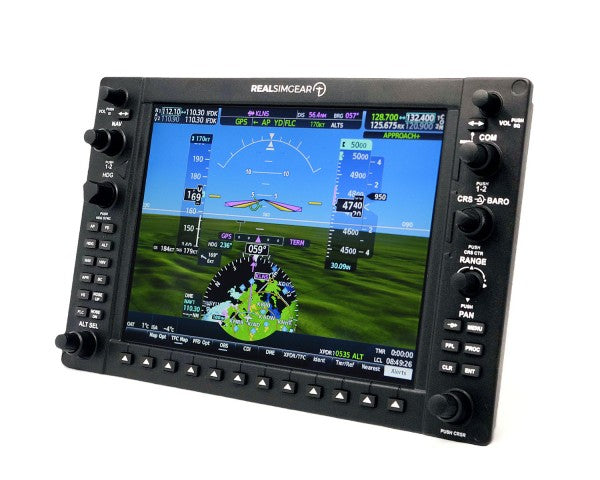
G1000 PFD/MFD Cabina de cristal LCD Todos los simuladores principales Pantallas principal/multifunción, visión sintética, monitorización de motor
G500 Cabina de cristal LCD MSFS, X-Plane Sistema de doble pantalla, superposición meteorológica, mapeo de terreno
G1000 Suite Sistema integrado LCD Todos los simuladores principales Solución completa de cabina de cristal, integración total, piloto automático avanzado

Paneles de instrumentos para Microsoft Flight Simulator

Da el salto a la nueva generación de aviación virtual con paneles de instrumentos especialmente diseñados para Microsoft Flight Simulator. Nuestra selección se integra perfectamente con MSFS 2024, logrando un nivel de inmersión y control sin precedentes. Siente la satisfacción de manipular perillas y botones reales que reflejan sus equivalentes virtuales, incluyendo el avanzado sistema G1000 y la interfaz intuitiva GTN750.

Paneles de instrumentos RealSimGear

RealSimGear está a la vanguardia del hardware para simulación de vuelo, ofreciendo soluciones profesionales que cierran la brecha entre lo virtual y la aviación real. Su compromiso con la calidad se nota en cada producto, desde la calibración precisa del GTN750 hasta la sensación auténtica de la suite G1000. El sistema de piloto automático GFC500 completa su gama, brindando control de vuelo realista y navegación avanzada.

Paneles de instrumentos de vuelo

  • Integración hardware: Nuestros paneles cuentan con conectividad USB plug-and-play, facilitando la instalación y la compatibilidad inmediata con las plataformas principales. Cada panel se somete a pruebas rigurosas para garantizar desempeño fiable incluso en sesiones prolongadas.
  • Calidad y materiales de fabricación: Materiales premium y construcción robusta aseguran que los paneles soporten miles de horas de uso. Las pantallas retroiluminadas ofrecen gran visibilidad en condiciones variables, mientras los interruptores y codificadores de calidad brindan una respuesta táctil idéntica a los componentes de aeronaves reales.
  • Compatibilidad de software: Más allá de la compatibilidad básica, estos paneles ofrecen integración profunda con diversos simuladores. Sus funciones avanzadas incluyen detección automática, mapeo de botones personalizable y actualizaciones de sistema en tiempo real.
  • Valor en formación: Si mantienes tu competencia como piloto o estudias para la licencia, estos paneles aportan enormes beneficios formativos. Practica procedimientos y desarrolla memoria muscular en un entorno seguro que refleja fielmente la instrumentación real.

Recomendaciones de nuestros expertos

Para el mejor setup de aviación general recomendamos combinar la suite G1000 con el sistema de piloto automático GFC500. Esta configuración provee instrumentación completa y control automatizado de vuelo. El GTN750 es un excelente complemento de navegación, ofreciendo funciones avanzadas como mapeo detallado e información meteorológica.

Instalación y soporte

Todos los paneles incluyen instrucciones detalladas y acceso a nuestro equipo de soporte técnico. Proveemos actualizaciones de firmware periódicas para asegurar el mejor desempeño y compatibilidad con las versiones más recientes de software de simulación.

Completa tu simulador de vuelo

Tu simulador no está listo solo con el panel de instrumentos. Consulta nuestros yokes, aceleradores y pedales de timón para despegar tu avión virtual. ¿Quieres la experiencia máxima? Una cabina de simulador de vuelo multiplica la inmersión.


Explora los favoritos de nuestros clientes

Ingresa en

¿Ha olvidado su contraseña?

¿Aún no tienes una cuenta?
Crear una cuenta


