Wingflex A320 Combo Cube places the Airbus glareshield essentials into one tidy desktop system, combining EFIS, FCU and multifunction RMP controls with high-contrast dual-colour displays. The knobs click and turn with enough purpose to make heading changes, radio tuning and barometric adjustments feel far better than poking at a virtual cockpit. USB connectivity keeps installation straightforward, while the 13-degree viewing angle brings the panels naturally into sight. It is compact Airbus hardware for pilots whose desks already resemble a mildly concerned electronics workshop.
What Sets the Wingflex A320 Combo Cube apart?
Three Core Panels Without a Full-Size Glareshield The bundle combines an EFIS, FCU and RMP-based multifunction panel in an 80% scale layout, saving roughly eleven centimetres compared with a full-size arrangement. Reviewers have praised that reduction because it preserves practical control spacing while fitting more comfortably beneath ordinary monitors. The result feels substantial enough for deliberate operation without demanding the sort of desk usually reserved for air-traffic control or an exceptionally ambitious accountant.
A Smarter Use of the Right-Hand Position Instead of supplying a second EFIS that a solo pilot may rarely touch, Wingflex fills the right side with a four-in-one panel covering radio management, transponder, TCAS and warning functions. Review feedback identifies this as one of the bundle’s most practical decisions, since it places genuinely useful controls within reach. It sacrifices strict two-seat symmetry, but gains considerably more day-to-day function for single-pilot desktop flying.
Clear Displays and Cohesive Night Lighting Dual-colour screens provide sharp contrast against their dark backgrounds, while synchronized brightness allows the EFIS, FCU and RMP sections to behave like one connected panel. Independent testing found the displays notably crisp and the backlighting pleasant in darker rooms. That matters during evening approaches, when deciphering fuzzy digits is an unnecessary challenge and the weather already has enough creative ways to ruin a carefully prepared arrival.
Simple Assembly With a Stable Optional Console When paired with the Cube Stand, the three modules connect through internal USB-C cables and a built-in hub, leaving a single cable running to the PC. Reviewers found assembly straightforward and noted that the broad base remained firmly planted while pressing buttons and turning encoders. The stand also gives the separate modules a cleaner, unified appearance, although it is an optional bundle choice rather than standard equipment with every configuration.
Pros and Cons
Pros
Cons
Compact layout preserves valuable desktop space.
Reduced scale differs from full-size cockpit dimensions.
Three modules cover major glareshield functions.
Optional console increases the complete setup footprint.
Dual-colour displays remain clear in low light.
RMP module combines four useful control sections.
USB installation requires minimal external interface hardware.
Specifications
Specification
Value
Product
Wingflex A320 Combo Cube
Included Modules
A320 EFIS Cube, A320 FCU Cube and A320 RMP Combo Cube
Scale
80% scale
Interface
USB
Installation
Plug-and-play
Display Type
Dual-colour LCD screens
Viewing Angle
13 degrees
FCU Construction
Aluminium body and knobs
RMP Functions
RMP, ATC, TCAS and side-panel controls
Lighting
Synchronized brightness across compatible Cube modules
Product Dimensions
52.0 × 18.5 × 16.5 cm
Package Dimensions
64.0 × 24.0 × 20.5 cm
Bundle Options
Three-module bundle, or bundle with Cube Stand
Glareshield Housing
Not included with the standard three-module bundle
Wingflex A320 Combo Cube Compatibility
Simulator
Aircraft With Full Bundle Support
Microsoft Flight Simulator
Fenix A3xx, FSLabs A32x, FlyByWire A320, iniBuilds A320, A321, A330 and A340, Aerosoft A340, Headwind A330
X-Plane
ToLiss A319, A320, A330 and A340; Laminar A330
Prepar3D
FSLabs A32x and other listed aircraft where supported through Wingflex Bridge
Aircraft
Compatibility Limitation
FlyByWire A380
EFIS and FCU supported; RMP Combo Cube not supported
iniBuilds A350
EFIS and FCU supported; RMP Combo Cube not supported
The three modules connect through USB and can operate as separate desktop units or within the optional Cube Stand. That stand contains an internal USB hub, allowing its three module connections to exit through one PC cable. The bundle pairs naturally with Airbus throttles, sidesticks, MCDUs and overhead panels, but it does not include a full glareshield enclosure and no standard mounting compatibility with third-party cockpit shells is specified.
Full compatibility depends on all three modules supporting the selected aircraft, because the EFIS and FCU lists are slightly broader than the RMP list. The complete bundle supports Fenix, ToLiss, FlyByWire A320, FSLabs, several iniBuilds aircraft, Aerosoft A340 and Headwind A330. The FlyByWire A380 and iniBuilds A350 are not fully supported because their RMP integration is currently excluded, even though the EFIS and FCU modules list them individually.
For software platforms, the Combo Cube is built for Microsoft Flight Simulator 2020 and 2024, X-Plane 11 and 12 and Prepar3D on Windows PC. It uses Wingflex Bridge for aircraft communication and firmware management. It is not listed as compatible with Xbox or PlayStation, because the required PC-side integration software and dedicated USB panel support are not available on those console platforms.
Bemærk! Forsendelse af denne vare kan tage 7-10 arbejdsdage!
Wingflex B777 CDU bringer flight management til langdistanceflyvninger over på en dedikeret fysisk grænseflade ved at kombinere 1:1-konstruktion i fuld skala med plug-and-play USB-tilslutning. Det oplyste tastatur i flystil gør indtastning af ruter, performanceberegninger og ændringer af ankomster til en præcis og tilfredsstillende oplevelse, mens det slanke kabinet undgår at optage halvdelen af skrivebordet. Fysisk valg mellem kaptajnens og styrmandens position giver ekstra fleksibilitet, og det justerbare stativ holder skærmen letlæselig fra flere siddepositioner. Det er en langt mere overbevisende løsning end at kæmpe med et lille pop-out-vindue et sted mellem marchhøjde og middagsserveringen.
Hvad gør Wingflex B777 CDU særlig?
Fuldskalakontroller til ægte Boeing-workflows 1:1-layoutet bevarer afstande, tastplaceringer og proportioner, som forventes af en Boeing 777 CDU. Det gør hyppige opgaver som ruteindtastning, performanceopsætning og ændringer af ankomstprocedurer lettere at udføre ved hjælp af muskelhukommelsen. Uafhængige videodemonstrationer viser også enheden som et solidt skrivebordskontrolpanel frem for et reduceret tastatur – noget piloter med trætte musefingre uden tvivl vil sætte pris på.
Praktisk understøttelse ud over Boeing 777 Selvom frontpanelet og betjeningsstilen er udviklet specifikt til B777, understøtter enheden udvalgte fly fra PMDG, iFly, Zibo, LevelUp og IXEG. Det omfatter flere 737-varianter samt PMDG 747 V2 ud over den understøttede 777-familie. Denne brede integration giver Boeing-entusiaster mere værdi ud af én enkelt enhed, selvom de fysiske markeringer og layout naturligvis passer bedst til 777 frem for alle fly på kompatibilitetslisten.
Én enhed kan bruges fra begge cockpitpladser Med fysisk valg mellem venstre og højre side kan CDU'en fungere som både kaptajnens og styrmandens enhed uden behov for en ekstra CDU. Det er særligt nyttigt i kompakte hjemmecockpits, delte træningsstationer og skrivebordsopsætninger, hvor plads ofte forsvinder hurtigere end brændstof under en dårligt planlagt diversion. Det justerbare stativ med flere vinkler giver yderligere fleksibilitet og gør det muligt at placere skærmen under en monitor, ved siden af et throttle quadrant eller som en del af et cockpit under opbygning.
Skrivebordsvenlig konstruktion uden et stort kabelprojekt USB-forbindelsen kombinerer skærm og fysiske kontroller i én samlet enhed, hvilket eliminerer behovet for separate controllerkort, videoforbindelser og specialtilpasset kabelføring, som ofte følger med mere avancerede cockpitkomponenter. Vægten på 1,25 kg giver tilstrækkelig stabilitet under dataindtastning, mens det slanke kabinet stadig er let at flytte. Videodemonstrationer viser desuden en enkel samling af stativet og problemfri brug med Microsoft Flight Simulator, hvilket gør enheden attraktiv for piloter, der foretrækker at flyve frem for at rode med kabler.
Fordele og ulemper
Fordele
Ulemper
Tastatur i fuld skala understøtter velkendte Boeing Flight Management-procedurer.
Det fysiske layout er specifikt tilpasset Boeing-fly.
Baggrundsbelyste taster gør betjening lettere i mørke cockpitmiljøer.
Kompatibiliteten er begrænset til de specifikt understøttede flypakker.
Fysisk omskifter vælger mellem kaptajnens og styrmandens position.
Justerbart stativ giver flere praktiske visningsvinkler.
USB-forbindelse reducerer behovet for ekstra interfacehardware.
Specifikationer
Specifikation
Værdi
Produkt
Wingflex B777 CDU
Flytype
Boeing 777 Control Display Unit
Skala
1:1 i fuld skala
Konstruktion
Materialer i luftfartskvalitet
Interface
USB
Installation
Plug-and-play-design
Tastatur
Intern tastaturkonstruktion i flystil med baggrundsbelysning
Inputadfærd
Brugerdefinerbar tilfældig inputforsinkelse
Valg af cockpitposition
Fysisk skift mellem venstre og højre sæde
Firmware
Understøtter online firmwareopdateringer
Stativ
Justerbart stativ med flere vinkler
Formfaktor
Slankt, ultratyndt design
Længde
33 cm
Højde
24 cm
Bredde
10 cm
Vægt
1,25 kg
Understøttede simulatorfamilier
Microsoft Flight Simulator, X-Plane 11/12 og Prepar3D
Wingflex B777 CDU Kompatibilitet
Platform
Kompatible fly
Microsoft Flight Simulator
PMDG 737NG 600, 700, 800 og 900; PMDG 777-300ER, 777-200ER og 777-200F; iFly 737 MAX
X-Plane 11/12
Zibo 737NG, LevelUp 737NG og IXEG 737-300 Classic
Prepar3D
PMDG 777, PMDG 737NGXu, PMDG 747 V2, iFly 737NG og iFly 737 MAX
CDU'en tilsluttes via USB og kombinerer skærm, baggrundsbelyst tastatur og kontroller til valg af cockpitposition i én samlet enhed. Den fysiske omskifter mellem kaptajnens og styrmandens position gør det muligt at bruge én enkelt CDU til begge pladser, mens det justerbare skrivebordsstativ med flere vinkler giver fleksible monteringsmuligheder. Der er dog ingen angivet standard for cockpitmontering eller direkte kompatibilitet med tredjeparts CDU-rammer, så permanent installation kan kræve et specialfremstillet beslag eller en hylde.
Softwareintegrationen omfatter PMDG-, iFly-, Zibo-, LevelUp- og IXEG-fly, herunder udvalgte 737-, 747- og 777-pakker. B777-layoutet passer naturligvis bedst til PMDG 777-operationer, selvom understøttet 737-software også kan kommunikere med enheden. Fly, der ikke fremgår af den officielle kompatibilitetstabel, generiske FMC-implementeringer og Airbus-pakker bør ikke betragtes som understøttede, blot fordi de anvender en lignende flight management-grænseflade.
Hvad angår simulatorplatforme, understøtter CDU'en Microsoft Flight Simulator på PC, X-Plane 11 og 12 samt Prepar3D, når den bruges sammen med et kompatibelt flymodul. Uafhængige demonstrationer viser funktionalitet i både Microsoft Flight Simulator 2020 og 2024. Det er et USB-tilbehør udviklet til PC og er ikke angivet som kompatibelt med Xbox eller PlayStation. Konsolversionerne af Microsoft Flight Simulator ligger derfor uden for den officielle kompatibilitet.
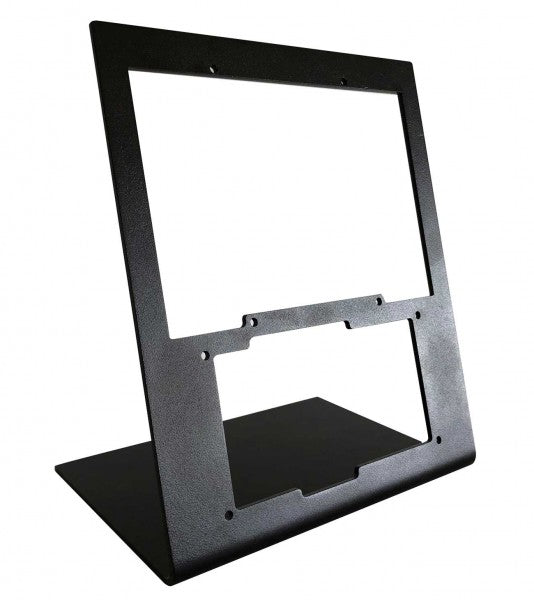
The RealSimGear - Desktop Stand for RealSimGear GTN650 delivers a solid and ergonomic foundation for your GTN650. Crafted from 3mm steel with a durable powder-coated matte black finish, it offers both sturdiness and style. Its rubber non-slip feet ensure stability during use, while its mounting holes provide compatibility with systems like Honeycomb Alpha, Bravo, and Saitek/Logitech yokes. This stand is a game-changer for anyone looking to create a reliable and clean cockpit setup for their simulation adventures.
RealSimGear - Desktop Stand for RealSimGear GTN650 apart?
Durable Steel Construction Constructed from 3mm steel and finished with a powder-coated matte black surface, the stand resists wear and adds a sleek touch to your setup. Its robust design ensures it can handle the demands of regular use without wobbling or bending.
Non-Slip Stability The stand features rubber non-slip feet, which keep it securely anchored on your desk. This design minimizes movement during use, even during intensive flight simulations, giving you peace of mind.
Versatile Mounting Compatibility With pre-drilled holes, the stand is compatible with the Honeycomb Alpha and Bravo systems, Saitek/Logitech yokes, and the RealSimGear Flight Deck Mounting Plate. This versatility makes it an excellent choice for a variety of setups.
Compact and Practical Design The stand elevates the GTN650 to an ergonomic viewing angle while maintaining a minimal footprint. It keeps your workspace organized and avoids unnecessary bulk, perfect for streamlined cockpit environments.
Pros and Cons
Pros
Cons
Durable 3mm steel construction with powder-coated finish.
Only compatible with the RealSimGear GTN650.
Rubber feet provide excellent non-slip stability.
Does not include additional mounting hardware.
Compatible with multiple mounting systems.
Specifications
Specification
Value
Material
3mm steel
Finish
Powder-coated matte black
Foot Type
Rubber non-slip feet
Mounting Holes
Compatible with Honeycomb Alpha/Bravo, Saitek/Logitech yoke, RealSimGear Flight Deck
RealSimGear - Desktop Stand for RealSimGear GTN650 Compatibility
The RealSimGear - Desktop Stand for RealSimGear GTN650 is specifically designed for the GTN650, ensuring a secure and elevated position for this device. It is equipped with mounting holes that support systems like the Honeycomb Alpha and Bravo, as well as Saitek/Logitech yokes, and the RealSimGear Flight Deck Mounting Plate. However, it is not suitable for devices outside this ecosystem, which makes it a dedicated choice for GTN650 users.
This stand integrates seamlessly with PC-based flight simulation setups and complements platforms like Microsoft Flight Simulator and X-Plane. However, it is not designed for console compatibility, ensuring it focuses solely on delivering an optimized experience for PC-based flight simulation enthusiasts.
The RealSimGear - Dual Desktop Stand for RealSimGear G5 brings durability and versatility to your flight simulation setup. Crafted from rugged 3mm powder-coated steel, this stand elevates and securely holds two G5 units, ensuring they remain stable throughout your sessions. With rubber non-slip feet and precise mounting compatibility, it offers an ergonomic and reliable way to configure your instruments, echoing the setup of real-world aviation cockpits for an unparalleled training and simulation experience.
What sets the RealSimGear - Dual Desktop Stand for RealSimGear G5 apart?
Designed for Dual G5 Units This stand is specifically built to house two G5 units, making it ideal for setups requiring both a Primary Flight Display (PFD) and Horizontal Situation Indicator (HSI). The design ensures seamless integration and proper spacing, allowing users to recreate the layout found in many aircraft panels.
Rugged Build Quality Made from 3mm powder-coated steel, the stand offers exceptional durability. Its matte black finish resists wear while complementing the sleek aesthetics of modern simulation setups, ensuring it lasts through countless hours of use.
Ergonomic Placement The elevated positioning provided by this stand reduces strain during long sessions and ensures easy access to both G5 units. Its thoughtful design mirrors real cockpit configurations, enhancing the practicality of your setup.
Flexible Mounting Compatibility With pre-drilled holes compatible with RealSimGear Flight Deck Mounting Plate, Saitek/Logitech yoke systems, and Honeycomb Alpha and Bravo controls, this stand integrates effortlessly into most flight sim configurations, reducing the need for additional mounting hardware.
Pros and Cons
Pros
Cons
Securely holds two G5 units for cohesive setups.
Not designed for single-unit configurations.
Durable steel construction with a matte black finish.
Limited to desk-mounted applications.
Compatible with multiple popular mounting systems.
Specifications
Specification
Value
Material
3mm steel
Finish
Powder-coated matte black
Features
Non-slip rubber feet, mounting screws
Capacity
Holds 2 x RealSimGear G5 units
Mounting Compatibility
Flight Deck Plate, Saitek/Logitech, Honeycomb Alpha/Bravo
RealSimGear - Dual Desktop Stand for RealSimGear G5 Compatibility
The RealSimGear - Dual Desktop Stand for RealSimGear G5 is purpose-built to accommodate two G5 units, making it perfect for those using a PFD/HSI setup. It features mounting holes that align with the RealSimGear Flight Deck Mounting Plate, Saitek/Logitech yoke systems, and Honeycomb Alpha and Bravo controls. This ensures seamless integration with popular hardware configurations while maintaining a stable and ergonomic layout.
The stand is optimized for PC-based simulation setups and supports platforms like X-Plane and Microsoft Flight Simulator. However, it does not directly support console-based gaming systems, focusing instead on professional and enthusiast PC configurations. Its compatibility ensures a plug-and-play experience with well-known flight simulation software.
The RealSimGear Desktop Stand for G500 is an elegant and functional solution for flight sim enthusiasts seeking a secure mount for their G500 avionics. Made from durable 3mm powder-coated steel, it combines strength with a sleek matte black finish. Its rubber non-slip feet ensure stability even during the most intense maneuvers. Compatible with popular mounting systems and yokes, this stand provides an elevated, ergonomic position for your hardware, enhancing your overall flight simulation experience.
What sets the RealSimGear Desktop Stand for G500 apart?
Durable Steel Construction Crafted from 3mm steel with a powder-coated finish, this stand resists wear and tear while maintaining a refined look. It's built to last, providing a dependable foundation for the G500 and other compatible hardware.
Non-Slip Stability The rubberized feet prevent sliding, offering a secure hold even during high-torque adjustments or enthusiastic use. This feature keeps your setup stable and in place without requiring constant adjustments.
Versatile Mounting Options Its base accommodates various mounting systems, including the RealSimGear Flight Deck Mounting Plate, Saitek/Logitech yoke systems, and Honeycomb Alpha and Bravo products. This flexibility makes it an excellent choice for multi-device setups.
Optimized Ergonomics The elevated design positions your G500 at a comfortable viewing angle, reducing strain and enhancing your control experience. The design ensures you can access your controls effortlessly during flights.
Pros and Cons
Pros
Cons
Sturdy 3mm steel construction ensures durability.
Limited to desk-mounted setups.
Rubberized feet provide exceptional stability.
Powder-coated surface may show scratches over time.
Compatible with multiple yoke and mounting systems.
Elevated design improves viewing and accessibility.
Specifications
Specification
Value
Material
3mm steel
Finish
Powder-coated matte black
Features
Non-slip rubber feet, mounting screws
Compatibility
RealSimGear Flight Deck Mounting Plate, Saitek/Logitech, Honeycomb Alpha & Bravo
RealSimGear Desktop Stand for G500 Compatibility
The RealSimGear Desktop Stand for G500 is designed to fit a range of flight simulation setups seamlessly. It supports the RealSimGear Flight Deck Mounting Plate and is fully compatible with Saitek/Logitech yoke systems, Honeycomb Alpha yoke, and Honeycomb Bravo throttle quadrants. This flexibility ensures it can integrate into diverse configurations, catering to a broad spectrum of flight sim enthusiasts.
While its compatibility with dedicated flight hardware is excellent, the stand is limited to desk-mounted applications and does not directly support gaming consoles. However, its universal design allows it to adapt to most PC-based setups, making it a versatile and practical choice for users running flight sims on Windows or other desktop platforms.
The RealSimGear Desktop Stand for GTN750 & GTN650 is a purpose-built solution for flight simulation enthusiasts looking to stabilize and showcase their avionics. Constructed from durable 3mm powder-coated steel, it combines strength with a sleek matte black finish. The rubber non-slip feet and mounting screws ensure a firm grip, even during intense sim sessions. Designed for the GTN750 and GTN650, it provides an elevated, ergonomic platform that enhances usability and keeps your setup organized and functional.
What sets the RealSimGear Desktop Stand for GTN750 & GTN650 apart?
Sturdy and Sleek Build Made from 3mm powder-coated steel, this stand combines durability with a stylish matte black finish. It resists scratches and wear, ensuring a lasting, polished appearance that fits seamlessly into your sim rig.
Enhanced Stability Equipped with rubber non-slip feet, the stand stays firmly in place during even the most demanding simulation sessions. This feature minimizes vibration and movement, giving you peace of mind while focusing on your flight.
Wide Compatibility The mounting holes are designed to accommodate a range of systems, including the RealSimGear Flight Deck Mounting Plate, Saitek/Logitech yoke systems, and Honeycomb Alpha and Bravo yokes. This versatility makes it an excellent choice for users with multi-brand setups.
Ergonomic Positioning The elevated design of the stand places your GTN750 and GTN650 at an optimal height and angle, reducing strain and making controls more accessible. It’s all about improving the functionality and comfort of your setup.
Pros and Cons
Pros
Cons
Sturdy 3mm steel construction for lasting durability.
Limited to desk-mounted setups only.
Rubber feet prevent sliding during intense use.
Not ideal for portable or travel use.
Compatible with multiple yoke and mounting systems.
Specifications
Specification
Value
Material
3mm steel
Finish
Powder-coated matte black
Features
Non-slip rubber feet, mounting screws
Compatibility
RealSimGear Flight Deck Mounting Plate, Saitek/Logitech, Honeycomb Alpha & Bravo
RealSimGear Desktop Stand for GTN750 & GTN650 Compatibility
The RealSimGear Desktop Stand for GTN750 & GTN650 is designed with versatility in mind, supporting various mounting systems and hardware configurations. It is fully compatible with the RealSimGear Flight Deck Mounting Plate, as well as Saitek/Logitech yoke systems and Honeycomb Alpha and Bravo yokes. This flexibility makes it a reliable choice for users running mixed-brand hardware in their simulation setups.
While it excels with PC-based simulation systems, this stand is not compatible with console-based setups. Its design caters primarily to desktop users, offering stability and integration with popular flight simulation platforms. For gamers using titles like Microsoft Flight Simulator or X-Plane, the stand provides a functional and ergonomic mounting solution, further enhancing their sim rig's performance.




