Flysimulator-joysticks

19 products

  • VelocityOne Flightdeck

    Turtle Beach VelocityOne Flightdeck

    Udsolgt, Pre-Orders Available. Shipped in 2-2.5 weeks from now.

    VelocityOne Flightdeck delivers an exceptional HOTAS experience, built for sim pilots who crave full control. The Flight Touch Display puts real-time status updates and extra input options at your fingertips, while the adjustable stick height ensures a comfortable grip for every hand size. Its Hall-effect sensors promise long-lasting accuracy, and the customizable OLED HUD offers on-the-fly tuning. Whether you're maneuvering through dogfights or exploring deep space, this setup provides a comprehensive set of controls designed for seamless integration with major flight sims. What Sets the VelocityOne Flightdeck Apart? Flight Touch Display Adds Layers of Control – Unlike traditional HOTAS setups, this system introduces a dedicated touchscreen for managing in-flight status and input commands. It effectively expands your cockpit controls, allowing you to assign up to 39 extra button functions for customized interactions. Fully Adjustable Stick for Comfort and Ergonomics – Many setups lock users into a single grip position, but this one features an adjustable stick height. That means pilots with different hand sizes can fine-tune the control feel, ensuring maximum precision without hand fatigue. Modular Design with Dual USB Connectivity – While some HOTAS systems cram everything into a single unit, this setup consists of two independently connected USB devices. This allows for greater flexibility in mounting options and ensures reliable input recognition without interference. Deep Customization Through the Flight Hangar App – Unlike many competitors, this system comes with a dedicated configuration app that allows users to tweak lighting, input sensitivity, and firmware updates. The ability to save and load profiles for different aircraft ensures consistency across multiple simulations. Pros and Cons Pros Cons Touchscreen display provides extra controls and customization Requires manual mapping for full function in some games Modular design with independent throttle and stick Button layout can feel overwhelming for beginners Adjustable stick height for better ergonomics Limited compatibility with certain space sims Specifications Specification Value Connection Type USB-C to USB-A (Throttle and Stick) Weight (Stick) 1.46kg / 3.22lbs Weight (Throttle) 1.51kg / 3.33lbs Dimensions (Stick) 177 x 215.8 x 234.3 mm / 6.97” x 8.50” x 9.22” Dimensions (Throttle) 177.9 x 207.6 x 134.2 mm / 7.00” x 8.17” x 5.28” Programmable Buttons 139 Throttle Type Dual-engine with independent or linked control Included Accessories 2x USB-C to USB-A cables, mounting screws VelocityOne Flightdeck Compatibility Software Compatibility Details Full Compatibility Microsoft Flight Simulator 2020, X-Plane 11 & 12, DCS World, Prepar3D, Star Citizen, War Thunder Limited Compatibility Star Wars Squadrons, Elite: Dangerous (requires manual mapping) Hardware Compatibility Details PC (Windows 10 & 11) Requires USB connection; no support for Mac or consoles Designed exclusively for Windows 10 & 11 PCs, this HOTAS system does not support MacOS or gaming consoles. The dual USB design allows separate recognition of the throttle and stick, reducing input lag and ensuring stable connection across all supported simulators. Best suited for Microsoft Flight Simulator, X-Plane, and DCS World, the VelocityOne Flightdeck also supports Star Citizen and War Thunder with full button mapping. While it works with Elite: Dangerous and Star Wars Squadrons, manual configuration is required due to button limitations.

    Udsolgt, Pre-Orders Available. Shipped in 2-2.5 weeks from now.

    €419,00

  • Sidste lager! VelocityOne Flightstick

    Turtle Beach VelocityOne Flightstick

    3 på lager Shipped in 1-3 business days.

    The VelocityOne Flightstick is a versatile and feature-rich joystick designed to elevate your flight sim adventures. With a dedicated throttle quadrant and customizable buttons, it offers detailed control for both casual and experienced pilots. Its ergonomic design ensures comfort during marathon sessions, while the integrated OLED display keeps critical data at your fingertips. Whether navigating the skies on PC or Xbox, this Flightstick combines functionality and flair, delivering a tactile experience that keeps you engaged from takeoff to landing. What sets the VelocityOne Flightstick apart? Integrated OLED Display The built-in OLED screen provides essential flight information in real-time, streamlining access to critical settings without distracting from the action. This feature is especially useful for adjusting configurations mid-flight, enhancing control fluidity. Extensive Customization With multiple programmable buttons and profiles, the VelocityOne Flightstick adapts to various flight styles and aircraft. Its dedicated trim wheel and dual hat switches allow for meticulous control adjustments, catering to both beginners and seasoned sim pilots. Dual-Platform Compatibility Seamlessly compatible with both PC and Xbox platforms, this joystick integrates effortlessly with popular simulators. Its USB-C connection ensures low-latency input and modern connectivity standards for hassle-free operation. Ergonomic Design and Build Built with durability and comfort in mind, the Flightstick’s intuitive layout and sturdy construction make it a dependable companion for long flight sessions. Its lightweight design adds portability without sacrificing stability during intense use. Pros and Cons Pros Cons OLED screen offers quick access to critical information. Initial setup may be challenging for beginners. Programmable buttons allow for extensive customization. Not compatible with PlayStation consoles. Works seamlessly with PC and Xbox platforms. Specifications Specification Value Product Type Joystick Rudder Control Yes Magnetic Sensors Yes RGB Lighting Yes Color Black Weight 0.8 kg Platform PC, Xbox One, Xbox Series X|S Operating System Windows 10 or higher Connection USB-C to USB-A Warranty 2 years (Carry-in) VelocityOne Flightstick Compatibility The VelocityOne Flightstick boasts compatibility with both PC and Xbox platforms, making it a versatile choice for flight sim enthusiasts. Designed for Windows 10 or higher, it connects seamlessly via USB-C, ensuring fast and reliable data transmission. However, it is not compatible with PlayStation systems, limiting cross-platform use for some users. The Flightstick integrates effortlessly with major flight simulators such as Microsoft Flight Simulator 2020, leveraging its precision controls to provide an exceptional experience. The joystick’s programmable buttons and trim wheel make it an excellent choice for various aircraft and playstyles. Its compatibility with both Xbox Series X|S and Xbox One ensures that console players can enjoy a robust and immersive flight simulation setup. However, it requires a Windows PC or Xbox, as Linux or macOS compatibility is not supported, and its features are optimized for the listed systems.

    3 på lager Shipped in 1-3 business days.

    €169,00

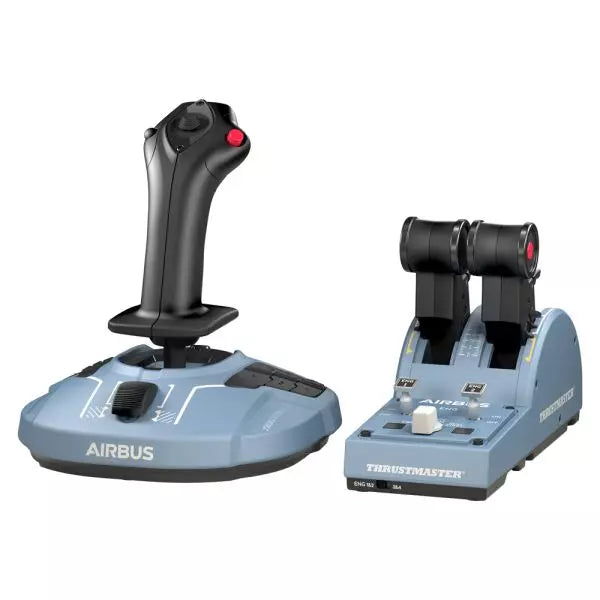
  • Sidste lager! TCA Officer Pack Airbus Edition for sale on FlightSimzone

    Thrustmaster TCA Officer Pakke Airbus Edition

    5 på lager Shipped in 1-3 business days.

    TCA Officer Pakke Airbus Edition er et must-have for alle, der ønsker at bringe følelsen af kommerciel luftfart ind i deres opsætning. Med sit ergonomiske design inspireret af Airbus A320, inkluderer det både TCA Sidestick og Throttle Quadrant for uovertruffen kontrol. Med magnetisk sensorteknologi, der sikrer glat input og et modulært sidestick til alsidige konfigurationer, giver denne pakke dig mulighed for at styre himlen med præcision. Uanset om du er pilot på et passagerfly eller et kampfly, tilpasser denne pakke sig dine behov. Hvad adskiller TCA Officer Pakke Airbus Edition fra andre? Modulært Sidestick Design Sidestickens hoved er modulært, hvilket giver dig mulighed for at tilpasse det til kaptajn, co-pilot eller solo flyopsætninger. Denne fleksibilitet er sjælden, og giver mulighed for tilpasning til forskellige spilstile og spilmiljøer. Detents og Thrust Reverser Mekanisme Throttle quadrant inkluderer præcise detents og en indbygget thrust reverser, som skaber taktil feedback, der simulerer virkelige kontroller. Muligheden for at skifte til lineær tilstand tilføjer endnu mere alsidighed til forskellige flytyper. Holdbar Magnetisk Teknologi Begge enheder udnytter kontaktløs magnetisk sensorteknologi, hvilket eliminerer potentiometre og sikrer lang levetid. Denne design forbedrer pålideligheden og minimerer input-lag under kritiske manøvrer. Problemfri Multi-Device Kompatibilitet Pakken integreres problemfrit med periferiudstyr som Thrustmaster T.Flight Rudder Pedals og TM Flying Clamp. Dette sikrer et sammenhængende og medrivende setup for dedikerede luftfartsentusiaster. Fordele og Ulemper Fordele Ulemper Ergonomisk design inspireret af Airbus A320-kontroller. Udsolgt ofte på grund af efterspørgsel. Modulært sidestick understøtter forskellige konfigurationer. Throttle quadrant mangler baggrundsbelysning til natte-sessioner. Magnetiske sensorer sikrer langvarig holdbarhed. Ingen natursk konsole-support; kun PC. Understøtter dobbelt gashåndtag til fire-motorers fly. Yderligere throttle quadrant kræves for fuld kontrol af fire-motorers fly. Specifikationer Specifikation Værdi TCA Sidestick Bredde 7.7” / 195 mm TCA Sidestick Dybde 8.9” / 225 mm TCA Sidestick Højde 7.7” / 195 mm TCA Sidestick Vægt 2.0 lb / 920 g TCA Quadrant Bredde 10.0” / 255 mm TCA Quadrant Dybde 5.7” / 145 mm TCA Quadrant Højde 3.3” / 85 mm TCA Quadrant Vægt 1.2 lb / 530 g Indhold i pakken TCA Sidestick, TCA Quadrant, 4 udskiftelige joystick hovedmoduler, USB kabel, klistermærke, stikforbindelser, fastgørelsesstang TCA Officer Pakke Airbus Edition Kompatibilitet Hardware Kompatibilitet Rudder Pedals Kompatibel med Thrustmaster T.Flight og Pendular Rudder Monteringsklemme Kompatibel med Thrustmaster TM Flying Clamp TCA Officer Pakke Airbus Edition er designet til at integreres problemfrit med andre Thrustmaster periferiudstyr, hvilket gør det til et alsidigt valg i en etableret opsætning. Throttle quadrant giver mulighed for at forbinde to enheder til at håndtere fire-motorers fly, og sidestickens modularitet tilpasser sig nemt til forskellige cockpit-konfigurationer. Det er dog kun kompatibelt med PC-brugere, da det ikke er kompatibelt med konsoller. På gamingplatformsfronten er denne pakke fuldt kompatibel med Windows 10 og 8 systemer og fungerer godt med populære flysimulatorer som Microsoft Flight Simulator og X-Plane. Den understøtter dog ikke konsolplatforme, hvilket begrænser brugen til Xbox eller PlayStation-brugere.

    5 på lager Shipped in 1-3 business days.

    €179,00

  • Sidste lager! Honeycomb Foxtrot Aviation Stick

    Fly Honeycomb Honeycomb Foxtrot Aviation Stick

    4 på lager Shipped in 1-3 business days.

    Honeycomb Foxtrot Aviation Stick is built for pilots who prefer a sidestick in hand and a clean desk in front of them. From the first movement, the smooth linear resistance system with no center detent feels fluid and deliberate, ideal for Airbus-style inputs and aerobatic maneuvers. Under the hood, 16-bit resolution with Hall Effect sensor technology translates subtle wrist movements into accurate on-screen control. Add adjustable tension and a fully ambidextrous layout, and you’ve got a stick that feels purposeful rather than toy-like. What Sets the Honeycomb Foxtrot Aviation Stick apart? Center-Detent-Free Control Philosophy Many sticks rely on a noticeable center bump, which can make small corrections feel mechanical. The Foxtrot’s linear resistance system eliminates that notch, creating a smooth transition across the full axis range. Pilots flying Airbus aircraft in particular appreciate this design, as it mirrors sidestick behavior more closely and allows gentle pitch and roll corrections without fighting a spring-loaded “click” at center. Sensor and Resolution Synergy With 16-bit resolution paired to Hall Effect sensors, the Foxtrot delivers clean, contactless input detection. Enthusiasts often point out the consistency over time—no spiking, no gradual degradation from physical potentiometers. Subtle trim adjustments during approach or careful roll inputs in aerobatics feel steady and predictable, especially when compared to entry-level sticks that can show jitter near center. Configurable Resistance and Ergonomics Adjustable tension allows the stick to be tuned to personal preference, whether you prefer lighter fingertip inputs or firmer resistance for controlled movements. Combined with its ambidextrous grip design, the Foxtrot suits both left- and right-handed setups. Users with compact cockpit builds often highlight how adaptable it feels in different seating positions, including center-mounted or side-mounted configurations. Switch Density Without Clutter Between the 5 two-way switches, 4 programmable action buttons, POV hat, trigger, rockers, and multi-way rotary panel, the stick offers serious input flexibility. What stands out is how logically the controls are spaced; sim pilots frequently mention that functions like trim, autopilot modes, or camera controls can be assigned without feeling cramped or hunting blindly mid-flight. Pros and Cons Pros Cons Linear resistance without center detent feels smooth. No native console compatibility. Hall Effect sensors reduce long-term wear. No included dedicated mounting base. Adjustable tension suits different flying styles. Extensive switch and button configuration options. Specifications Specification Value Product Name Honeycomb Foxtrot Aviation Stick Control System Linear resistance system with no center detent Sensor Technology Hall Effect sensors Resolution 16-bit Tension Adjustment Adjustable stick resistance Switches 5 two-way switches Action Buttons 4 programmable buttons Rotary Panel 3-, 4-, and 5-way rotary controls Grip Design Ambidextrous Connection USB-C to USB-A cable System Compatibility PC and Mac Included in the Box Foxtrot Aviation Stick, USB-C to USB-A Cable, Quick Start Guide (EFIGS) Download Support Basic Bindings Profiles (XML) for MSFS 2024 Honeycomb Foxtrot Aviation Stick Compatibility Platform Compatibility Operating Systems PC and Mac Connection Type USB-C to USB-A direct USB interface Primary Sim Support MSFS 2024 (XML bindings), MSFS, X-Plane, Prepar3D The Foxtrot Aviation Stick connects via standard USB, allowing it to integrate easily into most desktop cockpit setups. It works seamlessly alongside throttle quadrants, rudder pedals, and radio panels from other major brands thanks to its plug-and-play HID architecture. Its ambidextrous design makes it suitable for left- or right-seat configurations, including Airbus-style side mounting. It is not compatible with Xbox consoles and does not function as a standalone device without a connected PC or Mac. On the software side, it supports Microsoft Flight Simulator 2024 with dedicated XML binding profiles and operates with popular PC simulators such as Microsoft Flight Simulator (2020), X-Plane, and Prepar3D through manual or community mappings. It is not designed for console-based platforms, as it relies on native PC/Mac driver recognition rather than console-certified firmware.

    4 på lager Shipped in 1-3 business days.

    €165,00

  • WINCTRL URSA MINOR Airline Joystick R

    WINCTRL WINCTRL URSA MINOR Airline Joystick R

    Udsolgt, Pre-Orders Available. Shipped in 2-2.5 weeks from now.

    WINCTRL URSA MINOR Airline Joystick R brings airline-style control to the desktop with a clever mix of tactile feedback and thoughtful engineering. The standout feature is the flight-data-linked vibration engine, which adds subtle physical cues during events like flap deployment, airflow changes, and touchdown. Pair that with non-contact magnetic resistance sensors on the X and Y axes, and the stick delivers smooth, stable inputs without the wear issues common in cheaper mechanisms. The result is a joystick that feels lively in hand yet technically grounded under the hood. What Sets the WINCTRL URSA MINOR Airline Joystick R apart? Flight Data Driven Vibration Feedback The URSA MINOR stands out with a vibration motor tied directly to in-sim flight data. Instead of generic rumble, the stick reacts to events like landing contact, airflow changes, or flap movement. Pilots online often mention how this adds subtle physical cues during phases like flare or speed changes, providing a tactile reminder of what the aircraft is doing without constantly glancing at instruments. Robust Gimbal With Magnetic Sensors At the core of the stick is a glass-fiber-reinforced nylon gimbal running on ball bearings, paired with non-contact magnetic sensors for the primary axes. This combination helps maintain smooth motion over time without the jitter common in potentiometer-based designs. Enthusiasts frequently note that the stick movement feels stable across the entire travel range, particularly during small pitch adjustments on final approach. Airliner-Inspired Grip Layout The grip design borrows cues from airline sidestick ergonomics, offering a balanced control layout that includes a PTT trigger, autopilot disconnect switch, and a concealed five-way switch beneath a magnetic cover. Pilots often highlight how practical this arrangement is for everyday flying tasks—radio calls, autopilot overrides, and camera views can all be handled without reaching for the keyboard. Flexible Mounting and Maintenance Design The base includes anti-slip pads for desktop use along with pre-drilled mounting holes for cockpit rigs. A quick-release base cover allows access to internal adjustments without dismantling the entire unit. This detail is frequently appreciated by sim cockpit builders who prefer gear that can be tuned or serviced easily rather than permanently sealed hardware. Pros and Cons Pros Cons Flight-data vibration feedback adds tactile flight cues. Plastic construction compared to metal joystick designs. Magnetic sensors reduce wear and input drift. Limited axis travel compared to extended bases. Good button layout for airliner-style flying tasks. Desk or cockpit mounting options included. Specifications Specification Value Product Model URSA MINOR-Airline-Joystick R Material Industrial ABS plastic (PC + ABS) Controller 32-bit ARM controller X/Y Axis Movement Angle ±15° Z Axis Rotation Angle ±20° X/Y Sensors Non-contact magnetic resistance sensors Gimbal Construction Glass fiber reinforced nylon with ball bearings Operating Force (X/Y) Approximately 6N Rotation Torque (Z) ~4 kgf·cm Throttle Axis Type Long-travel sliding potentiometer Throttle Axis Travel 38 mm Buttons 14 buttons (250gf press force, 0.25 mm travel) Special Controls Hidden 5-way switch, PTT trigger, autopilot disconnect Vibration Feature Adjustable amplitude levels from 0–255 Mounting Options Anti-slip desktop pads and cockpit mounting holes Item Weight 3 kg Included in Box J5-BASE-BLACK + JGRIP-C1-R, Data Cable, Toolkit, Accessories Pack WINCTRL URSA MINOR Airline Joystick R Compatibility Platform Compatibility Connection Type USB plug-and-play connection Software Configuration WW SIMAPP Pro software for button mapping Mounting Desktop use or cockpit mounting The URSA MINOR Airline Joystick R connects via standard USB, allowing it to integrate easily with throttle quadrants, rudder pedals, and other flight hardware from many manufacturers. The base supports both desktop placement with anti-slip pads and cockpit mounting using pre-drilled holes, which is useful for sim rigs or permanent setups. Configuration is handled through WW SIMAPP Pro software, enabling button assignments and vibration adjustments directly from a visual interface. Within a flight setup, the joystick works well alongside external throttles, radio panels, or pedal systems because it behaves as a standard USB HID controller. It does not require proprietary ecosystems and can coexist with other brands in the same cockpit. However, it is intended for PC-based simulation environments and does not integrate directly with console platforms. In terms of simulators, the stick supports Microsoft Flight Simulator 2020, X-Plane, Prepar3D, and also space or combat titles like Star Citizen, Elite Dangerous, and War Thunder. Its plug-and-play USB design allows quick recognition in most PC simulation platforms. It is not designed for Xbox or PlayStation consoles, as those systems typically require licensed hardware and different firmware structures.

    Udsolgt, Pre-Orders Available. Shipped in 2-2.5 weeks from now.

    €99,00

  • WINCTRL URSA MINOR Airline Joystick L

    WINCTRL WINCTRL URSA MINOR Airline Joystick L

    Udsolgt, Pre-Orders Available. Shipped in 2-2.5 weeks from now.

    WINCTRL URSA MINOR Airline Joystick L brings airline-style control to the desktop with a clever mix of tactile feedback and thoughtful engineering. The standout feature is the flight-data-linked vibration engine, which adds subtle physical cues during events like flap deployment, airflow changes, and touchdown. Pair that with non-contact magnetic resistance sensors on the X and Y axes, and the stick delivers smooth, stable inputs without the wear issues common in cheaper mechanisms. The result is a joystick that feels lively in hand yet technically grounded under the hood. What Sets the WINCTRL URSA MINOR Airline Joystick L apart? Flight Data Driven Vibration Feedback The URSA MINOR stands out with a vibration motor tied directly to in-sim flight data. Instead of generic rumble, the stick reacts to events like landing contact, airflow changes, or flap movement. Pilots online often mention how this adds subtle physical cues during phases like flare or speed changes, providing a tactile reminder of what the aircraft is doing without constantly glancing at instruments. Robust Gimbal With Magnetic Sensors At the core of the stick is a glass-fiber-reinforced nylon gimbal running on ball bearings, paired with non-contact magnetic sensors for the primary axes. This combination helps maintain smooth motion over time without the jitter common in potentiometer-based designs. Enthusiasts frequently note that the stick movement feels stable across the entire travel range, particularly during small pitch adjustments on final approach. Airliner-Inspired Grip Layout The grip design borrows cues from airline sidestick ergonomics, offering a balanced control layout that includes a PTT trigger, autopilot disconnect switch, and a concealed five-way switch beneath a magnetic cover. Pilots often highlight how practical this arrangement is for everyday flying tasks—radio calls, autopilot overrides, and camera views can all be handled without reaching for the keyboard. Flexible Mounting and Maintenance Design The base includes anti-slip pads for desktop use along with pre-drilled mounting holes for cockpit rigs. A quick-release base cover allows access to internal adjustments without dismantling the entire unit. This detail is frequently appreciated by sim cockpit builders who prefer gear that can be tuned or serviced easily rather than permanently sealed hardware. Pros and Cons Pros Cons Flight-data vibration feedback adds tactile flight cues. Plastic construction compared to metal joystick designs. Magnetic sensors reduce wear and input drift. Limited axis travel compared to extended bases. Good button layout for airliner-style flying tasks. Desk or cockpit mounting options included. Specifications Specification Value Product Model URSA MINOR-Airline-Joystick L Material Industrial ABS plastic (PC + ABS) Controller 32-bit ARM controller X/Y Axis Movement Angle ±15° Z Axis Rotation Angle ±20° X/Y Sensors Non-contact magnetic resistance sensors Gimbal Construction Glass fiber reinforced nylon with ball bearings Operating Force (X/Y) Approximately 6N Rotation Torque (Z) ~4 kgf·cm Throttle Axis Type Long-travel sliding potentiometer Throttle Axis Travel 38 mm Buttons 14 buttons (250gf press force, 0.25 mm travel) Special Controls Hidden 5-way switch, PTT trigger, autopilot disconnect Vibration Feature Adjustable amplitude levels from 0–255 Mounting Options Anti-slip desktop pads and cockpit mounting holes Item Weight 3 kg Included in Box J5-BASE-BLACK + JGRIP-C1-R, Data Cable, Toolkit, Accessories Pack WINCTRL URSA MINOR Airline Joystick L Compatibility Platform Compatibility Connection Type USB plug-and-play connection Software Configuration WW SIMAPP Pro software for button mapping Mounting Desktop use or cockpit mounting The URSA MINOR Airline Joystick L connects via standard USB, allowing it to integrate easily with throttle quadrants, rudder pedals, and other flight hardware from many manufacturers. The base supports both desktop placement with anti-slip pads and cockpit mounting using pre-drilled holes, which is useful for sim rigs or permanent setups. Configuration is handled through WW SIMAPP Pro software, enabling button assignments and vibration adjustments directly from a visual interface. Within a flight setup, the joystick works well alongside external throttles, radio panels, or pedal systems because it behaves as a standard USB HID controller. It does not require proprietary ecosystems and can coexist with other brands in the same cockpit. However, it is intended for PC-based simulation environments and does not integrate directly with console platforms. In terms of simulators, the stick supports Microsoft Flight Simulator 2020, X-Plane, Prepar3D, and also space or combat titles like Star Citizen, Elite Dangerous, and War Thunder. Its plug-and-play USB design allows quick recognition in most PC simulation platforms. It is not designed for Xbox or PlayStation consoles, as those systems typically require licensed hardware and different firmware structures.

    Udsolgt, Pre-Orders Available. Shipped in 2-2.5 weeks from now.

    €99,00

  • Honeycomb Echo Aviation Controller

    Fly Honeycomb Honeycomb Echo Aviation Controller

    Udsolgt, Pre-Orders Available. Shipped in 2-2.5 weeks from now.

    Honeycomb Echo Aviation Controller is one of those devices that makes you rethink how much hardware you actually need to fly properly. Everything sits in your hands—pitch, roll, yaw, throttle, trim—all within reach, anchored by a 16-bit Hall-effect thumbstick that feels smooth and consistent through every movement. Pair that with a complete all-in-one flight control layout, and you’ve got a compact cockpit that works just as well on a desk as it does on the couch. It’s clever, tactile, and surprisingly capable for its size. What Sets the Honeycomb Echo Aviation Controller apart? All-in-One Without Feeling Compromised – Many compact controllers try to do everything and end up feeling like a gamepad with extra buttons. The Echo stands out because each control has a defined purpose and physical identity. Users often mention how the dedicated trim wheel, levers, and rudder system make it feel closer to a proper flight control setup, rather than a simplified alternative. Mechanical Rudder Integration – Instead of relying on twist input or triggers, the Echo uses mechanically linked rudder pedals with Hall-effect sensing. This is something pilots quickly notice, especially during coordinated turns or crosswind landings. The self-centering action gives a consistent feel that’s easier to manage than digital-style inputs found on many compact controllers. Designed for Flexible Flying Spaces – Feedback from users consistently highlights how freeing it is to fly without a fixed rig. Whether sitting at a desk, relaxing on a couch, or traveling, the Echo adapts without needing mounts or external peripherals. It’s particularly appealing for sim pilots who don’t have space for a full yoke, throttle quadrant, and pedal setup. Thoughtful Control Layout for MSFS – The layout feels intentionally designed around Microsoft Flight Simulator workflows. Common functions like gear, flaps, trim, and camera controls are placed where fingers naturally rest. Many users note that once muscle memory develops, cockpit interaction becomes quicker and more fluid compared to mapping everything onto a generic controller. Pros and Cons Pros Cons All flight controls integrated into one compact unit Less tactile separation than full-size hardware setups Hall-effect sensors provide smooth, drift-free input Limited physical range compared to dedicated yokes Wireless operation with long battery life Portable design works without dedicated sim rig Specifications Specification Value Control Type All-in-one flight controller (pitch, roll, yaw, throttle, trim, flaps, gear) Primary Input 16-bit Hall-effect thumbstick Rudder System Mechanically linked Hall-effect rudder pedals Throttle/Sliders Four detented sliders with interchangeable caps Connectivity Wireless (2.4 GHz dongle) or USB-C wired Battery 1200 mAh, up to 15 hours usage System Compatibility PC and Mac Software Compatibility Microsoft Flight Simulator, X-Plane 11/12, Prepar3D Included Accessories Travel case, lever caps, wireless dongle, USB cable Warranty 2-year limited warranty Honeycomb Echo Aviation Controller Compatibility The Echo is built with flexibility in mind. It is compatible with PC and Mac systems and connects either through USB-C wired connection or a 2.4 GHz wireless dongle. Because it operates as a standalone controller, it does not require additional yokes, pedals, or throttle quadrants, making it ideal for compact setups or portable use. It is not designed to integrate directly with traditional hardware ecosystems like separate yokes or external rudder pedals. Its all-in-one design means fewer cables and simpler setups, but it also means less modular expansion compared to full cockpit systems. Pilots who prefer mixing and matching hardware may find it less suited to complex multi-device configurations, as the Echo is intended to replace, rather than complement, those components. On the software side, the controller is fully compatible with Microsoft Flight Simulator and also supports X-Plane 11, X-Plane 12, and Prepar3D. It is not designed for console use, focusing entirely on PC-based simulation platforms where full input mapping and customization are available.

    Udsolgt, Pre-Orders Available. Shipped in 2-2.5 weeks from now.

    €150,00

Flight Simulator Joysticks for sale at FlightSImZone

Når du træder ind i flysimulatorens verden, er et kvalitets flight simulator joystick din primære forbindelse til det virtuelle fly. Disse præcisionsinstrumenter omsætter dine mindste bevægelser til nøjagtige styringssignaler, og de er dermed uundværlige – både til casual flyvning og seriøs flytræning.

Bedste Joysticks til Flysimulator

Markedet tilbyder i dag flere joystick-designs, der imødekommer forskellige behov og præferencer. HOTAS Warthog er i premium-segmentet – metal hele vejen og militær præcision – mens T.Flight Stick X er en fremragende indgang for nye brugere. TCA Sidestick X Airbus Edition bygger bro mellem segmenterne: autentisk airliner-følelse og sensorer i professionel klasse.

Microsoft Flight Simulator Joystick

Microsoft Flight Simulators avancerede fysikmotor kræver præcise inputenheder for den bedste kontrol. T16000M FCS er populær – Hall Effect sensorer og ergonomi leverer super præcision. VelocityOne Flightstick supplerer med dedikerede funktioner optimeret til Microsoft-platformen.

Flysimulator Joystick til PC

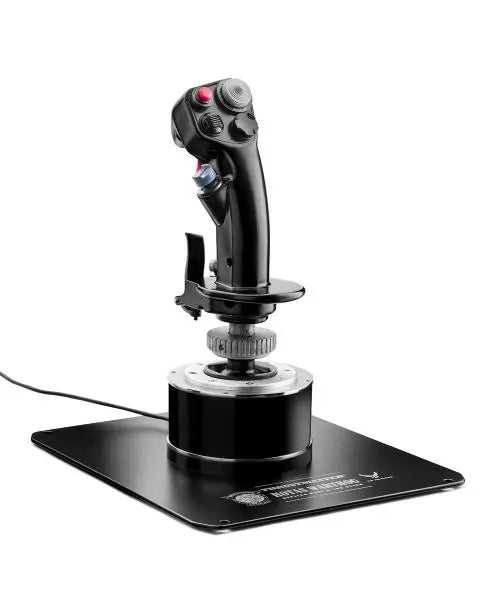
PC-platformen giver den bredeste kompatibilitet med flystyringssystemer – piloten kan vælge blandt mange avancerede løsninger. AVA F/A-18 Super Hornet Flightstick er et eksempel på ny PC-teknologi: avancerede sensorer, programbare funktioner, og software til personlige profiler og følsomhedsjustering.

Sammenligningstabel

Funktion HOTAS Warthog TCA Sidestick X Airbus T16000M FCS VelocityOne Flightstick T.Flight Stick X AVA F/A-18 Super Hornet
Platformskompatibilitet PC PC PC Xbox Series X|S, PC PC, PS3 PC
Konstruktion Hele i metal Industriel plast Forstærket plast Premium plast Plast Hybrid metal/plast
Sensortype H.E.A.R.T Hall Effect H.E.A.R.T Hall Effect Hall Effect Hall Effect Potentiometer Hall Effect
Antal knapper 19 + Hat Switch 17 + Hat Switch 16 + Hat Switch 12 + Hat Switch 12 + Hat Switch 19 + Dual Hat Switch
Throttle inkluderet Ja (separat) Nej Valgfrit Nej Nej Nej
Softwarefunktioner T.A.R.G.E.T Software T.A.R.G.E.T Software T.A.R.G.E.T Software Custom App Grundlæggende kalibrering Avanceret programmering
Opløsning på akser 16-bit 16-bit 16-bit 16-bit 8-bit 16-bit
Særlige funktioner • Militær design
• Dobbelt throttle system
• Metalplade-mount
• Airbus-design
• Modulopbygget
• Ambidextrous
• Ambidextrous design
• Bred base
• Justerbar spænding
• Xbox-optimeret
• Statusdisplay
• Hurtigstyring
• Grundfunktioner
• Kompakt design
• Prisvenlig
• F/A-18 kopi
• Klar til combat
• Premium greb

Vigtige Tekniske Funktioner:

Præcisionsteknologi

  • Hall Effect magnetiske sensorer
  • 16-bit resolutionsakser
  • Multiretnings-hat switches

Holdbarhed

  • Forstærket basekonstruktion
  • Industrielle komponenter
  • Metal-gimbal mekanismer

Flysimulator Joystick til Xbox

Konsolbaseret flysimulering har udviklet sig markant, især i Xbox-universet. Moderne Xbox-kompatible joysticks tilbyder avancerede funktioner, som før kun fandtes til PC. Disse controllere kombinerer plug-and-play enkelhed med funktioner i professionel klasse, så konsolpiloter kan opnå samme præcision som på PC.

Avancerede Kontrolteknologier

Moderne flysimulator joysticks indeholder flere teknologiske innovationer, der forbedrer ydelse og holdbarhed. Højopløsningssensorer leverer præcise positionsdata, og avancerede materialer sikrer problemfri drift over tusindvis af flyvetimer. Producenter inkorporerer nu også militær-inspirerede elementer, så kontrolleren føles autentisk og ergonomisk.

Disse innovationer går igen i software – mange joysticks har dedikerede programmeringsværktøjer, hvor brugeren kan lave egne kontrolprofiler, justere kurver og opsætte avanceret knapmapping til forskellige flytyper. Integration af flere kontrolakser giver mere realistisk simulering af komplekse flymanøvrer fra præcis formation til avanceret combat.

Køb dit Flysimulator Joystick hos FlightSimZone

Et kvalitets flysimulator joystick er en afgørende investering i din virtuelle flyrejse. Uanset om du øver rigtige flyprocedurer eller bare flyver for sjov, kan det rette joystick løfte oplevelsen betragteligt. Hos FlightSimZone ved vi, hvor vigtigt det er at matche piloter med deres ideelle styringsløsning.

Køb dit Flysimulator Joystick hos FlightSimZone i dag og oplev den perfekte balance mellem præcision og kontrol i din virtuelle cockpit.


Login

Forgot your password?

Don't have an account yet?
Create account


