Flight Simulator kontrol

50 products

  • WINCTRL URSA MINOR Airline Joystick R

    WINCTRL WINCTRL URSA MINOR Airline Joystick R

    Udsolgt, Forudbestillinger tilgængelige. Sendes om 2-2,5 uger fra nu.

    WINCTRL URSA MINOR Airline Joystick R brings airline-style control to the desktop with a clever mix of tactile feedback and thoughtful engineering. The standout feature is the flight-data-linked vibration engine, which adds subtle physical cues during events like flap deployment, airflow changes, and touchdown. Pair that with non-contact magnetic resistance sensors on the X and Y axes, and the stick delivers smooth, stable inputs without the wear issues common in cheaper mechanisms. The result is a joystick that feels lively in hand yet technically grounded under the hood. What Sets the WINCTRL URSA MINOR Airline Joystick R apart? Flight Data Driven Vibration Feedback The URSA MINOR stands out with a vibration motor tied directly to in-sim flight data. Instead of generic rumble, the stick reacts to events like landing contact, airflow changes, or flap movement. Pilots online often mention how this adds subtle physical cues during phases like flare or speed changes, providing a tactile reminder of what the aircraft is doing without constantly glancing at instruments. Robust Gimbal With Magnetic Sensors At the core of the stick is a glass-fiber-reinforced nylon gimbal running on ball bearings, paired with non-contact magnetic sensors for the primary axes. This combination helps maintain smooth motion over time without the jitter common in potentiometer-based designs. Enthusiasts frequently note that the stick movement feels stable across the entire travel range, particularly during small pitch adjustments on final approach. Airliner-Inspired Grip Layout The grip design borrows cues from airline sidestick ergonomics, offering a balanced control layout that includes a PTT trigger, autopilot disconnect switch, and a concealed five-way switch beneath a magnetic cover. Pilots often highlight how practical this arrangement is for everyday flying tasks—radio calls, autopilot overrides, and camera views can all be handled without reaching for the keyboard. Flexible Mounting and Maintenance Design The base includes anti-slip pads for desktop use along with pre-drilled mounting holes for cockpit rigs. A quick-release base cover allows access to internal adjustments without dismantling the entire unit. This detail is frequently appreciated by sim cockpit builders who prefer gear that can be tuned or serviced easily rather than permanently sealed hardware. Pros and Cons Pros Cons Flight-data vibration feedback adds tactile flight cues. Plastic construction compared to metal joystick designs. Magnetic sensors reduce wear and input drift. Limited axis travel compared to extended bases. Good button layout for airliner-style flying tasks. Desk or cockpit mounting options included. Specifications Specification Value Product Model URSA MINOR-Airline-Joystick R Material Industrial ABS plastic (PC + ABS) Controller 32-bit ARM controller X/Y Axis Movement Angle ±15° Z Axis Rotation Angle ±20° X/Y Sensors Non-contact magnetic resistance sensors Gimbal Construction Glass fiber reinforced nylon with ball bearings Operating Force (X/Y) Approximately 6N Rotation Torque (Z) ~4 kgf·cm Throttle Axis Type Long-travel sliding potentiometer Throttle Axis Travel 38 mm Buttons 14 buttons (250gf press force, 0.25 mm travel) Special Controls Hidden 5-way switch, PTT trigger, autopilot disconnect Vibration Feature Adjustable amplitude levels from 0–255 Mounting Options Anti-slip desktop pads and cockpit mounting holes Item Weight 3 kg Included in Box J5-BASE-BLACK + JGRIP-C1-R, Data Cable, Toolkit, Accessories Pack WINCTRL URSA MINOR Airline Joystick R Compatibility Platform Compatibility Connection Type USB plug-and-play connection Software Configuration WW SIMAPP Pro software for button mapping Mounting Desktop use or cockpit mounting The URSA MINOR Airline Joystick R connects via standard USB, allowing it to integrate easily with throttle quadrants, rudder pedals, and other flight hardware from many manufacturers. The base supports both desktop placement with anti-slip pads and cockpit mounting using pre-drilled holes, which is useful for sim rigs or permanent setups. Configuration is handled through WW SIMAPP Pro software, enabling button assignments and vibration adjustments directly from a visual interface. Within a flight setup, the joystick works well alongside external throttles, radio panels, or pedal systems because it behaves as a standard USB HID controller. It does not require proprietary ecosystems and can coexist with other brands in the same cockpit. However, it is intended for PC-based simulation environments and does not integrate directly with console platforms. In terms of simulators, the stick supports Microsoft Flight Simulator 2020, X-Plane, Prepar3D, and also space or combat titles like Star Citizen, Elite Dangerous, and War Thunder. Its plug-and-play USB design allows quick recognition in most PC simulation platforms. It is not designed for Xbox or PlayStation consoles, as those systems typically require licensed hardware and different firmware structures.

    Udsolgt, Forudbestillinger tilgængelige. Sendes om 2-2,5 uger fra nu.

    €99,00

  • WINCTRL URSA MINOR Airline Joystick L

    WINCTRL WINCTRL URSA MINOR Airline Joystick L

    Udsolgt, Forudbestillinger tilgængelige. Sendes om 2-2,5 uger fra nu.

    WINCTRL URSA MINOR Airline Joystick L brings airline-style control to the desktop with a clever mix of tactile feedback and thoughtful engineering. The standout feature is the flight-data-linked vibration engine, which adds subtle physical cues during events like flap deployment, airflow changes, and touchdown. Pair that with non-contact magnetic resistance sensors on the X and Y axes, and the stick delivers smooth, stable inputs without the wear issues common in cheaper mechanisms. The result is a joystick that feels lively in hand yet technically grounded under the hood. What Sets the WINCTRL URSA MINOR Airline Joystick L apart? Flight Data Driven Vibration Feedback The URSA MINOR stands out with a vibration motor tied directly to in-sim flight data. Instead of generic rumble, the stick reacts to events like landing contact, airflow changes, or flap movement. Pilots online often mention how this adds subtle physical cues during phases like flare or speed changes, providing a tactile reminder of what the aircraft is doing without constantly glancing at instruments. Robust Gimbal With Magnetic Sensors At the core of the stick is a glass-fiber-reinforced nylon gimbal running on ball bearings, paired with non-contact magnetic sensors for the primary axes. This combination helps maintain smooth motion over time without the jitter common in potentiometer-based designs. Enthusiasts frequently note that the stick movement feels stable across the entire travel range, particularly during small pitch adjustments on final approach. Airliner-Inspired Grip Layout The grip design borrows cues from airline sidestick ergonomics, offering a balanced control layout that includes a PTT trigger, autopilot disconnect switch, and a concealed five-way switch beneath a magnetic cover. Pilots often highlight how practical this arrangement is for everyday flying tasks—radio calls, autopilot overrides, and camera views can all be handled without reaching for the keyboard. Flexible Mounting and Maintenance Design The base includes anti-slip pads for desktop use along with pre-drilled mounting holes for cockpit rigs. A quick-release base cover allows access to internal adjustments without dismantling the entire unit. This detail is frequently appreciated by sim cockpit builders who prefer gear that can be tuned or serviced easily rather than permanently sealed hardware. Pros and Cons Pros Cons Flight-data vibration feedback adds tactile flight cues. Plastic construction compared to metal joystick designs. Magnetic sensors reduce wear and input drift. Limited axis travel compared to extended bases. Good button layout for airliner-style flying tasks. Desk or cockpit mounting options included. Specifications Specification Value Product Model URSA MINOR-Airline-Joystick L Material Industrial ABS plastic (PC + ABS) Controller 32-bit ARM controller X/Y Axis Movement Angle ±15° Z Axis Rotation Angle ±20° X/Y Sensors Non-contact magnetic resistance sensors Gimbal Construction Glass fiber reinforced nylon with ball bearings Operating Force (X/Y) Approximately 6N Rotation Torque (Z) ~4 kgf·cm Throttle Axis Type Long-travel sliding potentiometer Throttle Axis Travel 38 mm Buttons 14 buttons (250gf press force, 0.25 mm travel) Special Controls Hidden 5-way switch, PTT trigger, autopilot disconnect Vibration Feature Adjustable amplitude levels from 0–255 Mounting Options Anti-slip desktop pads and cockpit mounting holes Item Weight 3 kg Included in Box J5-BASE-BLACK + JGRIP-C1-R, Data Cable, Toolkit, Accessories Pack WINCTRL URSA MINOR Airline Joystick L Compatibility Platform Compatibility Connection Type USB plug-and-play connection Software Configuration WW SIMAPP Pro software for button mapping Mounting Desktop use or cockpit mounting The URSA MINOR Airline Joystick L connects via standard USB, allowing it to integrate easily with throttle quadrants, rudder pedals, and other flight hardware from many manufacturers. The base supports both desktop placement with anti-slip pads and cockpit mounting using pre-drilled holes, which is useful for sim rigs or permanent setups. Configuration is handled through WW SIMAPP Pro software, enabling button assignments and vibration adjustments directly from a visual interface. Within a flight setup, the joystick works well alongside external throttles, radio panels, or pedal systems because it behaves as a standard USB HID controller. It does not require proprietary ecosystems and can coexist with other brands in the same cockpit. However, it is intended for PC-based simulation environments and does not integrate directly with console platforms. In terms of simulators, the stick supports Microsoft Flight Simulator 2020, X-Plane, Prepar3D, and also space or combat titles like Star Citizen, Elite Dangerous, and War Thunder. Its plug-and-play USB design allows quick recognition in most PC simulation platforms. It is not designed for Xbox or PlayStation consoles, as those systems typically require licensed hardware and different firmware structures.

    Udsolgt, Forudbestillinger tilgængelige. Sendes om 2-2,5 uger fra nu.

    €99,00

Flight Simulator Controls for sale at FlightSimZone

Når du dykker ned i den virtuelle flyvnings verden, fungerer flysimulator-kontroller som din fysiske forbindelse til det virtuelle cockpit. Disse avancerede inputenheder forvandler skrivebordet til et realistisk flightdeck og giver den taktile feedback og præcision, der er nødvendig for en fordybende flyveoplevelse.

Kontroller til flysimulator

Moderne flykontroller har udviklet sig markant og tilbyder hidtil uset nøjagtighed og funktion. TCA Captain Pack X Airbus Edition er et eksempel på denne udvikling, med autentiske Airbus-inspirerede kontroller, der perfekt replicerer de virkelige styringsenheder. Disse professionelle enheder har avanceret sensorteknologi for præcis input og jævn drift på alle akser.

Tilgængelighed for flysimulator-kontrol

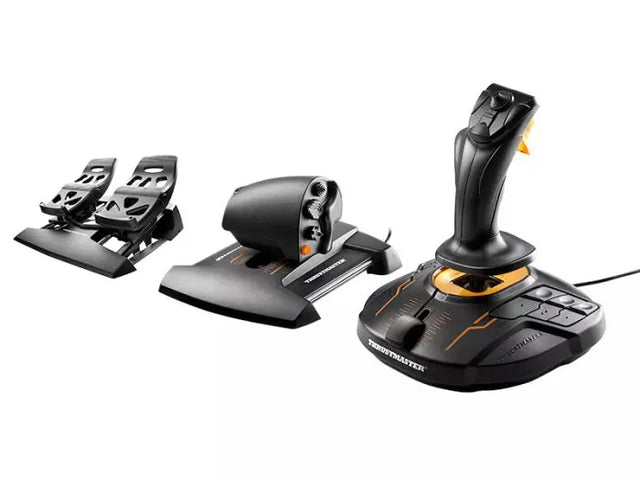
Tilgængelighed i flysimulation har gjort store fremskridt med modulære systemer, som tilgodeser flere færdighedsniveauer og fysiske behov. Disse fleksible løsninger sikrer, at virtuel flyvning er åben for alle. T16000M FCS Flight Pack demonstrerer denne tilpasningsevne med ergonomisk layout og programmerbare knapper, så piloter kan skræddersy deres setup.

Xbox flysimulator-kontroller

Konsolbaseret flysimulering har fået stor fremgang – især på Xbox med avancerede kontrolmuligheder. Turtle Beach VelocityOne Flight System er førende, og sikrer Xbox-brugere en komplet cockpit-oplevelse, der kan måle sig med traditionelle PC-setups. Disse konsolkontroller har professionelle features og gnidningsfri kompatibilitet.

Kontroller til flysimulator på PC

PC-platformen giver det bredeste udvalg til flysimulatorstyringer – fra enkle joysticks til komplette cockpit-løsninger. Moderne PC-kontroller bruger USB og højopløsningssensorer for præcis input – og kan tilpasses via dedikeret software, så brugeren kan finjustere response og knapfunktioner.

Microsoft Flight Simulator-kontroller

Den nyeste version af Microsoft Flight Simulator har revolutioneret samspillet med cockpit-udstyr. Simulatorens avancerede fysik kræver moderne kontrolhardware for fuldt ud at kunne udnytte platformens muligheder. Nyt kontroludstyr er optimeret til MSFS og tilbyder plug-and-play-funktionalitet og specialfeatures, der forbedrer simulatorens egenskaber yderligere.

Sammenligningstabel

Funktion TCA Captain Pack X Airbus T16000M FCS Flight Pack VelocityOne Flight System
Platformskompatibilitet PC PC Xbox Series X|S, PC
Kontrolltype Sidestick + Throttle Quadrant HOTAS + Rorpedaler Yoke + Throttle System
Knapper/Controls 21+ programmerbar 16 + HAT Switch 18 + Statuspanel
Sensorteknologi H.E.A.R.T Hall Effect Hall Effect Sensors Hall Effect Sensors
Ekstra hardware Dobbelte thrust-levers, flaps, SPD BRK Throttle, rorpedaler Integreret panelet display
Software-funktioner T.A.R.G.E.T Software T.A.R.G.E.T Software Custom Management App
Byggemateriale Industriel plast Forstærket plast Forstærket plast
Særlige funktioner • Autentisk Airbus-design
• Modulopbygget
• Ambidextrous
• Fuldt HOTAS-system
• Præcis ror-kontrol
• Militær-style greb
• Status display panel
• Trimhjul inkluderet
• Modulopbygget design

Hardwareudvikling og integration

Nutidens flysimulator-kontroller inkluderer flere teknologiske fremskridt:

Sensorteknologi

  • Hall effect magnetiske sensorer
  • Kontaktløs positionssporing
  • Højopløsningsakse-detektion

Byggekvalitet

  • Materialer i industrikvalitet
  • Præcis produktion
  • Design med fokus på holdbarhed

Software-integration

  • Egne programmeringsmuligheder
  • Synkronisering af flere enheder
  • Realtidskalibrering af input

Disse innovationer sikrer, at moderne flykontroller leverer den nøjagtighed og pålidelighed, der kræves til både underholdning og træning. Integration af avancerede materialer og sensorer betyder, at systemerne kan holde til tusindvis af timers brug og stadig bevare præcision og følelse.

Køb dine flysimulator-kontroller hos FlightSimZone

Flysimulator-kontroller er fundamentet for en autentisk virtuel flyveoplevelse. Den rette kombination kan forvandle et simpelt setup til et avanceret hjemme-cockpit og give værktøjer til både underholdning og færdighedstræning. Hos FlightSimZone forstår vi vigtigheden af kvalitet til at skabe den bedste simoplevelse.

Køb dine flysimulator-kontroller hos FlightSimZone i dag og oplev den perfekte balance mellem realisme og funktionalitet i dit virtuelle cockpit.


Login

Forgot your password?

Don't have an account yet?
Create account


