Flight Simulator Controls

41 products

  • Last stock! TCA Yoke Boeing Edition Pack for sale at FlightSimZone

    Thrustmaster TCA Yoke Pack Boeing Edition

    5 in stock Shipped in 1-3 business days.

    Step into the captain’s seat with the TCA Yoke Pack Boeing Edition, a flight system designed to emulate the controls of a Boeing 787. With its suspended PENDUL_R mechanism providing fluid motion and a 100% metal internal structure, this yoke system offers durability and balance that will make you feel like you're piloting the real thing. Paired with a throttle quadrant featuring swappable levers and an iconic Boeing autopilot knob, it's an aviation enthusiast's dream grounded in technical brilliance. What sets the TCA Yoke Pack Boeing Edition apart? Boeing-Approved Design and Feel Designed with official Boeing licensing, the TCA Yoke Pack mirrors the ergonomic and operational feel of a 787 cockpit. The PENDUL_R mechanism mimics the genuine pendular motion of a Dreamliner’s yoke, offering an unmatched connection between pilot and machine. Adjustable Resistance for Tailored Control Its customizable spring system allows for precise resistance adjustments, catering to both beginner and experienced aviators. Whether you prefer a light touch or robust tension, the system adapts seamlessly to your needs. Durable All-Metal Construction With a 100% metal frame, this yoke delivers robustness and longevity. Users praise its sturdiness, ensuring it remains a reliable part of your setup for countless flight hours without losing its balanced feel. Swappable and Ambidextrous Throttle Quadrant The throttle levers can be swapped for speed brake and flaps levers, ensuring an ambidextrous setup. This flexibility is particularly lauded by users who need configurations suited to varied aircraft. Pros and Cons Pros Cons Robust metal construction ensures lasting durability. Expensive compared to many flight yoke systems. Suspended PENDUL_R mechanism provides smooth movement. Setup may be challenging for smaller spaces. Swappable levers offer exceptional customization options. Limited throttle quadrant size for complex setups. Compatible with both Xbox and PC for versatile use. Heavier weight makes portability difficult. Specifications Specification Value Yoke Dimensions 11.8" W x 15.4" D x 15.0" H Yoke Weight 14.8 lb / 6,700 g Quadrant Dimensions 5.1" W x 7.7" D x 5.9" H Quadrant Weight 1.3 lb / 600 g Box Contents Yoke, Quadrant, USB Cable, Mount, Levers, Flyers TCA Yoke Pack Boeing Edition Compatibility The TCA Yoke Pack Boeing Edition is officially licensed for use with Xbox One and Xbox Series X|S, making it an excellent choice for console-based aviators. Its PC compatibility adds flexibility, allowing for use with Microsoft Flight Simulator and other popular platforms. However, it may not be directly compatible with older Xbox models or PlayStation systems, so plan accordingly. The yoke and quadrant integrate automatically with Microsoft Flight Simulator, ensuring quick setup and recognition. It supports USB-C to USB-A connections, broadening its range of hardware compatibility. Be mindful of the need for supported software, as its advanced features require compatible simulation environments. With its seamless integration into modern gaming systems, the TCA Yoke Pack elevates the experience for casual flyers and hardcore enthusiasts alike. Whether flying on console or PC, it delivers the tools needed to take virtual aviation to new heights.

    5 in stock Shipped in 1-3 business days.

    €499,00

  • Last stock! TCA Yoke Boeing Edition for sale on FlightSimZone

    Thrustmaster TCA Yoke Boeing Edition

    5 in stock Shipped in 1-3 business days.

    Take your flight simulation to the next level with the TCA Yoke Boeing Edition. Designed with official Boeing licensing, this yoke is a 1:1 ergonomic replica of the 787 Dreamliner controls. Its suspended PENDUL_R mechanism delivers a smooth, pendular motion for authentic maneuvering, while the 100% metal frame ensures stability and long-lasting durability. Complete with adjustable springs and two additional axes, this yoke is perfect for takeoffs, landings, and everything in between. If you're serious about flight simulation, this is an experience that’s hard to ignore. What sets the TCA Yoke Boeing Edition apart? Licensed Boeing Replica Design The TCA Yoke Boeing Edition replicates the ergonomic design and controls of a Boeing 787 cockpit, offering enthusiasts the opportunity to feel like they’re gripping the real deal. This level of accuracy is rare in the sim market and appeals to those who demand authenticity in their setups. Suspended PENDUL_R Mechanism Unlike conventional yoke systems, the suspended PENDUL_R mechanism simulates the pendular movement of a genuine airliner yoke, offering a fluid and realistic range of motion. This feature is especially appreciated for its natural feel during pitch and roll adjustments. Customizable Spring Resistance The adjustable spring system allows you to fine-tune the tension to your preference, making it suitable for both novice and seasoned pilots. This flexibility ensures comfort and precision regardless of your flying style or aircraft type. Versatile Control Options With 18 action buttons, 6 axes, and a built-in mini-stick, the yoke provides ample mapping possibilities for various aircraft types. Whether navigating a jumbo jet or a small propeller plane, you’ll have the tools to control it all. Pros and Cons Pros Cons Official Boeing-licensed design for an authentic feel. Higher price point compared to other yokes. Suspended PENDUL_R mechanism offers fluid movement. Bulky design may be difficult to mount in tight spaces. Adjustable springs for tailored resistance preferences. 18 action buttons and versatile mapping possibilities. Specifications Specification Value Dimensions (Yoke) 11.8" W x 15.4" D x 15.0" H Weight (Yoke) 14.8 lb / 6,700 g Additional Axes 2 built-in Frame Material 100% Metal Action Buttons 18 Box Contents Yoke, USB Cable, Extra Spring, Tablet Stand TCA Yoke Boeing Edition Compatibility The TCA Yoke Boeing Edition is fully compatible with Xbox One, Xbox Series X|S, and PC. Its integration with Microsoft Flight Simulator ensures a seamless connection right out of the box. However, it may lack compatibility with older systems or non-Xbox consoles, making it essential to confirm your setup before purchase. Its USB-C to USB-A connection broadens compatibility with modern PC hardware. Users appreciate the plug-and-play convenience for supported systems. While the yoke lacks native support for macOS or Linux platforms, its design is tailored for a rich experience on officially supported devices. For gaming platforms, the TCA Yoke integrates naturally with Microsoft Flight Simulator, making it an ideal choice for sim enthusiasts. It’s also likely compatible with other simulation software, provided they support generic joystick input devices. However, it's worth noting that its advanced features may require dedicated profiles or configurations in less popular software.

    5 in stock Shipped in 1-3 business days.

    €399,00

  • Sale -3% Moza MRP Rudder Pedals for sale on FlightSimZone

    Moza Moza MRP Rudder Pedals

    1 review

    Out of stock, Pre-Orders Available. Shipped in 2-2.5 weeks from now.

    Moza MRP Rudder Pedals bring a reassuring sense of solidity the moment your feet settle in. The cool touch of full metal construction and the deliberate sweep of the swing-arm immediately signal serious intent. With generous pedal travel and finely adjustable angles, each input feels deliberate and controlled, whether easing through a crosswind landing or nudging a helicopter in a hover. The wide-ranging adjustability makes it easy to tailor stance, resistance, and motion, turning long sessions into something focused, comfortable, and deeply satisfying for dedicated flight sim pilots. What Sets the Moza MRP Rudder Pedals apart? Built Like Cockpit Hardware, Not Desk Gear – Across forums and long-term user discussions, one recurring theme stands out: these pedals feel closer to fixed-base cockpit hardware than typical consumer peripherals. The extensive metal structure keeps flex at bay even under heavy braking, while the linkage system maintains consistent movement over time. Users often note that this solidity translates into confidence during demanding phases of flight, where lighter pedal sets can feel vague or unsettled. Adjustability That Actually Gets Used – Many pilots praise how often they end up tweaking these pedals, not because something feels wrong, but because the options invite fine-tuning. Stepless pedal tilt, adjustable end stops, spring swaps, and optional damping let pilots dial in behavior for anything from twitchy helicopters to lumbering airliners. Feedback suggests this flexibility encourages experimentation rather than locking users into a single “good enough” setup. Controlled Motion With Purposeful Weight – Community impressions frequently mention the character of the movement itself. The long swing-arm travel and brake range give inputs a measured, progressive feel, avoiding the abrupt on/off sensation common in shorter-throw designs. Combined with adjustable resistance, the pedals convey a sense of mass and inertia that many pilots associate with better directional control during taxi, takeoff roll, and rollout. Distinct Design That Grows on You – While the angular, stealth-inspired look can be polarizing at first glance, many users report that it quickly becomes a visual highlight of their cockpit. The design doesn’t just aim to look aggressive; it visually reinforces the mechanical nature of the unit. Over time, pilots often appreciate how the form mirrors the function, especially when paired with other metal flight hardware. Pros and Cons Pros Cons All-metal structure resists flex under heavy braking. Large footprint may challenge smaller cockpit spaces. Wide adjustment range suits many seating positions. Optional damper adds extra cost for tuning. Long pedal travel supports smooth directional control. Dual connection options simplify system integration. Specifications Specification Value Construction Full metal body and linkage system Pedal Tilt Adjustment Stepless, ±25° per pedal Swing-Arm Rotation ±30° Rudder Travel 15 cm total travel Brake Pedal Travel 25° Sensors High-resolution sensors for rudder and brakes Centering Force Interchangeable springs Damping Optional adjustable damper Connectivity RJ11 (MOZA flight bases), USB (PC) Base Grip Four rubber anti-slip pads Moza MRP Rudder Pedals Compatibility The pedals integrate cleanly into many flight setups thanks to flexible connections. Direct RJ11 linking allows seamless pairing with MOZA flight bases, while the standard USB connection enables standalone PC use without additional adapters. They are commonly paired with yokes and joysticks from other major PC-focused flight hardware brands. However, they are not designed for direct console connection and do not interface natively with non-PC ecosystems. Within a PC-based simulator environment, compatibility is broad and straightforward. Using USB, the pedals work with Windows-based PCs and are supported by popular flight simulators that accept standard HID rudder inputs, including civilian and combat-focused titles. They are not compatible with PlayStation or Xbox consoles, even when using some third-party adapters, as console flight titles generally lack native support for USB rudder peripherals.

    Out of stock, Pre-Orders Available. Shipped in 2-2.5 weeks from now.

    €369,00 €359,00

  • Last stock! Honeycomb Sierra TPM Module

    Fly Honeycomb Honeycomb Sierra TPM Module

    2 in stock Shipped in 1-3 business days.

    Honeycomb Sierra TPM Module brings the tactile charm of classic general aviation straight to your desk, with a lockable metal throttle vernier that feels satisfyingly mechanical in hand and a high-resolution integrated trim wheel that lets you dial in attitude with fingertip finesse. Designed with single-prop aircraft like the Cessna 172 in mind, it combines all-metal construction, integrated flap and parking brake controls, and LED landing gear indicators into a compact module that slots neatly into a serious home cockpit. What Sets the Honeycomb Sierra TPM Module apart? True General Aviation Vernier Feel The lockable metal throttle vernier with fine-tune prop and mixture knobs doesn’t just look the part—it delivers that push-pull, twist-to-adjust sensation pilots associate with classic GA cockpits. Many users highlight how the incremental adjustment allows smoother power changes during climb and approach, especially in piston aircraft, compared to sliding lever-based throttles that can feel too abrupt for delicate engine management. Integrated Cockpit Workflow Instead of scattering controls across separate panels, the Sierra TPM places trim, flaps, parking brake, and landing gear in one cohesive layout. The low-profile, high-resolution trim wheel earns particular praise for its smooth rotation and granular input, making pitch adjustments during cruise or final approach feel natural. It reduces reliance on keyboard shortcuts and keeps hands where they belong—on dedicated hardware. Solid All-Metal Construction Built with Honeycomb-grade components and a durable all-metal chassis, this module has noticeable heft and rigidity. Enthusiasts frequently mention that it feels planted on the desk, with minimal flex during aggressive throttle movements. Compared to lighter plastic alternatives, the Sierra TPM maintains structural stability over time, which is especially appreciated in permanent or semi-permanent cockpit setups. Seamless Integration with Honeycomb Ecosystem Designed to pair cleanly with Honeycomb yokes and mounting systems, the included dual mounting solution simplifies alignment and positioning. Users who already run Alpha or Bravo units often comment on how the design language and control spacing feel unified, creating a visually coherent and ergonomically consistent flight deck without mismatched modules. Pros and Cons Pros Cons Metal vernier throttle offers fine incremental control. Designed primarily for single-engine GA aircraft. Integrated trim wheel provides smooth pitch adjustments. Requires desk space for full mounting solution. All-metal chassis feels stable and durable. LED gear indicators add clear visual feedback. Specifications Specification Value Product Name Honeycomb Sierra TPM Module EAN 4039621003998 Construction All-metal construction with Honeycomb-grade components Throttle Type Lockable metal throttle vernier with prop and mixture knobs Integrated Controls Trim wheel, parking brake, flap lever, landing gear lever with LED indicators Layout General aviation style for single prop airplanes Mounting Dual mounting solution included Connection USB-C to USB-A cable Compatibility PC and Mac Drivers MSFS 2020 Driver, MSFS 2024 Driver Included in the Box Sierra TPM Module, Dual Mounting Solution, USB-C to USB-A Cable, Quick Start Guide (EFIGS) Honeycomb Sierra TPM Module Compatibility Platform Compatibility Operating Systems PC and Mac Connection Type USB-C to USB-A (direct USB connection) Primary Ecosystem Pairing Honeycomb Alpha and Bravo hardware The Sierra TPM Module connects via direct USB, making it straightforward to integrate into most desktop cockpit builds. It pairs especially well with Honeycomb Alpha yokes and Bravo throttle quadrants, sharing the same design philosophy and mounting ecosystem. Thanks to its dual mounting solution, it can be desk-mounted alongside other Honeycomb units for a unified layout. It is not intended for console setups and does not interface directly with standalone hardware without a compatible PC or Mac. On the software side, it supports Microsoft Flight Simulator 2020 and Microsoft Flight Simulator 2024 through dedicated drivers, and it also works with simulators like X-Plane and Prepar3D on PC. It is not compatible with Xbox consoles, as it relies on standard USB PC/Mac drivers rather than console-certified firmware. For desktop sim pilots focused on general aviation, it slots cleanly into modern PC-based sim platforms.

    2 in stock Shipped in 1-3 business days.

    €269,00

  • Last stock! Honeycomb Foxtrot Aviation Stick

    Fly Honeycomb Honeycomb Foxtrot Aviation Stick

    4 in stock Shipped in 1-3 business days.

    Honeycomb Foxtrot Aviation Stick is built for pilots who prefer a sidestick in hand and a clean desk in front of them. From the first movement, the smooth linear resistance system with no center detent feels fluid and deliberate, ideal for Airbus-style inputs and aerobatic maneuvers. Under the hood, 16-bit resolution with Hall Effect sensor technology translates subtle wrist movements into accurate on-screen control. Add adjustable tension and a fully ambidextrous layout, and you’ve got a stick that feels purposeful rather than toy-like. What Sets the Honeycomb Foxtrot Aviation Stick apart? Center-Detent-Free Control Philosophy Many sticks rely on a noticeable center bump, which can make small corrections feel mechanical. The Foxtrot’s linear resistance system eliminates that notch, creating a smooth transition across the full axis range. Pilots flying Airbus aircraft in particular appreciate this design, as it mirrors sidestick behavior more closely and allows gentle pitch and roll corrections without fighting a spring-loaded “click” at center. Sensor and Resolution Synergy With 16-bit resolution paired to Hall Effect sensors, the Foxtrot delivers clean, contactless input detection. Enthusiasts often point out the consistency over time—no spiking, no gradual degradation from physical potentiometers. Subtle trim adjustments during approach or careful roll inputs in aerobatics feel steady and predictable, especially when compared to entry-level sticks that can show jitter near center. Configurable Resistance and Ergonomics Adjustable tension allows the stick to be tuned to personal preference, whether you prefer lighter fingertip inputs or firmer resistance for controlled movements. Combined with its ambidextrous grip design, the Foxtrot suits both left- and right-handed setups. Users with compact cockpit builds often highlight how adaptable it feels in different seating positions, including center-mounted or side-mounted configurations. Switch Density Without Clutter Between the 5 two-way switches, 4 programmable action buttons, POV hat, trigger, rockers, and multi-way rotary panel, the stick offers serious input flexibility. What stands out is how logically the controls are spaced; sim pilots frequently mention that functions like trim, autopilot modes, or camera controls can be assigned without feeling cramped or hunting blindly mid-flight. Pros and Cons Pros Cons Linear resistance without center detent feels smooth. No native console compatibility. Hall Effect sensors reduce long-term wear. No included dedicated mounting base. Adjustable tension suits different flying styles. Extensive switch and button configuration options. Specifications Specification Value Product Name Honeycomb Foxtrot Aviation Stick Control System Linear resistance system with no center detent Sensor Technology Hall Effect sensors Resolution 16-bit Tension Adjustment Adjustable stick resistance Switches 5 two-way switches Action Buttons 4 programmable buttons Rotary Panel 3-, 4-, and 5-way rotary controls Grip Design Ambidextrous Connection USB-C to USB-A cable System Compatibility PC and Mac Included in the Box Foxtrot Aviation Stick, USB-C to USB-A Cable, Quick Start Guide (EFIGS) Download Support Basic Bindings Profiles (XML) for MSFS 2024 Honeycomb Foxtrot Aviation Stick Compatibility Platform Compatibility Operating Systems PC and Mac Connection Type USB-C to USB-A direct USB interface Primary Sim Support MSFS 2024 (XML bindings), MSFS, X-Plane, Prepar3D The Foxtrot Aviation Stick connects via standard USB, allowing it to integrate easily into most desktop cockpit setups. It works seamlessly alongside throttle quadrants, rudder pedals, and radio panels from other major brands thanks to its plug-and-play HID architecture. Its ambidextrous design makes it suitable for left- or right-seat configurations, including Airbus-style side mounting. It is not compatible with Xbox consoles and does not function as a standalone device without a connected PC or Mac. On the software side, it supports Microsoft Flight Simulator 2024 with dedicated XML binding profiles and operates with popular PC simulators such as Microsoft Flight Simulator (2020), X-Plane, and Prepar3D through manual or community mappings. It is not designed for console-based platforms, as it relies on native PC/Mac driver recognition rather than console-certified firmware.

    4 in stock Shipped in 1-3 business days.

    €165,00

Flight Simulator Controls for sale at FlightSimZone

When diving into the world of virtual aviation, flight simulator controls serve as your physical connection to the virtual cockpit. These sophisticated input devices transform your desk into a realistic flight deck, providing the tactile feedback and precision necessary for an immersive flying experience.

Flight Controls for Flight Simulator

Modern flight controls have evolved significantly, offering unprecedented levels of accuracy and functionality. The TCA Captain Pack X Airbus Edition exemplifies this evolution, featuring authentic Airbus-style controls that perfectly replicate their real-world counterparts. These professional-grade peripherals incorporate advanced sensor technology for precise input detection and smooth operation across all axes of movement.

Flight Simulator Access Control

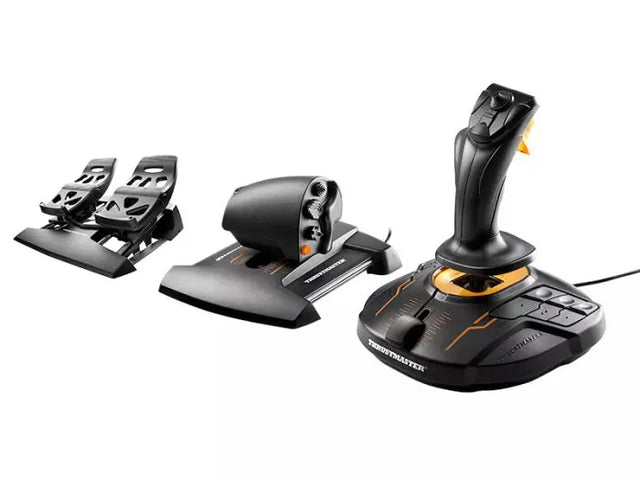
Accessibility in flight simulation has made remarkable strides, with manufacturers developing modular systems that accommodate various skill levels and physical requirements. These adaptive control solutions ensure that virtual aviation remains accessible to a broad audience. The T16000M FCS Flight Pack demonstrates this versatility with its ergonomic design and customizable button layout, allowing pilots to create their ideal control setup.

Xbox Flight Simulator Controls

Console-based flight simulation has grown exponentially, particularly with Xbox platforms offering sophisticated control options. The Turtle Beach VelocityOne Flight System leads this segment, providing Xbox users with a comprehensive control solution that rivals traditional PC setups. These console-specific controls maintain professional-grade features while ensuring seamless compatibility with Xbox systems.

Flight Simulator Controls for PC

PC platforms offer the most extensive range of flight simulator control options, supporting everything from basic joysticks to complete cockpit setups. Modern PC flight controls utilize USB connectivity and high-resolution sensors to deliver precise input recognition. These systems often feature extensive customization options through proprietary software, allowing users to fine-tune their control responses and button mappings.

Microsoft Flight Simulator Controls

Microsoft Flight Simulator's latest iteration has revolutionized the way control systems interact with virtual aircraft. The platform's advanced physics engine demands equally sophisticated control hardware to fully appreciate the simulation's depth. Modern control systems are specifically optimized for Microsoft Flight Simulator, offering plug-and-play functionality and specialized features that enhance the platform's capabilities.

Comparison table

Feature TCA Captain Pack X Airbus T16000M FCS Flight Pack VelocityOne Flight System
Platform Compatibility PC PC Xbox Series X|S, PC
Control Type Sidestick + Throttle Quadrant HOTAS + Rudder Pedals Yoke + Throttle System
Buttons/Controls 21+ Programmable 16 + HAT Switch 18 + Status Panel
Sensor Technology H.E.A.R.T Hall Effect Hall Effect Sensors Hall Effect Sensors
Additional Hardware Dual Thrust Levers, Flaps, SPD BRK Throttle, Rudder Pedals Integrated Panel Display
Software Features T.A.R.G.E.T Software T.A.R.G.E.T Software Custom Management App
Build Material Industrial-Grade Plastic Reinforced Plastic Reinforced Plastic
Special Features • Authentic Airbus Design
• Modular System
• Ambidextrous
• Full HOTAS System
• Precision Rudder Control
• Military-Style Grip
• Status Display Panel
• Trim Wheel Included
• Modular Design

Hardware Evolution and Integration

Current generation flight simulator controls incorporate multiple technological advances:

Sensor Technology

  • Hall effect magnetic sensors
  • Contactless position tracking
  • High-resolution axis detection

Build Quality

  • Industrial-grade materials
  • Precision manufacturing
  • Durability-focused design

Software Integration

  • Custom programming options
  • Multiple device synchronization
  • Real-time input calibration

These innovations ensure that modern flight controls provide the precision and reliability required for both entertainment and training purposes. The integration of advanced materials and sensors results in control systems that can withstand thousands of hours of use while maintaining their accuracy and feel.

Buy your Flight Simulator Controls at FlightSimZone

Flight simulator controls represent the cornerstone of an authentic virtual aviation experience. The right combination of control devices can transform a basic setup into a sophisticated home cockpit, providing the tools necessary for both enjoyment and skill development. At FlightSimZone, we understand the importance of quality control systems in creating an immersive simulation environment.

Buy your Flight Simulator Controls at FlightSimZone today and experience the perfect blend of realism and functionality in your virtual cockpit.


Login

Forgot your password?

Don't have an account yet?
Create account


