MOZA MA3F Electronic Flight Control Modules R capture the distinctive workflow of the Airbus A320 flight deck with hardware that feels satisfying every time you dial in a heading or adjust altitude. The dual-rail spring-loaded push/pull mechanism recreates the signature operation of Airbus autopilot controls, while custom segmented displays faithfully mirror Airbus-specific character formatting and spacing. Every knob, button, and illuminated indicator works together to make route management, climb planning, and approach setup feel remarkably natural throughout every stage of flight.
What Sets the MOZA MA3F Electronic Flight Control Modules R apart?
Airbus Push/Pull Controls Done Properly – One feature that consistently stands out is the custom dual-rail push/pull mechanism. Instead of using a basic spring-loaded encoder, the controls deliver distinct travel and resistance that closely match Airbus operating procedures. Many experienced Airbus sim pilots appreciate how this makes managed and selected mode changes feel much more deliberate while reducing accidental inputs during busy phases of flight.
Displays That Capture Airbus Character – The segmented displays have been carefully designed to reproduce the distinctive appearance of Airbus FCU readouts, including character spacing and formatting. Rather than looking like generic digital displays, they blend naturally into an Airbus cockpit. Enthusiasts often point to details like these as the difference between simply operating a simulator and enjoying a convincing airline cockpit environment.
Expandable to Match Your Cockpit – Whether you choose the FCU on its own, pair it with a single EFIS module, or install the complete Electronic Flight Control Module suite, the system grows alongside your cockpit. Builders appreciate this flexibility because it allows gradual upgrades while maintaining a consistent appearance and control layout throughout the simulator.
Purpose-Built for Dedicated Airbus Flying – Seamless integration with MOZA Cockpit software, synchronized lighting, and support for leading Airbus aircraft make the system especially attractive for airliner enthusiasts. Community feedback often highlights how easy it is to configure while still providing extensive customization for display lighting, controls, and cockpit organization.
Pros and Cons
Pros
Cons
Excellent Airbus-style push/pull autopilot controls.
Designed specifically for Airbus aircraft.
Displays accurately reproduce Airbus FCU formatting.
Requires a Windows PC.
Multiple configurations suit evolving cockpit builds.
Synchronized lighting enhances cockpit consistency.
Specifications
Specification
Value
Product Type
Airbus A320-style FCU and EFIS control system
Available Configurations
EFIS
Display Type
Custom Airbus-style segmented displays
Autopilot Control Mechanism
Dual-rail spring-loaded push/pull controls
Lighting
Independent display, character, and status illumination
Software Integration
MOZA Cockpit
Supported Platform
PC
Mounting Options
Included bracket, aluminum profile, 75 mm VESA mount
Extended Function
Optional EFIS extended-function control mode
MOZA MA3F Electronic Flight Control Modules R Compatibility
Hardware
Compatibility
Mounting Systems
Included bracket, aluminum-profile rigs, 75 × 75 mm VESA mounts
MOZA Cockpit Software
Supported for telemetry synchronization and configuration
Cockpit Layouts
FCU only, single EFIS, or complete EFCM suite
Flight Simulator
Compatibility
Microsoft Flight Simulator
Default Airbus A320/A330 and supported Airbus add-ons
X-Plane
Compatible with Airbus aircraft including ToLiss models
Third-Party Aircraft
Fenix A320, FlightFactor A320, ToLiss series, and other Airbus airliners
Built for PC flight simulation, the MA3F Electronic Flight Control Modules R work seamlessly with MOZA Cockpit software, providing synchronized lighting, telemetry integration, and straightforward configuration. Included bracket mounting, aluminum-profile compatibility, and 75 mm VESA support make installation simple whether you're assembling a desktop setup or a dedicated Airbus cockpit.
The modular design allows builders to begin with a single FCU or expand into a complete Electronic Flight Control Module suite over time. Independent adjustment of display brightness, character illumination, and status lighting helps maintain a consistent cockpit appearance during daytime departures and late-night arrivals.
Compatible with Microsoft Flight Simulator and X-Plane, the system supports default Airbus A320 and A330 aircraft together with leading third-party aircraft including Fenix A320, ToLiss, FlightFactor A320, and other popular Airbus airliners. The supported platform is PC; gaming consoles and macOS are not supported.
MOZA MA3F Electronic Flight Control Modules bring the Airbus A320 flight deck to your simulator with controls that feel satisfying from the first heading change to the final approach. The dual-rail spring-loaded push/pull mechanism recreates the distinct operation of Airbus autopilot controls, while custom segmented displays faithfully reproduce the unique FCU character layout and formatting. Every knob rotation, button press, and display update feels purposeful, making long IFR flights far more engaging than relying on virtual cockpit controls alone.
What Sets the MOZA MA3F Electronic Flight Control Modules apart?
Autopilot Controls That Feel Convincing – One feature frequently praised by experienced Airbus sim pilots is the dual-rail spring-loaded push/pull mechanism. Rather than relying on a basic push button behind a rotary encoder, the controls provide distinct travel and resistance that better reflect Airbus workflow. During climbs, descents, and approach changes, every input feels deliberate and encourages proper cockpit procedures.
Displays Designed Around Airbus Styling – The segmented displays do more than simply show numbers. Character spacing, formatting, and typography closely mirror Airbus FCU presentation, creating a cockpit appearance that immediately feels familiar to Airbus enthusiasts. Builders often appreciate this level of visual detail because it helps the hardware blend naturally with other cockpit panels instead of standing out as a generic controller.
Flexible Configurations for Every Cockpit – The system is available as an FCU alone, an FCU paired with a single EFIS, or as a complete EFCM suite. This flexibility allows builders to expand gradually instead of purchasing everything at once. The optional extended-function capability also gives one EFIS module additional duties, reducing unnecessary mouse interaction during busy phases of flight.
Designed to Fit Existing Flight Decks – Standard 75 mm VESA compatibility, the included mounting bracket, and aluminum-profile support make installation straightforward across a wide variety of simulator frames. Users also appreciate the seamless integration with MOZA Cockpit software, where synchronized lighting and control configuration can be managed without lengthy setup procedures.
Pros and Cons
Pros
Cons
Excellent Airbus-style push/pull control mechanism.
Focused exclusively on Airbus aircraft.
Segmented displays closely match Airbus formatting.
PC platform only.
Multiple configurations suit different cockpit budgets.
Integrated lighting synchronization enhances cockpit consistency.
Specifications
Specification
Value
Product Type
Airbus A320-style FCU and EFIS control system
Configuration
FCU only
Display Type
Custom segmented Airbus-style displays
Autopilot Controls
Dual-rail spring-loaded push/pull mechanism
Lighting
Independent screen, character, and status illumination
Software
MOZA Cockpit integration
Supported Platform
PC
Mounting Options
Included bracket, aluminum profile, 75 mm VESA mount
Extended Functions
Optional EFIS extended-function control mode
MOZA MA3F Electronic Flight Control Modules Compatibility
Hardware
Compatibility
Mounting Systems
Included bracket, aluminum-profile rigs, 75 mm VESA mounts
MOZA Cockpit Software
Telemetry synchronization and configuration supported
Cockpit Configurations
FCU only, single EFIS, or complete EFCM suite
Flight Simulator
Compatibility
Microsoft Flight Simulator
Default A320/A330 aircraft and compatible Airbus add-ons
X-Plane
Compatible Airbus aircraft including ToLiss series
Third-Party Aircraft
Fenix A320, FlightFactor A320, and other popular Airbus airliners
Designed for PC flight simulation, the MA3F Electronic Flight Control Modules integrate with MOZA Cockpit software for telemetry synchronization, lighting control, and straightforward configuration. 75 mm VESA compatibility, aluminum-profile support, and the included mounting bracket allow the modules to fit easily into desktop cockpits or larger simulator frames.
The modular design allows builders to start with a single FCU or expand to a complete EFCM suite as their cockpit grows. Independent lighting adjustment for displays, characters, and status indicators helps the modules blend naturally with surrounding instruments during both daytime and night operations.
Compatible with Microsoft Flight Simulator and X-Plane, the system supports default Airbus A320 and A330 aircraft alongside leading third-party add-ons including Fenix A320, ToLiss, and FlightFactor A320. The modules are intended for PC use and are not compatible with gaming consoles.
MOZA FMP18 Panel Bundle transforms a desktop into a carrier-style cockpit with thoughtfully engineered controls, sharp displays, and a layout inspired by the legendary F/A-18. The true-to-life 7.1-inch square displays deliver crisp 800 × 800 visuals, while the magnetic modular quick-swap system makes changing panel configurations remarkably simple. Every button, rotary control, and switch provides a confident mechanical feel, making startup procedures, navigation, and combat tasks satisfying from the first checklist through the final trap aboard the carrier.
What Sets the MOZA FMP18 Panel Bundle apart?
Square Displays That Match the Aircraft Layout – Many competing cockpit panels rely on conventional rectangular screens that compromise proportions. The FMP18 instead uses dedicated 7.1-inch square displays, creating a much closer visual match to the aircraft's DDI and AMPCD layout. Builders across the community frequently appreciate hardware that avoids stretched graphics and provides a cleaner presentation throughout every stage of flight.
Magnetic Modular Expansion – The magnetic quick-swap system with integrated pogo-pin connections makes changing layouts refreshingly straightforward. Rather than rebuilding an entire cockpit for different aircraft, users can swap compatible panels quickly while maintaining a tidy installation. This flexibility has become increasingly popular among enthusiasts who regularly fly multiple aircraft without dedicating permanent space to each one.
Controls Designed for Confident Operation – With 95 buttons, 16 rotary controls, and seven toggle switches, every command has a distinct mechanical feel. Pilots often praise hardware that communicates each input through touch, reducing the need to look down during busy carrier approaches or complex weapon management. The result is a cockpit workflow that feels deliberate and highly satisfying.
Easy Integration Into Existing Cockpits – Standard 75 × 75 mm VESA compatibility, an adjustable desk clamp, and aluminum-profile support allow the FMP18 to fit naturally into a wide variety of simulator rigs. MOZA Cockpit software also lets users assign displays and customize controls, making the bundle equally appealing for dedicated carrier cockpits or expanding an existing simulator.
Pros and Cons
Pros
Cons
Square displays closely match aircraft proportions.
Requires significant desk or cockpit space.
Magnetic quick-swap system simplifies panel changes.
PC platform only.
Excellent tactile buttons and rotary controls.
Flexible VESA mounting suits many cockpit builds.
Specifications
Specification
Value
Product Type
Carrier-style front cockpit panel bundle
Dimensions
527 × 456 × 212 mm (including clamp)
Weight
4.15 kg
Housing Material
Composite materials
Displays
Three 7.1-inch square displays
Display Resolution
800 × 800
Refresh Rate
60 Hz
Buttons
95
Rotary Controls
16
Toggle Switches
7
USB Polling Rate
1000 Hz
Connection Ports
USB 3.0 Type-A ×3, USB Type-C ×4
Mounting Options
Desk clamp, aluminum profile, standard 75 × 75 mm VESA
Supported Platform
PC
Included Accessories
USB 3.0 Type-A cables (3), USB Type-C cables (4)
MOZA FMP18 Panel Bundle Compatibility
Hardware
Compatibility
Mounting Systems
Official desk clamp, aluminum-profile rigs, 75 × 75 mm VESA mounts
MOZA Cockpit Software
Display assignment and complete control mapping
Modular Panels
Supports magnetic quick-swap compatible modules
Platform
Compatibility
PC
Supported
Designed for PC-based flight simulation, the FMP18 integrates with MOZA Cockpit software for display assignment, button mapping, and rotary control customization. The magnetic quick-swap system allows compatible modules to be exchanged rapidly, while standard VESA mounting and aluminum-profile compatibility make installation straightforward across many cockpit designs.
The included angle-adjustable clamp supports both the complete assembly and individual modules, allowing builders to tailor positioning without replacing mounting hardware. The lightweight composite construction also reduces the load placed on simulator frames while maintaining excellent rigidity.
PC is the supported platform, making the bundle suitable for major flight simulators that support custom cockpit hardware. Gaming consoles are not supported, and the system is intended for users building dedicated desktop or cockpit-based flight simulation environments.
MOZA MB7F Flight Computer Display captures the look and workflow of the Boeing 737 CDU, giving home cockpit builders a satisfying way to manage routes, arrivals, and aircraft performance. The 5.1-inch high-resolution IPS display presents crisp text that remains easy to read during every phase of flight, while the die-cast aluminum front panel provides a solid feel every time you press a key. From pre-flight programming to descent planning, each button press and display update adds confidence to the experience without needing to reach for a mouse.
What Sets the MOZA MB7F Flight Computer Display apart?
Built Around Boeing 737 Workflows – Rather than serving as a generic keypad, the MB7F is designed around the layout and operating flow of the Boeing 737 CDU. Pilots who regularly fly PMDG and similar aircraft appreciate having dedicated hardware that keeps route programming, performance entries, and FMC changes within easy reach instead of relying on on-screen pop-up windows.
Excellent Mechanical Feel – The combination of heavy-actuation dome switches and rigid silicone keycaps gives every press a confident, positive response. Many cockpit builders value hardware that communicates each input through touch alone, making it easier to work through lengthy flight plans and data entries while keeping attention focused on the flight deck.
Useful Beyond Flight Planning – The integrated checklist pages and three built-in whiteboard pages transform the MB7F into more than a CDU replica. Frequencies, clearance notes, approach briefings, and operating reminders can all be stored directly on the unit, reducing the need for paper notes or additional displays during longer flights.
Designed to Grow With Your Cockpit – The included desktop stand offers an easy starting point, while standard 75 × 75 mm VESA compatibility makes permanent installation equally straightforward. Combined with synchronized lighting through MOZA Cockpit software, the display fits naturally into compact desktop setups and full Boeing-style cockpit builds alike.
Pros and Cons
Pros
Cons
Excellent tactile keys with minimal wobble.
Designed primarily for Boeing 737 aircraft.
Sharp IPS display keeps text easy to read.
PC platform only.
Integrated checklist and whiteboard functions.
Solid die-cast aluminum front panel.
Specifications
Specification
Value
Product Type
Boeing 737 Flight Computer Display (CDU)
Dimensions
277.9 × 145.5 × 32 mm
Weight
646 g
Display Size
5.1-inch IPS
Housing Material
Die-cast aluminum alloy, ABS, PC
Connection
USB Type-C 2.0
Rated Voltage
5 V
Rated Current
900 mA
Supported Platform
PC
Mounting Options
Desktop stand, 75 × 75 mm VESA mount
Included Accessories
Data cable, desktop stand
MOZA MB7F Flight Computer Display Compatibility
Hardware
Compatibility
MOZA Cockpit Software
Supports synchronized lighting and configuration
Mounting Systems
Desktop stand and 75 × 75 mm VESA mount
Connection
USB Type-C 2.0
Flight Simulator
Compatibility
Microsoft Flight Simulator
Supports PMDG and other Boeing 737 add-ons
X-Plane
Compatible with supported Boeing 737 add-ons
Designed for PC flight simulation, the MB7F integrates with MOZA Cockpit software for synchronized lighting and configuration. A USB Type-C connection keeps installation straightforward, while the included desktop stand and 75 × 75 mm VESA compatibility make it easy to move between a desktop setup and a dedicated cockpit.
The compact footprint and sturdy metal front panel make the MB7F well suited to multi-panel installations without placing excessive load on mounting frames. It works comfortably alongside yokes, throttles, radio panels, and other cockpit hardware, whether installed on a desk or an aluminum-profile simulator frame.
Compatible with Microsoft Flight Simulator and X-Plane, the MB7F is designed for PMDG and other leading Boeing 737 add-ons. PC is the supported platform; Mac systems and gaming consoles are not supported.
MOZA MA3F Flight Computer Display brings Airbus-style flight management into the home cockpit with a layout that rewards every button press and data entry. The 5.1-inch high-resolution IPS display keeps flight plans, procedures, and navigation pages crisp and easy to read, while the die-cast aluminum front panel gives every interaction a reassuring sense of solidity. Heavy-actuation keys, synchronized lighting, and thoughtful workflow tools make programming an arrival or revising a route feel satisfying from the first waypoint to the final approach.
What Sets the MOZA MA3F Flight Computer Display apart?
Keys That Feel Purpose-Built – Many flight management units focus almost entirely on appearance, but the MA3F pays equal attention to how every key behaves. The heavy-actuation dome switches and rigid silicone keycaps create a firm, deliberate press that users frequently appreciate during longer flights. The stable key action also helps reduce accidental inputs when quickly updating flight plans or changing performance data.
Practical Features Beyond Flight Planning – Built-in checklist pages and three integrated whiteboard pages make this more than a simple MCDU replica. Pilots can keep notes, approach briefings, frequencies, or clearance information directly on the unit instead of relying on paper or a second monitor. Many cockpit builders value these workflow additions because they reduce clutter while keeping important information close at hand.
Premium Construction Without Excessive Bulk – The die-cast aluminum front panel gives the MA3F a reassuringly solid feel while keeping overall weight manageable for desktop or cockpit installations. Combined with the sharp IPS display and clean surface finish, it stands out as a polished piece of hardware that integrates naturally into dedicated Airbus flight decks.
Broad Airbus Ecosystem Support – The MA3F supports numerous Airbus aircraft across Microsoft Flight Simulator and X-Plane, including respected third-party add-ons such as the Fenix A320, Toliss aircraft, and FlightFactor A320. Combined with customizable fonts and synchronized lighting, it adapts easily as simulator libraries continue to grow.
Pros and Cons
Pros
Cons
Excellent tactile keys with firm mechanical feel.
Limited to Airbus flight management systems.
Sharp IPS display with customizable fonts.
PC platform only.
Built-in checklist and whiteboard pages add utility.
Die-cast aluminum front panel feels exceptionally solid.
Specifications
Specification
Value
Product Type
Airbus-style Flight Computer Display (MCDU/FCD)
Display Size
5.1-inch IPS
Front Panel Material
Die-cast aluminum alloy
Body Material
ABS + PC
Connection
USB Type-C 2.0
Rated Voltage
5V
Rated Current
900mA
Supported Platform
PC
Mounting Options
Desktop stand, 75 × 75 mm VESA mount
Included Accessories
Data cable, desktop stand
MA3F Dimensions
277.9 × 145.5 × 29.6 mm
MA3F Weight
588 g
MB7F Dimensions
277.9 × 145.5 × 32 mm
MB7F Weight
646 g
MOZA MA3F Flight Computer Display Compatibility
Hardware
Compatibility
MOZA Cockpit Software
Supports telemetry synchronization and lighting control
Mounting
Desktop stand and 75 × 75 mm VESA mount
Connection
USB Type-C 2.0
Flight Simulator
Compatibility
Microsoft Flight Simulator
Supports Airbus A320/A330 family
X-Plane
Supports Airbus aircraft including Toliss models
Third-Party Aircraft
Compatible with Fenix A320, FlightFactor A320, and others
Built for PC flight simulation, the MA3F integrates with MOZA Cockpit software for synchronized lighting and configuration. A USB Type-C connection keeps installation straightforward, while the included desktop stand and 75 × 75 mm VESA compatibility make it equally suitable for desktop use or permanent cockpit installations.
The compact dimensions and lightweight construction make it easy to install alongside other Airbus controls without placing excessive strain on a cockpit frame. The display is intended to complement dedicated Airbus flight decks while remaining flexible enough for modular home cockpit projects.
Compatible with Microsoft Flight Simulator and X-Plane Airbus aircraft, the MA3F supports the A320 and A330 families along with respected third-party aircraft including Fenix A320, Toliss, and FlightFactor A320. The supported platform is PC; Mac systems and gaming consoles are not supported.
The Virtual Fly Yoko+ is a meticulously crafted flight yoke designed for pilots who demand superior control and durability. Featuring magnetic Hall sensors for wear-free accuracy and a robust 90% metal construction, this yoke excels in precision and longevity. With a 14.4 cm pitch travel and 180° range of motion, it provides an expansive, fluid control experience. The addition of a POV hat switch ensures seamless camera management, making it a standout choice for serious sim pilots.
What sets the Virtual Fly Yoko+ apart?
Exceptional Build Quality The Yoko+ is constructed with 90% metal, giving it a rugged yet refined build that stands up to years of intense use. Its weight and solid design provide a dependable, substantial feel, elevating it beyond other yokes that rely heavily on plastic components.
Magnetic Hall Sensors Unlike potentiometers found in some yokes, the Yoko+ employs magnetic sensors, offering wear-free operation and consistent input accuracy. These sensors ensure long-lasting performance, making it a reliable choice for extended simulation sessions.
Wide Range of Motion With 14.4 cm of pitch travel and a 180° rotational range, the Yoko+ provides nuanced control for even the most demanding flight maneuvers. This extensive movement range mimics real-world yoke behavior, giving pilots an authentic experience.
POV Hat Switch The addition of a hat switch enables precise camera control, a feature absent in its predecessor. This improvement streamlines cockpit navigation, ensuring you maintain focus on critical flight controls without interruption.
Pros and Cons
Pros
Cons
Solid metal construction ensures durability and stability.
Does not include throttle control functionality.
Magnetic sensors provide accurate and wear-free operation.
Higher price point compared to other yokes.
Wide pitch and roll range for realistic input control.
POV hat switch simplifies cockpit camera management.
Specifications
Specification
Value
Material
90% metal construction
Pitch Travel
14.4 cm
Roll Range
180°
Sensors
Magnetic Hall sensors
Connectivity
USB
Virtual Fly Yoko+ Compatibility
The Virtual Fly Yoko+ is compatible with a wide range of flight simulators, including Microsoft Flight Simulator (FSX and MSFS), Prepar3D, and X-Plane. Its plug-and-play USB connection ensures easy integration, while tools like FSUIPC allow for advanced customization. However, it is not compatible with console platforms, focusing exclusively on PC setups.
In terms of hardware, the Yoko+ connects seamlessly to standard flight sim rigs and complements other Virtual Fly products. The metal build and smooth movement make it suitable for use with professional and enthusiast-grade setups. It is best paired with other high-quality peripherals for a cohesive experience.
On the platform side, the Yoko+ excels on PC, working perfectly with major simulation software. However, its USB-only connection means it cannot natively support gaming consoles. For PC users, this yoke delivers an exceptional flying experience across supported titles.
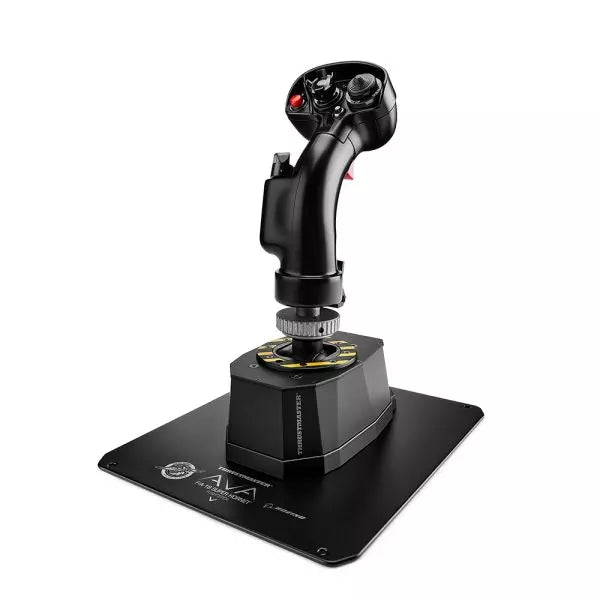
The AVA F/A-18 Super Hornet Flightstick is a meticulously crafted masterpiece designed for aviation enthusiasts seeking unmatched adaptability and authenticity. Featuring a 1:1 scale replica of the F/A-18C Hornet flight stick and the versatile AVA modular base, it offers unparalleled customization through adjustable axis curves, resistance, and damping. Whether navigating aerial dogfights or perfecting civilian landings, this flightstick provides tactile satisfaction with its all-metal construction and precise control mechanisms. It's not just equipment—it's your co-pilot in the cockpit, ready to handle any mission.
What sets the AVA F/A-18 Super Hornet Flightstick apart?
Unrivaled Customization The AVA base allows you to adjust axis curves, resistance, travel, and damping, letting you tailor every detail to your flying style. Swapping cams and springs is quick, enabling seamless adjustments mid-session without breaking your flow.
Officially Licensed 1:1 Scale Replica The F/A-18C Hornet grip is a licensed Boeing replica, crafted with all-metal construction and an array of 19 action buttons. This ensures an authentic layout for military-grade simulations, elevating its appeal for fans of precise recreations.
AXY Technology for Precision Control The dual AXY sensors let you fine-tune center-point tension and stick progressiveness, giving a level of control that stands out among competitors. It's perfect for achieving consistent, repeatable maneuvers in all types of aviation.
Modular Ecosystem Designed for scalability, the AVA platform supports current and future add-ons like additional grips and dampers, making it a long-term investment for flight sim enthusiasts. This ecosystem approach ensures the setup evolves with your skills and needs.
Pros and Cons
Pros
Cons
Highly customizable for various aviation styles.
Steep learning curve for initial setup.
Durable all-metal construction ensures longevity.
Premium price may not suit all budgets.
Official F/A-18C Hornet replica with authentic layout.
Specifications
Specification
Value
Width
5.0” / 12.8 cm
Depth
6.7” / 17.0 cm
Height
13.4” / 34.1 cm (with grip and adapter)
Weight
7.6 lb / 3.5 kg
Package Contents
AVA base, F/A-18C Hornet grip, offset adapter, base plate, cams, springs, masks, hex keys, USB-C cable
Material
All-metal construction
AVA F/A-18 Super Hornet Flightstick Compatibility
The AVA F/A-18 Super Hornet Flightstick is fully compatible with PC platforms running Windows 10/11, with plug-and-play functionality in leading flight simulators like DCS, X-Plane 11/12, and Microsoft Flight Simulator 2020. The official recognition by these games ensures seamless integration, letting you focus on flying rather than configuration. However, it is not compatible with consoles, limiting its versatility for multi-platform gamers.
Its modular design supports compatibility with the expanding AVA ecosystem, allowing you to integrate additional grips, dampers, and other accessories for a tailored experience. The USB-C connection ensures reliable, fast data transfer, but it may require adapter solutions for older USB ports.
For gaming, the stick works flawlessly with most PC-based simulators, particularly those that support HOTAS configurations. With an extensive array of buttons and excellent in-game recognition, the AVA F/A-18 Flightstick is a great choice for serious sim pilots who primarily fly on PC platforms.
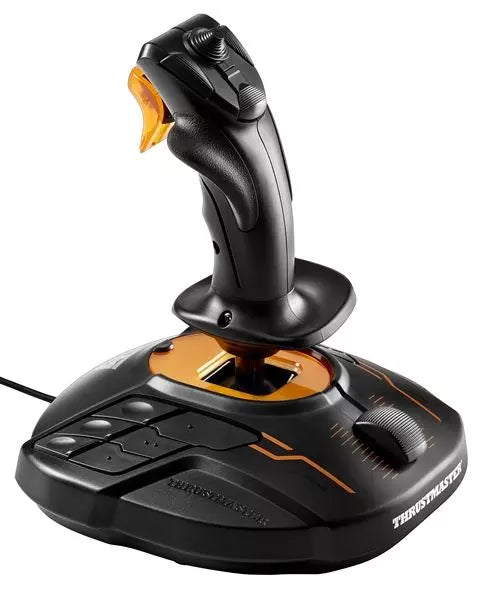
The T16000M FCS is a versatile flight stick designed for pilots who demand greater control and flexibility. Featuring the innovative H.E.A.R.T HallEffect AccuRate Technology™, it delivers a resolution of 16,000 x 16,000 values for pinpoint accuracy. Its ambidextrous design caters to both left-handed and right-handed users, with removable components for customization. With 16 action buttons, an 8-way hat switch, and twist rudder capabilities, the T16000M FCS is an ergonomic marvel that ensures every input feels deliberate and controlled.
What sets the T16000M FCS apart?
Ambidextrous Design The T16000M FCS offers true versatility with a fully ambidextrous design that can be tailored for left- or right-handed use. This makes it one of the few joysticks that works seamlessly for dual-stick setups, giving you flexibility for both traditional flight simulation and complex space sim configurations.
H.E.A.R.T. Technology Its HallEffect sensors ensure long-lasting accuracy, free from the wear-and-tear issues that plague potentiometer-based systems. With 16-bit resolution, it provides incredibly fine control over pitch, roll, and yaw, setting it apart from many of its competitors in the mid-tier joystick category.
Comprehensive Button Layout With 16 buttons equipped with tactile “braille”-style identifiers, an 8-way PoV hat switch, and multiple axes, the T16000M FCS delivers a cockpit-like experience. This rich input map makes it ideal for complex control schemes, such as those found in combat or space exploration simulators.
T.A.R.G.E.T. Software Integration By combining with Thrustmaster's T.A.R.G.E.T. software, users can create custom profiles and merge the joystick with other Thrustmaster peripherals. This feature offers unparalleled flexibility for fine-tuning your hardware setup to meet the demands of specific games.
Pros and Cons
Pros
Cons
Ambidextrous design accommodates both left- and right-handed users.
Limited compatibility with consoles; PC-only use.
HallEffect sensors ensure durable and accurate performance.
Plastic construction feels less robust compared to pricier models.
Affordable price point for the range of features offered.
Specifications
Specification
Value
Technology
H.E.A.R.T. HallEffect AccuRate Technology™
Axes
4 independent axes, including twist rudder
Buttons
16 action buttons + 8-way hat switch
Compatibility
PC via USB, Windows 7/8/10
Customizable Design
Ambidextrous with 3 removable components
T16000M FCS Compatibility
The T16000M FCS is designed for PC use, supporting USB connectivity on Windows 7, 8, and 10. It works seamlessly with Thrustmaster’s T.A.R.G.E.T. software, which allows you to integrate it with other Thrustmaster peripherals, such as the TWCS Throttle or TFRP Rudder Pedals, for a unified control experience. While the joystick is not compatible with consoles like Xbox or PlayStation, its flexibility with PC-based games makes it a popular choice for dedicated sim pilots.
For gaming platforms, the T16000M FCS excels in flight and space sims, with full compatibility in titles like Microsoft Flight Simulator, Elite Dangerous*, and Star Citizen. It lacks native support for consoles or mobile devices, but its integration with PC games is enhanced by its high customizability and programmable input profiles, making it a preferred choice for complex simulations.
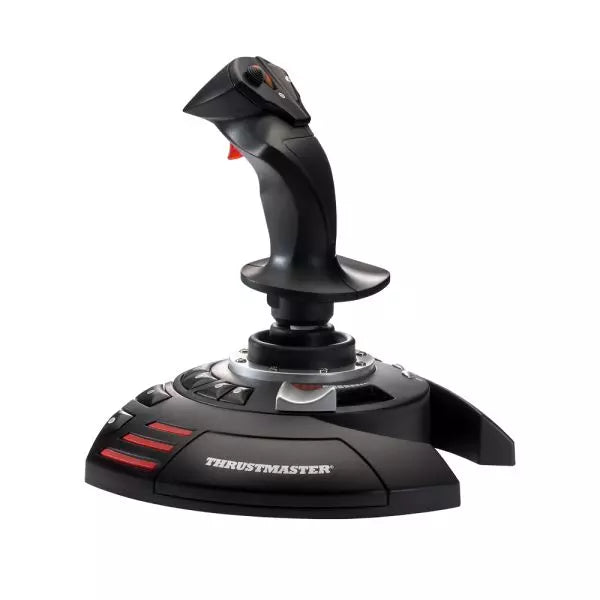
The T.Flight Stick X is a versatile and affordable joystick designed for PC flight simulation enthusiasts. With 12 programmable action buttons and a twist rudder feature, this joystick adapts seamlessly to every flight scenario—from dogfights to commercial aviation. Its ergonomic design ensures comfort during long sessions, while the integrated throttle and lockable twist rudder provide precise control. Whether you're navigating civil skies or engaging in space battles, the T.Flight Stick X delivers an intuitive experience that keeps you fully engaged in your mission.
What sets the T.Flight Stick X apart?
Programmable Controls for Complete Customization The T.Flight Stick X features 12 programmable buttons and 4 axes, allowing users to configure the joystick to their exact preferences. This level of control ensures compatibility with various flight simulation games and enables quick adjustments during gameplay, making it suitable for both beginners and experienced pilots.
Twist Rudder with Locking Mechanism The twist rudder function adds a layer of control, especially in tight maneuvers. For those who prefer traditional rudder pedals or a more stable experience, the lockable handle allows for straightforward, fixed-axis control, providing versatility for different playstyles.
Ergonomic Design for Comfortable Use Its ergonomic build accommodates extended gaming sessions by reducing hand fatigue. The carefully contoured grip and intuitive button placement ensure that all essential controls are within easy reach, enhancing both comfort and functionality.
Plug-and-Play Simplicity Designed for hassle-free setup, the T.Flight Stick X is fully Plug-and-Play compatible with PC, eliminating the need for complicated installations. It works out of the box with most popular flight simulation games, making it a great choice for newcomers to the genre.
Pros and Cons
Pros
Cons
Programmable buttons allow extensive customization for gameplay.
Build materials feel less premium than competitors.
Lockable twist rudder offers versatile handling options.
No separate throttle unit included.
Plug-and-Play ensures easy setup for PC users.
Specifications
Specification
Value
Action Buttons
12 programmable
Axes
4
Throttle
Integrated
Rudder
Twist with locking mechanism
Compatibility
PC (Plug-and-Play)
T.Flight Stick X Compatibility
Compatibility
Details
Platforms
PC (Plug-and-Play)
Games
Compatible with most PC flight simulators
The T.Flight Stick X is designed for PC and works seamlessly with a wide range of flight simulation games, including popular titles like Microsoft Flight Simulator and X-Plane. Its Plug-and-Play capability means there's no need for drivers or special software—just connect and play. While it lacks console support, it excels in providing straightforward compatibility for PC gaming.
With its integrated throttle and programmable buttons, the T.Flight Stick X adapts well to both modern and classic flight simulators. While it does not include additional hardware like rudder pedals, its built-in twist rudder and locking mechanism ensure versatile control options, making it an excellent entry point for aspiring flight sim pilots.
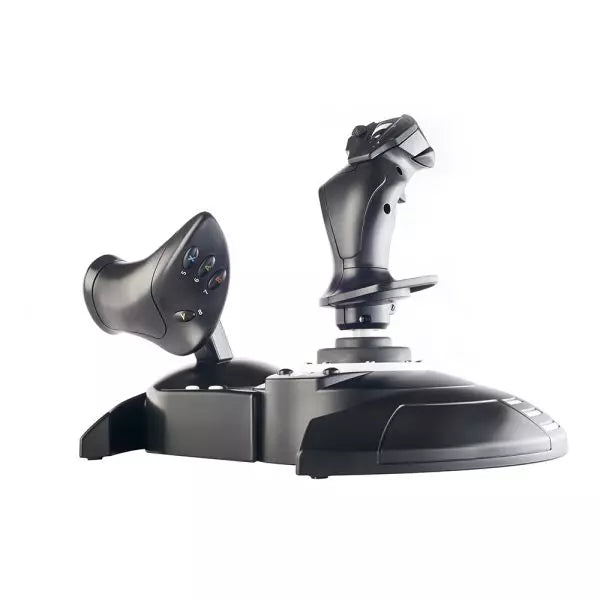
The T.Flight Hotas One is a versatile joystick and throttle combo, officially licensed for Xbox and Windows, delivering a smooth and engaging piloting experience. With a detachable, full-size throttle for precise control and a dual rudder system that feels natural in hand, this setup adapts to everything from civil aviation to space exploration. Its ergonomic design, weighted base, and adjustable handle resistance make long sessions comfortable and steady, while intuitive controls ensure every action is at your fingertips.
What sets the T.Flight Hotas One apart?
Detachable Throttle for Flexible Setup The full-size throttle can be used separately from the joystick or attached to save space. This flexibility allows you to recreate authentic cockpit conditions or streamline your desk setup, providing versatility for any gaming environment.
Intuitive Dual Rudder System The rudder system offers two input methods: a rotating handle for traditional use or a progressive tilting lever for added precision. This duality makes it an ideal choice for both seasoned pilots and newcomers who want fine control without needing additional pedals.
Xbox and Windows Integration Designed with official Xbox buttons, it offers seamless integration with Xbox consoles, including Series X|S, and PC. Gamers can easily navigate menus, adjust settings, or swap between game and system with a layout that feels like an extension of the console itself.
Ergonomics Tailored for Flight A wide hand rest, weighted base, and adjustable stick resistance ensure comfort and stability during extended use. These features reduce fatigue and keep movements fluid, ideal for complex flight missions or extended exploration sessions.
Pros and Cons
Pros
Cons
Detachable throttle offers flexible configuration options.
Plastic build feels less premium compared to rivals.
Compatible with both Xbox consoles and PC.
Limited button mapping customization on some games.
Weighted base enhances stability during intense sessions.
Specifications
Specification
Value
Axes
5
Buttons
14 action buttons + 1 rapid-fire trigger
Hat Switch
Multidirectional (navigation/panoramic view)
Throttle
Detachable, full-size
Rudder System
Dual (rotating handle or tilting lever)
Console Buttons
Guide, View, Menu
Platform Compatibility
Xbox One, Xbox Series X|S, Windows
T.Flight Hotas One Compatibility
Compatibility
Details
Hardware
Supports T.Flight Rudder Pedals with S.M.A.R.T. rails.
Platforms
Xbox One, Xbox Series X|S, Windows PC.
The T.Flight Hotas One integrates seamlessly with Xbox consoles, including Xbox One and Xbox Series X|S, using its official buttons for effortless navigation and system controls. Its compatibility with Windows PCs adds flexibility, offering gamers a single joystick solution across both console and PC platforms. For flight enthusiasts looking for an expandable setup, it supports T.Flight Rudder Pedals, allowing smoother turns and advanced control options.
When it comes to gaming platforms, the T.Flight Hotas One works flawlessly with popular simulation titles like Microsoft Flight Simulator on Xbox and PC. However, it lacks official support for PlayStation consoles. Its customizable setup and broad game compatibility make it a strong choice for any flight simulation fan looking to elevate their cockpit experience.
The TWCS Throttle brings finesse and control to your left hand, making every flight an exercise in precision. Featuring the patented S.M.A.R.T. (Sliding Motion Advanced Rail Tracks) system, its smooth sliding motion feels natural and satisfying during extended use. With 5+3 axes, 14 buttons, and a mini-stick, the throttle provides extensive functionality for complex flight operations. Whether you’re strafing in space or commanding an aerial dogfight, this throttle combines versatility and ergonomics to keep you firmly in command.
What sets the TWCS Throttle apart?
Smooth and Adjustable Sliding Motion The S.M.A.R.T. rail system ensures consistent and frictionless throttle travel, eliminating the uneven resistance common in many competing products. The adjustable tension screw further lets you fine-tune the throttle feel to match your preferences, offering both smoothness and stability for precise maneuvers.
Extensive Control Options With 5 primary axes and three additional ones, the TWCS Throttle accommodates complex flight scenarios. The mini-stick for elevation and strafing and the rotary dial for antenna control add extra layers of versatility, perfect for detailed cockpit management or space simulation games.
Modular Compatibility The TWCS Throttle integrates seamlessly into the Thrustmaster ecosystem, with a connector for external TFRP rudder pedals and full support for other peripherals. This modular approach ensures an expandable setup for pilots looking to enhance their controls further.
Ready for Cockpit Mounting Featuring two M6 screw threads and four rubber pads, the throttle is equally at home mounted in a cockpit or placed on a desk. This adaptability gives pilots the freedom to design their setup as they see fit, ensuring comfort and stability in any environment.
Pros and Cons
Pros
Cons
Smooth sliding motion with adjustable tension.
Plastic construction may lack durability for heavy use.
14 buttons and 8-way PoV hat offer versatility.
No dedicated PlayStation support outside Thrustmaster ecosystem.
Compact design is easy to integrate into setups.
Specifications
Specification
Value
Slide Rail System
S.M.A.R.T. (Sliding Motion Advanced Rail Tracks)
Axes
5 (+3 optional)
Buttons
14 action buttons + 8-way PoV hat
Mini-Stick
Elevation, strafing, and menu control
Mounting Options
2 M6 screw threads + 4 rubber pads
Resistance Adjustment
Tension screw on throttle base
TWCS Throttle Compatibility
Compatibility
Details
Thrustmaster Ecosystem
Works with FCS flight stick, TFRP rudder, and more.
External Rudder Pedals
Supports TFRP rudder via connector port.
Platform
Designed for PC use.
The TWCS Throttle is a PC-focused device that integrates seamlessly with the Thrustmaster ecosystem. It connects directly to TFRP rudder pedals and other Thrustmaster peripherals, enabling a fully synchronized control setup. While it is primarily designed for PC users, its connector port adds flexibility for pilots looking to expand their configurations. However, it does not natively support PlayStation platforms outside specific Thrustmaster devices.
For gaming platforms, the TWCS Throttle excels on PC, working flawlessly with games that recognize throttle and axis inputs. It supports T.A.R.G.E.T software for advanced programming, giving users the ability to create custom profiles for their favorite games. While console compatibility is limited, PC users will appreciate the versatility and expandability it offers for flight and space simulation games.
The VelocityOne Flightstick is a versatile and feature-rich joystick designed to elevate your flight sim adventures. With a dedicated throttle quadrant and customizable buttons, it offers detailed control for both casual and experienced pilots. Its ergonomic design ensures comfort during marathon sessions, while the integrated OLED display keeps critical data at your fingertips. Whether navigating the skies on PC or Xbox, this Flightstick combines functionality and flair, delivering a tactile experience that keeps you engaged from takeoff to landing.
What sets the VelocityOne Flightstick apart?
Integrated OLED Display The built-in OLED screen provides essential flight information in real-time, streamlining access to critical settings without distracting from the action. This feature is especially useful for adjusting configurations mid-flight, enhancing control fluidity.
Extensive Customization With multiple programmable buttons and profiles, the VelocityOne Flightstick adapts to various flight styles and aircraft. Its dedicated trim wheel and dual hat switches allow for meticulous control adjustments, catering to both beginners and seasoned sim pilots.
Dual-Platform Compatibility Seamlessly compatible with both PC and Xbox platforms, this joystick integrates effortlessly with popular simulators. Its USB-C connection ensures low-latency input and modern connectivity standards for hassle-free operation.
Ergonomic Design and Build Built with durability and comfort in mind, the Flightstick’s intuitive layout and sturdy construction make it a dependable companion for long flight sessions. Its lightweight design adds portability without sacrificing stability during intense use.
Pros and Cons
Pros
Cons
OLED screen offers quick access to critical information.
Initial setup may be challenging for beginners.
Programmable buttons allow for extensive customization.
Not compatible with PlayStation consoles.
Works seamlessly with PC and Xbox platforms.
Specifications
Specification
Value
Product Type
Joystick
Rudder Control
Yes
Magnetic Sensors
Yes
RGB Lighting
Yes
Color
Black
Weight
0.8 kg
Platform
PC, Xbox One, Xbox Series X|S
Operating System
Windows 10 or higher
Connection
USB-C to USB-A
Warranty
2 years (Carry-in)
VelocityOne Flightstick Compatibility
The VelocityOne Flightstick boasts compatibility with both PC and Xbox platforms, making it a versatile choice for flight sim enthusiasts. Designed for Windows 10 or higher, it connects seamlessly via USB-C, ensuring fast and reliable data transmission. However, it is not compatible with PlayStation systems, limiting cross-platform use for some users. The Flightstick integrates effortlessly with major flight simulators such as Microsoft Flight Simulator 2020, leveraging its precision controls to provide an exceptional experience.
The joystick’s programmable buttons and trim wheel make it an excellent choice for various aircraft and playstyles. Its compatibility with both Xbox Series X|S and Xbox One ensures that console players can enjoy a robust and immersive flight simulation setup. However, it requires a Windows PC or Xbox, as Linux or macOS compatibility is not supported, and its features are optimized for the listed systems.